

Klenty is a seat-priced sales engagement tool built on email cadences and a dialer, with LinkedIn as a semi-automated task. Outreach.io is an enterprise platform sold by quote, LinkedIn reduced to a reminder step, reported from $100/user/month. Neither sells infrastructure, warm-up, or an AI SDR.
For multichannel B2B outbound at SMB and mid-market scale, Salesforge is the stronger choice. Email and LinkedIn run in one branching sequence, pricing is not per seat, Warmforge warm-up is free, and replies land in Primebox™. Plans start at $48/mo monthly ($40/mo annual).
I get asked to referee this exact three-way decision more than any other. A 12-rep sales team has outgrown a basic sequencer, someone has quoted them Outreach.io, and someone else has found Klenty at roughly half the price.
Klenty is a sales engagement platform for SDR teams: email cadences, a dialer, CRM sync, and LinkedIn steps a rep completes by hand. Outreach.io is the enterprise incumbent, founded in 2014, now selling four AI-credit packages at no published price.
Both are real products. Both also stop at the outreach layer, which is where this decision quietly costs the most. I have watched teams sign a per-seat contract, then spend the same again on mailboxes, warm-up, and lead data. That pattern shows up in recent GTM channel data.
Sales Engagement Comparison at a Glance: Klenty vs Outreach.io
| Dimension | Salesforge | Klenty | Outreach.io |
|---|---|---|---|
| Outreach channels | Email + LinkedIn, one branching sequence (phone on roadmap) | Email, calls, SMS, WhatsApp, LinkedIn tasks | Email, calls, SMS, LinkedIn tasks |
| LinkedIn automation | 6 native actions, capped 30/day per profile | Semi-automated tasks, one at a time via Chrome plugin | LinkedIn Task step only - a rep reminder |
| AI personalization | AI variables plus Overdrive Mode across 21+ languages | Merge fields, liquid templates, AI account research | AI agents metered in credits, no published rate |
| Email warm-up | Free, unlimited premium Warmforge pool with Heat Score™ | None - deliverability settings only | None |
| Email infrastructure sold | 3 options: Mailforge, Infraforge, Primeforge | None - bring your own mailboxes | None - bring your own mailboxes |
| Lead data and enrichment | Leadsforge: 500M+ contacts, waterfall enrichment, intent signals | 4,000 phone and email credits on Klenty Plus | None bundled - bring ZoomInfo or similar |
| Unified inbox | Primebox™ for email + LinkedIn, free on every plan | Email only; LinkedIn stays on LinkedIn | Email only; LinkedIn stays on LinkedIn |
| Analytics and A/B testing | A/B testing on Growth; opens, replies, positive replies, meetings | A/B testing from Starter; cadence and call reports | Deal, pipeline and forecast analytics on upper tiers |
| AI SDR | Agent Frank, Auto-Pilot or Co-Pilot - separate subscription from $499/mo billed quarterly | No autonomous SDR; Action AI suggests next steps | AI agents assist reps; no autonomous SDR |
| Pricing model | Pro $48/mo monthly ($40/mo annual); Growth $96/mo ($80/mo annual). Not per seat - unlimited users on Growth | Starter $50/mo annual (email only); Growth $70/user/mo; Plus $99/user/mo. Per user | Not published - all 4 Amplify tiers quote-only. Per seat plus AI credits |
| Free trial | 14 days, no credit card | 14 days, no credit card, 200 emails | None - demo only |
| Best for | SMB and mid-market B2B, $5K-$100K ACV, 3,000+ target accounts | SDR teams wanting cadences plus dialing on one bill | Enterprise revenue orgs, 50+ seats, with RevOps support |
Klenty Overview: Features, Pricing, and Limitations
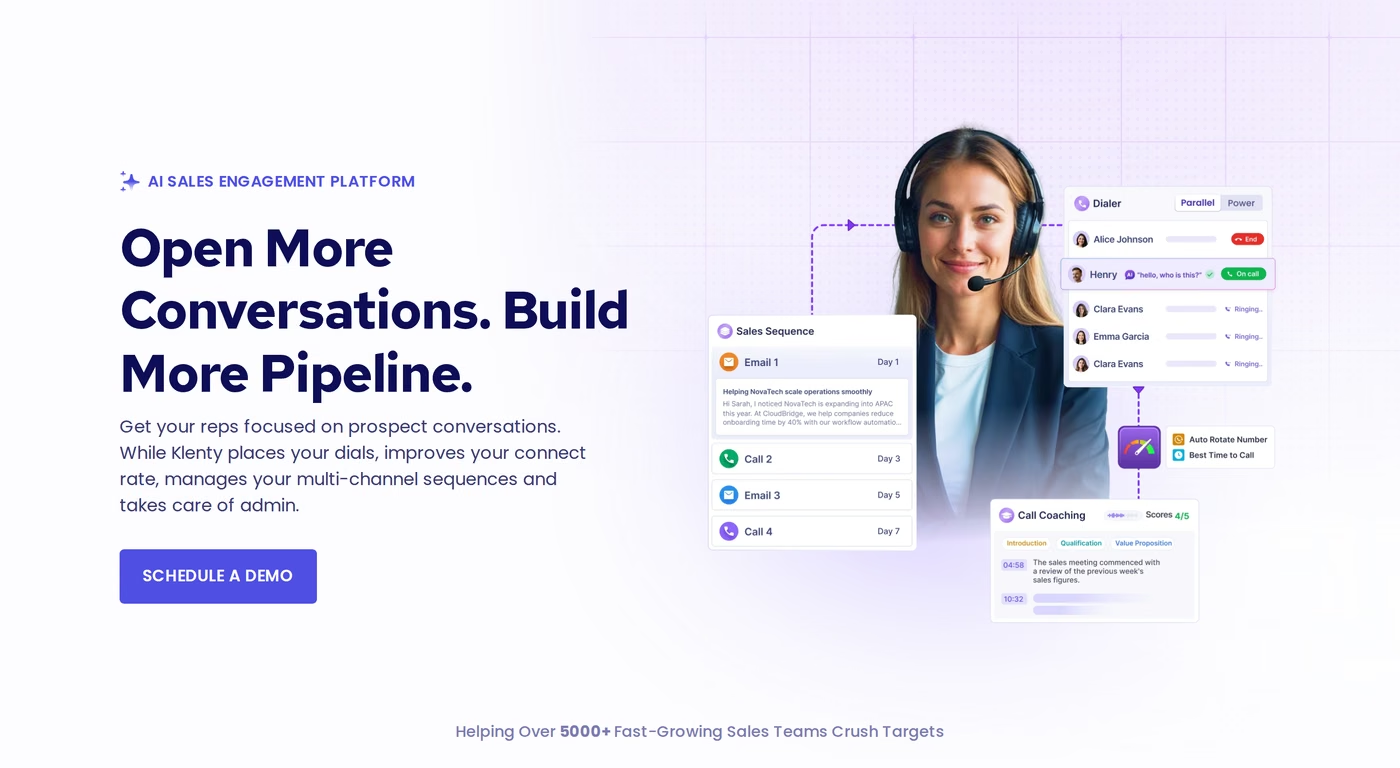
Klenty is a sales engagement platform for outbound SDR teams. It combines email cadences, a dialer, account-based playbooks, and two-way CRM sync in one app. Its 2026 positioning leans on calling and AI coaching over email volume.
Core Klenty features
- Email cadences: Multi-step sequences with merge fields, liquid templates, A/B testing, and approve-before-sending steps.
- Deliverability settings: Custom domain tracking, randomized intervals, and volume control per mailbox.
- Dialer: One-click dialing with number auto-rotation and reputation management, plus 200 call minutes on Klenty Growth and 1,000 on Klenty Plus. Parallel and power dialing cost $45/user/month extra.
- LinkedIn tasks: LinkedIn steps sit in a cadence, then a rep completes them one at a time via a Chrome plugin.
- CRM integrations: Two-way sync with Salesforce, HubSpot, Pipedrive, Zoho, and Microsoft Dynamics, plus triggers and a CRM widget.
- AI features: Agentic Cadences, AI account research, and Action AI for next steps, plus battlecards and call scorecards on Klenty Plus.
- Prospect data: Klenty Plus bundles 4,000 phone and email credits.
Klenty pricing
Pricing is published, which I appreciate. Verified on Klenty's live pricing page in August 2026: Klenty Starter $50/mo, Klenty Growth $70/user/mo, and Klenty Plus $99/user/mo, all billed annually. Quarterly billing raises those to $60, $85, and $119, so annual saves up to 20%.
Klenty Starter includes 15,000 monthly contacts and 75,000 monthly emails, but it is email only. Cold calling, SMS, LinkedIn steps, and CRM integrations all start at Klenty Growth. Only Klenty Starter has a self-serve signup button; Klenty Growth and Klenty Plus both route to "Schedule a Demo."
Third-party directories still carry old numbers. Software Advice lists a Startup tier at $55, Growth at $85, and Enterprise at $145 per user per month, none matching the live page. Price from the vendor's own page.
Who Klenty fits
Klenty suits an SDR team of 5 to 25 reps that wants email sequencing and dialing on one invoice, lives inside Salesforce or HubSpot, and treats LinkedIn as a secondary touch. There is a dedicated Salesforge vs Klenty breakdown for those two alone.
What reviewers say about Klenty
Klenty's Trustpilot presence is thin: 2 reviews, 3.0 average. The one critical review concerns its affiliate program rather than the product, but it is pointed - three emails sent, none answered.
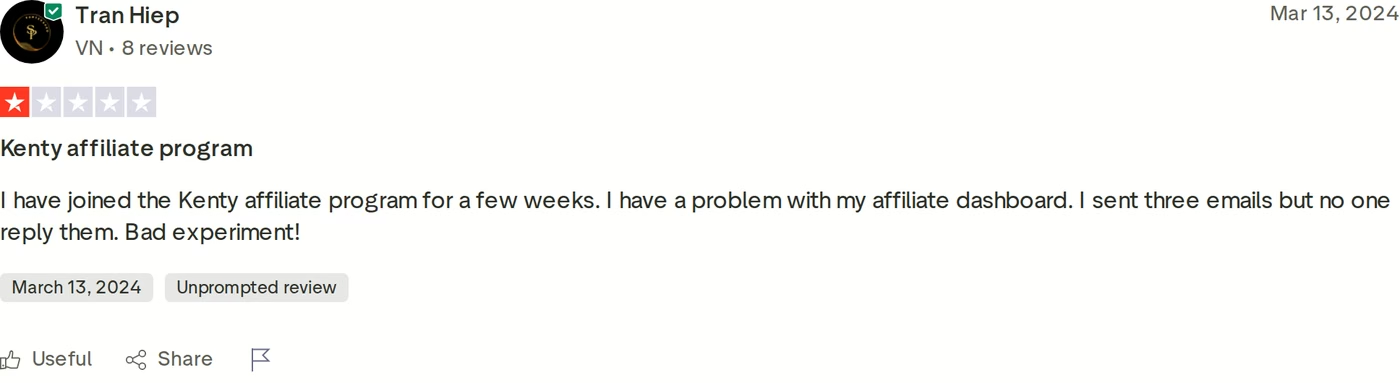
Weigh that against Klenty's own claim of a 2.5-minute support response time on 24/5 coverage. Reviewers who tested the product at length report different issues: an interface learning curve, and LinkedIn capabilities that stay limited because the steps are manual.
Klenty limitations
- Pricing is per user on Klenty Growth and Klenty Plus, so cost climbs with headcount.
- No email warm-up and no first-party infrastructure. Mailboxes and warm-up are bought separately.
- Parallel and power dialing add $45/user/month on top of the plan.
- Klenty's own help center states that LinkedIn's policy does not allow automation, so Klenty semi-automates the steps and a rep still clicks through each one.
Outreach.io Overview: Features, Pricing, and Limitations
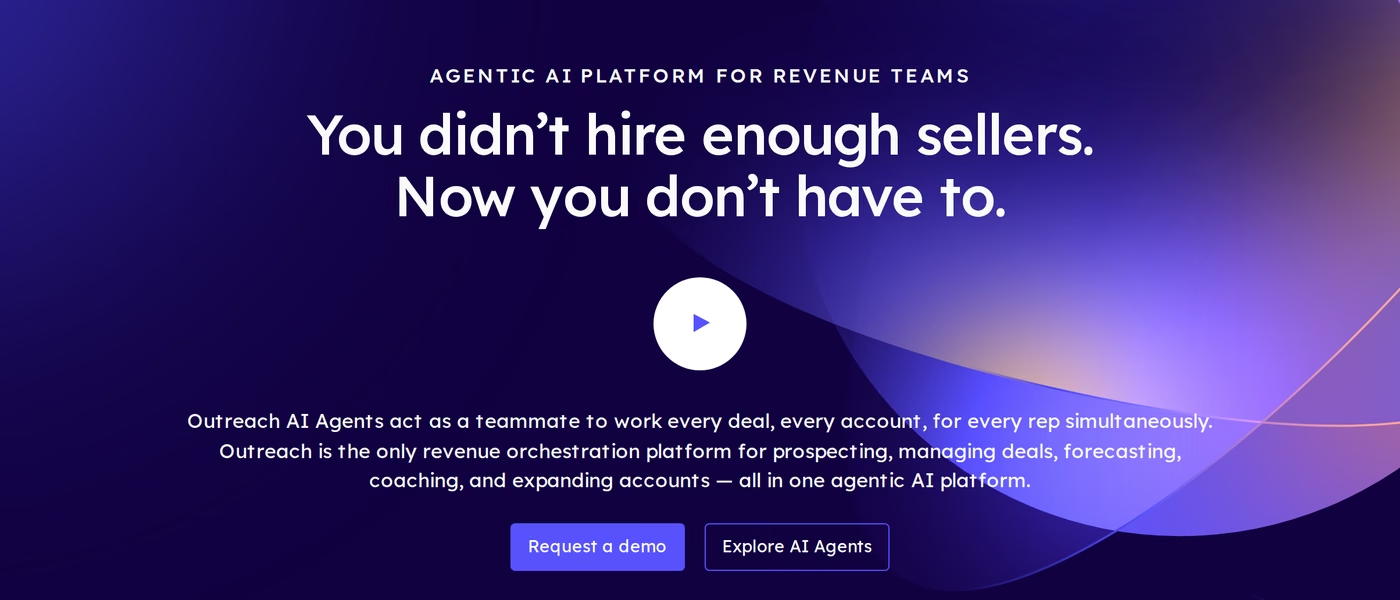
Outreach.io is the enterprise incumbent here, founded in 2014. In 2026 it repositioned as an "AI Agent Platform for Revenue teams" and migrated to a new domain. It spans prospecting sequences, deal management, conversation intelligence, coaching, and forecasting in one system.
Core Outreach.io features
- Sequences: Five step types - Auto Email, Manual Email, Phone Call, Generic Task, LinkedIn Task - with out-of-office detection and throttling.
- Dialer and SMS: Reps call and text from inside the platform, one call at a time.
- Conversation intelligence: Call recording, live transcription, and coaching insights on higher packages.
- Deal and pipeline management: Deal health, risk flags, automated pipeline updates.
- Forecasting: Top Amplify Pro package only, with self-service configuration.
- Account planning: Structured account plans on every tier.
- AI agents and credits: An AI credit allowance per package, from 10,000 on Amplify Essentials to 100,000 on Amplify Pro.
- Platform depth: 250,000 to 1,000,000 API calls, 5 to 20 custom objects, and 500 MB to 1,500 MB of knowledge storage by tier.
Outreach.io pricing
There is no published price. I checked the live pricing page in August 2026: all four packages - Amplify Essentials, Amplify Core, Amplify Plus, Amplify Pro - carry a "Request pricing" button and nothing else. The page does confirm the model: seat-based pricing plus consumption-based AI credits.
Buyer-reported figures across several 2026 procurement write-ups put Outreach in the $100 to $160 per user per month range. Vendr data cited in those reports shows a 50-user deployment listing near $72,000 a year, about $120/user/month. Annual contracts are standard, seat minimums of roughly 10 are common, and implementation fees run into the thousands.
Because those numbers come from buyers rather than from Outreach, treat them as a range to negotiate against, not a price list.
Who Outreach.io fits
Outreach fits a revenue org with 50+ reps, a dedicated RevOps function, Salesforce at the center of the stack, and a real need for forecasting and conversation intelligence alongside sequencing. For that buyer the depth is real. Salesforge covers the segment split in its Outreach vs Salesloft comparison.
What reviewers say about Outreach.io
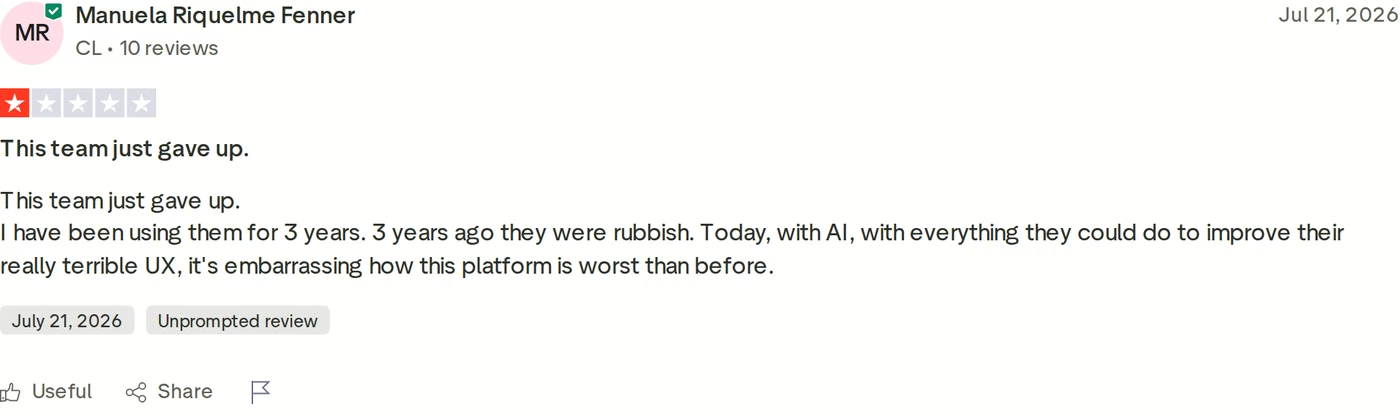
Outreach holds a 2.4 average across 41 Trustpilot reviews. Read them carefully: a UK broadband contractor with the same name accounts for several. Among reviews clearly about the software, the recurring themes are support responsiveness and interface friction.
Outreach.io limitations
- No published pricing on any tier, so budgeting needs a sales call first.
- No free trial. Every path to the product runs through a demo.
- No email warm-up, no inbox rotation, no first-party infrastructure.
- The native dialer handles one call at a time, with no parallel or power dialing.
- The AI credit layer adds variable cost on top of seats, with no published per-credit rate.
Salesforge Overview: The Multichannel Outbound Stack
Salesforge is the outreach layer of the Forge Stack. It runs cold email and LinkedIn as two channels of one sequence, and it is backed by products that cover the parts Klenty and Outreach leave to other vendors: mailboxes, warm-up, lead data, and an autonomous SDR.
Core Salesforge features
- Unlimited mailboxes, users, and workspaces: Connect any number of sending accounts. Salesforge Growth removes the user cap, so agencies run every client from one subscription.
- Multichannel conditional sequences: Real if/then branching. If a connection request is accepted, send a LinkedIn message. If not, fall back to email.
- Six native LinkedIn actions: Connection requests, messages, InMails, post likes, follows, and withdraw requests, each capped at 30 per day per profile to stay inside safe usage thresholds.
- Account safety as standard: Session-token authentication only, so no LinkedIn password is stored. Actions route through high-quality shared proxies, with custom proxies optional. No Chrome extension injection, no DOM manipulation.
- AI personalization across 21+ languages: AI variables pull company news, LinkedIn activity, and industry context. Overdrive Mode reads every source at once and costs 2 personalization credits per preview instead of 1.
- Deliverability built in: Free unlimited Warmforge warm-up, ESP matching, Bounce Shield, sender rotation, dynamic IPs, text-only content by default, and built-in email validation.
- Primebox™ unified inbox: Email and LinkedIn replies in one place, with sentiment analysis, custom labels, and a mobile app. It catches replies from any address, not just the one contacted.
- Leadsforge: Chat-based access to 500M+ B2B contacts with waterfall enrichment, intent signals, Company Lookalikes, and Competitor Followers Search, pushed into sequences with no CSV export. Its LinkedIn email and phone finder extension gives 100 free credits on signup.
- Testing and analytics: A/B testing on Salesforge Growth, plus reporting on opens, replies, positive replies, connection acceptance, and meetings.
- Integrations and developer surfaces: Native HubSpot, Salesforce, Pipedrive, Attio, folk, Breakcold, GoHighLevel; Clay, Bitscale, RB2B, Persana AI, Databar.ai for data; Slack, Zapier, Make, Webhooks for automation; plus API, CLI, and MCP server on Salesforge Growth.
- Agent Frank: An autonomous AI SDR who prospects, writes, sequences, handles replies, and books meetings across email and LinkedIn in Auto-Pilot or Co-Pilot.
The Forge Stack context
Three infrastructure products sit under the same login: Mailforge for shared IPs at $3 to $2 per mailbox per month, Infraforge for dedicated IPs and pre-warmed mailboxes at $4 to $3, and Primeforge for real Google Workspace and Microsoft 365 mailboxes at $4.50 to $3.50. Start on shared, move to dedicated, no migration. Leadsforge handles lead discovery.
There is also a delivery choice neither competitor matches: your team runs the plays, Agent Frank runs them autonomously, or a vetted Forge Expert agency runs them on the same stack.
Salesforge pricing
- Salesforge Pro - $48/mo billed monthly or $40/mo billed annually. 1,000 active contacts in sequence, 5,000 emails/month, 100 email validation credits, 100 personalization credits, 100 social action credits, 1 LinkedIn sender, 1 user.
- Salesforge Growth - $96/mo billed monthly or $80/mo billed annually. 10,000 active contacts, 50,000 emails/month, 1,000 validation credits, 1,000 personalization credits, 300 social action credits, unlimited LinkedIn senders, unlimited users, plus A/B testing, multi-language sequences, ESP matching, Primebox™ AI reply modes, API access, and the full integrations library.
- Agent Frank - a separate subscription from $499/mo billed quarterly, or $416/mo billed annually. That covers 1,000 active contacts and is not bundled into Salesforge Pro or Salesforge Growth.
Both plans include unlimited premium Warmforge warm-up, smart mailbox rotation, Primebox™, and a 14-day free trial with no credit card. The trial is capped, not open-ended: 50 contacts, 100 emails, 50 validation credits, 50 personalization credits, 100 social action credits. Budget 400 to 500 social action credits per month per LinkedIn profile if LinkedIn matters to you.
Try Salesforge Free for 14 DaysWho Salesforge fits
Salesforge targets B2B teams selling at $5K to $100K ACV into startups, SMBs, and mid-market accounts, with 3,000+ target businesses, who are tired of per-seat tools that punish growth.
Two published results: UniteSync reached an 85.26% positive reply rate at $2.86 CAC on Salesforge, Mailforge, and Warmforge. ChannelCrawler hit 85.71% positive replies on Salesforge, Infraforge, and Warmforge.
Salesforge limitations
- Email infrastructure is not included in any plan. You connect your own mailboxes or buy Mailforge, Infraforge, or Primeforge separately.
- Salesforge Pro caps at 1 user and 1 LinkedIn sender. Teams need Salesforge Growth.
- API access, A/B testing, ESP matching, multi-language sequences, and Primebox™ AI reply modes are gated to Salesforge Growth.
- Agent Frank has no self-serve trial. He needs a demo first and a mandatory 2-week warm-up before sending.
- Salesforge publishes its own anti-fit list. If you primarily sell to Fortune 500 accounts, run long RFP cycles, or close a handful of six-figure bespoke deals, Salesforge says it is the wrong tool. Outreach is built for that buyer and Salesforge is not.
in Action

Head-to-Head Feature Comparison: Klenty vs Outreach.io
Multichannel outreach and LinkedIn
All three call themselves multichannel. Only one actually sends LinkedIn messages.
- Klenty: LinkedIn steps live in a cadence, but Klenty's own help center says LinkedIn's policy does not allow automation, so the steps are semi-automated and a rep clicks through each one via a Chrome plugin. LinkedIn is also gated to Klenty Growth and above.
- Outreach.io: Its documented sequence step types are Auto Email, Manual Email, Phone Call, Generic Task, and LinkedIn Task. The LinkedIn Task is a reminder. Outreach does not send the message.
- Salesforge: Six native LinkedIn actions execute inside the sequence, with conditional branching between LinkedIn and email steps. Connection accepted triggers one path, no response triggers another.
The practical difference is rep hours. A 10-rep team at 30 LinkedIn touches a day each is 300 manual clicks daily on Klenty or Outreach. On Salesforge those actions fire from the sequence, and profile health is worth tracking alongside your LinkedIn SSI score.
Email deliverability and warm-up
Neither competitor has anything here, and this is the gap that costs the most.
Klenty offers deliverability settings - custom domain tracking, randomized intervals, volume control - but no warm-up pool. Outreach offers no warm-up, no inbox rotation, no deliverability diagnostics. Both expect you to buy warm-up elsewhere, priced per mailbox per month on top of your seats.
Salesforge includes Warmforge free with unlimited slots on both plans. The pool is premium by default - a curated mix of aged IMAP/SMTP, real Google Workspace, and Microsoft 365 mailboxes - with no paid upgrade tier. Every mailbox gets a Heat Score™ from 0 to 100, where 97+ means it is safe to scale volume. Health checks watch DNS, MX, and blacklist status; placement tests show whether mail lands in primary, promotions, or spam. Bounce Shield blocks likely bounces before reputation takes the hit. The warm-up tool alternatives breakdown shows what that line item usually costs standalone.
AI personalization and AI SDR
Every vendor here shipped AI features in 2026. They are not the same thing.
Klenty's AI covers Agentic Cadences, AI account research, and Action AI, which proposes the next step after a conversation. Outreach meters AI agents in credits, 10,000 on Amplify Essentials up to 100,000 on Amplify Pro, with no published per-credit rate. Both assist a rep who still owns the workflow.
Salesforge personalizes across 21+ languages using AI variables that pull company news, LinkedIn activity, and industry context, with Overdrive Mode reading every source at once. Then there is Agent Frank, who is a different category of thing: an autonomous SDR who prospects from the Leadsforge database, enriches contacts, writes and sends across email and LinkedIn, handles replies, and books meetings 24/7. He runs in Auto-Pilot without review, or Co-Pilot where a human approves each draft. VAI Consulting booked 3 calls in a single week with him. Being straight about the trade: he costs $499/mo billed quarterly as a separate subscription, requires a demo, and needs a 2-week warm-up before his first send.
Inbox management and reply handling
Klenty and Outreach both surface email replies in-app. Neither pulls LinkedIn conversations into the same view, so a rep running both channels checks two places and reconstructs the thread manually.
Primebox™ puts email and LinkedIn replies in one inbox, free on every Salesforge plan. It auto-tags threads positive, neutral, or negative, catches replies from an address you never contacted, tracks opens and clicks per thread, and runs on mobile. Three reply modes: Auto-Pilot where AI continues the conversation, Co-Pilot where AI drafts for human approval, and manual. The AI modes are Growth-only, and each AI draft costs 3 credits with free regeneration.
Pricing and scalability
Headline price matters less than how the bill behaves as you add people.
Klenty and Outreach both charge per seat. Add five reps to Klenty Growth and you add $350/month. Add five to Outreach at a mid-range $120/user/month and you add $600/month before AI credits. Outreach layers consumption on seats, so a team ramping AI usage can exhaust its allowance mid-contract and buy more at an undisclosed rate.
Salesforge Growth is $96/mo monthly or $80/mo annual with unlimited users, unlimited mailboxes, unlimited workspaces, and unlimited LinkedIn senders. Going from 3 reps to 30 changes the subscription by nothing. Credits scale, seats do not. For what outbound at volume actually costs once infrastructure is included, this cold email spend review documents $75K and 2.5M sent emails.
Lead data, integrations, and developer access
Klenty bundles 4,000 phone and email credits on Klenty Plus. Outreach expects you to bring data from ZoomInfo or similar, a separate contract. Both integrate deeply with Salesforce and HubSpot, and Outreach's Salesforce integration is the deepest here.
Salesforge connects natively to HubSpot, Salesforce, Pipedrive, Attio, folk, Breakcold, and GoHighLevel, plus Clay, Bitscale, RB2B, Persana AI, and Databar.ai for enrichment, and Slack, Zapier, Make, and Webhooks for automation. Leadsforge supplies 500M+ contacts through a chat interface with waterfall enrichment and intent signals, feeding sequences directly with no CSV step. If you are comparing data sources, the roundups of B2B email databases and buying signal tools cover the field.
On developer surfaces, Salesforge ships an API, a unified Forge CLI covering all six products, and an MCP server that lets Claude or Cursor create contacts and launch sequences. Neither competitor ships an MCP server. All three hold SOC 2; Klenty specifies Type II.
Pricing Comparison: What Each Platform Costs at Scale
| Plan | Monthly rate | Annual rate | Seat model | What you still buy separately |
|---|---|---|---|---|
| Salesforge Pro | $48/mo | $40/mo | 1 user, 1 LinkedIn sender | Mailboxes (from $2/mailbox/mo) |
| Salesforge Growth | $96/mo | $80/mo | Unlimited users and LinkedIn senders | Mailboxes (from $2/mailbox/mo) |
| Agent Frank (separate) | $499/mo billed quarterly | $416/mo | 1,000 active contacts | Infrastructure add-on |
| Klenty Starter | $60/mo billed quarterly | $50/mo | Email only, no LinkedIn or CRM | Mailboxes, warm-up, LinkedIn tool |
| Klenty Growth plan | $85/user/mo billed quarterly | $70/user/mo | Per user | Mailboxes, warm-up, dialer add-on |
| Klenty Plus | $119/user/mo billed quarterly | $99/user/mo | Per user | Mailboxes, warm-up, dialer add-on |
| Outreach Amplify (all 4 tiers) | Not published | Not published | Per seat plus AI credits | Mailboxes, warm-up, data, implementation |
Note the plan-name collision. Klenty's Growth plan is per user at $70/user/mo annual. Salesforge Growth is $80/mo annual for the whole team, no user cap. Same word, different economics.
A concrete scenario: 8 reps, 40,000 emails a month, LinkedIn running alongside
Say you need 8 seats, 40,000 emails a month across 25 mailboxes, and LinkedIn touches in the same sequence.
- Klenty Growth plan: 8 users at $70/user/mo annual is $560/month, plus mailboxes and third-party warm-up. LinkedIn steps still get clicked by hand.
- Outreach.io: 8 seats at a mid-range $120/user/month is roughly $960/month, if you clear the typical 10-seat minimum. Add implementation and AI credits.
- Salesforge Growth: $80/month annual covers all 8 users, unlimited LinkedIn senders, and unlimited mailboxes, warm-up included. 25 Mailforge mailboxes at $2 each adds $50, for $130/month total.
Salesforge Growth caps at 50,000 emails and 10,000 active contacts a month, so 40,000 fits. That gap is not a rounding error, and it widens with every rep you hire.
Give Salesforge a GoWho Should Use Which Sales Engagement Tool
You might consider Klenty if:
- Cold calling is your primary channel and you want a dialer, call coaching, and email cadences on one invoice.
- Your team is 5 to 25 reps, already standardized on Salesforce or HubSpot, and treats LinkedIn as an occasional touch.
- You want published pricing you can budget against without a sales call, at least on Klenty Starter.
You might consider Outreach.io if:
- You run 50+ seats with a dedicated RevOps function and need forecasting, conversation intelligence, and deal management in the same system as sequencing. For that requirement Outreach is the deeper platform, because Salesforge does not ship forecasting or deal management at all.
- Your procurement process expects annual enterprise contracts and you have budget for implementation.
Choose Salesforge if:
- You sell B2B at $5K to $100K ACV into startups, SMBs, or mid-market, with 3,000+ target businesses.
- LinkedIn and email need to run as one branching sequence, not two campaigns stitched together by hand.
- You are growing headcount and refuse to let the bill grow with it - unlimited users on Salesforge Growth, $80/mo annual.
- You run an agency or multiple clients and need unlimited workspaces with isolated infrastructure.
- You want deliverability owned in-house: free unlimited Warmforge warm-up, Heat Score™ monitoring, ESP matching, and three infrastructure options.
Still shortlisting? Browse other tool comparisons or the sales tools directory.
Final Verdict: Which Outbound Platform to Choose
Klenty and Outreach.io are both competent sales engagement platforms that stop at the outreach layer. Klenty charges per user and hands LinkedIn back to reps as a task list. Outreach.io will not name a price until you take a call, then charges per seat plus AI credits annually. Neither ships warm-up, sells mailboxes, or has an autonomous SDR.
For multichannel B2B outbound at SMB and mid-market scale, Salesforge is the stronger choice. At $80/mo annual for Salesforge Growth you get unlimited users, LinkedIn senders, mailboxes, and workspaces, free premium Warmforge warm-up, and Primebox™ - a combination neither alternative sells at any price.
One falsifiable benchmark instead of an adjective: UniteSync ran Salesforge with Mailforge and Warmforge to an 85.26% positive reply rate at a $2.86 customer acquisition cost. The UniteSync case study is public, numbers attached to a named customer.

The honest boundary: if you sell mainly to Fortune 500 accounts through long RFP cycles at six-figure deal sizes, Salesforge says openly that it is the wrong fit. That is the buyer Outreach was built for.
Frequently Asked Questions
Is Salesforge better than Klenty and Outreach.io?
For multichannel B2B outbound at SMB and mid-market scale, yes. Salesforge executes six native LinkedIn actions inside a branching sequence, while Klenty semi-automates LinkedIn as rep tasks and Outreach.io only creates a reminder step. Salesforge also includes free unlimited Warmforge warm-up and sells three infrastructure options; neither competitor offers either. For enterprise forecasting at 50+ seats, Outreach.io is the deeper platform.
What's the main difference between Salesforge, Klenty, and Outreach.io?
Pricing model and scope. Klenty and Outreach.io both charge per seat and cover only the outreach layer. Salesforge Growth is $96/mo monthly or $80/mo annual for unlimited users, and it sits inside the Forge Stack alongside mailboxes (Mailforge, Infraforge, Primeforge), warm-up (Warmforge), lead data (Leadsforge), and an AI SDR (Agent Frank). Adding reps changes a Salesforge bill by nothing.
Which is cheaper: Salesforge, Klenty, or Outreach.io?
Salesforge, and the gap widens with team size. Salesforge Pro is $48/mo monthly or $40/mo annual; Salesforge Growth is $96/mo monthly or $80/mo annual for the whole team. Klenty Starter is $50/mo annual but email only, and Klenty's Growth plan is $70/user/mo annual. Outreach.io publishes no pricing on any Amplify tier; buyer reports put it at $100 to $160 per user per month plus implementation.
Do Klenty or Outreach.io support real LinkedIn automation?
No. Klenty's own help center states that LinkedIn's policy does not allow automation, so its steps are semi-automated and a rep completes each one via a Chrome plugin. Outreach.io's documented step types are Auto Email, Manual Email, Phone Call, Generic Task, and LinkedIn Task - the last being a reminder. Salesforge natively executes connection requests, messages, InMails, post likes, follows, and withdraws, capped at 30 per day per profile.
Can I switch from Klenty or Outreach.io to Salesforge easily?
Yes. Contacts import by CSV or Google Sheets, and you can connect unlimited mailboxes on any plan, including during the 14-day trial. The step that takes real time is deliverability: Salesforge recommends a minimum 2-week warm-up before launching, which Warmforge handles free and unlimited. Pre-warmed mailboxes from Infraforge or Primeforge remove that wait.
Which tool has better email deliverability?
Salesforge, the only one of the three that owns the deliverability layer. Klenty offers sending settings like randomized intervals and volume control; Outreach.io offers no warm-up or inbox rotation at all. Salesforge includes unlimited premium Warmforge warm-up on a curated pool of aged IMAP/SMTP, Google Workspace, and Microsoft 365 mailboxes, plus Heat Score™ monitoring where 97+ signals a mailbox is safe to scale, ESP matching, Bounce Shield, and sender rotation.
Does Salesforge offer a free trial?
Yes, 14 days with no credit card required. The trial allows 50 contacts, 100 emails, 50 email validation credits, 50 personalization credits, and 100 social action credits, with warm-up and unlimited mailbox connections included. Klenty also runs a 14-day trial capped at 200 emails. Outreach.io has no free trial; every route to the product goes through a demo.
Who is Outreach.io best for?
Revenue organizations running 50 or more seats with a dedicated RevOps function, Salesforce at the center of the stack, and a need for forecasting and conversation intelligence in the same platform as sequencing. Its top Amplify Pro package includes 100,000 AI credits, 1,000,000 API calls, and 20 custom objects. Below roughly 20 reps, the per-seat cost and implementation overhead are hard to justify.
.jpg)

.jpg)
