Blog
Sales Tech Stack: How to Build, Audit, and Scale One in 2026

Sales Tech Stack: How to Build, Audit, and Scale One in 2026

Summarize with

Sales reps are already dealing with too many tools. Salesforce's State of Sales 2026 report found that 42% of reps feel overwhelmed by the number of tools they use.

That tells you something important about building a sales tech stack in 2026: the goal isn't to collect more tools. It's to build a system where your tools work together and help your team move deals forward.

I've built and rebuilt outbound stacks for everything from founder-led sales motions to 30+ rep teams. And the biggest mistake I see is choosing tools one by one without thinking about how the entire stack will work together.

In this guide, I'll show you:

  • What a sales tech stack actually needs to cover in 2026
  • The nine core jobs your stack should handle
  • A 5-step framework for building one from scratch
  • How your stack should change as your team grows from 0–5 to 20+ reps
  • Where fragmented tools start costing you time, data, and revenue
  • When a connected stack makes sense and where the Forge stack fits

One thing to keep in mind: there is no perfect sales tech stack. A two-person founder-led team does not need the same setup as a 30-rep SDR team.

The right stack is the one that fits your sales motion today and can grow with you without turning into another mess of disconnected tools.

Let's break it down.

Table of Contents

What Is a Sales Tech Stack

A sales tech stack is the set of tools a sales team uses to find prospects, reach out to them, book meetings, close deals, and track everything that happens in between.

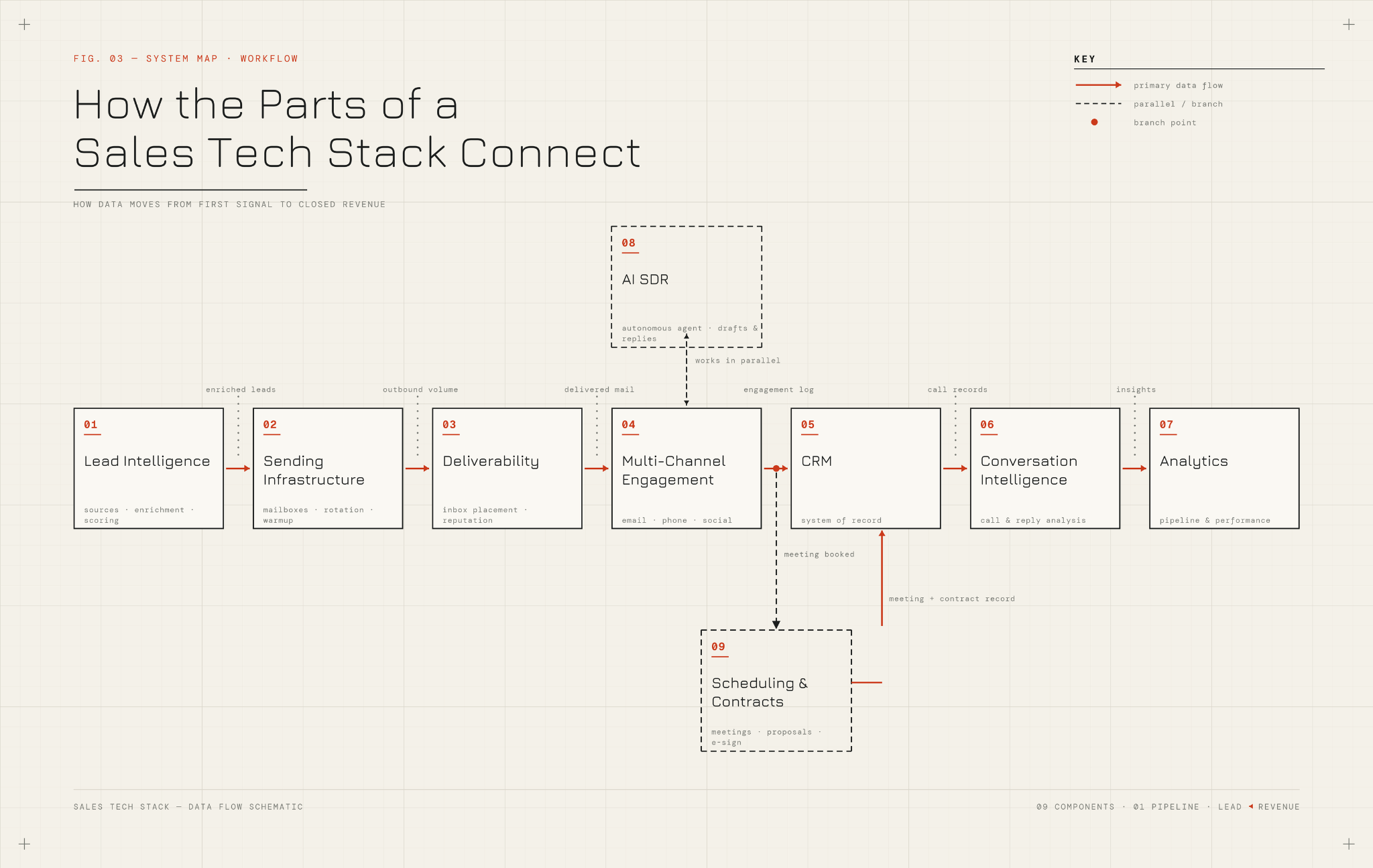
Think of it less as a shopping list and more as a connected workflow. Each tool has a job.

The jobs feed each other:

  • Prospecting feeds outreach
  • Outreach feeds meetings
  • Meetings feed the CRM
  • The CRM feeds forecasting

When the handoffs between those jobs work, your team sells. When the handoffs break, your team spends half its day copying data from one tab to another.

That is the whole game.
Turn your stack into a meeting engine

Stop losing good prospects between prospecting, sending, and follow-ups. Keep the whole outbound motion moving toward booked meetings.

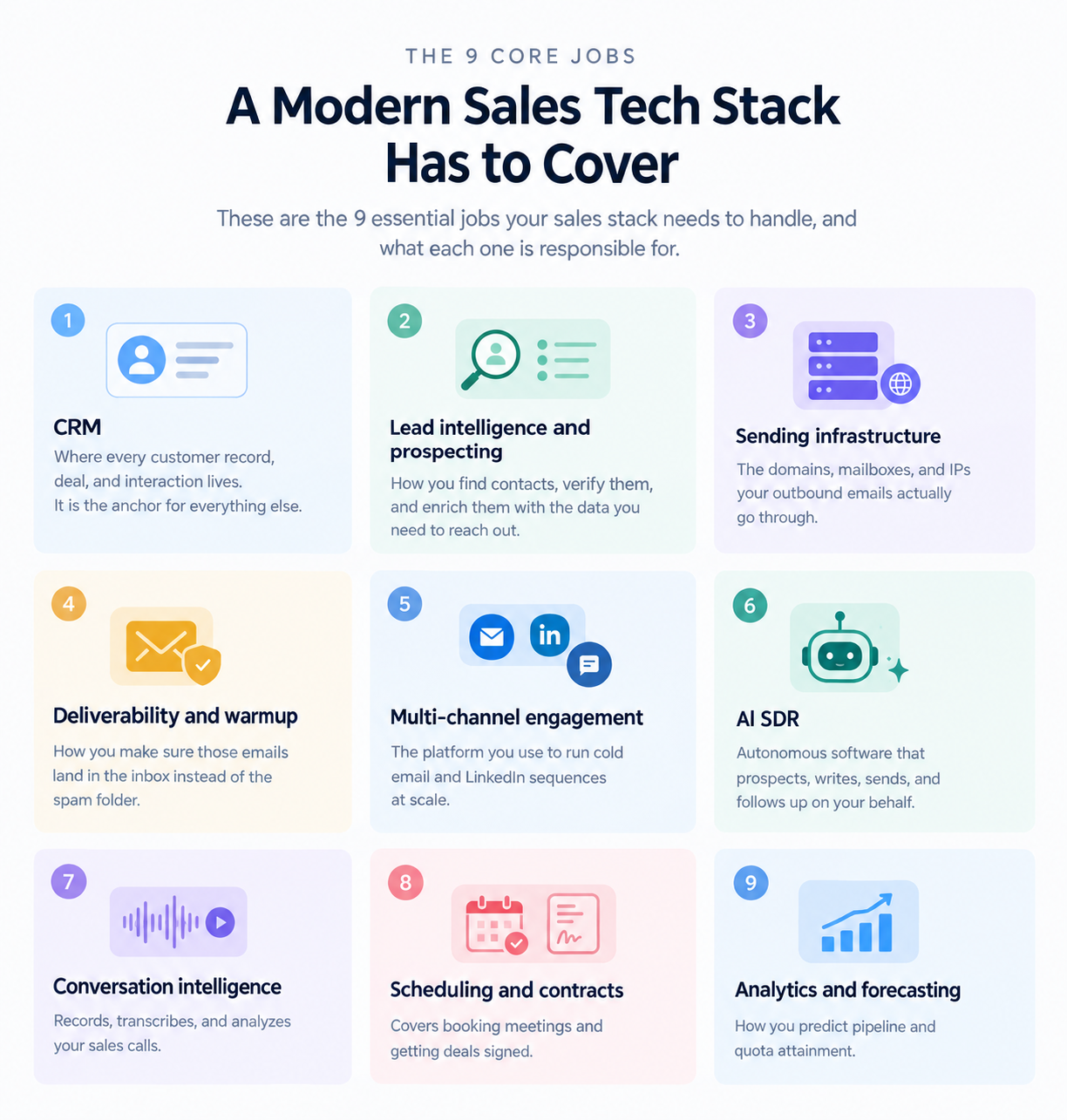
9 Jobs a Modern Sales Tech Stack Has to Cover in 2026

Most modern sales tech stacks cover nine core jobs. Some teams combine a few into one tool. Some teams split one job across multiple tools.

The jobs themselves stay pretty consistent:

  1. CRM is where every customer record, deal, and interaction lives. It is the anchor for everything else.
  2. Lead intelligence and prospecting is how you find contacts, verify them, and enrich them with the data you need to reach out.
  3. Sending infrastructure is the domains, mailboxes, and IPs your outbound emails actually go through.
  4. Deliverability and warm-up are how you make sure those emails land in the inbox instead of the spam folder.
  5. Multi-channel engagement is the platform you use to run cold email and LinkedIn sequences at scale.
  6. AI SDR is autonomous software that prospects, writes, sends, and follows up on your behalf.
  7. Conversation intelligence records, transcribes, and analyzes your sales calls.
  8. Scheduling and contracts cover booking meetings and getting deals signed.
  9. Analytics and forecasting are how you predict pipeline and quota attainment.

Some of those will sound familiar. A few of them, honestly, would not have made the list even 18 months ago.

How a Sales Tech Stack Differs From a Marketing Tech Stack and a GTM Stack

Since these three terms get used interchangeably, here is the clean distinction:

  • Marketing tech stack — covers everything before someone becomes a qualified lead (ad platforms, marketing automation, CMS, SEO tools, attribution)
  • Sales tech stack — takes over after that (prospecting, outreach, meeting booking, closing, pipeline tracking)
  • GTM stack — the umbrella that includes both, plus customer success and revenue operations tools sitting across everything
If you own outbound, you are building a sales tech stack. If you own the funnel end to end, you are building a GTM stack. The frameworks in this guide apply to both, but the jobs I walk through are the sales side.

Now that you know what belongs in a stack and why the definition has shifted, the next question is how to actually build one. I will start with the jobs themselves, then the framework I use to put them together.

How to Build a Sales Tech Stack 

I am going to walk through each of the nine jobs your sales tech stack has to cover. For every one, I will explain:
  • What the job is
  • What breaks when you get it wrong
  • What to look for when you buy for it
  • Which tools to consider

Job 1: CRM Is the Anchor Every Other Tool Writes To

Your CRM holds every account, contact, deal, activity, and touchpoint your team creates. If a tool cannot write back to your CRM cleanly, that tool should not be in your stack.

I say this because most fragmented stacks fail here first. A rep sends an email from one tool, logs a call in another, books a meeting in a third, and none of it lands in the CRM without manual copying.

When that breaks:

  • Forecasting stops being reliable
  • Lead routing misfires
  • Reporting turns into a scavenger hunt

Tools to consider:

  • Salesforce for enterprise complexity
  • HubSpot for a friendly middle ground
  • Pipedrive for smaller teams that want something simple

What to look for when you buy:

  • Native integrations with the tools you already run, not just an API or a Zapier connector
  • Reporting and dashboard flexibility your team can actually use without a RevOps hire
  • A pricing model that scales with contacts and deals, not with every seat you add

Pick the one your team will actually use, and make it the non-negotiable data core for everything else.

Job 2: Lead Intelligence and Prospecting Feed the Whole Machine

This job covers finding contacts, verifying their emails, enriching them with firmographic and intent data, and pushing them into your outreach flow.

Tools that lead this category:

  • Apollo for a large database plus light outreach built in
  • ZoomInfo for enterprise-grade data with intent signals
  • Clay for waterfall enrichment across 100+ sources
  • Cognism for GDPR-compliant prospecting in EU markets
  • Lusha for quick individual contact lookups

What to look for when you buy:

  • Accuracy over database size. A contact list that is 60% correct is worse than a smaller list that is 95% correct, because bounced emails destroy your sender reputation faster than a bad subject line ever will.
  • Waterfall enrichment. Instead of pulling data from a single source, waterfall enrichment queries multiple providers and takes the best available match. That usually accounts for the 20 to 30 percentage points of accuracy that separate a good list from a bad one.
  • CRM sync out of the box. If you have to CSV-export leads and manually import them, the tool is already failing.
If you want a deeper breakdown of what actually works at each stage of prospecting, I've compared the best sales prospecting tools across finding, enriching, and reaching.

Job 3: Sending Infrastructure Is the Job Most Sales Tech Stacks Skip

If you are sending more than a few hundred cold emails a day, you cannot run everything through your primary Google Workspace or Microsoft 365 mailbox. You need dedicated sending infrastructure, which means multiple domains, dozens of mailboxes, and clean DNS configuration on every single one.

Three ways to handle sending infrastructure:

  • Shared IP infrastructure. Cheapest option and fastest to set up. Your emails are sent from IPs shared with other senders, which keeps costs low but means you share reputation too. Right choice for most teams that need scale without the price of dedicated infrastructure.
  • Real Google Workspace or Microsoft 365 mailboxes. Higher trust because the receiving inbox recognizes the sending provider. Better reply rates in some verticals. Higher cost per mailbox than shared IP options.
  • Dedicated IPs. Your own IP address means full control over sender reputation and no risk from what other senders on a shared IP are doing. Right choice for high-volume senders (2,000-plus emails a day) who cannot afford to share reputation with anyone.

What to look for when you buy:

  • Automated SPF, DKIM, and DMARC configuration on every new domain (setting these by hand for 20 domains is a full weekend of work you should not have to do)
  • Bulk domain and mailbox management, especially if you are running more than 10 mailboxes
  • Clear separation from your primary business domain, so a blacklist event on cold outreach never touches invoices or contracts
Get this wrong, and everything downstream fails. For a step-by-step walkthrough of how to actually set the domains, mailboxes, and DNS records up, I've written a full guide on cold email infrastructure setup.

Job 4: Deliverability and Warmup: Decide Whether Your Emails Get Seen

Sending infrastructure gets your emails out the door. Deliverability decides whether they land in the inbox.

What a good warmup and deliverability tool handles:

  • Warms your mailboxes to build sender reputation for 14 days before you start sending real campaigns
  • Tracks a real-time mailbox health score (heat score, deliverability score, whatever the vendor calls it) so you can catch problems before they hurt your campaigns
  • Monitors inbox placement rates across the major email providers (Google, Microsoft, Yahoo)
  • Runs SPF, DKIM, and DMARC checks automatically to catch authentication problems

Why this job matters, in one number:

If your inbox placement drops from 85% to 65%, you have effectively cut your outbound reply rate by a third without changing a single subject line or CTA. Warmup is what keeps that from happening.

What to look for when you buy:

  • A warm-up pool of real Google Workspace and Microsoft 365 mailboxes, not spam-farm inboxes that will hurt your reputation instead of building it
  • Placement testing across all major providers, not just Gmail
  • Direct integration with your engagement tool, so warm-up keeps running while campaigns are live
If you want to go deeper on the mechanics, I've broken down cold email deliverability end to end with Jeremy from QuickMail.

Job 5: Multi-Channel Engagement Is Where Prospects Actually Get Reached

This is the tool your reps live in every day. It is where cold email sequences run, where LinkedIn messages get sent, where follow-ups fire automatically, and where replies come back.

Tools that lead this category:

  • Outreach and Salesloft for enterprise SDR floors with heavy Salesforce integration
  • Instantly and Smartlead for cold-email-first teams optimizing for volume
  • Reply.io for multi-channel across email, LinkedIn, WhatsApp, and calls
  • Lemlist for creative personalization with images, video, and landing pages

Two things to check before you buy:

  • Channel mix support. If you only send email, an email-first tool is fine. If you run email and LinkedIn together (which most modern outbound teams do), you need something that treats both as first-class channels instead of tacking LinkedIn on as an afterthought.
  • Pricing model. Per-seat pricing scales badly for outbound teams that need dozens of sender mailboxes. Flat pricing scales cleanly.

What to look for when you buy:

  • Conditional if/then branching between channels (if a LinkedIn connection is accepted, next step is a LinkedIn message; if not, fall back to email)
  • A unified reply inbox so your team is not opening 15 mailbox tabs to triage responses
  • Native CRM sync, not a middleware workaround
For a full breakdown of how conditional multi-channel sequences actually work in practice, I've written a multi-channel outreach playbook covering the exact sequence patterns I use.

Job 6: AI SDR Is the Newest Job in the Sales Tech Stack

An AI SDR is autonomous software that finds prospects, writes personalized outreach, sends it, handles follow-ups, and books meetings. All without human input on any given message.

The category is new enough that most teams have not decided whether it is one job or a feature bolted onto engagement. My take is that it is its own job, because the tools that do it well are architected differently from traditional engagement platforms. If you want the deeper explainer on the category, I've written a full guide on what an AI SDR is and the five steps to implement one in your workflow.

Tools in this space:

  • 11x and Artisan as the standalone AI SDR players
  • AI SDR add-ons from the major engagement platforms (Jason from Reply.io, Ava from Artisan, and equivalents from Outreach and Salesloft)

What to check when you evaluate an AI SDR:

  • Auto-Pilot mode runs the whole workflow without approval on individual messages
  • Co-Pilot mode drafts everything but waits for your review before sending
  • Human account manager matters more than most buyers realize, because a live person walking you through setup is often the difference between an AI SDR that works and one that gets abandoned in month two
  • Knowledge base support so the agent has your product docs, ICP, and messaging context to draw from, instead of guessing at your business
  • Language coverage if any of your target markets are outside the US

Scale outbound without hiring another SDR

Give your team more sending capacity, more channels, and AI-powered follow-ups without adding another layer of sales software to manage.

Job 7: Conversation Intelligence Turns Calls Into Coachable Moments

This job covers recording, transcribing, and analyzing your sales calls so you can spot patterns, coach reps, and pull competitive intelligence out of what your prospects actually say.

Tools that lead this category:

  • Gong (dominates)
  • Chorus (now part of ZoomInfo)
  • Clari Copilot

When to add it:

  • 3-plus reps making outbound calls
  • 100-plus calls a month
  • Before that, it is a solution looking for a problem

What to look for when you buy:

  • Automatic call scoring against your ideal call structure so coaching is not a manual review of every recording
  • Deal-level insights that tie call moments to pipeline movement, not just individual call analytics
  • Native CRM sync so call summaries land on the deal record automatically

Job 8: Scheduling and Contracts Close the Loop

The last two jobs before revenue hits your CRM are booking the meeting and signing the deal.

For scheduling:

  • Calendly for individual booking links
  • Chili Piper for round-robin routing across a sales team

For contracts:

  • DocuSign and PandaDoc for e-signature on simple deals
  • DealHub or Salesforce CPQ for deals that include configuration, quoting, or proposal generation

What to look for when you buy:

  • CRM sync that logs the booked meeting or signed contract to the deal record without a manual step
  • Reminder and no-show logic that recovers meetings automatically instead of losing them

These are boring tools. They are also non-negotiable, because the second friction shows up between booking and signing, your close rate takes a hit.

Job 9: Analytics and Forecasting Show You What Is Actually Happening

The last job in a modern sales tech stack is knowing what your pipeline actually looks like. Not the story your reps tell in the weekly forecast call. The real numbers.

Tools that lead this category:

  • Clari
  • BoostUp
  • InsightSquared
They pull from your CRM, your engagement platform, and your conversation intelligence tool to give you a predictive view of pipeline that is more reliable than any rep's gut feel.

When to add it:

  • 10-plus reps
  • $2 million-plus in active pipeline
  • Before that, your CRM's built-in reporting will do fine

What to look for when you buy:

  • Predictive forecasting that uses activity data, not just rep-entered close dates
  • Deal risk scoring that surfaces slipping deals before your rep flags them
  • Native integrations with your CRM, engagement platform, and conversation intelligence tool (not a duct-taped data pipeline)

Now that you know the parts, the next question is how to actually put them together. Here is the framework I use.

5-Step Framework I Use to Build a Sales Tech Stack From Scratch

Every sales tech stack I have built (from scratch or from a mess) has followed the same five steps in the same order. The order matters. Skip a step or do them out of sequence, and you end up with the fragmented stack you were trying to avoid.

Step 1: Audit Every Tool You Are Currently Paying For

Before you buy anything, list every tool your team is already using. Every one. Include the ones nobody logs into anymore. Include the ones you only use for one feature.

Then map each tool to the nine jobs from the previous section. You will usually find three things:

  1. You have two or three tools doing the same job
  2. You have no tool covering a job that should exist
  3. You are paying for features you do not use
Getcleed's research says 67% of purchased features go unused across the average sales tech stack. Your audit will confirm this.

Once the map is honest, write down what you actually need. Not what would be nice. What is missing, duplicated, or broken.

Step 2: Anchor Your Stack on Your CRM Before Buying Anything Else

Every other tool in your stack has to write back to your CRM. So pick the CRM first, before you buy prospecting tools, engagement tools, or anything else.

Which CRM to pick, based on team profile:

  • Salesforce for enterprise complexity and heavy customization
  • HubSpot for a friendly middle ground with strong marketing integration
  • Pipedrive for smaller teams that want something simple

Do not skip this step because you "already have a CRM." Confirm the CRM you have can actually handle what you are about to build on top of it. If it cannot, migrate now before you add more tools that will have to be re-integrated later.

Step 3: Enforce the Integration Mandate on Every New Tool

This is the rule that separates connected stacks from fragmented ones.

Never buy a tool that does not natively sync to your CRM.

  • Not "has an API"
  • Not "supports Zapier"
  • Native, two-way sync out of the box
Zapier and third-party middleware are duct tape. They will work until they don't, and when they don't, you will be debugging integrations instead of selling. Native integrations survive product updates, edge cases, and team turnover. Middleware does not.

This rule alone will kill 60% of the tools your team wants to try. That is the point.

Step 4: Layer AI With Human Review Before You Move to Full Automation

AI SDRs, AI email writers, and AI research tools are worth adding. But not on full autopilot from day one.

The rollout order for any AI tool:

  1. Start in review mode where a human checks every output
  2. Run for 1-2 weeks and track output quality
  3. Move to full automation once outputs are consistently good
  4. Not the other way around

The reason is simple. AI failures at scale are much more expensive than AI failures at low volume. If your AI SDR sends 500 personalized emails a day and 10% of them get the recipient's name wrong, that is 50 damaged prospects a day. That compounds fast.

Agent Frank's Co-Pilot mode is built for exactly this reason. You review drafts before they send until you trust the outputs, then you move to Auto-Pilot.

Step 5: Phase Your Rollout Over 8 to 12 Weeks, Not All at Once

Do not flip five new tools live in the same month. Your reps will burn out on training, adoption will collapse, and you will not know which tool is helping and which is hurting.

The rollout order I use:

  1. CRM (or CRM audit if it already exists)
  2. Sending infrastructure
  3. Deliverability and warmup
  4. Engagement platform
  5. AI SDR
  6. Everything else (conversation intelligence, forecasting, enablement)

Two tools a week is a reasonable pace for most teams.

How to check whether a tool is landing:

  • Track adoption for each new tool in the first 30 days
  • Look for at least 60% weekly active usage across your team after a month
  • If you are below that threshold, either the tool is wrong, or the training was
  • Fix that before you move on to the next one
Want to see how the whole workflow ties together once the stack is live? I've written up the outbound sales strategy that still works in 2026 — signals, sequencing, and the role AI plays inside it.

How Your Sales Tech Stack Should Change as Your Team Grows From 0 to 20 Reps

The right stack for a two-person founder-led motion is not the right stack for a 30-rep SDR team. Here is what changes at each stage.
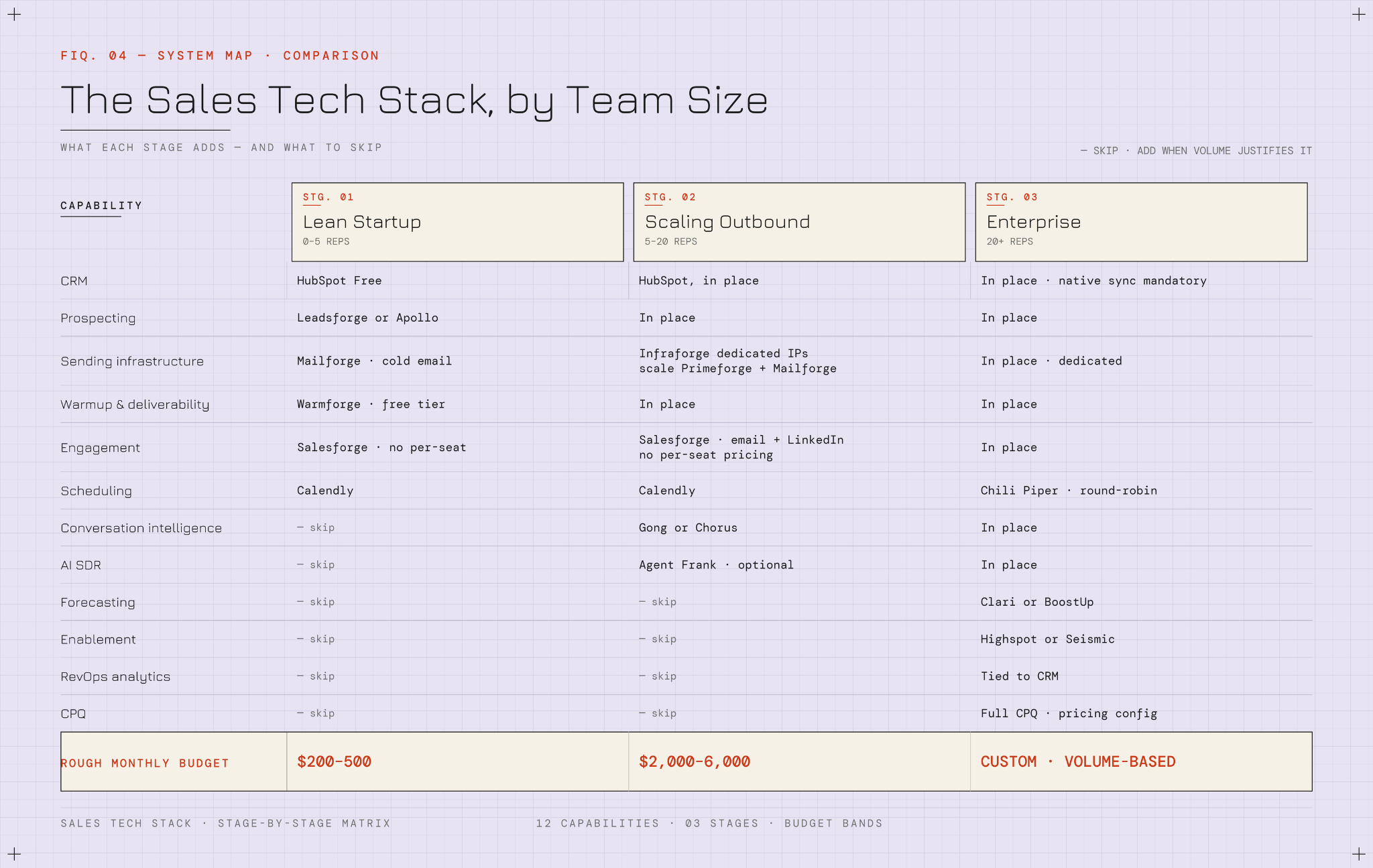
The Lean Startup Sales Tech Stack for 0 to 5 Reps

At this stage, you are optimizing for cost and simplicity. You need to reach prospects, book meetings, and track deals. That's it.

The minimum viable stack:

  • CRM: HubSpot's free tier
  • Prospecting: Leadsforge or Apollo
  • Sending infrastructure: Mailforge if you are running cold email
  • Warmup: Warmforge (has a free tier)
  • Engagement: Salesforge (no per-seat pricing, which matters even at this stage)
  • Scheduling: Calendly

What to skip at this stage:

  • Conversation intelligence
  • Forecasting
  • Dedicated infrastructure

Add them when you have the volume to justify them.

Rough budget: $200 to $500 a month, depending on how many mailboxes you need and which CRM tier you pick.

The Scaling Outbound Sales Tech Stack for 5 to 20 Reps

At this stage, volume matters. You are sending enough cold email that shared infrastructure starts to feel limiting, and you have enough calls that recording them for coaching starts to pay off.

What to add:

  • Dedicated sending infrastructure: Infraforge for dedicated IPs if you are running high-volume cold outbound, or scale up your Primeforge and Mailforge mailboxes
  • Conversation intelligence: Gong or Chorus
  • AI SDR: Agent Frank, if your prospecting team is overwhelmed and hiring more SDRs is not the answer

What to check on your engagement tool:

Your engagement tool should now handle multi-channel sequences across email and LinkedIn, since your team is working accounts across both. Salesforge handles this without per-seat pricing, which matters when you have 15 reps.

Rough budget: $2,000 to $6,000 a month, depending on the AI SDR decision and the depth of your conversation intelligence setup.

The Enterprise Sales Tech Stack for 20-Plus Reps

At 20-plus reps, complexity is your enemy. You need forecasting, enablement, RevOps analytics, and probably a full CPQ tool for pricing configuration.

What to add:

  • Forecasting: Clari or BoostUp
  • Enablement: Highspot or Seismic for content management and sales training
  • RevOps analytics tied to your CRM
  • Round-robin scheduling: Chili Piper (replaces individual Calendly links)

The most important rule at this stage:

The integration mandate from Step 3 becomes non-negotiable. Every new tool your reps want to try has to prove native CRM sync before it enters the stack. No exceptions.

Rough budget: $15,000 a month and up for the sales tech stack alone, before you factor in the broader RevOps and marketing stacks.

Where the Forge Stack Fits Into a Modern Sales Tech Stack

Now that you know what the parts of a sales tech stack are, how to build one, and when consolidation makes sense, here is where the Forge stack sits in that picture.
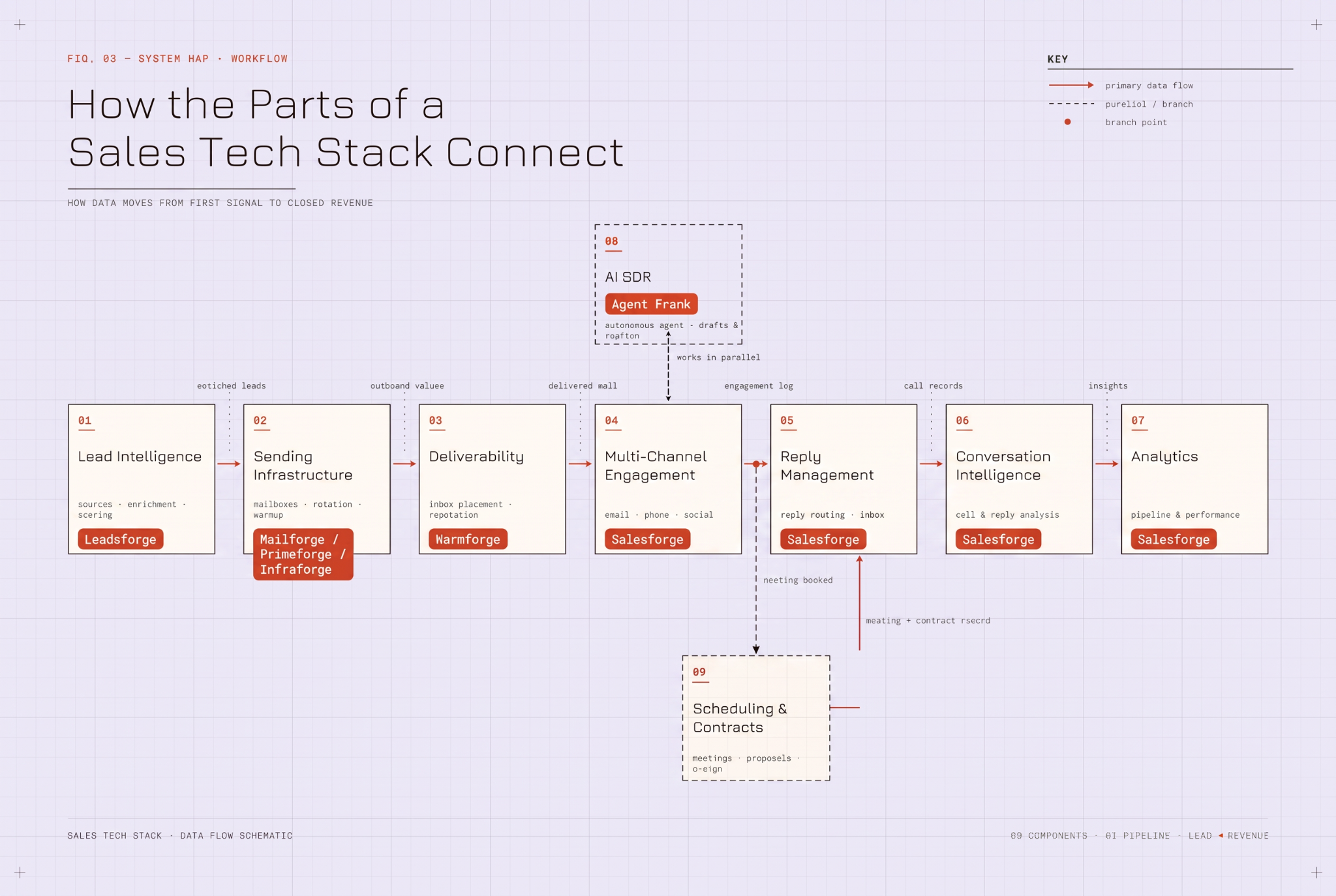
The Forge stack was built to cover the five jobs of the outbound workflow that fail hardest when they are fragmented:

  • Lead intelligence
  • Sending infrastructure
  • Deliverability
  • Multi-channel engagement
  • AI SDR

1. Leadsforge for Lead Search and Enrichment

Leadsforge is a lead search engine that covers the lead intelligence job.

What it gives you:
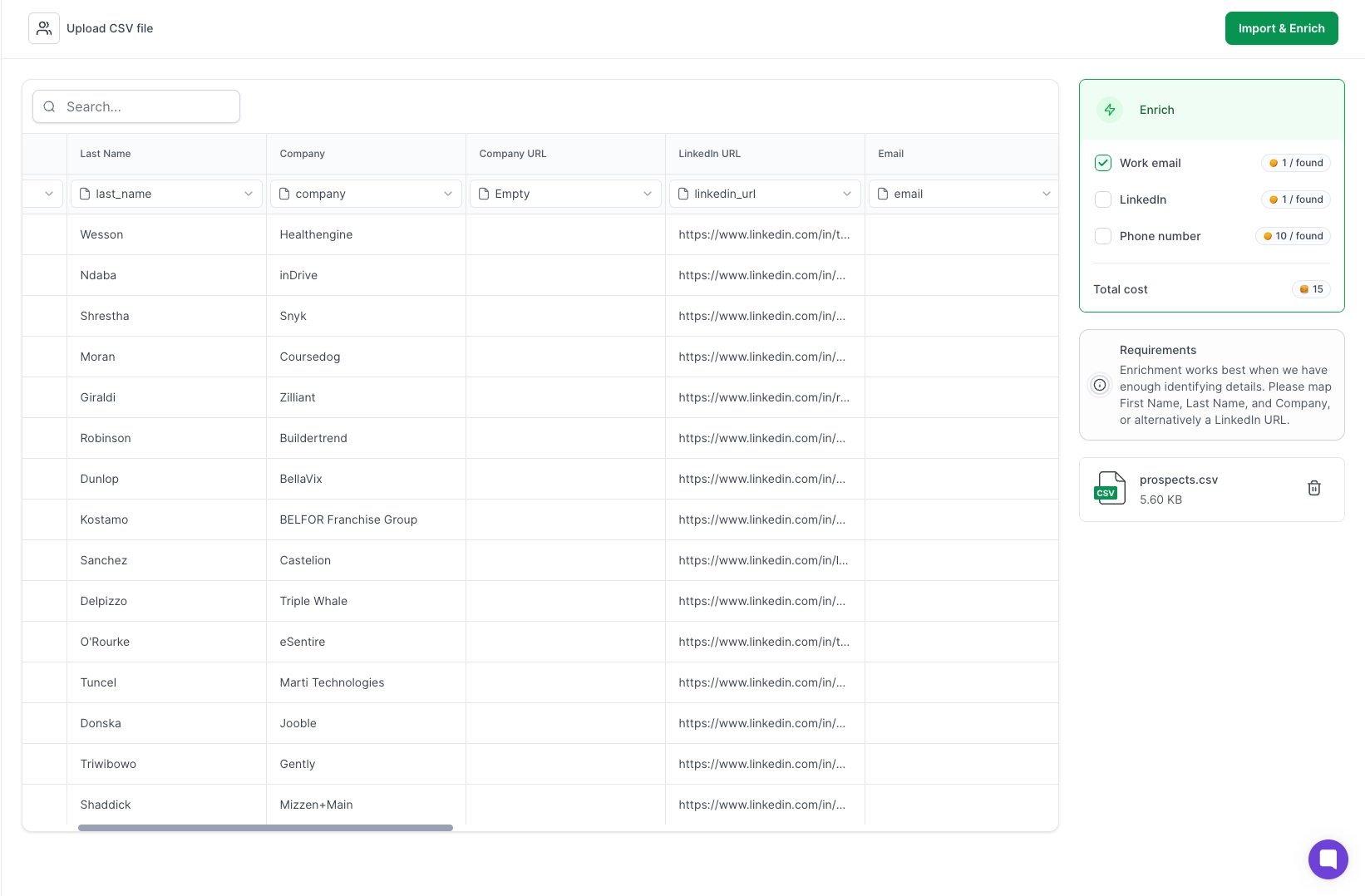
  • 500-million-plus contact database
  • Waterfall enrichment across multiple data sources (higher accuracy than any single-source tool)
  • ICP-based search where you describe your ideal customer and get matched leads back
  • Lookalike search to find companies similar to your best customers
  • Competitor follower targeting
  • Intent signals
The waterfall enrichment part is what matters most. You are not stuck with the hit rate of a single data provider.

Make your next 100 prospects count

Get accurate leads into outreach faster, protect your sending reputation, and give every prospect the follow-up they need.

2. Mailforge, Primeforge, and Infraforge for Sending Infrastructure

This is where the Forge stack does something most competitors do not. It treats sending infrastructure as three distinct choices instead of a single product.

Mailforge — shared IP infrastructure

  • Automated DNS setup, live in about 5 minutes
  • $2 to $3 per mailbox per month
  • Right choice for most teams that need scale without the cost of dedicated infrastructure

Primeforge — real Google Workspace and Microsoft 365 mailboxes

  • Not repurposed personal accounts, not EDU workarounds
  • US IPs and profile pictures out of the box
  • Ready in 30 minutes at $3.50 to $4.50 per mailbox per month
  • Right choice when your target audience is more likely to reply to a Google or Microsoft mailbox than a custom domain

Infraforge — dedicated IPs and prewarmed infrastructure

  • Thousands of domains and mailboxes at scale
  • Bulk DNS management
  • $3 to $4 per mailbox per month
  • Right choice for high-volume senders who need full control over their sender reputation

The key distinction between Mailforge and Infraforge:

Shared IPs (Mailforge) versus dedicated IPs (Infraforge) is the core choice. Mailforge for cost-effective scale. Infraforge for volume and control.

3. Warmforge for Deliverability and Warmup Monitoring

Warmforge covers the deliverability job.
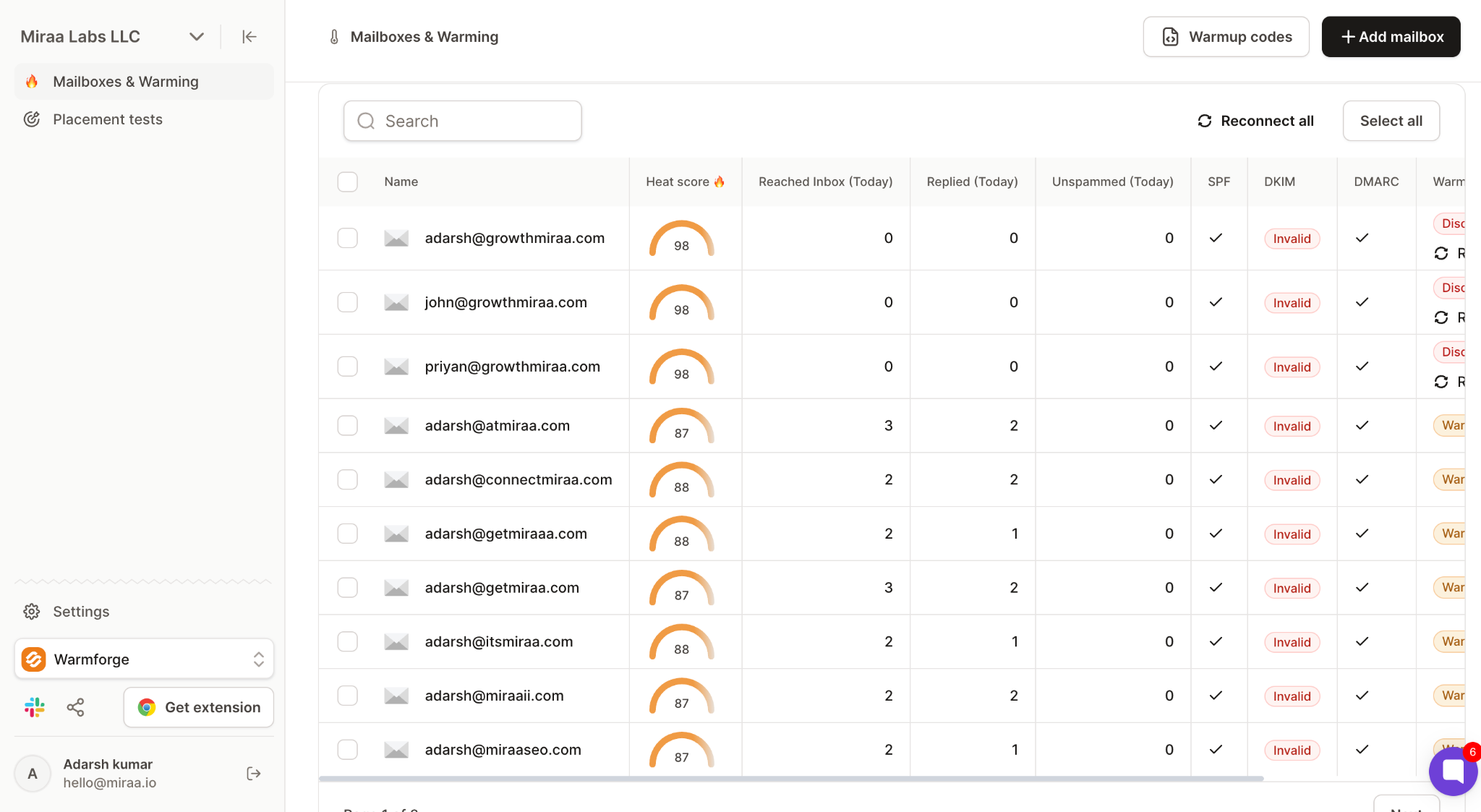
What it does:

  • Warms your mailboxes for 14 days to build sender reputation before you send real campaigns
  • Tracks a Heat Score in real time (target: 85 or higher) that shows mailbox health
  • Monitors inbox placement rates across the major email providers
  • Runs SPF, DKIM, and DMARC checks automatically

A low-friction way to try it:

Warmforge has a free tier that gives you one Google or Microsoft warming slot plus one free placement test. That is enough to check whether your existing deliverability is where you think it is.

4. Salesforge and Agent Frank for Multi-Channel Engagement and AI SDR

Salesforge and Agent Frank cover the last two jobs the Forge stack was built for.

Salesforge for multi-channel engagement:

  • Cold email and LinkedIn sequences from one platform
  • Unlimited mailboxes
  • Unlimited LinkedIn senders in a single sequence
  • Primebox™ as a unified inbox for every reply across email and LinkedIn
  • No per-seat pricing (matters when your team grows past five reps)

Agent Frank for the AI SDR job:

  • Hire him, and he prospects, writes personalized outreach, sends it, follows up, and books meetings on your behalf
  • Auto-Pilot mode runs the whole workflow autonomously
  • Co-Pilot mode drafts everything but waits for your review before sending
  • Every Agent Frank user gets a dedicated human account manager, which sets him apart from most AI tools that leave you to figure things out alone

Start Building Your Sales Tech Stack Today

Do not try to rebuild your entire sales tech stack in a weekend. Nobody wins that fight.

Pick the one part of the workflow that is hurting the most right now:

  • Reply rates dropping? Start with deliverability and warm-up.
  • Can reps not find good prospects? Start with lead intelligence.
  • Sender reputation fragile or already burned? Start with sending infrastructure.
  • SDR team overwhelmed and hiring more is not the answer? Start with AI SDR.

Then follow the same pattern for every next decision:

  1. Fix one part of the stack
  2. Prove the value with measurable outcomes
  3. Move to the next one
  4. Enforce the integration mandate at every step

That is how connected stacks actually get built. One decision at a time, in the right order, with the integration mandate enforced from step one.

And when you are ready to consolidate the outbound side of your stack, Salesforge is where I would start. Unlimited mailboxes, unlimited LinkedIn senders, free warm-up, Primebox™ for unified replies, and Agent Frank ready to hire when your team needs an AI SDR. Flat pricing, no per-seat fees.

Start a 14-day free trial. No credit card required.

Frequently Asked Questions About Building a Sales Tech Stack

What is a sales tech stack in 2026?

A sales tech stack is the set of tools a sales team uses to find prospects, reach them, book meetings, close deals, and track everything in between. In 2026, a modern stack covers nine jobs: CRM, lead intelligence, sending infrastructure, deliverability and warmup, multi-channel engagement, AI SDR, conversation intelligence, scheduling and contracts, and analytics and forecasting.

What tools do I actually need to build a sales tech stack?

The minimum is a CRM, a lead intelligence tool, sending infrastructure if you are running cold email, warm-up, one multi-channel engagement platform, and a scheduling tool. Everything else (conversation intelligence, AI SDR, forecasting, enablement) is optional at the start and becomes necessary as your team scales past 5 to 20 reps.

How much does a sales tech stack cost?

A lean startup stack (0 to 5 reps) usually runs $200 to $500 a month. A scaling outbound team stack (5 to 20 reps) runs $2,000 to $6,000 a month. An enterprise stack (20-plus reps) starts around $15,000 a month and scales from there. These are directional and depend heavily on the AI SDR decision, the depth of your conversation intelligence setup, and how many sender mailboxes you need.

What is the difference between a sales tech stack and a marketing tech stack?

A marketing tech stack covers everything before a lead becomes qualified (ad platforms, marketing automation, SEO, attribution). A sales tech stack takes over after that (prospecting, outreach, meeting booking, closing, pipeline tracking). A GTM stack is the umbrella that covers both plus customer success and RevOps.

Is it better to use one connected sales tech stack or multiple best-of-breed tools?

It depends on your motion, your team size, and your budget for RevOps support. Connected stacks pay off fastest for teams running high-volume outbound with $5,000 to $100,000 ACVs into startups, SMBs, and mid-market accounts. Best-of-breed setups still make sense for Fortune 500 enterprise deals, compliance-heavy industries, and teams with the RevOps budget to keep a fragmented stack integrated.

How long does it take to build a sales tech stack from scratch?

Plan on 8 to 12 weeks for a proper rollout. Flip five new tools live in the same month and adoption collapses. Two tools a week is a reasonable pace, with the CRM going first, then sending infrastructure, then deliverability, then engagement, then AI, then everything else.

Do I need an AI SDR in my sales tech stack?

If you are selling B2B products with $5,000 to $100,000 ACVs to startups, SMBs, or mid-market accounts, and hiring more human SDRs is not the answer, an AI SDR is worth the investment. If you are selling six- or seven-figure enterprise deals through long RFP cycles, or your motion depends on bespoke high-touch relationships, an AI SDR is the wrong tool.


Book more meetings on autopilot

Set up in minutes. No per-seat pricing. No commitment.
Try
free
4.6 rating on G2
Add as a preferred
source on Google