
Personalized Outbound Strategy
Get The Right Outbound Strategy In Minutes
Enter your email to get a custom plan & stack recommendation for your business
It's being carefully crafted by AI
Please check your mailbox in 5 minutes
Letting an AI agent find leads is easy. Letting it choose who receives an email, what it says, and how to answer replies is harder. One poor decision still goes out under your name.
This guide covers that handover. I’ve already written about using Jev for sales prospecting, cold email outreach, and LinkedIn outreach.
Those guides focused on running campaigns. This one focuses on the agent itself: which decisions it makes, what Jev handles, what follows fixed rules, and what still comes to me.
If you’re considering Jev for email agents, ask how much your agent can safely do without supervision. The steps below explain how I decide.
While building this workflow, I kept returning to one question: What can my agent do without asking me? Each step answers part of that question.
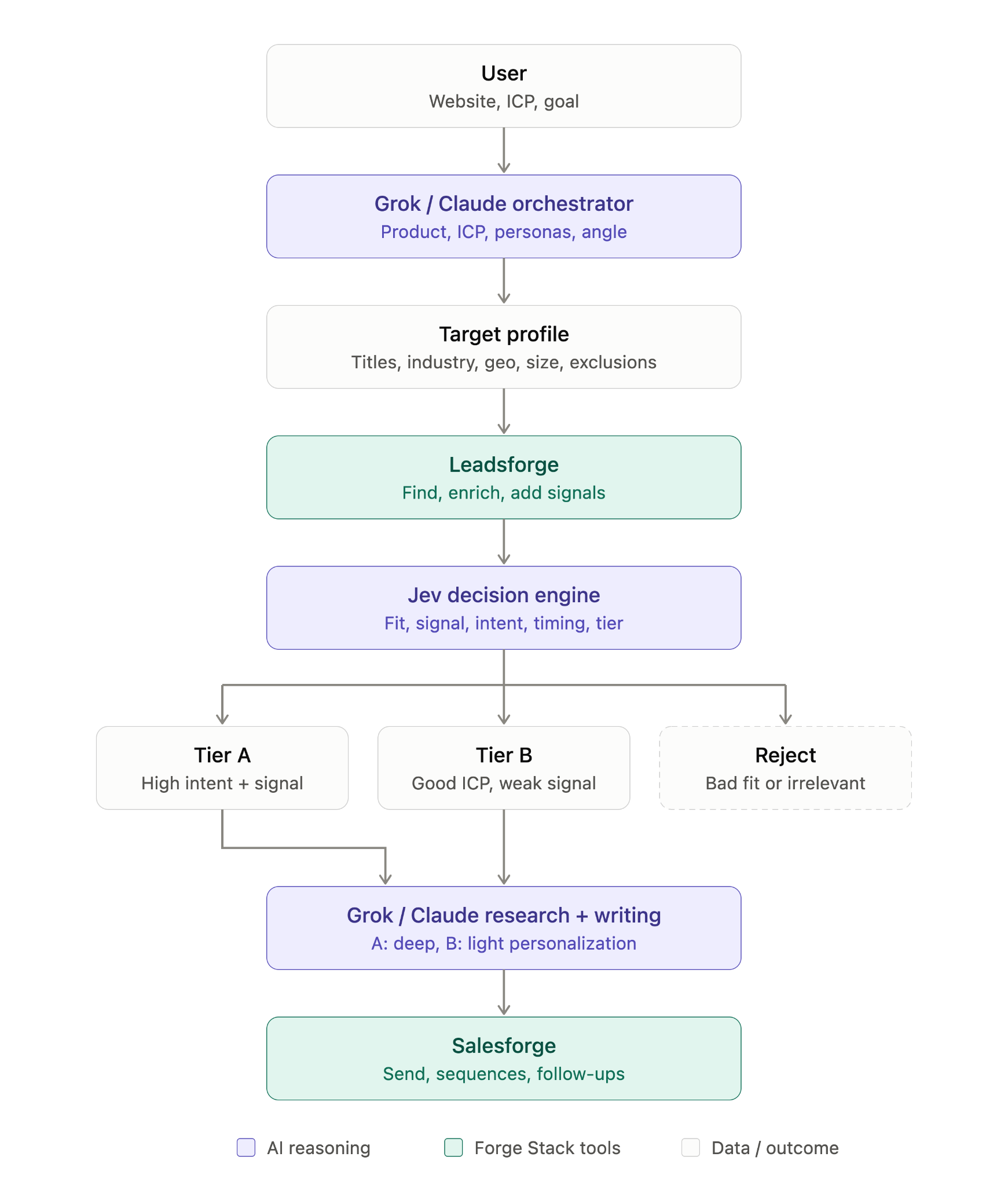
A cold email agent makes many small decisions during one campaign. Before adding Jev, I listed each decision and assigned an owner.
The split follows a simple principle. Jev handles questions with a right answer and enough evidence to find it. Research and writing have no single correct answer, so the agent handles them. Anything that cannot be undone, such as emailing someone who asked to be removed, follows a fixed rule.
These decisions sit on top of the rules my agent already follows, including never guessing an email address and asking me before launching anything.
Do you need to write the code that calls Jev? No. My agent writes it, while the TypeSafe skill shows it how.
TypeSafe’s documentation lists agents inventing request or response fields as a common problem. That is why I want my agent to use the skill rather than rely on memory.
Mine uses the skill whenever it writes code for TypeSafe and checks TypeSafe’s current documentation each time.
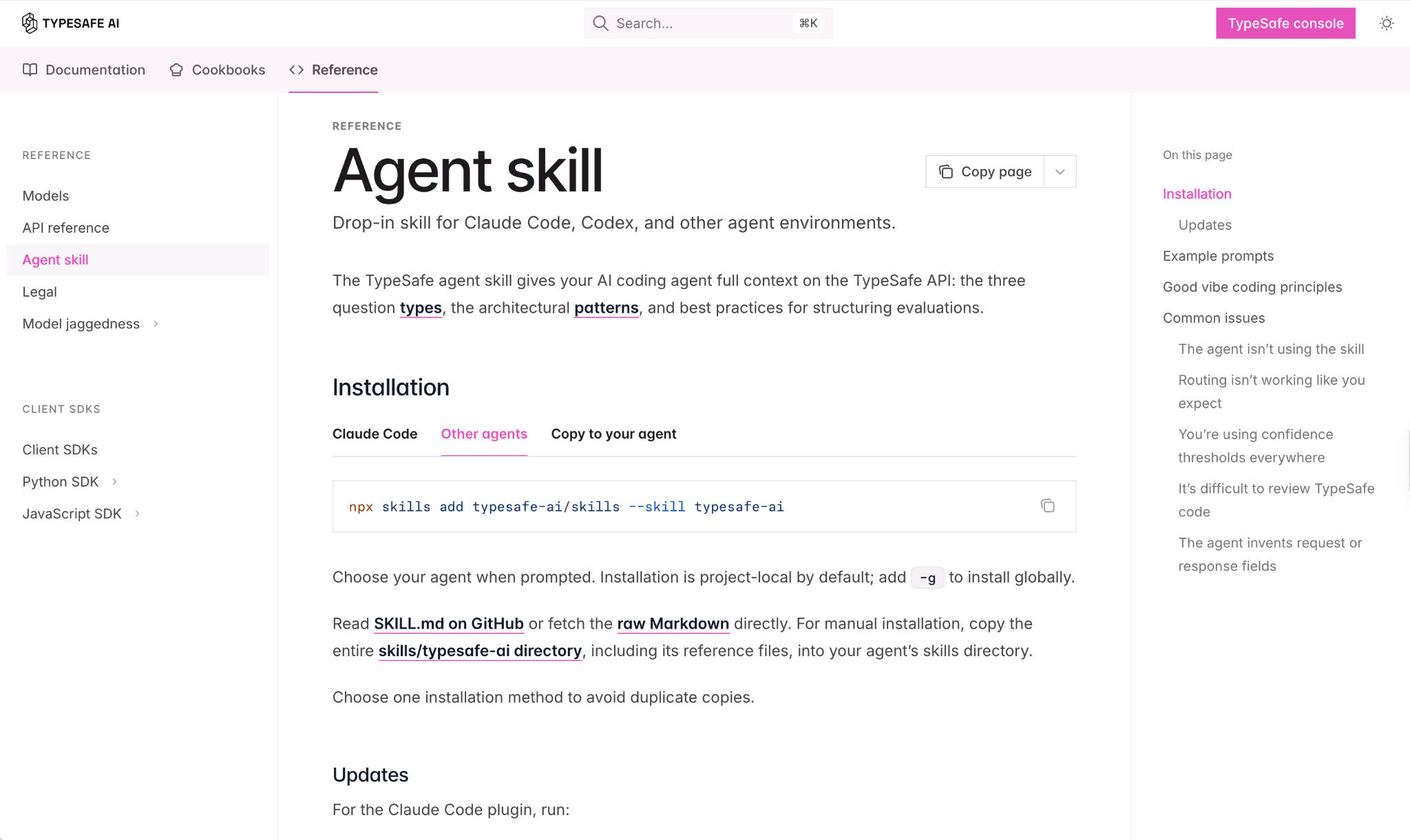
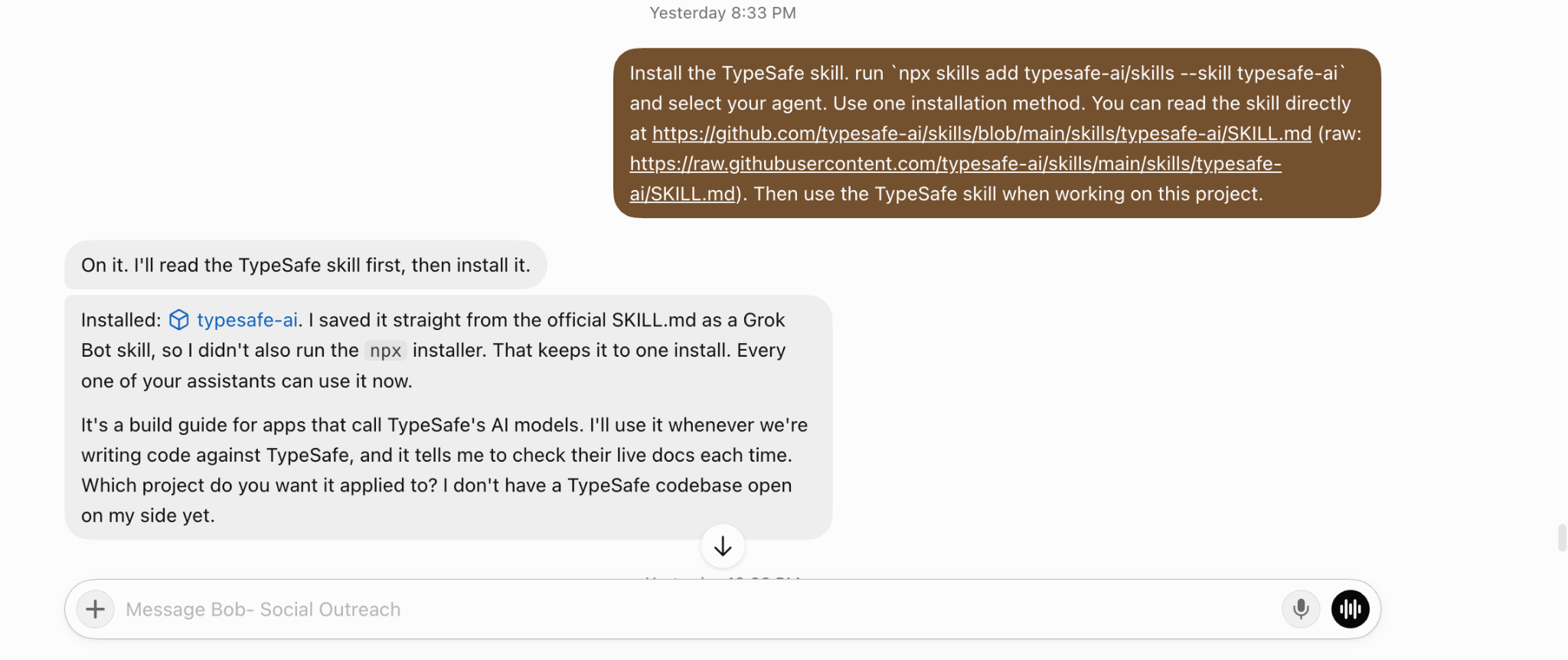
Install the TypeSafe skill instructions with:
npx skills add typesafe-ai/skills --skill typesafe-aiYou can also ask your agent to save the official SKILL.md as a skill, which is what mine did.
Next, create an API key in the TypeSafe console and give it to the agent, which stores it securely.
If your agent is not connected to Leadsforge and Salesforge, connect them first. Both work through Salesforge’s Forge MCP using an API key.

My agent is already a language model, so why ask another model? When an agent reasons in prose, it must read its own paragraph and decide what the answer means. An unsupervised agent should not have to interpret itself.
Jev returns one of three answer types: a pick from a list, a score, or a probability. The agent can act on each result without interpreting it.
The work lies in turning a broad thought into a narrow question.
That is the main lesson for anyone using Jev with an email agent. One broad question produces one vague answer. Four narrow questions give your agent four answers it can use.
Using the TypeSafe skill, turn these into Jev questions for every lead: ICP fit as a score from 0 to 3, persona as a pick from my list, enough information to personalize as a probability, and contact now, nurture, or don’t contact as a pick.
Test them on 20 leads and show me every answer before using them elsewhere.
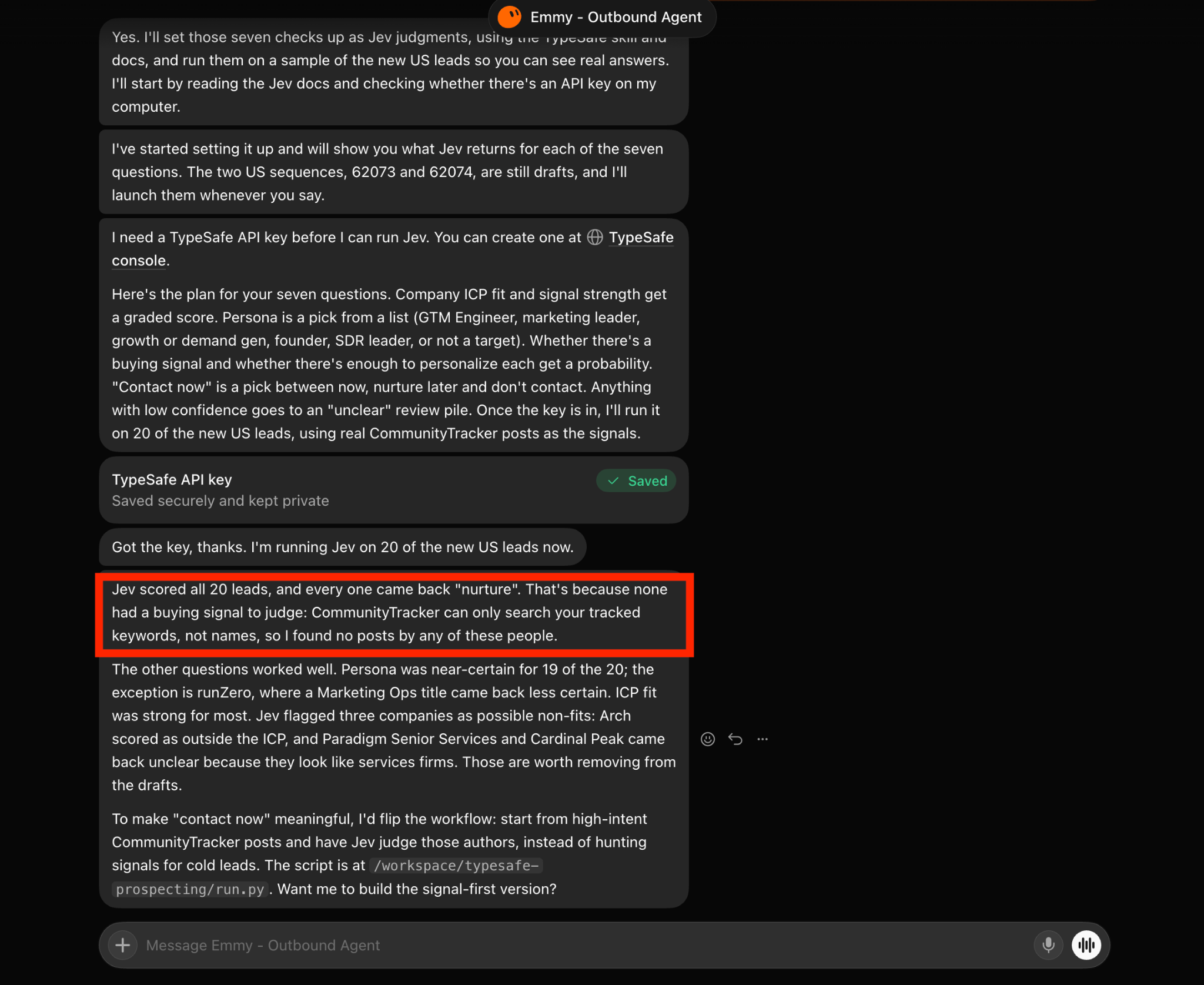
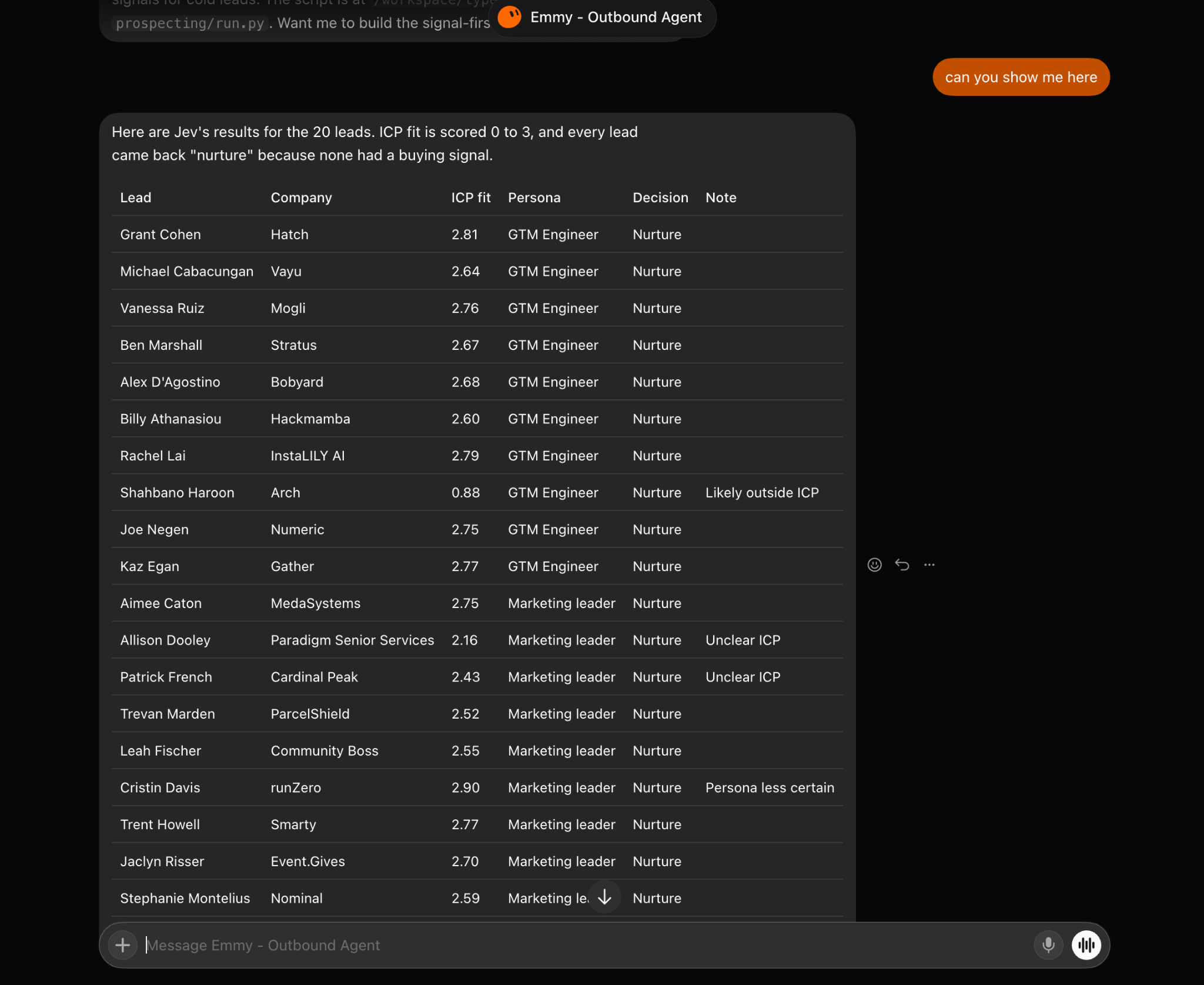
In my first test, Jev answered the “who” questions confidently but sent all 20 leads to nurture. The agent had not failed. It simply didn't give Jev enough information to judge timing.
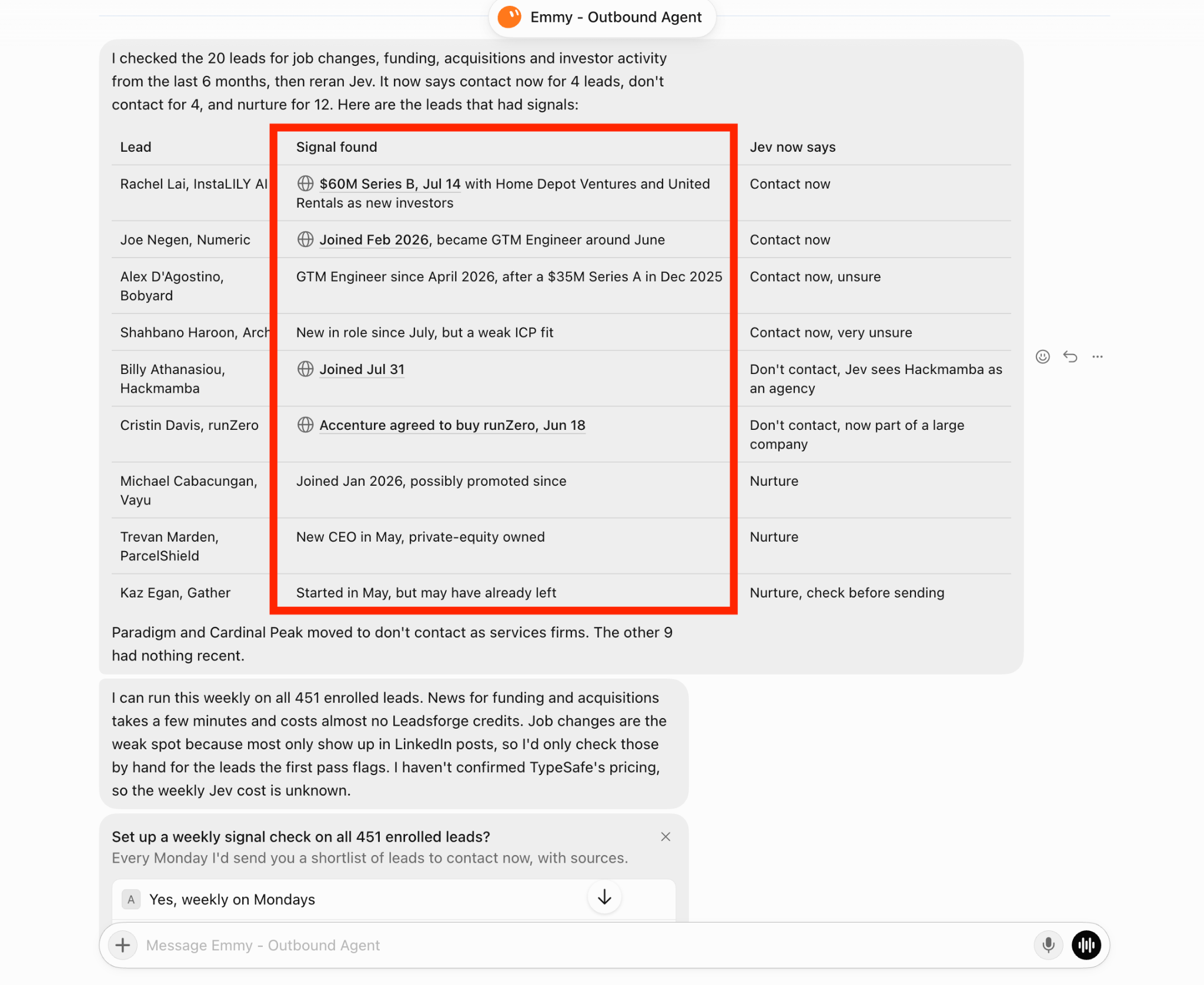
Jev’s answer is only as good as the information it receives. Before any lead reaches Jev, my agent attaches sourced signals from Leadsforge:
Once the same 20 leads had signals, Jev began sending them to all three outcomes instead of putting everyone in nurture.
I gave my agent three evidence rules:
Before asking Jev about a lead, attach their Leadsforge signals from the past six months and include a source for each one. Remove anything you cannot verify.
Flag job changes for manual review. If the lead has no signal, tell Jev there is no signal.
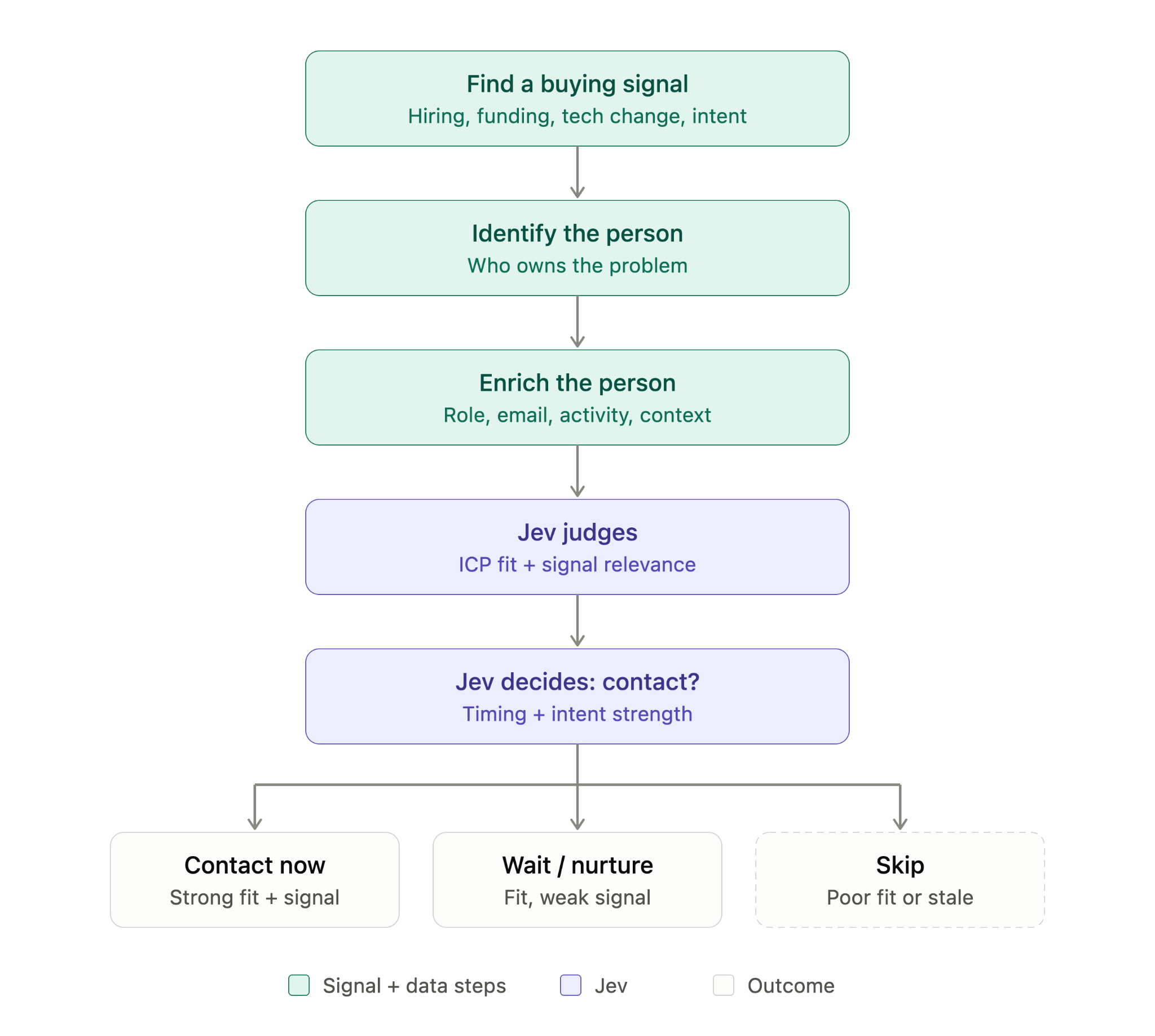
What happens when Jev is unsure? This is the step I would least want an agent to mishandle. To an agent, “contact now, unsure” can look too similar to “contact now.”
Two leads in my test produced that result. One had a new role at a strong company. The other had a new role at a company that barely matched my ICP, and Jev showed very low confidence. Neither should receive an email without a review.
My agent now treats every low-confidence answer as unclear. Unclear leads never enter a campaign. They come to me with their signal and scores, so I can decide quickly without repeating the research.
If any Jev answer has low confidence, mark the lead unclear. Do not add unclear leads to a campaign. Send them to me with the signal, its source, and Jev’s scores.
After Jev approves a lead, my agent handles the work I least want to do manually. It researches what changed at the company, connects that change to what I sell, chooses a sourced angle, and builds the Salesforge campaign.
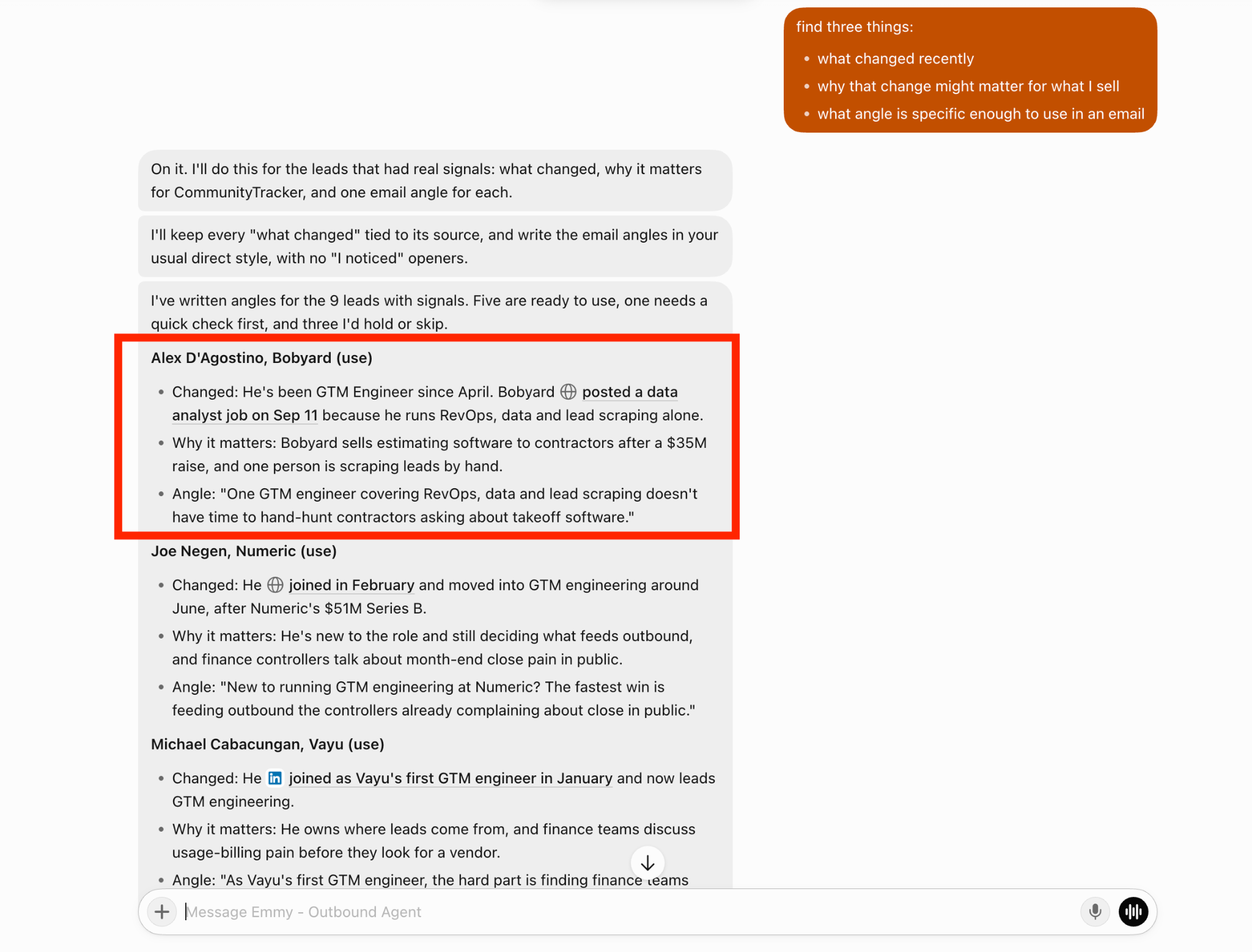
The campaign still remains a draft. During my test, the agent enrolled five leads in Salesforge but sent nothing.
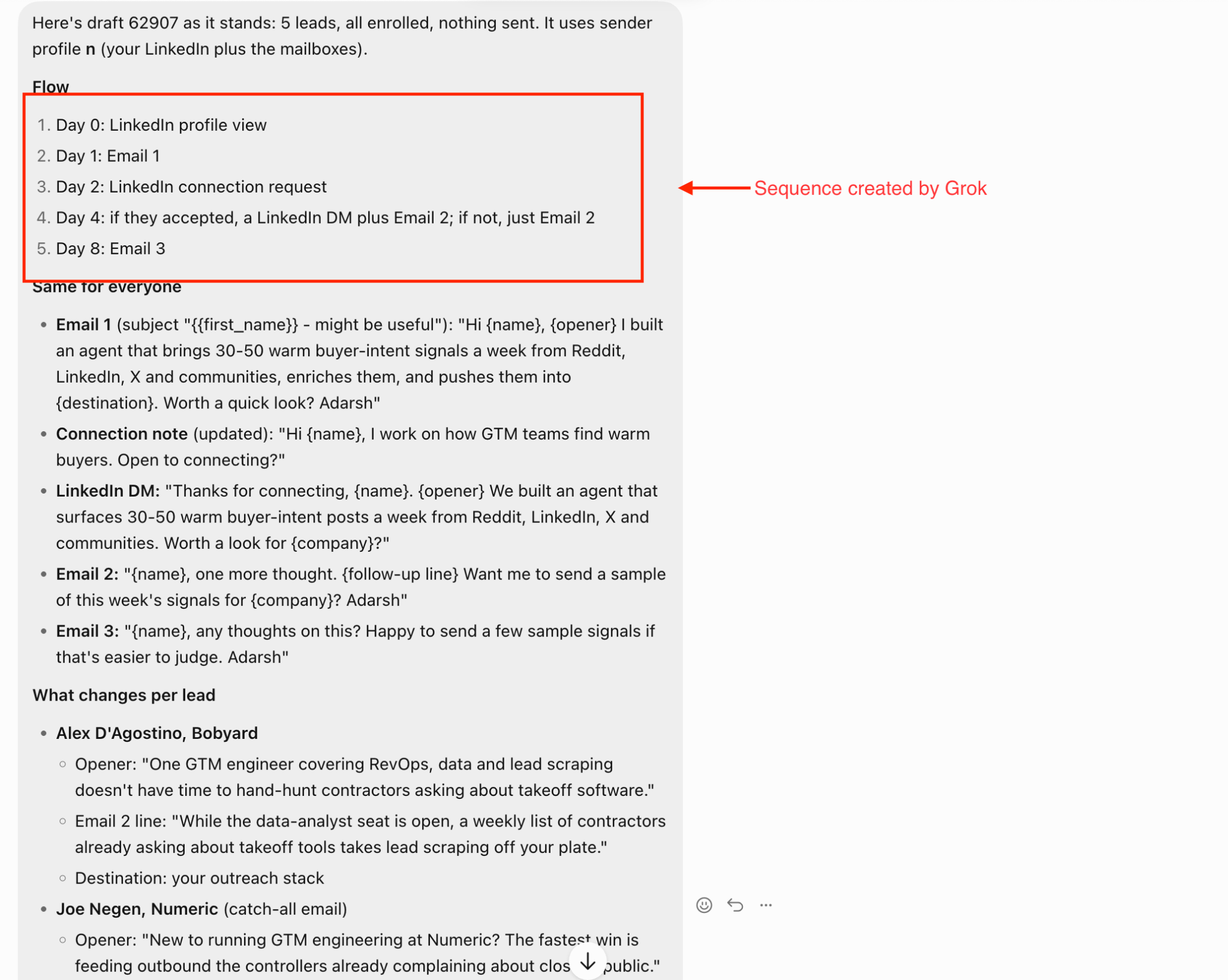
If I still approve every campaign, what have I automated? Everything before the final approval. I only need to check three things:
Reply handling is where a poor decision becomes hardest to reverse. My agent asks Jev five questions about each reply:
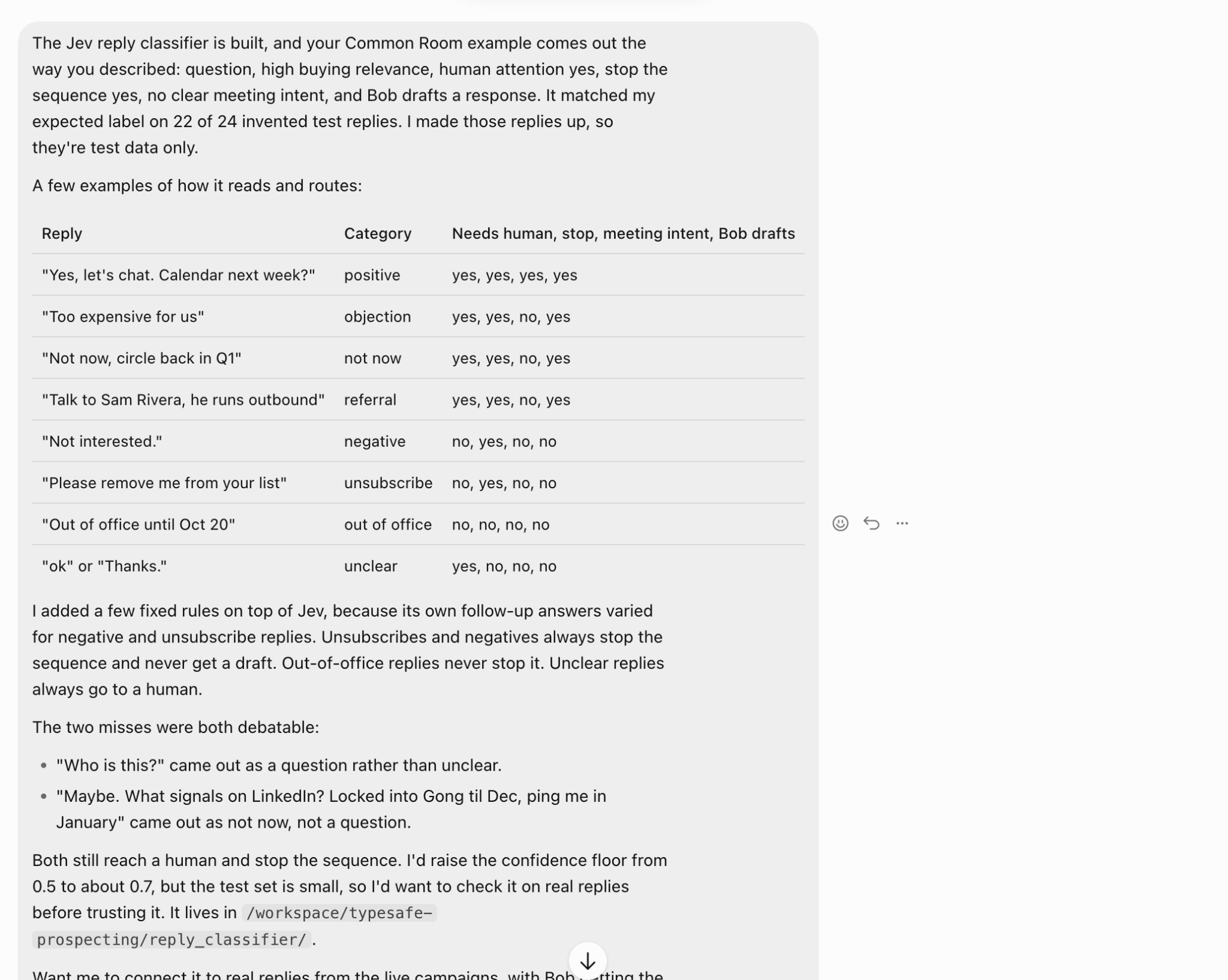
Jev did not give consistent next steps for negative replies and unsubscribes, so fixed rules handle both. Each stops the sequence, and neither receives a drafted response.
Out-of-office replies never stop the sequence, while unclear replies always come to me.
The classifier also has a minimum confidence level. Anything below it becomes unclear. Mine is currently 0.5.
The agent suggested raising it to around 0.7, but only after testing it on real replies. So far, I have only used replies I wrote myself.
An agent that only works when I ask does not save much time. Mine offered to check all enrolled leads every Monday for new signals, run them through Jev, and send me a sourced shortlist of people to contact that week.
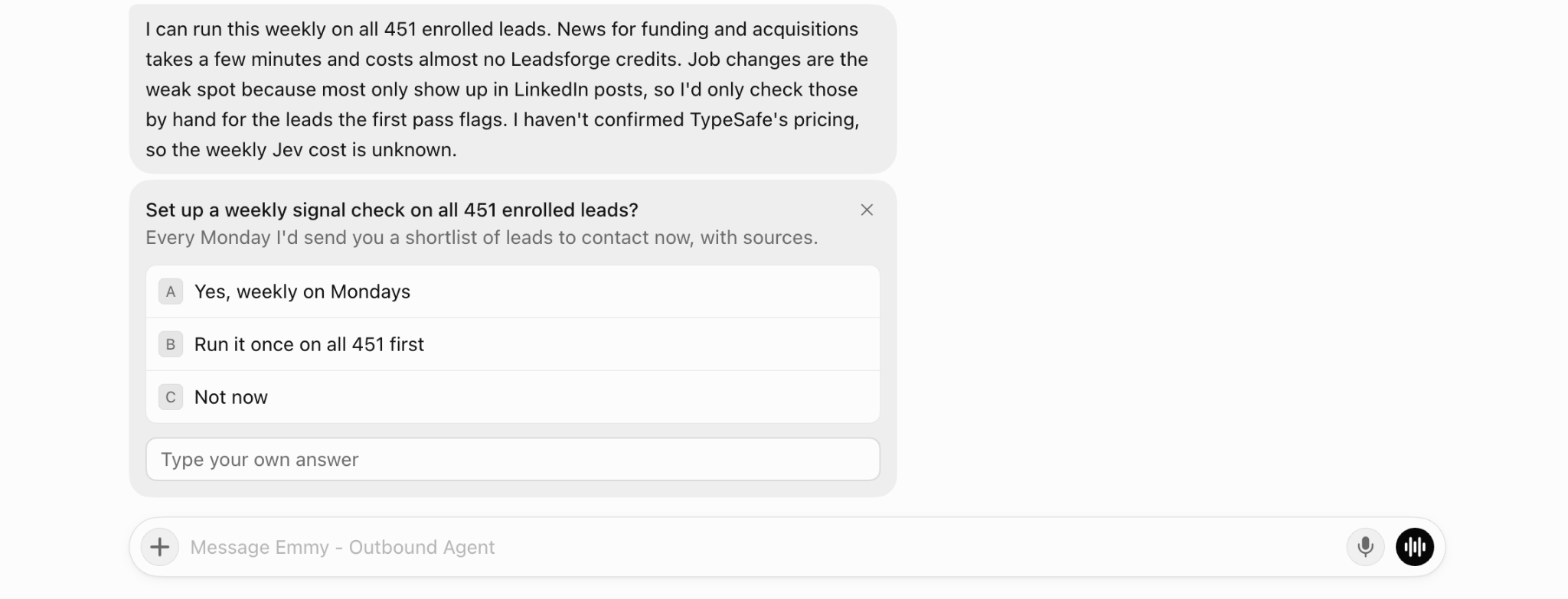
It gave me three options: run weekly on Mondays, run once across every lead, or wait. I would begin with one run. The agent could not tell me the weekly Jev cost, and a single run reveals the volume before you commit.
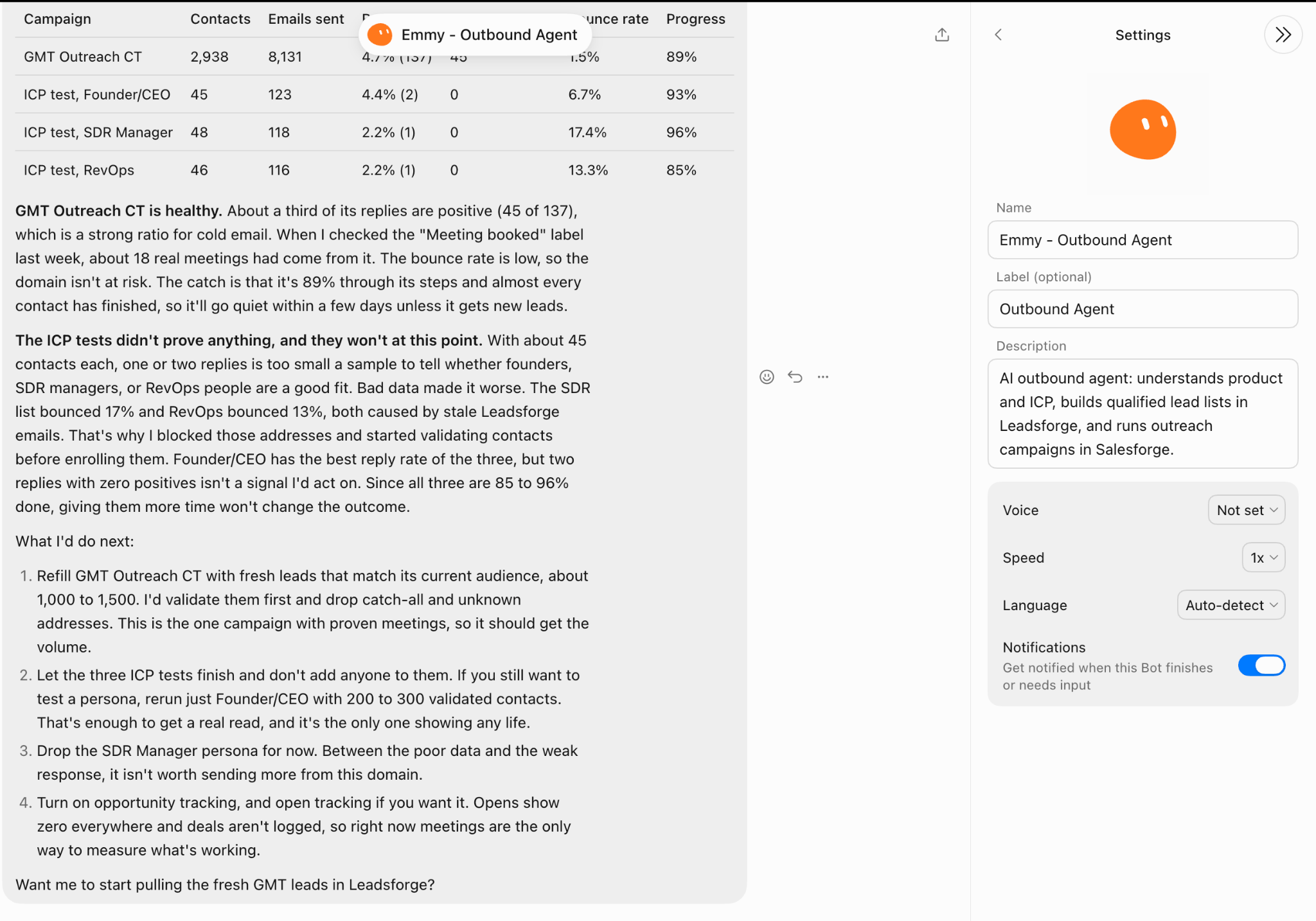
Turn on notifications in the agent’s Grok Bot settings. You will receive an alert when it finishes or needs your input, so you do not have to keep checking its progress.
I do not plan to give my agent full autonomy at once. Each part receives more freedom only after it performs reliably in testing.
For the next 30 days, record every Jev decision beside my decision for the same lead or reply. Group and show every disagreement by question. Do not automate any decision until I approve it.
It depends on how much you want the agent to handle without you.
If you review every lead and reply yourself, Jev’s fixed answers add little value because you already make each decision.
Jev becomes useful when your agent handles more than you can review manually, such as hundreds of leads, several signals per company, and clear ICP rules. At that point, the agent needs direct answers it can act on. A paragraph it must interpret does not help.
Do not use Jev for open-ended work such as writing emails, researching companies, or planning campaigns. Leave those tasks with the agent.
Three parts of my setup remain unproven:
I would compare all three with the extra qualified leads and meetings they generate before letting the agent work independently.
Enter your email to get a custom plan & stack recommendation for your business
Please check your mailbox in 5 minutes

You do not have to trust an email agent all at once. I assigned every decision an owner. The agent researches and writes. Jev answers narrow questions using evidence. Fixed rules cover replies that cannot be mishandled. I still control launches and unclear decisions.
Every step stays with me until it performs reliably in testing. Once it does, the agent earns a little more freedom.
![How to Use Jev for Cold Email Agents [Step-by-Step Guide]](https://cdn.prod.website-files.com/6436c3ac9f9fd0594d00b9fc/6acbd25fa19716f481a8dc43_Duplicate-me-open-graph%20(67).jpg)

![How to Use Jev for LinkedIn Outreach [Step-by-Step Guide]](https://cdn.prod.website-files.com/6436c3ac9f9fd0594d00b9fc/6acbc875da442e046e263670_Duplicate-me-open-graph%20(66).jpg)

![How to Use Jev for Cold Email Outreach [Step-by-Step Guide]](https://cdn.prod.website-files.com/6436c3ac9f9fd0594d00b9fc/6acbc7c2c1eea5af07ff181b_Duplicate-me-open-graph%20(65).jpg)