I’ve been using a Grok Bot called BoB as my lead generation agent.
BoB already has access to Leadsforge to find prospects and Salesforge to launch email campaigns. I manage the whole workflow from the Grok Bot Desktop App. I can tell BoB who I want to target, ask it to find leads, build a campaign, or check what happened with the outreach.
But there was one part I didn’t want Grok making on its own:
Which leads are actually worth contacting?
Finding 1,000 people who technically match your filters is easy. But deciding which 100 have a strong enough fit or a relevant enough signal to deserve outreach is a different problem.
That’s where I started using Jev from TypeSafe AI.
Jev isn’t another model I use to research prospects or write cold emails. I use it as a decision layer inside BoB.
For example, BoB can send Jev a prospect and ask:
Jev is built around this kind of bounded decision. You send it a state and one or more typed questions, and it can return a choice, an ordered score, or a calibrated yes/no probability rather than writing a paragraph that my agent then has to interpret.
So my setup now looks roughly like this:
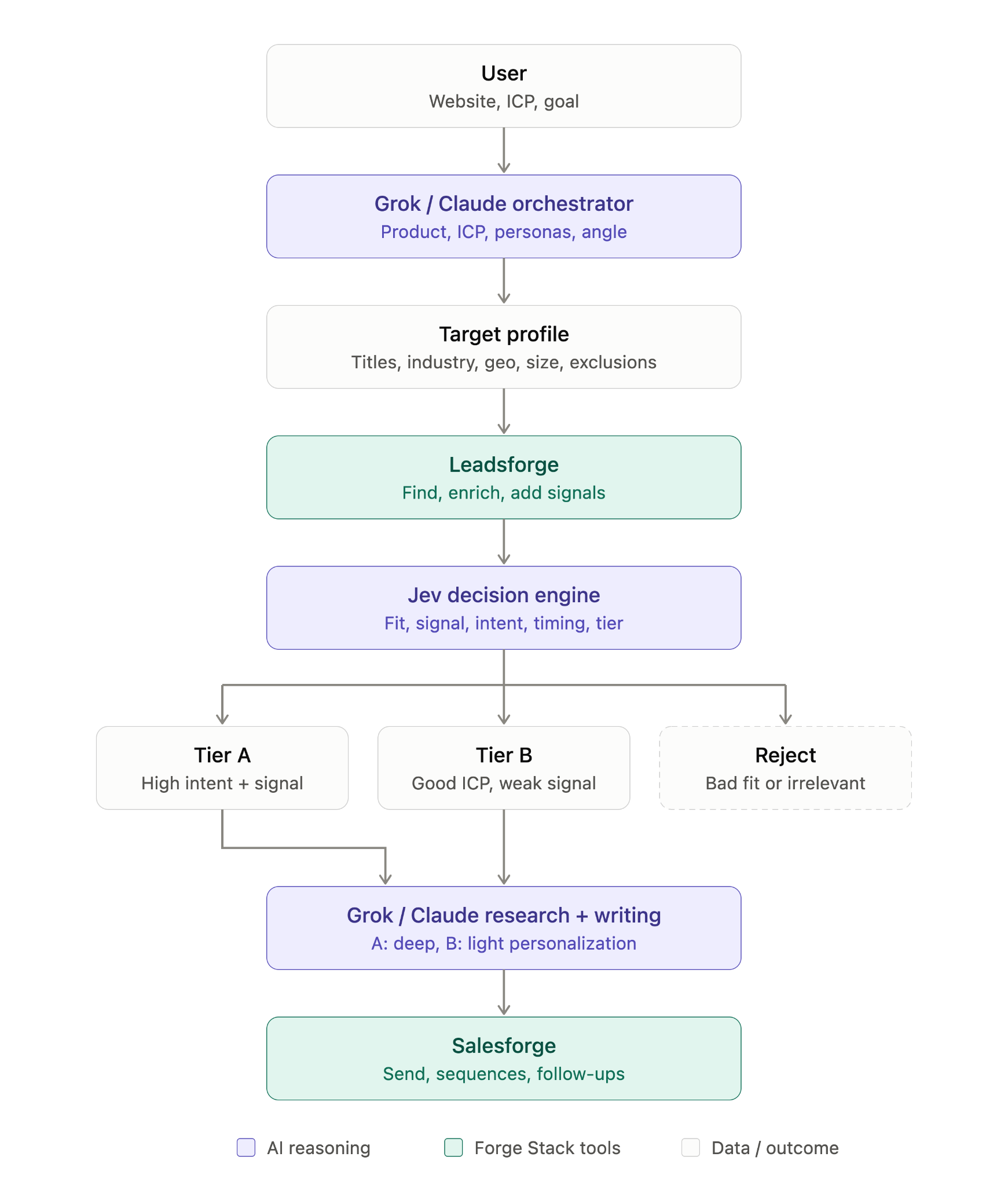
Replies can come back through the same workflow, where Jev can classify what happened, and BoB can decide what to do next.
In this guide, I’ll show you how I’m setting this up inside BoB, step by step, and where Jev actually makes sense in a sales prospecting workflow.
The first thing I did was give BoB the official TypeSafe skill.
Since I’m managing the whole prospecting workflow from the Grok Bot Desktop App, I wanted BoB to understand how TypeSafe and Jev are supposed to be used before I started wiring Jev into the lead flow.
I gave BoB the TypeSafe skill instructions and asked it to install the official skill.
You can install it with:
npx skills add typesafe-ai/skills --skill typesafe-aiIn my case, BoB read the official SKILL.md directly and saved it as a Grok Bot skill instead of running the npx installer.
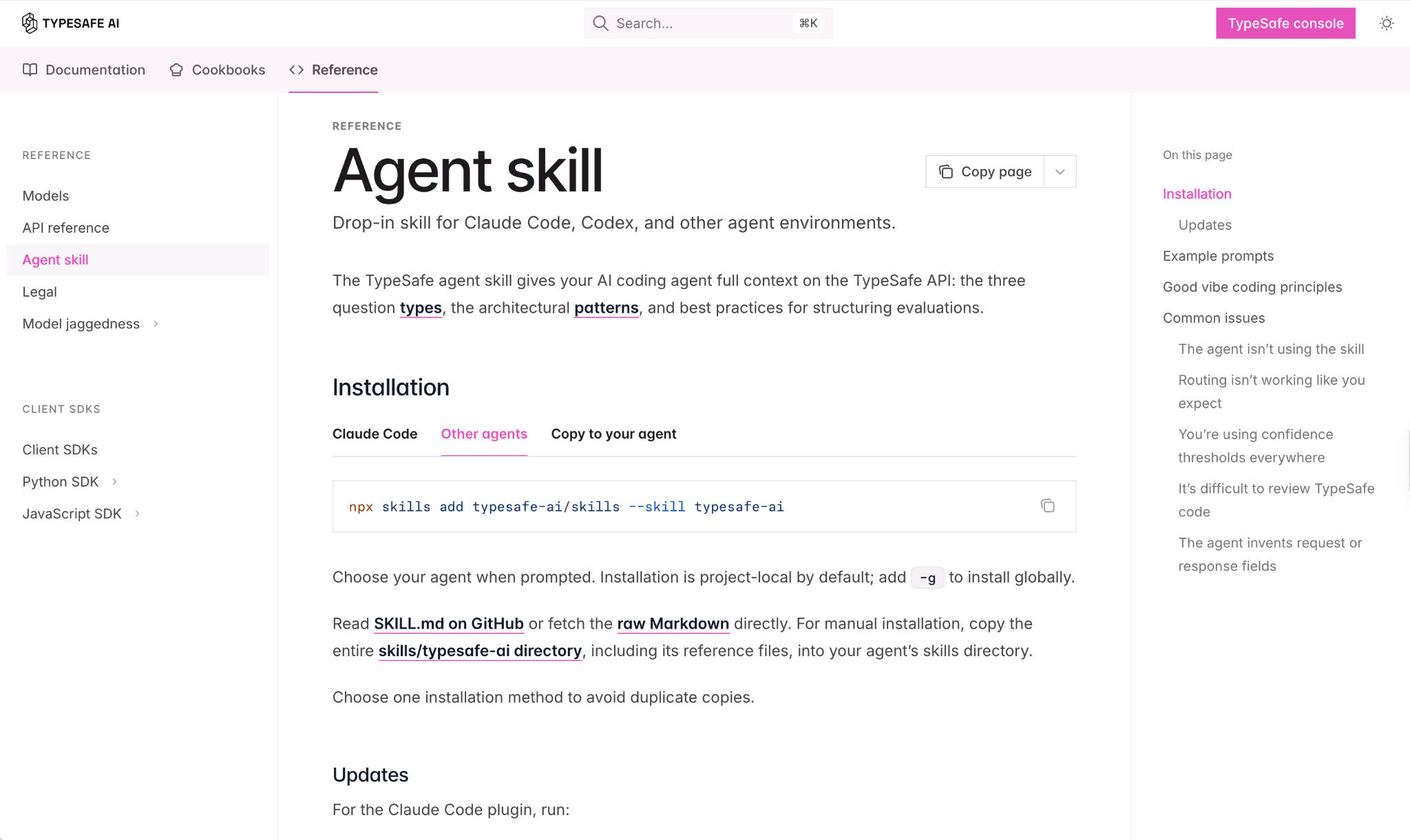
That works for my setup because the goal is simply to make the TypeSafe instructions available to BoB whenever it works with Jev.
Once installed, BoB confirmed that the skill was available across my assistants.
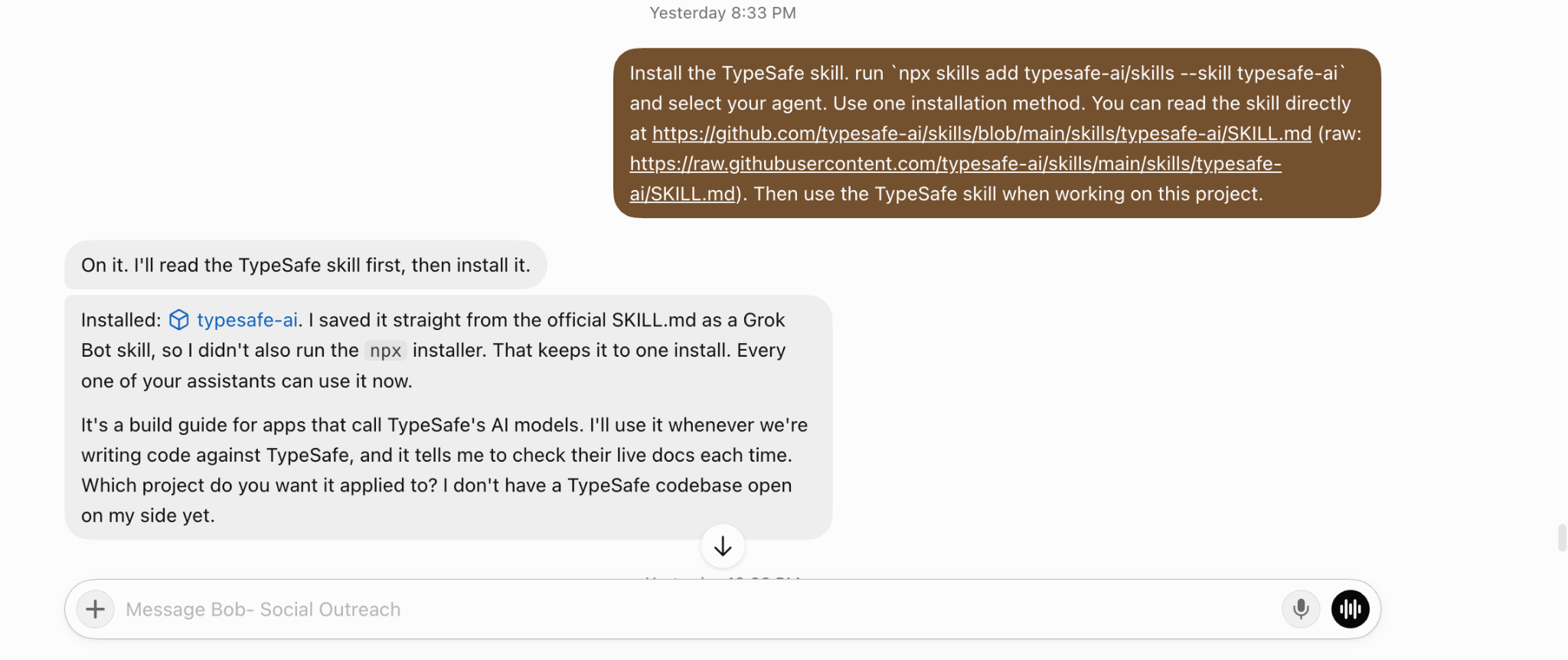
This matters more than it might seem.
I don't want to manually tell Grok how Jev works every time I build a new part of the prospecting workflow. The skill gives BoB the TypeSafe-specific instructions it needs when we start writing code, defining Jev questions, or changing the decision logic.
At this point, I haven't connected Jev to any leads yet. I've only given BoB the knowledge it needs to work with TypeSafe correctly.
The next step is where it starts getting useful: defining exactly what I want Jev to decide about every prospect.
After installing the TypeSafe skill, you need to add your TypeSafe API key.
You can create API from TypeSafe console. Once I added the key, Grok saved it securely.

From there, I didn't want to jump straight into a full campaign. I asked BoB to test Jev on 20 real US leads first.
I set a simple goal: see whether Jev could make useful prospecting decisions before I trusted it with hundreds of leads. For each prospect, BoB planned to run 7 checks.
Some were scores:
Some were classifications:
And some were probability-based decisions:
I also kept an "unclear" route for low-confidence decisions instead of forcing Jev to pick an answer. Then BoB ran Jev across all 20 leads. That first test immediately showed me something useful.
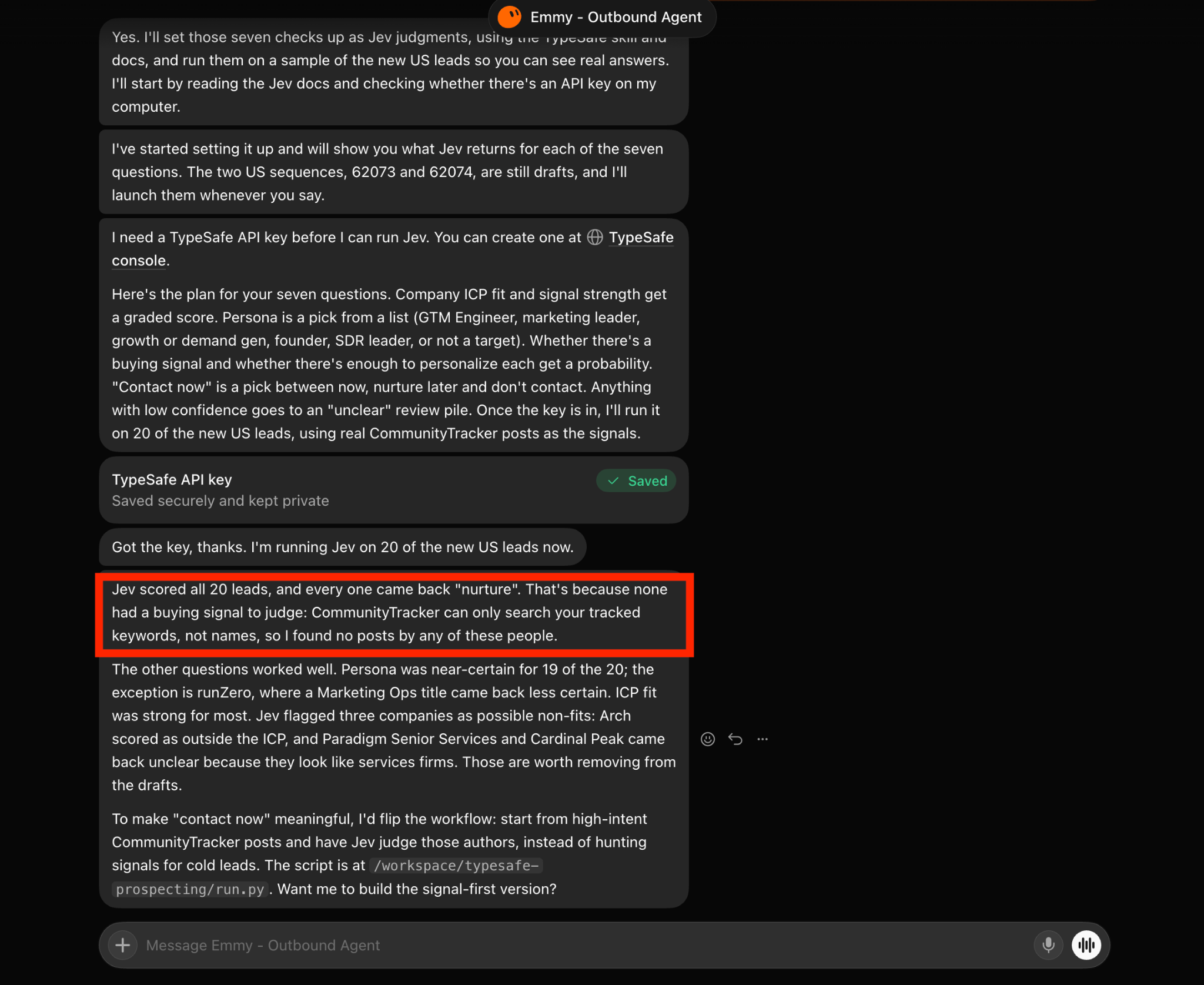
Every lead came back as "nurture." Not because the leads were bad. The problem was that there was no actual buying signal attached to them.
I was starting with a list of cold prospects and then asking Jev whether they were ready to contact based on intent. Jev had company and persona information, but nothing meaningful to judge buying intent from.
Jev did a good job on the things where it actually had evidence.
For example, persona matching was very confident for 19 out of the 20 leads. The one less-certain result was a Marketing Ops title, where the buyer fit wasn't as obvious. ICP qualification also worked well.
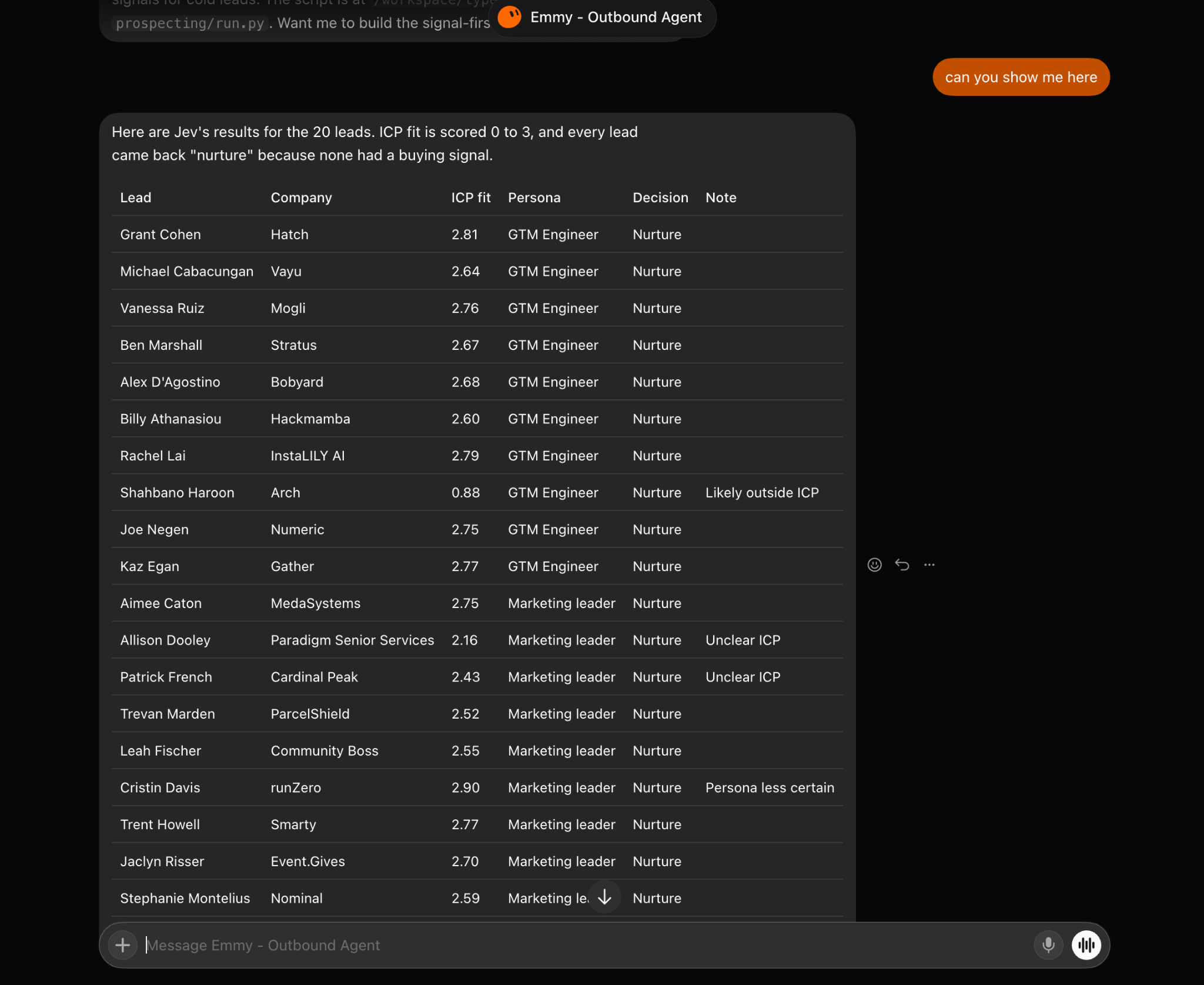
Jev flagged a few companies that deserved a second look:
Those are exactly the kinds of leads I don't want my Grok agent blindly pushing into Salesforge just because they happened to match a few database filters. The failed part was the intent scoring. And that actually helped me improve the architecture.
My first Jev test had a clear problem: the leads had firmographic and persona data, but almost no context around why I should contact them now.
So I asked my grok agent to check the same 20 leads for the signals available to me through Leadsforge:
I limited the search to activity from the last 6 months, attached the relevant signal to each lead, and ran the Jev checks again. This time, the results changed.
Out of the 20 leads:
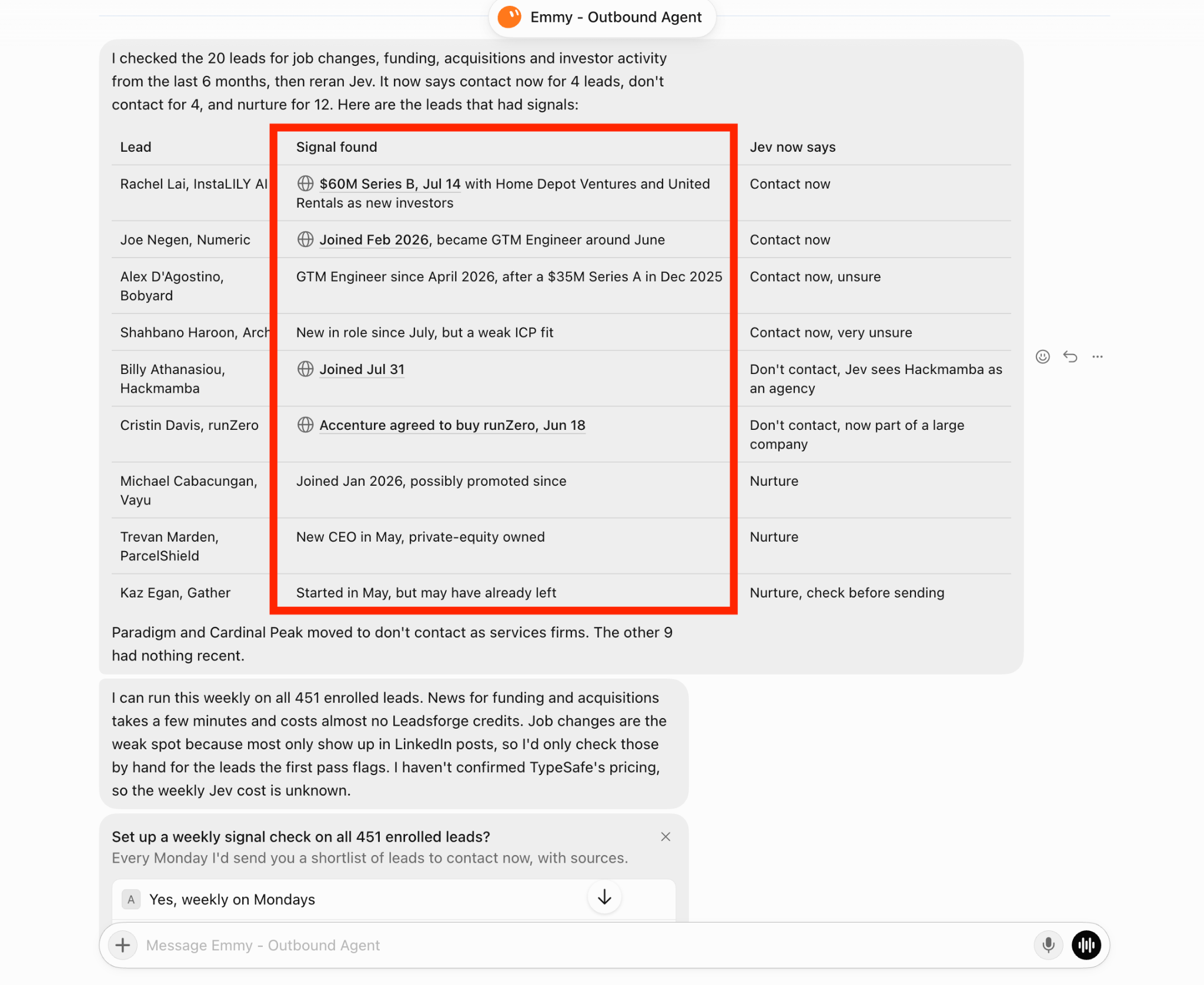
As you can see in screenshot, one prospect's company had raised a $60M Series B with new investors. Jev moved that lead to contact now.
Another prospect had recently joined the company and moved into a GTM Engineer role. That also gave my Grok agent enough context to recommend contacting them.
It also worked in the opposite direction.
One lead had recently joined a company, but Jev identified the company as an agency and recommended not contacting them.
Another company had recently been acquired by Accenture. Rather than treating the acquisition itself as a positive signal, Jev recommended don't contact because the company was now part of a much larger organization.
The signal itself doesn't decide whether someone should receive an email.
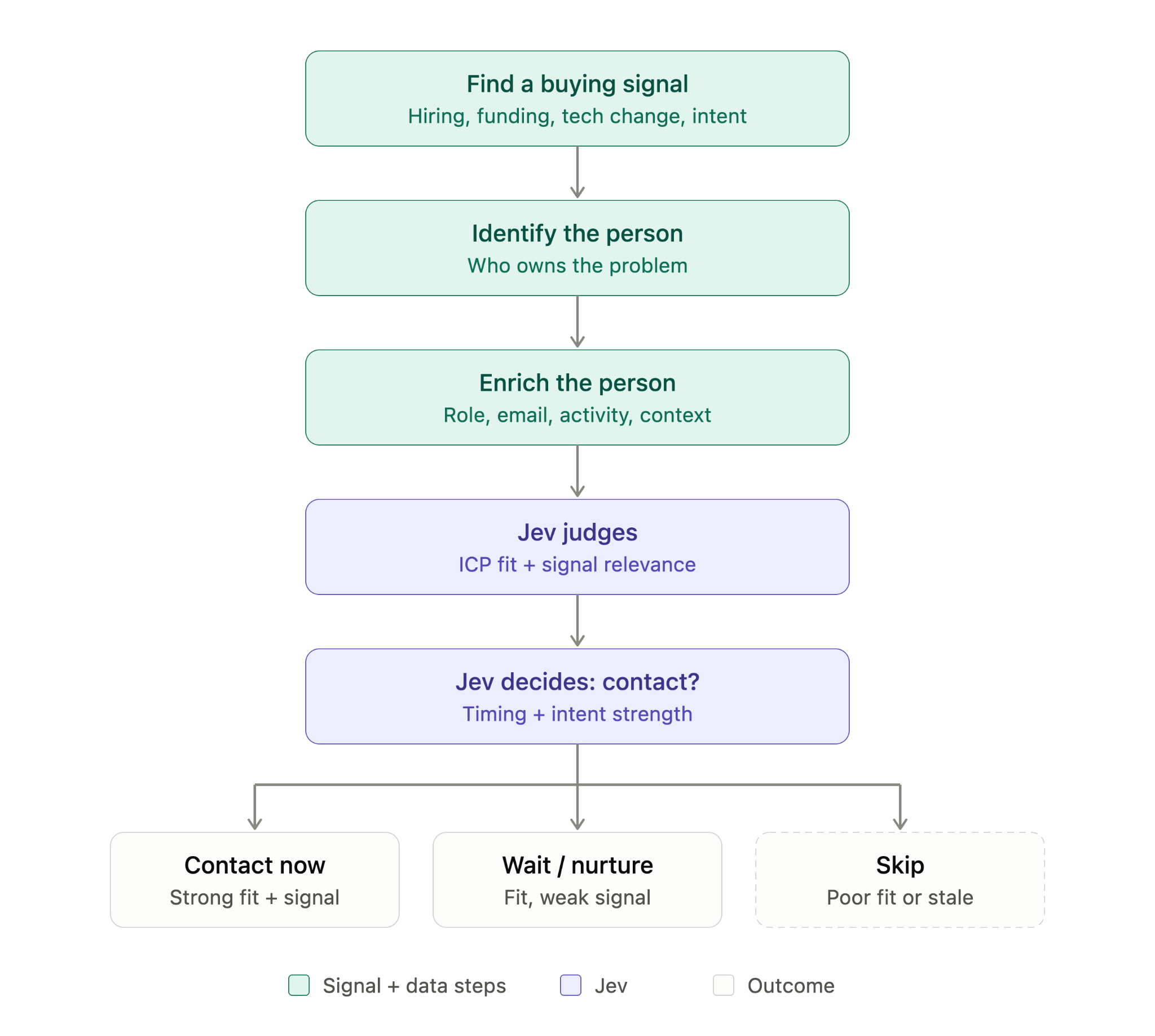
Leadsforge gives my Grok bot the signal. Jev judges whether that signal actually matters for this prospect and my ICP.
My workflow now looked like this:
I also had a few borderline results where Jev returned contact now but with low confidence. I wouldn't send those automatically.
I'd rather keep uncertain leads in a review queue than turn a weak signal into forced outreach.
Now I had something I could actually act on: 4 leads Jev believed were worth contacting immediately.
My Grok agent also suggested turning this into a weekly signal check across all 451 enrolled leads.
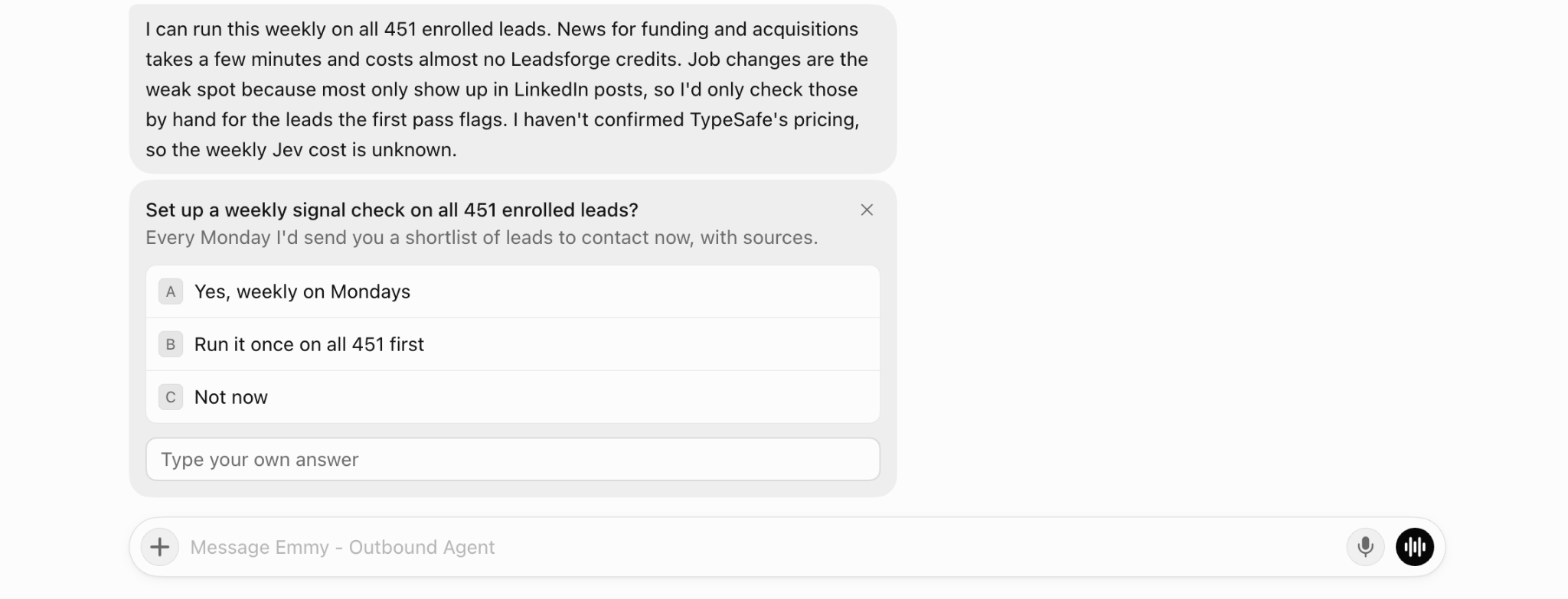
The idea is simple: every Monday, my Grok agent would re-check the lead pool for new funding, acquisition, investor, or job-change signals, run the updated records through Jev, and give me a shortlist of leads worth contacting now.
That turns Jev from a one-time scoring layer into an ongoing prioritization system.
The next step was figuring out how BoB should research and personalize those leads before sending them to Salesforge.
Once Jev shortlisted the leads worth contacting, I asked BoB to research them before writing any email.
For each lead, I wanted three things:
I also asked BoB to keep every “what changed” point tied to a real source. I didn’t want it inventing a reason to personalize just because a lead had passed Jev’s checks.
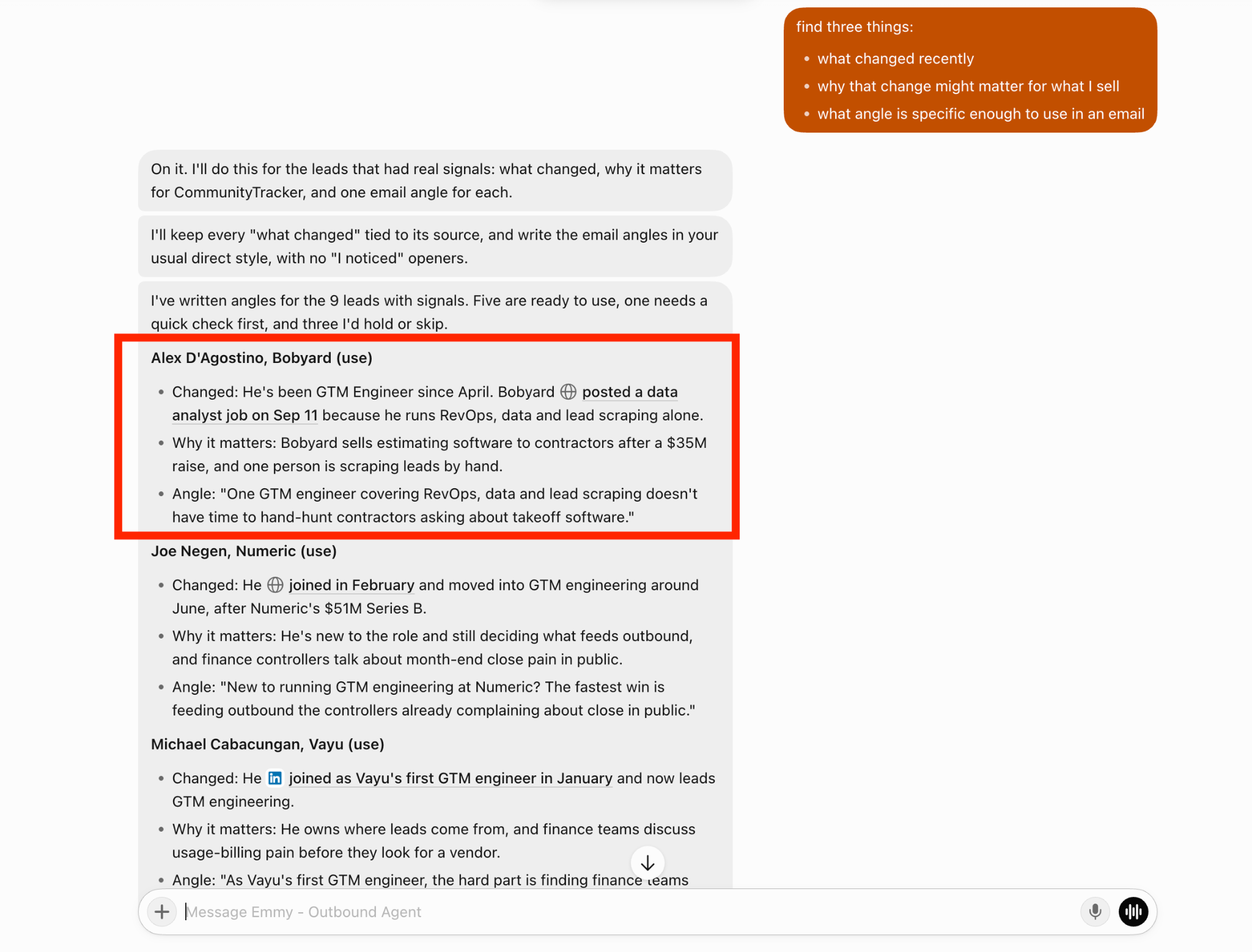
BoB found usable angles for the leads that had real signals.
For example, for Alex D’Agostino at Bobyard, BoB found that he had been a GTM Engineer since April and that Bobyard was hiring a data analyst to support RevOps, data, and lead scraping.
That gave BoB something much more specific than a generic funding or job-change opener.
Its angle was based on the fact that one GTM engineer appeared to be covering RevOps, data, and lead scraping at a company that had recently raised money.
For Joe Negen at Numeric, the context was different. He had recently moved into GTM engineering after Numeric’s Series B, so BoB focused the angle on someone new to the role deciding how outbound gets fed.
That is the level of research I wanted. Not a full account report.
Just enough context to answer: Why this person, why now, and what should I actually say?
In this test, BoB found five angles ready to use, one that needed a quick check, and three leads I’d rather hold or skip.
That gave me a much cleaner handoff into the next step: turning those angles into actual emails and pushing the qualified leads into Salesforge.
Once BoB had the research and outreach angles, I asked it to turn them into a campaign inside Salesforge.
For this test, it created a draft with 5 leads enrolled and nothing sent yet, which gave me a chance to review the sequence before launching it.
The campaign was multichannel:
The structure stayed the same for everyone, but the parts that mattered changed per lead.
BoB personalized:
For example, Alex D’Agostino’s opener was based on the fact that he was covering GTM engineering, RevOps, data, and lead scraping at Bobyard.
Joe Negen’s opener was completely different because his context was different: he had recently moved into GTM engineering at Numeric.
That is the setup I wanted.
I’m not asking Grok to rewrite the entire sequence from scratch for every lead.
I’m keeping the campaign structure consistent and only changing the parts that are actually tied to the research.
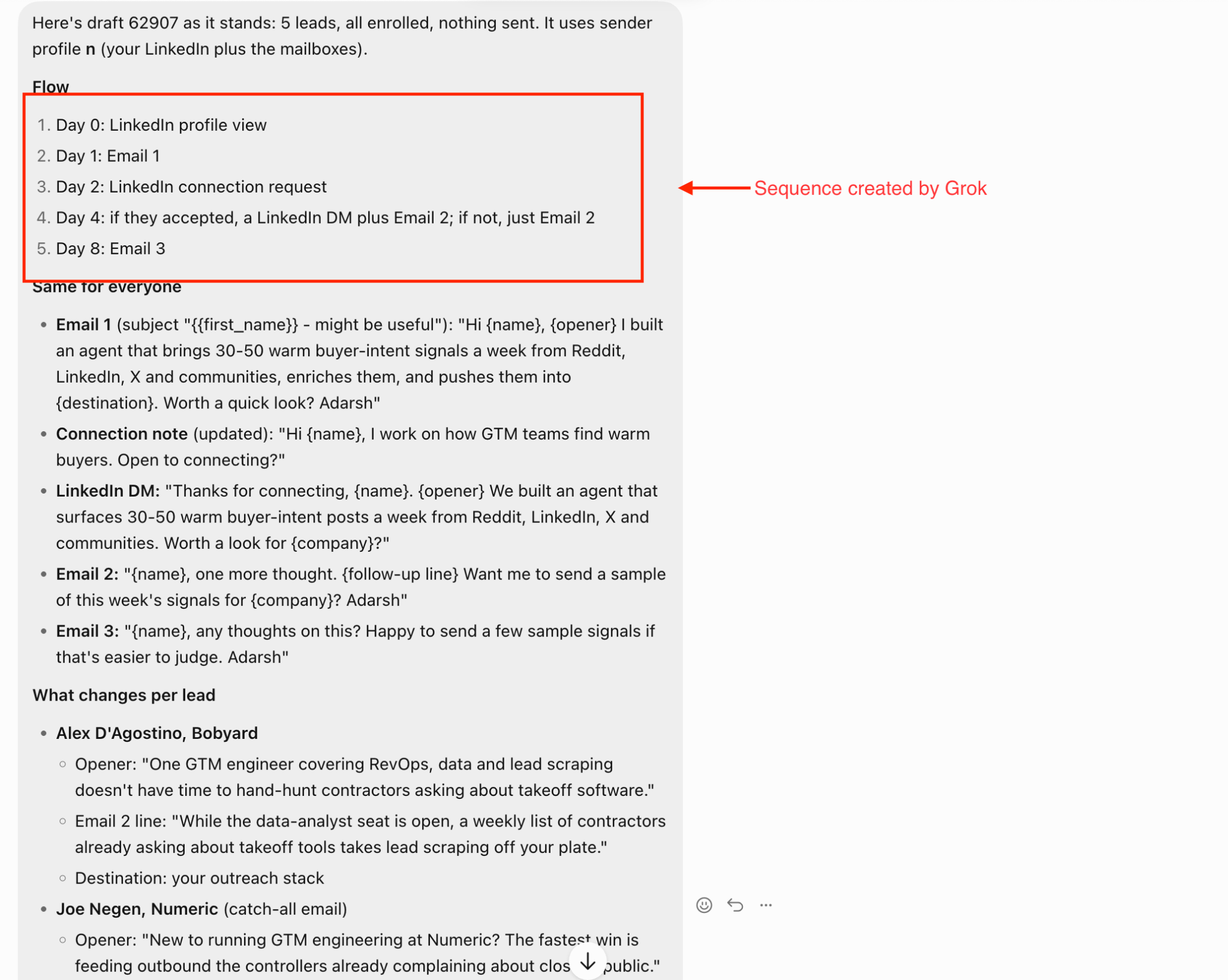
This also makes the campaign easier to review before I send anything.
I can check the sequence once, then look at the lead-specific opener and follow-up lines separately.
Once those looked good, the next thing I wanted Jev to help with was what happens after replies start coming back.
Once the campaign is running, the next place I use Jev is reply handling.
I built a reply classifier inside BoB and tested it on 24 sample replies before connecting it to live campaign responses.
The classifier looks at each reply and decides things like:
The main categories I used were:
For example: “Yes, let’s chat. Calendar next week?”
came back as positive, with clear meeting intent, human attention required, and the sequence stopped.
“Too expensive for us” was classified as an objection, so the sequence stopped and BoB could prepare a response.
“Not now, circle back in Q1” was routed as not now.
And: “Please remove me from your list” was classified as unsubscribe, with no response draft and the sequence stopped immediately.
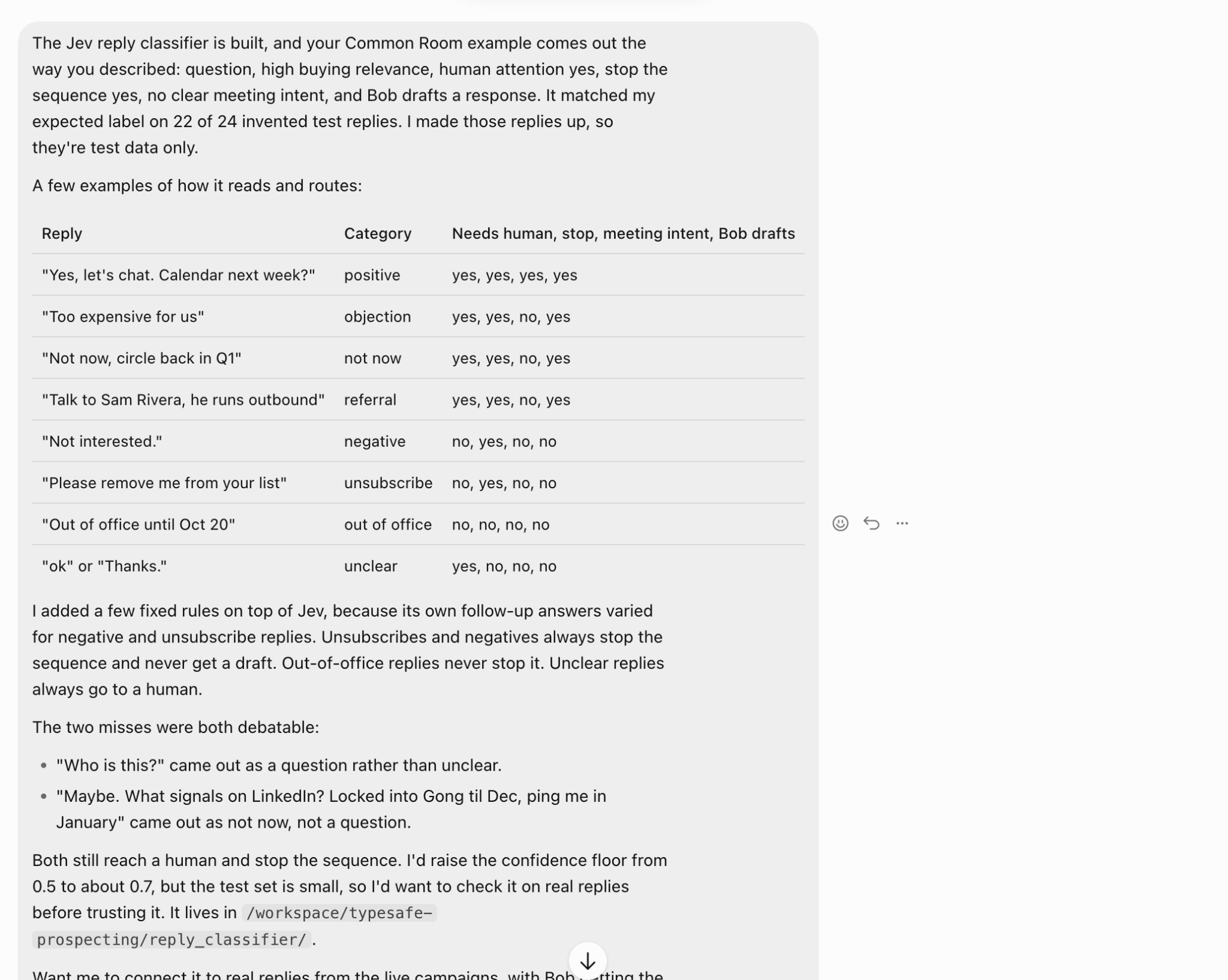
On this small test set, Jev matched my expected label on 22 of 24 replies.
The two misses were fairly borderline.
One reply, “Who is this?” was classified as a question instead of unclear.
Another reply combined a product question with “ping me in January” and was classified as not now instead of a question.
The routing still ended up being safe in both cases because they went to human review and stopped the sequence. I also added a few fixed rules on top of Jev instead of letting the model decide everything.
For example:
That gave me a cleaner setup than relying on one model decision for every action.
The next thing I’d test this on is real Salesforge replies before trusting it to automate anything fully.
Once my agent can qualify leads, research them, build the campaign, and classify replies, the last step is to use the campaign data to improve what happens next.
I can pull the sent messages and outcomes from Salesforge, then have Jev label each message by things like:
For example:
Then I can compare those labels against actual outcomes:
That tells me more than just which campaign performed best. I can see which types of signals and messaging angles are actually working.
The point is to feed those findings back into BoB. So instead of keeping the same rules forever, I can adjust things like:
That gives me a loop where the system gets better based on real campaign results, not just on what I think should work. I’d still review the conclusions manually at first, especially with a small sample size.
But once enough replies come in, this is the part that should make the whole setup more useful over time.
After Step 7, I wouldn’t add another process section. The seven steps are done. The next section should step back and give the reader your actual takeaway from building it.
I’d use:
The biggest thing I learned is that Jev works best when you give it a narrow decision with enough evidence. It was much less useful when I asked it to judge intent from a plain lead record.
It became useful once my Grok Bot agent had real context: a job change, funding event, acquisition, role change, or another concrete signal. I also wouldn’t let Jev control every action on its own. Some decisions should stay deterministic.
For example:
For everything else, I like Jev as a second layer between the data and the action. This is something I was missing before.
I also learned not to trust a workflow just because the first few results look good. My first lead test exposed a problem with the signal data.
The reply classifier got 22 out of 24 sample replies right, but those were still invented examples.
Before I let my agent run this more autonomously, I’d want to test the same logic against a much larger set of real leads and real replies.
For now, that’s how I’m using Jev inside my Grok Agent: not as another sales agent, but as the decision layer that keeps the agent from treating every lead, signal, and reply the same.
The setup works, but I wouldn’t scale it to thousands of leads yet. There are a few gaps I’d fix first.
Funding and acquisition events are easier to verify. Job changes are messier because a lot of them show up first on LinkedIn, and not every source catches them reliably.
For now, I’d treat job-change signals as something BoB should verify before using them in outreach.
The 22/24 result looked good, but those were sample replies I created for testing. Real replies will be messier.
People combine objections, questions, referrals, timing, and sarcasm in the same message. I’d want at least a few hundred real replies before automating reply routing aggressively.
If the signal is wrong, stale, or poorly sourced, Jev can still make the wrong decision.
So I’d keep the source attached to every signal and make my Grok agent reject anything it can’t verify.
A weekly check on 451 leads is manageable.
But if I start running multiple judgments across thousands of prospects every week, the cost needs to be measured against the number of additional qualified leads and meetings it creates.
That’s the point where I’d decide which Jev checks are worth keeping and which ones can be replaced with simple rules.
For now, I’d keep the system fairly conservative: verify the signal, require enough confidence, and automate only the decisions that have already been held up in testing.
For me, yes but only if you already have a workflow where decisions are being made at scale. Jev makes sense when you have:
I wouldn’t add Jev just to score a small list of prospects. That adds unnecessary complexity.
Where it starts to make sense is when your AI Agent is handling hundreds of leads and I need a repeatable way to decide which ones deserve research, outreach, or follow-up.
I’d also use it only for decisions that can be clearly defined.
Good examples:
Bad examples:
Those jobs still belong to Grok/Claude or any other AI agent.
So if you already have lead sourcing and sending in place, Jev can be a useful layer between the two. If you don’t, I’d build the basic outbound workflow first and add Jev once you have enough volume for the decision layer to matter.
I built this setup because I wanted my agent to do more than find leads and send emails. I wanted it to make better decisions before anything reached Salesforge.
The useful thing was being able to turn messy lead data, signals, and replies into a smaller set of clear actions that an AI agent can work with.
I’m still testing the thresholds and reply logic, so I wouldn’t call the system finished yet. But even with the small sample, it has already made the workflow more selective and easier to control.
If I scale this further, the next test will be simple: does adding Jev actually improve positive reply rates and meetings booked compared with my normal outbound campaigns?
That’s the metric I care about.
.jpg)

![How to Build a Grok Bot for Sales Outbound [Step-by-Step Guide]](https://cdn.prod.website-files.com/6436c3ac9f9fd0594d00b9fc/6ac9208bfdd0ee5ed557ffbe_Duplicate-me-open-graph%20(60).jpg)

.jpg)

