
Personalized Outbound Strategy
Get The Right Outbound Strategy In Minutes
Enter your email to get a custom plan & stack recommendation for your business
It's being carefully crafted by AI
Please check your mailbox in 5 minutes
A prospect asks for sales tool recommendations on LinkedIn. Another announces they're hiring five SDRs. A third posts about struggling with manual prospect research.
All three give you a reason to reach out. But if you're only filtering prospects by job title, industry, and company size, you'll miss these signals.
That's the gap with traditional LinkedIn outreach. You know who fits your ICP, but you don't know what's happening at their company or what problems they're discussing.
Signal-based LinkedIn outreach uses these activities to decide who to contact, when to reach out, and what to say.
In this guide, I'll show you which signals to track, how to find them, and how to turn them into LinkedIn messages that start conversations.
Signal-based LinkedIn outreach is a way of reaching out to prospects based on their recent LinkedIn activity or changes happening at their company. Instead of sending a message just because someone matches your ideal customer profile (ICP), you look for signs that they might have a problem your product can solve.
For example, a VP of Sales might comment on a post about poor email deliverability, ask for cold outreach tool recommendations, or announce plans to hire more SDRs.
Each activity gives you a different reason to contact them. These signals generally fall into two categories:
The important part is understanding what the signal actually tells you. Someone asking for alternatives to their current sales tool may be actively looking for a replacement. Someone liking a post about sales automation may simply find the topic interesting.
Signal-based outreach uses these details to decide who to contact, when to reach out, and how to start the conversation.
The signals you track should tell you what a prospect is discussing, researching, or changing at their company. Here are 10 signals you can use for LinkedIn outreach.
A Head of Sales asking for CRM alternatives deserves different attention than one who just liked a CRM-related post. To decide whom to contact first, look at what the prospect said, how recent the activity is, and whether it relates to your product.
These priorities can change depending on what you're selling. For example, a company hiring 20 SDRs could be a high-priority prospect for a sales training provider, even if it hasn't asked for recommendations.
But for a CRM vendor, a prospect publicly asking for CRM alternatives may be a stronger signal. Before adding someone to your LinkedIn outreach campaign, check three things.
You can start signal-based LinkedIn outreach without buying a signal-tracking tool or setting up complicated workflows. The first thing you need is a clear idea of who you want to contact and which activities might suggest they need your product.
Here's how to get started.
Before tracking signals, decide which companies and people you want to reach. For example, if you sell B2B prospecting software, your target customers might be SaaS companies hiring salespeople or agencies building lead lists for clients.
You can narrow your search using:
These are example filters. Adjust them to match your product. Once you've defined your ICP, you can focus on signals coming from companies and people who could actually use what you're selling.
You don't need to monitor every LinkedIn post or company announcement. Start with two or three signals that relate to your product.
For example, if you're selling prospecting software, you could track:
A request for prospecting software gives you a more direct reason to reach out than a general hiring announcement. So, choose signals based on what they tell you about a possible need, not simply how often they appear.
Once you've chosen your signals, start looking for prospects showing them. You can find many of these activities directly on LinkedIn.
For company-level signals, you can also use Leadsforge. It lets you search a database of 500M+ B2B contacts and find prospects using selected signals such as hiring, funding, and job changes.
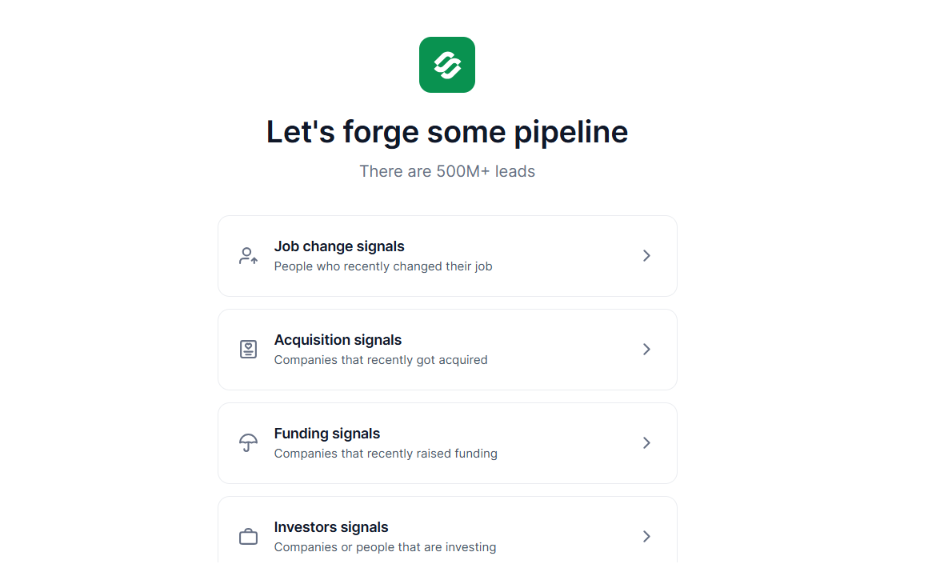
For example, you could look for SaaS companies that recently raised funding, identify their sales leaders, and then check their LinkedIn activity before reaching out. Leadsforge helps with finding prospects and company signals. You still need to review the context behind each signal.
Suppose you find a SaaS company hiring five SDRs and want to contact its Head of Sales.
Before adding that person to your LinkedIn campaign, check a few details.
If you can't find a connection between the hiring announcement and your product, don't force one.
Once you've checked the signal, use it to decide what to say. Suppose a Head of Sales posts:
"We're struggling to find accurate emails for outbound. Any tools you'd recommend?"
You could send:
Example LinkedIn message
"Hey [Name], saw your post about finding accurate emails for outbound. Are you having trouble finding the right contacts or verifying the emails you already have?"
This gives the prospect something specific to respond to.
You don't need to explain your entire product in the first message. For signals like funding or hiring, be more careful. A company raising money doesn't mean it needs your software.
Research its plans first, then decide whether you have a reason to start a conversation.
Once you've written your message, send it while the signal is still relevant.
If you're not connected with the prospect, start with a short connection request. After they accept, you can continue the conversation.
For example, if a company recently announced plans to hire SDRs, you could ask:
"Hey [Name], saw you're growing the SDR team at [Company]. Are the new hires going to handle prospect research themselves, or do you already have a process for building their lead lists?"
If they don't reply, your next message should add something relevant rather than repeat the same question.
You can use Salesforge to create LinkedIn outreach sequences and schedule follow-ups.
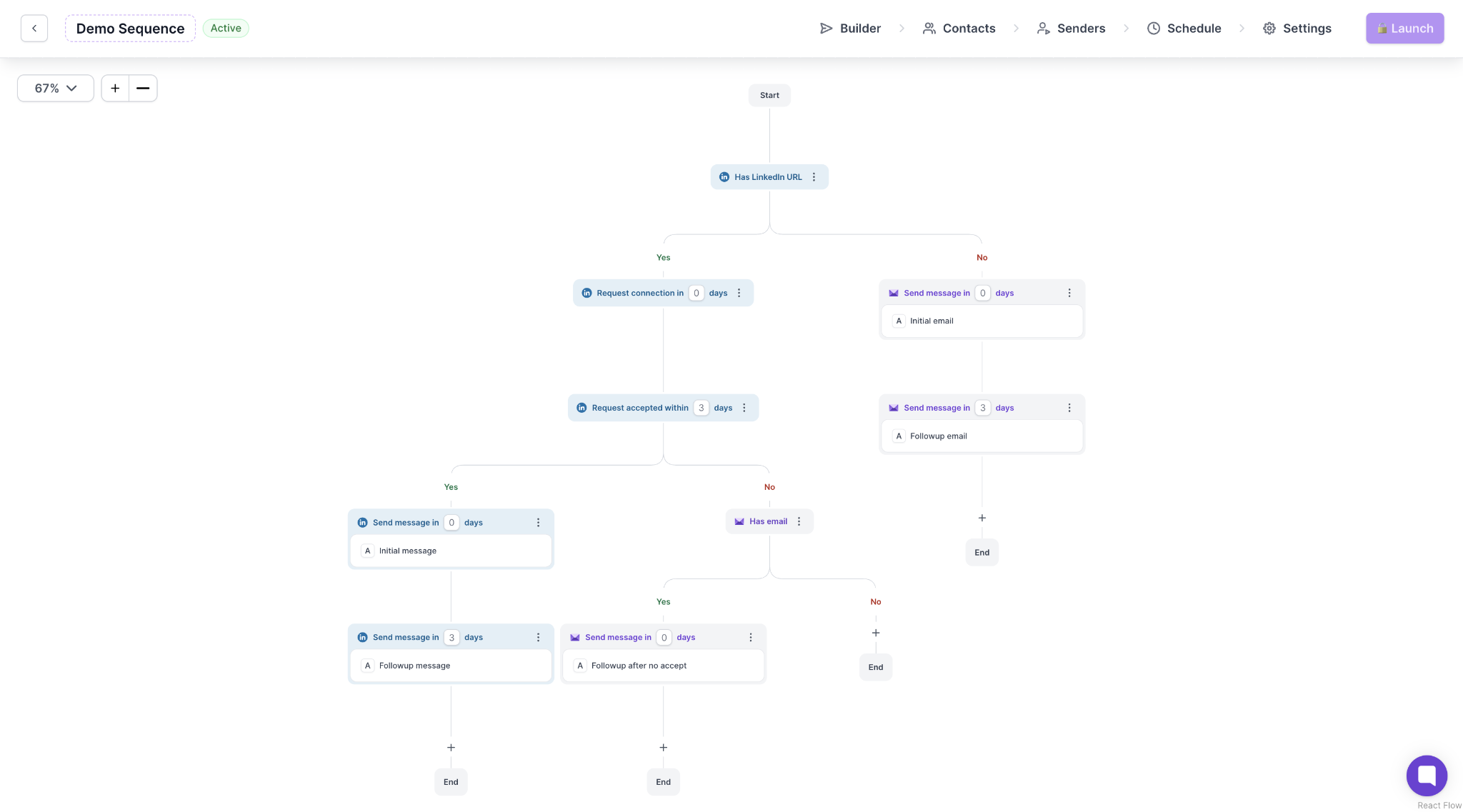
It also brings email and LinkedIn replies into Primebox, where you can review prospect conversations.
Salesforge handles the outreach, while the signals you researched help you decide who to contact and what to say.
Once your LinkedIn campaign starts getting responses, compare the results for each signal type. For example, you might contact prospects who recently changed jobs, companies hiring SDRs, and sales leaders who posted about poor lead quality.
Track the following details.
If pain-point posts bring more positive replies than hiring announcements, you may want to focus more of your outreach on those discussions.
Compare results across enough prospects before changing your approach. A few replies from a small campaign aren't enough to prove one signal works better than another.
Your LinkedIn message should reflect what the prospect actually posted or what changed at their company. A request for software recommendations gives you a different opening than a hiring announcement.
Here are five examples for different signals.
Signal: A Head of Sales posts on LinkedIn asking for alternatives to their current lead generation software because the contact data is inaccurate.
LinkedIn message
"Hey [Name], saw your post about looking for a new lead generation tool. Are you mainly struggling with finding the right prospects or getting accurate contact details?"
This works as an opening because the prospect has already mentioned a problem and asked for recommendations. Your message helps you understand what they're looking for before suggesting a product.
Signal: A B2B SaaS company announces that it's hiring five SDRs to expand outbound sales.
LinkedIn message
"Hey [Name], noticed [Company] is adding five SDRs. Are you planning to have them build their own prospect lists, or will they be working from lists your team already prepares?"
The hiring announcement gives you a reason to ask about prospecting. It doesn't assume the company needs new software.
Signal: A VP of Sales joins a new company and posts about building its outbound sales process.
LinkedIn message
"Hey [Name], congrats on the new role at [Company]. Saw your post about building the outbound process. Are you starting with the existing prospecting setup or planning to make changes?"
Here, the reason for reaching out isn't just the job change. It's the prospect's stated plan to work on outbound sales.
Signal: A sales leader posts about SDRs spending too much time researching prospects and finding contact details.
LinkedIn message
"Hey [Name], read your post about SDRs spending hours on prospect research. Is most of that time going into finding the right companies or finding contact details for the people you want to reach?"
The message picks up on the specific problem rather than immediately pitching a prospecting tool.
Signal: A prospect comments on a competitor's LinkedIn post asking whether its contact database covers smaller European companies.
LinkedIn message
"Hey [Name], saw your question about finding contacts at smaller European companies. Is that a market you're prospecting into right now?"
The comment gives you a specific topic to discuss. It doesn't mean the prospect is unhappy with their current provider or ready to switch.
These are sample messages, so the details should come from the prospect's actual post, comment, or company announcement. If you can't confirm the activity, don't mention it as something the prospect said.
A LinkedIn signal can give you a reason to contact someone, but how you interpret it matters. These are the mistakes that can lead to poorly timed or irrelevant messages.
Enter your email to get a custom plan & stack recommendation for your business
Please check your mailbox in 5 minutes

A prospect asking for lead generation tool recommendations is a stronger outreach opportunity than someone who simply likes a post about sales software. That's the difference signal-based LinkedIn outreach helps you identify.
But finding a signal is only part of the process. You still need to check whether the prospect fits your ICP, whether the activity is recent, and whether your product addresses the problem they're discussing.
For company-level signals such as hiring, funding, and job changes, Leadsforge can help you find relevant prospects and their contact details. You can then use Salesforge to send LinkedIn messages, set up follow-ups, and manage replies.
Start with the signals most closely related to your product, test your messages, and pay attention to which conversations turn into meetings. That will tell you which prospects deserve more of your attention.
.jpg)

![How to Use Jev for Cold Email Agents [Step-by-Step Guide]](https://cdn.prod.website-files.com/6436c3ac9f9fd0594d00b9fc/6acbd25fa19716f481a8dc43_Duplicate-me-open-graph%20(67).jpg)

![How to Use Jev for LinkedIn Outreach [Step-by-Step Guide]](https://cdn.prod.website-files.com/6436c3ac9f9fd0594d00b9fc/6acbc875da442e046e263670_Duplicate-me-open-graph%20(66).jpg)