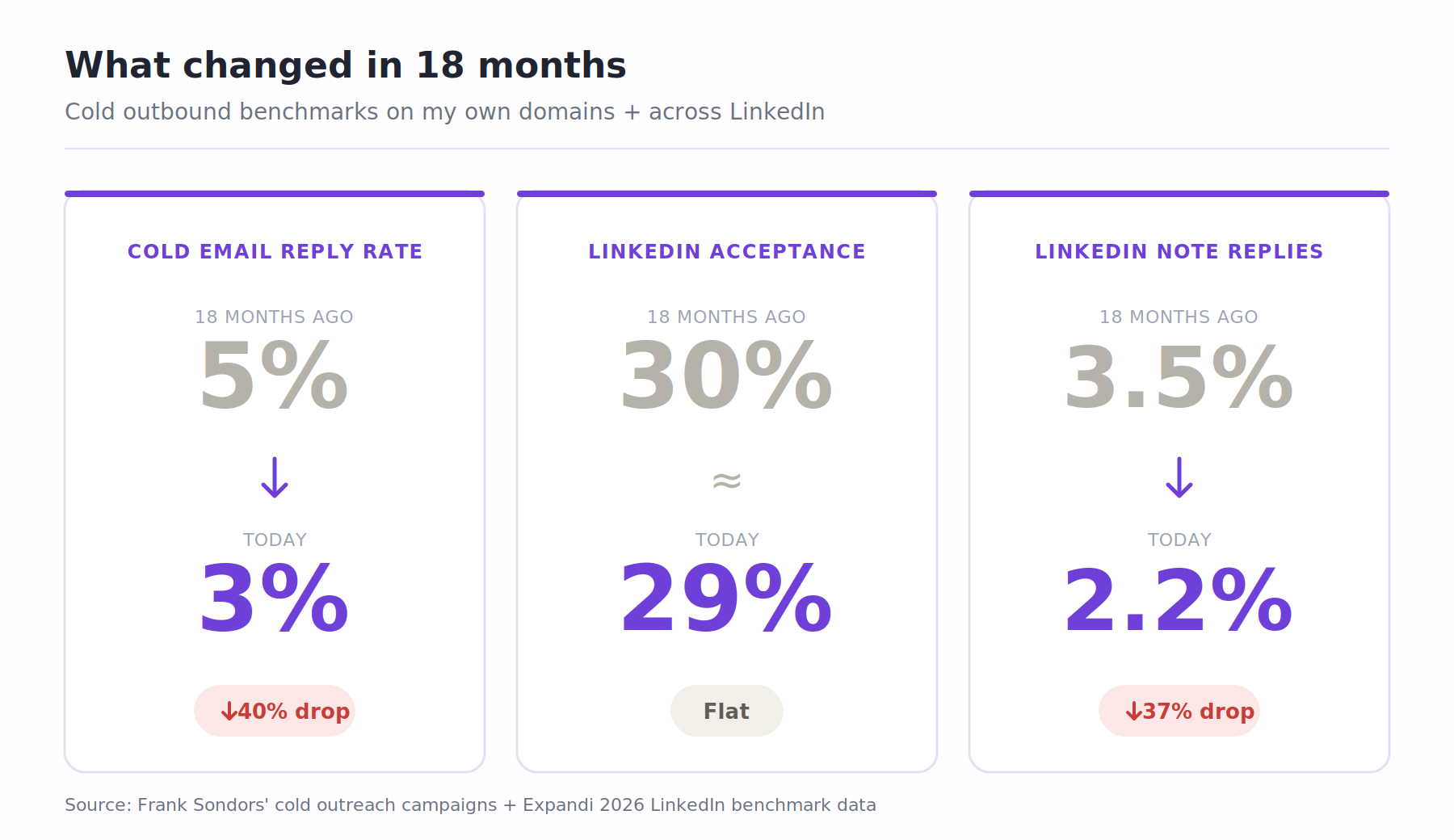
Cold email reply rates on my own domains fell from around 5% to 3% over the last 18 months.
LinkedIn connection acceptance held roughly flat at 28 to 30% across the platform, but the reply rate to connection notes dropped from 3.5% to 2.2% in the same window.
Every channel I sent through got harder in 2026, and I stopped treating multichannel outreach as an upgrade.
What I run today is two or more channels toward the same prospect inside one sequence, where what happens on one channel decides what happens on the next.
This guide covers how I actually run multichannel sales outreach campaigns today.
What Is Multichannel Outreach?
Multichannel sales outreach is the practice of running two or more coordinated channels toward the same prospect inside one sequence.
What happens on one channel changes what happens on the other.
Email plus LinkedIn is the most common pairing, with phone, SMS, and WhatsApp added depending on who you're selling to.
Real multichannel needs three things:
The sequence branches based on what the prospect does: Connection accepted → send LinkedIn message. Ignored after 7 days → withdraw and send email. The if/then logic runs in the tool, not in a rep's head.
One unified inbox across all channels: Every reply from every channel lands in one place, and a reply on any channel pauses the touches on every channel. No tab-jumping between LinkedIn, Gmail, and a dialer.
Both channels need to be warm before you send: Email mailboxes need 2 to 4 weeks in a warmup pool. LinkedIn accounts need profile activity (visits, likes, post engagement) before running outreach at volume. Cold on either side and the sequence gets flagged fast.
Miss any of these three and you're running parallel campaigns, not multichannel outreach.
Multichannel vs. Single-Channel Outreach
Single-channel outreach still has its place. When you're testing new copy on a new list segment, running one channel first isolates the reply-rate signal so you know whether the message works before layering the second channel.
Compliance-restricted industries (healthcare, financial services) also lean single-channel by design.
Outside those cases, running only one channel in 2026 leaves reply rates on the table.
Here's how the two compare at scale:
Dimension
Single-channel outreach
Multichannel sales outreach
Best for
Tight, warm-adjacent lists under 50 accounts
Cold outbound at 200+ accounts per month, where multiple channels make pipeline generation more resilient
Typical reply rate
3–5% on cold email in 2026
7–12% blended across email and LinkedIn
Deliverability risk
If the channel goes down, the campaign stops
If one channel underperforms, other channels continue generating engagement
$80–$150 (native platform) or $250–$500 (stitched stack)
Everyone points to the reply-rate lift when they pitch multichannel.
But it isn't what convinced me. What convinced me was watching a client's pipeline flatten for six weeks when their email domain got flagged and they had no LinkedIn track running underneath.
Six weeks of zero pipeline because of one bad month on one channel.
Benefits of Multichannel Outreach
Five benefits I've seen hold up in sales teams' numbers:
Higher reply rates that compound. When a prospect sees your name twice on LinkedIn, they open your cold email at a higher rate. 2026 benchmarks show multichannel sequences hitting 2 to 3x the reply rate of single-channel sends, with top-quartile teams clearing 15% blended. The pattern of messages across channels beats any single message every time.
Deliverability insurance. When an email provider flags a mailbox, the LinkedIn track keeps running while you rotate mailboxes. When LinkedIn throttles an account, the emails keep going. One channel breaks, the other carries the load.
More ways to spot interest. A prospect who views your LinkedIn profile after touch #2 tells you they're paying attention, even if they haven't replied. Add LinkedIn to the mix and you catch these signals your email tool can't see on its own.
Better personalization. What a prospect posts on LinkedIn can show up in your next email. What they say in an email reply can shape your next LinkedIn message. Every channel makes the next one smarter.
Recognition builds faster. When a prospect sees the same photo and name on both LinkedIn and email, they remember you sooner. That's the difference between "I don't know this person" on touch 3 and "I've heard of them" on touch 5.
How to Build a Multichannel Outreach Strategy
I've personally watched SDR teams try to "just add LinkedIn" to a broken email tool that I now insist on running the strategy work before the tool work.
Every one of the six things below is a decision I've had to make on my own campaigns, sometimes badly the first time.
Step 1 - Match the channel pair to the ICP
The channels I pick change by who I'm chasing, not by what my tool can run.
Most teams get this wrong. They buy a stack that runs five channels, then fire all five at every ICP because the feature is there. Extra channels lift replies only when the buyer already checks them.
Here's how I pair channels by ICP:
B2B SaaS (PMs, marketing, ops, growth): Email and LinkedIn. Both are where these buyers actually live during the workday.
B2B services and agencies: LinkedIn first, email second. Service buyers vet me on LinkedIn before they open the email.
Enterprise IT and security: Email and phone. LinkedIn works as a warm-up, not a primary channel. These buyers screen inbound, so a voicemail with a specific reason to call back beats a cold LinkedIn message.
Consumer-adjacent B2B (real estate, franchise, home services): SMS, email, and phone. LinkedIn barely registers here. SMS open rates sit near 98%, which earns it the slot even with the TCPA overhead.
International (LatAm, MENA, parts of APAC): WhatsApp and email. WhatsApp is the default business channel in those markets. Skipping it costs me more replies than I lose to noise.
Step 2 - Pick only two channels
Two channels run well beat five channels run badly. I've tried the five-channel push twice. Both times I ran out of hours before I ran out of leads, and the reply rate landed below what email plus LinkedIn gave me alone.
For US B2B SaaS I stick to email and LinkedIn. The 3.43% cold email reply rate and the ~10% LinkedIn reply rate stack into enough replies to build pipeline on. And I only write copy for two channels instead of five.
I add a third channel when the ICP demands it. Enterprise IT and security buyers pick up the phone more than they open cold email, so I run email, phone, and LinkedIn there. LatAm and MENA prospects use WhatsApp, so I add it for those geographies only.
I don't run Twitter/X for outbound anymore. DMs get lost in the algorithm, and prospects go defensive when messages sit in a public app.
Step 3 - Nail the cadence
The cadence rules I run on every sequence:
Rule
What I do
Why
Sequence length
12–14 days
Beyond day 14, reply rates tend to flatten. Under day 10, there usually isn't enough touchpoint coverage to generate consistent responses.
Number of messages
5–7 messages per sequence
More can feel excessive, while fewer often don't create enough visibility or recall.
Same-channel spacing
3–4 days between messages
Allows the previous message enough time to be noticed before the next follow-up arrives.
Cross-channel timing
Never email and message on LinkedIn on the same day
Same-day outreach across channels can feel intrusive and may create a negative first impression.
LinkedIn connection requests
Under 100 per week
Generally stays within LinkedIn's safer activity limits while maintaining healthy acceptance rates.
LinkedIn daily messages
20–30 per account
Higher volumes can increase the likelihood of LinkedIn warnings or account restrictions.
More volume doesn't buy more accepts. It buys warnings from LinkedIn.
Step 4 - Set up deliverability before Day 1
The setup work every rep skips is the setup work every rep pays for later. I don't launch a multichannel sequence until every channel has its deliverability layer in place. That work starts 2 to 4 weeks before Day 1.
Channel
What I set up
Why it matters
Email
Warmed mailboxes (minimum 2 weeks), sender rotation across 3+ mailboxes per user, ESP matching, and bounce protection
New mailboxes that begin cold outreach immediately are significantly more likely to encounter deliverability issues and spam filtering.
LinkedIn
Server-side automation with dedicated residential IPs instead of browser extensions
Browser-extension-based automation is generally more visible to platform detection systems and can increase account-risk exposure.
Phone
Local-presence phone numbers routed through a dialer using the prospect's area code
Prospects are often more likely to answer calls that appear local and familiar.
The teams I've seen skip this end up spending the first quarter of every year rebuilding domains and buying new LinkedIn accounts.
Step 5 - Unify reply management
Most reps check LinkedIn once a day, email five times a day, and phone voicemail once a week. Warm replies rot in whichever inbox nobody checked that hour, and by the time the rep sees it, the prospect has moved on.
The fix is a unified inbox where every reply from every channel lands in one place. See a reply within an hour, respond within four. If a prospect writes "sure, let's talk," they shouldn't wait 18 hours for someone to notice.
I use Primebox™ inside Salesforge for this. It pulls email and LinkedIn replies into one view and runs two modes:
Co-Pilot: AI drafts a reply, I approve or edit before sending. For high-value accounts.
Auto-Pilot: AI drafts and sends without my approval. For high-volume campaigns with predictable reply patterns.
One person can clear a full pipeline of cross-channel replies in under an hour a day. Two disconnected inboxes turns that into a full-time job.
Step 6 - Native execution vs manual task reminders
This is the test I run before recommending any multichannel tool: build a two-channel sequence with a LinkedIn step, click launch, watch what happens on Day 3.
Native execution: the platform sends the LinkedIn message itself. The connection request fires. The follow-up message fires. The withdraw fires if the connection sits ignored past day 10. The sequence runs while I sleep.
Manual task reminder: the platform generates a task for my rep to complete. Log into LinkedIn, find the prospect, copy the message, paste it, hit send, mark the task done. Every step manual.
Task completion rates I've watched sit around 20 to 40% on a good week and drop to zero on a bad one. The "multichannel sequence" becomes an email sequence with occasional LinkedIn touches, and the dashboard still shows it green.
Only native execution enables real conditional branching. A task-reminder tool can't branch on an action it didn't take.
I use this test to cut most of the multichannel category before I open a demo, and it's why I build on the tools I list at the end of this guide.
Multichannel Outreach Examples
Every guide I've read talks about cadence in theory and leaves the reader to figure out the day-by-day.
I've run enough sequences to know the theory is the easy part.
Below are two sequences I actually run, one for B2B SaaS and one for enterprise IT, with the day-by-day actions, the branching logic, and the copy patterns I use at each step.
Example 1: B2B SaaS, 14-day email + LinkedIn sequence
This is the sequence I run against founders, marketing leaders, ops leaders, and PMs at Series A to Series C SaaS companies.
Email plus LinkedIn, 6 touchpoints across 14 days, branching on connection acceptance and reply behavior.
Day
Channel
Action
If/Then Branch
1
LinkedIn
Send a connection request without a note
If accepted → continue to Day 3 LinkedIn. If still pending → continue to Day 3 email.
3
LinkedIn or Email
Send a LinkedIn message if connected, or Email #1 if the connection request is still pending
If a reply is received → pause the sequence. If no reply → continue.
5
Email
Send Email #1 if LinkedIn engagement happened on Day 3, or Email #2 if Email #1 was already sent on Day 3
If a reply is received → pause the sequence. If no reply → continue.
8
LinkedIn
Send LinkedIn Message #2 with a soft nudge referencing a post, event, or trigger
If a reply is received → pause the sequence. If no reply → continue.
11
Email
Send Email #2 or #3 using a different angle and avoiding a direct ask
If a reply is received → pause the sequence. If no reply → continue.
14
Email
Send a short break-up email that gives the prospect an easy opt-out
End of sequence.
A few things I do inside this sequence that most tools skip:
Blended reply rate on this sequence: 7 to 12% depending on list quality. Top-quartile campaigns clear 15%.
This is the sequence I run against IT directors, VPs of security, and CISOs at 500+ employee companies.
Email plus phone plus LinkedIn, 8 touchpoints across 21 days.
Phone calls are the primary live channel here, email and LinkedIn warm the prospect up for the call.
Day
Channel
Action
If/Then Branch
1
LinkedIn
Send a connection request without a note
If accepted → continue to Day 4 LinkedIn. If still pending → continue to Day 4 Email.
4
LinkedIn or Email
Send a LinkedIn message if connected, or Email #1 if the request is still pending
If a reply is received → pause the sequence. If no reply → continue.
7
Email
Send Email #1 if LinkedIn outreach happened on Day 4, or Email #2 if Email #1 was already sent on Day 4
If a reply is received → pause the sequence. If no reply → continue.
10
Phone
Place Call #1 using a local-presence number. Leave a voicemail if unanswered and reference the previous email.
Live conversation → move into discovery. Voicemail left → continue.
13
Email
Send Email #3 referencing the voicemail left on Day 10
If a reply is received → pause the sequence. If no reply → continue.
17
Phone
Place Call #2 using a local-presence number. Leave a voicemail with a different angle if unanswered.
Live conversation → move into discovery. Voicemail left → continue.
20
LinkedIn
Send a LinkedIn message referencing the previous calls, voicemails, and emails
If a reply is received → pause the sequence. If no reply → continue.
21
Email
Send a break-up email with a simple opt-out
End of sequence.
Blended reply rate on this sequence: 4 to 8%. Meeting-book rate runs higher than my SaaS sequence because phone conversations convert to meetings faster than email replies.
Multichannel Outreach Best Practices
Seven things I do on every multichannel campaigns I run, regardless of ICP or sequence length:
Warm mailboxes for 2 to 4 weeks before Day 1: A fresh mailbox that starts cold-emailing on Day 1 gets flagged inside a week. I warm every new mailbox with real inbox activity (Warmforge inside Salesforge does this for free on my account) before it sends a single outbound message.
Use dedicated infrastructure, not free mailboxes: A free Gmail sending to cold prospects gets throttled inside a week, and shared-IP resellers get blacklisted the moment one tenant on the same IP sends spam. I run real Google Workspace inboxes (Primeforge) for high-priority ICPs and dedicated prewarmed IPs (Infraforge) when I need volume. Great copy can't save a burned sender reputation.
Segment sequences by ICP: I've seen teams run one sequence for "all of North America" and another for "all of EMEA." The ICP matters more than the geography, and the target audience should determine which channels and messages get priority. A CISO in London and a CISO in Chicago respond to the same cadence and the same messaging. A CISO and a marketing lead in the same city don't.
A/B test one variable per sequence: I test subject line, or I test Day 1 channel choice, or I test the Day 3 personalized messages. Not all three at once. Testing three variables at once means I can't attribute the lift to any of them. Salesforge on the Growth plan runs the A/B test for me and holds the winning variant.
Match sender identity across channels: Same photo on LinkedIn as in the email signature. Same name spelling ("Frank" everywhere, not "Frank" on email and "Franciszek" on LinkedIn). Same role and same company. A prospect who spots a mismatch treats it as a scam signal, and I've had prospects reply "who are you actually" when the channels didn't match.
Pick tools by workflow, not by feature count: All-in-one platforms usually do one thing well and four things badly. I run lead data through Leadsforge, mailboxes through Primeforge or Infraforge, warm-up through Warmforge, and sequences through Salesforge. Each product was built for one job, and the handoffs happen inside the same account instead of through exported CSVs.
Track meeting-booked rate: Open rates are inflated by Apple Mail Privacy Protection and Gmail image proxying. Reply rate is a better signal but a "not interested" reply is still a reply. The number I care about is meetings booked per 100 prospects contacted. Everything else is a vanity metric.
Common Multichannel Outreach Mistakes
There are six total mistakes that generally kill multichannel sales outreach campaigns.
Same-day blast across channels: Day 1 at 9am the prospect gets a LinkedIn connection request. 9:30am, cold email. 10am, phone call from a rep who introduces himself as "just following up." The response is a spam complaint or an angry LinkedIn message, and I've had one prospect actually reply "are you people OK." Reasonable pacing across 3 days would have converted the same prospect.
Parallel channels with no cross-channel logic: A prospect replies to my email on Tuesday and gets a LinkedIn message from a teammate on Wednesday asking the same question the email already answered. The prospect stops replying and assumes we're bots. The fix isn't running two campaigns better, it's running one sequence where a reply on any channel pauses the touches on every channel.
No deliverability layer: Monday: 20 new mailboxes go live on a fresh domain. Tuesday: first cold emails sent, 100 per mailbox. Friday: domain flagged, mailboxes land in spam, the entire quarter's list is un-emailable. This is the single most preventable disaster I audit, and 2 to 4 weeks of warmup before Day 1 fixes it every time.
Wrong channel for ICP: Reply rate on the SaaS playbook (email + LinkedIn) drops from 8% to 3% when a team runs it on an enterprise IT list where phone is the primary channel. Nobody notices for six weeks because the sequence looks healthy in the dashboard. Enterprise IT wants phone plus email, and I fix this by moving the channel pair before I touch the tool.
Ignoring reply management: A warm reply lands in a LinkedIn inbox at 2pm Tuesday. The rep checks LinkedIn once a day at 9am. By Wednesday morning when they see it, the prospect has already scheduled a call with the competitor who replied inside the hour. A unified inbox with hourly checks is what I use to catch these before they rot.
Multichannel Outreach Tools
I use this list to route people, not to sell them.
Every multichannel sales outreach tools list I recommend below includes platforms that run native LinkedIn (no manual task reminders), conditional branching (the sequence actually reacts to what the prospect does), and a unified inbox for replies across channels.
That's the bar for any outreach tool suitable for outbound sales teams that need coordinated execution across multiple channels.
If a platform failed any of the three, I cut it before this section.
If you want the wider ranking of the six multichannel automation tools I audited (including the ones I cut and why), I've written that up separately in my full multichannel outreach tools breakdown.
The three below are the ones I actually recommend, in the order I recommend them:
HubSpot + Pipedrive (Ultimate only); API, Zapier, Make (Pro+)
MCP CLI
Forge MCP Server (Claude, Cursor, custom agents)
No native MCP
MCP support published
1 - Salesforge
Salesforge is the only multichannel platform on this list that runs 6 native LinkedIn actions on the same conditional sequencer as cold email. On top of that, it ships a unified Primebox™ inbox and free Warmforge warm-up.
That's the combination I've been trying to find in a single platform for two years.
I picked Salesforge because it's the only tool I've tested that runs the full playbook above natively.
No manual task queues on LinkedIn. No bolted-on warm-up subscription. No per-seat pricing on mailboxes. My reps and I run our sequences on the same platform without hitting seat caps or stepping on each other.
Here's what I actually use inside the platform, tied to the playbook I laid out earlier:
Multichannel conditional sequences. One sequence with email and LinkedIn steps that branch on prospect behavior. The if/then logic runs in the platform automatically, so the 14-day and 21-day sample sequences above actually run without a rep completing manual tasks.
6 native LinkedIn actions. Connection requests, messages, InMails, likes, follows, and withdraw requests execute from inside the sequence via shared proxy infrastructure with session-token-only authentication. Zero LinkedIn account bans in my own use.
AI personalization across 21+ languages. AI variables pull company news, LinkedIn activity, and industry context into every message. The {{localized_greeting}} variable handles greetings in the recipient's local language (1 personalization credit per send).
Primebox™ for unified replies. Email and LinkedIn replies land in one inbox with Co-Pilot mode (AI drafts, I approve) and Auto-Pilot mode (AI drafts and sends). Lets one person clear a full pipeline of cross-channel replies in under an hour a day.
LinkedIn Email Finder Chrome Extension. Free to install. Lookups pull from Leadsforge's 500M+ contact database and consume Leadsforge credits (1 per email, 10 per mobile). New accounts get 100 free credits on signup.
Integrations. Native to HubSpot, Pipedrive, LinkedIn Sales Navigator, plus API, Zapier, and webhooks. Every Forge Stack product (Warmforge, Leadsforge, Mailforge, Infraforge, Primeforge) runs under the same login, no CSV exports between them.
MCP CLI. Forge MCP Server connects Salesforge to Claude, Cursor, and other AI agents for scripted campaign operations from the command line.
Unlimited senders and mailboxes. No per-seat pricing on mailboxes. Growth adds unlimited users and LinkedIn senders. I've run 40+ mailboxes and 8 LinkedIn accounts on a single Growth plan without hitting a cap.
Free unlimited warm-up via Warmforge. Every mailbox gets warmed for free using the Warmforge premium pool of aged Google Workspace and Microsoft 365 mailboxes. Heat Score™ tracks reputation on each mailbox. Warmforge is a separate subscription for standalone use but included free inside every Salesforge plan.
Agent Frank is available as a separate add-on at $499/month (billed annually) if I want the full workflow run autonomously (prospecting from Leadsforge, sequencing, replying through Primebox™, meeting booking).
I use it selectively on campaigns where I want to test end-to-end automation, not as a default across every sequence.
Pros:
Only platform on the list where 6 LinkedIn actions run inside the same conditional sequencer as email, with real if/then branching
Free unlimited warm-up via Warmforge included in every plan
Unlimited mailboxes on Pro; unlimited mailboxes plus unlimited LinkedIn senders plus unlimited users on Growth
Flat-fee pricing that doesn't scale per seat, per mailbox, or per LinkedIn account
Primebox™ unifies every reply across email and LinkedIn with Co-Pilot and Auto-Pilot modes
Forge Stack ecosystem (Warmforge, Leadsforge, Mailforge, Infraforge, Primeforge) all under one login with separate subscriptions
MCP CLI for scripted campaign operations from Claude, Cursor, and other agents
Cons:
No free plan; 14-day free trial
Phone and SMS not native (add through Zapier or an external dialer if the ICP demands it)
Every paid plan includes unlimited Warmforge warm-up, mailbox rotation, dynamic IPs, email validation, and Primebox™. 14-day free trial, no credit card required.
If you're running email plus LinkedIn on a team of 2 or more and the seat math on the other two tools has already priced you out, this is the one I'd hand you.
Reply.io was one of the first platforms I tested for multichannel work, back when "multichannel outreach" mostly meant "email plus a manual LinkedIn task."
The Multichannel plan at $89 per user per month billed annually now bundles email, LinkedIn, calls, and SMS in one subscription (LinkedIn and calls are add-ons only on the cheaper Email Volume plan).
If I needed calls and SMS running inside the same sequence as email and LinkedIn on a small team, this is the platform I'd short-list first. It’s also a fit for outbound teams that need several outreach channels in one plan.
Where it stops working for me is the per-seat cost at scale. A 10-person team on Multichannel is $890 per month billed annually.
Add Jason AI SDR for autonomous outbound and it's $500 per month more. That's before data enrichment. The platform is capable, but I've priced myself out of it every time I've scaled past 4 or 5 seats.
Core features I use when I run Reply.io:
Multichannel sequence builder: Email, LinkedIn, calls, and SMS steps in the same conditional flow on the Multichannel plan. It supports multiple sales channels inside one conditional flow. Branching on prospect behavior is well built.
Jason AI SDR agent: A separate product starting at $500 per month that runs the full outbound workflow autonomously. Handles contact search, intent signals, AI personalization, and AI-generated responses. It can help with lead generation, but the extra cost changes the ROI at scale.
Real-time data: 1+ billion global B2B contacts available inside the platform. 50 live data credits included per month on Multichannel; more credits scale the price.
Email deliverability suite: Warmup, sender rotation, anti-spam scoring included on every plan.
Integrations: Native to HubSpot, Salesforce, Pipedrive, plus API and Zapier.
Pros:
Native email + LinkedIn + calls + SMS in one subscription on the Multichannel plan ($89/user/month billed annually)
Mature platform with a well-built sequence branching engine
Jason AI SDR available as a separate autonomous option
Real-time B2B data included, no separate provider needed for basic enrichment
Cons:
Per-user pricing scales fast at team size; a 10-person team runs $890/month billed annually before add-ons
Jason AI SDR is a separate $500/month subscription, not bundled
50 live data credits per month on Multichannel is barely enough for one day of prospecting; more credits cost extra
No first-party MCP server documented at time of writing
Pricing (annual):
Plan
Price
Includes
Email Volume
$49/user/month (billed annually)
1,000 active contacts
Email outreach
Email warm-up included
LinkedIn add-on: $69/account/month
Calls add-on: $29/account/month
Multichannel
$89/user/month (billed annually)
Email
LinkedIn
Calls
SMS
WhatsApp
Unlimited active contacts
Unified inbox
Jason AI SDR
From $500/month
Autonomous AI SDR
Separate subscription
14-day free trial available on all plans.
3 - LaGrowthMachine
La Growth Machine is a French multichannel platform that runs LinkedIn, email, calls, and X (Twitter) from one visual sequence builder.
I've used the visual builder more than any other in this category, and it works especially well for LinkedIn outreach and other coordinated touches across channels. Drag-and-drop branching logic is faster to build in LGM than in the tools I've tested against it.
Native LinkedIn voice messages are a differentiator I haven't seen in another multichannel tool, and I've watched them land well with senior European buyers.
Where it doesn't work for me is the pricing model. LGM bills per identity, which is per LinkedIn account being automated. Five SDRs running five LinkedIn accounts on the Pro plan pay €600 per month billed annually.
Enrichment credits cap at 400 leads per identity per month on Pro, and campaigns pause when you burn through them.
The tool is priced for teams with 1 to 3 identities running high-touch campaigns, not for scaled outbound programs.
Core features:
Visual multichannel sequence builder: Drag-and-drop workflow builder with LinkedIn, email, calls, and X (Ultimate only) as native channel steps. Supports multi channel outreach logic in a drag-and-drop format, with conditional branching on every action.
Native LinkedIn actions with voice messages: Cloud-based automation with connection requests, messages, InMails, likes, follows, profile visits, and AI-generated voice messages. The voice messages are the one feature I'd point to as unmatched in this list.
AI Copywriting: Assistant included on every plan for message generation.
Waterfall enrichment: 9 email providers plus 2 verification tools cascade to find verified emails per lead. Enrichment credits included per identity per month (250 on Basic, 400 on Pro, 1,000 on Ultimate).
Multichannel inbox: LinkedIn plus email replies unified into one view on Pro and Ultimate, which helps smaller teams maintain a consistent presence across channels.
CRM sync: HubSpot and Pipedrive integration on Ultimate only; API and Zapier on Pro and above.
Pros:
Visual sequence builder I've found faster to work in than any other multichannel tool I've tested
Native LinkedIn voice messages, which no other platform on this list offers
Cloud-based LinkedIn automation with strong safety architecture (I've seen zero restrictions on LGM in my own use)
MCP support published, uncommon for a mid-market outbound tool
EU-hosted and GDPR-native, which matters for EU teams
Cons:
Per-identity pricing scales expensively at team size (5 identities on Pro = €600/month billed annually)
Enrichment credits cap per identity per month and pause campaigns when exhausted
Twitter/X and CRM sync gated behind Ultimate
No included warm-up, users bring their own tool or infrastructure
Prices in EUR (currency conversion adds friction for US teams comparing budgets)
Pricing (annual):
Plan
Price
Includes
Basic
€60/identity/month (billed annually)
LinkedIn + Email
250 enriched leads/month
1 sending email per identity
Up to 3 identities
Pro
€120/identity/month (billed annually)
Everything in Basic
Calls
400 enriched leads/month
5 sending emails per identity
Multichannel inbox
Up to 6 active campaigns
Ultimate
€120/identity/month (billed annually)
Everything in Pro
X (Twitter) outreach
1,000 enriched leads/month
10 sending emails per identity
Unlimited campaigns
HubSpot and Pipedrive CRM sync
14-day free trial, no credit card required.
Final Verdict
The multichannel category split into two categories in 2026, and that matters for anyone choosing a multichannel outreach platform for outbound sales because the first decision is which shape the tool fits into.
The tools that fire the LinkedIn action themselves work.
The tools that hand my rep a task to complete manually don't.
Inside the "native execution" bucket, the routing gets simpler.
I run Reply.io if I need email plus LinkedIn plus calls plus SMS bundled in one plan and my team is 4 seats or fewer, because per-seat math works at that headcount; the right choice depends on whether I need several outreach channels natively or only email plus LinkedIn.
I run La Growth Machine if I'm on a 1-to-3-identity EU team and I want the visual builder and native LinkedIn voice messages.
I run Salesforge for everything else, and it's what I've built on for two years now, because consolidating execution in one platform avoids the complexity of separate tools, and unlimited mailboxes plus unlimited LinkedIn senders plus free Warmforge warm-up plus Primebox™ at a flat $80 per month billed annually is the math that scales with my team instead of against it.
If you want to try Salesforge on a live campaign before you commit to any of the three, start the 14-day free trial. No credit card required.
FAQs
1) What is multichannel sales outreach?
Multichannel sales outreach is running two or more coordinated channels, or a multi channel sequence, toward the same prospect inside one sequence, where what happens on one channel changes what happens on the next, with each touchpoint reinforcing the same core message. The most common pair is email plus LinkedIn. Phone, SMS, and WhatsApp come in as the third channel depending on the ICP. Real multichannel needs conditional branching (the sequence reacts to prospect behavior) and unified reply management (every reply lands in one inbox). Without both, it's parallel channel campaigns dressed up as multichannel, instead of coordinating different channels around the prospect.
2) How many channels should a multichannel sequence use?
For most B2B outbound I run 2 channels, not 5. Two channels executed well beat five channels executed badly. Email plus LinkedIn is the workable minimum for US B2B SaaS. I add a third channel when the ICP demands it: phone for enterprise IT and security, WhatsApp for LatAm and MENA, SMS for consumer-adjacent B2B. Beyond 3 channels I've found the copy and cadence workload starts eating the reply-rate gains, and trying to cover every possible channel creates too much work for minimal effort gains.
3) What are the best channels for B2B SaaS outreach?
Email plus LinkedIn for founders, PMs, marketing leads, ops leaders, and growth roles in SaaS. Both channels are where these buyers spend their workday. Email plus phone plus LinkedIn for enterprise IT, security, and CISOs where phone is the primary channel and email is the warm-up. I run Twitter/X for outbound almost never; the DMs get lost in the algorithm and the public nature makes prospects defensive.
4) Is LinkedIn automation safe in 2026?
It depends on how the platform executes actions. Cloud-based, proxied automation with session-token-only authentication and conservative daily limits (under 100 connection requests per week, 20 to 30 messages per day) stays under LinkedIn's detection thresholds and I've kept accounts running on that setup for years. Chrome-extension-based automation that injects scripts into a LinkedIn tab gets caught. I've had two LinkedIn accounts restricted from Chrome-extension tools. I've had zero restrictions on proxied automation.
5) What does a multichannel outreach stack cost at scale?
Depends on how you shape it. I've priced a stitched stack at roughly $465 per user per month (email tool at $37/month, LinkedIn tool at $79/month, dialer at $200/month, warm-up at $50/month, data provider at $99/month) before I've sent a single email. A consolidated stack on Salesforge Growth ($80/month billed annually) plus Leadsforge Essential ($49/month billed annually) runs $129 per user per month for the same functional coverage, with free Warmforge warm-up included. The gap at 5 users over 12 months is around $20,000 in my own math.
6) How is multichannel outreach different from omnichannel?
Multichannel means multiple channels running through one sequence with cross-channel logic, and inside outbound teams it’s usually the sales engagement term, while omnichannel is broader. Omnichannel usually gets used to describe an integrated experience across marketing, sales, and support channels (email, LinkedIn, phone, SMS, web chat, in-app messaging, ads retargeting, and linkedin ads) tied together through a customer data platform. For B2B outbound specifically, multichannel is the operational term. Omnichannel is a broader marketing-and-support concept that shows up more in enterprise CX conversations than in day-to-day SDR work.
7) How does Salesforge compare to Amplemarket for multichannel outreach?
In the comparison I reviewed, Amplemarket scored 219 out of 231 in multichannel capabilities. Both platforms run native multichannel with conditional sequences and a unified inbox, so the real difference is price and channel breadth: Amplemarket sits at roughly $300 per user per month billed annually (verify on their live pricing page) and covers 7 channels, which reflects stronger channel breadth with support beyond email and LinkedIn; Salesforge Growth is $80 per month billed annually with unlimited mailboxes, unlimited LinkedIn senders, and free Warmforge warm-up, and covers email plus LinkedIn natively. If channel breadth beyond email plus LinkedIn is a hard requirement for me, I short-list Amplemarket. If it isn't, the price math routes me to Salesforge every time, and I've written a fuller side-by-side of all six tools I ranked in my multichannel outreach tools breakdown; for some teams, that broader mix can also include whatsapp outreach.
Book more meetings on autopilot
Set up in minutes. No per-seat pricing. No commitment.
Compare 5 AI inbox managers for cold email and sales outreach. See how Salesforge, Smartlead, Instantly, Reply.io, and Saleshandy handle replies, AI features, and pricing.


.jpg)

.jpg)

