You have 50 replies sitting in your cold email inbox. How many are actually interested? Which ones need a response? And can AI handle those replies without you checking every conversation?
That's exactly what an AI inbox manager is supposed to help with. But there's a difference between an AI that simply tags a reply as “Interested” and one that can draft a relevant response, answer questions, or book a meeting.
And not every tool goes that far. Some AI inbox managers focus on identifying positive replies. Others can write responses, handle objections, and continue conversations based on your instructions.
So, which tools are actually worth using? In this article, I’ll compare five AI inbox managers for cold email and sales outreach. I’ll cover their AI features, pricing, limitations, and how much inbox work they can realistically take off your plate.
AI-generated replies using company and conversation context
Yes
Sentiment analysis
Email + LinkedIn
$48/mo; Primebox AI on $96 Growth
Smartlead Master Inbox
Context-aware AI reply drafts
No
Lead categories
Email
$39/mo
Instantly Unibox
Reply suggestions + AI Reply Agent
Yes
AI lead-status tagging
Email
$47/mo
Reply.io Jason AI
Handles replies, objections, and follow-ups
Yes
AI intent classification
Multichannel
$800/mo
Saleshandy Unified Inbox
Manual replies
No
AI intent categorization
Email
$41/mo
1. Salesforge (Primebox)
Salesforge is a cold outreach platform for email and LinkedIn, while Primebox is where you manage the replies coming back from that outreach.
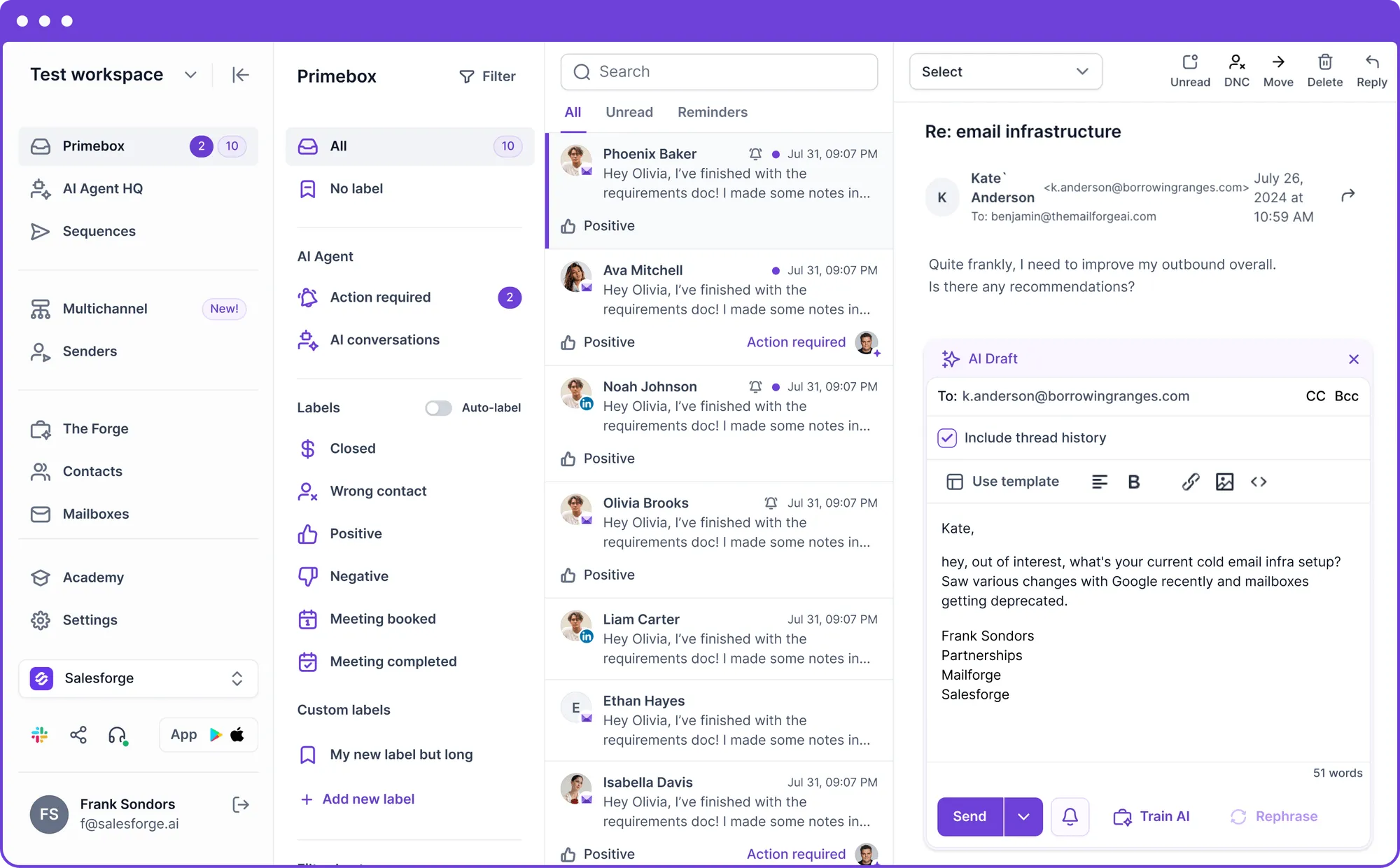
This image shows the Primebox by Salesforge
Primebox pulls email and LinkedIn conversations into one inbox. It also catches direct mailbox replies, including cases where a prospect responds from a different email address.
The AI layer starts with sentiment analysis, which identifies positive, neutral, and negative responses. Primebox AI can then generate a reply using your company knowledge, product details, and the conversation history.
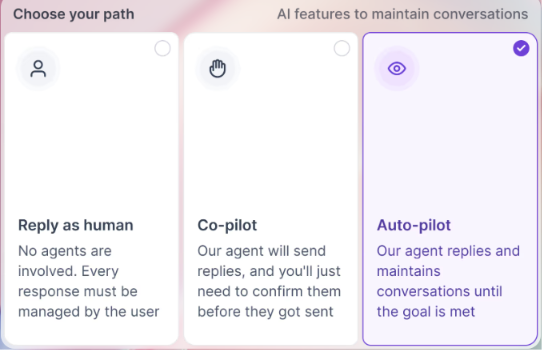
You have three ways to respond.
This image shows the Primebox™ helps your team respond faster across email and LinkedIn with two AI reply modes
Co-pilot mode prepares an AI reply while keeping you in the approval loop.
Auto-pilot mode lets AI continue the conversation automatically.
Reply as human gives you full control over the response.
Primebox also includes custom labels, follow-up reminders, saved reply templates, and message status tracking. You can reply to both email and LinkedIn conversations without leaving the inbox.
What stands out to me is the choice between Co-pilot and Auto-pilot. I can keep control of replies that need my attention and give AI more freedom on conversations where I don't need to approve every response.
What I Liked About Primebox
Email and LinkedIn replies appear in the same inbox.
AI sentiment analysis separates positive, neutral, and negative responses.
AI replies use company information and the existing conversation history.
Co-pilot mode lets me review a response before it goes out.
Auto-pilot mode lets AI continue the conversation automatically.
Direct mailbox replies are captured alongside campaign replies.
Reminders let me return to a conversation on a specific follow-up date.
Where Primebox Falls Short
Primebox AI is listed on the Growth plan rather than the $48 Pro plan.
Each AI-generated reply uses 3 personalization credits.
Salesforge Pricing
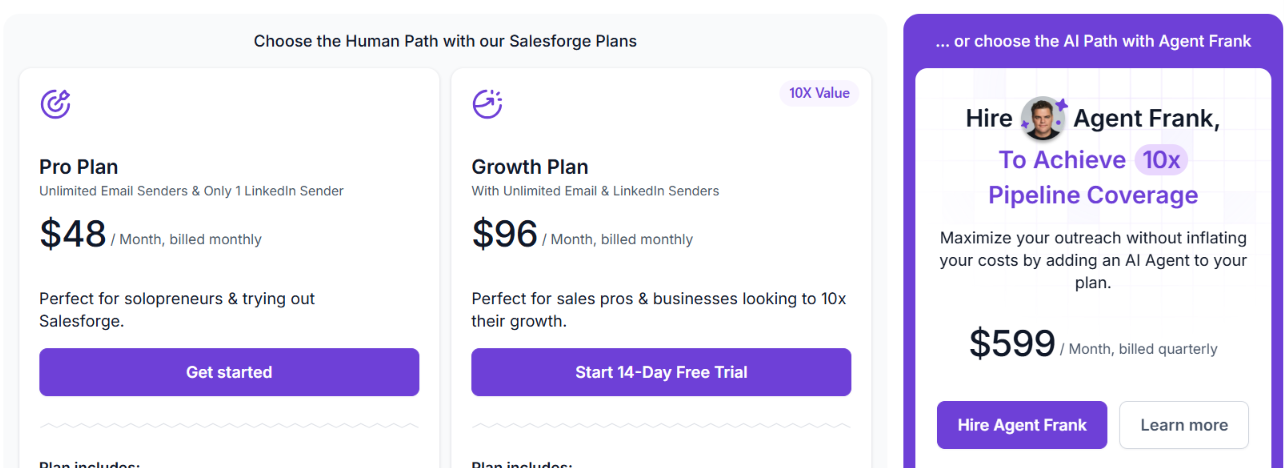
This image shows the Salesforge pricing
The Pro plan costs $48 per month and includes Primebox, sentiment analysis, unlimited connected mailboxes, one LinkedIn sender, 1,000 active contacts, and 5,000 emails per month.
The Growth plan costs $96 per month and adds Primebox AI. It also includes unlimited LinkedIn senders, 10,000 active contacts, 50,000 emails, and 1,000 personalization credits per month.
Since an AI-generated Primebox reply costs 3 personalization credits, the included credit allowance is something to watch if you plan to use AI for a large number of conversations.
For me, the useful part is being able to decide which conversations AI can handle and which ones I still want to approve myself.
2. Smartlead (Master Inbox)
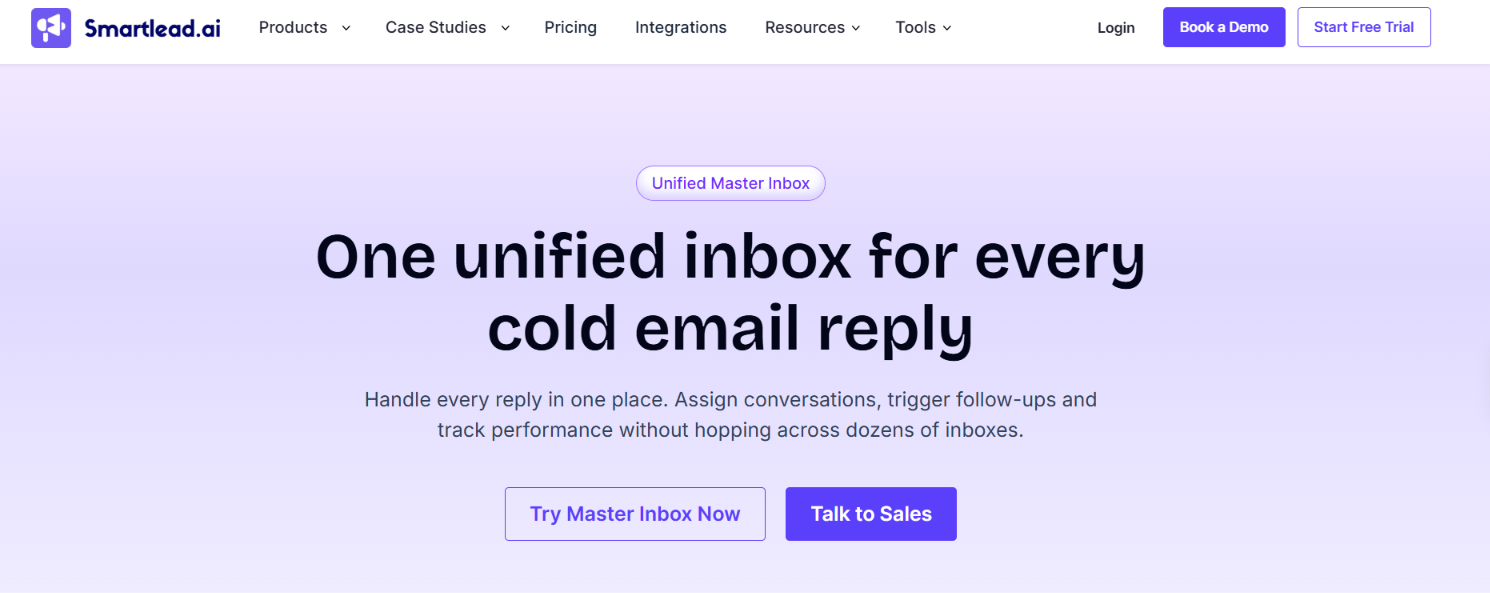
This image shows the Master Inbox by Smartlead
Smartlead’s Master Inbox brings replies from your connected cold email accounts into one place. Instead of checking each sending mailbox separately, you can see and respond to conversations from the same inbox.
New replies are pulled into Master Inbox in real time. Smartlead says they should appear within a minute regardless of the email provider being used. Once those replies start coming in, you have several ways to separate what needs attention.
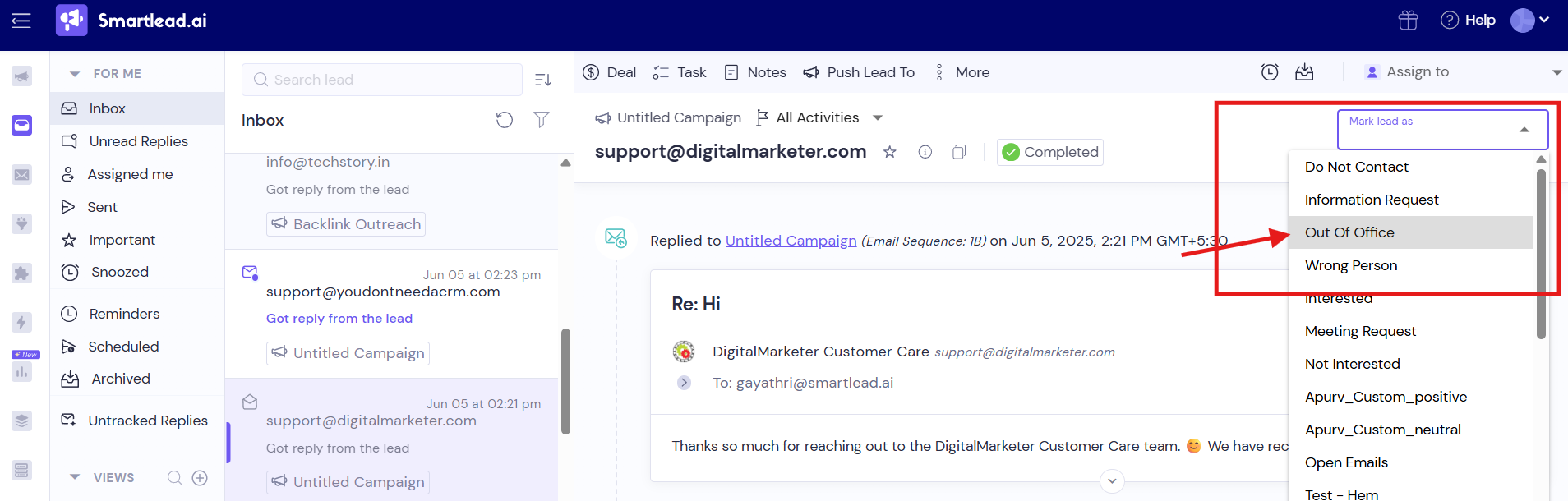
Lead categories help separate replies such as Interested, Meeting Request, Not Interested, Do Not Contact, Information Request, Out of Office, and Wrong Person.
This image shows the Lead categories help separate replies
Views let you save combinations of filters for a particular campaign, client, sender account, team member, or reply date.
Team assignments let you give a lead to a specific person instead of passing the conversation around manually.
Untracked Replies catch messages that are not connected to the original campaign, including cases where someone starts a new thread or writes from another email address.
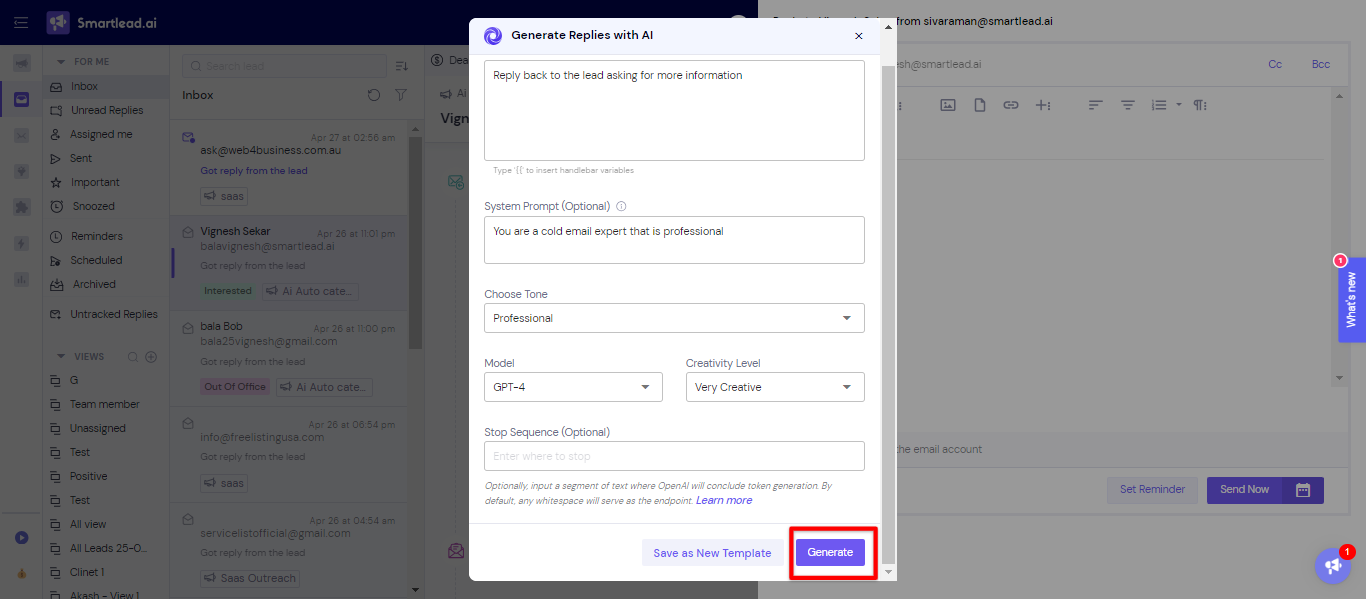
For actual responses, Smartlead has an AI reply option inside Master Inbox. You give it instructions for the response and can choose the tone and creativity level. It generates a draft that you can insert into the email before sending.
This image shows the Generate replies with AI
The AI helps write the response, but it does not automatically take over the conversation in this documented workflow. You still decide what gets sent.
Master Inbox also covers the work around the reply. You can set reminders, schedule messages, add tasks and notes, attach files, snooze conversations, and move leads into another campaign.
What I Liked About Smartlead Master Inbox
Replies from connected sending accounts are collected in one place.
AI can draft responses directly from the inbox.
You can give the AI your own instructions and choose the tone of its response.
Views make it easier to separate replies by campaign, client, sender account, or lead category.
Untracked Replies can catch responses that would otherwise sit outside the original campaign thread.
Conversations can be assigned to individual team members.
Reminders, tasks, notes, scheduling, and attachments are available without leaving Master Inbox.
Where Smartlead Master Inbox Falls Short
AI-generated responses still need to be inserted and sent rather than continuing the conversation automatically.
The number of saved Views available depends on your plan.
Smartlead Pricing
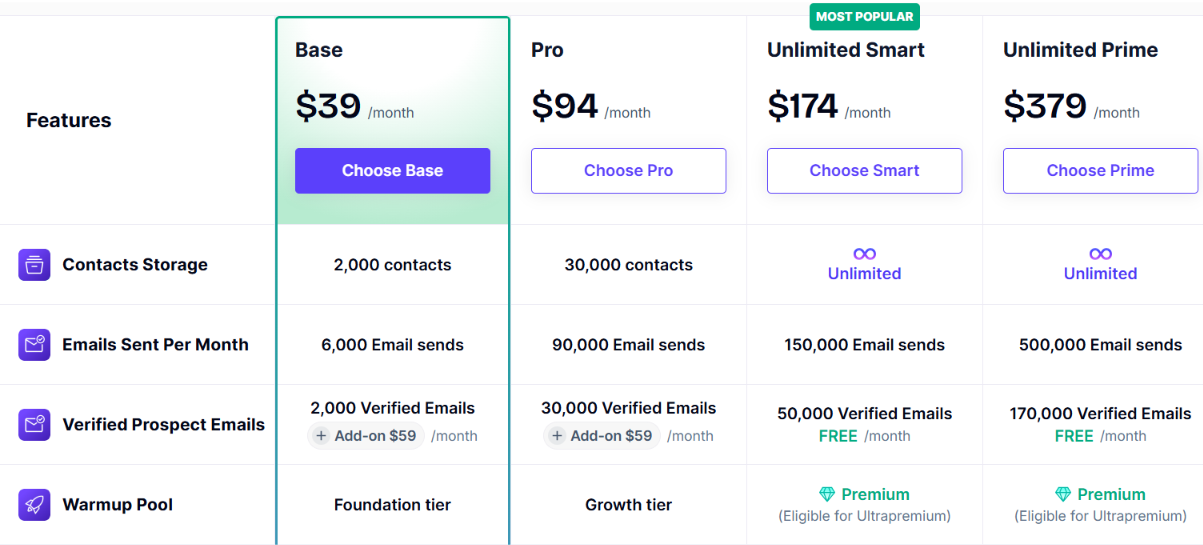
This image shows the Smartlead pricing
Smartlead has four main monthly plans.
Base costs $39/month with 2,000 contacts, 6,000 email sends, and 2,000 verified prospect emails.
Pro costs $94/month with 30,000 contacts, 90,000 email sends, and 30,000 verified prospect emails.
Unlimited Smart costs $174/month with unlimited contact storage, 150,000 email sends, and 50,000 verified prospect emails.
Unlimited Prime costs $379/month with unlimited contact storage, 500,000 email sends, and 170,000 verified prospect emails.
Annual billing gives a 17% discount, and Smartlead says all four plans come with a free trial without requiring a credit card.
Smartlead does more of the organizing than the replying. AI helps draft the response, while Master Inbox handles the sorting, filtering, assignments, and follow-up work around it.
3. Instantly (Unibox)
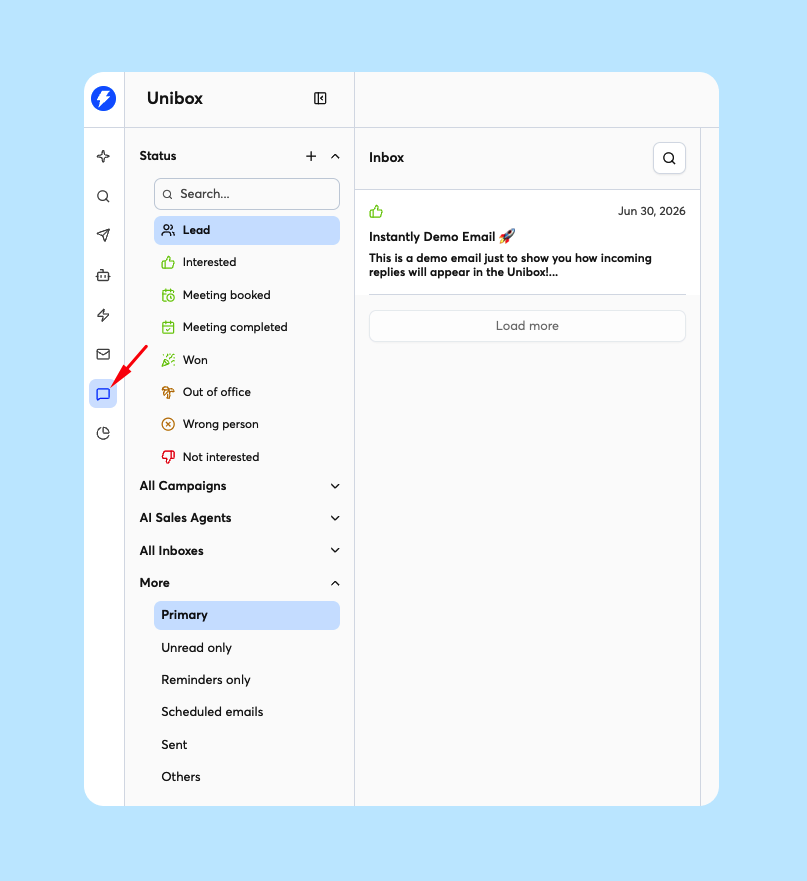
Instantly is a cold email platform, while Unibox is its centralized inbox for replies from your connected sending accounts.
This image shows the Unibox by Instantly
You can filter conversations by campaign, sending account, lead status, reminders, and AI Sales Agent. Search goes further, letting you find conversations by keyword, sender, recipient, subject, attachment, date, campaign, and read status.
Instantly then adds AI at different points in the reply workflow.
AI reply tagging reads incoming responses and applies lead statuses automatically. Interested, Not Interested, and Out of Office are enabled as default labels, and you can create custom labels with your own descriptions.
OpenAI Reply Suggestions use your existing macros or recent emails to suggest a response while you are writing. You can press Tab to insert a suggestion you want to use.
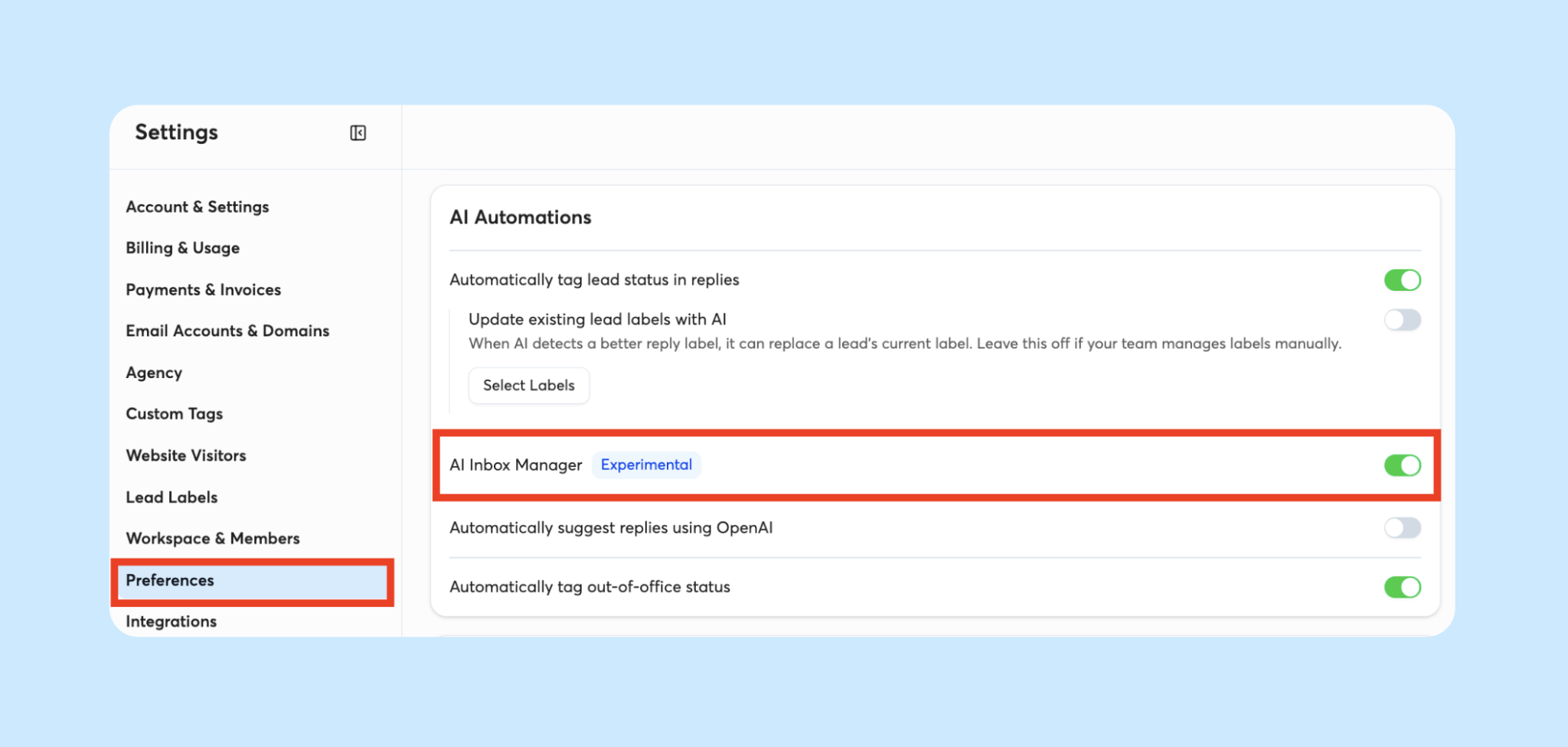
AI Inbox Manager can automatically schedule a response five minutes after a lead's first reply when the AI is confident in its suggestion.
This image shows the Turn on AI Inbox Manager on Instantly
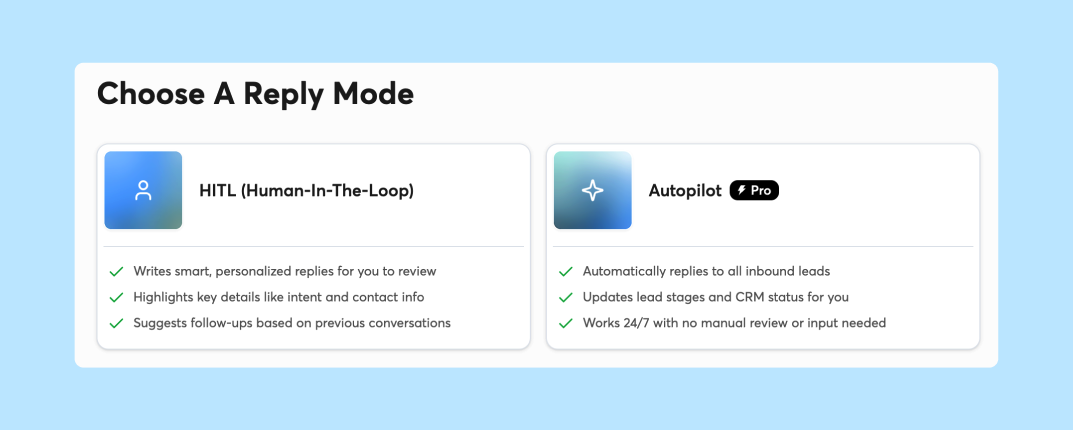
AI Reply Agent goes further by handling follow-ups, sales objections, booking links, and AI CRM updates. In Human-In-The-Loop mode, it can instead prepare drafts for you to approve.
This image shows Choose reply mode on Instantly
That gives you a choice between getting help with a reply and handing more of the conversation to AI. There are useful automations around replies too. AI Smart Pause detects out-of-office messages, pauses outreach until the prospect's return date, and then resumes the sequence. If AI categorizes a reply incorrectly, you can submit feedback from Unibox.
For conversations you want to handle yourself, Unibox supports Reply Macros, scheduled replies, reminders, notes, attachments, and moving leads into another campaign or subsequence. Replies that come from a different email address can also be attached back to the original lead.
This is where Instantly differs from a basic AI reply writer. You can decide how far AI gets involved, from tagging the reply to handling follow-ups.
What I Liked About Instantly Unibox
Replies from connected sending accounts are collected in one inbox.
AI can automatically categorize incoming replies by lead status.
Custom labels let you define additional reply categories for AI to apply.
OpenAI Reply Suggestions can help write responses while you handle the conversation yourself.
AI Inbox Manager can schedule a response to a lead's first reply when its confidence is high enough.
AI Reply Agent supports both review-before-send and automated reply handling.
AI Smart Pause can pause outreach after an out-of-office reply and resume it when the prospect returns.
Replies from another email address can be connected back to the original lead.
Where Instantly Unibox Falls Short
Direct replies from Unibox are available on Hyper Growth and Light Speed, while Growth users can only preview replies and respond from their original mailbox.
AI Inbox Manager only automates the lead's first reply and does not apply to auto-responses.
AI Inbox Manager is still marked as an experimental Early Access feature.
OpenAI Reply Suggestions require you to connect your own OpenAI API key.
AI Reply Agent uses Data Credits to generate replies.
Instantly Pricing
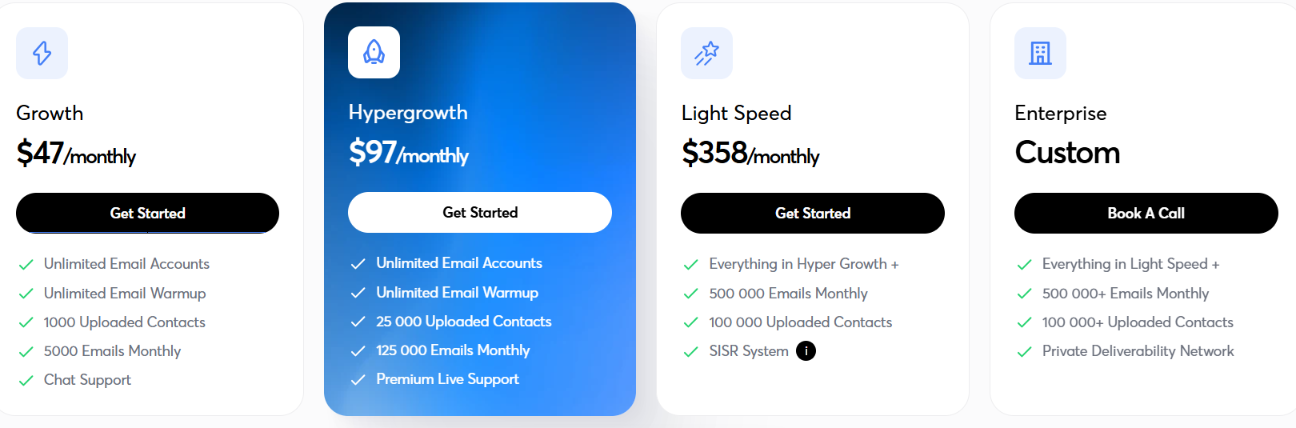
This image shows the Instantly pricing
Instantly's Outreach plans start at $47 per month for Growth, which includes unlimited email accounts, unlimited email warmup, 1,000 uploaded contacts, and 5,000 emails per month.
However, Growth only gives you preview access in Unibox. To reply to prospects directly from Unibox, you need Hyper Growth or Light Speed.
Growth costs $47/month with 1,000 uploaded contacts and 5,000 emails per month.
Hyper Growth costs $97/month with 25,000 uploaded contacts.
Light Speed costs $358/month with 100,000 uploaded contacts and 500,000 emails per month.
Enterprise uses custom pricing for higher sending volumes and includes a private deliverability network.
AI Reply Agent uses Data Credits whenever it generates replies, so credit usage is another limit to watch.
4. Reply.io (Jason AI)
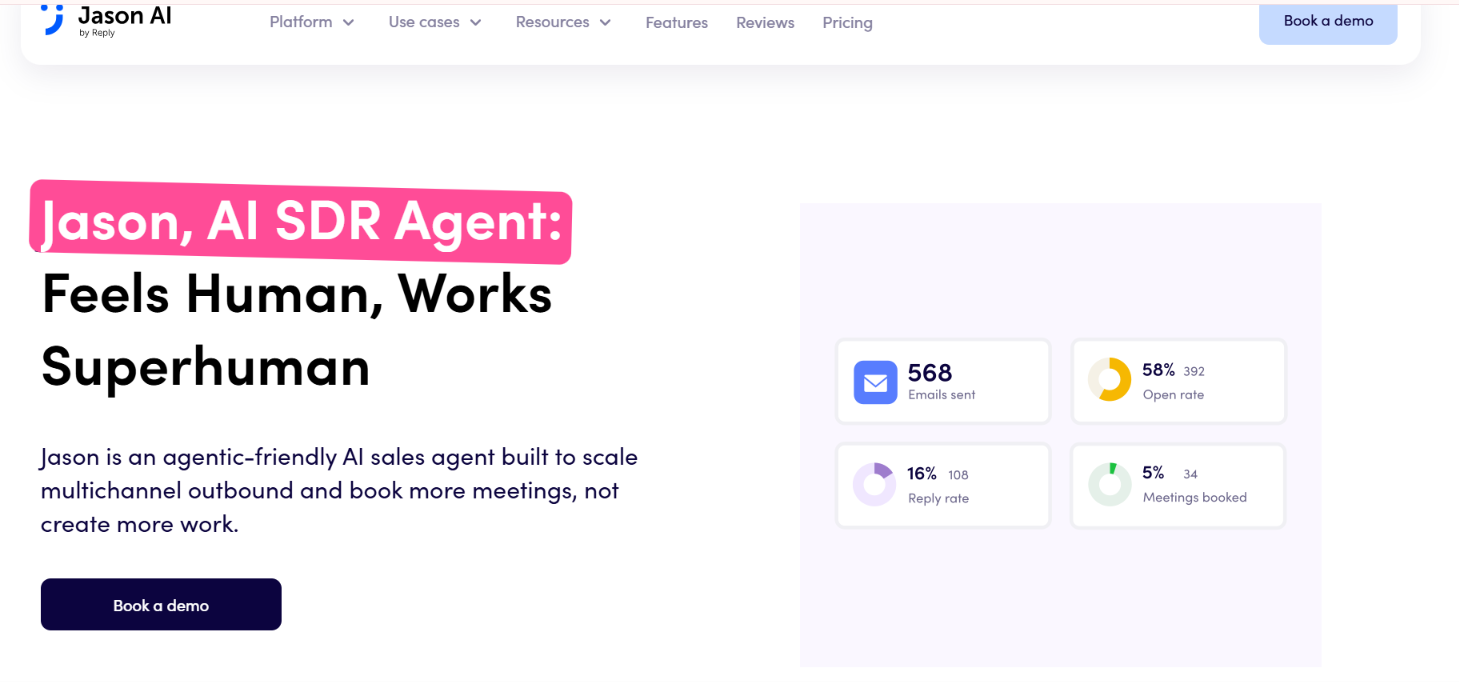
Reply.io takes a different approach to inbox management. Jason AI is an AI SDR rather than a standalone inbox manager, so handling replies is one part of a larger outbound process that also covers prospecting, personalization, email, LinkedIn, calls, and follow-ups.
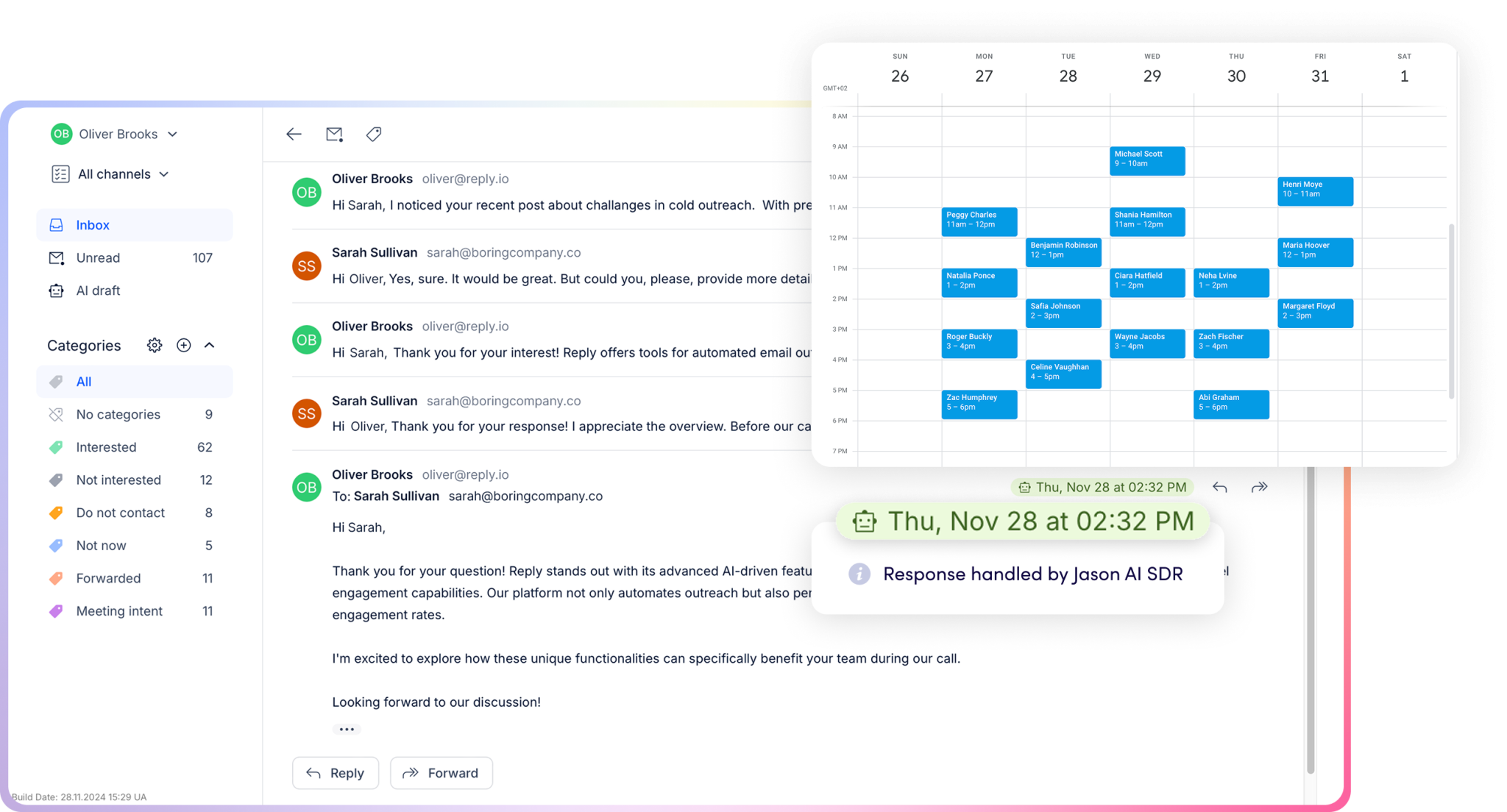
This image shows the Jason AI by Reply.io
Before Jason starts replying, you give it the context it needs. You can add product information, offers, case studies, objection-handling instructions, FAQs, and your preferred tone. Jason uses this information when responding to prospects.
Once a prospect replies, Jason can take over different parts of the conversation.
Reply handling uses your instructions and company knowledge to respond to prospects based on the sales approach you set.
This image shows the Replies handled by Jason AI SDR
Objection handling lets Jason answer common questions, address simple objections, share relevant information, and suggest the next step.
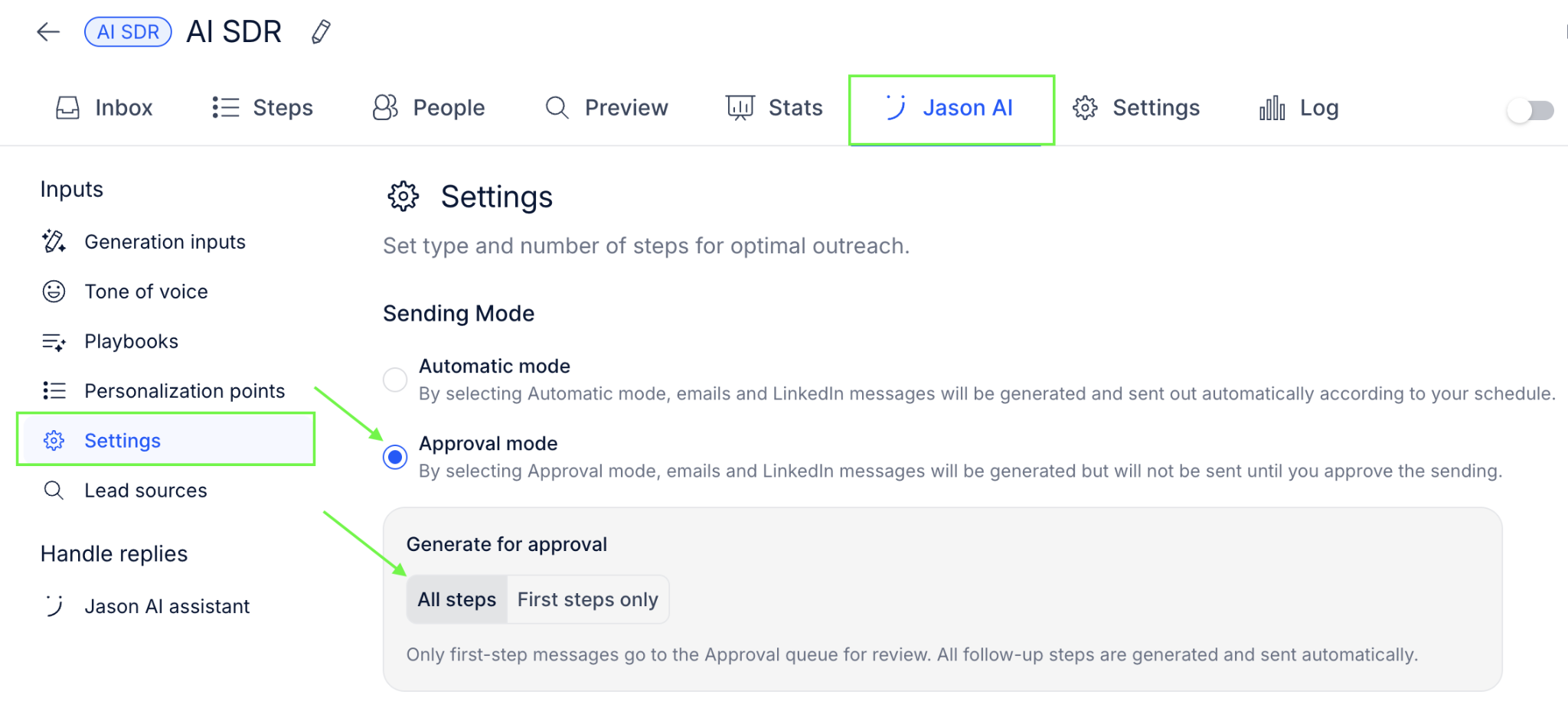
Approval Mode generates an AI response but waits for you to approve it before sending.
This image shows the Approval mode activated
Automatic Mode generates and sends the response without requiring approval.
Re-engagement lets you define when and how Jason should follow up with prospects who stop responding.
Meeting booking connects with your calendar so Jason can check availability and schedule meetings.
You can decide how much control Jason gets. Replies that need your attention can stay in Approval Mode, while more routine conversations can run in Automatic Mode.
Reply.io also has a centralized inbox, and its mobile app lets you access the outreach inbox, review and send AI-generated replies, and get notified when a prospect responds.
Once Jason starts handling a reply, it can keep working on that conversation through objections, follow-ups, and scheduling instead of stopping after the first response.
What I Liked About Reply.io Jason AI
Jason can use your product details, FAQs, offers, and objection-handling instructions when replying.
Approval Mode lets you check AI-generated replies before they are sent.
Automatic Mode can send AI-generated responses without waiting for approval.
Jason can answer common questions and handle simple sales objections.
Re-engagement rules can bring prospects back into the conversation after they stop replying.
Calendar access lets Jason propose available times and book meetings.
Where Reply.io Jason AI Falls Short
Jason AI is a full AI SDR rather than a dedicated inbox manager, so its scope goes well beyond managing incoming replies.
Jason needs product details, FAQs, objection-handling guidance, and other company context to guide its replies.
Automatic Mode can send responses without your approval, so conversations you want to review need to stay in Approval Mode.
Reply.io Jason AI Pricing
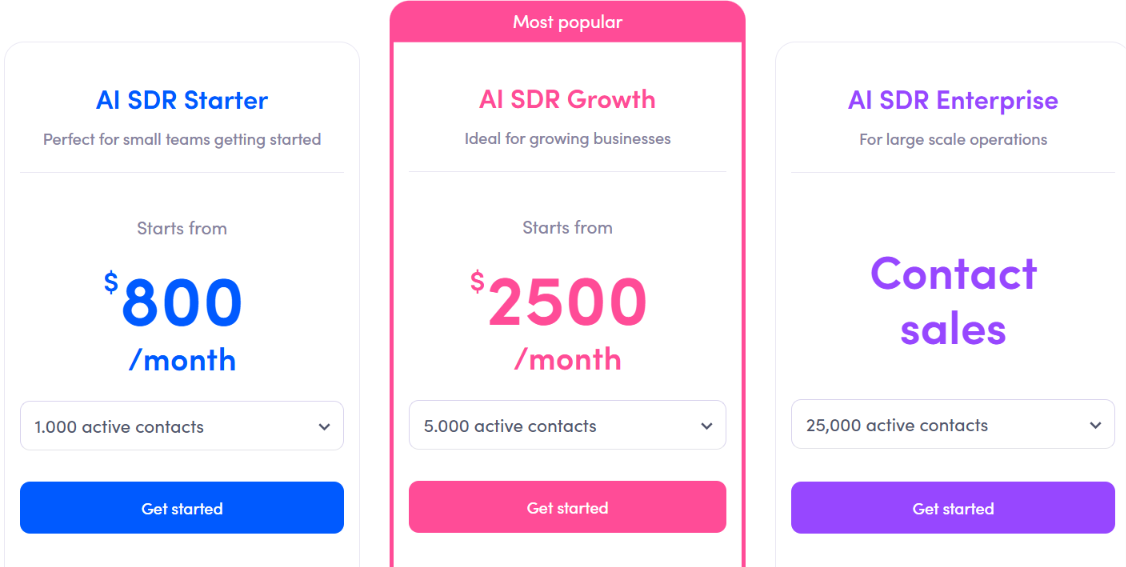
This image shows the Jason AI SDR pricing
Jason AI SDR Starter starts at $800 per month. The Starter plan includes 1,000 active contacts, 1,000 real-time B2B contacts, two LinkedIn accounts, unlimited users, AI personalization, intent signals, Autopilot and Copilot modes, multichannel automation, and unlimited mailboxes and warm-ups.
AI SDR Growth starts at $2,500/month with 5,000 active contacts and 10 included LinkedIn accounts. It also adds white-glove onboarding, a Slack channel, and custom playbooks.
AI SDR Enterprise uses custom pricing with 25,000 active contacts and 25 included LinkedIn accounts, along with custom playbooks and prompt engineering, a Slack channel, and additional support.
At $800 per month to start, Jason makes more sense if you want AI involved in the wider outbound process rather than paying only for help sorting and drafting inbox replies.
5. Saleshandy (Unified Inbox)
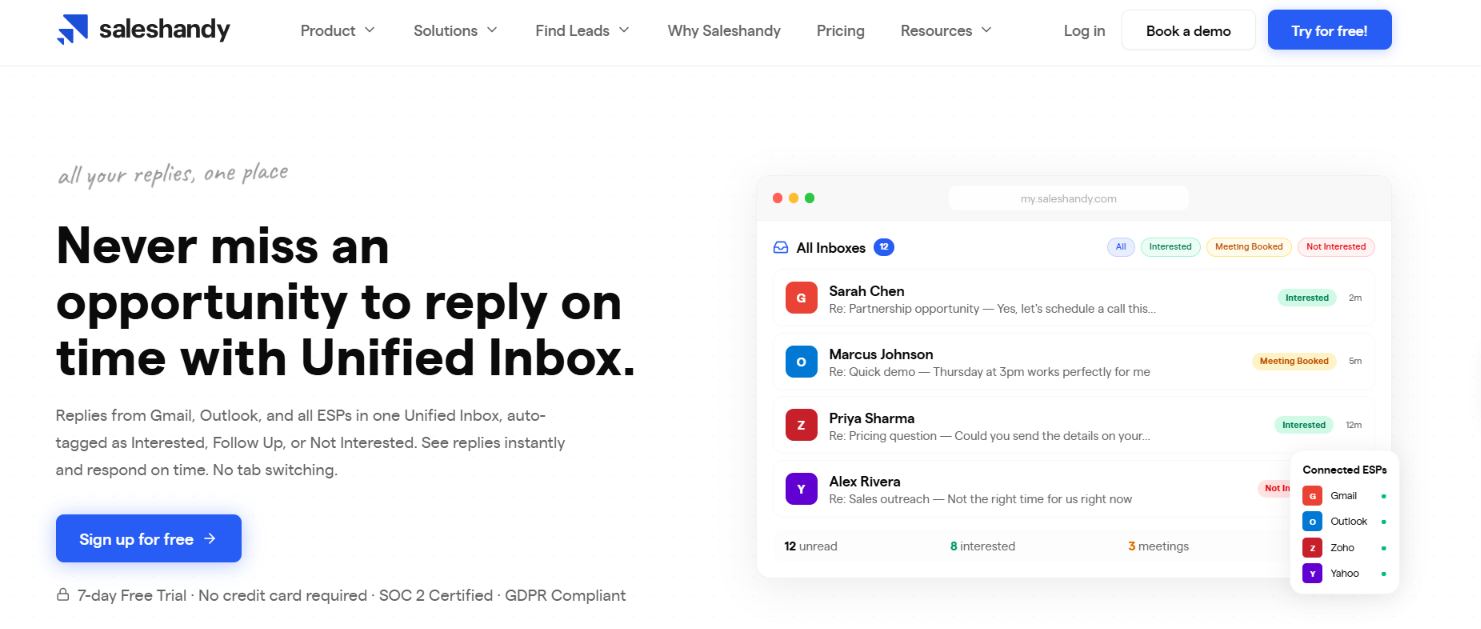
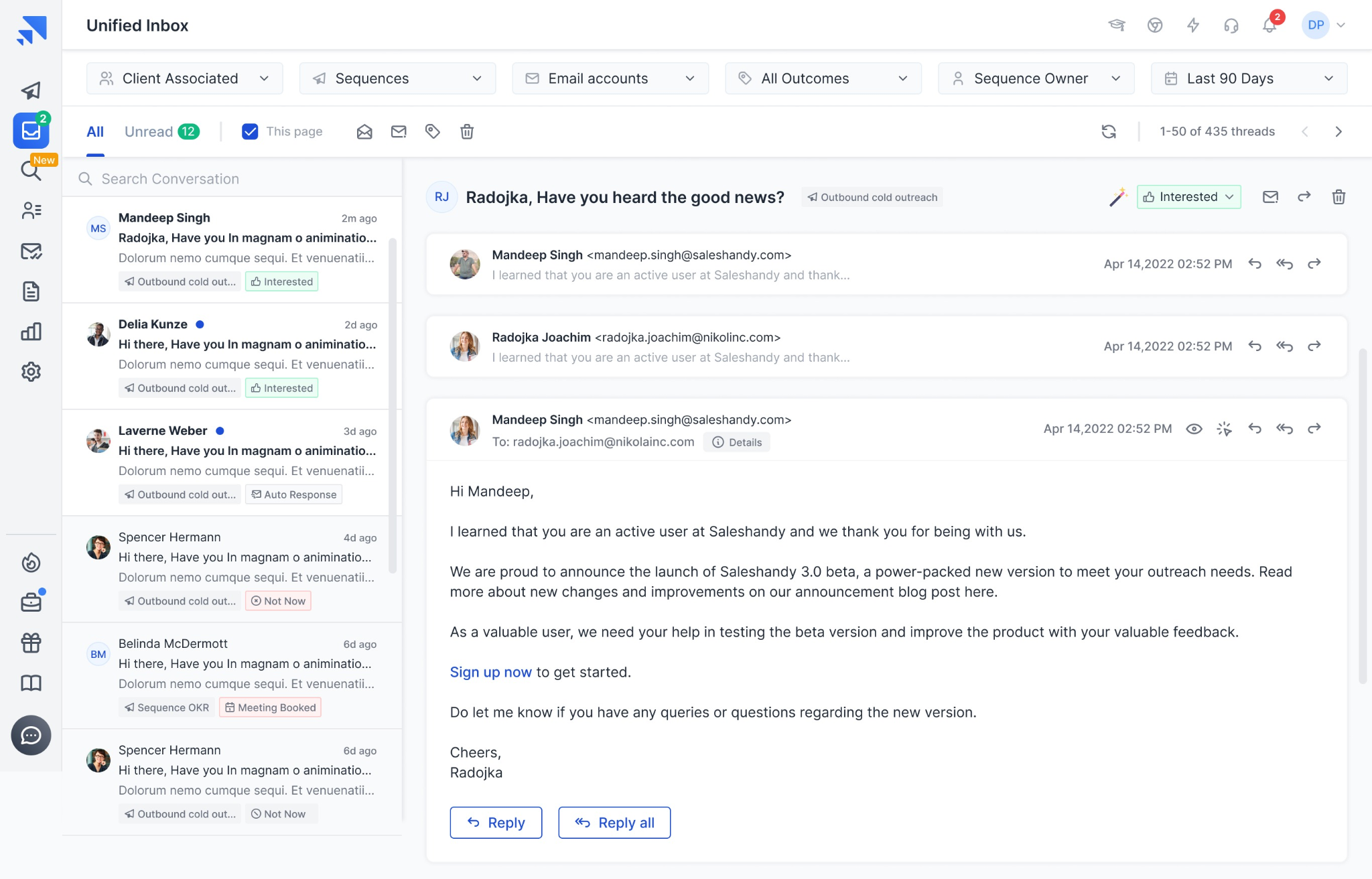
This image shows the Saleshandy unified inbox homepage
Saleshandy’s Unified Inbox is more focused on finding the replies that need your attention than letting AI run the conversation.
Replies from the email accounts and sequences connected to Saleshandy appear in one inbox, so you don't have to open each sending account separately. From there, you can search conversations and filter them by account, outcome, sequence owner, client, and date range.
The AI comes in when those replies need to be sorted.
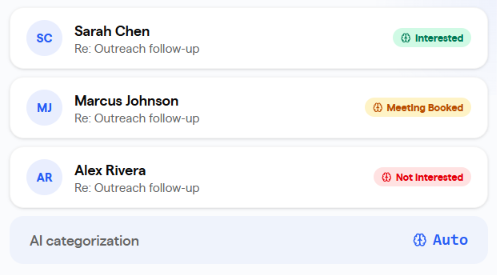
AI categorization reads the latest prospect reply and automatically categorizes it based on its tone and intent.
Interested separates prospects who have shown interest.
Not Interested identifies negative responses.
Meeting Booked keeps confirmed meetings separate from other conversations.
This image shows the AI reads & finds interested prospects
Automatic Response, Not Now, Closed, and Do Not Contact give you additional ways to organize what came back from a campaign.
You can also create custom prospect outcomes. However, Saleshandy's AI does not automatically categorize replies into those custom outcomes, so you need to assign them yourself.
Once you've found a reply that needs attention, you can respond from the same thread inside Unified Inbox. The response is sent through the same account used for the original email. Reply All, forwarding, CC and BCC, drafts, and scheduled replies are also available.
This image shows the Unified inbox dashboard
Saleshandy stops at identifying the reply intent. It helps you find the conversations that matter, while you remain responsible for writing and sending the response.
What I Liked About Saleshandy Unified Inbox
Replies from different connected email accounts and sequences appear in one inbox.
AI categorization sorts incoming replies based on their tone and intent.
Categories such as Interested, Not Interested, Meeting Booked, Not Now, and Do Not Contact make it easier to decide which conversations need attention first.
Search and filters help narrow conversations by account, outcome, sequence owner, client, and date.
Bulk actions let you mark conversations read or unread, change categories, and delete multiple threads at once.
Where Saleshandy Unified Inbox Falls Short
AI categorizes replies but does not generate or automatically send prospect responses based on the Unified Inbox information provided.
AI cannot automatically assign replies to custom prospect outcomes. Those need to be categorized manually.
Unified Inbox only shows replies connected to Saleshandy sequences rather than every email in the underlying mailbox.
Email history in Unified Inbox is limited to 90 days.
Only the sequence owner can view that sequence's prospect replies.
Saleshandy Pricing
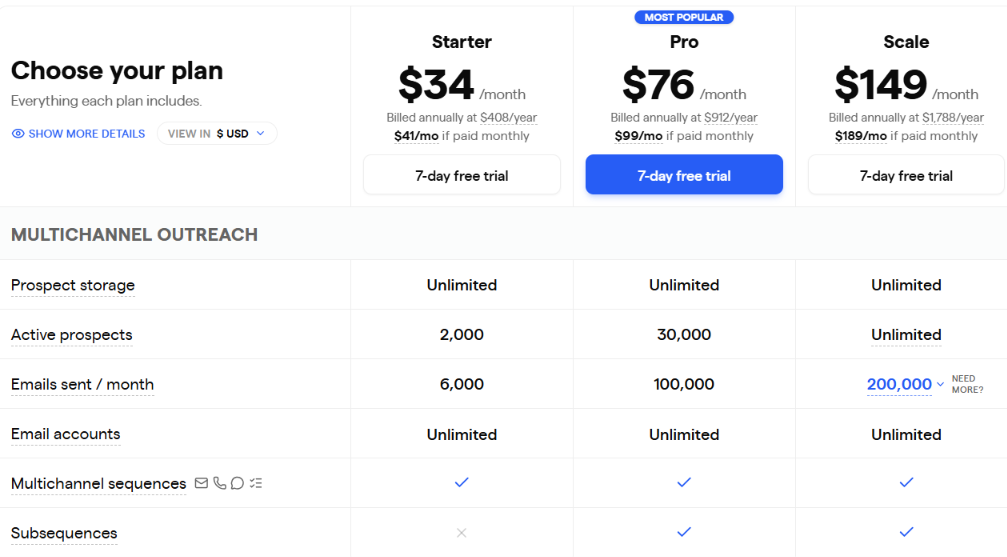
This image shows the Saleshandy pricing
Saleshandy includes Unified Inbox access across its Starter, Pro, and Scale plans, according to the pricing information you provided.
Starter costs $41/month, or $34/month when billed annually. It includes 2,000 active prospects, 6,000 emails per month, unlimited email accounts, and one user.
Pro costs $99/month, or $76/month when billed annually. It includes 30,000 active prospects, 100,000 emails per month, unlimited email accounts, and up to 10 users.
Scale costs $189/month, or $149/month when billed annually. It includes unlimited active prospects, 200,000 emails per month, unlimited email accounts, and unlimited users.
Enterprise uses custom pricing based on volume and requirements.
There is also a 7-day free trial with no credit card required. Saleshandy fits a simpler inbox workflow. AI tells you what kind of response came back, then you decide what to say and handle the conversation yourself.
Which AI Inbox Manager Should You Choose?
You should choose based on how much of the reply process you want AI to handle.
Your Priority
Choose
Manage email and LinkedIn replies with AI drafts or automatic responses
Salesforge Primebox
Organize replies across multiple email accounts and use AI to draft responses
Smartlead Master Inbox
Automate reply tagging, responses, objections, follow-ups, and meeting links
Instantly Unibox
Let an AI SDR handle replies, objections, re-engagement, and meeting booking
Reply.io Jason AI
Automatically categorize replies while keeping responses manual
Saleshandy Unified Inbox
Personalized Outbound Strategy
Get The Right Outbound Strategy In Minutes
Enter your email to get a custom plan & stack recommendation for your
business
It's being carefully crafted by AI
Please check your mailbox in 5 minutes
Conclusion
The real test of an AI inbox manager starts after the reply comes in. Can it tell which prospect is interested, understand what they said, and help move that conversation forward without creating more work for you?
If you only want help finding interested prospects, AI categorization may be enough. If replies are where most of your time goes, look for a tool that can draft responses, understand the conversation, and take over selected replies without forcing you to automate everything.
That is where Salesforge Primebox makes a strong case. Co-pilot lets you approve AI-generated replies, while Auto-pilot can handle conversations you don't want to review one by one. Email and LinkedIn replies also stay in the same inbox.
If you want to spend less time working through replies without giving AI control over every conversation, Salesforge is the one I'd start with.
Book more meetings on autopilot
Set up in minutes. No per-seat pricing. No commitment.
Compare 5 AI inbox managers for cold email and sales outreach. See how Salesforge, Smartlead, Instantly, Reply.io, and Saleshandy handle replies, AI features, and pricing.
Compare 11 AI agents for tracking buying signals in sales. See which tools help spot funding, hiring, job changes, and buyer intent, plus features and pricing.
Compare 5 SyncGTM alternatives for B2B buying signals and outreach. See how Leadsforge, Bitscale, Clay, 6sense, and Apollo differ in features and pricing.


.jpg)

.jpg)

.jpg)