Blog
11 Best AI Agents for Tracking Buying Signals in Sales

11 Best AI Agents for Tracking Buying Signals in Sales

Summarize with

You find out that a company raised $20 million in funding. Sounds like a good time to reach out, right?

But by the time your sales team spots the news, researches the company, finds the right decision-maker, and prepares an email, someone else may have already started the conversation.

And funding is just one buying signal.

Companies hire new executives, expand their sales teams, change technology, and show interest in competing products every day.

The challenge is keeping track of these changes and figuring out which ones are actually worth acting on.

That's where AI agents can help. Some monitor company activity for buying signals, while others research those signals and use them to identify prospects for outreach.

But which ones are actually worth using? I've shortlisted 11 AI agents for tracking buying signals in sales, covering the signals they work with and how they can help you find potential buyers.
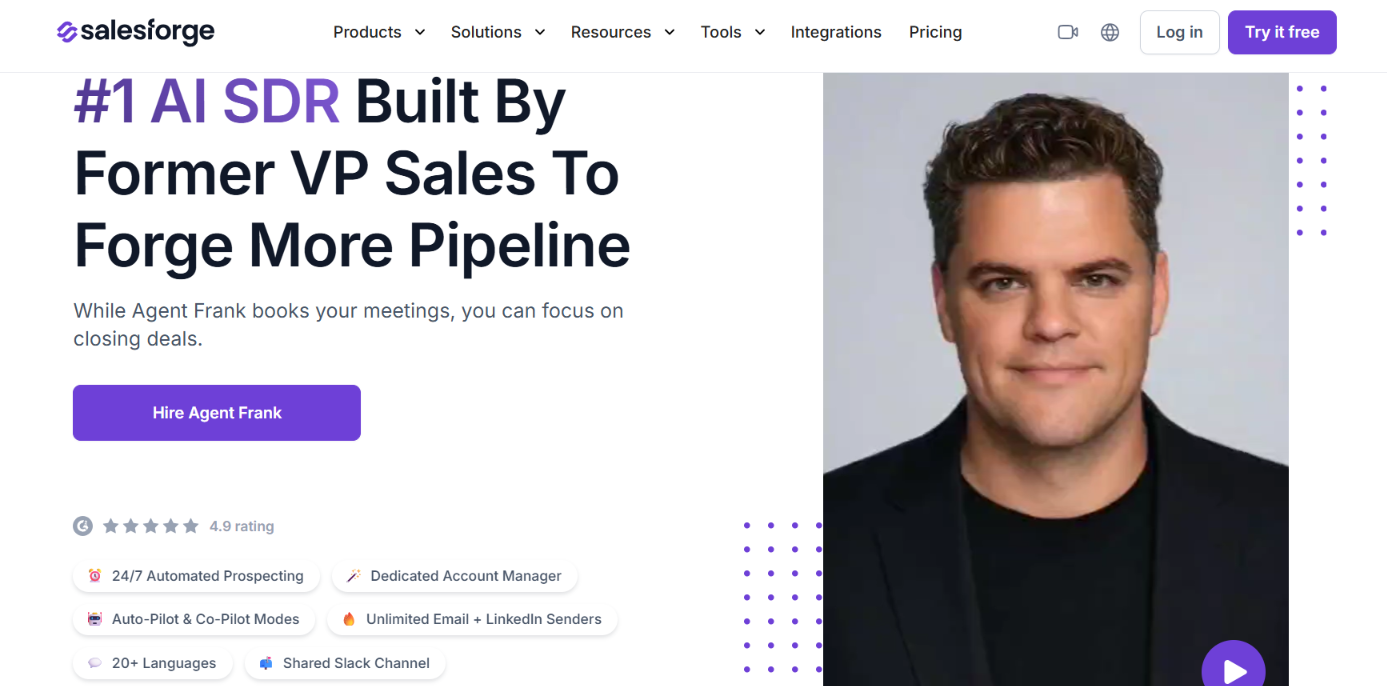
Table of Contents

TL;DR – 11 Best AI Agents for Tracking Buying Signals in Sales (2026)

  1. Agent Frank (Salesforge) – Best for researching buying signals and personalizing AI SDR outreach.
    ‍
  2. Salesmotion Signal Agent – Ideal for tracking funding, hiring, leadership changes, and technology adoption.
    ‍
  3. CommunityTracker – Best for detecting buying intent across Reddit, LinkedIn, Slack, and Discord.
    ‍
  4. Coldreach AI SDR – Great for identifying custom buying signals and triggering outreach.
    ‍
  5. Claygent – Best for researching funding, executive hires, and technology changes.
    ‍
  6. Ava by Artisan – Ideal for using funding, job changes, and website intent to trigger outreach.
    ‍
  7. Amplemarket Duo – Best for tracking job changes, funding, and hiring signals.
    ‍
  8. Alice by 11x – Ideal for triggering outreach based on company and prospect signals.
    ‍
  9. AiSDR – Best for monitoring CRM records for funding, hiring, and job changes.
    ‍
  10. Jason AI by Reply.io – Best for prospecting using hiring, technology, and engagement signals.
    ‍
  11. Piper by Qualified – Great for identifying website visitors showing buying intent.

11 Best AI Agents for Tracking Buying Signals in Sales: Quick Comparison

AI Agent Company Signals Buyer Intent Signals Automated Outreach
Agent Frank Best Overall Yes Prospect research Yes
Salesmotion Yes Limited Drafts only
CommunityTracker Yes Social posts, hiring, funding and tools Yes
Coldreach Yes LinkedIn activity Yes
Claygent Yes Custom research Via workflows
Ava by Artisan Yes Website and social activity Yes
Amplemarket Duo Yes G2, Slack, website, product usage Assisted
Alice by 11x Yes G2 and website intent Yes
AiSDR Yes LinkedIn and website activity Yes
Jason AI Hiring and tech usage LinkedIn engagement Yes
Piper by Qualified CRM account context Website and email intent Inbound

1. Agent Frank by Salesforge – Best for AI SDR Outreach Using Buying Signals

Agent Frank homepage
This image shows the Agent Frank homepage

Agent Frank is an AI SDR from Salesforge that handles prospecting, personalized outreach, follow-ups, and meeting booking.

It works through Salesforge and uses Leadsforge to find prospects matching your ideal customer profile (ICP).

Before contacting someone, Agent Frank researches their company, buying signals, timing, likely pain points, and objections. This research helps it prepare messages based on the prospect's situation instead of sending the same pitch to everyone.

Agent Frank supports email and LinkedIn outreach and operates in two modes. Auto-Pilot lets it handle outreach independently, while Co-Pilot allows you to review and approve its work.
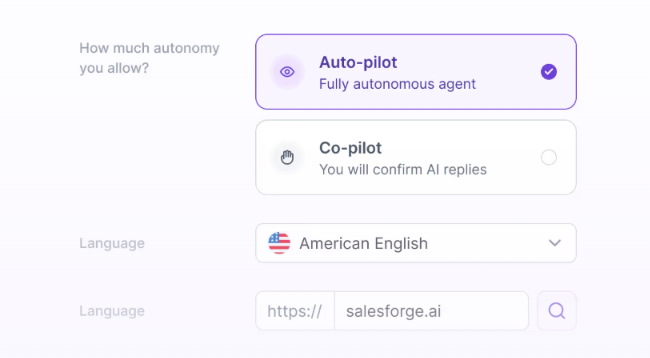
Agent Frank runs in two modes
This images shows the Agent Frank runs in two modes

How Agent Frank Helps Track and Use Buying Signals

Agent Frank researches buying signals before reaching out to prospects. It looks at company information, timing, and potential pain points to prepare messages that fit each prospect. 
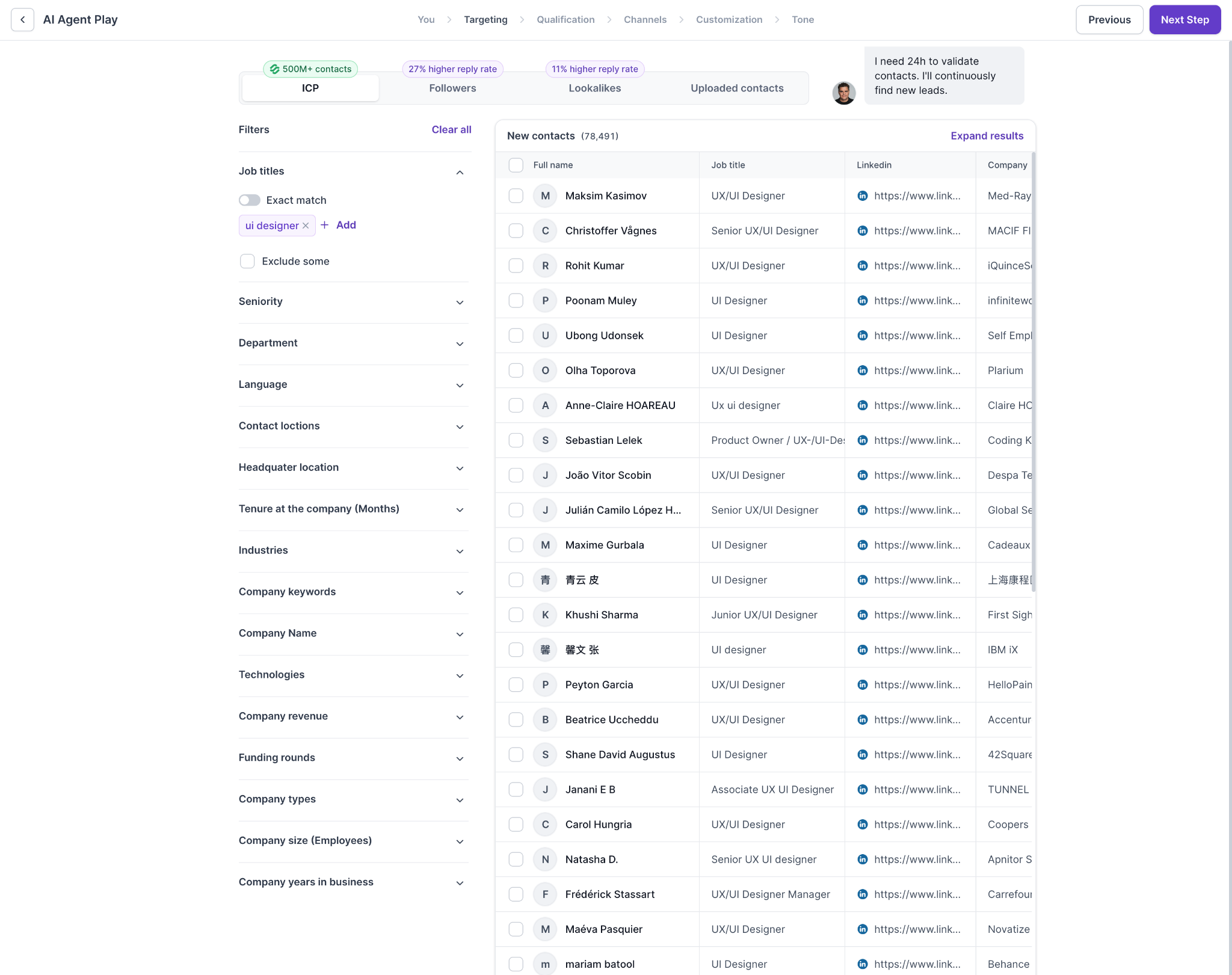
Browse potential leads using the familiar Leadsforge search interface
This image shows the Browse potential leads using the familiar Leadsforge search interface

Here's how it works.

  • Continuous prospecting finds new leads matching your ICP through Leadsforge.
    ‍
  • Buying signal research examines prospects, company activity, and timing before outreach.
    ‍
  • Lead targeting lets you review prospects, refine filters, and exclude irrelevant contacts.
    ‍
  • Personalized outreach uses prospect research to write email and LinkedIn messages.
    ‍
  • Automated follow-ups handle ongoing conversations and meeting booking.
    ‍
  • Co-Pilot mode lets you review and approve Agent Frank's work.

Agent Frank focuses on researching and acting on buying signals rather than providing a dedicated dashboard for tracking signal changes.
Pros of Agent Frank

  • Runs prospecting and outreach 24/7.
    ‍
  • Researches buying signals before contacting prospects.
    ‍
  • Offers Auto-Pilot and Co-Pilot modes.
    ‍
  • Includes Leadsforge-powered prospect search.
    ‍
  • Supports 20+ languages.

Cons of Agent Frank

  • Requires a demo before onboarding.
    ‍
  • Email infrastructure costs extra.
    ‍
  • No free trial for Agent Frank.
    ‍
  • Less suited to highly customized enterprise sales cycles.

Agent Frank Pricing

Agent Frank pricing
This image shows the Agent Frank pricing

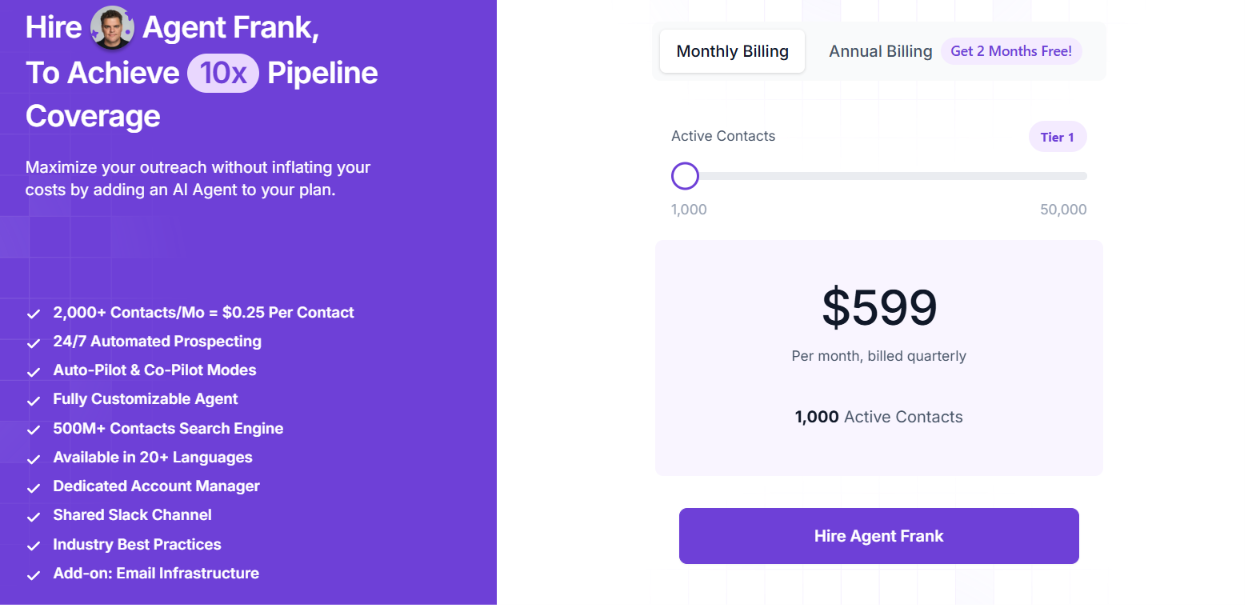
Agent Frank's current product page lists a starting price of $599 per month, billed quarterly, for 1,000 active contacts. The subscription includes:

  • Up to 1,000 active contacts at a time.
    ‍
  • Continuous AI prospecting through a 500M+ contact search engine.
    ‍
  • Auto-Pilot and Co-Pilot modes.
    ‍
  • Email and LinkedIn outreach.
    ‍
  • Access to Salesforge for managing Agent Frank.
    ‍
  • A dedicated account manager and shared Slack channel.

According to Salesforge, 1,000 active contacts can translate to approximately 2,000–2,500 new prospects contacted per month, depending on how contacts move through sequences.

Email infrastructure is billed separately. You can connect existing mailboxes or purchase infrastructure through the Forge Stack.

Agent Frank is a better fit if you want an AI SDR to research prospects and reach out when it spots relevant buying signals. If you just need alerts about funding, hiring, or job changes, a dedicated signal-tracking tool may work better.

Personalized Outbound Strategy

Get The Right Outbound Strategy In Minutes

Enter your email to get a custom plan & stack recommendation for your business

It's being carefully crafted by AI

Please check your mailbox in 5 minutes

2. Salesmotion Signal Agent – Best for Monitoring Company Buying Signals

Salesmotion Signal Agent homepage
This image shows the Salesmotion Signal Agent homepage

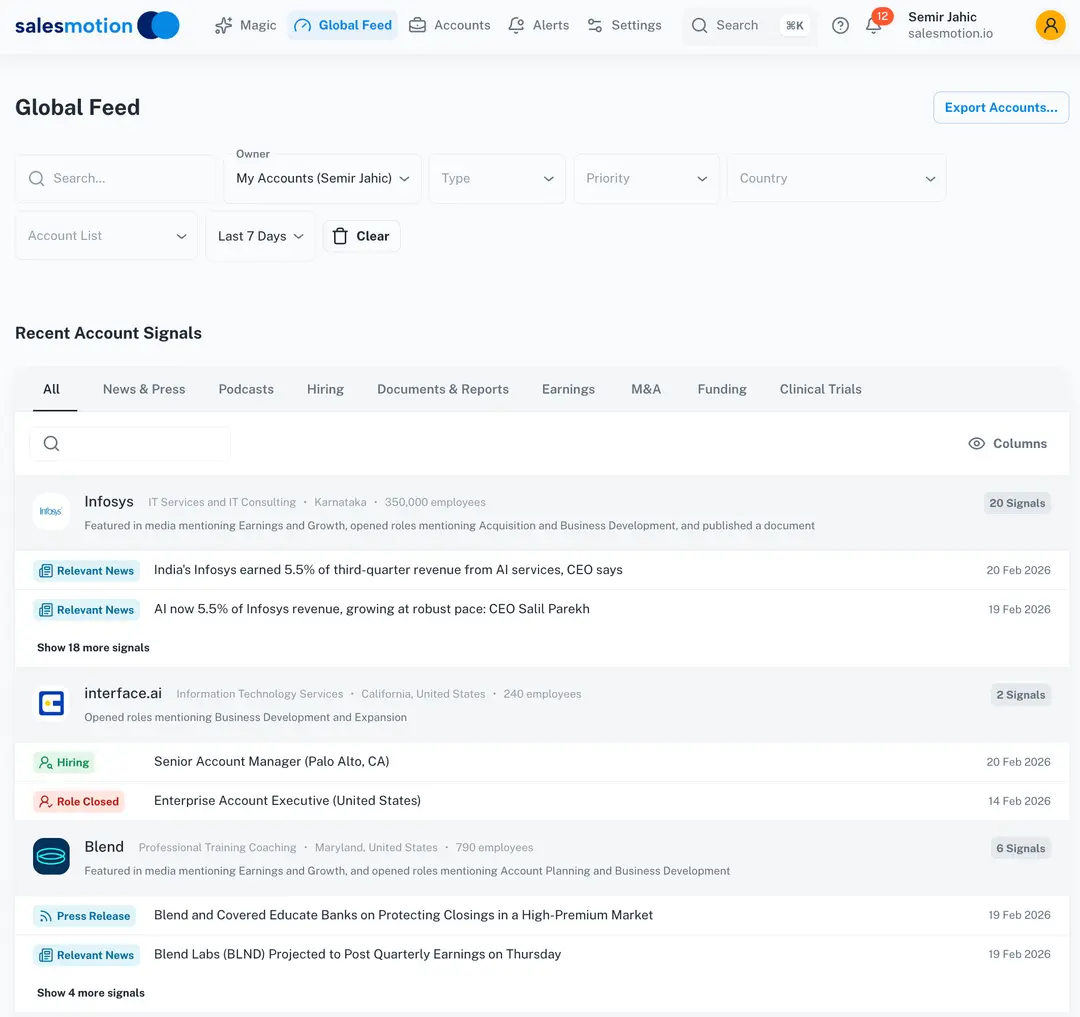
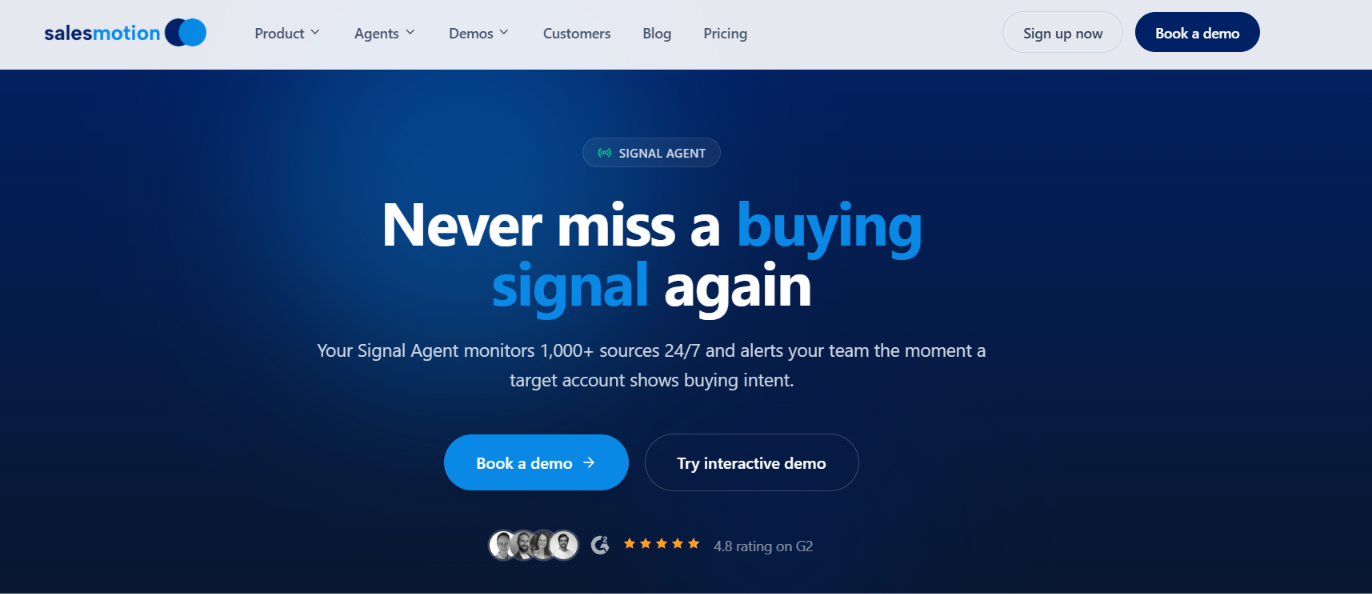
Salesmotion Signal Agent is an AI agent built to track buying signals across your target accounts. It continuously monitors 1,000+ sources, including earnings calls, SEC filings, company news, job postings, and funding announcements.

Unlike agents that mainly use signals to personalize outreach, Salesmotion focuses on detecting company changes and notifying sales reps when something relevant happens. It also works with two other Salesmotion agents.

The Research Agent prepares account briefs, while the Outreach Agent drafts emails and LinkedIn messages based on the signals found.

How Salesmotion Signal Agent Tracks Buying Signals

You start by adding the companies you want to monitor. Salesmotion then tracks those accounts across 1,000+ sources, looking for changes that might give your sales reps a reason to reach out.

Salesmotion Signal Agent account signals example
This image shows the Salesmotion Signal Agent account signals example

It covers more than 50 types of buying signals, including the following.

  • Leadership changes flag new executives, promotions, and role changes that could create sales opportunities.
    ‍
  • Funding announcements identify companies that have recently raised money.
    ‍
  • Hiring activity shows which companies are increasing recruitment or hiring for specific roles.
    ‍
  • Technology adoption identifies changes in the tools companies use.
    ‍
  • Earnings calls reveal business priorities and planned investments mentioned by executives.
    ‍
  • Signal scoring helps you decide which account changes deserve attention first.
    ‍
  • Custom alerts send relevant updates through email, Slack, or your CRM.

For example, if a target company appoints a new CRO, Salesmotion can flag the change and provide account context. Its Outreach Agent can then draft a message referencing the appointment. The important distinction is that Salesmotion prepares the research and outreach drafts. Your sales reps still review the information and decide what to send.

Pros of Salesmotion Signal Agent

  • Monitors 1,000+ sources continuously.
    ‍
  • Detects 50+ types of buying signals.
    ‍
  • Scores signals by relevance and urgency.
    ‍
  • Sends alerts through email, Slack, and CRM.

Cons of Salesmotion Signal Agent

  • Individual plan allows only 100 monitored accounts.
    ‍
  • CRM integrations require a custom plan.
    ‍
  • Custom signal types and data sources are not included in the Individual plan.
    ‍
  • Outreach Agent drafts messages but does not independently run the full outreach process. 

Salesmotion Signal Agent Pricing

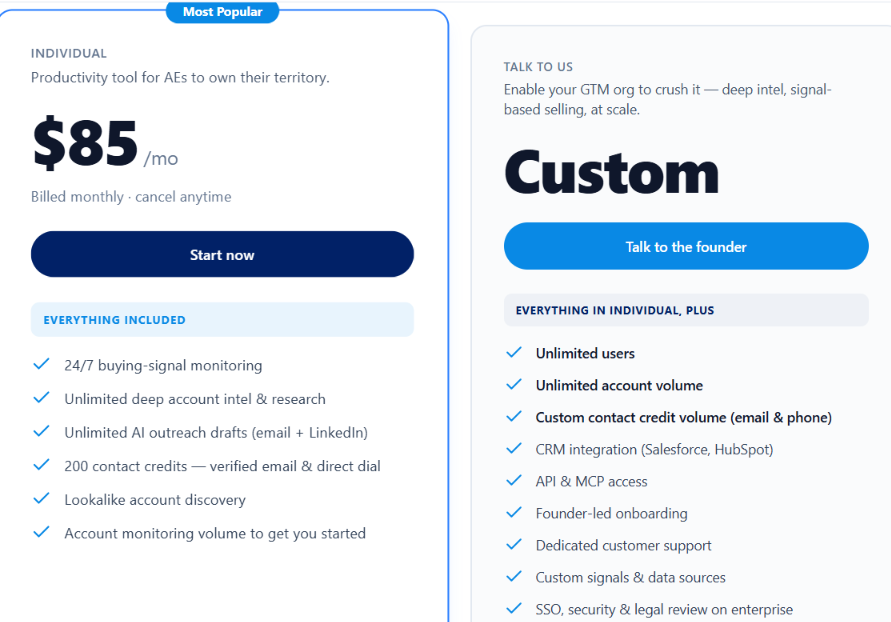
Salesmotion Signal Agent Pricing
This image shows the Salesmotion Signal Agent Pricing

Salesmotion starts at $85 per month, with monthly billing and no annual commitment.

  • Individual – $85/month includes 100 monitored accounts, continuous signal tracking, account research, unlimited AI outreach drafts, and 200 contact credits per month.
    ‍
  • Team – Custom pricing includes unlimited users, custom account monitoring limits, Salesforce and HubSpot integrations, API and MCP access, and custom signals.

You can change which accounts you monitor as your target list changes. Salesmotion is particularly relevant for account executives and SDRs working from a defined list of companies. Instead of checking each account for changes, they can review the signals Salesmotion finds and decide which ones give them a reason to reach out.

3. CommunityTracker – Best for Finding Buying Signals in Online Communities

Someone asking for an alternative to a competitor on Reddit could be a potential customer. The same goes for a LinkedIn post requesting software recommendations or a Slack discussion about a problem your product solves.

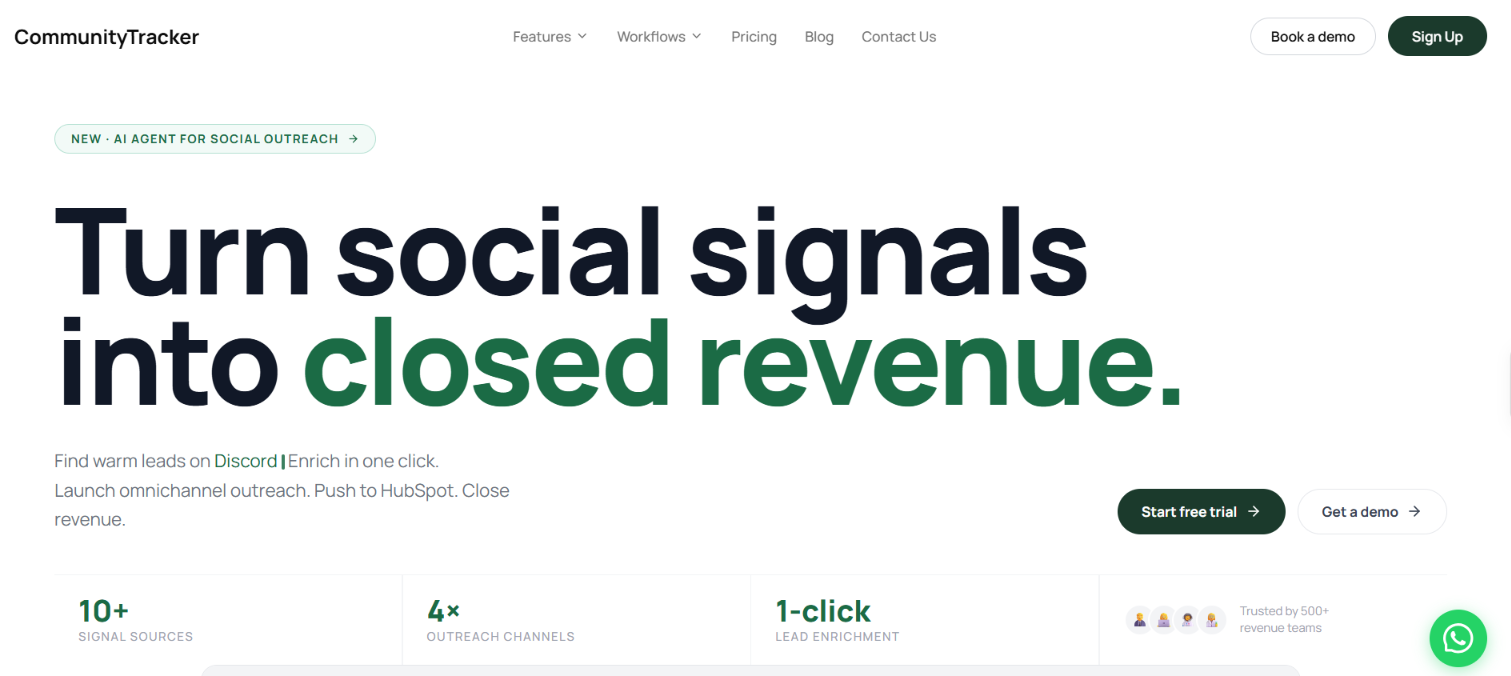
CommunityTracker homepage
This image shows the CommunityTracker homepage

CommunityTracker helps you find these conversations without manually checking each platform. It monitors Reddit, LinkedIn, Slack, Discord, X, and other online communities for buying signals. It also scores posts by buying intent, helping you separate people actively looking for solutions from those simply discussing a topic.

Once you find a relevant conversation, CommunityTracker can help you identify the person behind it, find their contact details, and prepare outreach based on what they posted.

How CommunityTracker Tracks Buying Signals

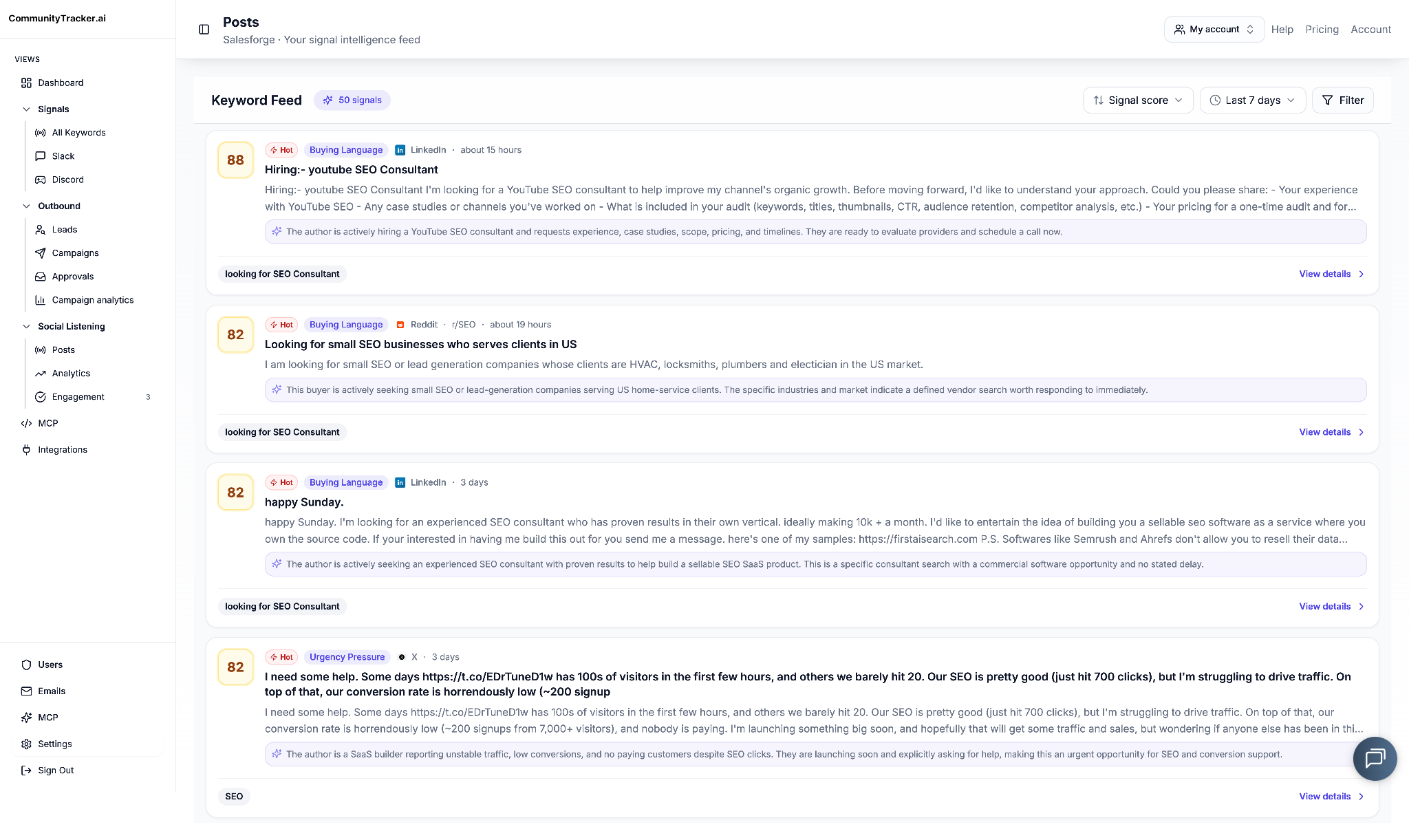
CommunityTracker buying signals dashboard
This image shows the CommunityTracker buying signals dashboard

CommunityTracker looks for buying intent in posts and discussions across supported online communities. You can track keywords, competitor names, and problems related to your product.

  • Product recommendations find people asking others to suggest tools or services in your category.
    ‍
  • Competitor alternatives identify posts from people comparing products or looking to switch providers.
    ‍
  • Pain-point detection finds conversations where people describe problems your product could address.
    ‍
  • AI intent scoring ranks posts based on buying intent, so you can review stronger signals first.
    ‍
  • Real-time alerts notify you when relevant conversations appear, with Slack alerts available on supported plans.
    ‍
  • Lead enrichment finds verified emails, LinkedIn profiles, job titles, and company details for people behind the posts.
    ‍
  • Signal-based outreach uses the original post to prepare email sequences, LinkedIn messages, Reddit replies, or AI voice calls.

If someone posts on Reddit asking for an alternative to their current sales tool, CommunityTracker can identify the discussion and score its buying intent. You can then enrich the author's details and prepare a message addressing the problem they mentioned.

This makes CommunityTracker different from company-level monitoring tools. It focuses on what individual buyers are saying in online communities rather than funding announcements, executive changes, or hiring activity.

Pros of CommunityTracker

  • Monitors buying signals across 12+ online communities.
    ‍
  • Identifies product comparisons, recommendations, and buyer pain points.
    ‍
  • Scores conversations by buying intent.
    ‍
  • Offers email, LinkedIn, Reddit, and AI voice outreach.

Cons of CommunityTracker 

  • Free plan monitors only one Reddit keyword.
    ‍
  • Advanced AI filtering and intent scoring require the Pro plan or higher.

CommunityTracker Pricing

CommunityTracker Pricing
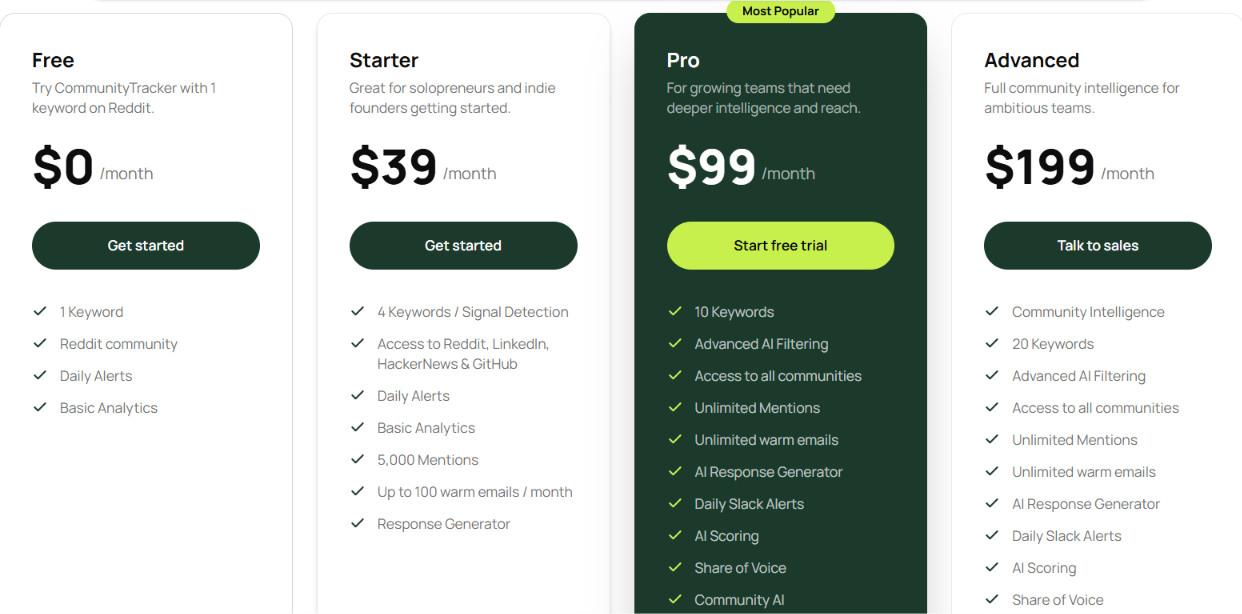
This image shows the CommunityTracker Pricing

CommunityTracker offers a free plan and three paid plans.

  • Free – $0/month includes one Reddit keyword, daily alerts, and basic analytics.
    ‍
  • Starter – $39/month includes four keywords, Reddit, LinkedIn, Hacker News, and GitHub monitoring, up to 5,000 mentions, and 100 warm emails per month.
    ‍
  • Pro – $99/month includes 10 keywords, all supported communities, AI intent scoring, advanced filtering, unlimited mentions, unlimited warm emails, and daily Slack alerts.
    ‍
  • Advanced – $199/month includes 20 keywords, Community Intelligence, Share of Voice tracking, Share of Voice Exporter, and AI Visibility tracking.

All paid plans are billed monthly, with no long-term contracts.

CommunityTracker is worth considering if your buyers use online communities to discuss software problems, ask for recommendations, or compare competing tools. It helps you find these conversations, gauge the buyer’s intent, and reference the original post when reaching out.

4. Coldreach AI SDR – Best for Finding Custom Buying Signals and Running Outreach

Coldreach homepage
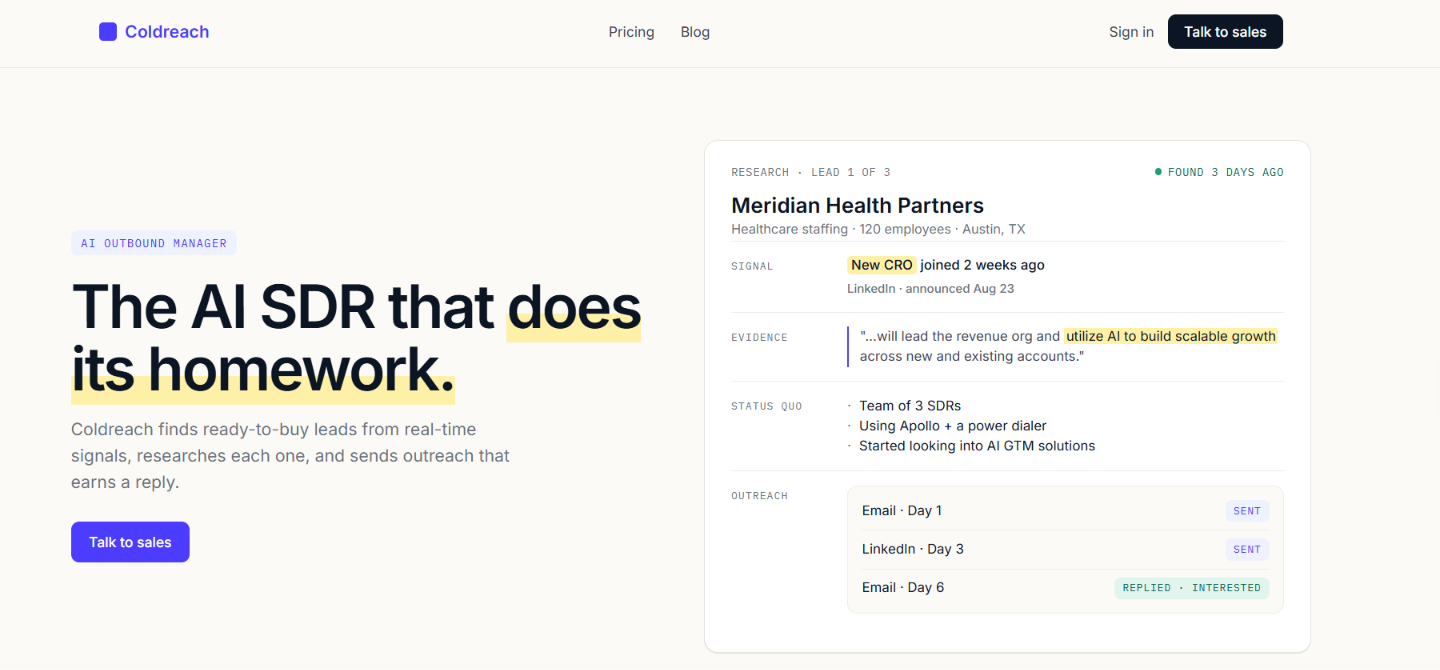
This image shows the Coldreach homepage

Coldreach AI SDR is an AI sales agent that finds companies showing buying signals, researches why they might need your product, and runs personalized email and LinkedIn outreach. It monitors 113M+ companies and lets you define buying signals in plain English rather than relying only on predefined categories.

For example, if you sell expense management software, you can ask Coldreach to find companies mentioning Excel-based expense reporting in their finance job descriptions.

Coldreach searches for matching companies, provides evidence from its research, and uses those findings to write outreach messages. You can review the messages before they go out or let the agent handle sending automatically.

How Coldreach AI SDR Tracks Buying Signals

Researches based on signals and prepares outreach accordingly
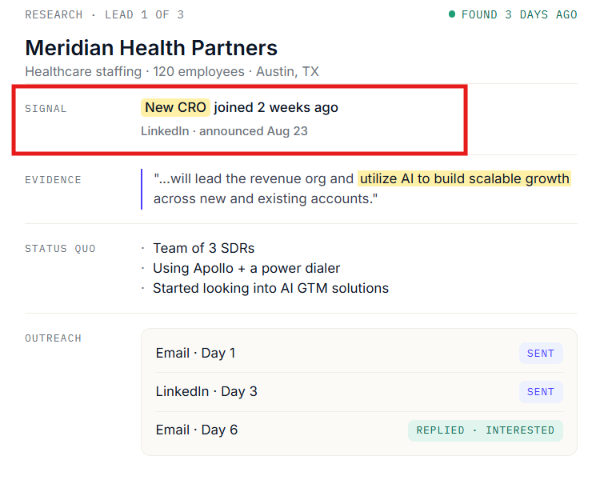
This image shows the Researches based on signals and prepares outreach accordingly

Coldreach monitors 113M+ companies and looks for signals related to the product you're selling. Instead of choosing only from predefined signal categories, you can describe what you want to find.

  • Job descriptions find mentions of problems or processes your product could address.
    ‍
  • Employee changes track recent hires and relevant details from employee profiles.
    ‍
  • Company news identifies events such as cybersecurity incidents or other developments relevant to your offering.
    ‍
  • Website research checks company pages for information such as certifications and technology requirements.
    ‍
  • SEC filings examine company reports for business initiatives and priorities.
    ‍
  • LinkedIn activity finds relevant posts from executives and employees.
    ‍
  • Custom signals let you describe your own buying criteria, which Coldreach can help set up.

For example, suppose you sell software that replaces manual expense reporting. You could ask Coldreach to find companies whose finance job descriptions mention preparing expense reports in Excel. Coldreach can research those companies, show where it found the information, and use that detail when writing outreach.

You can review messages before sending them in Reveal mode or let Coldreach send automatically in Autopilot mode.

Pros of Coldreach AI SDR 

  • Lets you define buying signals in plain English.
    ‍
  • Researches companies across multiple sources.
    ‍
  • Shows supporting evidence for detected signals.
    ‍
  • Includes email and LinkedIn outreach.
    ‍
  • Offers manual approval and automatic sending modes.
    ‍
  • Includes email domains, warmed mailboxes, and sending infrastructure.

Cons of Coldreach AI SDR

  • Starts at $899 per month.
    ‍
  • Salesforce sync is included in the custom-priced Scale plan.
    ‍
  • Custom signals may require help from Coldreach during setup.

Coldreach AI SDR Pricing

Coldreach pricing
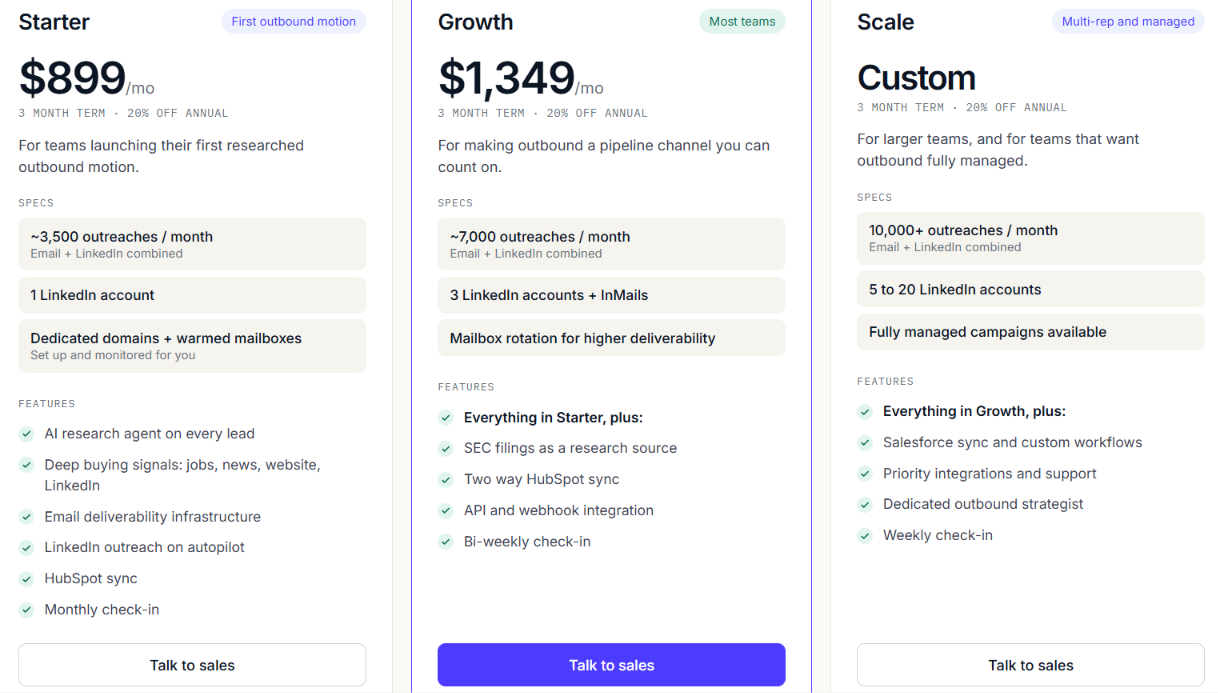
This image shows the Coldreach pricing

Coldreach offers two fixed-price plans and a custom plan. All plans require a three-month term.

  • Starter – $899/month includes approximately 3,500 email and LinkedIn outreaches per month, one LinkedIn account, AI research, buying signals from jobs, news, websites, and LinkedIn, warmed mailboxes, and HubSpot sync.
    ‍
  • Growth – $1,349/month includes approximately 7,000 outreaches per month, three LinkedIn accounts, SEC filing research, two-way HubSpot sync, API access, and webhooks.
    ‍
  • Scale – Custom pricing includes 10,000+ outreaches per month, 5–20 LinkedIn accounts, Salesforce sync, custom workflows, and the option for fully managed campaigns.

Coldreach also advertises a 20% discount on annual commitments. Coldreach makes sense when your ideal buying signals are too specific for standard funding or hiring alerts. You can define exactly what to look for, see the evidence behind each lead, and run outreach from the same tool.

However, if you only need buying-signal alerts and already have an outreach system, its $899 starting price and three-month commitment may be more than you need.

5. Claygent – Best for Researching Custom Buying Signals

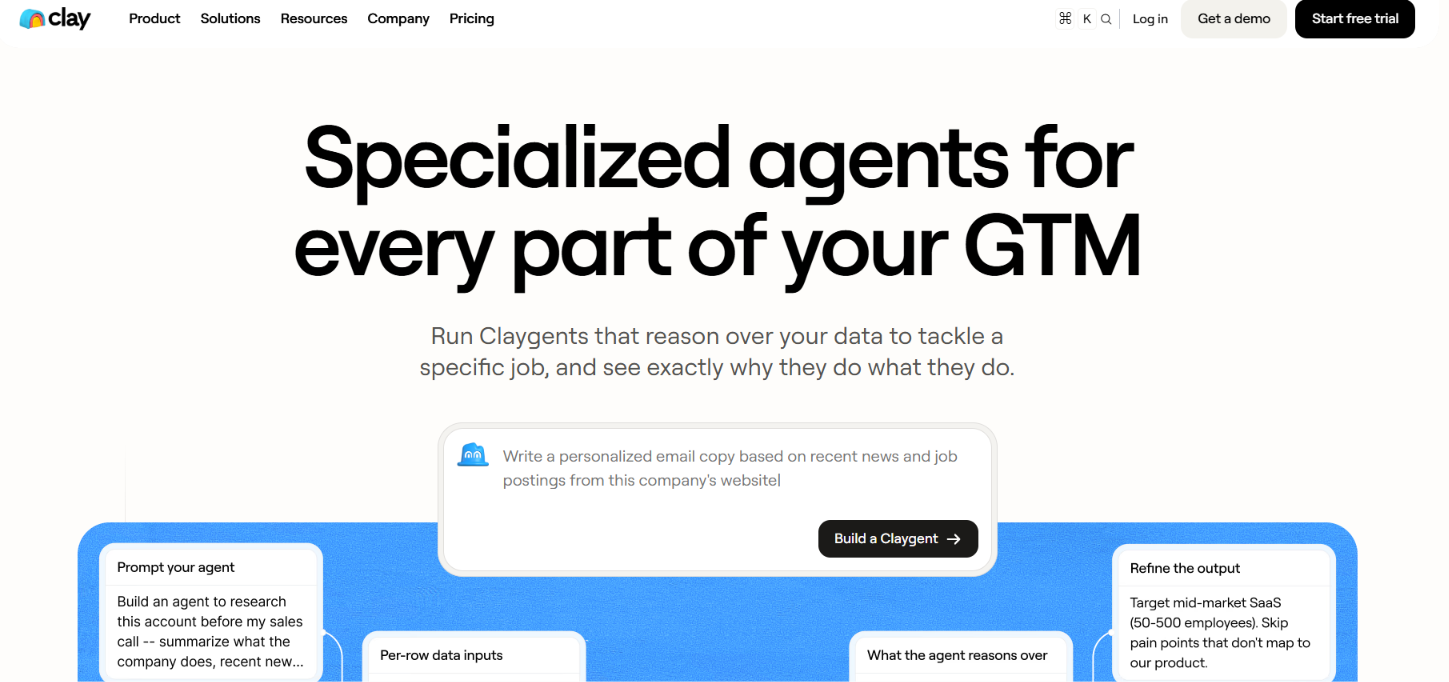
Claygent homepage
This image shows the Claygent homepage

Claygent is an AI research agent within Clay that helps you find buying signals and company information that standard data providers may not offer.

You can give it a specific research task, such as checking whether a company recently hired a new executive, announced funding, or changed the technologies it uses.

Claygent researches the relevant information and returns structured results that you can use to qualify accounts or build sales workflows. It also supports custom signals. For example, a cybersecurity company could use Clay to track businesses announcing SOC 2 certifications, hiring CISOs, or updating compliance-related pages.

How Claygent Tracks Buying Signals

Claygent researches websites and other sources based on your instructions. Claygent researches websites and other sources to find that information. You can also combine its findings with Clay's data providers and connected systems.

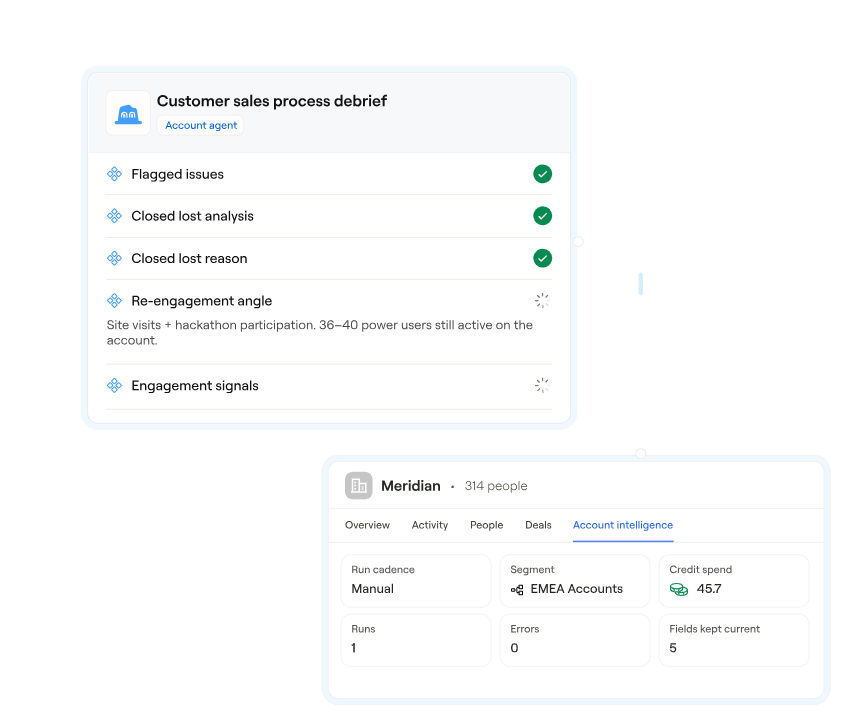
A Claygent synthesizes data from your CRM, data warehouse, Gong calls, and other signals in Audiences
This image shows a Claygent synthesizes data from your CRM, data warehouse, Gong calls, and other signals in Audiences
  • Funding announcements research recent funding news to identify companies that have raised money.
    ‍
  • Technology changes use Clay's data providers and custom research to identify changes in the tools companies use.
    ‍
  • Website changes examine company pages for updates related to your product or industry.
    ‍
  • Company news finds events such as product launches, security incidents, and new investments.
    ‍
  • Custom signal research lets you investigate specific information that standard data filters may miss.
    ‍
  • Account monitoring uses Clay's Account Agents to research accounts within a segment and track what has changed over time.

You could ask Claygent to research companies that recently announced SOC 2 certification and check whether they are also hiring security leaders.

Clay can combine those findings with other signals and route matching accounts into a sales workflow. General-purpose Claygents run on demand or on a schedule. For ongoing account research that remembers what changed, Clay offers separate Account Agents in Audiences.

Pros of Claygent

  • Supports custom research instructions in natural language.
    ‍
  • Can combine research with Clay's 200+ enrichments.
    ‍
  • Provides reasoning traces for agent decisions, with research replays available through supported models such as Navigator.
    ‍
  • Supports scheduled research and ongoing account monitoring through different agent types.
    ‍
  • Can use research findings in CRM and outreach workflows.

Cons of Claygent

  • Requires you to configure research prompts and workflows.
    ‍
  • General-purpose Claygents do not retain account history between runs.
    ‍
  • Account Agents are available only on Launch, Growth, and Enterprise plans.
    ‍
  • Research costs vary depending on the AI model and request.
    ‍
  • Claygent is not a standalone AI SDR that manages outreach from start to finish.

Claygent Pricing

Claygent is available within Clay rather than through a separate subscription. General-purpose Claygents are available across all Clay plan tiers. Account Agents, currently in beta, are available on Launch, Growth, and Enterprise plans.

Clay charges for agent usage through two components.

  • Data credits vary for advanced reasoning models, while Clay's own models and standard content generation use fixed pricing.
    ‍
  • Actions cost one action per AI prompt. Account Agents use one action per record processed.

Claygent is useful when you need to research buying signals that ordinary filters cannot identify. You can investigate specific company changes, combine the findings with other data, and use them to decide which accounts deserve attention.

If you only need basic funding or job-change alerts, however, setting up custom research and workflows may be more work than necessary.

6. Ava by Artisan – Best for Turning Buying Signals Into Automated Outreach

Ava by Artisan homepage
This image shows the Ava by Artisan homepage

Ava by Artisan is an AI BDR that monitors buying signals and uses them to start sales conversations. It can find prospects, write personalized messages, handle replies, and book meetings without requiring a rep to manage every step.

Suppose you sell HR software and want to reach companies hiring their first HR manager. You can set that hiring event as a trigger, choose the company sizes and industries you want to target, and specify which decision-makers Ava should contact.

Once a company matches, Ava can find relevant contacts, research them, and prepare outreach tied to the hiring event. You can review messages before they go out or let Ava send them automatically.

How Ava by Artisan Tracks Buying Signals

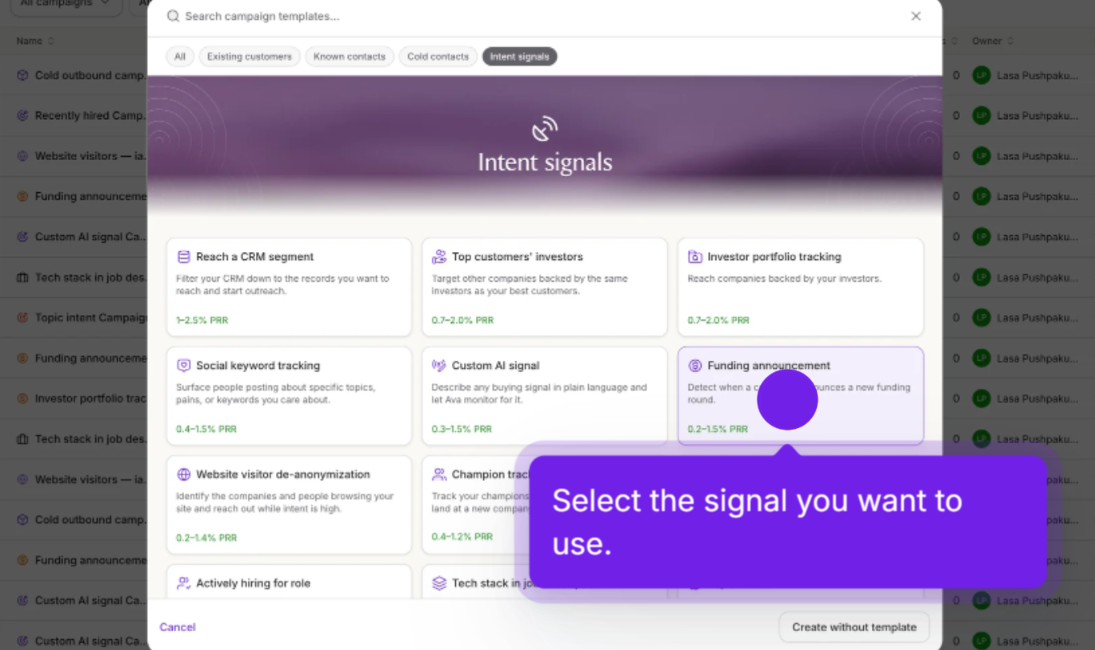
Intent signals by Artisan
This image shows the Intent signals by Artisan

Artisan offers dedicated signal campaigns. Each campaign has its own targeting rules, so you can control which events matter and who receives outreach.

  • Hiring signals track recent hires, first hires in specific roles or departments, and companies recruiting for selected positions.
    ‍
  • Funding announcements identify companies that have raised funding within a period you specify.
    ‍
  • Champion tracking follows selected contacts when they move to new companies or roles.
    ‍
  • Technology signals find mentions of particular tools in job descriptions.
    ‍
  • Website visitors let you target identified visitors or people at identified companies based on activity on your connected website.
    ‍
  • Social and topic intent monitor selected keywords and topics to find relevant prospect activity.
    ‍
  • Custom AI signals let you describe a buying trigger in plain English, such as a company winning a contract or earning a certification, and choose how often Ava searches for it.

You can narrow these campaigns by industry, company size, location, job title, and seniority. Ava also offers an optional AI qualification step. Before contacting someone, it can research whether that prospect meets your conditions. Leads that fail the checks are excluded from outreach.

Once the campaign is running, Ava can personalize messages, manage follow-ups, respond to interested prospects, and schedule meetings.

Pros of Ava by Artisan 

  • Prebuilt campaigns cover hiring, funding, champion changes, and other buying events.
    ‍
  • Custom AI signals allow research beyond predefined triggers.
    ‍
  • Signal recency and audience filters help narrow outreach.
    ‍
  • Includes 250M+ B2B contacts and enrichment from 22+ sources.
    ‍
  • Can take a prospect from signal detection through meeting booking.

Cons of Ava by Artisan

  • Website visitor campaigns require a connected website.
    ‍
  • Optional AI qualification uses additional credits.
    ‍
  • Calling still involves rep-managed steps through the dialer.

Artisan Pricing

Artisan does not publish fixed monthly prices for Ava. Plans are quoted based on lead volume, mailboxes, and dialer seats.

Plan Monthly Lead Volume Pricing
Team Approximately 2,500 leads Custom quote
Scale Approximately 6,000 leads Custom quote
Enterprise Custom volume Custom quote

Every plan includes Ava's campaign types, autonomous replies, meeting booking, the contact database, Salesforce and HubSpot sync, and onboarding support. Scale adds a dedicated customer success manager, CRM setup, and priority support.

Enterprise includes a forward-deployed strategist, additional rollout assistance, and advanced security controls. The AI dialer is a per-seat add-on.

Ava's main advantage is that a buying signal can become the starting point for an entire sales conversation. A new hire, funding event, or website visit can lead to targeted outreach without someone manually moving the prospect between tools.

7. Amplemarket Duo – Best for Finding Contact-Level Buying Signals

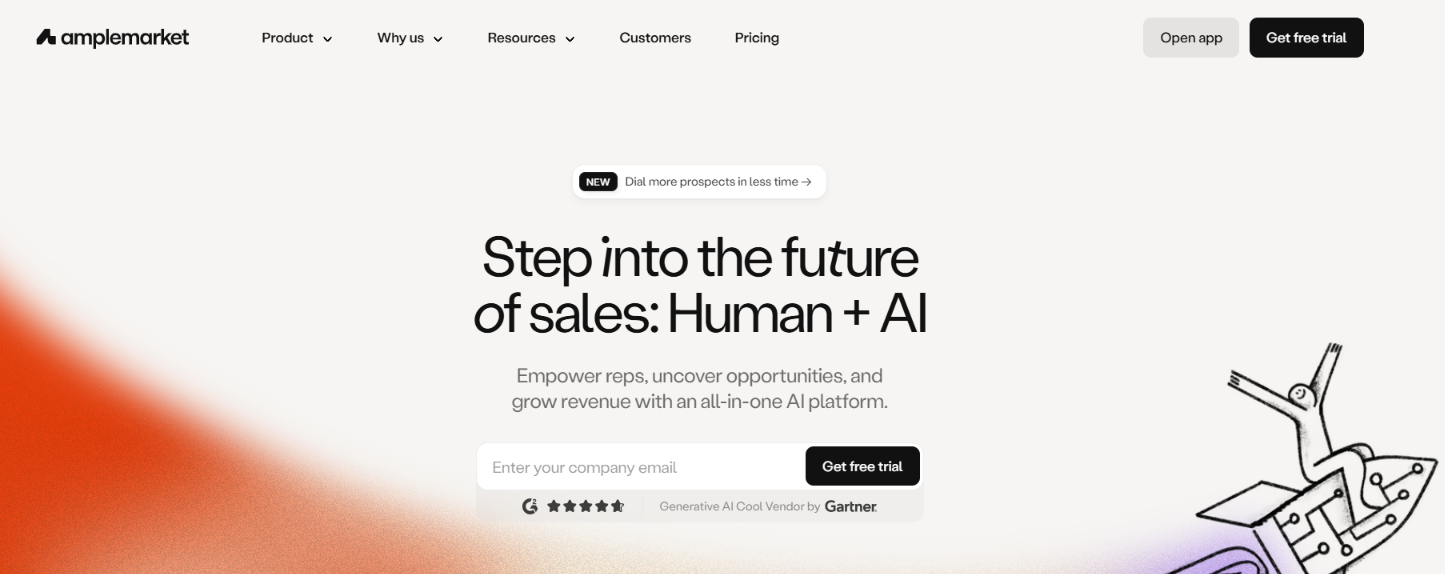
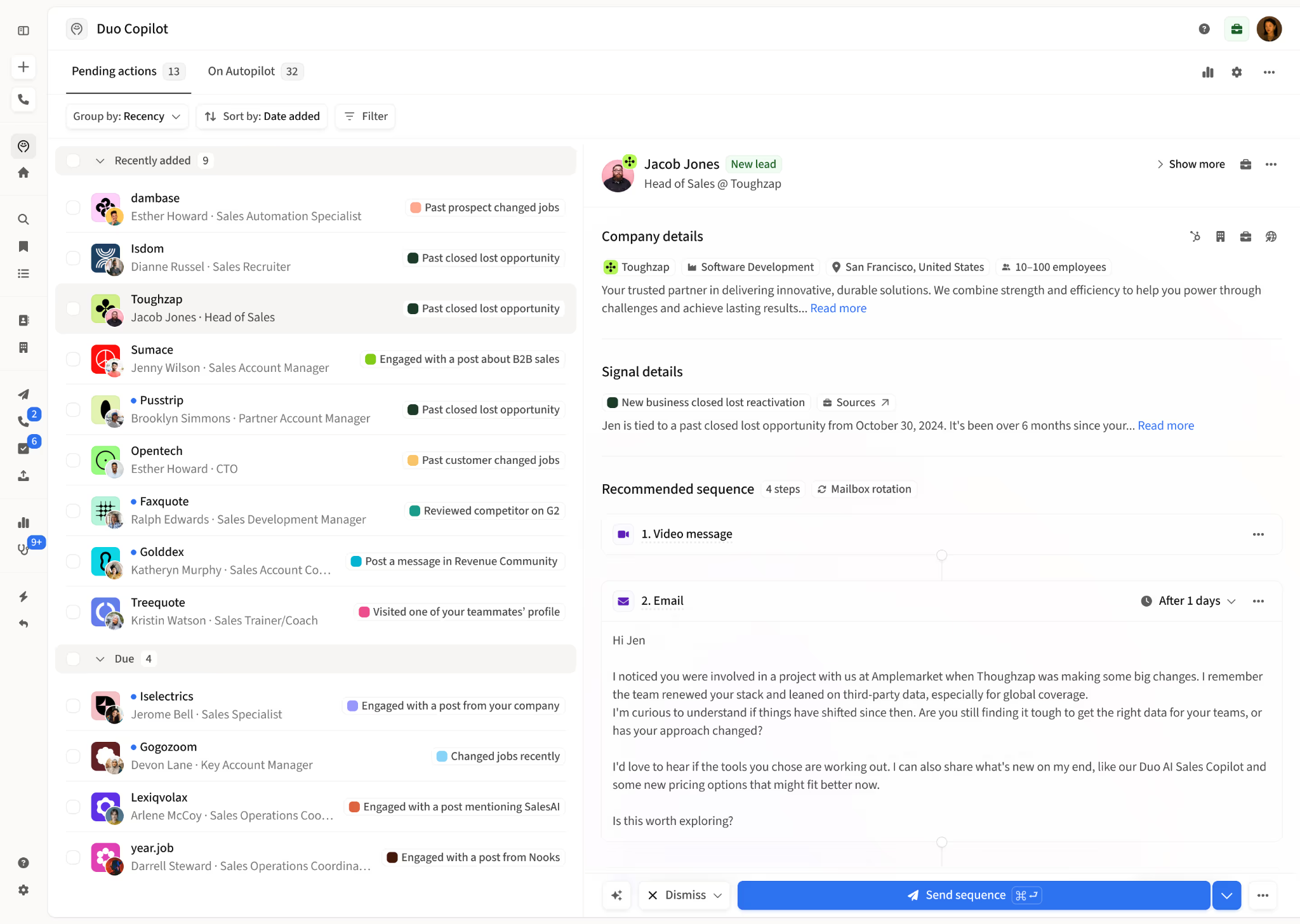
Amplemarket Duo homepage
This image shows the Amplemarket Duo homepage

Amplemarket Duo is an AI sales copilot that helps sales reps identify prospects showing buying intent, research their activity, and prepare personalized outreach.

One of its biggest differences is the level of detail behind its buying signals. Instead of only showing that a company might be interested in a particular topic, Amplemarket can identify specific people interacting with competitors, discussing problems in Slack communities, or leaving reviews on G2.

For example, imagine a prospect leaves a negative review of your competitor on G2. Duo can surface that activity, provide context about the prospect, and suggest an outreach sequence based on the issue they raised.

It monitors buying signals daily and presents recommended prospects to sales reps. Reps can review the research, edit the suggested messages, and decide when to send them.

How Amplemarket Duo Tracks Buying Signals

Amplemarket Duo collects signals
This image shows the Amplemarket Duo collects signals

Amplemarket supports 24+ buying-signal types across social activity, company changes, website behavior, CRM records, and external intent sources.

  • Competitor activity identifies people interacting with competitors, including negative or neutral G2 reviews.
    ‍
  • Slack community discussions monitors relevant conversations where prospects mention problems, ask for recommendations, or discuss solutions.
    ‍
  • Job changes tracks prospects, former customers, and past champions moving to new roles or companies.
    ‍
  • Company activity follows funding announcements, hiring, company news, and other business changes.
    ‍
  • Website engagement uses activity such as pricing-page visits, content downloads, and abandoned forms to identify interest.
    ‍
  • Product usage tracks trial activity, feature adoption, usage spikes, and approaching trial expiration.
    ‍
  • Third-party intent brings in signals from sources such as Demandbase and 6sense through connected data.
    ‍
  • Custom signals lets you bring your own buying events from a CRM or API.

Duo also researches the people behind these signals. For each recommended prospect, reps can review contact details, company information, recent activity, and the reason Duo suggested reaching out.

The copilot then prepares a personalized multichannel sequence. Reps can edit, regenerate, or send it.

Pros of Amplemarket Duo 

  • Tracks 24+ types of buying signals.
    ‍
  • Identifies individual prospects behind certain competitor and social signals.
    ‍
  • Covers Slack discussions, G2 reviews, job changes, and website activity.
    ‍
  • Provides prospect research alongside each recommendation.
    ‍
  • Creates personalized multichannel sequences based on detected signals.
    ‍
  • Supports custom signals through CRM and API connections.

Cons of Amplemarket Duo

  • The starting price is higher than that of basic signal-monitoring tools.
    ‍
  • Some signal types depend on data from your CRM, website, or connected tools.
    ‍
  • Reps still need to review recommendations and manage sending decisions.
    ‍
  • Signal quality depends on the relevance of the tracked activity to your buyers.
    ‍
  • Advanced plans require a custom quote.

Amplemarket Duo Pricing

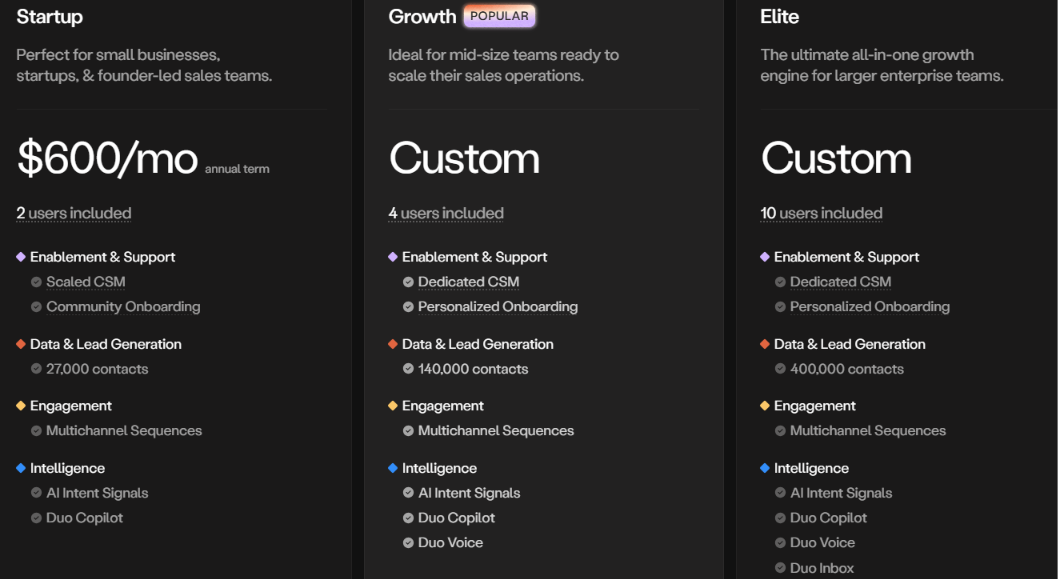
Amplemarket Duo pricing
This image shows the Amplemarket Duo pricing

Duo Copilot is included in Amplemarket's subscription plans.

Plan Pricing Included Users
Startup $600/month with an annual term 2
Growth Custom pricing 4
Elite Custom pricing 10

The Startup plan includes Duo Copilot, AI intent signals, multichannel sequences, and 27,000 contacts. Growth increases the contact allowance to 140,000 and adds Duo Voice, dedicated customer success support, and personalized onboarding.

Elite includes 400,000 contacts, Duo Inbox, and additional features for larger sales operations. All three plans offer a free trial. Amplemarket Duo stands out for signals that reveal what a specific person is doing, particularly around competitors and community discussions.

It also keeps reps involved. Rather than automatically running the entire sales conversation, Duo recommends prospects, explains the signals, and prepares outreach for reps to review. That makes it particularly relevant for sales reps who want fresh buying opportunities each day but prefer to control the conversations themselves.

8. Alice by 11x – Best for Running Signal-Based Outbound Campaigns

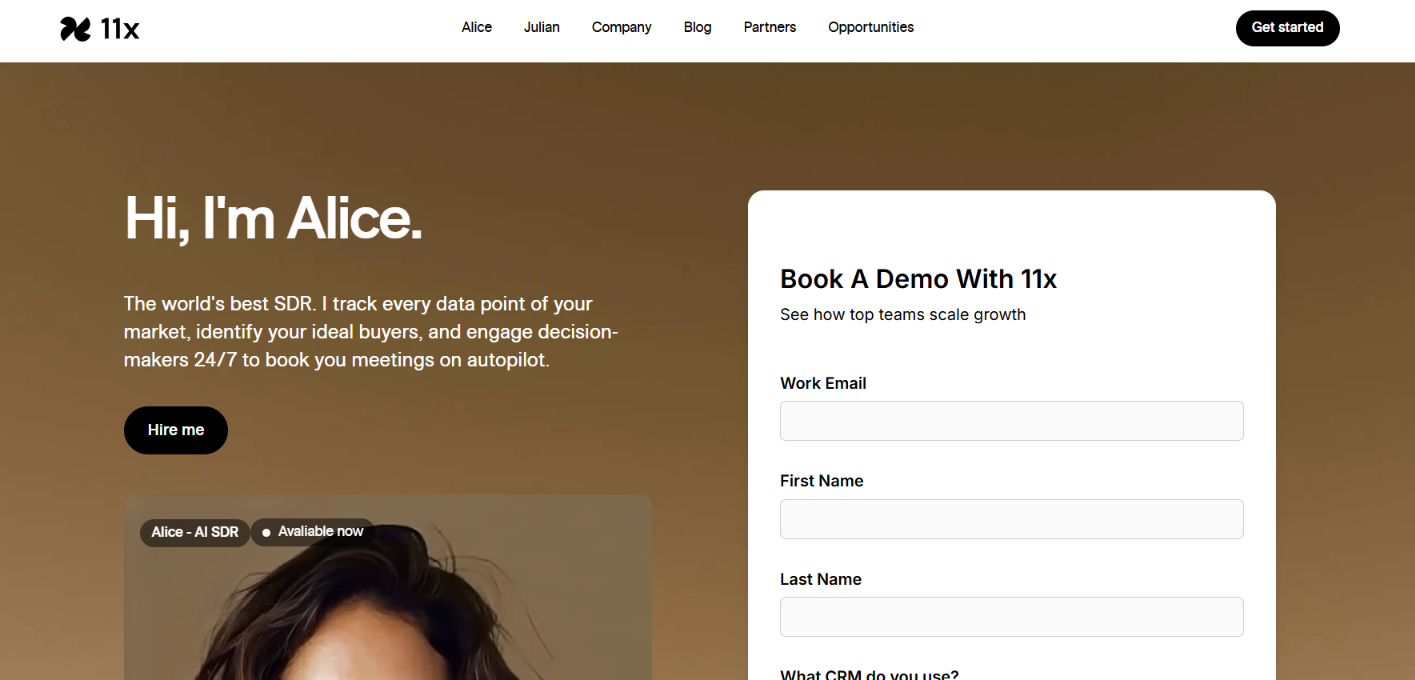
Alice by 11x homepage
This image shows the Alice by 11x homepage

Alice by 11x is an AI SDR that researches prospects, tracks buying signals, and runs outbound campaigns across multiple channels. One of its main features is the ability to build and refresh prospect lists based on buying signals. For example, suppose you're targeting companies expanding their sales departments.

11x can use hiring activity to find matching accounts and add them to an outbound campaign. As more companies meet your targeting conditions, the campaign audience can update without someone manually rebuilding the list. Alice then researches the prospects, prepares personalized messages, manages follow-ups, and handles replies.

How 11x Tracks Buying Signals

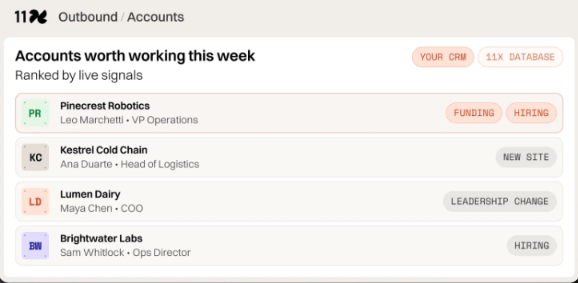
Example of accounts ranked by live signals
This image shows the Example of accounts ranked by live signals

11x monitors changes in company activity and buyer behavior to identify potential sales opportunities.

  • Funding announcements identify companies that have recently raised capital.
    ‍
  • Hiring activity tracks hiring spikes that may indicate business expansion.
    ‍
  • Job changes identifies prospects moving into new roles or companies.
    ‍
  • Technology changes tracks shifts in the tools companies use.
    ‍
  • Website visits identifies accounts visiting important pages, including pricing pages.
    ‍
  • G2 buying intent identifies accounts researching your company, competitors, or product category.
    ‍
  • CRM activity combines existing account information with fresh signals to revisit inactive leads and closed-lost opportunities.
    ‍
  • Signal-based targeting lets you define the buying events and audience conditions that determine which accounts enter your campaigns.

11x also offers Deep Research, which combines live web research, company news, public filings, CRM records, and your company's knowledge.

Alice uses this information to understand why a prospect might be worth contacting and prepare messages based on that context. Once a campaign starts, 11x coordinates email and social outreach alongside rep-led calling.

Its Smart Replies feature can answer common questions, handle objections, and escalate sensitive conversations to sales reps.

Pros of 11x

  • Uses live buying signals to build and refresh outbound campaign lists.
    ‍
  • Tracks funding, hiring, job changes, technology shifts, and website activity.
    ‍
  • Supports email, social outreach, and rep-led calling.
    ‍
  • Supports reactivation campaigns for inactive and closed-lost leads.

Cons of 11x

  • Public subscription prices are not provided in the supplied information.
    ‍
  • Covers the full outbound process, which may be unnecessary if you only need buying-signal alerts.
    ‍
  • Live phone conversations still require a sales rep.
    ‍
  • The supplied information does not specify how frequently each buying-signal source is updated.
    ‍
  • Website visitor identification depends on the accounts that can be identified.

11x Pricing

11x does not list subscription prices in the supplied information. You can contact its sales team or book a demo to learn about pricing.

Alice's main advantage is its ability to keep outbound campaigns connected to changing buyer activity. Instead of rebuilding lists whenever companies raise funding, hire employees, or show interest, 11x can refresh the campaign audience and carry that context into prospect research and outreach.

9. AiSDR – Best for Combining Multiple Buying Signals to Find Prospects

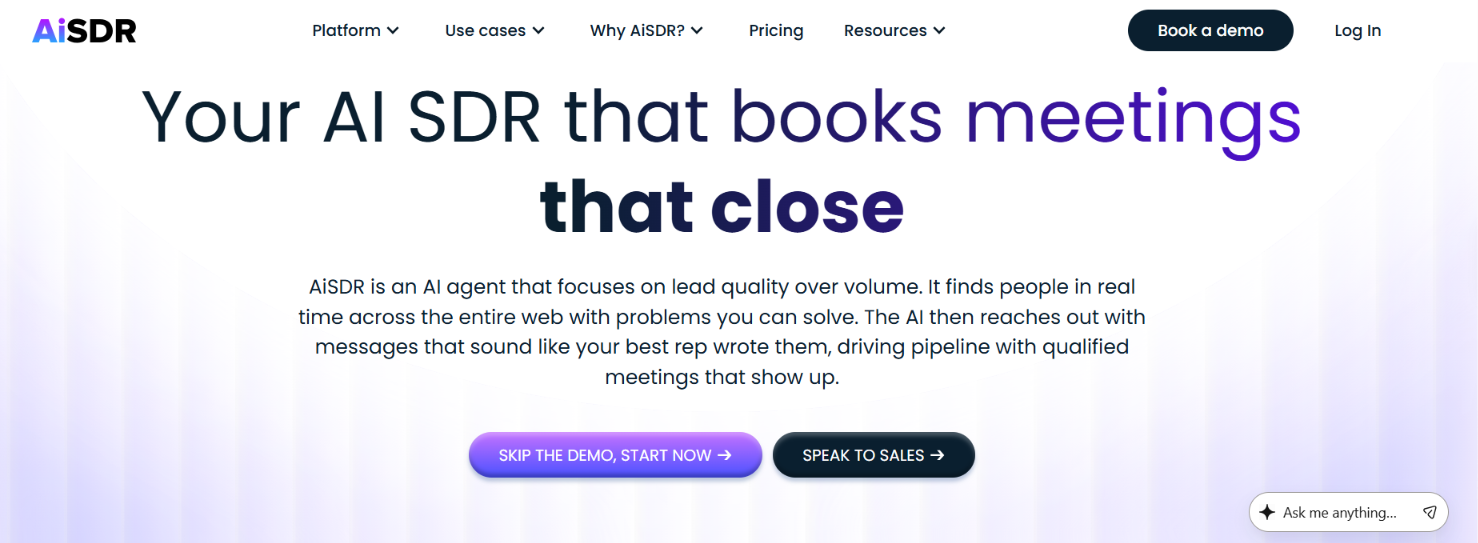
AiSDR homepage
This image shows the AiSDR homepage

AiSDR is an AI sales agent that finds prospects, researches their activity, and runs outreach through email and LinkedIn. Its Live AI feature lets you describe your ideal buyers in plain English, including the events that make them worth contacting.

For example, you could search for sales leaders at B2B SaaS companies that recently raised Series A funding and are hiring SDRs. AiSDR checks those conditions against live web data and returns matching prospects. It also shows which search criteria each prospect meets, so you can review the results before launching a campaign.

You can enable Add fresh leads daily to keep finding new matches without repeating the search manually.

How AiSDR Tracks Buying Signals

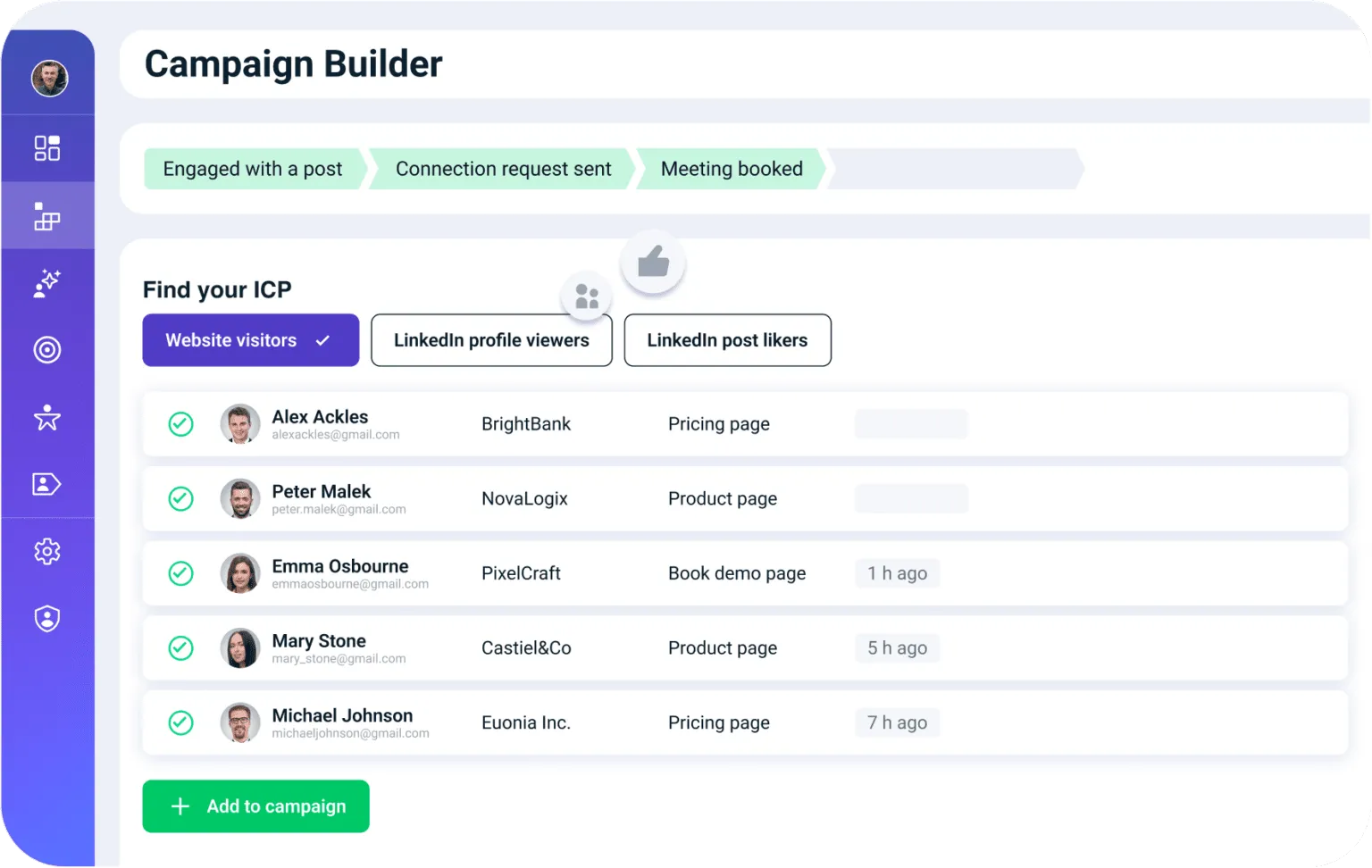
Find your ICP on AiSDR
This image shows to Find your ICP on AiSDR

AiSDR finds buying signals through Live AI searches, LinkedIn activity, and CRM monitoring. You can search for new prospects based on recent company events, track people engaging with relevant LinkedIn content, or monitor existing accounts for changes.

Here are the signals it supports.

  • Funding announcements identify companies that recently raised capital.
    ‍
  • Hiring activity finds companies recruiting for specific roles.
    ‍
  • Job changes track prospects moving into new positions.
    ‍
  • Technology usage identifies companies using specific software.
    ‍
  • LinkedIn post likes find people engaging with relevant posts.
    ‍
  • LinkedIn profile views identify people who viewed your LinkedIn profile or a connected team member's profile.
    ‍
  • LinkedIn keywords track posts and comments about relevant topics.
    ‍
  • CRM monitoring detects funding, hiring, and organizational changes.
    ‍
  • Website visits identify companies visiting your website.

AiSDR can also score CRM accounts against your chosen criteria, helping you decide which prospects to contact first.

Pros of AiSDR 

  • Supports LinkedIn post likes, profile views, and keyword tracking.
    ‍
  • Live AI lets you combine multiple buying signals in one search.
    ‍
  • Can add fresh matching leads to campaigns daily.
    ‍
  • Monitors existing CRM accounts for new opportunities.
    ‍
  • Scores companies against custom criteria and explains the matches.
    ‍
  • Handles email and LinkedIn outreach, replies, and meeting booking.

Cons of AiSDR

  • Too many search filters can reduce the number of matching leads.
    ‍
  • LinkedIn post tracking depends on engagement from the selected profiles.
    ‍
  • LinkedIn signals and website visitor tracking require a Team plan.
    ‍
  • AI Company Scoring uses one search credit per company.
    ‍
  • Team plan prices require contacting sales.

AiSDR Pricing

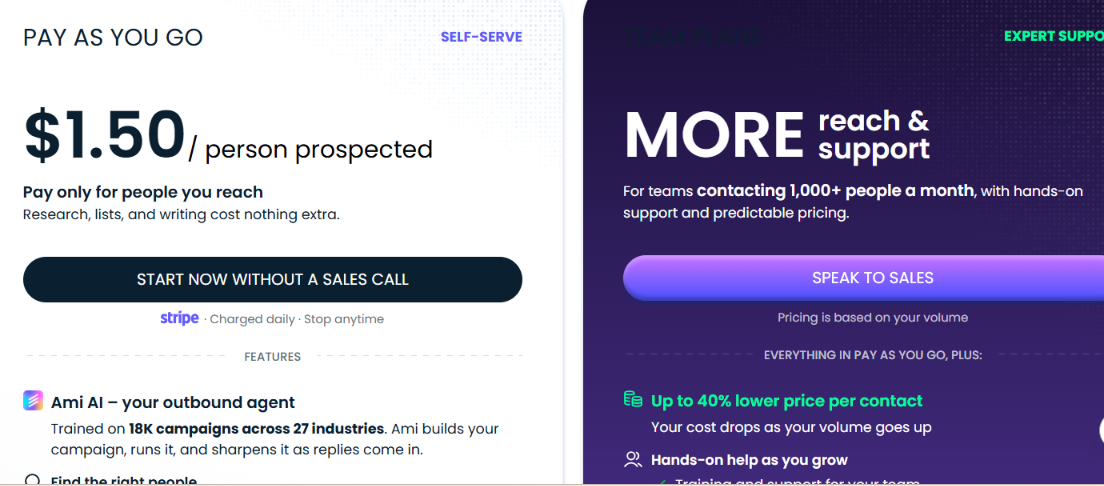
AiSDR pricing
This image shows the AiSDR pricing

AiSDR offers two pricing options.

  • Pay as you go – $1.50 per person prospected. Includes Live AI signals, prospect research, email and LinkedIn outreach, AI reply handling, and HubSpot sync. Billed daily.
    ‍
  • Team plans – Custom pricing. For businesses contacting 1,000+ prospects monthly. Adds LinkedIn signals, website visitor tracking, Salesforce integration, and a dedicated GTM engineer. Billed monthly with quarterly contracts.

Additional services include a warmed-up mailbox for $33, managed campaigns for $149 each, and fully managed outreach for $2,500/month.

AiSDR makes more sense if you plan to act on buying signals through outreach. If you only want LinkedIn engagement alerts or account monitoring, you'll be paying for a broader sales platform.

10. Jason AI by Reply.io – Best for Turning Buying Signals Into Automated Outreach

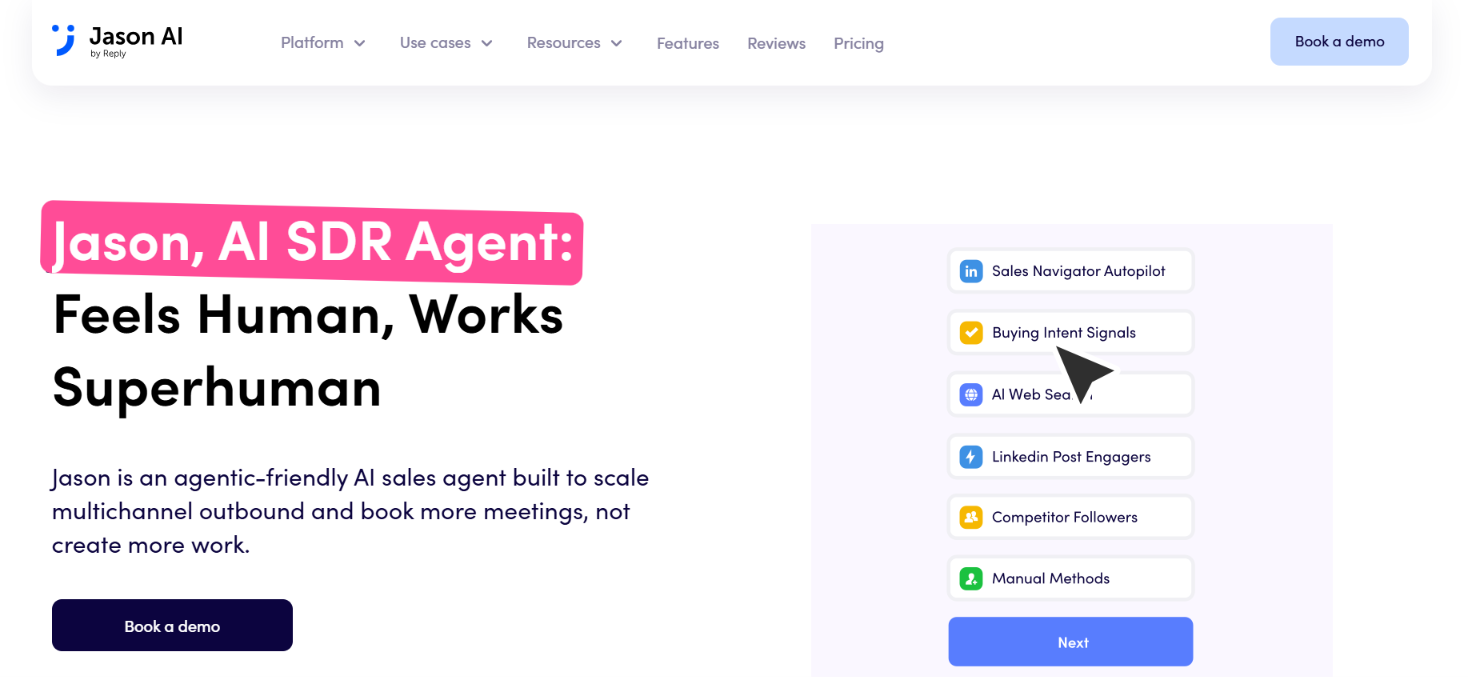
Jason by Reply homepage
This image shows the Jason by Reply homepage

Jason AI by Reply.io is an AI SDR that finds prospects, qualifies them against your ideal customer profile, and runs outreach through email and LinkedIn.

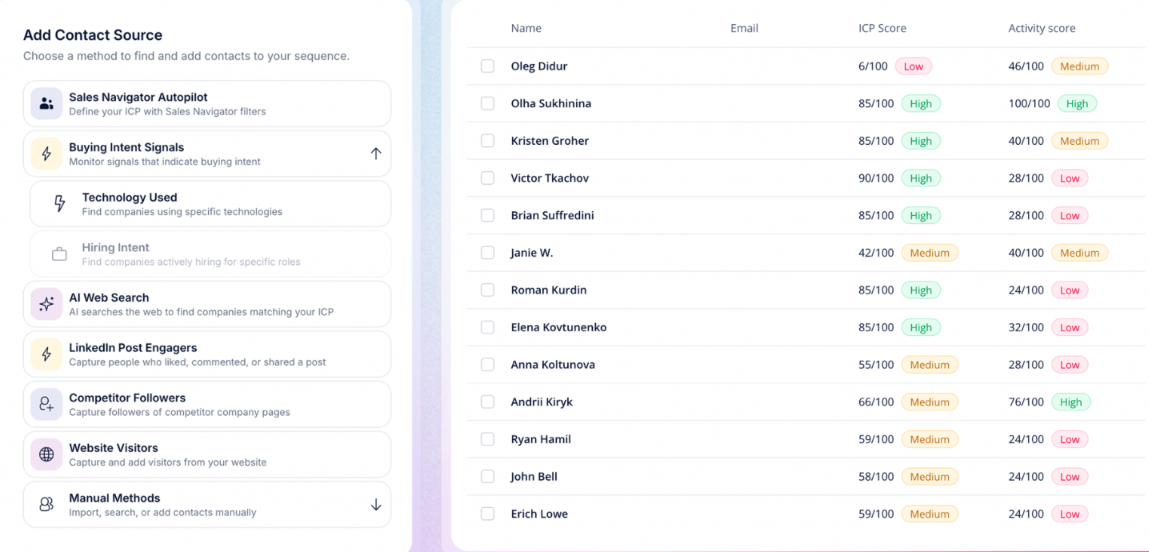
One useful feature is that buying signals can work as contact sources inside a campaign. For example, if you sell recruiting software, you can set up a campaign targeting companies hiring sales representatives. Jason finds matching companies, identifies relevant contacts, and adds them to your outreach sequence.

You can also target people engaging with specific LinkedIn posts or following competitors. Jason checks each contact against your ICP fit threshold before adding them, so your campaign doesn't depend on the signal alone.

How Jason AI Tracks Buying Signals

Find ideal contacts based on signals
This image shows to Find ideal contacts based on signals

Jason AI lets you select buying signals when creating an AI SDR sequence. Once the campaign is active, it finds matching prospects and adds them to the sequence automatically.

The supported buying intent signals include:

  • Hiring intent finds companies recruiting for specific job titles.
    ‍
  • Technology usage identifies businesses using selected software or tools.
    ‍
  • LinkedIn post engagement tracks people liking or commenting on selected posts or creator profiles.
    ‍
  • Competitor followers finds people following competing companies on LinkedIn.

You can set an ICP fit threshold to filter out contacts that don't match your target audience. There are some important limits. Hiring intent and technology usage require Sales Navigator Autopilot, and you cannot use both signals in the same sequence.

For LinkedIn post URLs, Jason monitors engagement for three days after launch. Creator profile tracking offers a selectable monitoring period. Beyond finding leads, Jason researches prospects, prepares personalized messages, handles replies, and books meetings.

You can approve messages yourself in Copilot mode or allow automatic sending through Autopilot.

Pros of Jason AI

  • Adds prospects to sequences based on selected buying signals.
    ‍
  • Tracks LinkedIn post engagement and competitor followers.
    ‍
  • Filters signal-based leads using ICP fit scores.
    ‍
  • Supports AI prospect research with links to the sources used.
    ‍
  • Runs email and LinkedIn outreach with automated follow-ups.
    ‍
  • Offers Copilot and Autopilot modes for message approval.
    ‍
  • Handles replies, re-engagement, and meeting scheduling.

Cons of Jason AI

  • Hiring intent and technology usage cannot run together in one sequence.
    ‍
  • Both signals require Sales Navigator Autopilot.
    ‍
  • LinkedIn post URL tracking stops after three days.
    ‍
  • Post engagement collection is limited to 100 contacts per post daily.
    ‍
  • Competitor follower collection is limited to 500 contacts per setup.
    ‍
  • Pricing starts at $800 per month.

Jason AI Pricing

Jason AI pricing
This image shows the Jason AI pricing

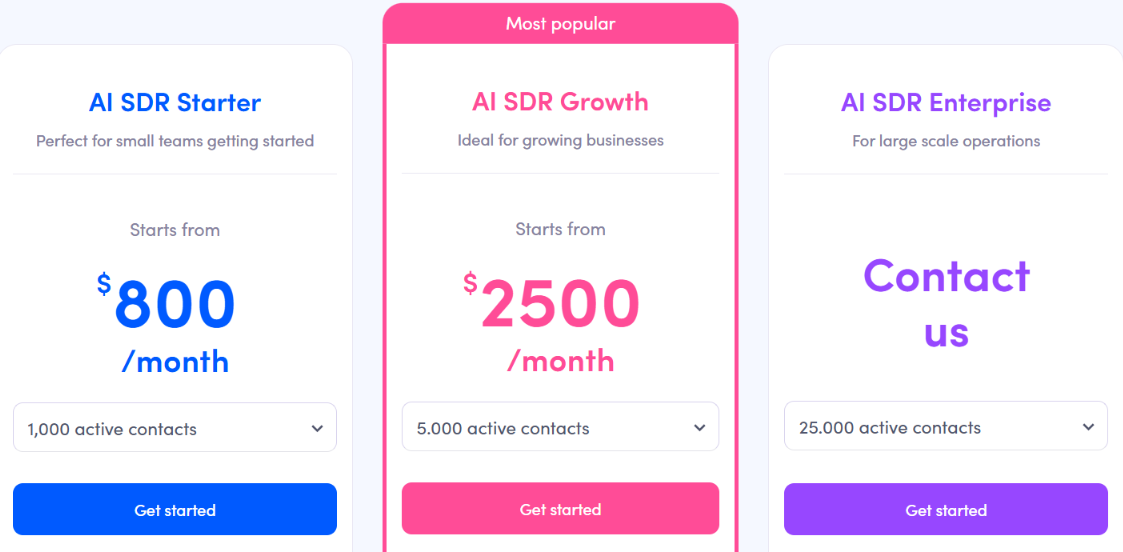
Jason AI offers three plans.

  • AI SDR Starter – Starts at $800/month. Includes 1,000 active contacts, intent signals, AI personalization, multichannel outreach, unlimited users, and one LinkedIn account.
    ‍
  • AI SDR Growth – Starts at $2,500/month. Includes 5,000 active contacts, Starter features, white-glove onboarding, a Slack channel, and custom playbooks.
    ‍
  • AI SDR Enterprise – Custom pricing. Includes 25,000 active contacts, custom playbooks and prompt engineering, and CEO strategy calls.

All three plans include unlimited mailboxes and warm-ups, along with Autopilot and Copilot modes.

Jason AI is worth considering if you want buying signals to feed directly into outreach campaigns. Its main distinction is the ability to collect signal-matched contacts, apply ICP filters, and start contacting them within the same sequence.

However, the restrictions on combining hiring and technology signals matter if your targeting depends on both conditions.

11. Piper by Qualified – Best for Tracking Inbound Buying Intent on Your Website

Piper by Qualified homepage
This image shows the Piper by Qualified homepage

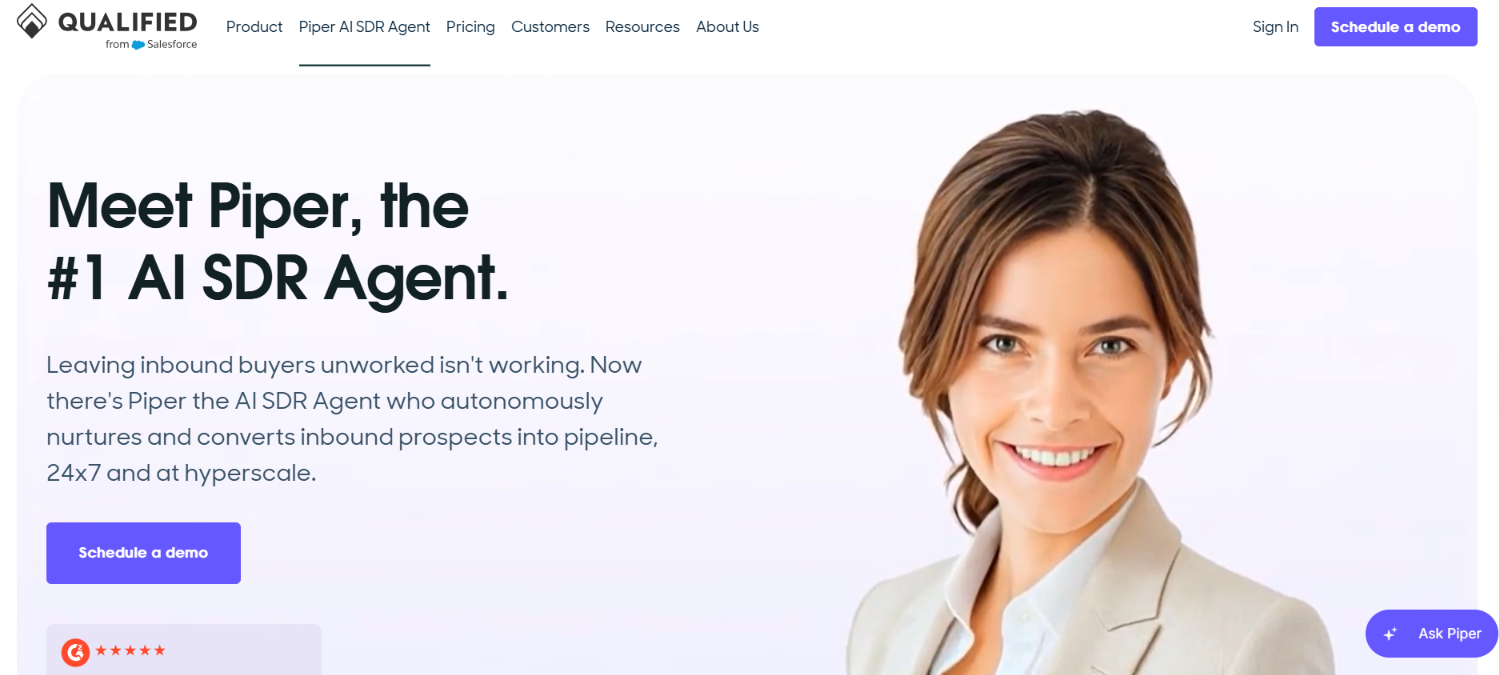
Piper by Qualified is an AI SDR agent that identifies interested website visitors, engages them in conversations, and follows up with inbound leads through email.

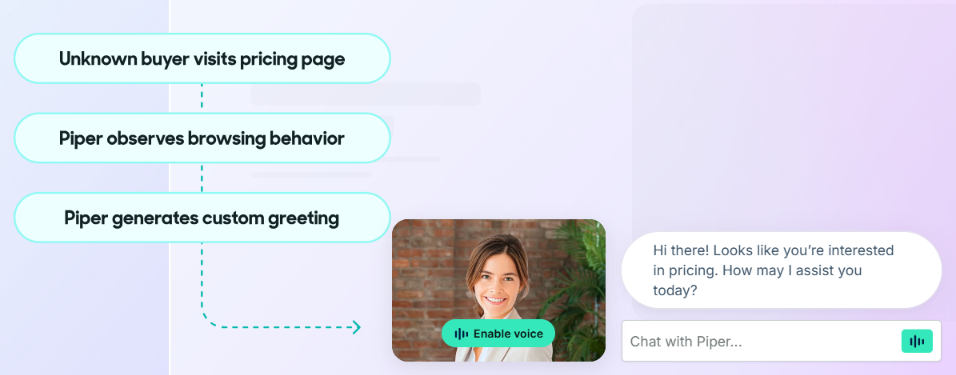
Unlike AI agents that search for prospects across LinkedIn or company databases, Piper focuses on buyers who have already interacted with your business. For example, someone from a target account might visit your pricing page after previously downloading a guide.

Piper can use that activity, along with CRM data and account information, to recognize the visitor and start a relevant conversation. If the buyer is ready to speak with sales, Piper can qualify them, route them to the right representative, and book a meeting.

It can also deliver a short sales presentation directly on your website through its Piper Presentations feature.

How Piper Tracks Buying Signals

Finds high-intent buyer
This image shows to Finds high-intent buyer

Piper looks at buyer activity across your website, email, and connected sales systems to determine when someone may be ready for a conversation. Here are the main signals it uses.

  • Website visits identify visitors showing interest through website activity.
    ‍
  • Pricing page activity helps recognize visitors exploring purchase options.
    ‍
  • Target account visits identify when companies on your account list visit your website.
    ‍
  • Open opportunities recognize website visitors associated with existing sales opportunities.
    ‍
  • Form submissions identify prospects requesting information or contacting sales.
    ‍
  • Content downloads identify leads engaging with your marketing materials.
    ‍
  • Email engagement helps assess buyer interest through email activity.
    ‍
  • Account-level intent changes help identify when existing leads or accounts show increased buying interest.

Piper also uses Agent Spotlight, which combines Salesforce data, buying stages, intent signals, website activity, and email engagement into a buyer profile.

For example, if an older lead starts visiting your website again, Piper can check whether the account matches your ICP and follow up with relevant content. It can continue the conversation through email or offer a meeting when the buyer shows stronger interest.

Pros of Piper

  • Identifies buying interest from website visits and account activity.
    ‍
  • Combines CRM data, intent signals, and email engagement.
    ‍
  • Recognizes target accounts and visitors linked to open opportunities.
    ‍
  • Engages website visitors through text, voice, and video.
    ‍
  • Follows up with inbound leads based on changing buyer signals.
    ‍
  • Qualifies prospects and routes them to assigned sales representatives.
    ‍
  • Can deliver sales presentations and book meetings directly on the website.

Cons of Piper 

  • Primarily designed for inbound leads rather than cold prospecting.
    ‍
  • Requires website traffic or an existing lead database to act on.
    ‍
  • Plan limits apply to monthly website sessions and active email contacts.
    ‍
  • Advanced features such as MCP and API access are listed under Enterprise and higher plans.

Qualified Pricing

Qualified pricing
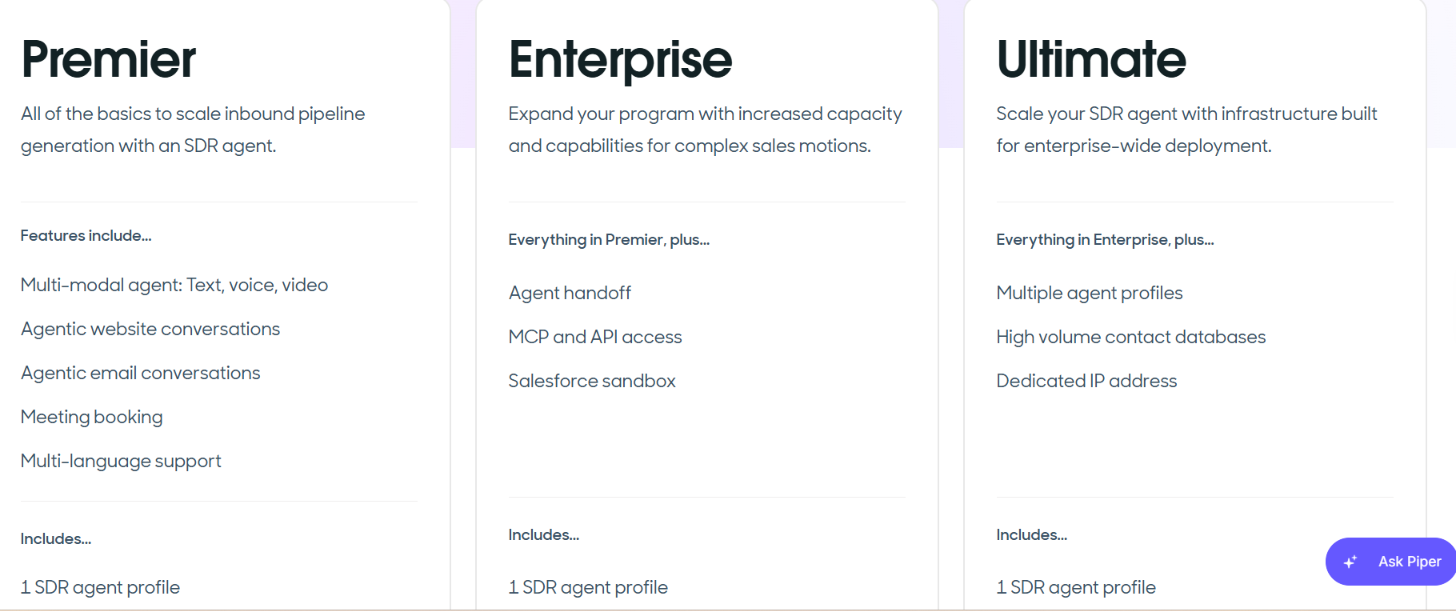
This image shows the Qualified pricing

Qualified offers three custom-priced plans for Piper.

  • Premier – Custom pricing. Includes text, voice, and video conversations, email engagement, meeting booking, 250,000 monthly website sessions, and 2,500 monthly active email contacts.
    ‍
  • Enterprise – Custom pricing. Adds agent handoff, MCP and API access, Salesforce sandbox support, 2 million monthly website sessions, and 10,000 monthly active email contacts.
    ‍
  • Ultimate – Custom pricing. Lists support for multiple agent profiles, high-volume contact databases, a dedicated IP address, 5 million monthly website sessions, and 24,000 monthly active email contacts. Confirm the included agent profile allowance with sales.

All plans include Salesforce CRM integration, account segmentation, reporting, and integrations with 20+ sales and marketing systems.

Piper is a better fit for businesses that already attract visitors and generate inbound leads but struggle to follow up while interest is high.

It is less suitable if your main goal is discovering new prospects through external signals such as hiring announcements, funding rounds, or LinkedIn engagement.

Which AI Agents Should You Choose for Tracking Buying Signals in Sales?

Your choice depends on where you want to find buying signals and how much of the follow-up process you want the agent to handle.

For example, Salesmotion is useful for tracking changes at target accounts, while Agent Frank is better suited to researching prospects and running outreach. If your focus is inbound leads, Piper works with website activity instead.

Here's which agent fits each use case.

If You Want To... Choose
Research prospects and automate outreach Agent Frank
Get alerts when target companies change Salesmotion Signal Agent
Find buyers discussing problems online CommunityTracker
Track specific buying triggers and run outreach Coldreach AI SDR
Research custom signals across websites Claygent
Start outreach after hiring or funding events Ava by Artisan
Find prospects through G2 reviews and Slack Amplemarket Duo
Update outbound lists as new signals appear Alice by 11x
Search for leads matching multiple signals AiSDR
Add signal-based leads to outreach sequences Jason AI by Reply.io
Engage website visitors and qualify inbound leads Piper by Qualified
Personalized Outbound Strategy

Get The Right Outbound Strategy In Minutes

Enter your email to get a custom plan & stack recommendation for your business

It's being carefully crafted by AI

Please check your mailbox in 5 minutes
Conclusion

Buying signals can tell you when a prospect might be worth contacting, but they don't always tell you whether that prospect is a good fit or what to say next.

That's where the differences between these 11 AI agents matter.

If you already have a list of target accounts, Salesmotion can help you monitor changes. CommunityTracker is useful for finding people discussing problems or comparing products online, while Claygent lets you research more specific buying triggers.

If you want to contact prospects based on those signals, the next step is researching the buyer, preparing a relevant message, and managing the follow-up. 

Agent Frank by Salesforge is one option worth considering. It researches prospects and their buying signals before preparing personalized email and LinkedIn outreach. It can also manage follow-ups and meeting booking, with the option to review its work before messages go out.

You can explore Agent Frank to see how it handles prospect research and outreach.

Book more meetings on autopilot

Set up in minutes. No per-seat pricing. No commitment.
Try
free
4.6 rating on G2
Add as a preferred
source on Google