Yes, we all know that sales cold emails mostly fail in the first line.
The rep opens with "I hope this finds you well," spends three sentences on the product, and asks for thirty minutes. The buyer reads half a line and hits delete.
The emails that book meetings look different. Every line is about the buyer's situation, and the ask is small enough to answer in one word.
This guide shows how to write a sales cold email that earns a reply. It covers who to email first, the structure I use, four templates for real selling situations, follow-up timing, and the deliverability basics that decide whether anyone sees your email at all. By the end, you will have a draft you can send this week.
What it is: a first message to a prospect who has never heard from you, written to start a sales conversation, not to close a deal.
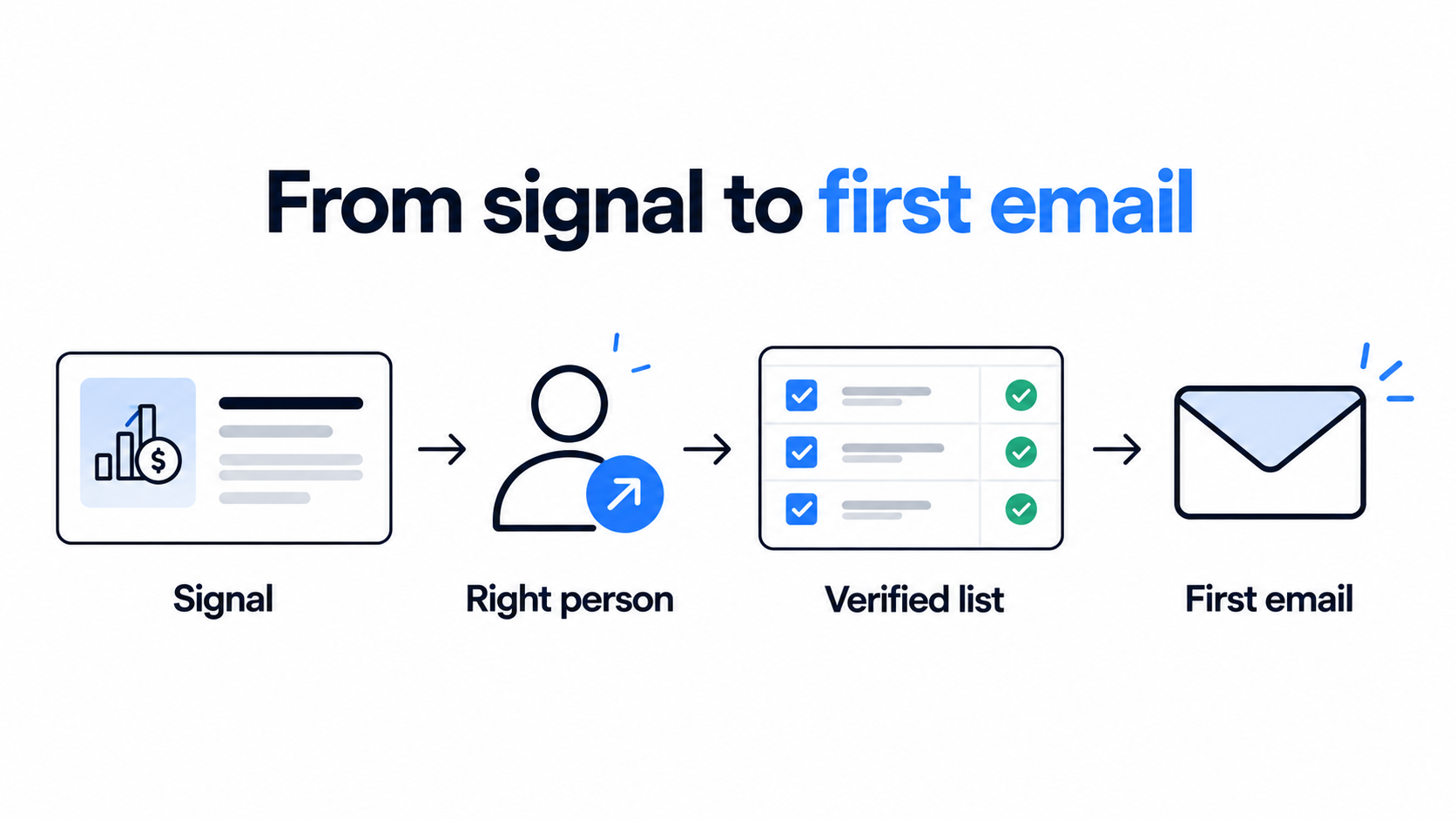
Start with the person: a relevant reason to write beats clever copy every time.
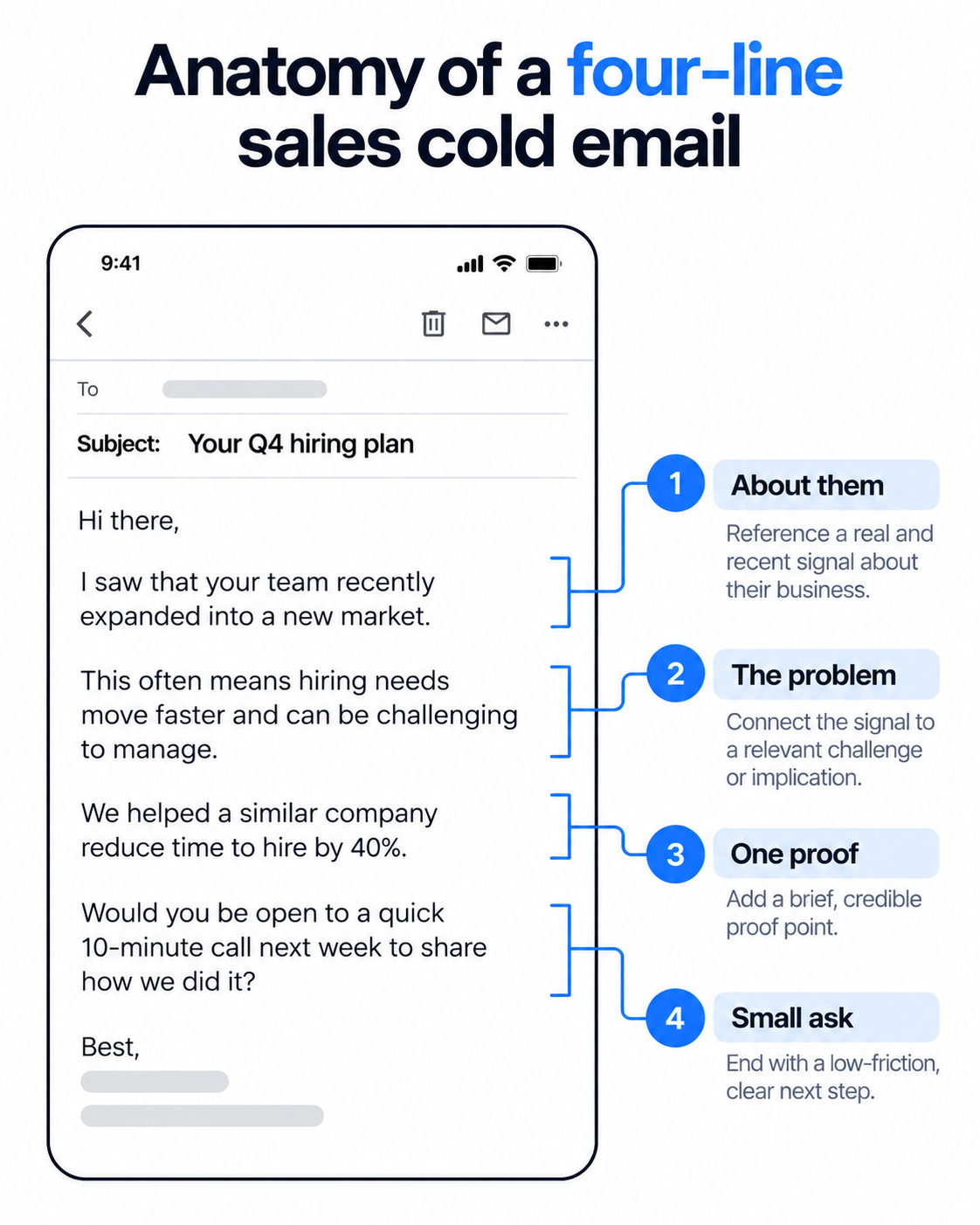
Structure: one line about them, one line on the problem, one line of proof, one small ask. Keep the body between 50 and 100 words.
Follow-ups: send the first email plus three follow-ups, three to five days apart, and give each one something new.
Setup: separate sending domains, SPF, DKIM, and DMARC, warmed mailboxes, and a verified list before the first send.
Scorecard: positive replies and meetings booked. Open rate is not a reliable number.
What a Sales Cold Email Is and Is Not
A sales cold email is a first message to a prospect who has never heard from you, written to start a conversation.
The word cold describes the relationship, not the tone. The buyer did not ask to hear from you, and they owe you no reply.
That changes the job. You are not closing, demoing, or explaining the product. You are giving one person a reason to answer one question.
It also separates a sales cold email from two things people confuse it with. Marketing email goes to people who opted in. Spam goes to anyone. A sales cold email goes to a specific person, for a reason you can state in one sentence.
If you want the wider definition, the legal basics, and the other use cases, my cold email guide covers them.
Who to Email Before You Write a Single Word
Targeting decides more replies than copy does, so the work starts in the list.
Before I write a line, I answer three questions. Who owns this problem? What changed at their company recently? Why would they care this month and not last quarter?
If I cannot answer all three, I do not send. The prospect goes on a nurture list until something changes.
That something is a buying signal: a funding round, a new executive, a job post that describes your problem, a tool they just dropped. My guide to signal-based outreach covers which signals matter most and how fast to move on each one.
Leadsforge makes this part quicker. You describe your buyer in plain English, and it searches a 500M+ contact database without filter stacking. Its buying signals cover hiring, job changes, acquisitions, funding, and investor activity, and every match shows the public source behind it. A signal you can cite is a signal you can write about.
Waterfall enrichment then fills in verified emails, and the finished list moves into a Salesforge sequence without a CSV export. Company Lookalikes helps when you already know which accounts you close.
If you sell to local businesses, Local Companies Search pulls dentists, law firms, or agencies by location and radius from Google Maps data. You can export the list right away or enrich it to find the right contact first.
This Leadsforge tutorial from the Salesforge team shows the lead generation workflow behind 500+ monthly demos:
If you want the full weekly routine behind this, I break it down in a 7-step workflow on how to automate prospecting.
The Structure of a Sales Cold Email That Gets Replies
Every sales cold email I send has four lines, and each line has one job.
For the full nine-step framework, see my guide on how to write a cold email. This section is the short version for reps who are writing today.
Subject line
Describe the email. Do not sell it. Three to five words, lowercase, and specific to the reader, like "your Q4 hiring plan."
Skip "quick question" and "following up." Buyers have learned to ignore both. My list of cold email subject lines has 30 more examples.
Opening line
One sentence about them, something you could not have written to anyone else. A hire, a launch, a post they wrote.
Skip "I hope this finds you well" and skip flattery. Buyers spot a template by the first line.
Problem and proof
Name the problem in the words the buyer would use with a colleague. Then add one line of proof: a customer in their space, a number you can defend, or the reason you picked them.
One proof point is enough. Stacking three reads like a brochure.
The ask
Make it small and answerable in one word. "Worth sending over the checklist?" beats "Do you have 30 minutes on Thursday?"
The first costs the prospect nothing. The second asks a stranger for a calendar slot.
Length and format
Aim for 50 to 100 words in plain text, with no logo, no attachment, and no calendar link in the first email. Most opens happen on a phone, and anything past the first screen gets skipped.
Four Sales Cold Email Templates for Real Selling Situations
These four cover situations sales reps hit often, and none of them is a generic introduction.
Each one stays under 75 words. Replace every {{variable}} with something real, because a template with a blank is worse than no email.
A champion moves to a new company
Use it when: a past user or champion changes jobs and lands somewhere you could sell.
TEMPLATE
Subject: {{old_company}} to {{new_company}}
{{first_name}}, congrats on the move to {{new_company}}.
At {{old_company}} you got {{result}} from {{category}}. New teams usually inherit the old stack and the old habits.
{{customer}} set this up in {{n}} weeks at a company your size. I can send the short version of what they changed first.
Worth sending over?
{{sender_name}}
Why it works: They already know the product works, so the email skips the explaining and goes straight to a small ask.
Re-opening a closed-lost deal
Use it when: a deal stalled on timing or a specific objection, and something has changed since.
TEMPLATE
Subject: what changed since {{month}}
{{first_name}}, I spoke with you in {{month}}, and the timing was not right.
Two things changed since then: {{update_one}} and {{update_two}}. Both address the concern you raised about {{objection}}.
If {{priority}} is back on your list this quarter, I can send a two-line summary of the changes.
Worth a look?
{{sender_name}}
Why it works: It names the real reason the deal stalled, and the new information gives the prospect a reason to read on.
Bringing a second stakeholder into the deal
Use it when: your champion agreed to an introduction and you need finance, IT, or an executive on board.
TEMPLATE
Subject: {{topic}} at {{company}}
{{first_name}}, {{champion_name}} on your {{team}} team has been testing {{product}} for {{use_case}}.
Finance and IT usually have questions before a rollout, and they are easier to answer early. I put together a one-page summary of security, cost, and setup time.
Want me to send it your way?
{{sender_name}}
Why it works: It gives a second stakeholder something useful instead of asking for a meeting from someone who has never heard of you.
Selling to a local business owner
Use it when: your list came from a location-based search, such as Leadsforge Local Companies Search.
TEMPLATE
Subject: {{business_name}} and {{problem}}
{{first_name}}, I found {{business_name}} while looking at {{business_type}} businesses in {{city}}.
Owners in {{city}} often lose time and money on {{problem}}. {{customer}}, a {{business_type}} business nearby, fixed it with {{solution}}.
Worth sending over how they did it?
{{sender_name}}
Why it works: Location and business type make it obvious the email was written for them, and the ask takes one word to answer.
For more scenarios, my collection of cold email templates covers networking, partnerships, and hiring outreach.
A Five-Question Check Before You Hit Send
I run every draft through these five questions before it goes into a sequence.
Could this email go to anyone else on the list without changing a word?
Is the first line about the buyer and not about me?
Does the email hold one problem, one proof point, and one ask?
Can the prospect answer in one word?
Did I read it aloud, and does it sound like something I would say to a colleague?
If the answer to the first question is yes, rewrite. If any other answer is no, cut until it becomes yes.
Turn your simple draft into a running sequence
Build the sequence, warm the mailboxes, and handle every reply from one login.
Most replies arrive after the first email, so a sales cold email is really a short sequence.
Send the first email plus three follow-ups, spaced three to five days apart, then stop. Each one adds something new: a different angle, a customer example, or a smaller ask.
The last email gives an easy way out. "If the timing is wrong, tell me and I will check back next quarter" works well.
Never send "just bumping this up" as a standalone line. It adds nothing and reads as pressure. Complaints tend to rise after the second email in a sequence, so I keep sequences short. My follow-up email guide has examples for each touch.
Sequence logic matters as much as copy here. In Salesforge I branch on what the prospect does. If a LinkedIn connection request is accepted, the next step is a LinkedIn message. If it is ignored, the sequence falls back to email.
A well-written sales cold email is worth nothing if it lands in spam, so the setup comes before the copy.
Five things decide inbox placement before anyone reads a word.
Separate sending domains. Never send cold email from your main company domain. One bad campaign can burn it for everything else.
Authentication. Every sending domain needs SPF, DKIM, and DMARC. Google and Yahoo require all three from bulk senders, and Google asks senders to keep spam complaints below 0.1%.
Warmup. A new mailbox has no history, so real volume from day one looks suspicious. Plan on two to four weeks of warmup before real sends.
List hygiene. Verify every address before it enters a sequence. Bounces damage the domain you just spent weeks warming.
Sending pattern. Keep volume per mailbox low, rotate across mailboxes, and send plain text with few links.
Salesforge handles most of this inside the platform. Warmforge warms every connected mailbox at no extra cost, with unlimited warmup slots. It runs one-click AI warmup through a pool of Google Workspace, Microsoft 365, and SMTP mailboxes, and it adds multilingual warmup activity so the traffic looks natural.
Heat Score™ shows when a mailbox is ready to scale. Inbox Placement Tests show whether emails land in primary, promotions, or spam, and Health Checks watch DNS, MX, and blacklist status.
Bounce Shield blocks sends to addresses likely to bounce, and built-in email validation checks every contact before send. Sender rotation spreads volume across mailboxes, and ESP matching sends Google to Google and Microsoft to Microsoft. Emails ship as text-only by default, without heavy HTML, tracking pixels, or attachments.
Judge the campaign on replies, not opens. Apple Mail loads tracking images automatically, so many recorded opens never happened. In the conversation below, Salesforge's CEO shares deliverability data from millions of sent emails. Campaigns with open tracking switched off saw more than double the reply rates.
For the full breakdown of domains, IP reputation, and warmup pools, read my guide to cold email deliverability.
Three Ways to Run Sales Cold Email in Salesforge
Salesforge runs cold email and LinkedIn as one sequence, and the same stack can be operated three different ways.
I use Salesforge because writing, sending, warming, and replies sit in one place. Sequences branch on prospect behavior across email and LinkedIn, and AI personalization works across 21+ languages, so a localized campaign does not need a separate copywriter per region.
Every reply from every mailbox and channel lands in Primebox™. Autopilot lets AI handle routine replies end to end. Co-pilot drafts the reply and a human approves it before it sends.
You can connect unlimited mailboxes, and A/B testing on subject lines and body variants is available on the Growth plan. The LinkedIn email and phone finder Chrome extension is powered by Leadsforge, and new users get 100 free credits.
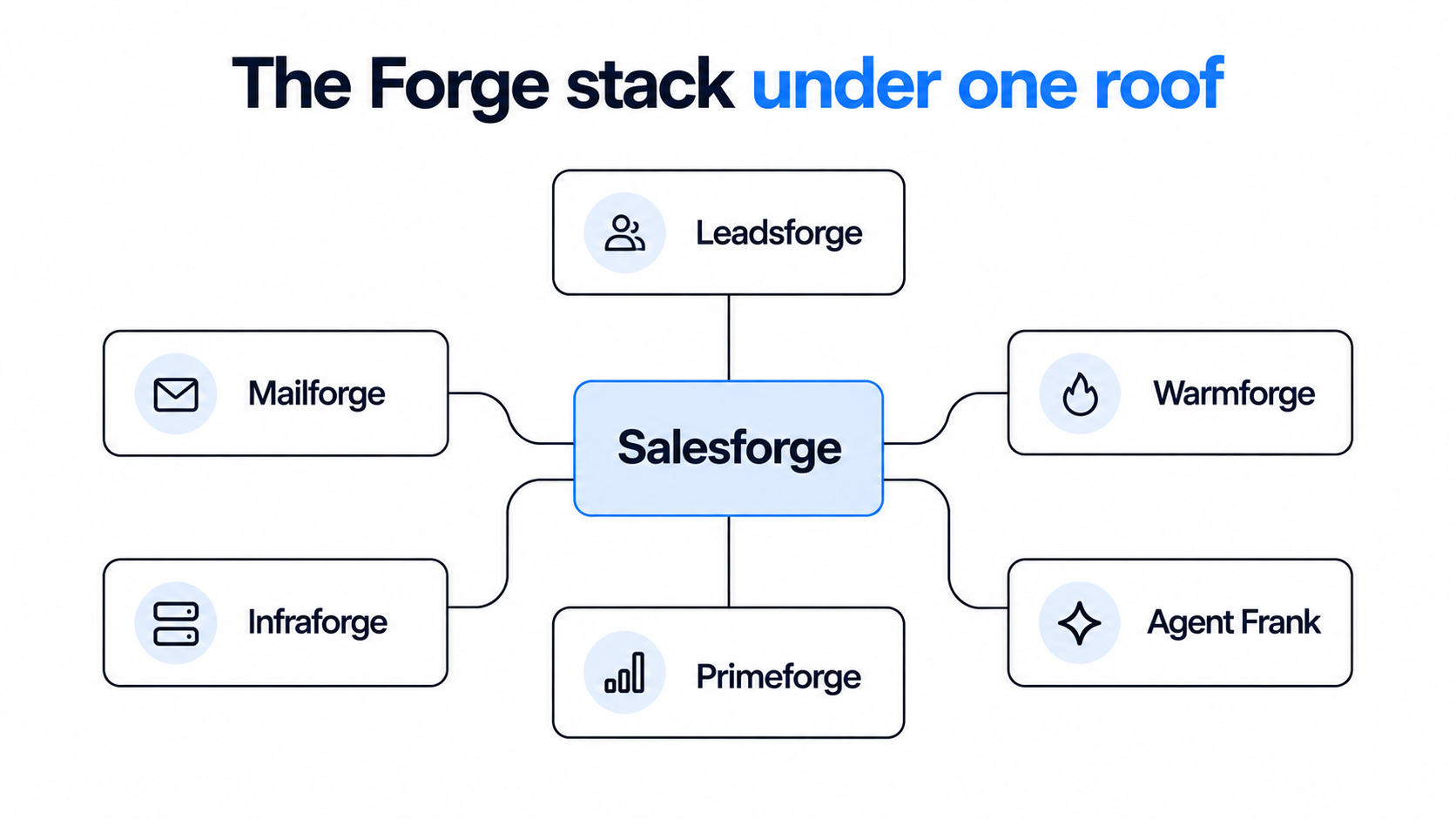
The rest of the Forge stack sits under the same login. Leadsforge finds and enriches the leads, and Warmforge warms the mailboxes. The mailboxes come from Mailforge for shared IPs, Infraforge for dedicated IPs, or Primeforge for real Google Workspace and Microsoft 365 mailboxes. Each is a separate subscription, and you can move between the three infrastructure options without switching platforms.
Every Forge product also exposes an MCP server, so Claude, Cursor, or your own agents can operate the stack through one protocol.
Then the practical question is who runs it. The same sequences work whether your team sends them, Agent Frank sends them, or a Forge Expert agency sends them.
Your team runs it
Agent Frank runs it
A Forge Expert agency runs it
Who writes and sends
Your SDRs and AEs build and launch the sequences
Agent Frank prospects, writes, sends, and follows up
A certified partner agency builds and runs the campaigns
Who handles replies
Your reps, with Primebox™ Co-pilot drafts if you want them
Agent Frank, in Auto-Pilot or Co-Pilot mode
The agency manages replies and reports back
How you start
Self-serve setup with a 14-day free trial
A demo first, then a dedicated account manager
You brief the agency, and it handles setup
Best fit
Teams that want hands-on control of messaging
Teams that want meetings booked without hiring more SDRs
Teams that want outbound without staffing it
Agent Frank is the AI SDR inside Salesforge. He prospects from the Leadsforge 500M+ database, enriches contacts, writes email and LinkedIn messages, runs follow-ups, handles replies through Primebox™, and books meetings on the rep's calendar. I think of him as a teammate who takes the repetitive work, so reps spend their time on live conversations.
He is not for every team. Agent Frank fits best when you sell to startups, SMBs, or mid-market buyers with deal sizes between $5K and $100K. If you mostly sell to Fortune 500 accounts, or your deals run through long RFP cycles, a hands-on setup will serve you better.
Final Verdict
A sales cold email works when the list, the setup, and the copy all hold up.
If I had to boil this guide down to one rule, it would be this: write to one person, for one reason, and ask for one small thing.
Get the list right first, the infrastructure second, and the copy third. Most campaigns fail in that order, not the reverse.
Cold email is also one channel. It works best next to LinkedIn touches and a real follow-up rhythm, and it will not rescue an offer nobody wants. If you only send a handful of emails a month by hand, a normal inbox is enough and you do not need a platform.
Before you launch, read through my list of cold email mistakes and audit your last five sent emails against it.
Want Agent Frank to send these for you?
See how Agent Frank prospects, writes, and follows up across email and LinkedIn, and how a demo with the team works.
Quick answers to the questions sales reps ask most about cold email.
What is a sales cold email?
A sales cold email is a first message to a prospect who has never heard from you, sent to start a sales conversation. It is not a pitch and not a bulk marketing email. It goes to a specific person for a specific reason.
How long should a sales cold email be?
Keep the body between 50 and 100 words. That fits on one phone screen without scrolling, which is where most cold email gets read. Longer emails get skimmed, and the ask gets lost.
How many follow-ups should I send?
Send the first email plus three follow-ups, spaced three to five days apart. Give each one something new, like a different angle or a customer example. After the last one, stop and move the prospect to a nurture list.
What makes a good subject line for a sales cold email?
Three to five words, lowercase, and specific to the reader. Describe the email instead of selling it, for example "your Q4 hiring plan." Avoid "quick question" and "following up," which buyers have learned to ignore.
Is sales cold email legal?
In most cases, yes. In the US, CAN-SPAM requires a real sender identity, a valid postal address, and a working opt-out. The UK exempts corporate subscribers from prior consent, the EU allows it under legitimate interest, and Canada requires consent first. This is not legal advice, so check the rules for the people you contact.
How do I keep sales cold emails out of spam?
Send from separate domains, set up SPF, DKIM, and DMARC, and warm every mailbox before real sends. Verify each address, keep volume per mailbox low, and send plain text with few links. Then watch replies and complaints rather than opens.
Can I use AI to write sales cold emails?
AI works well for research and for drafting at volume. The email still needs a real signal about the buyer and a human check before it goes out. Agent Frank, the AI SDR inside Salesforge, drafts emails and lets you approve AI replies before they go out if you choose Co-Pilot mode.
Book more meetings on autopilot
Set up in minutes. No per-seat pricing. No commitment.
Cold email best practices work in a fixed order: infrastructure first, list second, copy third. I cover domain setup, warmup, list quality, short plain-text copy, sending limits, follow-up timing, and the few numbers that show a campaign is healthy.
A sales cold email is one step in a deal, not a pitch. I cover who to email first, the short structure that earns replies, four templates for real selling situations, follow-up timing, and the deliverability basics that keep your emails out of spam.