Most cold email mistakes do not look like mistakes. The campaign sends, the dashboard turns green, and you assume the silence on the other end is normal. It is not.
I have run and audited enough outbound to know that reply rates rarely collapse for one dramatic reason. They erode through small, avoidable cold email mistakes: a domain that should never be sending, a warm-up step that got skipped, a subject line written for a spam filter instead of a human.
This is the list of 15 I see most in 2026, grouped the way I actually troubleshoot them. Infrastructure and deliverability first, then targeting, then copy, then follow-up. Each one comes with the fix I would apply before the next send.
If you only fix a handful of things before your next campaign, fix the deliverability ones first. Nothing else matters if the email never arrives.
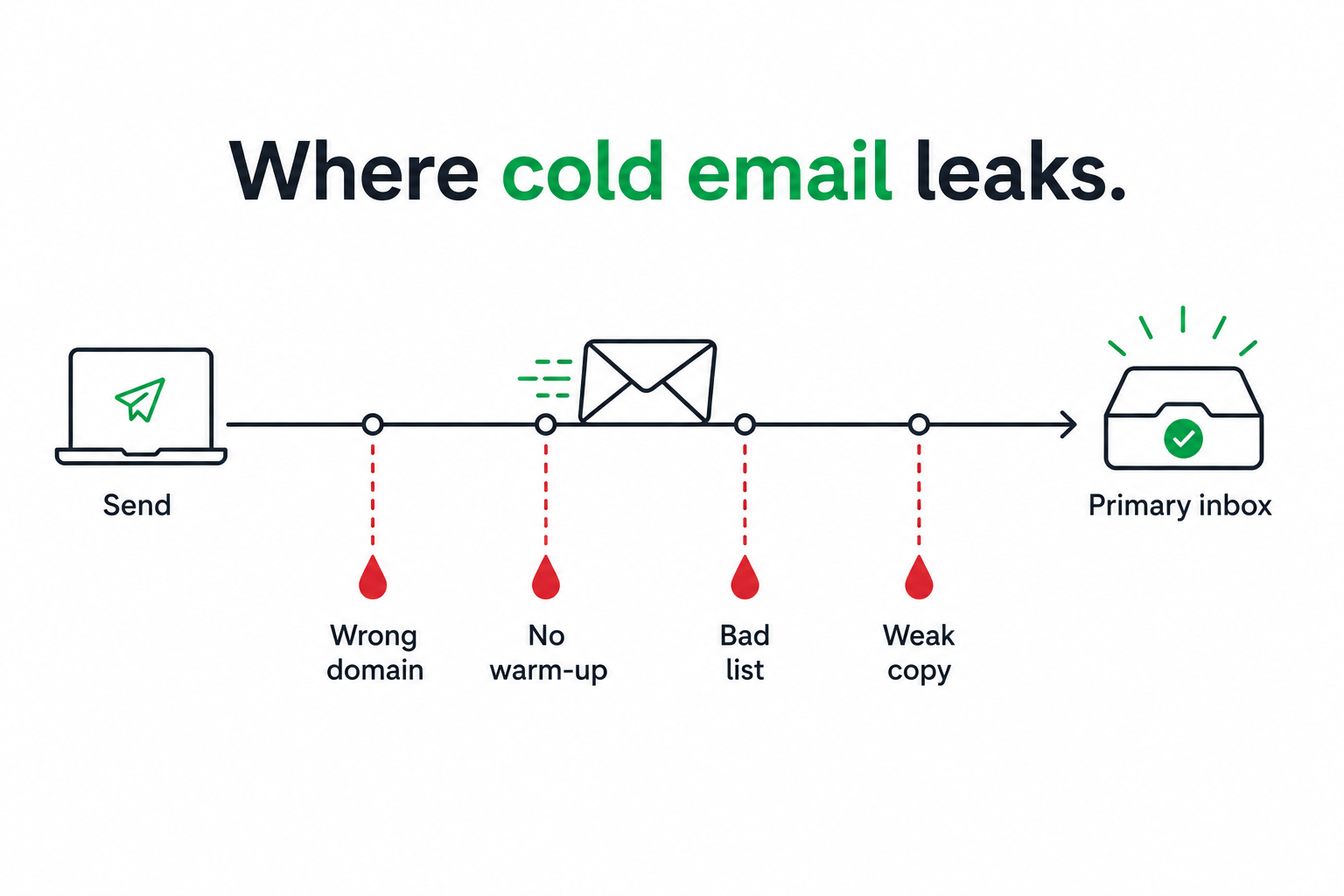
This is the most expensive mistake on the list, and it happens on day one. When you send cold email from the same domain that runs your billing, support, and team communication, a wave of spam complaints does not just hurt outreach. It drags down every email your company sends.
New domains with no sending history get treated as suspicious by default, so the damage compounds quickly.
The fix: Buy separate lookalike domains that exist only for outbound, and keep your primary domain out of the sending pool entirely. Getting the sending domains and DNS right first is exactly what proper email infrastructure is for.
A brand-new mailbox has no reputation, and inbox providers treat unknown senders with suspicion. Push real volume through it on day one, and you are teaching Gmail and Outlook to flag you.
Most flagged domains I look at were never warmed properly in the first place.
The fix: Warm every new mailbox for around two weeks before it touches a real prospect, and keep warm-up running in the background after that. Free unlimited email warm-up via Warmforge handles this automatically, and the Heat Score™ tells you when a mailbox is safe to scale.
Authentication is the low-effort fix almost everyone still skips. Without SPF, DKIM, and DMARC set correctly, inbox providers cannot verify you are who you claim to be.
In 2026, Gmail rejects unauthenticated bulk mail outright instead of quietly filtering it, so a missing record is no longer a soft problem.
The fix: Configure all three records on every sending domain before you send a single email. Good infrastructure sets these up automatically, and running an email deliverability check confirms nothing broke after a DNS change.
There is no version of 2026 where one mailbox sends hundreds of cold emails a day and survives. The safe ceiling sits far lower than most people expect.
Push past it, and you burn the mailbox reputation you spent two weeks building.
The fix: Keep daily volume conservative per address, use one sending address per domain, and spread total volume across many mailboxes so sender rotation distributes the load automatically. Bounce Shield adds a second layer by pausing any mailbox that starts bouncing before the damage spreads.
A list that has been sold and resold to thousands of senders is already burned before you touch it. An unverified list drives bounce rates straight into spam-folder territory.
Bounces are one of the fastest ways to wreck a young domain.
The fix: Validate every contact before you send, and pull from fresh, verified B2B leads rather than a recycled export. Waterfall enrichment queries multiple data providers in sequence, so you get an accurate email instead of a single provider’s stale guess.
Getting the company right and the person wrong is quietly one of the biggest reasons reply rates stall. Targeting for topical relevance, a marketing manager, because you sell a marketing tool, often misses the person who actually holds the budget.
Operators who fixed this alone reported reply rates moving from under two percent into the mid-single digits.
The fix: Target for buying authority, not just job-title keywords. Describe your ideal customer in plain language and let Leadsforge return the decision-makers who match, instead of stacking filters and hoping the intersection is useful.
A cold list with no timing behind it is a guess. In 2026, signal-based outreach timed around a real event consistently beats batch-and-blast by a wide margin.
The prospect who just raised a round or changed jobs is in-market in a way a random export never is.
The fix: Build lists around buying signals instead of a static export. The new Signals sourcing path in Leadsforge finds companies and people the moment something changes: a funding round, an acquisition, a job change, or a new investment. Every match comes with evidence explaining why it surfaced, so you reach out inside the buying window instead of guessing at it.
Sending before you have looked at the company or the role is how generic outreach happens. The reader can tell in the first line that the email could have gone to anyone.
That single signal is often enough to earn a delete.
The fix: Spend the thirty seconds it takes to understand what the company does and why this person would care. AI personalization across 21+ languages can pull company news, LinkedIn activity, and industry context into each message, but it works because the targeting underneath gave it something real to say.
Long cold emails do not get read. The consensus across operators in 2026 is tight: keep the first touch short enough to read in about twenty seconds, often under eighty words.
Every extra sentence is another reason to stop reading.
The fix: Cut the email to one clear idea. Delete the preamble, the second paragraph of context, and the third sentence about your company. If it cannot be skimmed on a phone in one glance, it is too long.
Dropping a first name into a template is not personalization, and referencing a random LinkedIn post the prospect barely remembers adds nothing. Recipients notice the difference between a detail that matters and a detail that was scraped.
Fake personalization can read worse than none at all.
The fix: Tie personalization to an actual problem the prospect has, not to surface trivia. One relevant, specific line about their situation beats five merge tags and reads like you understood their world.
Openers like “My name is” or “I run a leading platform that” lose the reader before the pitch starts. The first line is about them, or it is deleted.
Nobody opens a cold email hoping to read your bio.
The fix: Open with the prospect’s situation, their problem, or the reason this email is landing now. Save your introduction for after you have earned the second sentence.
A generic subject line like “quick question” gets ignored, and a fake “Re:” or “Fwd:” trick erodes trust the moment the email opens. Both cost you, in opposite ways.
The subject line sets the expectation that the first sentence has to keep.
The fix: Write a subject line that is specific and honest, and make sure the first sentence delivers on it. If you are stuck, an AI subject line generator gives you variants to test, and A/B testing tells you which one actually earns opens.
An email that ends with “let me know if interested” asks the reader to do the work, and an email with three asks gets none of them done. A weak close undoes good copy.
The reader should never have to decide what you want from them.
The fix: End with one low-friction, specific ask. Give the reader a single clear next step and make saying yes almost effortless.
“Dear Sir or Madam” and corporate phrasing read as inauthentic in a 2026 inbox. Buzzword-heavy copy tells the reader nothing and signals a template.
The more it sounds like marketing, the faster it gets ignored.
The fix: Write the way you would explain the product to someone you met at a conference. Plainly, briefly, in terms of what it does for them. Read it out loud, and if it sounds like a press release, rewrite it.
Two opposite mistakes live here. Sending one email and giving up leaves most of your replies on the table, since a large share arrive after the first touch. Over-sequencing is the flip side, where pushing past roughly four to seven touches drops engagement and starts to annoy.
The goal is persistence with a limit, not a machine that never stops.
The fix: Build a sequence of a few well-spaced follow-ups, each adding something new instead of repeating the pitch, and end with a clean breakup email rather than following up forever. Automated follow-ups across email and LinkedIn keep the cadence consistent, multichannel outreach lets a LinkedIn touch follow an unanswered email in the same sequence, and Primebox™ keeps every reply in one inbox with Auto-Pilot and Co-Pilot modes so nothing slips.
Read the fixes back to back, and one theme repeats. Almost every cold email mistake in 2026 is a seam between tools: infrastructure from one vendor, warm-up from another, leads from a third, replies scattered across two inboxes. Every seam is a place where something gets skipped.
The reason I run outbound on the Forge Stack is that it closes those seams. Infrastructure (Mailforge, Infraforge, Primeforge), free warm-up via Warmforge, lead discovery via Leadsforge, and multichannel sending all sit under one login, with Primebox™ holding every reply. No competitor packages infrastructure, deliverability, a lead finder, multichannel outreach, and an autonomous AI SDR as one stack.
It also runs three ways. Your own team operates it, Agent Frank operates it as an autonomous AI SDR: he prospects and books meetings 24/7, or a Forge Expert agency runs it for you. Same product, three levels of hands-on.
A quick reference you can run down before your next send. Fix the deliverability rows first.
None of these cold email mistakes is dramatic on its own. That is exactly why they persist. Each one shaves a little off your reply rate until the campaign looks broken and you cannot point to the reason.
The teams that win outbound in 2026 are not the ones with the cleverest subject lines. They are the ones who got the boring things right: clean sending domains, warmed mailboxes, verified lists, real targeting, short human copy, and a follow-up cadence that knows when to stop.
Fix the five deliverability mistakes first, since nothing else matters if the email never arrives. Then targeting, then copy, then follow-up. Work the list in that order, and your next campaign will land in more inboxes and earn more replies than your last one.
What is the most common cold email mistake in 2026?
Sending a cold email from your main business domain. A wave of spam complaints on that domain damages every email your company sends, not just outreach. The fix is to send only from separate lookalike domains kept out of your primary sending pool.
How long should a cold email be?
Short. Keep the first touch to something a busy person can read in about twenty seconds, often under eighty words. One clear idea and one specific ask outperform a long, context-heavy pitch almost every time.
Do I need to warm up a new mailbox before sending a cold email?
Yes. A new mailbox has no reputation, so sending real volume on day one is the fastest way to get flagged. Warm each mailbox for around two weeks first, and keep the warm-up running afterwards. Free unlimited warm-up via Warmforge handles this automatically.
How many cold emails can I send per inbox per day?
Fewer than most people think. Keep daily volume conservative per address, use one sending address per domain, and spread total volume across many mailboxes with sender rotation instead of pushing one inbox hard.
How many follow-ups should a cold email sequence have?
A few well-spaced touches, usually landing in the four-to-seven range, including the first email. Each follow-up should add something new rather than repeat the pitch, and the sequence should end with a clean breakup email instead of following up forever.
What is the best way to personalize cold emails at scale?
Tie personalization to a real problem the prospect has, not to surface trivia scraped from a profile. AI personalization across 21+ languages can pull company news and industry context into each message, but it only works when your targeting gives it something relevant to say.


.png)