Every team I talk to wants to know how to automate prospecting, and almost every one of them starts at the wrong end of the workflow.
They automate sending first. More mailboxes, more sequences, more follow-ups. Volume goes up, reply rate goes down, and six weeks later someone is manually cleaning a spreadsheet at 9 pm because the list was never the thing that got fixed.
Prospecting is five jobs, not one. Finding the right accounts, finding the right people inside them, filling in contact data, reaching out, and handling what comes back. Automation pays off when it covers all five in the same environment. It creates work when it covers one and hands you a CSV for the rest.
This is the workflow I run, step by step, with the sourcing side shown in detail because that is where most of the time goes. I have also called out the two parts I still do by hand.
Automated prospecting means software handles the repeatable parts of finding and contacting buyers, while a human keeps ownership of who gets contacted and why.
Broken into layers, it looks like this.
You do not have to automate all five at once. You do have to know which one is costing you the most time before you buy anything, because the answer decides where to start.
For most teams the answer is sourcing. Research is where the hours disappear, and it is also the layer that decides whether the other four are worth running at all. If you want the wider category view before committing, the roundup of sales prospecting tools breaks the market into finders, enrichers, and senders.
Sending has been a solved problem for years. Deciding who to send to has not, and that gap is where most automation projects quietly fail.
A typical lead database asks you to stack industry, headcount, geography, seniority, and title filters, then hope the intersection is useful. It usually returns thousands of contacts who match on paper and have no reason to reply this quarter.
Nothing in that list tells you whether the company is in a buying window. So the sequence goes out on your calendar rather than theirs.
A list exported in March is a snapshot of March. People change jobs, companies get acquired, teams get funded, budgets move. By week three of a campaign a meaningful share of that file is wrong, and the personalization built on top of it is wrong too.
Every CSV handoff between a data tool and a sending tool costs field mapping, deduplication, and a validation pass. Teams that automate the send and keep the export loop often end up doing more manual work than before, just later in the week.
The fix is not more filters. It is sourcing on events, which is the core idea behind signal-based prospecting, and keeping the list in the same environment as the sequence.
This is the step I automate first, because a good list makes every later step cheaper. Leadsforge is the lead finder in the Forge stack, and it gives you several sourcing paths against the same 500M+ contact database.
When you open it, you pick how you want to build the list rather than which filters to stack.
The Customer profile path takes a sentence, not a query. Something like "heads of revenue operations at US SaaS companies between 50 and 500 employees" returns a matching list without boolean syntax or a training session.
I use this path for the steady baseline list, the one that refills every month regardless of what is happening in the market.
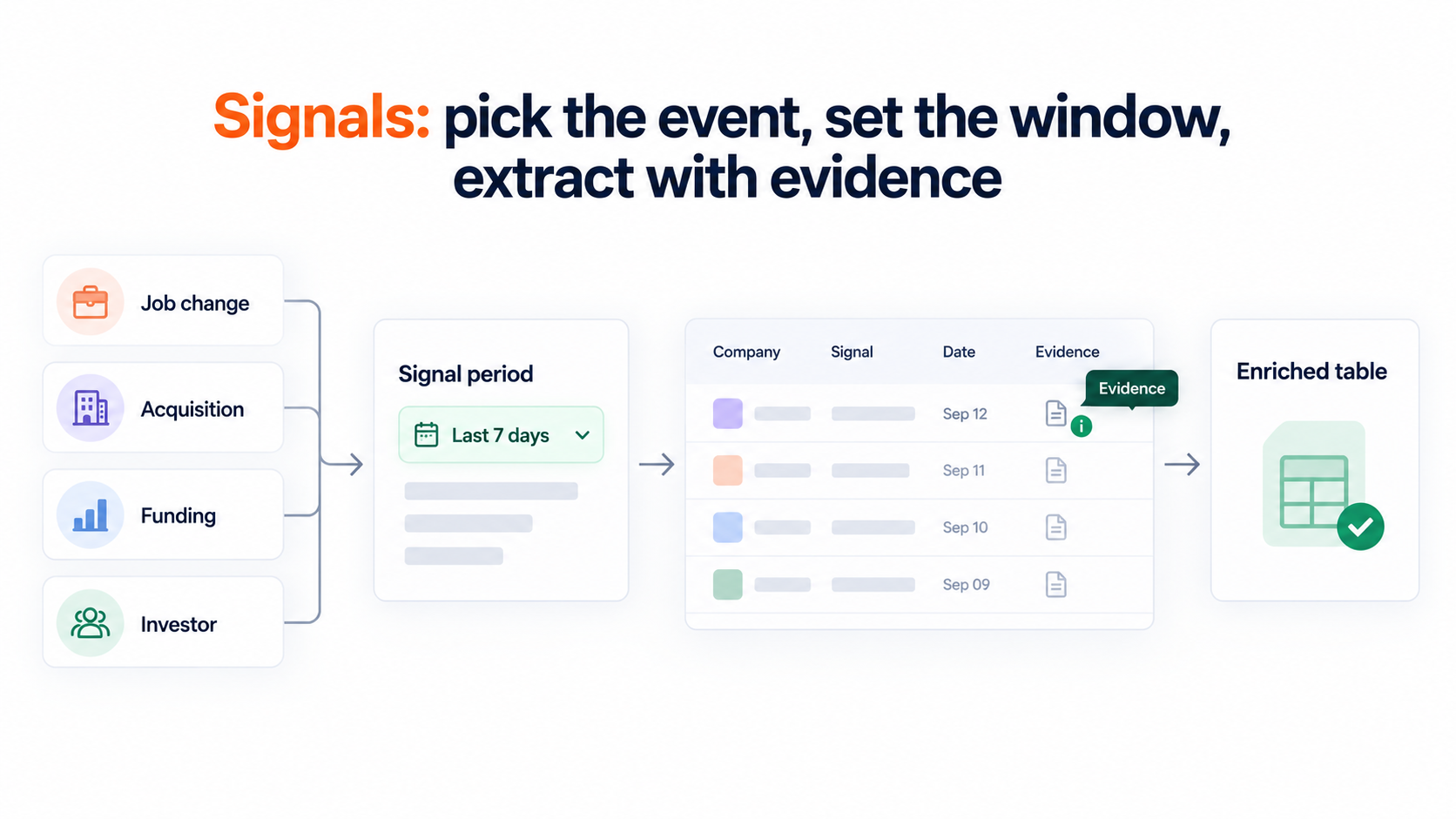
Signals is the newer sourcing path, and it is the one that changed how I build lists. Instead of searching by ICP criteria alone, you build the list around companies and people who have recently done something meaningful.
Four signal types are available today.
The signal period is a date range, with presets for the last 7, 14, 30, 90, 180, and 365 days. Tight windows are the point. A funding round from ten months ago is history. A round from last week is a reason to send today.
For the company-based signals, Leadsforge finds the matching companies first, matches them against the lead database, then surfaces the relevant employees at those companies. You are not left with a company name and a LinkedIn tab to go hunting in.
Before extracting anything, the screen shows an estimated count of matching companies or contacts. That estimate is what stops you from burning credits on a list that turns out to be twelve people.
Every extracted company and contact carries evidence. Open the Details view and you see exactly why that record matched the signal, sourced from public pages, news, and posts. I use that evidence line as the opening reference in the first email, which is the difference between a relevant message and a lucky guess.
Credits are charged at extraction time, based on how many companies or contacts you select, and extracted leads can then run through the usual enrichment workflows.
Local Companies Search is the sourcing path for geographic prospecting. You set a location, define a search radius, and search by business type such as dentists, law firms, restaurants, or marketing agencies. The data comes from Google Maps.
Matching businesses can be extracted as they are, or enriched further to find the right contacts inside them. Lists export straight after extraction or after enrichment.
If you sell into service businesses inside a defined territory, this replaces the afternoon usually spent copying names off a maps tab.
Two paths take an existing list and widen it without loosening your targeting.
You can also upload a CSV of Companies or People. Uploaded companies run through the same company-to-lead matching as the signal paths, so a list of target accounts from your CRM comes back as named contacts.
For one-off additions while browsing, the LinkedIn email and phone finder Chrome Extension pulls verified contact details from profiles and searches using the same database. It is free to install, new accounts get 100 free credits, and further lookups draw on Leadsforge credits.
Once the list exists, waterfall enrichment queries multiple data providers in sequence for each contact rather than relying on a single vendor hit rate. Emails, phone numbers, and missing fields get filled at the highest coverage and confidence available.
This matters more than database size. A 500M+ database with one enrichment source still hands you blanks. Querying providers in sequence is what turns a matched contact into a contactable one.
Enriched leads land in the Enriched table, ready to move into outreach.
Sourcing only pays off if the list reaches a sequence without a detour through a spreadsheet, which is the part of the workflow Salesforge handles.
Lists move from Leadsforge into multichannel outreach sequences inside the same login. No export, no field mapping, no second validation pass.
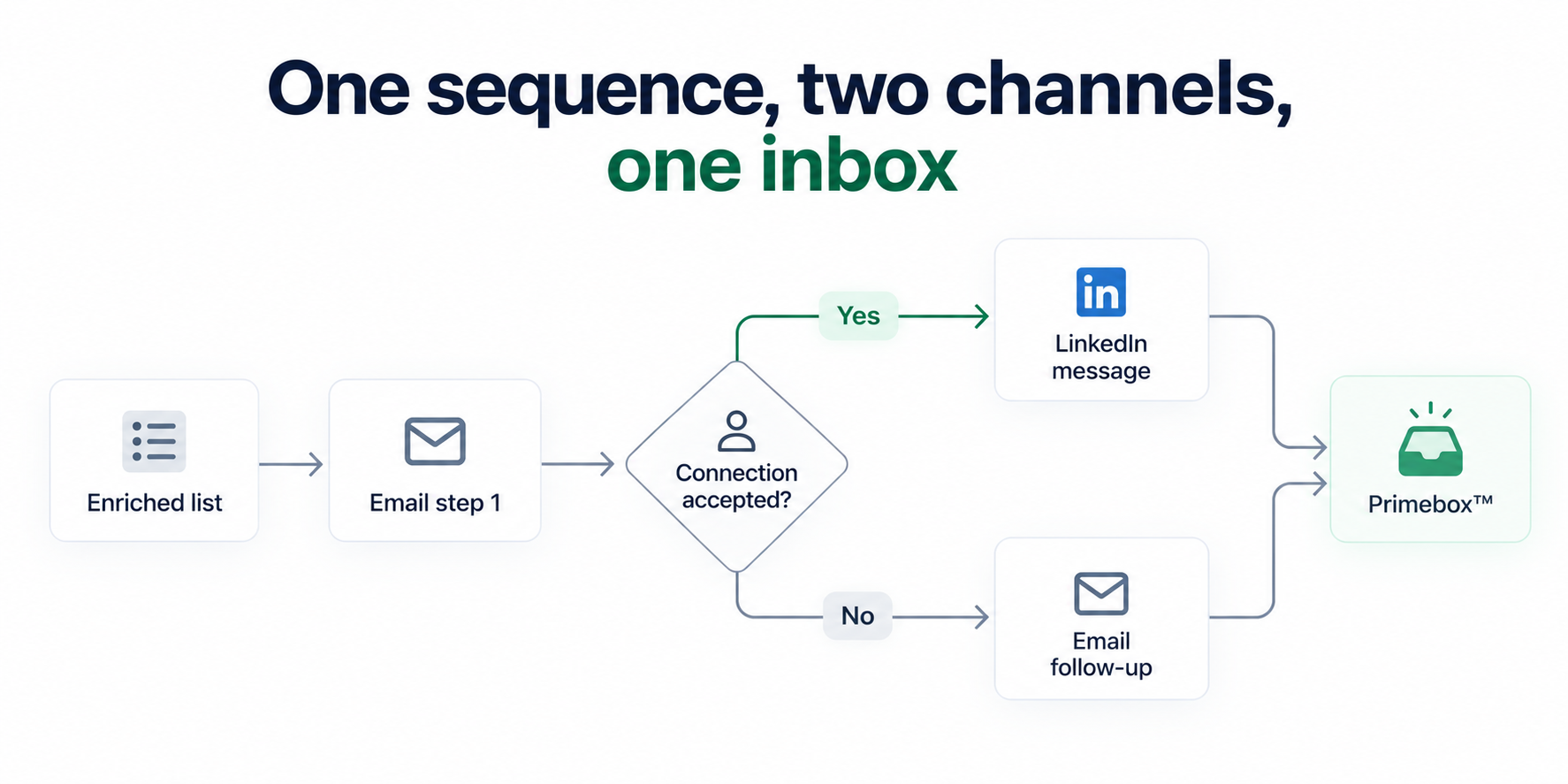
Cold email and LinkedIn run as steps in the same sequence rather than as two campaigns you stitch together afterwards. Six native LinkedIn actions are available inside that sequence: connection requests, messages, InMails, post likes, follows, and withdraw requests.
The branching is conditional, not linear. If a connection request gets accepted, the sequence triggers a LinkedIn message. If it does not, the sequence falls back to email. Each LinkedIn action type is capped at 30 per day per profile to stay inside safe usage thresholds, and actions route through high-quality proxies with session-token-only authentication, so no LinkedIn password is ever stored.
Unlimited mailboxes, users, and workspaces come with the plans, which matters when the automated list is bigger than the sending capacity you had planned for.
AI personalization across 21+ languages writes prospect-specific copy using AI variables that pull company news, LinkedIn activity, and industry context. With a signal-sourced list, the strongest variable is the evidence that put the person on the list in the first place.
A message that opens on a Series B closed eleven days ago reads differently from one that opens on a job title. It also removes the need for a separate copywriter per region, since the same variables work across languages.
Follow-ups run on the schedule you set, and automated follow-ups apply across both channels. The rule I hold to is that every step has to add something. A reworded first email with a new subject line is not a follow-up, it is noise.
Set the stop conditions before launch. A reply, an unsubscribe, or a disqualification should end the sequence for that contact immediately, and A/B testing on subject lines and message variants tells you which version earned the reply.
Automating prospecting raises sending volume, and volume is exactly what exposes a weak sending setup, so the deliverability layer belongs inside the workflow rather than after it.
Every connected mailbox is warmed through email warm-up with unlimited slots included on Salesforge plans. Warmup emails are AI-written across multiple languages so the activity pattern looks natural, and Heat Score™ tracking tells you when a mailbox is strong enough to scale volume on.
Inbox Placement Tests show where messages are actually landing across major providers before a campaign goes live. Health Checks monitor DNS records, MX records, and blacklist status on every mailbox.
Three email infrastructure options sit under the same login. Mailforge for shared IPs when you are starting out or scaling fast. Infraforge for dedicated IPs and pre-warmed mailboxes when you want full control of sender reputation. Primeforge for real Google Workspace and Microsoft 365 mailboxes when you want to match the provider your prospects already use.
The practical benefit is that outgrowing one model does not mean rebuilding the stack. Most teams running serious volume end up on two providers so there is always a matching mailbox for the recipient.
Prospecting automation that ends at the send just moves the bottleneck into the inbox, which is the problem this layer solves.
Every reply across every mailbox and both channels lands in Primebox™, so there is no switching between LinkedIn tabs and email clients to find out what came back.
Auto-Pilot handles replies end to end without a human in the loop. Co-Pilot drafts the reply and waits for approval before it sends.
I run Co-Pilot on any campaign where the messaging is new and Auto-Pilot once a sequence has proven itself. Co-Pilot is slower and catches the replies that need a person, which on a high-value list is worth the extra minutes.
Interested replies pause the sequence for that contact automatically, which is the single most important automation rule in the whole workflow. Nothing kills a warm conversation faster than an automated follow-up arriving after a human has already answered.
Everything above assumes you want to operate the workflow yourself, and that is only one of the ways the stack gets run.
Agent Frank is the AI SDR who runs the full workflow end to end. He prospects continuously from the 500M+ database, enriches contact and company data before outreach, writes personalized email and LinkedIn messages, runs the sequences, handles follow-ups, manages replies through Primebox™, and books meetings straight onto a calendar. He works 24/7 without manual intervention, and the base plan covers up to 1,000 active contacts.
He runs in Auto-Pilot or Co-Pilot mode, the same two modes that govern reply handling, and every Agent Frank account comes with a human account manager for setup and ongoing tuning.
So there are three ways to run the same product. Your own team operates it, Agent Frank operates it, or a Forge Expert agency operates it for you. I have not found another platform in this category that offers all three.
Agent Frank is worth considering when the constraint is headcount rather than tooling. He augments a sales team rather than replacing it, and the honest framing is that he handles prospecting and meetings so the humans spend their day closing.
Automation earns its place on the repetitive work, and there are parts of prospecting where handing over control costs more than it saves.
Once someone shows real interest, automation should get out of the way. A rep can hear what the actual problem is, answer the question behind the question, and decide what happens next. An automated reply cannot.
Signal filters and ICP definitions drift. I check every two weeks whether the accounts entering campaigns still look like accounts worth winning, and adjust the signal period, seniority, or industry filters before increasing volume rather than after.
AI personalization is reliable when the underlying data is clean. On a freshly extracted signal list I read the first twenty generated messages before the campaign scales, because that is where a wrong evidence line or a stale job title shows up. Twenty minutes there saves a week of low reply rates.
Here is the whole workflow compressed into one campaign, using a funding signal as the trigger, so the sequence of steps is concrete rather than theoretical.
Start to finish, the setup is an afternoon. The part that used to take the longest, finding companies with a reason to talk this month, is now the fastest step in the process.
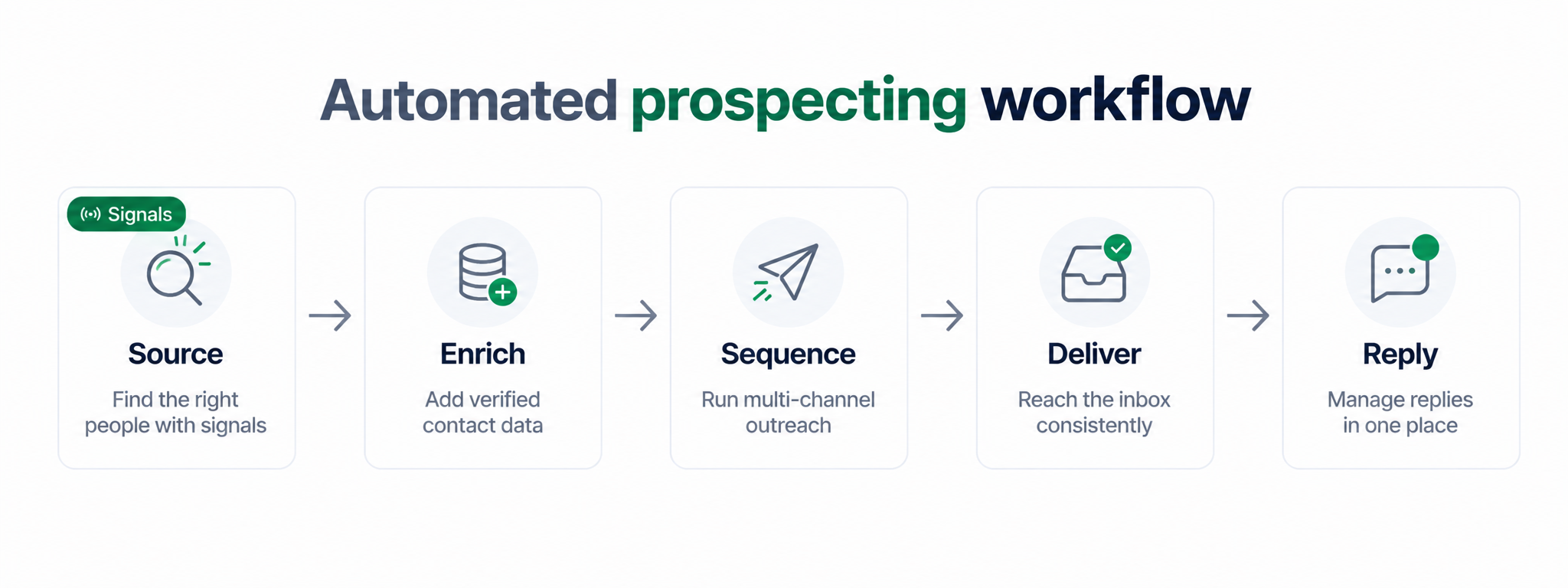
Each layer of the workflow has an owner, and skipping one is what creates the manual work people blame on automation.
No competitor I have tested offers the sourcing layer, the deliverability layer, three infrastructure models, the outreach layer, and an autonomous AI SDR as one connected stack under one roof. That is the part worth weighing when you compare tools, because every gap in that list becomes a subscription and an export loop.
If you take one thing from this, make it the order of operations. Automate sourcing before sending.
Most teams do the reverse, which is why they end up with more volume and the same number of meetings. A sequence can only be as good as the reason the person is in it, and the reason has to come from the list.
Signals is the shortcut. Funding, acquisitions, job changes, and new investments give you accounts with something happening right now, evidence to open the conversation with, and a window tight enough that the message reads as timely rather than lucky.
After that, the value is in how few tools sit between the list and the reply. Leadsforge sources and enriches, Salesforge sends across email and LinkedIn, Warmforge keeps the mailboxes healthy, Primebox™ catches everything that comes back, and Agent Frank runs all of it if you would rather hire the capacity.
The honest caveat: automation makes a bad ICP fail faster. Get the targeting right on a small list before you scale the volume, and check it every two weeks after that.
Start by defining the ideal customer profile and the roles you want to reach. From there, automate sourcing first so the right accounts enter the workflow, then enrichment and validation, then outreach and follow-ups, then reply handling. Sourcing on buying signals such as funding rounds, acquisitions and job changes narrows the list to accounts that are in-market, which is what makes the later automation worth running.
Three things. The conversation after a positive reply, because a rep can hear the real problem and an automated response cannot. Targeting review, because signal filters and ICP definitions drift over time. And a first-pass read of AI-generated copy on a new campaign, since that is where stale data or a wrong evidence line shows up before volume scales.
Only partly. Automating sends against a list you built by hand still leaves the slowest step manual. Using a lead finder that sits in the same environment as the sending tool removes the export loop entirely, which is where most of the promised time savings actually come from.
Signals replace filter stacking as the starting point for the list. Instead of searching by firmographics alone, you build the list around companies and people that recently raised funding, got acquired, changed jobs or made an investment. Each match carries evidence from public sources, which gives the first message a specific reason to exist.
It can, because automation increases volume and volume exposes a weak sending setup. Continuous warmup, ESP matching, sender rotation, bounce protection, email validation before send and text-only content are what keep automated volume landing in the primary inbox. Treat deliverability as part of the prospecting workflow rather than a separate project.
The sourcing and sequencing setup is realistically an afternoon once the ICP is clear. Deliverability is the longer lead time. Mailboxes need a warmup period before live sending, which is typically two to four weeks unless you start on pre-warmed mailboxes that are ready on day one.
Yes. An AI SDR can prospect continuously from a contact database, enrich records, write personalized email and LinkedIn messages, run sequences, handle follow-ups, manage replies and book meetings around the clock. Most teams still keep a human on targeting decisions and on conversations with interested prospects.