If you're building a CFO email list for B2B outreach, you need accurate contact details for finance decision-makers at companies that fit your target market.
Finding the right CFOs can take time, especially when you need to filter contacts by industry, company size, location, and revenue.
CFO email list providers help you find relevant contacts, verify email addresses, and build targeted prospect lists for your campaigns.
In this guide, we'll compare six tools, covering their key features, pricing, and use cases to help you choose the right provider for your needs.
Leadsforge: Best for GTM teams and lead generation agencies that want to build targeted CFO email lists using AI Search, waterfall enrichment, follower search, and advanced filters.
Cognism: Best for B2B sales teams that need international business contact data, contact verification, and sales intelligence for targeting CFOs.
Apollo.io: Best for sales teams that want to find CFO contacts, enrich prospect data, and manage outbound email campaigns from one platform.
A Quick Comparison of the Best CFO Email List Providers
Let’s have a quick overview of this table to find the best places for getting a CFO email list.
6 Best Places to Get CFO Email List in 2026 [A Detailed Discussion]
Let’s understand each of the email list provider in detail by discussing their features, pricing, and key capabilities.
1. Leadsforge
Best for: GTM teams and lead generation agencies that want to build targeted CFO email lists for outbound campaigns.
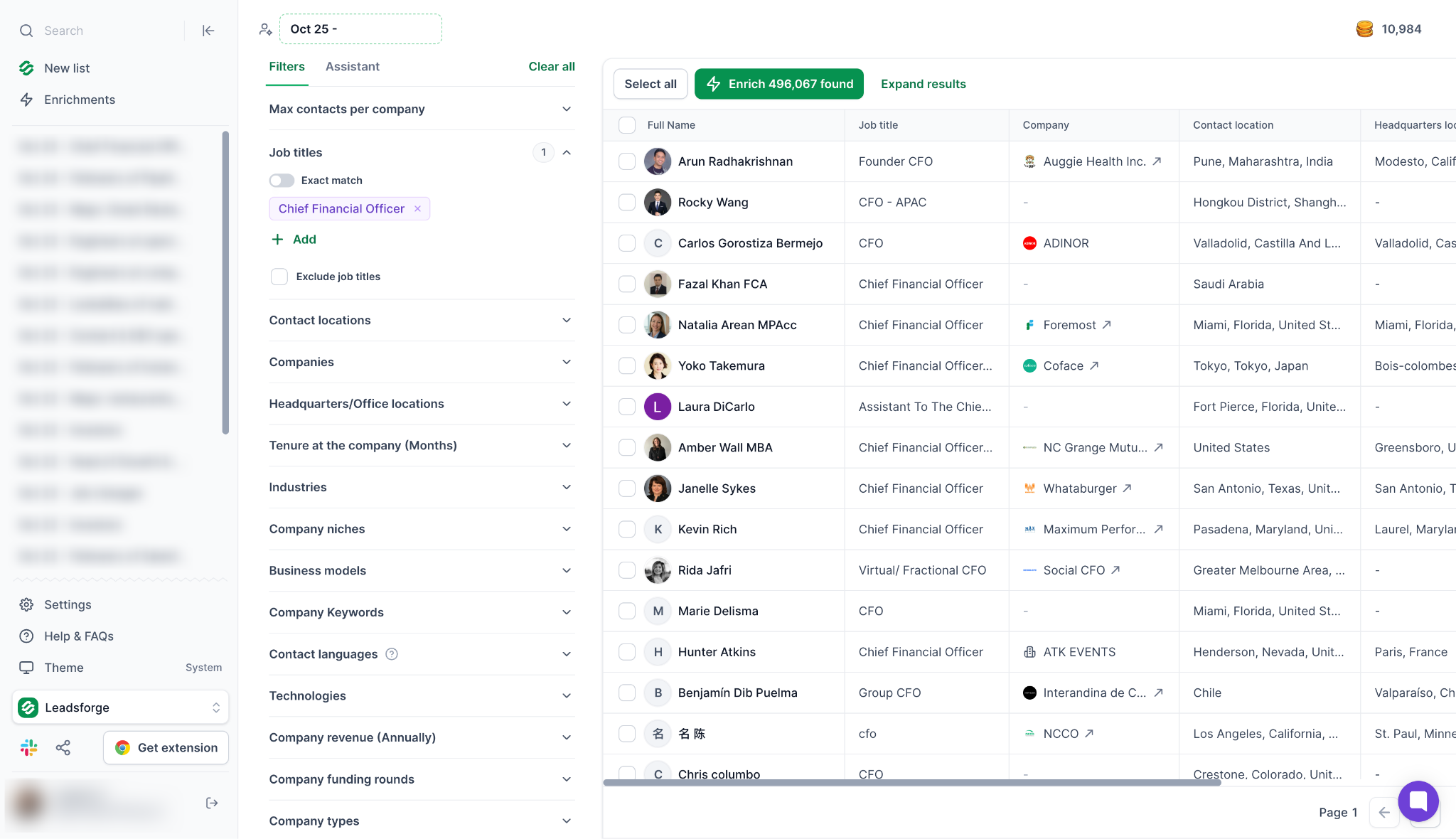
Leadsforge is an AI-powered B2B lead generation platform that helps you find CFOs who match your ideal customer profile (ICP). Its database includes 500M+ contacts, with search options to identify finance leaders based on job title, industry, company size, location, and other available attributes.
For CFO email list building, you can use AI Search to describe your target audience in plain English instead of manually setting every filter.
You can also refine your search, qualify prospects, and extract the contact details you need for your campaigns.
Leadsforge supports waterfall enrichment across multiple data providers to find contact information.
It also offers follower search to help you identify prospects connected to relevant social profiles, where supported. You can export contacts to CSV or send them to Salesforge for outreach.
Key features
AI Search: Describe your target audience in plain English to find CFOs who match your requirements.
Waterfall enrichment: Search across multiple data providers to find missing contact details and improve email coverage.
Follower search: Find potential prospects connected to relevant social profiles.
Advanced filters: Narrow your search by job title, industry, company size, location, and other available attributes.
Buying signals: Use available signals to identify companies that may be showing interest in relevant products or services.
Contact extraction: Collect prospect details for your lead generation workflow.
CSV exports and Salesforge integration: Export contact lists or send prospects to Salesforge to manage outreach.
Pricing
Free credits: 100 credits
Essential: $49/mo ($588/year), billed annually
Included credits: 28,000 credits/year
Monthly billing option: $49/mo, with 2,000 credits/month
Use AI Search, advanced filters, and waterfall enrichment to find CFOs who match your ideal customer profile and build targeted prospect lists for outbound campaigns.
Best for: B2B sales teams targeting CFOs at mid-sized and enterprise companies across multiple markets.
Cognism is a B2B sales intelligence platform that helps businesses find professional contact details and company information.
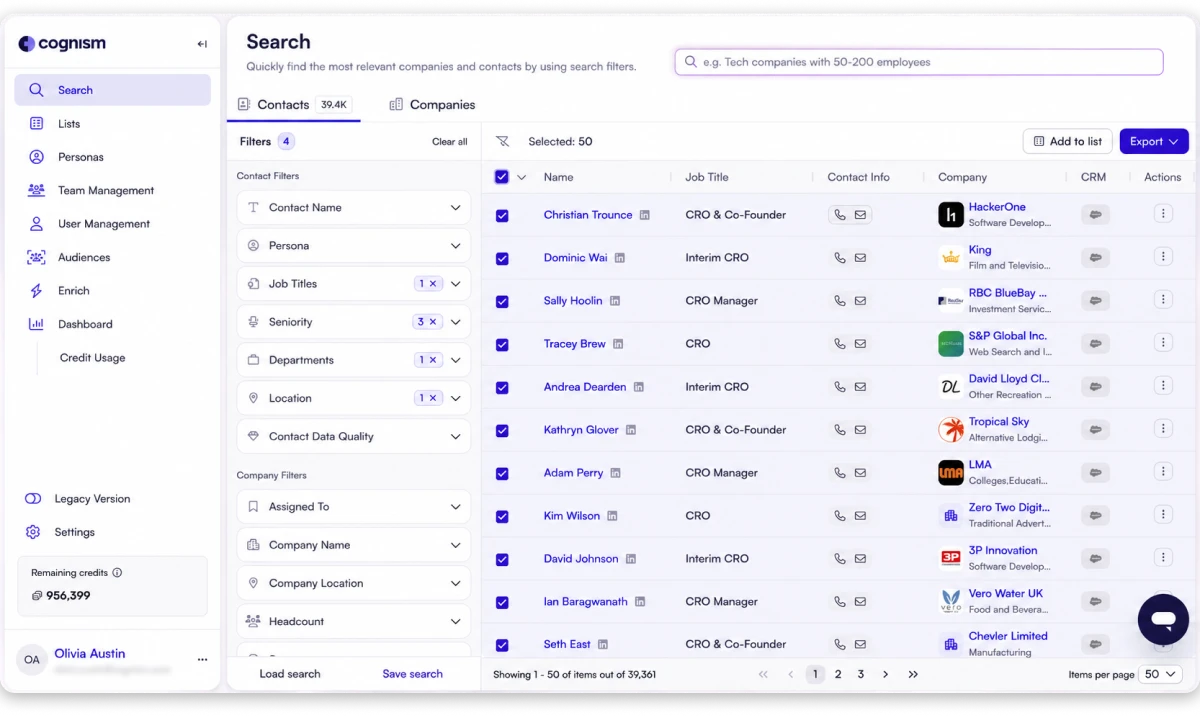
Its database supports searches for CFOs and other senior finance professionals based on job title, seniority, industry, location, and company attributes.
For CFO email list building, you can use Cognism to identify finance leaders at companies that match your target market. Its firmographic filters help narrow the audience by company size, revenue, industry, and geography.
These options are useful when your team targets specific business segments rather than building a broad list of finance professionals.
Cognism also provides sales intelligence features, including available buying-intent data and contact verification capabilities. You can use its data enrichment features and supported CRM integrations to add contact details to your existing records and connect prospecting with your sales workflow.
Key features
B2B contact database: Find CFOs and other finance executives using job titles, seniority, and company details.
Firmographic filters: Build targeted lists based on industry, company size, revenue, and location.
Contact verification: Access verification features designed to help assess the quality of contact data.
Intent data: Use available buying-intent signals to help prioritize accounts that may be researching relevant solutions.
Data enrichment: Add available company and contact details to existing prospect records.
CRM integrations: Send contact data to supported CRM and sales systems.
International coverage: Research business contacts across supported markets for international prospecting.
Pricing
Standard: Custom quote
Pro: Custom quote
CRM Enrichment: Custom quote
Seats: 5 seats included in the Standard and Pro prospecting packages
Cognism tailors pricing to your team's requirements, selected package, and data usage. Contact its sales team for a quote.
3. ZoomInfo
Best for: Enterprise sales teams that need detailed company intelligence and contact data for account-based prospecting.
ZoomInfo is a B2B data and sales intelligence platform that helps businesses research companies, identify decision-makers, and find professional contact information.
It supports prospecting across industries and company sizes, making it useful for teams that need to reach CFOs at specific accounts.
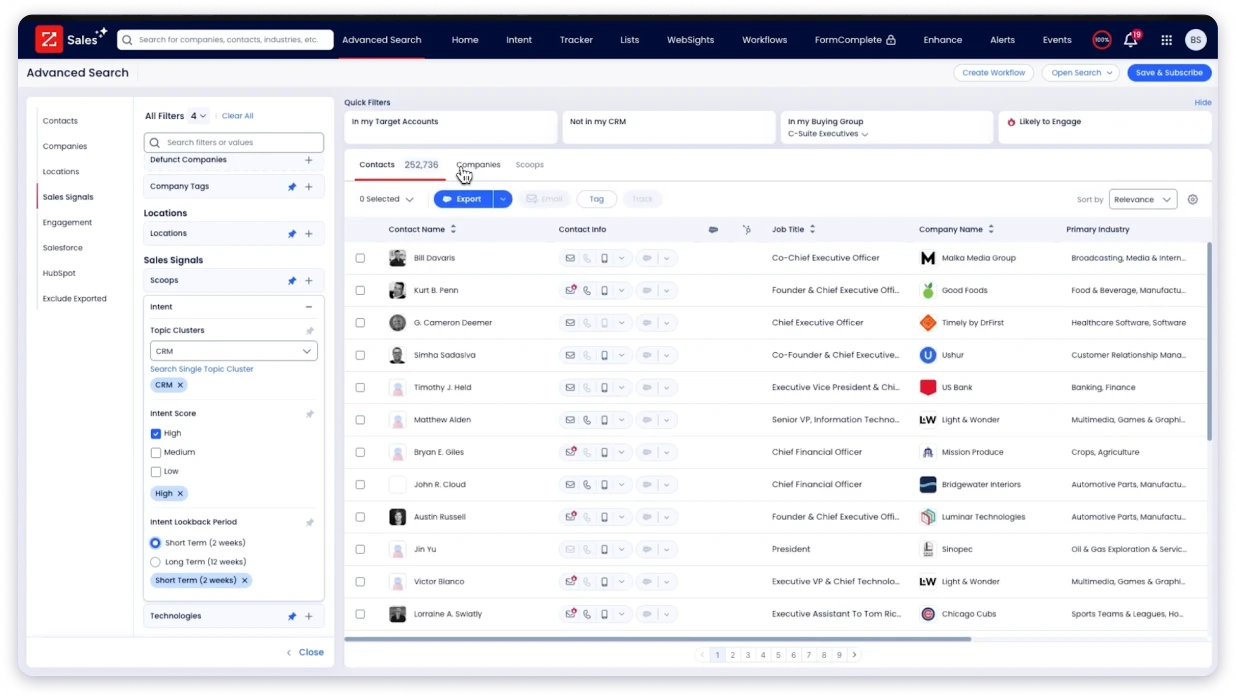
When building a CFO email list, you can search for finance leaders using job titles, company details, locations, and other available filters. You can then refine the list based on factors such as company revenue, employee count, industry, and organizational structure. These details help you focus on CFOs at businesses that fit your product's target market.
ZoomInfo also offers company intelligence, technographic data, intent signals, and integrations with sales systems. These capabilities can help your team prioritize accounts, enrich existing contact records, and move relevant prospects into its sales workflow.
Key features
B2B contact database: Find CFOs and other finance decision-makers using professional and company information.
Advanced search filters: Narrow prospect lists by job title, department, location, industry, and company size.
Company intelligence: Review available information about revenue, employee count, organizational structure, and other company attributes.
Intent data: Identify companies showing available signals of interest in relevant business topics.
Technographic data: Research companies based on the technologies they use, where data is available.
Data enrichment: Update existing business records with available contact and company information.
CRM integrations: Connect prospect data with supported sales and marketing systems.
Pricing
Sales: Custom quote
Marketing: Custom quote
Other products and enterprise packages: Custom quote
ZoomInfo does not publicly display fixed prices for these packages on its official pricing page. Contact its sales team to get a quote based on your requirements.
If you are evaluating other contact data platforms, you can compare their options in our guide to ZoomInfo alternatives.
4. BookYourData
Best for: Businesses that want to purchase targeted CFO contact lists without committing to a full sales intelligence subscription.
BookYourData is a B2B contact data provider that lets businesses search for professional contacts and purchase lists based on their prospecting requirements.
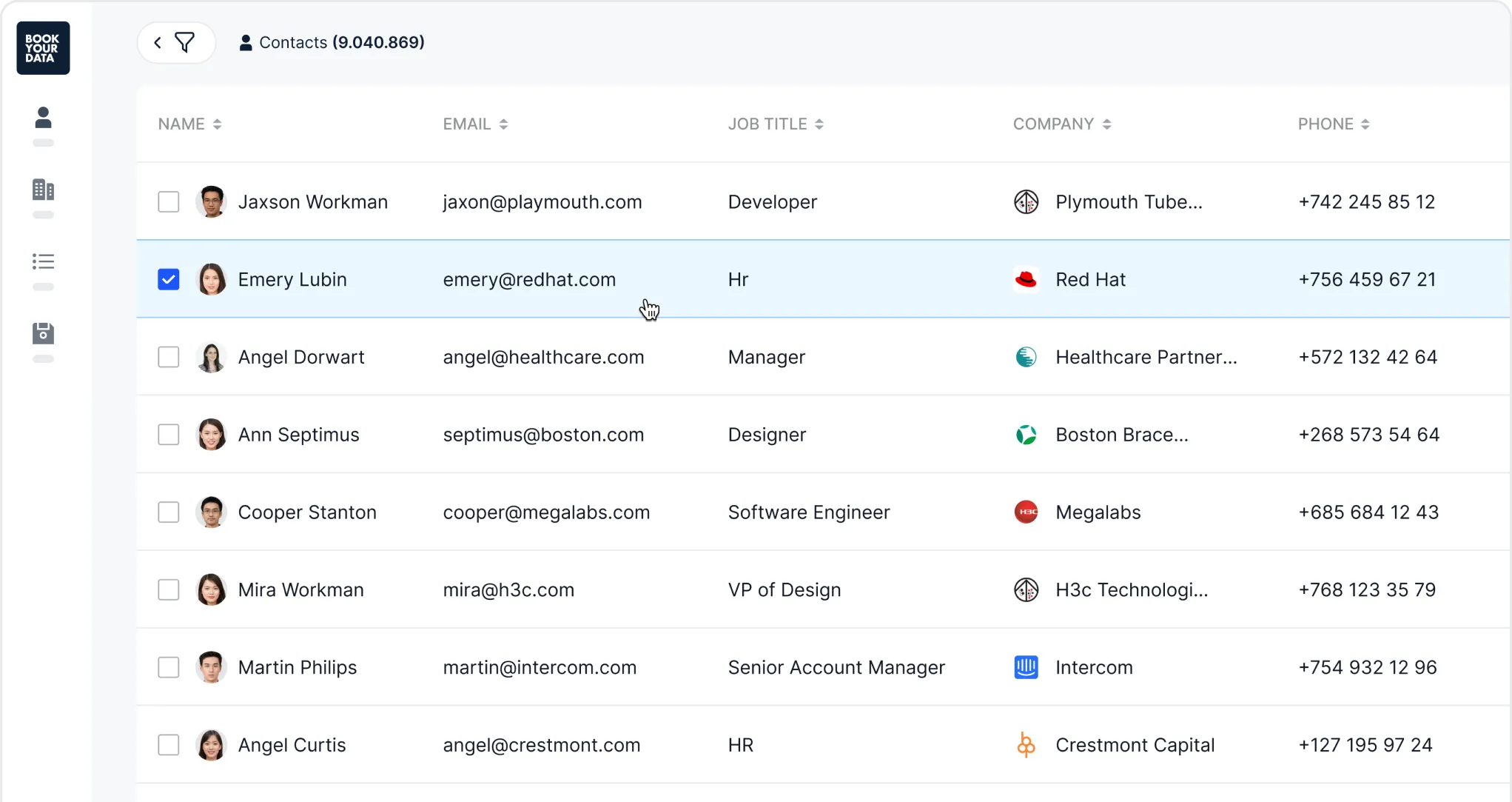
You can define an audience by job title, industry, geography, and company attributes to find contacts that fit your campaign.
For a CFO email list, you can focus on chief financial officers in specific countries, regions, or industries. You can also narrow your audience using available company filters, such as employee count or revenue.
The platform is useful when you have a defined target audience and want to purchase a list for a particular outreach campaign.
BookYourData provides contact data and offers email verification options to help you assess list quality. Before buying, review the available fields, verification details, and list size so you understand what the selected package includes.
Key features
Targeted CFO lists: Search for chief financial officers and other finance professionals based on available job-title filters.
Geographic targeting: Build lists for specific countries, regions, or other supported locations.
Industry filters: Focus on companies operating in industries relevant to your product or service.
Company attributes: Refine your audience using available firmographic information.
Email verification: Review the verification options offered for the contact records you purchase.
Flexible list sizes: Select a list based on your campaign requirements and budget.
Contact exports: Obtain contact records for use in your prospecting and sales workflows.
Pricing
Free pack: 10 free credits
Pay-as-you-go: Variable pricing based on the number of contacts purchased
Volume discounts: Available for larger purchases
Custom list building (BeSpoke): Starts at $499 for 1,000 records
BookYourData does not require a recurring subscription. Its official pricing page uses a dynamic pricing interface rather than displaying a fixed price for every contact pack.
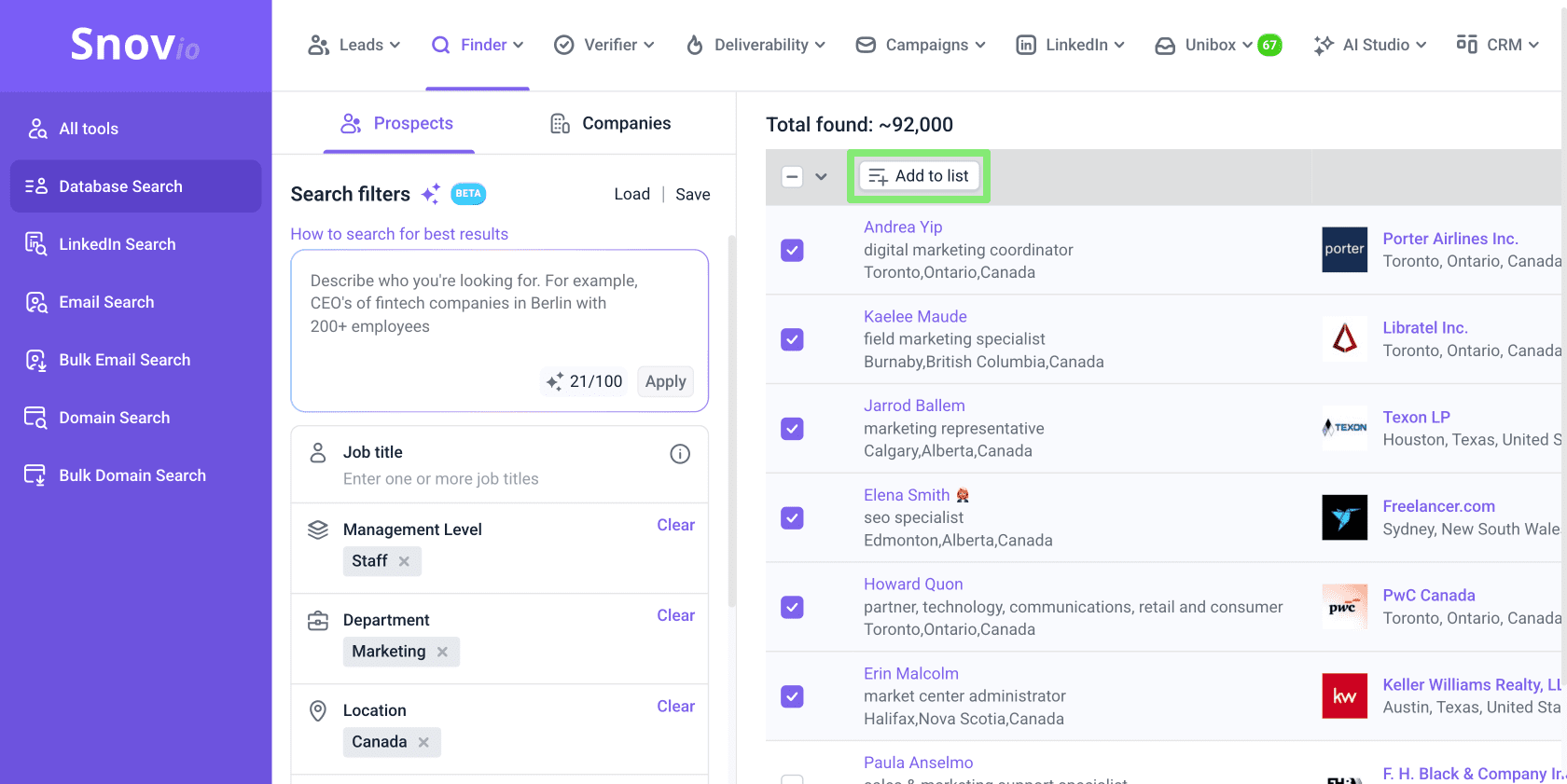
5. Snov.io
Best for: Small and mid-sized sales teams that need email finding, verification, and outreach tools in one platform.
Snov.io is a sales prospecting platform that combines email discovery, contact verification, lead management, and email outreach.
It helps users find professional email addresses and organize prospect data for outbound campaigns.
To build a CFO email list, you can search for contacts using a person's name, company, or domain. You can also use available search criteria to identify finance executives at companies that fit your target market.
Once you have a list, Snov.io's email verification features can help you check addresses before adding them to an outreach campaign.
Snov.io also supports email sequences and automated follow-ups. Rather than exporting contacts to a separate tool for every step, you can manage prospecting and outreach activities within the platform. The features and usage limits available to you depend on your subscription plan.
Key features
Email finder: Find professional email addresses associated with individuals, companies, or domains.
Domain search: Discover available email addresses associated with a target company's domain.
Email verification: Check addresses for validity and identify potentially risky records before sending campaigns.
Prospect management: Organize contacts and manage prospect lists within the platform.
Email campaigns: Create outreach sequences and schedule follow-ups using supported features.
Lead generation workflows: Combine contact discovery with other prospecting activities.
CRM integrations: Connect prospect information with supported CRM systems.
Pricing
Free trial: Free plan available
Starter: $29.25/mo
Pro S: $74.25/mo
Pro M: $141.75/mo
Pro L: $276.75/mo
Ultra: $553.50/mo
The prices above reflect the 25% annual-billing discount shown on Snov.io's official pricing page. Monthly billing is available at higher rates.
For more detail on its email finding, verification, and outreach features, read our Snov.io review.
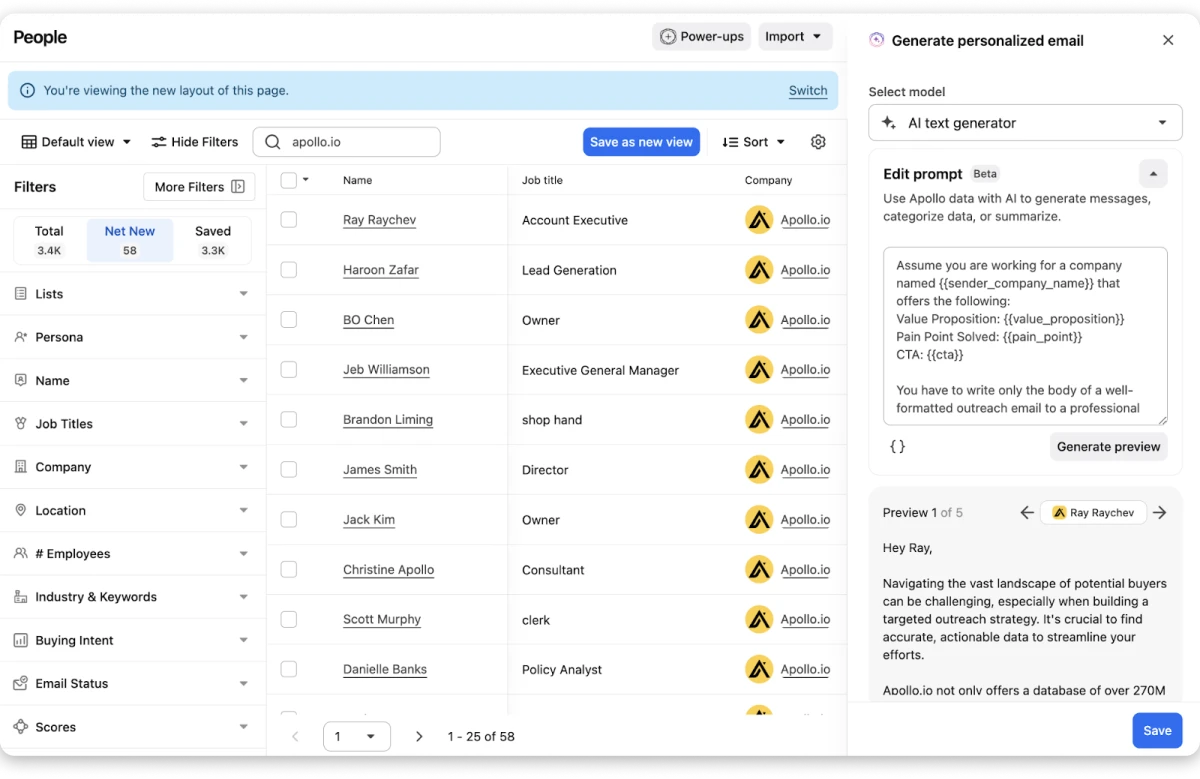
6. Apollo.io
Best for: Sales and growth teams that want B2B contact data, prospecting filters, and outbound engagement tools in one platform.
Apollo.io is a B2B sales intelligence and engagement platform that helps businesses find prospects, access professional contact details, and manage outbound sales activities.
Its database and search tools let teams identify decision-makers based on job title, company information, industry, location, and other available criteria.
For CFO email list building, you can search for finance leaders at companies that fit your ideal customer profile.
You can refine your list by company size, revenue, industry, and geography, then review available contact details before adding prospects to your workflow.
Apollo also includes email-finding features, contact data enrichment, sales engagement tools, and integrations with supported CRMs.
Its combination of prospecting and outreach capabilities can help teams move from contact discovery to campaign execution within one platform.
Read our Apollo.io review for a closer look at its contact database, prospecting features, pricing, and limitations.
Key features
B2B contact database: Search for CFOs and other finance professionals using job titles and company information.
Advanced prospect filters: Narrow your list by industry, company size, revenue, location, and other available attributes.
Email finding: Access available professional email addresses for relevant prospects.
Contact enrichment: Add available company and contact details to existing records.
Buying intent: Use available intent signals to help prioritize accounts.
Email sequencing: Create outreach sequences and automate follow-ups on supported plans.
CRM integrations: Sync prospect information with supported CRM platforms.
Pricing
Free: $0
Basic: $49/user/mo
Professional: $79/user/mo
Organization: $119/user/mo (minimum 3 seats)
Apollo's annual plans include different credit allowances and features. The Organization plan is designed for larger teams and includes a minimum seat requirement.
For teams comparing several prospecting platforms, explore these Apollo.io alternatives to find an option that fits their data and outreach needs.
What is a CFO Email List?
A CFO email list is a collection of professional contact details for chief financial officers at companies that match your target audience. Depending on the source, it may include names, business email addresses, job titles, company names, locations, LinkedIn profiles, and other business information.
Sales teams use CFO email lists to reach finance leaders who influence budgeting, financial planning, purchasing, and investment decisions.
For example, a company selling financial planning software might target CFOs at mid-sized businesses. A provider of expense management software might focus on finance leaders at companies with large teams or multiple offices.
A useful CFO email list should include:
Accurate contact details: Professional email addresses that have been checked for validity.
Relevant job titles: CFOs and other finance leaders who influence purchasing decisions.
Target company details: Industry, company size, revenue, and location.
Current information: Contact details that reflect recent changes in roles or companies.
Relevant targeting criteria: Data that helps you focus on businesses likely to need your product or service.
The quality of your list matters more than the number of contacts it contains. A smaller, well-targeted list can be more useful than a large list of contacts who have little connection to your offer.
Why Use a CFO Email List?
CFOs oversee financial planning, budgets, reporting, and other important financial decisions. Reaching them can be useful when your product or service addresses a business finance need.
A targeted CFO email list can help you:
1. Reach finance decision-makers
A CFO list helps you identify finance leaders who may evaluate or influence purchases involving financial software, accounting services, expense management, risk management, and business operations.
2. Focus on your target market
You can filter contacts by company size, industry, location, or revenue. These filters help you focus on businesses that fit your ideal customer profile instead of sending messages to an unrelated audience.
3. Reduce manual prospect research
Finding CFOs one by one can take time. A contact database can help you collect names, company details, and available contact information in a more organized way.
4. Personalize your outreach
Company and contact details can help you write more relevant emails. For example, you can tailor your message to a company's size, industry, or likely financial priorities instead of sending the same generic pitch to every CFO.
5. Support account-based marketing
If you're targeting a defined group of high-value companies, a CFO list can help you identify finance leaders within those accounts. You can then coordinate email outreach with other appropriate sales and marketing activities.
6. Keep prospect data organized
A structured list makes it easier to segment contacts, track outreach, update records, and identify which prospects need follow-up.
Remember that having a CFO's email address does not guarantee that the person is interested in your offer. Keep your outreach relevant, respect opt-out requests, and follow the privacy and email marketing rules that apply to your target market.
How to Choose the Right Provider for a CFO Email List
The right provider depends on your target market, budget, list size, and prospecting process. Compare the following factors before making a decision.
1. Contact accuracy
Check how the provider collects, updates, and verifies contact data. Ask whether email verification is included, whether it uses multiple data sources, and how it handles outdated records.
No provider can guarantee that every email address will work. Verification can reduce the risk of invalid addresses, but it cannot eliminate it.
2. Targeting filters
Look for filters that match your ideal customer profile. Useful criteria may include:
Job title and seniority
Industry and company size
Annual revenue
Country, state, or region
Technologies used by the company
Available buying-intent signals
Better filters help you create a more relevant list.
3. Data coverage
Check whether the provider covers the countries and industries you want to target. A platform with strong coverage in one region may have less complete data in another.
If you're targeting CFOs in multiple markets, test the provider's coverage before committing to a large subscription.
4. Pricing model
CFO email list providers use different pricing models. Some offer monthly or annual subscriptions, while others charge based on credits, contact volume, or individual list purchases.
Compare the total cost against your expected usage. Check credit limits, export restrictions, renewal terms, and extra charges before choosing a plan.
5. Integration with your workflow
Consider how you plan to use the contacts after finding them. If you already use a CRM or email outreach platform, check whether the provider supports integration or contact exports.
A tool that fits your existing workflow can reduce manual data handling.
6. Additional prospecting features
Email finding may be enough for a small campaign. Larger teams may need enrichment, intent data, company intelligence, or automated outreach.
Choose features based on your actual workflow. Paying for tools you won't use can increase costs without improving your results.
7. Compliance and responsible outreach
Check how the provider handles data sourcing, privacy requests, and contact suppression. You should also understand the rules that apply to your audience and outreach location.
For example, business email outreach may be subject to requirements under laws such as the CAN-SPAM Act in the United States or GDPR and PECR in relevant European markets.
Buying a list does not remove your responsibility to follow applicable rules.
Find and Enrich CFO Contacts with Leadsforge
Discover relevant finance decision-makers using AI-powered prospecting, follower search, and contact enrichment. Export your list or send prospects to Salesforge for outreach.
A CFO email list can help you reach finance leaders at companies that fit your target market. The right provider depends on your budget, target audience, and prospecting requirements.
Leadsforgeis a strong option for GTM teams and lead generation agencies that want to build targeted CFO email lists. Its AI Search, waterfall enrichment, follower search, and advanced filters help you find relevant prospects and collect contact details for outbound campaigns.
Before choosing a plan, review the available features, pricing, and credit limits.
Start with a focused list, verify the email addresses, and refine your targeting based on campaign results.
FAQs About CFO Email Lists
1. What is the best tool to find CFO email addresses?
The best tool depends on your requirements. Leadsforge offers AI-powered prospecting and enrichment, Cognism and ZoomInfo focus on B2B sales intelligence, BookYourData lets you purchase targeted lists, and Snov.io and Apollo.io combine contact discovery with other sales tools.
2. Can I buy a CFO email list?
Yes. Providers such as BookYourData offer targeted B2B contact lists. Before purchasing, review the data fields, geographic coverage, verification process, and applicable terms. Check whether the provider's data collection and intended use align with the privacy and marketing rules that apply to your campaign.
3. How do I build a targeted CFO email list?
Start by defining your ideal customer profile. Decide which industries, company sizes, revenue ranges, and locations you want to target. Use a prospecting platform to find CFOs who match those criteria, then verify their contact details and remove irrelevant or outdated records.
4. How can I check whether CFO email addresses are valid?
Use an email verification tool to check addresses before adding them to your campaign. Verification can identify invalid or risky addresses, but results are not a guarantee of delivery. Recheck older lists before using them because contact data can change over time.
5. How much does a CFO email list cost?
The price depends on the provider, number of contacts, data fields, and pricing model. Subscription platforms may charge monthly or annually, while list providers may charge based on the number of records purchased. Check current pricing and included limits before making a decision.
6. What information should a CFO email list include?
A useful list may include the CFO's name, professional email address, job title, company name, industry, location, and LinkedIn profile. Depending on your targeting needs, revenue data and other firmographic details may also be useful.
7. Is a purchased CFO email list ready for outreach?
Not always. Review the list, check for outdated contacts, verify email addresses, and remove duplicates. Make sure your outreach follows the laws and platform policies that apply to your campaign. A purchased list should not be treated as permission to send unrestricted marketing emails.
8. How can I improve responses from CFO outreach?
Build a focused list, write messages that address a relevant business problem, and explain why your offer may be useful to that company. Keep emails concise, avoid generic pitches, and personalize them with accurate information. Track replies and opt-outs, and adjust your targeting based on the results.
Book more meetings on autopilot
Set up in minutes. No per-seat pricing. No commitment.
Compare six CFO email list providers in 2026, including Leadsforge, Cognism, ZoomInfo, BookYourData, Snov.io, and Apollo.io. Explore their features, pricing, targeting capabilities, and contact verification options to choose the right platform for building targeted B2B prospect lists.
Learn how to use Jev for B2B lead generation with Grok Bot and Leadsforge, from scoring ICP fit and buying signals to finding qualified leads every week.




.jpg)
