
Personalized Outbound Strategy
Get The Right Outbound Strategy In Minutes
Enter your email to get a custom plan & stack recommendation for your business
It's being carefully crafted by AI
Please check your mailbox in 5 minutes
I've been using a Grok Bot called BoB to manage my B2B lead generation.
BoB has access to Leadsforge for finding prospects and Salesforge for running outreach campaigns. I manage everything from the Grok Bot Desktop App, where I can ask BoB to build lead lists, research companies, and prepare campaigns.
But there was one decision I wasn't comfortable leaving entirely to BoB.
Which of these leads actually has a good reason to buy?
A company might have recently raised funding, hired a new GTM Engineer, or gone through an acquisition. But that doesn't automatically make it a good prospect for my business.
That's why I added Jev from TypeSafe AI to my setup.
I use Jev as a decision layer inside BoB. It helps me check:
I first tested Jev on 20 leads. Initially, all 20 were marked for nurture. Once I added recent funding, job-change, and acquisition signals, four moved to the contact-now category.
In this guide, I'll show you the seven steps I followed to set up Jev with Grok Bot and Leadsforge and qualify B2B leads every week.
Before I show you the seven steps, here's how my setup works. I use BoB, my Grok Bot agent, to manage the process. I tell it what kind of companies and people I'm looking for, and it uses Leadsforge to find matching prospects.
Here's what each tool does:
BoB handles the research, while Jev helps me decide which leads are worth contacting.
My goal was to build a process where BoB could find new prospects every week, check which ones were worth contacting, and give me a shortlist of qualified leads.
My target was 20+ qualified leads every week, but I didn't want to spend hours checking each prospect's company, role, and recent activity. So I started with 20 real leads to see how Jev handled qualification before using it on a larger list. Here's how I set everything up.
I started by installing the official TypeSafe skill in BoB. I was already using Grok Bot to find leads through Leadsforge. Now I needed BoB to understand how to send prospect information to Jev and get qualification decisions back.
You can install the skill using this command:
npx skills add typesafe-ai/skills --skill typesafe-ai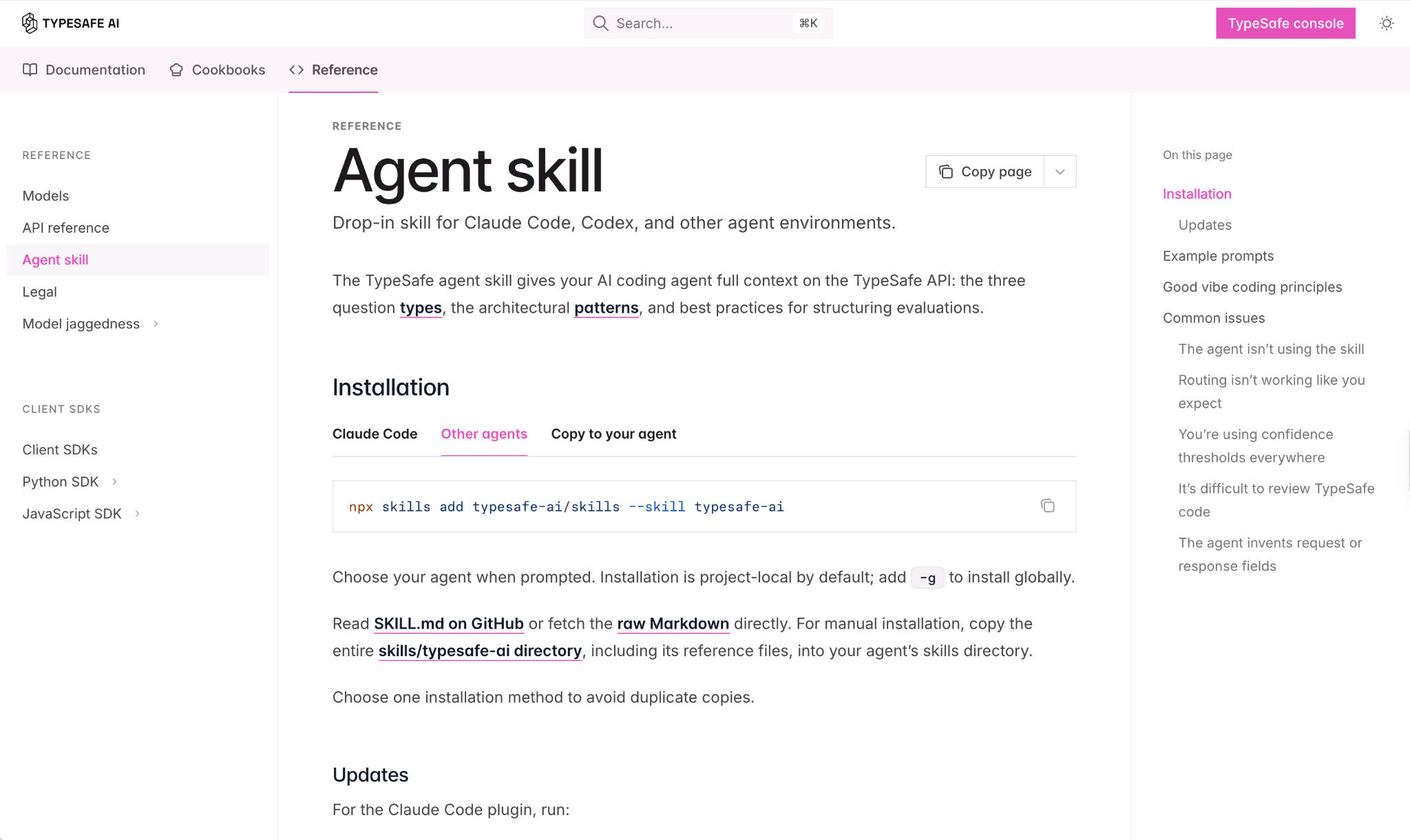
I asked BoB to read the official TypeSafe SKILL.md file and save it as a Grok Bot skill instead of running the installer. Once that was done, BoB confirmed that the skill was available across my assistants.
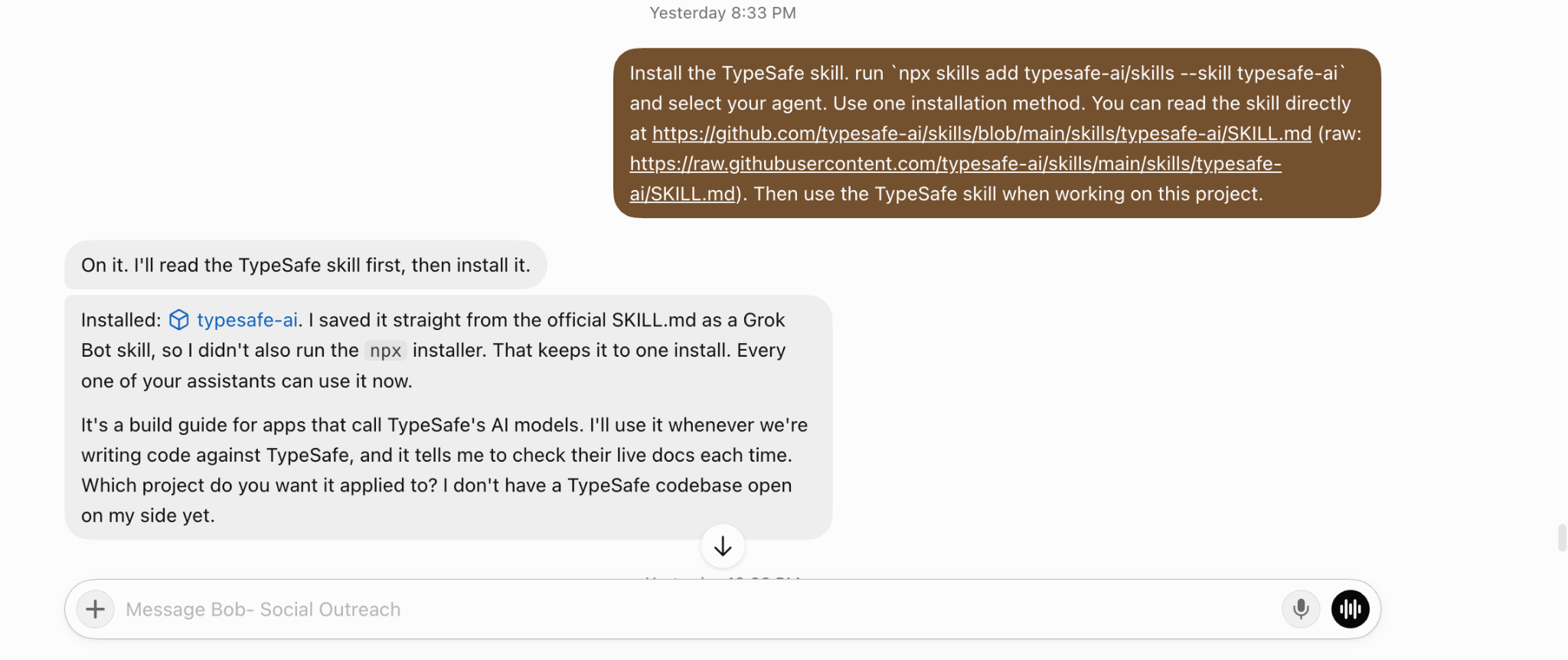
I did this so I wouldn't have to explain how Jev works every time I wanted BoB to score leads or change the qualification rules. Next, I needed to connect my TypeSafe API key and test Jev on real prospects.
After installing the TypeSafe skill, I created an API key from the TypeSafe console and added it to BoB.

I didn't want to start with hundreds of leads. So I asked BoB to test Jev on 20 real US prospects using my Leadsforge lead data.
For each prospect, I wanted Jev to run seven checks.
Some were scores:
Some were classifications:
And some were probability-based decisions:
I also kept an unclear option for cases where Jev wasn't confident enough to make a decision. Once BoB finished running these checks, all 20 leads came back as nurture.
I looked at the individual results to understand why.
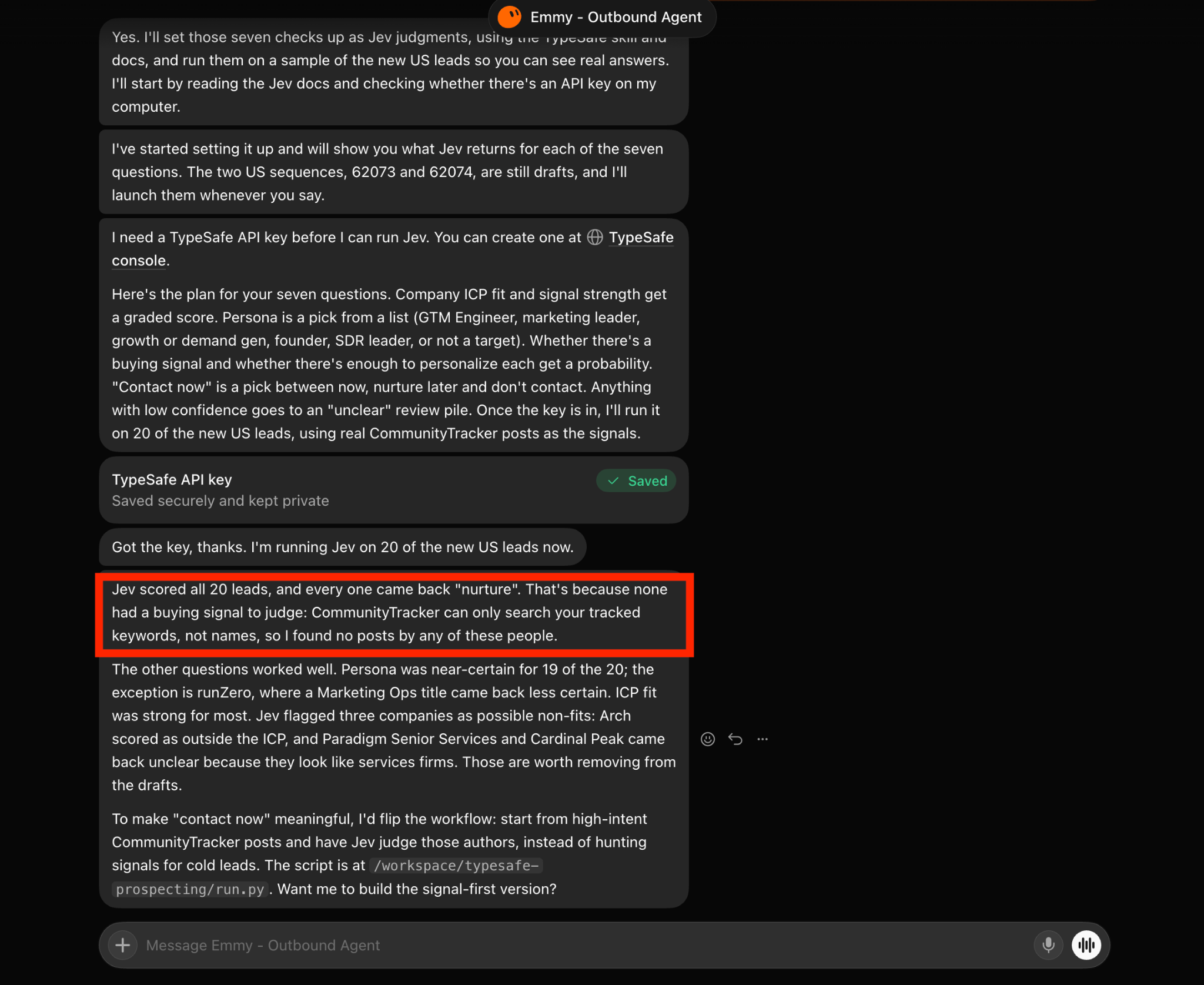
Jev was confident about the buyer role for 19 of the 20 prospects. The one less-certain result was a Marketing Ops title.
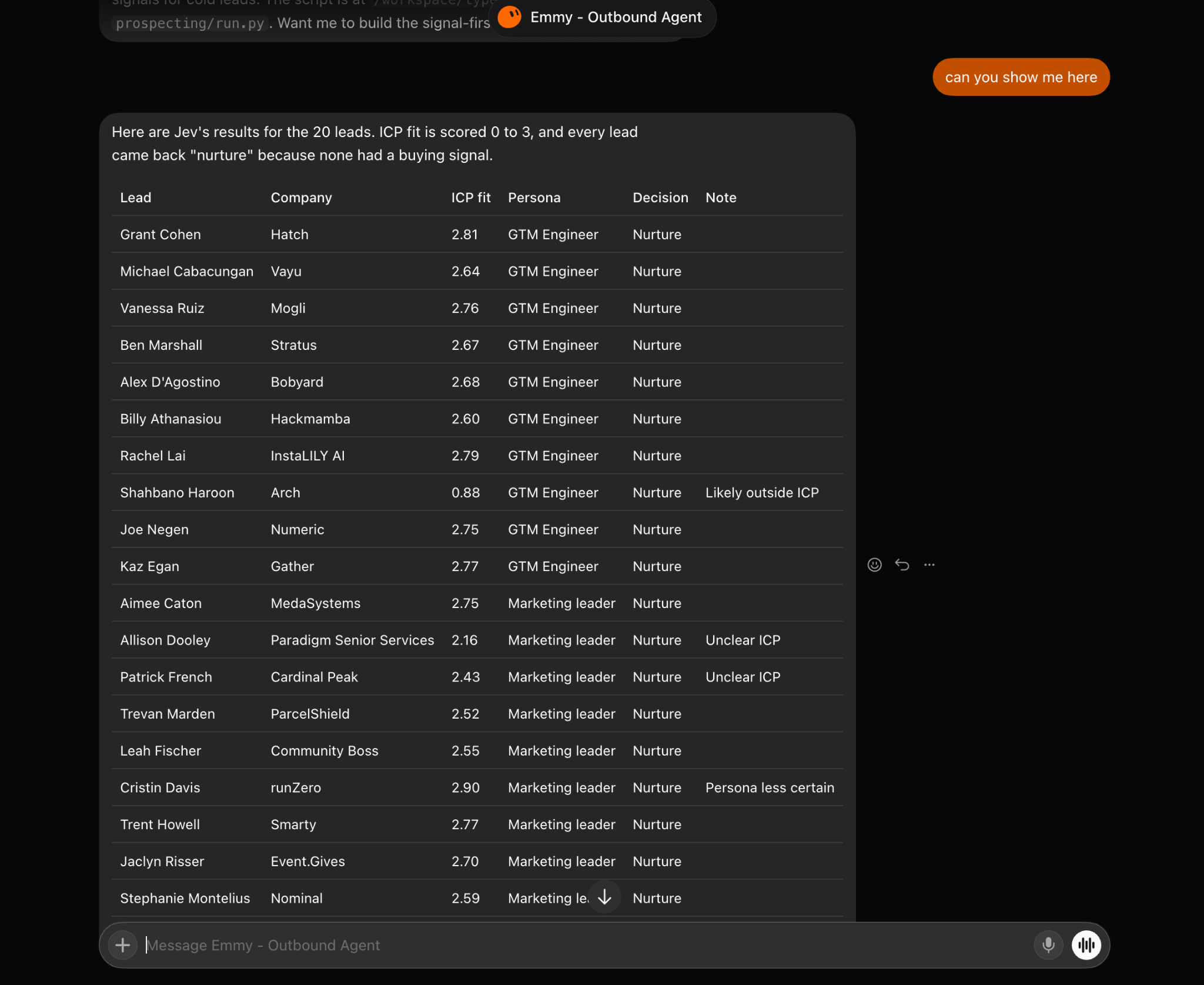
Jev also flagged three companies for review:
But Jev couldn't confidently judge buying intent.
I'd given Jev company and persona information, but no meaningful buying signals. It had nothing to tell it why those prospects might need my product right now.
I asked BoB to look at four types of activity for the same 20 prospects through Leadsforge:
I limited the search to the last six months so BoB wouldn't use old company news to judge current buying intent.
One prospect's company had raised a $60 million Series B with new investors. Another prospect had recently moved into a GTM Engineer role.
But I also wanted to check changes that could make a prospect a poor fit. For example, an acquisition might mean the company no longer matches the type of business I'm targeting.
BoB attached the available signals to each lead record and sent the updated information to Jev for another round of scoring.
When I ran Jev again, the same 20 leads received different contact decisions.
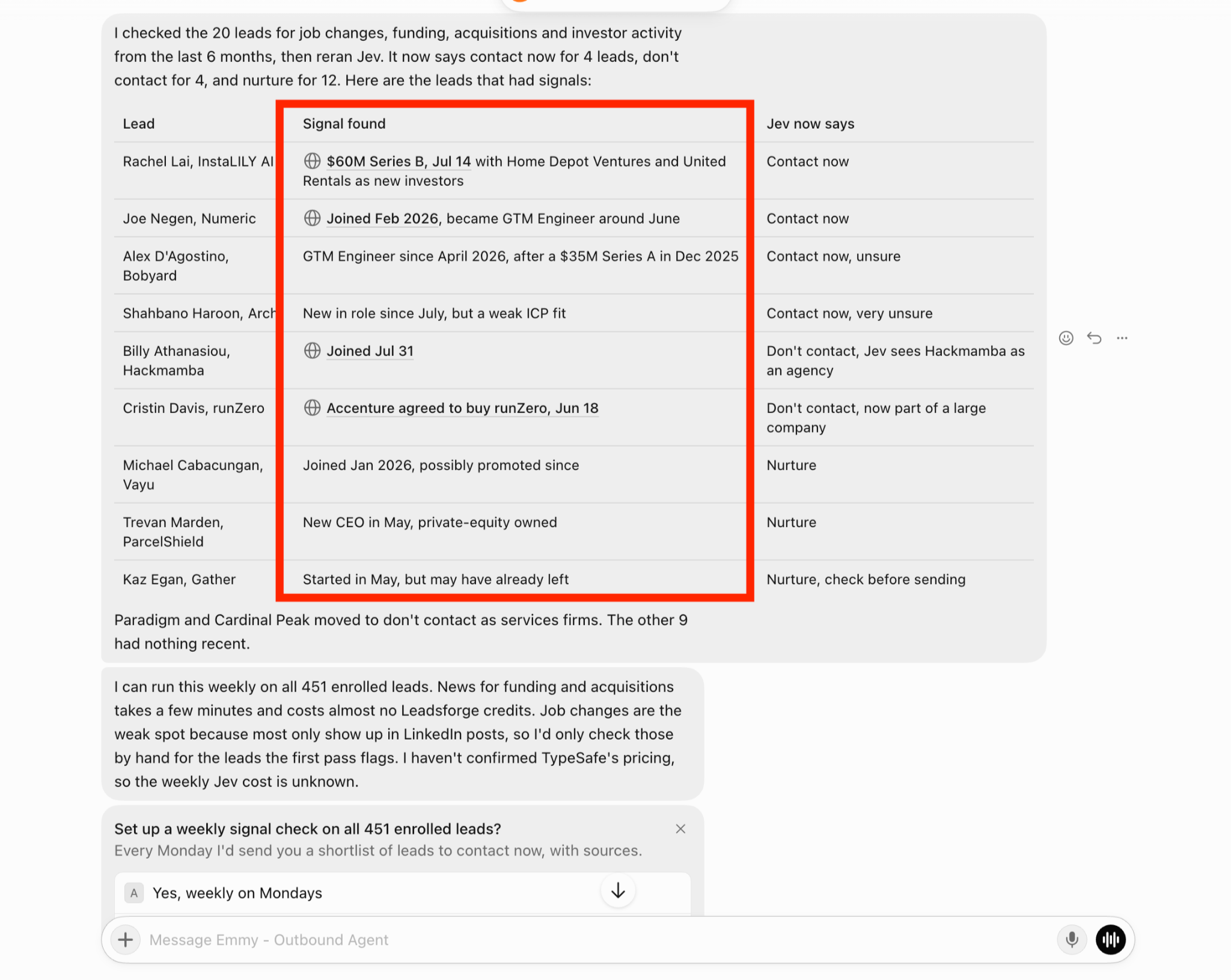
After the second round of scoring, Jev divided the 20 prospects into three groups:
I wanted to understand why Jev had made those decisions, so I checked the results individually. The prospect connected to the $60 million Series B moved to Contact Now. So did the person who had recently taken a GTM Engineer role.
But Jev didn't treat every recent change as a reason to reach out. One prospect was marked Don't Contact because their company was an agency outside my ICP. Another received the same decision because their company had been acquired by Accenture and was now part of a much larger organization.
I also found a few borderline Contact Now recommendations with low confidence. I kept those for manual review rather than treating them as automatically qualified.
The first test left me with four leads Jev recommended contacting immediately.
Before using those recommendations, I still needed to verify the signals and find a relevant reason to approach each prospect.
Once Jev had shortlisted the leads, I asked BoB to research them before I used them for outreach.
For each prospect, I wanted BoB to check three things:
I also asked BoB to keep the source attached to every finding. I didn't want it making up a reason to contact someone just because Jev had marked them as Contact Now.
For example, BoB researched Alex D'Agostino at Bobyard. It found that Alex had been working as a GTM Engineer since April. Bobyard was also hiring a data analyst to support RevOps, data, and lead scraping.
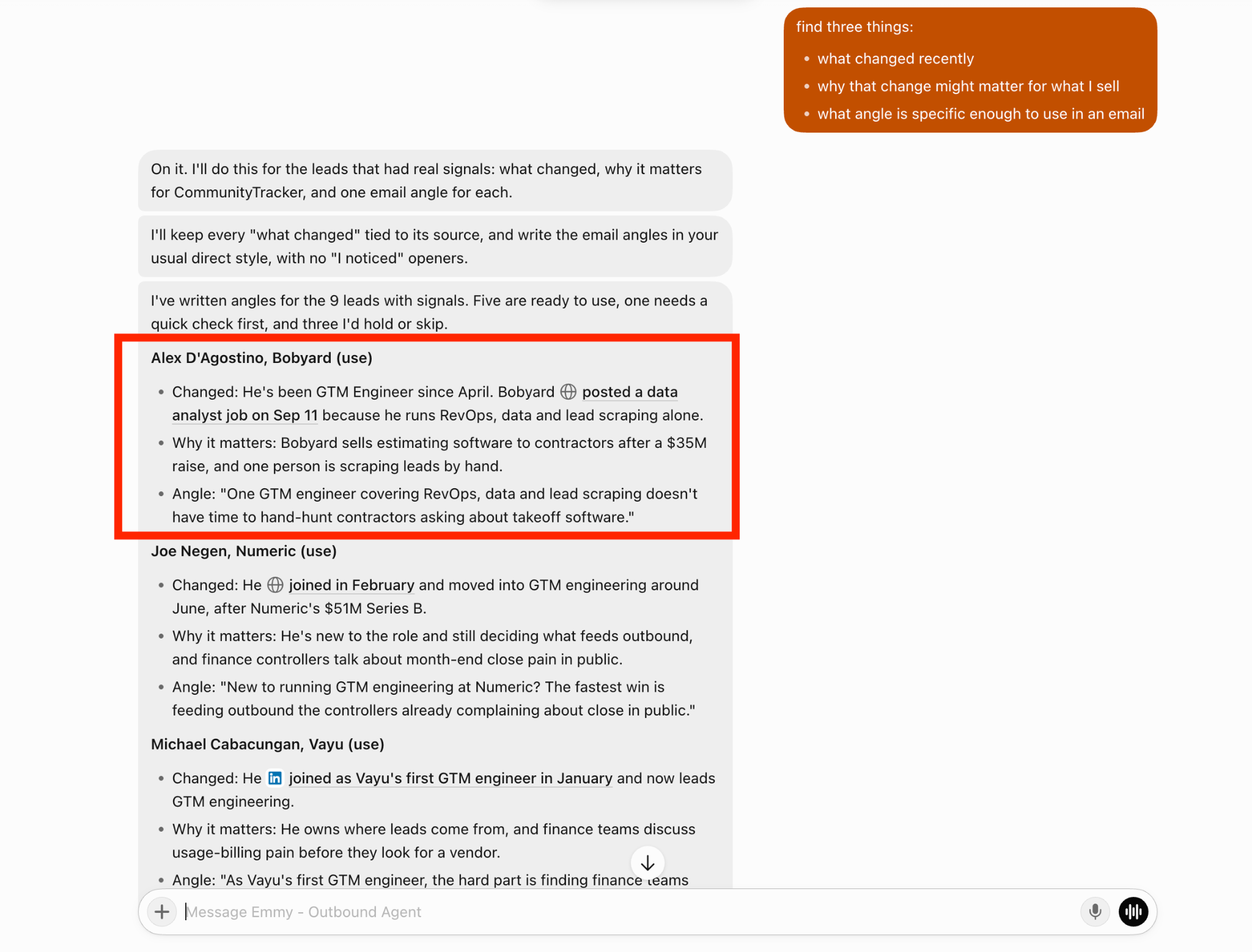
That gave me a specific reason to approach Alex based on the work happening at his company.
For Joe Negen at Numeric, BoB found a different angle. Joe had moved into a GTM Engineer role after Numeric's Series B funding round.
Instead of using the funding announcement alone, I could focus on his new role and how he might be approaching outbound prospecting.
After reviewing the research, BoB had identified:
I wasn't looking for a detailed company report on every prospect. I just needed enough verified information to understand why I should contact that person and what I could say.
With those angles prepared, I could move on to getting the qualified leads ready for outreach.
After reviewing the research, I asked BoB to organize the qualified prospects into a list I could use for outreach. I wanted each lead to have enough information to explain why it was worth contacting.
For each prospect, I asked BoB to include:
I also asked BoB to keep low-confidence recommendations separate so I could review them myself.
I used those findings to decide which prospects were ready for outreach and which still needed more information.
For the remaining prospects, I wanted BoB to keep checking for new buying signals instead of leaving them in nurture indefinitely.
After the first test, I wanted Jev to help me find new qualified leads without starting the research process from scratch every week.
BoB suggested using my existing pool of 451 enrolled leads and checking them every Monday. I wanted Jev to handle the qualification decisions while BoB collected updated prospect information through Leadsforge.
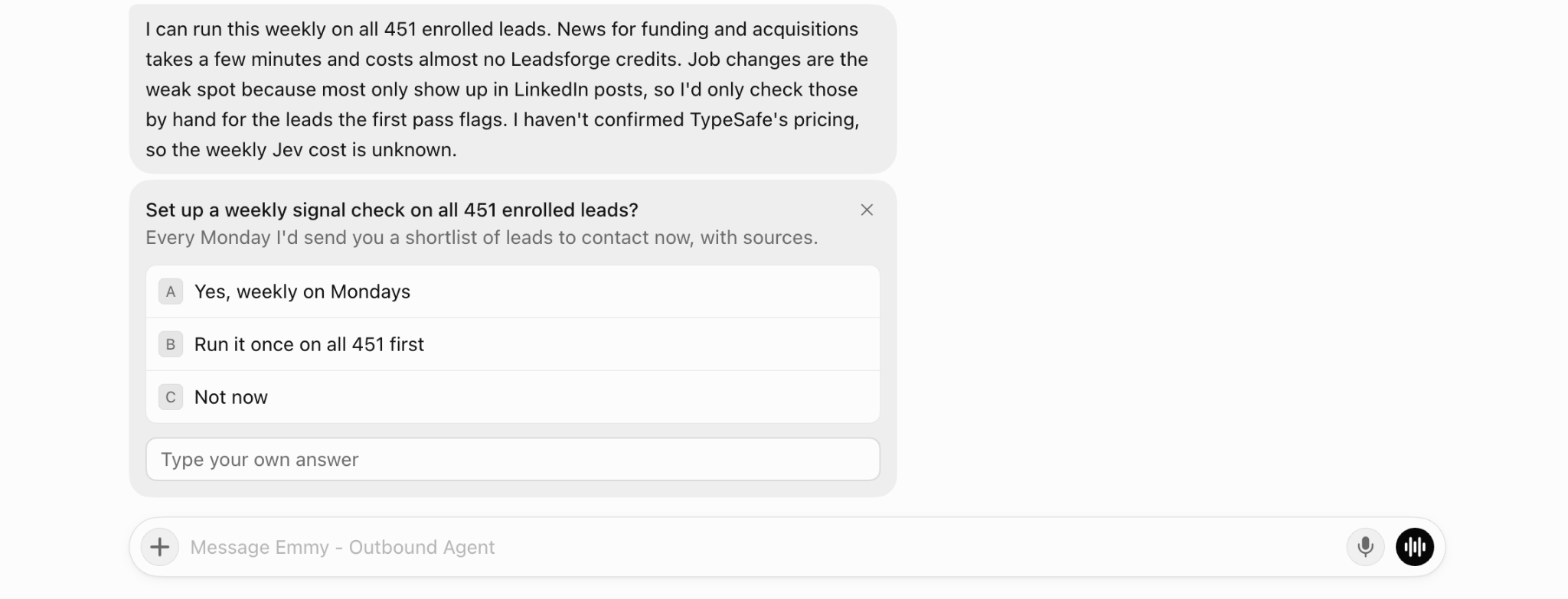
Here's how I planned to use Jev each week:
For example, a prospect might have been marked Nurture because there was no clear reason to contact them.
If that person recently became a GTM Engineer at a company matching my ICP, Jev could reassess the prospect using the new information and recommend Contact Now.
My goal was to find 20+ newly qualified leads every week by checking existing prospects for changes that could make them worth contacting.
I planned to test this process on the larger pool of 451 leads and measure how many new Contact Now recommendations Jev could identify each week.
Jev recommended contacting 4 out of the 20 prospects after I added recent buying signals.
The results showed some clear differences between the prospects.
BoB's follow-up research also found five usable outreach angles, including Alex D'Agostino's GTM Engineer role at Bobyard and Joe Negen's new role at Numeric. The test gave me four leads to consider contacting immediately, 12 to keep in nurture, and four to exclude. Each Contact Now recommendation still needed its buying signal checked before outreach.
Jev helped me pick leads for outreach, but I noticed few problems during my test.
Funding rounds and acquisitions were easier to confirm. Job changes were harder because they often appeared on LinkedIn before other sources picked them up.
For now, I'd ask BoB to check a person's LinkedIn profile before using a new role as a reason to contact them.
I tested Jev on 24 sample replies. It classified 22 correctly, but missed two.
It treated “Who is this?” as a question instead of unclear. It also marked a reply that included a product question and “ping me in January” as Not Now.
Both went to human review, so nothing was sent automatically. But I'd want to test a few hundred real Salesforge replies before trusting Jev to handle them without my approval.
Jev judged the signals BoB sent it, but it didn't check whether those signals were true.
If BoB found an old funding announcement or an outdated job title, Jev could still use it to recommend Contact Now.
I'd keep the original source with every signal and have BoB check it before moving a lead into outreach.
BoB suggested checking my 451 enrolled leads every week for new buying signals.
But if I started checking thousands of leads and asking Jev several questions about each one, the number of requests would grow.
I'd need to check the cost and see which questions were worth running every week. Some decisions, such as stopping outreach after an unsubscribe, could simply follow a fixed rule instead of requiring another Jev check.
Enter your email to get a custom plan & stack recommendation for your business
Please check your mailbox in 5 minutes

Yes, I would recommend Jev if you're handling hundreds of B2B leads and need to decide who to contact first. In my test, Jev helped me narrow down 20 prospects to four worth contacting. It also helped me check buyer roles, review buying signals, and sort sales replies.
I wouldn't use Jev for a small list of leads. The time spent setting it up may be more than the time needed to review those leads myself. But for my Grok Bot setup, I'd keep it. Leadsforge finds the prospects, Jev checks who is worth contacting, and Salesforge handles the outreach.
I still want to test Jev on more leads and real campaign replies before trusting it with every decision.
For now, Jev has earned its place in my lead generation process. My next step is to see whether its Contact Now recommendations lead to more positive replies and booked meetings.
.jpg)



.png)