B2B appointment setting means finding the right buyers, reaching them, and getting a meeting on a rep's calendar. Most teams solve it by hiring more SDRs, and that gets expensive well before it gets effective.
I looked at the three ways teams run it today: in-house SDRs, outsourced appointment setters, and an AI SDR.
The one I spend the most time on is Agent Frank, the AI SDR inside Salesforge, because he changes the headcount math the most.
Here is how each option works, where each one breaks, and who should hire Agent Frank.
This is the short version if you only have a minute.
B2B appointment setting means prospecting, outreach, follow-up, and booking meetings.
In-house SDRs give you control but scale only as fast as you hire. Outsourced setters start faster but know your product less well.
Agent Frank is an AI SDR that prospects, writes, follows up, and books meetings 24/7 across email and LinkedIn, so your reps focus on closing.
He fits best when your ACV is $5K to $100K, and you target 3,000+ businesses.
You can run the Forge Stack three ways: your own team operates it, Agent Frank operates it, or a Forge Expert agency operates it.
What B2B Appointment Setting Involves
This section defines the job, so the three options below can be compared on the same terms.
The four steps of the workflow
Appointment setting has four parts: building a target list, sending personalized outreach, following up, and booking the meeting. Every option in this guide does the same four things.
They differ in who does the work, how many contacts they can reach, and how much of it keeps running when nobody is online.
Why headcount becomes the bottleneck
One SDR can only research and message so many prospects in a day. Doubling meetings usually means doubling hires, plus ramp time, management, and tooling.
The bottleneck gets worse in 2026 because sending is no longer the hard part. Deliverability and reply handling decide whether outreach turns into meetings.
Why timing and targeting matter as much as volume
A message that reaches the right person right after a funding round or a job change gets read differently. That is why list quality and buying signals matter more than raw send volume.
Three Ways to Run B2B Appointment Setting
This section compares in-house SDRs, outsourced appointment setters, and an AI SDR on cost, control, and scale.
In-house SDRs
You get full control over messaging and a rep who learns your product deeply. That is hard to beat for complex, high-touch deals.
The cost is salary, ramp time, management, and turnover. Output grows only as fast as you can hire and train.
Outsourced appointment setting services
Agencies get you moving quickly without a hiring cycle, and good ones bring tested playbooks. For a short push or a new market, that speed is real.
The trade-off is context. The people booking your meetings rarely know your product as well as your own team, and quality varies a lot between providers.
An AI SDR
An AI SDR handles prospecting, outreach, and follow-up continuously, without a salary per seat. It still needs a clear ICP and accurate product context to perform well.
I see this as the option that changes the cost curve. Adding contacts no longer means adding people.
Quick comparison
Here is how the three options stack up on the factors that usually decide the choice.
This section explains what Agent Frank does day to day and how I would think about hiring him.
What he handles end to end
Agent Frank is an autonomous AI SDR built into Salesforge. He runs the whole outbound workflow instead of one slice of it.
Prospects continuously from the Leadsforge 500M+ contact database
Enriches contact and company data before outreach
Writes personalized email and LinkedIn messages with AI, in 21+ languages
Runs multichannel sequences and handles follow-ups
Manages replies through Primebox™
Books meetings directly on the rep's calendar
Works 24/7 without manual intervention
The base plan handles up to 1,000 active contacts.
A teammate you hire, not a tool you buy
I treat Agent Frank as an addition to the sales team. He takes on prospecting, follow-up, and booking, so your reps spend their time on live deals.
That is also the honest way to describe the value. You scale without hiring more SDRs, rather than swapping people out.
Auto-Pilot vs Co-Pilot
You decide how much control you keep over replies.
In Auto-Pilot, Agent Frank prospects, writes, sends, and follows up with no approval step. In Co-Pilot, he drafts and you approve replies before they go out.
If the messaging is new, I would start in Co-Pilot. Once the replies look right, moving to Auto-Pilot saves the most time.
What the setup looks like
Agent Frank is available after a demo with the team. That demo is how the team learns how he fits your sales process.
A dedicated Account Manager creates a complimentary Salesforge account, which is Agent Frank's office.
You build his Knowledge Base by uploading product brochures, docs, and website links, so his emails reference your product correctly.
You choose infrastructure: your own mailboxes, Infraforge with dedicated IPs, or Megaforge, the premium multi-ESP option.
New mailboxes go through a two-week warmup with Warmforge before sending starts.
You upload contacts or set an ICP (job titles, locations, industries) for continuous prospecting.
You pick Auto-Pilot or Co-Pilot, the language, and your goals.
Agent Frank starts reaching out, and you tune performance with your Account Manager in a shared Slack channel.
See how Agent Frank would book meetings for your ICP
Book a demo, and your Account Manager will walk through the Knowledge Base, infrastructure options, and Auto-Pilot or Co-Pilot setup.
Outreach only books meetings when the leads, mailboxes, and inbox behind it are healthy, so this section covers the products Agent Frank runs on.
Leadsforge for targeting and enrichment
Leadsforge is the AI lead finder behind Agent Frank's prospecting. You describe your ICP in plain English, and it returns a matching list from 500M+ contacts. There is no filter stacking and no boolean queries.
For every contact, waterfall enrichment queries multiple data providers in sequence to fill in emails, phone numbers, and other fields at higher coverage. Company Lookalikes surface accounts similar to the ones you already close, and Competitor Followers Search pulls the people following your competitors.
Leadsforge feeds Salesforge directly, so lists move into campaigns with no CSV export. The LinkedIn email and phone finder Chrome Extension also runs on Leadsforge, and new users get 100 free credits on signup.
Signals for better timing
Signals is the newest sourcing path in Leadsforge. It builds lists around real-world events, so you reach companies and people who recently did something meaningful, instead of searching by ICP alone.
The flow is short:
Select Signals as the sourcing path.
Choose a signal type.
Configure the provider-specific filters.
Check the estimated number of matching companies or contacts.
Extract results using credits.
Open the Details view to see the evidence for each match, then enrich and move leads into the Enriched table.
Four signal types are available:
Signal
What it finds
Filters
Job Change
People who recently changed jobs
Signal period, contact location, positions, seniorities, departments
Acquisition
Companies recently acquired
Signal period, company location, categories, subcategories, employee count, founded year
Funding
Companies that recently raised funding
Signal period, company location, categories, subcategories, industries, funding round, funding amount (USD), employee count, founded year
Investor
Companies and people actively investing
Signal period, company location, headquarters, type, ticket size (USD)
For company-based signals, Leadsforge first finds the matching companies. It then matches them against its lead database and surfaces the relevant employees.
Every extracted company or contact carries supporting evidence. For appointment setting, that gives your first message something real to reference. Credits are charged at extraction, based on how many companies or contacts you select.
Signals are a Leadsforge sourcing path, so you can build a list there and upload it for Agent Frank as your own contacts.
Local Companies Search for local markets
If you sell to local businesses, Local Companies Search finds them by location and business type, using Google Maps data. You set a location and radius, search for types like dentists, restaurants, marketing agencies, or law firms, then extract the businesses or enrich them to find the right contacts.
Warmforge and your mailbox options
Every mailbox connected to Salesforge is warmed with Warmforge, included free with unlimited warmup slots. Warmforge also gives you Heat Score™ tracking, Inbox Placement Tests, and Health Checks for DNS, MX, and blacklist status.
For the mailboxes themselves, three options sit under one login. You can move between them as scale and budget change, without migrating.
Mailforge: shared infrastructure built for cold outreach, from $3 to $2 per mailbox per month, billed annually, with a 10-slot minimum.
Infraforge: dedicated IPs, with pre-warmed mailboxes sold separately, from $4 to $3 per mailbox per month, billed annually.
Primeforge: real Google Workspace and Microsoft 365 mailboxes with ESP matching, from $4.50 to $3.50 per mailbox per month, billed annually.
I would pair Primeforge with Mailforge or Infraforge. Teams that run two or more providers usually have a mailbox that matches their prospect's inbox provider.
Deliverability controls in Salesforge
Salesforge adds several controls that protect sender reputation before problems show up:
Bounce Shield blocks sends to addresses likely to bounce.
Built-in email validation checks every contact before sending.
Sender rotation spreads volume across mailboxes and domains.
Text-only content keeps payloads light, with no heavy HTML or tracking pixels by default.
ESP matching pairs Google to Google and Microsoft to Microsoft (Growth plan).
Replies from email and LinkedIn land in Primebox™, so there is one inbox to check instead of several.
Who Agent Frank Fits and Who He Does Not
This section helps you decide honestly whether an AI SDR matches your sales motion.
A good fit
Agent Frank works well when most of these are true:
You sell B2B products or services with ACVs between $5K and $100K.
Your buyers are decision-makers at startups, SMBs, or mid-market companies.
You target 3,000+ businesses.
You want to book meetings at scale without building a large SDR team.
Email and LinkedIn already work manually, but scaling them has become costly or inefficient.
A weaker fit
I would look elsewhere, or keep human SDRs in the lead, when:
You mainly sell to Fortune 500 companies.
Your deals run through long RFP cycles and complex procurement.
Your average deal size is consistently in the six to seven figures.
Your pipeline depends on a small number of highly bespoke, high-touch deals.
You are comfortable with a fragmented tool stack and manual processes.
5 Steps to Run the Forge Stack, and What It Costs
This section shows who can operate the stack, why having everything under one roof matters, and what each plan costs.
Team, Agent Frank, or a Forge Expert agency
The same product can be run in three ways. Your own team operates it, Agent Frank operates it, or a Forge Expert agency operates it for you. I have not seen a direct competitor that offers all three.
That matters for appointment setting, because you can start with your team on Salesforge and hand more of the work to Agent Frank as volume grows.
One roof instead of a stitched stack
Most teams combine a lead database, a sending tool, a warmup tool, a mailbox provider, and a separate LinkedIn tool. Every handoff between them is a place where lists break, and context gets lost.
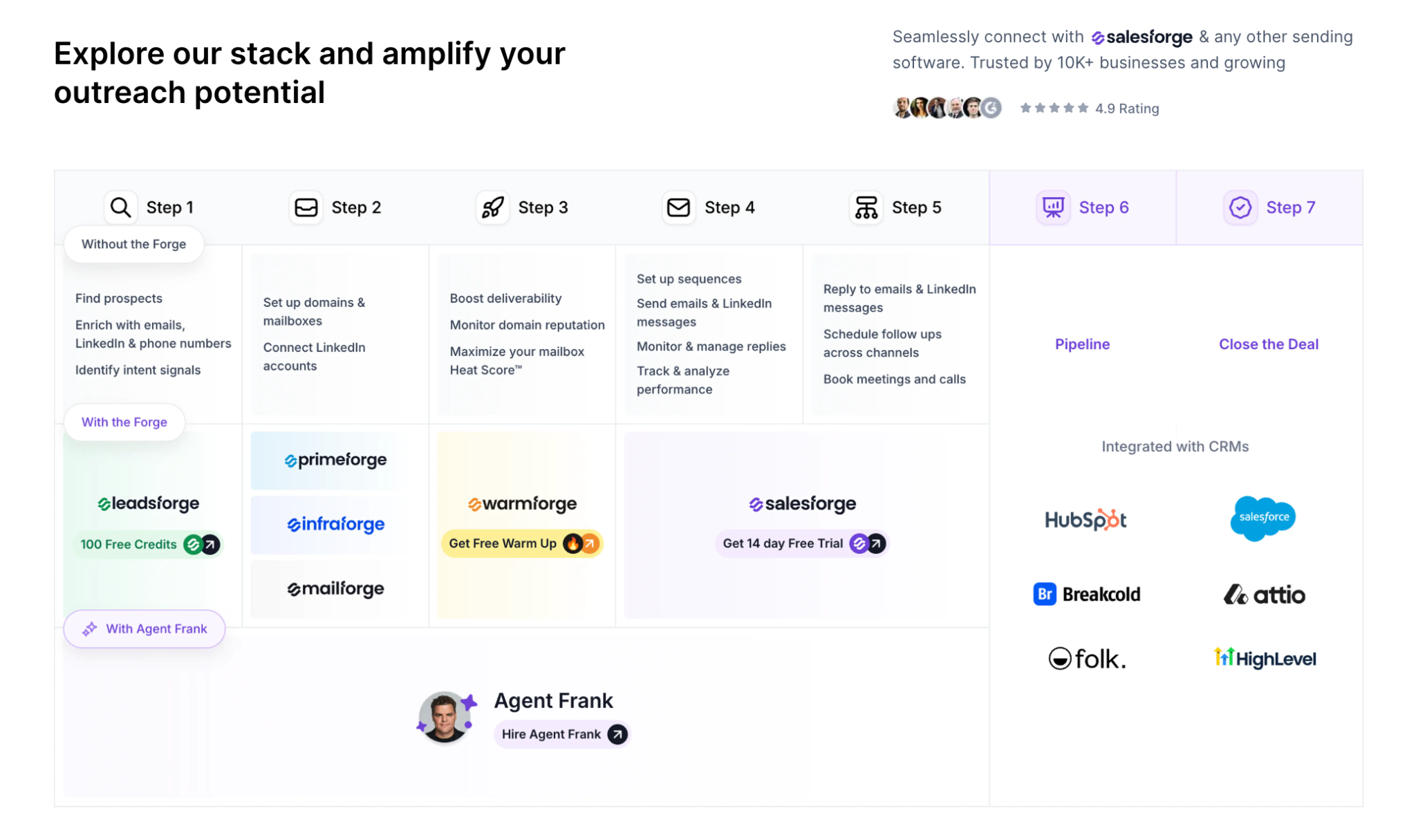
The Forge Stack covers infrastructure (Mailforge, Infraforge, Primeforge), deliverability (Warmforge), lead finding (Leadsforge), multichannel outreach (Salesforge), and an AI SDR (Agent Frank). These are separate subscriptions under one login. A few things follow from that:
Leadsforge feeds Salesforge directly, with no CSV export.
Warmforge warms every mailbox for free with Salesforge.
Primebox™ brings LinkedIn and email replies into one inbox, with Autopilot and Co-pilot modes.
Conditional sequences run LinkedIn and email in one flow. For example, if a connection request is accepted, a LinkedIn message goes out. If it is not, the sequence falls back to email.
Every Forge product exposes an MCP server, so Claude, Cursor, or your own agents can operate the platform through one protocol.
Both Pro and Growth include unlimited Warmforge warmup, smart mailbox rotation, and Primebox™. A/B testing, multi-language sequences, ESP matching, and API access are Growth-only.
There is a 14-day free trial with no credit card required.
Final Verdict
The right option depends on your deal size, your target list, and how much of the work you want a person to own.
In-house SDRs fit teams with complex, high-touch deals and a small target list. Outsourced setters fit short pushes or a new market where speed matters more than product depth.
For ACVs of $5K to $100K and a target list of 3,000+ businesses, I would hire Agent Frank. He handles prospecting, outreach, and booking, while your reps close. If you want to stay hands-on first, run the same stack with your own team in Salesforge and move to Agent Frank later.
Build your pipeline in Salesforge, or hire Agent Frank
Try multichannel outreach with unlimited warmup included. No credit card required, or book a demo to see Agent Frank.
It is the process of finding qualified business buyers, reaching them, and booking a meeting for a sales rep. It covers list building, outreach, follow-up, and scheduling.
Can an AI SDR book meetings on its own?
Yes. Agent Frank prospects, writes personalized email and LinkedIn messages, follows up, handles replies through Primebox™, and books meetings on the rep's calendar. You choose Auto-Pilot or Co-Pilot.
Does Agent Frank replace my SDRs?
No. He augments your sales team by handling prospecting and meeting booking, so your reps focus on closing deals. The value is scaling without hiring more SDRs.
How much does Agent Frank cost?
Agent Frank starts from $499 per month, billed quarterly. The base plan handles up to 1,000 active contacts.
How do I get started with Agent Frank?
You start with a demo. A dedicated Account Manager then sets up the account, Knowledge Base, infrastructure, prospecting, and your Auto-Pilot or Co-Pilot choice.
Which companies should skip an AI SDR?
Teams selling mainly to Fortune 500 accounts, or with long RFP cycles and six to seven-figure deals, are usually a weaker fit.
What are Leadsforge Signals?
Signals is a sourcing path in Leadsforge that builds lists from real events: job changes, acquisitions, funding rounds, and investments. Each match includes evidence that explains why it qualified.
Book more meetings on autopilot
Set up in minutes. No per-seat pricing. No commitment.
B2B appointment setting does not have to mean hiring more SDRs. I compare in-house reps, outsourced setters, and an AI SDR, then show how Agent Frank books meetings using Leadsforge, Warmforge, and Primebox™ inside one connected Forge Stack workflow.
A step-by-step guide to building a cold email list in 2026: define your ICP, source contacts with Leadsforge signals and lookalikes, verify every email, segment by role and trigger, then send through Salesforge with free Warmforge warmup.


.png)