
Personalized Outbound Strategy
Get The Right Outbound Strategy In Minutes
Enter your email to get a custom plan & stack recommendation for your business
It's being carefully crafted by AI
Please check your mailbox in 5 minutes
Meta just gave its new AI agent a computer of its own.
Muse works from a computer in the cloud. It can browse the web, access email, and keep working after you leave.
Now put that to work on a cold email inbox. A prospect replied three months ago and nobody followed up. Could Muse find that thread, read what happened, research the prospect, and prepare the next reply?
Now multiply that across hundreds of conversations.
If Muse can do this reliably, it could turn an inbox full of forgotten leads into follow-ups without someone digging through every thread. But finding and researching those leads is still a long way from running the campaign itself.
Can Muse make that jump from working through your inbox to actually running cold email outreach?
That's what I wanted to find out.

Meta launched Muse in September 2026 as a personal AI agent. Unlike a chatbot that mainly responds to questions, Muse can take a task and work on it for you.
Each Muse runs on its own Muse Secure VM. This is a cloud computer with a full browser. Muse can use the browser to open websites and complete tasks. It can also keep working after you close the app.
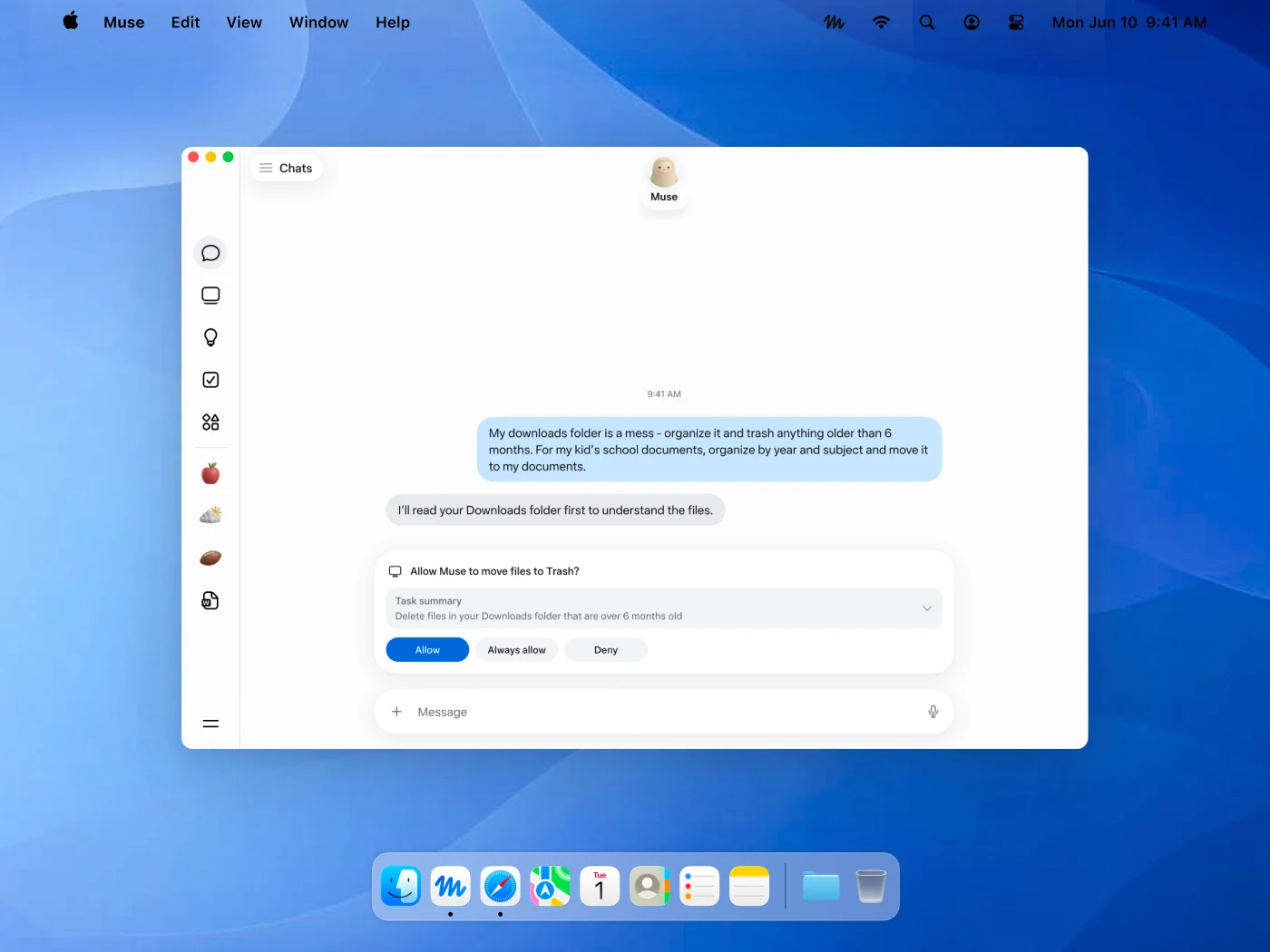
You can connect apps such as email and calendar. You decide which apps Muse can access and what it is allowed to do inside them. Muse also asks for permission before important actions such as sending an email or making a purchase. You can see a record of what it has done and what it plans to do.
Muse is not built specifically for cold email. But some of its functions can be useful for email work.
Muse can connect to your email. You decide what access it gets. You can let Muse read your email. You can also give it permission to send emails on your behalf. This means Muse can work with information already sitting in your inbox.
Meta specifically says Muse can sort your email. For cold outreach, you could ask Muse to work through a busy inbox and organize the conversations that need your attention.
This is useful once replies start coming in and you have more conversations to keep track of.
You can give Muse a task and close the app. Muse can continue working and come back when something changes or it needs your approval.
For email work, this means you do not have to keep Muse open while it works through a longer task.
Muse gets its own cloud computer with a full browser. It can open websites and use information from the apps you have connected. This gives Muse a way to research information outside an email thread when the task requires it.
Muse can send emails on your behalf. But sending an email is treated as a sensitive action. Muse has to ask for your approval each time before it sends one.
That creates an important limit for cold email automation. You cannot simply give Muse permanent permission to send emails without approval.
So Muse can handle useful work around your inbox. But Meta does not position it as software for running cold email campaigns from start to finish.
Muse is not a cold email platform, so you will not find a ready-made cold email campaign builder inside it. Instead, you can give Muse specific tasks based on the emails it can access.
Here are a few ways you could use it:
You can ask Muse to go through your cold email replies and bring conversations that need attention to you.
For example, you might ask it to look for prospects who replied but have not received a response yet.
Muse officially supports email access. You decide what it is allowed to read and do.
You could ask Muse to review older email threads and find conversations you want to revisit.
For cold outreach, this could mean looking for prospects who previously showed interest but never moved forward.
This is a task you give Muse rather than a built-in lead recovery feature.
Once you find a conversation worth continuing, you can ask Muse to prepare a reply.
Meta shows drafting replies as one of the ways Muse can work for businesses. You can then review the message before anything is sent.
Muse has its own cloud computer with a full browser. It can browse websites as part of a task.
For example, you could ask it to check a prospect's company website before preparing a response.
Muse can send an email if you give it the required access. But sending an email is treated as a sensitive action.
Muse must ask for approval each time. You cannot set email sending to “Always allow.”
So Muse can take on parts of the work around cold email conversations. So Muse can take on parts of the work around cold email conversations. But Meta does not position it as a tool for running automated cold email sequences at scale.
Muse becomes useful once there are emails and conversations for it to work with. But it does not give you everything needed to get a cold email campaign running in the first place. You will still need separate tools for:
Muse therefore sits on top of an existing cold email process rather than replacing it. Your other tools can handle finding prospects and sending campaigns. Muse can then help with some of the work around the conversations those campaigns create.
Meta Muse has a free option and two paid plans.
The Free plan lets you use Muse without paying, but Meta puts a limit on how much you can use it. Power costs $20 per month and raises the allowance to 500 million Muse tokens per week.
For heavier use, Maximum costs $100 per month and includes 3 billion Muse tokens per week.
Meta does not translate these token limits into a fixed number of emails or cold email tasks. So you cannot say that Power will handle a certain number of replies or that Maximum will process a specific number of inbox conversations.
Muse is better for work around your cold email inbox than for running the campaigns themselves.
Use Muse if you:
Skip Muse if you:
Muse is better suited to inbox and reply work than running cold email campaigns at scale.
Muse can help with tasks around cold email. But if you want an AI agent built specifically to run cold outreach, Agent Frank is a better fit.

Agent Frank is an AI SDR from Salesforge. You give it your ICP and information about what you sell. You can upload your own contacts or let it keep finding new prospects based on your ICP.
From there, Agent Frank can:
You can run Agent Frank in Auto-Pilot or use Co-Pilot when you want to review its work.
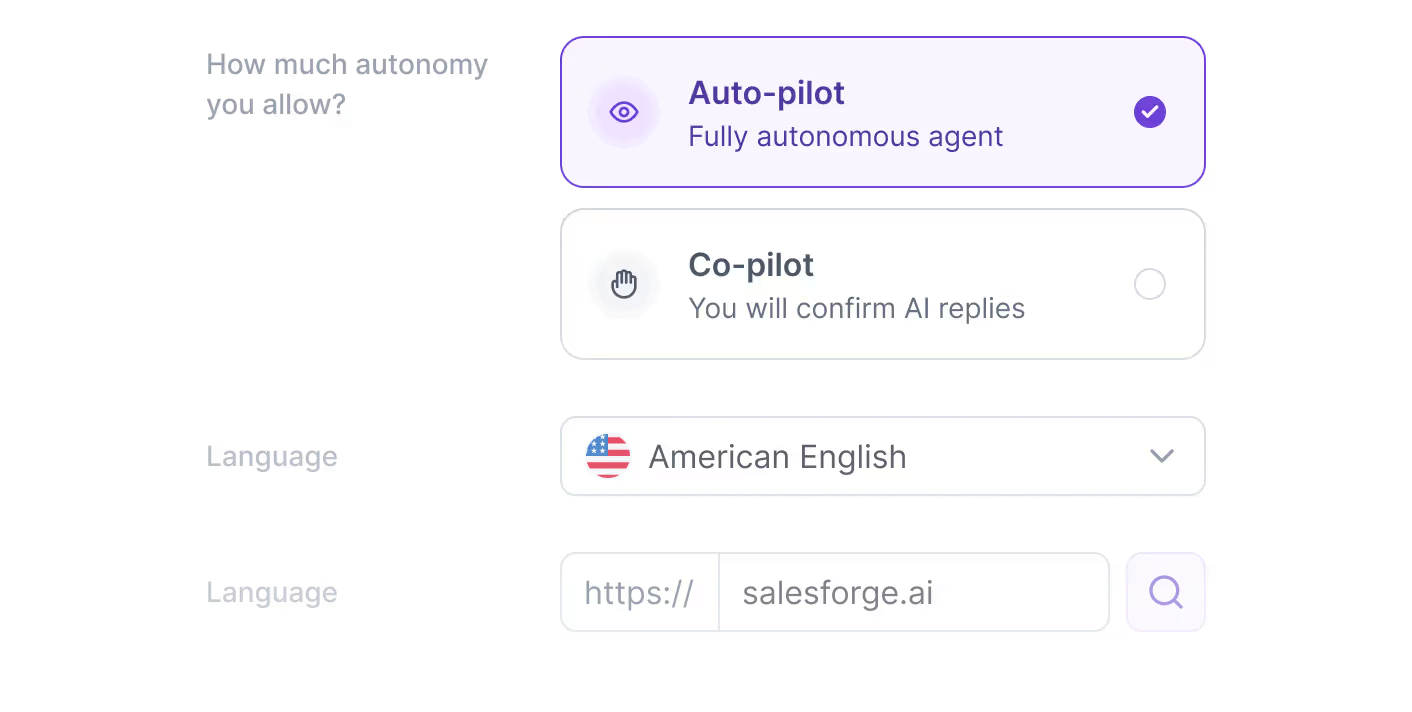
You can also control send windows, wait days, language and writing rules.
So if you mainly want help with email and other day-to-day tasks, Muse makes sense. If you want an AI agent to find prospects and run cold outreach through to meeting booking, Agent Frank is built for that job.
Enter your email to get a custom plan & stack recommendation for your business
Please check your mailbox in 5 minutes
Meta's Muse is not the right tool if your main goal is cold email automation.
It can work with your email and draft replies. It can also use its browser for other tasks. But Meta does not offer Muse as a cold email platform.
You do not get a built-in B2B prospect database or cold email sequence builder. Meta also does not list mailbox rotation or deliverability tools. Muse requires approval each time it sends an email.
That makes it a poor fit for running cold email campaigns at scale.
If you want a general AI agent that can also work with email, Muse makes sense. If you want an AI agent to find prospects and run cold outreach through to meeting booking, Agent Frank is the better choice.