Most cold email advice starts with the subject line. That is the wrong place to start.
A perfect email sent from a burned domain to a stale list gets zero replies. The same email sent from a warmed mailbox to a verified, well-chosen list gets answers.
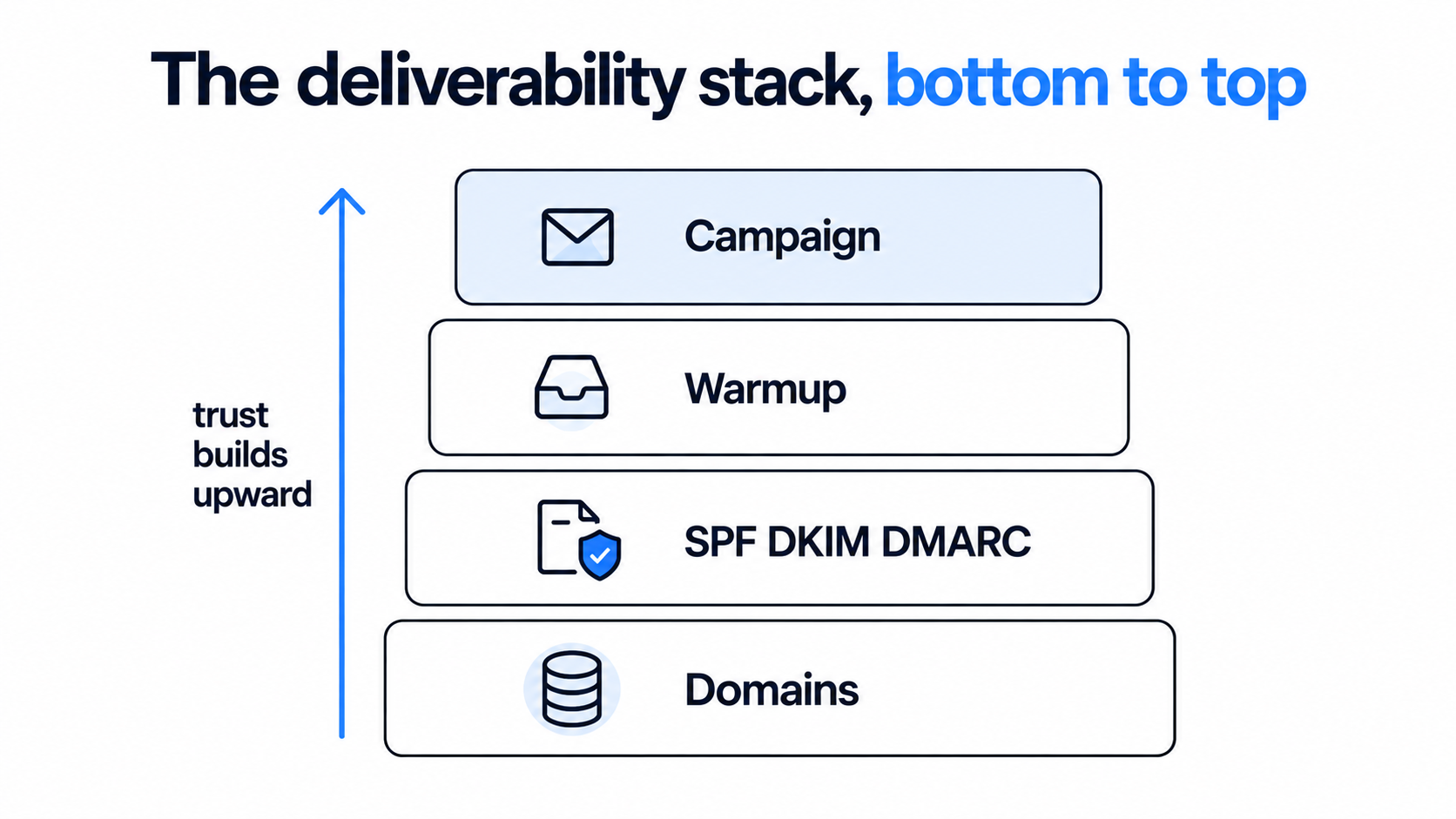
So the best practices below follow the order that actually decides results: infrastructure, list, copy, sending rules, follow-ups, and measurement. Work through them top to bottom, and each fix makes the next one matter.
If you want the broader definition first, my cold email guide covers what cold email is and when it works.
Ten rules cover most of what separates campaigns that book meetings from campaigns that get flagged.
Separate domains: never send cold email from your main company domain.
Authenticate: SPF, DKIM, and DMARC on every sending domain before the first send.
Warm up: give every new mailbox two to four weeks before real volume.
Verify the list: bad addresses cause bounces, and bounces damage the whole domain.
Lead with a signal: write to people who have a reason to care this month.
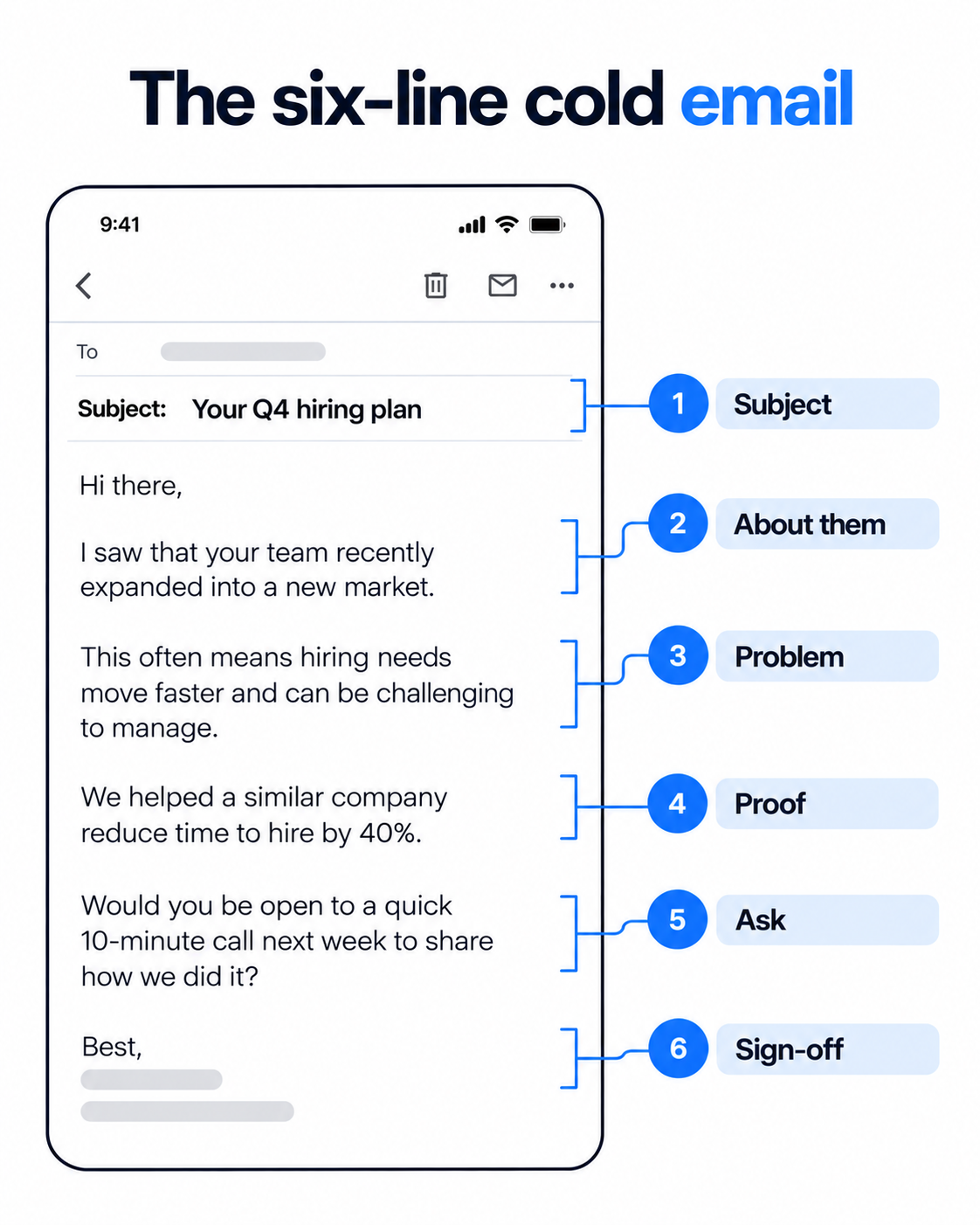
Keep it short: 50 to 125 words, plain text, one ask.
Cap the volume: about 30 cold emails per mailbox per day, spread across mailboxes.
Follow up: the first email plus three follow-ups, three to five days apart, each adding something new.
Turn open tracking off: judge the campaign on replies and meetings instead.
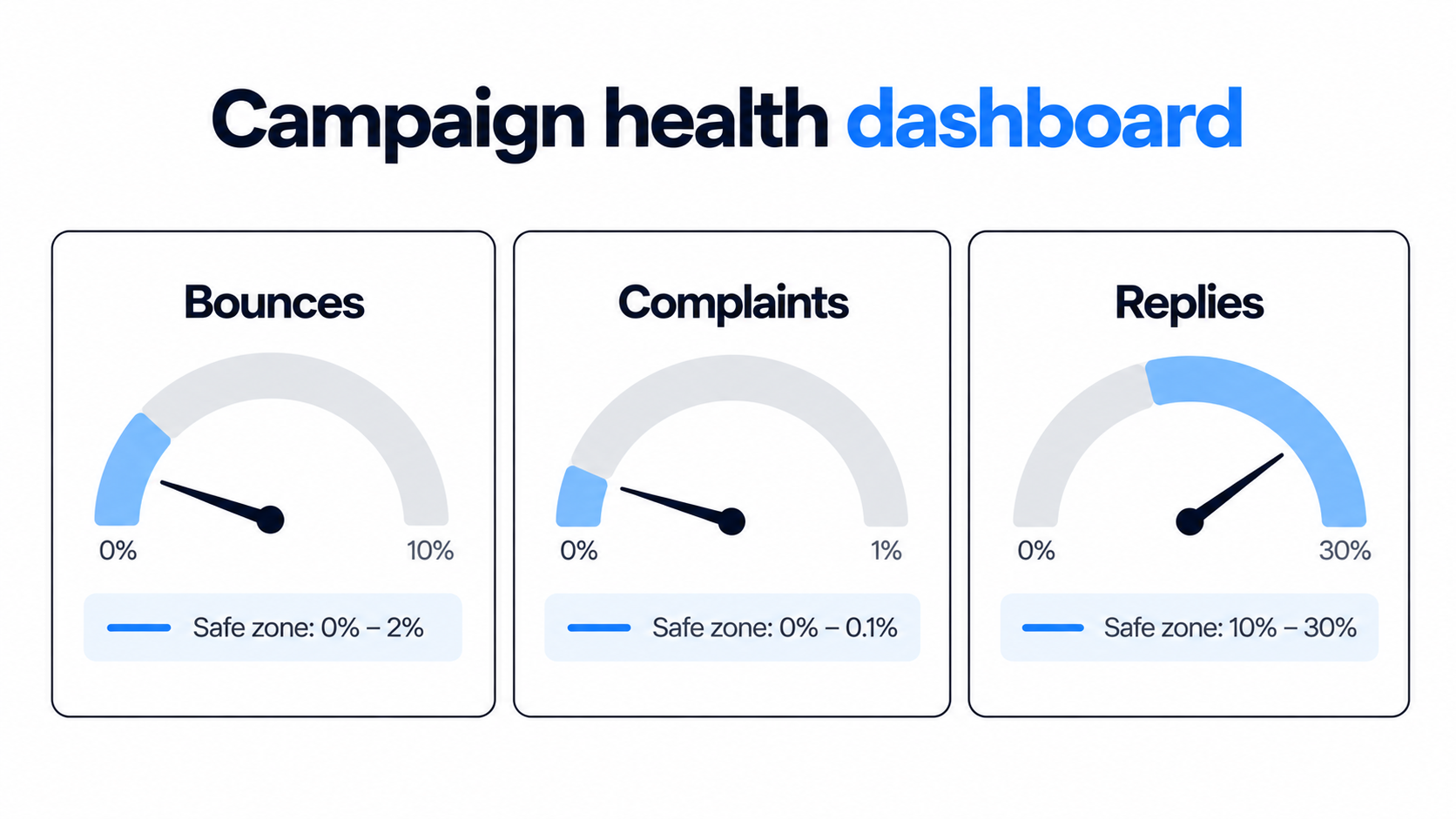
Watch complaints and bounces: pause the moment either drifts past the limits in the table below.
Why Cold Email Best Practices Have an Order
Every rule in this guide either protects your sender reputation or earns a reply, and reputation comes first.
Reputation is slow to build and fast to lose. One campaign with a high bounce rate can push a domain toward spam folders for weeks.
Copy is the opposite. You can rewrite a weak email in ten minutes and test it the same day.
That is why I fix things in this order. A weak email on a healthy domain is easy to fix, while a great email on a damaged domain is not.
If you want the mistakes version of this list, my guide to common cold email mistakes shows what breaks when the order is ignored.
Set Up Your Infrastructure Before You Write Anything
Infrastructure is the part nobody sees, and it decides whether anyone sees your email.
My full walkthrough of domains, mailboxes, and DNS is in cold email infrastructure. Here is the short version.
Use separate sending domains
Register lookalike domains for outreach and keep your main domain for customers, invoices, and team mail.
If a sending domain gets flagged, you replace it. If your main domain gets flagged, every email your company sends suffers.
Authenticate every domain
Google and Yahoo expect SPF, DKIM, and DMARC on bulk senders, and skipping them invites filtering even at small volume. My guide to SPF, DKIM, and DMARC walks through each record.
Google also asks senders who reach 5,000 or more Gmail addresses a day to keep user-reported spam below 0.1%, and never at 0.3% or higher.
Warm up every new mailbox
A brand-new mailbox has no history, so full volume on day one looks like a spam operation.
Plan on two to four weeks of gradual warmup before real campaigns. My email warm-up guide explains the ramp and what to avoid.
Warmforge handles this inside Salesforge. It runs one-click AI warmup at no extra cost, with unlimited warmup slots, across Google Workspace, Microsoft 365, and SMTP mailboxes.
Pick the right infrastructure for your volume
Mailforge gives you distributed infrastructure with shared IPs, which suits most teams starting out. Infraforge gives you dedicated IPs for larger programs, and Primeforge provisions real Google Workspace and Microsoft 365 mailboxes.
For a sense of what this looks like at scale, AKOOL reached 200,000+ contacts across multiple segments. Their case study reports a 16.06% average positive reply rate on 150+ dedicated mailboxes.
In the above video, our Salesforge CEO shares deliverability data from millions of sent emails. Campaigns with open tracking switched off saw more than double the reply rates.
A clean, targeted list does more for reply rates than any copy trick.
Verify every address
Bounces are the fastest way to hurt a new domain, so verify every address before it enters a sequence. Keep bounces under 2% as a working limit.
Bounce Shield in Salesforge blocks sends to addresses likely to bounce, and built-in email validation checks each contact before sending.
Start with a reason, not a demographic
The best cold emails go to people who have a reason to care right now: a funding round, a new hire, a job change, a tool they just adopted.
My guide to signal-based outreach covers which signals matter most and how fast to act on each.
Keep segments small
One message should fit everyone on the list without a single edit. If it cannot, split the list.
Smaller, tighter segments also let you write one specific line of proof instead of a vague claim.
Find the contacts without a spreadsheet hunt
Leadsforge describes your ideal buyer in plain English and searches a 500M+ contact database, with waterfall enrichment across 10+ data providers. You can also start from customer lookalikes or competitor followers, then export a verified list.
If you only need the lookup step, the Lead Finder page shows how it works. New users get 100 free credits.
That Leadsforge tutorial walks through the list workflow behind 500+ monthly demos, from search to a sequence-ready list.
Start with a clean, verified list
Describe your buyer in plain English, enrich the contacts, and export a list ready for your first sequence.
Ask for one thing the reader can answer in a word. "Worth sending over the checklist?" beats "Do you have 30 minutes on Thursday?"
Send plain text
Skip images, logos, tracking pixels, and attachments. They add weight and raise spam signals without adding replies.
Emails from Salesforge ship as text-only by default, with few links, for this reason.
Personalize one real line, then scale the rest
One genuine, specific line beats five merge fields. Salesforge supports AI personalization across 21+ languages, but the input still has to be a real fact about the prospect.
Run a draft through the free email spam checker before it goes into a sequence.
Send Like a Person Too
How and when you send matters as much as what you send.
Cap volume per mailbox
I keep each mailbox at about 30 cold emails a day. Some senders go as low as 5 to 10 on new mailboxes.
Scale by adding mailboxes and domains, not by pushing each mailbox harder. Salesforge lets you connect unlimited mailboxes and rotates sends across them.
Send on weekday mornings
Belkins analyzed 7.5 million cold emails from 2025 and found the best results on Wednesday and Thursday mornings, between 8 a.m. and noon. Late evening sends performed worst.
Treat that as a starting point and test your own audience, because timing varies by role and region.
Turn off open tracking
Tracking pixels can trigger filters, and Apple Mail loads images automatically, so many recorded opens never happened.
Judge the campaign by replies and meetings booked. Open rate is no longer a reliable number.
Match the mailbox to the recipient
Salesforge uses ESP matching to send Google to Google and Microsoft to Microsoft. Treat it as one helpful signal among several, not a fix for weak lists or weak copy.
Follow Up Without Burning the Domain
Most replies arrive after the first email, so a cold email is really a short sequence.
Send the first email plus three follow-ups, spaced three to five days apart. Each follow-up should add something new: a different angle, a customer example, or a smaller ask.
Never send "just bumping this up" as a standalone line. It adds nothing and reads as pressure. My follow-up email guide has examples for each touch.
Complaints tend to rise after the second email in a sequence, so end the sequence on a polite last line, then stop. "If the timing is wrong, tell me and I will check back next quarter" works well.
Sequences can span channels too. In Salesforge, automated follow-ups run across email and LinkedIn. A prospect who accepts a connection request gets a LinkedIn message instead of a fourth email. That is what multichannel outreach looks like in practice.
A few numbers tell you whether a campaign is healthy, and most others are noise.
Start with the health limits below. Then track positive replies and meetings booked, which are the only results that pay for the work.
For context on reply rates, Belkins measured an average of 0.45% across 7.5 million cold emails in 2025. That figure counts replies against total sends, not opens, so it looks lower than older reports. Use your own trend line as the real benchmark.
Metric
Working limit
What to do if you miss it
Bounce rate
Under 2%
Pause the campaign, re-verify the list, and check the data source.
Spam complaints
Under 0.1%, never 0.3%
Stop sending from that mailbox, tighten targeting, and shorten the sequence.
Mailbox volume
About 30 a day
Add mailboxes instead of raising the cap.
Warmup period
Two to four weeks
Delay launch until the mailbox is ready.
Inbox placement
Test before each launch
Run a placement test and fix DNS or content issues first.
Positive reply rate
Your own trend
Change one variable at a time: list, offer, or opening line.
Heat Score™ in Warmforge shows when a mailbox is ready to scale. Inbox Placement Tests show whether emails land in primary, promotions, or spam. You can also run a free inbox placement test before a launch.
Stay on the Right Side of the Rules
Cold email is legal in most markets when you follow a few clear rules.
In the US, CAN-SPAM requires a real sender identity, a valid postal address, and a working opt-out. The UK exempts corporate subscribers from prior consent, the EU allows it under legitimate interest, and Canada requires consent first.
Add a simple opt-out line, honor it fast, and keep your targeting relevant. This is not legal advice, so check the rules for the regions you contact. My guide on cold email vs spam covers the line between the two.
The Pre-Send Checklist
Run this list before every launch, and skip nothing on it.
Sending domains are separate from the main company domain.
SPF, DKIM, and DMARC pass on every sending domain.
Every mailbox has finished warmup.
Every address on the list has been verified.
The email fits the whole segment without edits.
The first line is about the buyer, not about you.
The body is under 125 words, in plain text, with one ask.
Open tracking is off and the opt-out line is in place.
Volume per mailbox is capped, and a placement test has run.
You know which two numbers decide whether to pause.
If any box is unchecked, fix it first. Launching anyway trades a few days for weeks of recovery.
How to Run These Best Practices in Salesforge
Salesforge turns most of the rules above into defaults, so you spend less time policing them.
I use cold email automation in Salesforge because sequences, warmup, and replies sit in one place. Sequences branch on prospect behavior across email and LinkedIn.
Every reply from every mailbox and channel lands in Primebox™. Autopilot lets AI handle routine replies end to end, and Co-pilot drafts the reply for a human to approve.
The rest of the Forge stack sits under the same login. Leadsforge finds the leads, Warmforge warms the mailboxes, and Mailforge, Infraforge, or Primeforge provides the infrastructure.
If you would rather not run it yourself, Agent Frank is the AI SDR inside Salesforge. He prospects, writes, follows up, and handles replies, with Auto-Pilot and Co-Pilot modes.
He fits best for startups, SMBs, and mid-market teams with deal sizes between $5K and $100K. If you mostly sell to Fortune 500 accounts through long RFP cycles, a hands-on setup will serve you better.
Best practice
What handles it
Where it lives
Verified list
Leadsforge with waterfall enrichment, Bounce Shield on send
Leadsforge and Salesforge
Warmed mailboxes
One-click AI warmup, Heat Score™
Warmforge
Separate domains and mailboxes
Shared, dedicated, or Google and Microsoft options
Mailforge, Infraforge, Primeforge
Matched sending
ESP matching and sender rotation
Salesforge
Follow-ups
Branching sequences across email and LinkedIn
Salesforge
One inbox for replies
Primebox™ with Autopilot and Co-pilot
Salesforge
Final Verdict
Cold email best practices come down to order: infrastructure, list, copy, then sending rules.
If I had to pick one habit, it would be checking the health numbers before scaling. Pause when bounces or complaints drift, fix the cause, and then continue.
Most campaigns that fail were launched too early, not written badly.
Run these best practices from one login
Connect your mailboxes, warm them up, and launch a sequence that follows the rules above. 14-day free trial, no credit card required.
Quick answers to the questions teams ask most about cold email best practices.
What are the most important cold email best practices?
Set up separate sending domains, authenticate them, warm up every mailbox, and verify your list before writing anything. Then keep emails under 125 words in plain text with one small ask. Follow up three times, and stop if bounces or complaints rise.
How many cold emails should I send per day?
About 30 per mailbox is a safe working limit, and new mailboxes can start lower. Scale by adding mailboxes and domains rather than raising the cap on each one.
How long should a cold email be?
Between 50 and 125 words. That fits on one phone screen, which is where most cold email is read.
How many follow-ups should I send?
Send the first email plus three follow-ups, spaced three to five days apart. Each one should add something new, then the sequence should end politely.
What is a good cold email reply rate?
It depends on how it is measured. Belkins reported an average of 0.45% across 7.5 million cold emails in 2025, counted against total sends. Track your own positive reply rate and meetings booked, and improve one variable at a time.
Should I track opens in cold email?
I would not. Tracking pixels can hurt deliverability, and Apple Mail loads images automatically, so recorded opens are unreliable. In data shared by Salesforge's CEO, campaigns with open tracking off saw more than double the reply rates.
Is cold email legal?
In most cases, yes. In the US, CAN-SPAM requires a real sender identity, a valid postal address, and a working opt-out. Rules differ in the UK, EU, and Canada, and this is not legal advice, so check the regions you contact.
Book more meetings on autopilot
Set up in minutes. No per-seat pricing. No commitment.
Cold email best practices work in a fixed order: infrastructure first, list second, copy third. I cover domain setup, warmup, list quality, short plain-text copy, sending limits, follow-up timing, and the few numbers that show a campaign is healthy.
A sales cold email is one step in a deal, not a pitch. I cover who to email first, the short structure that earns replies, four templates for real selling situations, follow-up timing, and the deliverability basics that keep your emails out of spam.