50% of your cold email success comes down to one thing: the quality of the email list you send to.
You can write the best cold email copy in the world, run the perfect subject line, warm your mailboxes for six weeks, and still get zero replies if your list is full of invalid addresses.
Because every bounce hurts your sender reputation.
Every "verified" email that turns out to be dead drops your inbox placement. And every bad address you paid for is money and time you will not get back.
So the tool you use to find emails is not a nice-to-have.
It is the foundation your entire outbound motion sits on.
The problem is that finding a good email finder is harder than the pricing pages make it look. Most tools claim 95%+ accuracy. Most tools promise verified emails. And most tools fall apart the moment you actually run 100 leads through them and check the bounce rate 24 hours later.
I know because I did exactly that.
I ran the same 100 test leads across 14 email finder tools, sent to the results through cold email campaigns, and measured what actually landed in the inbox. This is what I found.
Here are the 14 email finder tools that hold up in 2026, ranked by accuracy, verification method, LinkedIn extraction depth, and how cleanly they fit into a real cold outreach workflow.
Quick scan of the roster?
Click any tool name to jump to its detailed review if you already know your pick.
You should know exactly how I ranked these before you trust the order. Here is the protocol.
I pulled the same 100 test leads (real names, real companies, real LinkedIn URLs) and ran them through every tool. Each result was then sent to via a Salesforge campaign, and I measured the bounce rate 24 hours later. If a tool claimed 98% accuracy but returned 15% bounces, that gap showed up in the ranking.
You can replicate this yourself. Pick 50 known leads (people you already have verified emails for), run them through each tool's free trial, and compare hit rates against your control list. Ten minutes of testing saves you three months of bad campaign data.
The single biggest predictor of whether a tool is safe at scale is how it verifies emails before returning them. Some tools do a syntax check. Others hit the mail server in real time. A small handful refund your credit when a "valid" email bounces.
If the pricing page cannot tell you what happens during verification, treat that as a red flag.
A single-source finder has one hit rate. A waterfall tool checks multiple providers in sequence, so if provider A blanks on a contact, provider B fills the gap. Your usable list grows without you doing anything.
Most tools do not do it. The few that do usually deliver more usable leads per credit.
You probably live inside LinkedIn all day. So the Chrome extension quality matters more than the database size for how these tools feel in daily use.
Every tool below is scored on three things: does the extension work on standard LinkedIn, does it work on Sales Navigator search results, and does it handle catch-all domains cleanly on bulk exports. My deep dive on LinkedIn email finder tools unpacks this further.
An email finder that does not plug into your sending platform is a dead end. You lose an hour a day to CSV cleanup and column mapping.
I scored each tool on native integrations, API access, and whether it hands off cleanly to a cold email service provider.
Sticker price is not real price. Credits, seats, add-ons for phone reveals, LinkedIn automation locked behind paid extras, the actual cost per verified email is usually 2–3x what the pricing page suggests.
I also flagged tools that inflate their monthly rate to make the annual discount look bigger. Two tools on this list do that.
Here is the indepth review of the best email finding platforms along with their key features, pros, cons and pricing plans.
The first email finder tool on my list is Leadsforge, and it takes the top spot for three reasons: it returns verified accurate emails, it runs on a strong database, and its filters actually work the way you want them to.
Here is how you find emails with Leadsforge. Instead of typing filters into a database ("Job Title: Founder, Industry: SaaS"), you describe your ideal customer in a chat prompt.
Type "SaaS founders in the US who raised Series A in the last 12 months" and Leadsforge builds the list for you. It then runs waterfall enrichment across multiple data providers, so when one source blanks on a contact, another fills the gap.

That is how you get high hit rates on niche ICPs where competitors return half-empty lists.
The Chrome extension covers the LinkedIn workflow you already run every day.
You open a LinkedIn profile or a Sales Navigator search result, click the extension, and Leadsforge pulls the verified email, LinkedIn URL, and mobile number directly into your list. Bulk extraction from a filtered Sales Nav search is one click, not one hour.
Once you have your list, you can push it straight into a Salesforge sequence for multichannel email plus LinkedIn outreach without exporting a CSV anywhere. Find the lead, send the sequence, get the reply. All under one login.
Leadsforge holds a 4.6 rating on G2 and is SOC 2 compliant.
Jessica K., Outreach Specialist on the workflow: "it pulls verified emails, LinkedIn profiles, and phone numbers from 500M+ contacts instantly, no clunky filters, no wasted time."
Another email finder tool worth your money is Apollo.io.
Here is how you find emails with Apollo. You open the advanced search panel, apply filters across the 230M+ contact and 30M+ company database (job title, industry, headcount, tech stack, funding stage, and about 60 more), and Apollo returns a filtered list of contacts with verified emails and phone numbers.
You can also use the Chrome extension to pull verified emails directly from any LinkedIn profile as you browse, or run bulk enrichment on a CSV you already have.
The Chrome extension is one of the most polished in this category. You open a LinkedIn profile, the Apollo panel opens on the side, and you get the verified email, phone, and company data in one click.
It works on standard LinkedIn but not as deeply on Sales Navigator search results, which is where competitors like Findymail and Skrapp pull ahead.

The catch is data freshness.
Apollo's free plan is generous enough that most teams do not hit paid tier limits for weeks. But when you scale into paid volume, bounce rates on older records climb noticeably. My testing showed 10–15% bounces on Apollo lists that had not been scrubbed through a secondary verifier. You need to add a verification pass before sending, especially outside the US.
Apollo is GDPR, SOC 2, and ISO/IEC 27001 certified with a 4.7 G2 rating across 9,688 reviews.
If Apollo's data freshness is what pushes you to shop around, my Apollo alternatives breakdown covers the tools most teams switch to.
Nitesh S., Senior BDE captures the upside: "The data provided by Apollo.io is unique, helpful, and impressively accurate, with the occurrence of incorrect data being less than 1%."
Adeel M., Virtual Assistant captures the downside: "Email bounce rates are higher than I'd like. probably 10–15% of contacts have outdated information."
Next up on my list is Hunter.io, and it is the tool you reach for when you need to answer one specific question fast: what emails exist on this company's domain?
Here is how you find emails with Hunter.
You type a company domain into the search bar (say, salesforge.ai) and Hunter returns every publicly indexed email tied to that domain, complete with names, job titles, and a confidence score per address.
If you already have a name and a company, the Email Finder predicts the person's address using pattern-matching against the domain's other verified emails, then runs it through a live verification pass before returning the result.

The Chrome extension works on both LinkedIn and any company website.
You open a profile or land on a company's site, click the extension, and Hunter shows you every email it has on that domain in a side panel. You can save any of them straight into a Hunter list or export as CSV.
The tradeoff is scope. Hunter does not do phones, does not carry a large B2B database in the Apollo or ZoomInfo sense, and its coverage thins for small companies that do not have many indexed employee emails online.
In my testing, Hunter returned around 90% valid emails on well-known SaaS companies but dropped to 60–65% on companies under 20 employees.
Hunter holds a 4.4 G2 rating across 652 reviews.
Roxy L., Account Executive frames the accuracy well: "email addresses are about 90% of the time correct, and I can verify them for just 0.5 credit."
brandon H., Commercial Sales on the verifier: "The email verification tool is also very reliable, helping reduce bounce rates and improve outreach performance."
Recommended Read: I did a full Snov.io vs Hunter.io comparison if you want to see how it stacks against the closest all-in-one competitor.
The fourth email finder tool worth your attention is Snov.io.
Here is how you find emails with Snov.io. You can start from a company domain, a person's name, a LinkedIn URL, a social handle, or a tech stack ("show me users of HubSpot in Germany").
Every result goes through a 7-tier verification pass before being handed back to you, which is genuinely more thorough than the syntax-only checks on cheaper tools. My 100-lead test showed 96–97% valid on Snov.io returns, close to their published 98% claim.

The LinkedIn Prospect Finder Chrome extension is where Snov.io shines. You open a LinkedIn profile or a Sales Navigator search page, click the extension, and Snov.io pulls emails and profile data for everyone visible on the page. Bulk extraction from Sales Nav search results is fast and clean.
What makes Snov.io different from Hunter or Voila Norbert is that finding an email is not a standalone job here. Verification, warmup, email sequences, LinkedIn touches, and a native CRM all live inside the same platform.
If your team is small and you want the whole outbound stack under one login, Snov.io is one of the most affordable ways to do it.
Snov.io has a 4.5 G2 rating across 496 reviews.
For the deeper feature-by-feature breakdown, my Snov.io review goes into the pricing math and where the platform hits its limits.
A Verified User in Computer Software on deliverability: "We can pull a list of prospects from LinkedIn, verify the addresses in bulk... Deliverability has noticeably improved since we started using it."
Ali R. on bounce rate: "It helps find verified business emails, reduce bounce rates, and streamline outreach campaigns."
Another solid pick on my list is Anymail Finder, and it is the only tool in this space with a genuinely different billing model.
Here is how you find emails with Anymail Finder. You paste in a name and company (or upload a CSV of names) and Anymail Finder hits the recipient's mail server in real time to verify the email exists.
You see two results: fully verified (safe to send, guaranteed 97% deliverable) and partially verified (70% deliverable). You only pay a credit if you decide to keep a fully verified result. If Anymail Finder cannot confirm the email is safe to send, you keep your credit.
That billing model matters when you run high volumes. On a 1,000-lead search where 30% return unverifiable, you save 300 credits versus a tool that charges for every result regardless of quality.
Anymail Finder does not have a LinkedIn Chrome extension in the traditional sense.

Their focus is bulk CSV enrichment through the web app. If you want to work directly inside LinkedIn all day, Findymail, Skrapp, or ContactOut are stronger fits.
Anymail Finder publishes a 15-tool benchmark showing 86.4% verified coverage at 98.9% accuracy, which is the highest combined score in the category. The benchmark is self-published, so treat it as directional rather than independent.
Anymail Finder holds a 4.8 rating on Trustpilot. Its G2 sample is small at 6 reviews (3.4 average).
Rodney N., AI Engineer on deliverability: "the emails it returns are consistently deliverable, which keeps our bounce rates low and protects our sender reputation."
A Verified User in Design on realistic coverage: "Anymail finder will not find emails for all contacts but possibly 70%."
Voila Norbert is the next email finder tool on my list, and it earns its spot on accuracy alone.
Here is how you find emails with Voila Norbert. You type a first name, last name, and company name into the search bar, and Norbert returns the verified email in seconds with a verification score attached.
That is the whole workflow. No database filters, no complex ICP builder, no LinkedIn extension to configure. Just a fast, accurate finder for one-lead-at-a-time lookups.
For bulk work, you upload a CSV and Norbert processes hundreds of names in one pass. Every plan includes bulk and API access from the entry tier, so you do not have to upgrade to unlock the core workflow.
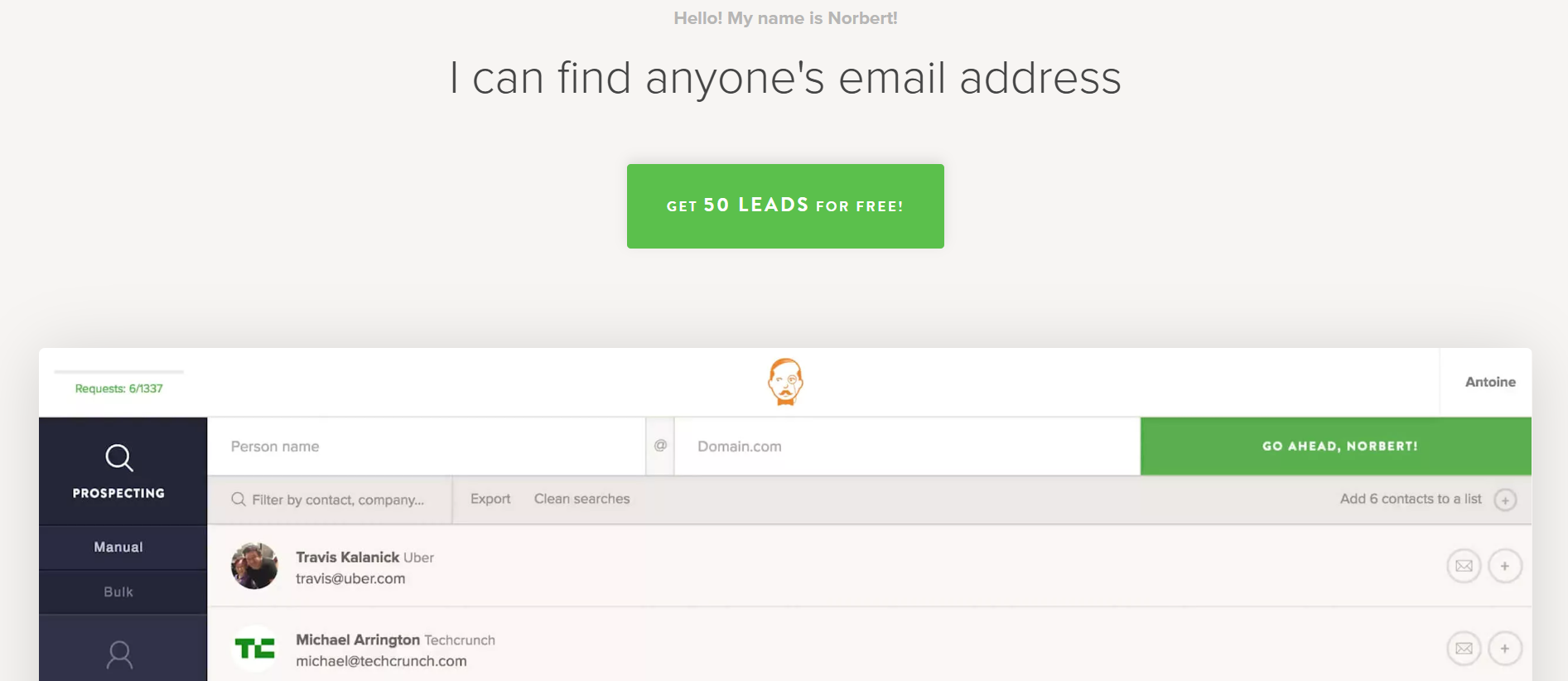
Norbert claims a 98% success rate and 98% deliverability. In my 100-lead test, Norbert hit 96% on first-name-plus-domain lookups but dropped to 78% on unusual job titles or contacts at companies under 20 employees.
If your ICP sits in the well-covered mid-market range, Norbert is one of the most reliable picks. If you target obscure niches or small businesses, coverage thins fast.
There is no LinkedIn Chrome extension listed on the pricing page. If LinkedIn is your primary prospecting surface, this is a real limitation.
Voila Norbert has a 4.6 G2 rating across 93 reviews.
Ramon Antonio M., Founder on accuracy: "Its email finder is highly accurate, boasting up to a 98% success rate, and every email comes with a verification score."
Tellab A., Domain Investor & Consultant on ease: "how easy and accurate it is when finding verified email addresses."
The seventh email finder tool on my list is Findymail, and it is built around one promise: your bounce rate stays under 5%.
Here is how you find emails with Findymail. You can search by name and company inside the web app, upload a CSV for bulk enrichment, or use the Chrome extension directly inside LinkedIn Sales Navigator.
Every email is found and verified in a single step, and Findymail will not charge you credits for emails it cannot confirm as valid.

The Sales Navigator workflow is what sets Findymail apart. You run a filtered Sales Nav search, click the Findymail extension, and it scrapes the entire search result page (up to hundreds of leads) with verified emails attached. You get a clean CSV ready to import into your sending platform.
This is the fastest Sales Nav workflow I have tested.
Findymail is SOC 2 and GDPR compliant with a 4.9 G2 rating across 57 reviews — the highest score in this roundup, and 100% five-star reviews.
Kevin Y., CEO & Founder, sends 7M cold emails a month: "I send 7m cold emails per month and tested over a dozen email finders. Findymail is the best email finder out there."
Yash A., Growth Consultant on Sales Nav: "the accuracy and coverage of the data... The ability to scrape from Sales Navigator is an additional bonus."
Next on my list is UpLead, and it is the tool you pick when data accuracy matters more than raw database size.
Here is how you find emails with UpLead.
You filter across 200M+ leads using 50+ search criteria (job title, industry, location, tech stack, revenue), and UpLead runs real-time email verification at the moment you export the contact, not months earlier when the record was scraped.
If an email is invalid, UpLead refunds the credit automatically. That is one of the cleanest accuracy guarantees in the category.
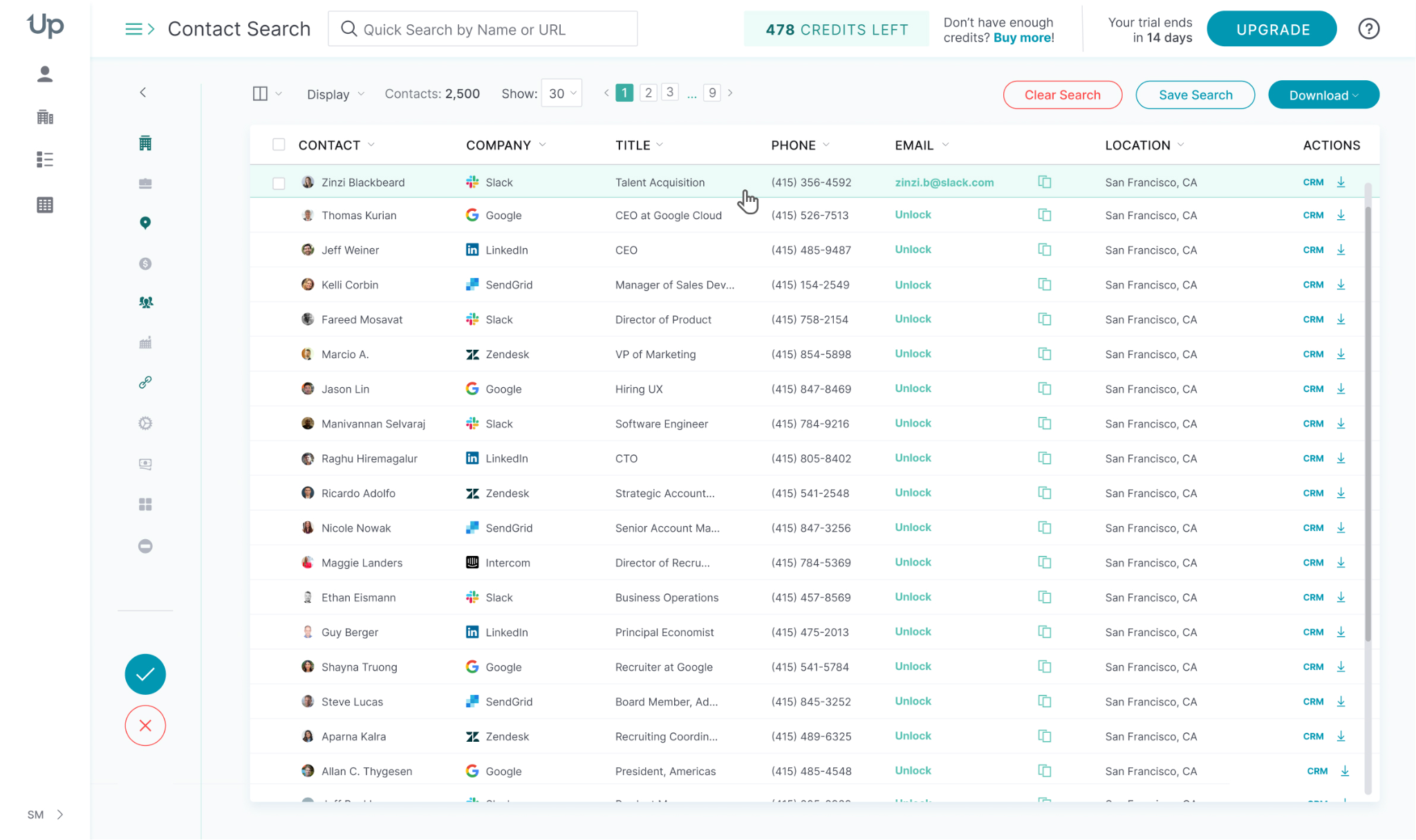
The Chrome extension pulls verified contact data from LinkedIn profiles while you browse. Click any profile, and UpLead shows you the verified email and mobile number in a side panel, ready to save to a list or export.
In my 100-lead test, UpLead returned around 94% valid on well-covered US B2B contacts, close to their 95% guarantee. Where UpLead struggles is scale — per-user pricing and credit caps make it expensive if you run a team of five or more SDRs.
UpLead has a 4.7 G2 rating across 828 reviews.
Eduardo G. on verification: "UpLead is known for providing reliable data and verifying their emails, which I consider the most important."
Lisa G., Sales Operations Executive on intent: "quick buying intent signals and reports on movement of prospects."
Another email finder tool worth trying is Skrapp, and it is the one to hand to a LinkedIn-native SDR.
Here is how you find emails with Skrapp.
The web app lets you search 200M+ B2B leads and 40M+ company profiles by name and domain, but the real workflow lives inside the Chrome extension.
You open a LinkedIn profile, a Sales Navigator search result, or a LinkedIn Recruiter search page, and Skrapp pulls verified emails and phones in one click.

On Sales Nav bulk searches, you can extract entire filtered pages of leads at once with verification status flagged per contact.
The 97% verification accuracy claim holds up in reviews and in my testing. Skrapp is one of the most reliable LinkedIn-native finders in the category.
Skrapp has a 4.5 G2 rating across 354 reviews.
Miram E. on the extension: "the Chrome extension... it's been super accurate with email and phone numbers. I've had amazing reply rates."
Kulsum S., Research Analyst on reliability: "one of the most reliable tools I've come across for finding verified email addresses."
The tenth email finder tool on my list is Lusha, and it is the one you pick when phone matters as much as email.
Here is how you find emails with Lusha. The Chrome extension is the primary workflow — you open a LinkedIn or Sales Navigator profile, click the Lusha button, and it reveals the verified email and direct-dial phone number.
You can also search the 300M+ contact database inside the web app using filters like industry, seniority, and location.

Lusha's direct-dial phone accuracy is where the tool genuinely earns its reputation. Reviewers consistently rate it as one of the most reliable phone finders in the category. ‘
If your outbound motion pairs a cold email with a same-day follow-up call, Lusha is worth the money.
The catch is pricing transparency. The annual discount is often shown as a "35% off" sale rather than a standing rate, and per-seat pricing on every plan makes team scaling expensive. Lusha has a 4.3 G2 rating across 1,660 reviews.
Varteq S., Founder on phones: "I have almost never found an incorrect phone number shared by Lusha, maybe 1 in 50 is wrong."
Vedant G., Business Development on speed: "the accuracy of its contact data... quickly find verified emails and phone numbers of decision-makers."
Next up is ContactOut, and it is the tool you hand to a recruiter or salesperson who lives inside LinkedIn all day. It also fits neatly into a broader LinkedIn outreach workflow.
Here is how you find emails with ContactOut. The Chrome extension is the main workflow. You open any LinkedIn profile (or a LinkedIn Recruiter or Sales Navigator search result) and ContactOut reveals up to three triple-verified emails per contact — work email, personal email, and direct-dial phone.
The personal email database is the largest on this list at 150M+ personal addresses, which is a big deal for recruiters who need to reach candidates who are not checking work email.

You can also use the web app to search across the 800M+ profile database, save leads to folders, and export in bulk. The AI Email Writer on the Email + Phone plan drafts personalized outreach based on the LinkedIn profile you are viewing.
The "unlimited" pricing on paid plans comes with a catch: fair-use policy caps kick in on high-volume usage, which reviewers flag consistently. ContactOut holds a 4.5 G2 rating across 113 reviews.
A Verified User in Information Technology on hit rates: "the sheer accuracy of its personal email database, which consistently delivers a 90% hit rate."
Another Verified User in Information Technology on reach: "the reach success rate has been around 85-90%."
Another strong email finder is Cognism, and it is the only tool on this list built specifically around European and international data quality.
Here is how you find emails with Cognism. You search the database inside the web app using standard filters (job title, seniority, industry, region), or you use the Chrome extension to pull verified contact data directly from LinkedIn or Sales Navigator profiles.
The workflow is similar to Apollo or ZoomInfo, but the data underneath is compliance-first: GDPR, CCPA, ISO 27001, and SOC 2 certified, with checks against 13+ global Do-Not-Call lists.

Cognism's flagship feature is Diamond Data, human-verified mobile numbers that consistently outperform standard database phone numbers in connect rates. If your outbound motion involves EMEA phone outreach, no other tool on this list matches the quality here.
The tradeoff is pricing transparency. Cognism does not publish any rates. Everything is quote-based, and contracts typically start at enterprise volumes. Cognism has a 4.5 G2 rating across 1,347 reviews.
Syed F., SDR on Diamond Data: "the accuracy of their mobile numbers... their 'Diamond Data' is a total lifesaver, it's actually human-verif[ied]."
Yeray C., CoFounder on EMEA coverage: "The accuracy of the contact data in European and international regions is outstanding."
The thirteenth email finder tool on my list is RocketReach.
Here is how you find emails with RocketReach. You search the 700M+ profile database inside the web app by name, company, job title, or location, and RocketReach returns verified emails and direct-dial phone numbers.
The Chrome extension works on LinkedIn profiles — you open any profile, click the extension, and RocketReach pulls the verified contact info in a side panel.

RocketReach's strength is executive-level coverage. Reviewers use it heavily for finding C-suite and hard-to-reach decision-makers at large enterprises where competitors thin out. If your role involves outreach to VPs and C-levels at Fortune 500 companies, the coverage depth matters.
The pricing framing is the honest concern. RocketReach shows a "Save 50% with annual" discount that leans more marketing gimmick than standing rate. RocketReach holds a 4.4 G2 rating across 1,369 reviews.
Harsh S., Market Intelligence Specialist on reliability: "one of the most reliable tools for outreach, especially when accuracy really matters."
Vamshi M., Key Account Manager on stale data: "A few of the contacts mentioned as having the right email ID are not working properly."
Last on my list is Saleshandy Lead Finder.
Here is how you find emails with Saleshandy. Lead Finder is a separate subscription from Saleshandy's Outreach product, with its own credit pool and pricing.
You search the 852M+ contact database inside the Lead Finder module using 75+ filters (job title, industry, size, location, tech stack, funding stage). Every result runs through built-in verification before being returned, and Saleshandy claims 92% of emails are verified on the first try.
The Saleshandy Connect Chrome extension pulls verified emails from LinkedIn profiles while you browse. You open a profile, click the extension, and the verified email pops up alongside the company data.

One thing to know upfront: the Outreach plans include a small one-time bundle of Lead Finder credits (100 on Starter, 500 on Pro, 1,000 on Scale), but these do not renew monthly. To get consistent monthly Lead Finder credits, you need the standalone Lead Finder subscription on top of your Outreach plan. Most teams end up paying for both.
Saleshandy has a 4.6 G2 rating across 782 reviews (this covers Saleshandy overall, not Lead Finder in isolation).
Chetan L. on accuracy: "Saleshandy is accurate and user-friendly. The accurate contact details ensure that I get connected to the correct point of contact."
Nishank N., Global Head Conferences on bulk search: "phenomenal tool for finding quality leads. I love the multiple lead/bulk search feature."
Fifty percent of your cold email success comes down to your list. So the tool you use to find emails is not a nice-to-have. It is the foundation.
Leadsforge takes the top spot because it delivers on the three things that actually matter: verified accurate emails, a strong database with waterfall enrichment, and filters that let you build a real ICP list in a chat prompt instead of 15 filter dropdowns.
Test it on your ICP with the 100 free credits and see the hit rate against your own leads.
The best email finder tool depends on your workflow. Leadsforge is the top pick for cold outreach teams because it combines waterfall enrichment with verified accurate emails and a chat-based ICP search that other tools do not offer. Apollo.io is the best all-in-one platform, Hunter.io is the best for domain-based search, and Findymail is the best for teams that care most about deliverability and low bounce rates.
Accuracy varies by tool and target market. Voila Norbert and Lusha claim 98%, UpLead guarantees 95%, Snov.io claims 98% with 7-tier verification, Hunter reports around 90% in reviewer testing, and Apollo bounces closer to 10–15% on stale records. Always prioritize tools that use SMTP-level verification rather than just syntax checks. That is what actually keeps your bounce rate low.
Yes. Most tools on this list have a Chrome extension that pulls verified emails directly from LinkedIn profiles or Sales Navigator search results. Skrapp, ContactOut, and Lusha are the standouts for LinkedIn-native extraction. Findymail is the pick if you specifically use Sales Navigator. My deep dive on LinkedIn email finder tools covers this comparison in more detail.
Yes. Hunter.io, Snov.io, Apollo.io, ContactOut, Skrapp, RocketReach, and Lusha all have permanent free plans. Leadsforge and Anymail Finder give you 100 free credits on signup. Free plans are useful for testing accuracy on your own list before committing to a paid plan.
An email finder starts with a name or LinkedIn URL and returns the email address. A lead database is a searchable directory where you filter by job title, industry, or location and pull verified contact records in bulk. Apollo, Cognism, and UpLead are databases. Hunter and Voila Norbert are finders. Leadsforge and Snov.io do both.
The best ones verify emails at the mail-server level (SMTP-level verification) before returning them, so you do not send to invalid addresses that would bounce and hurt your domain reputation. Some tools go further with catch-all handling and pay-for-valid billing. Pair your finder tool with a solid cold email service provider that includes warmup and inbox rotation for the strongest protection.