

Linked Helper is a desktop app that automates LinkedIn from your own computer. Octopus CRM is a Chrome extension that does the same job inside your browser. Both are LinkedIn-only, bill per account, and send zero cold email.
For real multi-channel B2B outbound, Salesforge is the stronger choice. It runs email and LinkedIn from one cloud dashboard, with no per-seat pricing, free unlimited Warmforge warm-up, a unified Primebox™ inbox, and an optional AI SDR (Agent Frank). Plans start at $48/mo monthly ($40/mo annual).
I've spent the last few years running outbound for B2B teams, and I get one question a lot: can a cheap LinkedIn automation tool replace a full outreach stack? Linked Helper and Octopus CRM are two of the most popular LinkedIn automation tools people ask about. Both are single-channel, run on your own machine, and send no cold email.
Salesforge sits in a different category. It runs email and LinkedIn together in the cloud, warms up your inboxes for free, and can hand the whole motion to an AI SDR.
One Salesforge customer, UniteSync, hit an 85.26% positive reply rate at a $2.86 cost per acquisition. This comparison covers where each tool fits, what it costs, and which one I'd pick.
LinkedIn Automation at a Glance: Linked Helper vs Octopus CRM
Here is the short version before the detail. Both competitors automate LinkedIn only and run on hardware you keep switched on. Salesforge adds email, deliverability, and an AI SDR on top.
| Feature | Salesforge | Linked Helper | Octopus CRM |
|---|---|---|---|
| Outreach channels | Email + LinkedIn | LinkedIn only | LinkedIn only |
| Runs on | Cloud (browser-independent) | Desktop app (computer must stay on) | Chrome extension (browser must stay open) |
| Entry price | $48/mo monthly ($40/mo annual) - Pro | $15/mo monthly (~$8.25/mo on 12-month term) - Standard | $9.99/mo monthly ($6.99/mo annual) - Starter |
| Top self-serve plan | $96/mo monthly ($80/mo annual) - Growth (unlimited users + LinkedIn senders) | $45/mo monthly (~$24.75/mo on 12-month term) - Pro | $39.99/mo monthly ($24.99/mo annual) - Unlimited |
| Email warm-up | Free, unlimited (Warmforge) | None (no email) | None (no email) |
| AI SDR | Agent Frank (Auto-Pilot / Co-Pilot) - separate subscription | None | None |
| Unified inbox | Primebox™ (free, email + LinkedIn) | None (per-account, no cross-account inbox) | None |
| LinkedIn senders / accounts | Unlimited (Growth plan) | 1 per license | 1 per subscription |
| Email infrastructure | 3 options (Mailforge, Infraforge, Primeforge) | None | None |
| Free trial | 14 days | 14 days | 7 days |
| SOC 2 compliant | Yes | Not stated | Not stated |
| Best for | SMB / mid-market B2B, $5K-$100K ACV | Solo LinkedIn power users (one account) | Solo, low-volume LinkedIn outreach |
Linked Helper Overview
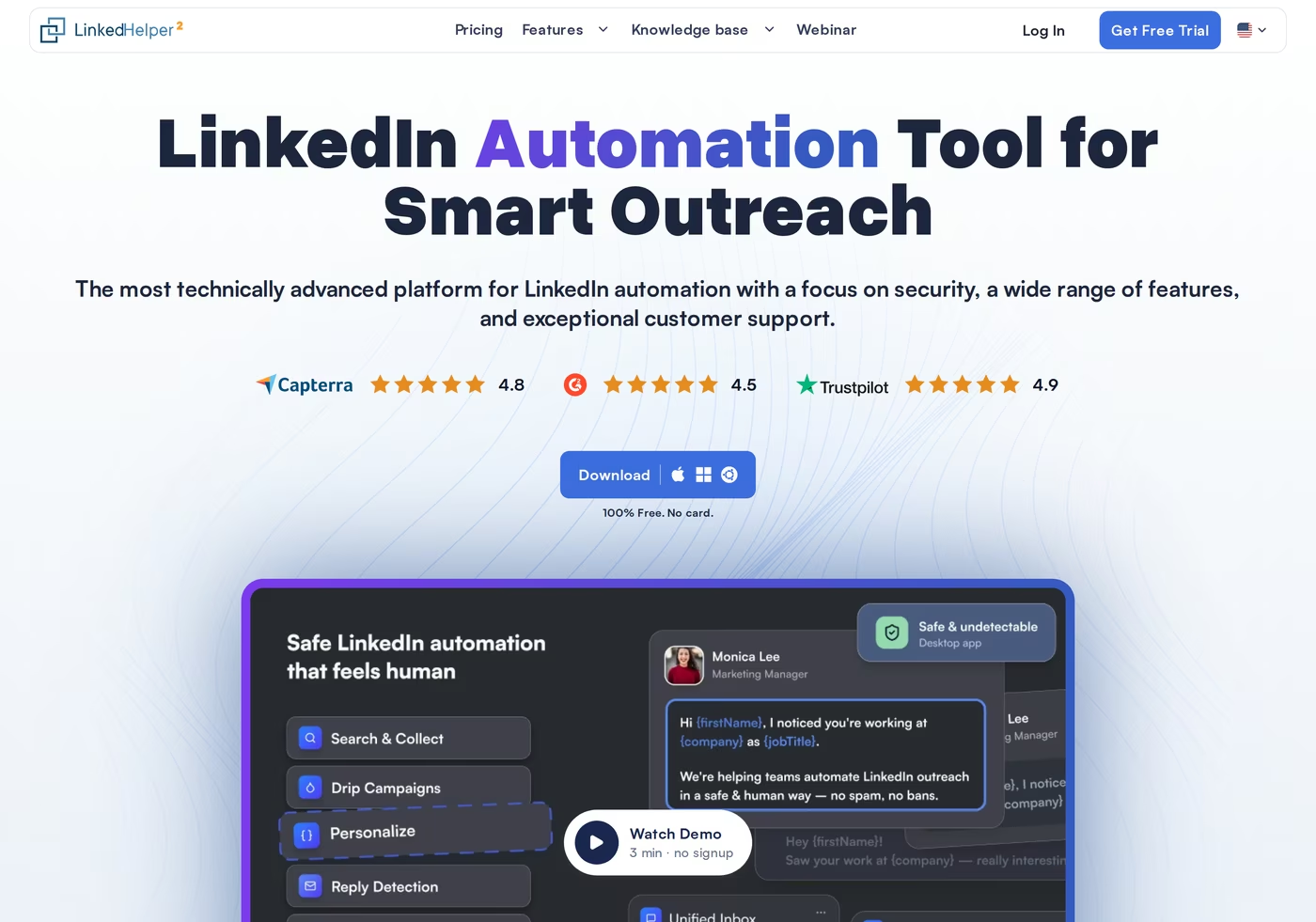
Linked Helper is a desktop application for LinkedIn automation. It installs on Windows, Mac, or Linux and runs a built-in browser session tied to your LinkedIn account. It bills per LinkedIn account through a licensing model, not an auto-renewing subscription.
Core features:
- Connection requests and message sequences - multi-step drip campaigns on LinkedIn with reply detection.
- Built-in CRM - tagging, notes, and full-profile scraping stored in the app.
- Data enrichment credits - 620 per month on Standard, 3,100 on Pro, for finding emails and phones.
- AI messages and AI ICP detection - newer AI credits for drafting and lead scoring (250 to 500 per month).
- Bulk engagement - profile visits, skill endorsements, and event or group invites.
- CSV export and webhooks - push profiles to Zapier or a CRM (Pro removes daily caps).
- Platform support - Free LinkedIn, Premium, Sales Navigator, and Recruiter.
Pricing has two licenses. On the local-storage version, Linked Helper Standard is $15/mo month-to-month and drops to about $8.25/mo on a 12-month license; Linked Helper Pro is $45/mo, dropping to about $24.75/mo on 12 months.
A newer cloud-storage version costs more ($29.90 and $59.90/mo month-to-month). There is a 14-day free trial with no card.
Linked Helper is best for a solo operator or recruiter who works one LinkedIn account, wants deep campaign control, and likes keeping prospect data on their own machine. For a LinkedIn-only motion on a single seat, it is capable and cheap.
Known limitations:
- Desktop-only: the app runs only while your computer is on and connected.
- Higher LinkedIn detection risk than cloud tools, because it simulates actions locally in a browser.
- No email outreach at all - it is purely a LinkedIn tool.
- No centralized inbox across multiple accounts, and messaging history is not exportable on Standard.
What reviewers say
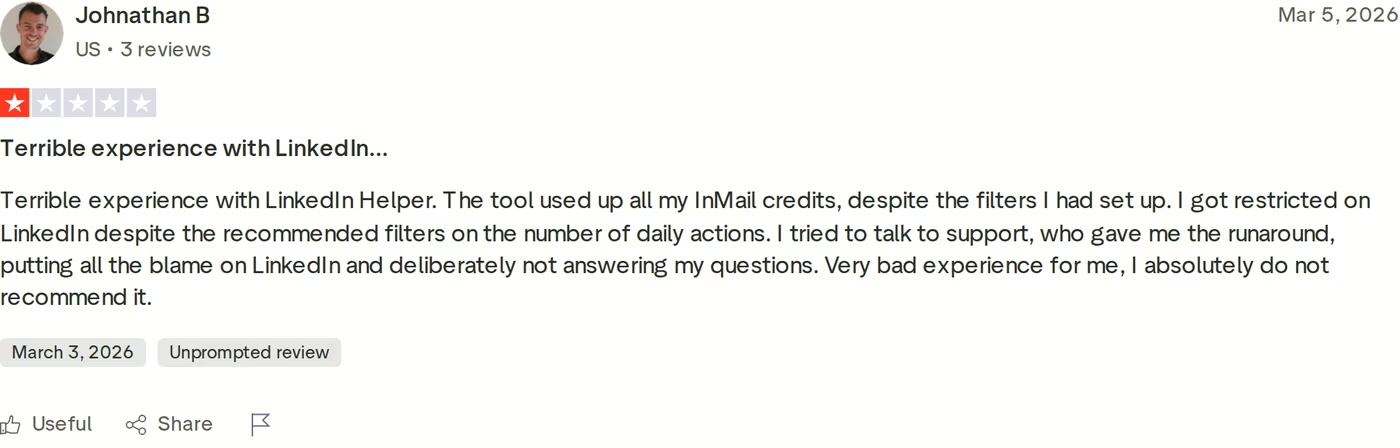
Reviews skew positive on ease of use, but the recurring complaint is account safety. In the 1-star Trustpilot review above, the reviewer reports the tool burned through his InMail credits despite his filters and that he got restricted on LinkedIn even at recommended daily limits. For a fuller picture, I'd read this in-depth Linked Helper review before committing.
Octopus CRM Overview
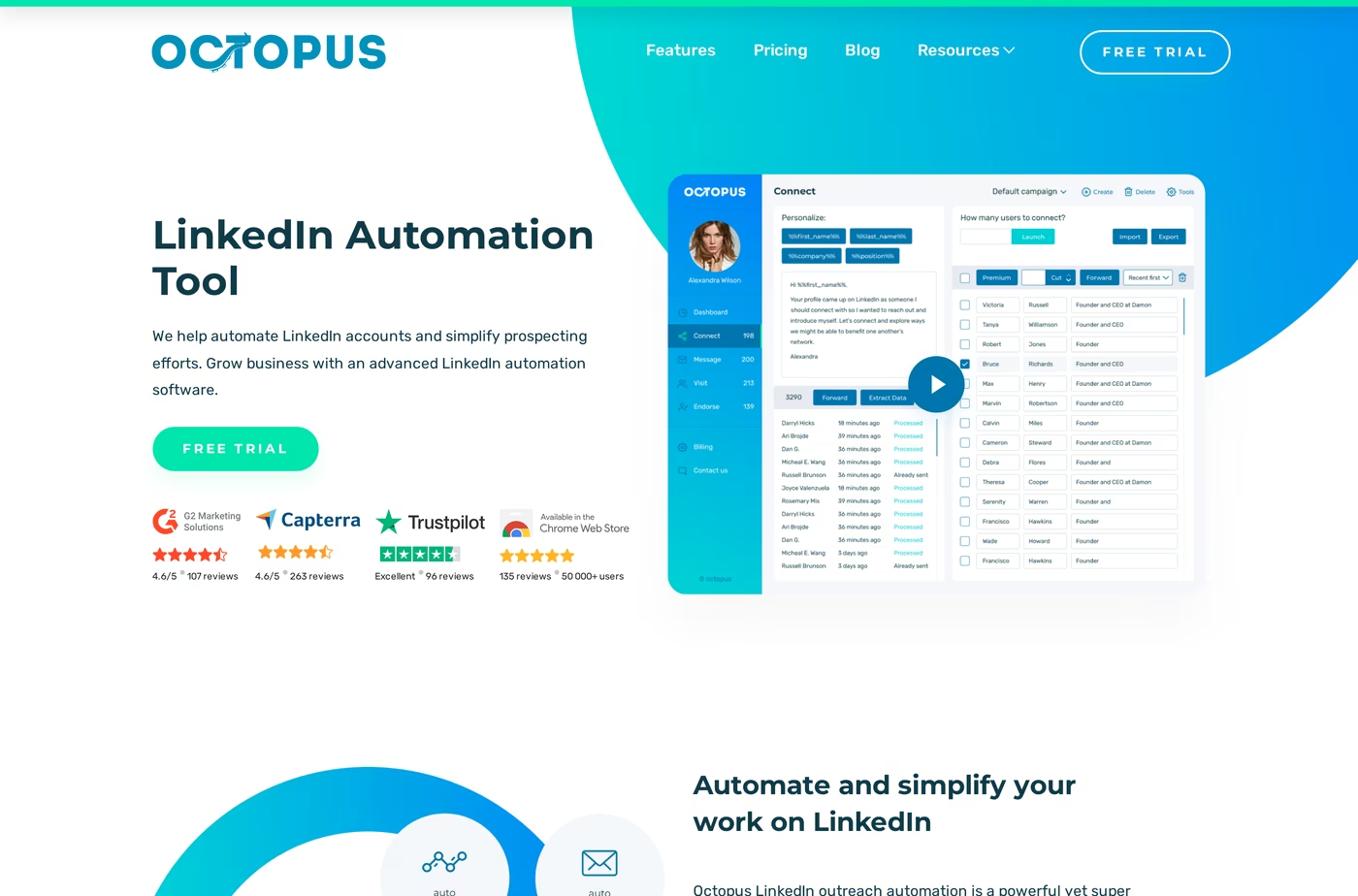
Octopus CRM is a Chrome extension that automates LinkedIn outreach. It launched in 2018 and reports more than 40,000 users. Because it is an extension, automation runs only while Chrome is open and your machine is on.
Core features:
- Connection requests and bulk messaging - personalized auto-invites and messages to first-degree contacts.
- Profile visits and skill endorsements - visibility plays that prompt profile views.
- Funnel builder - chain action types into a sequence (Advanced plan and up).
- Personal CRM with stats - track connected, messaged, and responded contacts.
- CSV import and export - feed your own prospect lists in and out (Advanced and up).
- Zapier and HubSpot integration - available only on the Unlimited plan.
- Connect-by-email - Unlimited-only trick to send invites by email past LinkedIn's weekly cap.
Pricing runs four tiers, billed per LinkedIn account: Octopus CRM Starter $9.99/mo, Pro $14.99/mo, Advanced $21.99/mo, and Unlimited $39.99/mo. Annual billing cuts roughly 35%, so annual rates are $6.99, $9.99, $14.99, and $24.99/mo.
There is a 7-day free trial with no card. Sales Navigator and Recruiter support are gated to the Unlimited plan.
Octopus CRM is best for a solo user or freelancer who wants a cheap, simple way to send LinkedIn connection requests and follow-ups at low volume, without conditional sequences or team features.
Known limitations:
- Chrome-extension only, so campaigns stop when you close the browser.
- No conditional multi-step logic - each action type is a separate campaign.
- No email outreach, no email finder, and no phone data.
- No team dashboard or shared inbox, and billing is per account for each seat.
What reviewers say
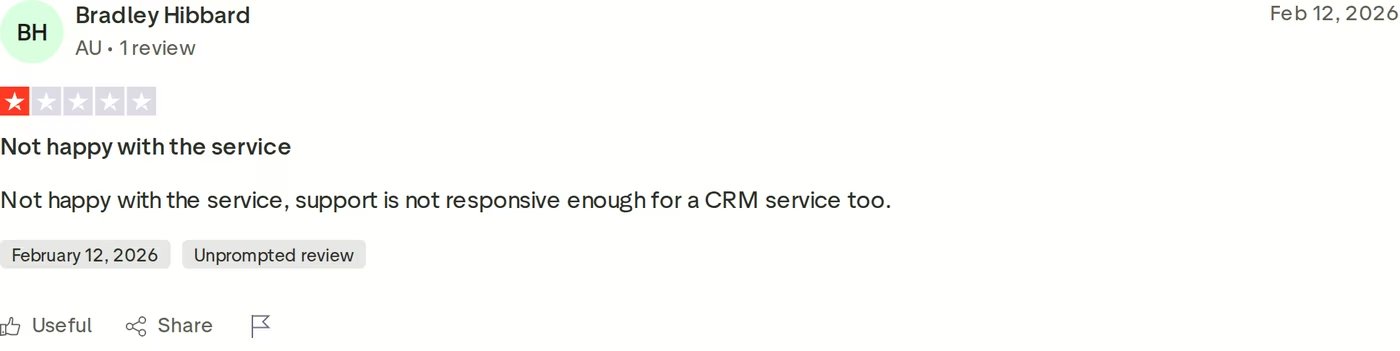
Positive reviews praise the low price and quick setup. The critical ones cluster around two themes: support that is slow to respond, as in the 1-star Trustpilot review above, and pricing many users find confusing because the displayed rate is often an annual figure divided by twelve. My longer take is in this Octopus CRM review.
Salesforge Overview: Email and LinkedIn in One Platform
Salesforge is an all-in-one cold outreach platform that combines email and LinkedIn in one workflow. It is the outreach layer of the Forge Stack, a set of products that also covers lead data, sending infrastructure, warm-up, and an AI SDR. The idea is to replace a duct-taped set of point tools with one system that syncs natively.
Core features:
- Conditional multi-channel sequences - email and LinkedIn touchpoints that branch on prospect behavior.
- Six native LinkedIn actions - connection requests, messages, InMails, post likes, follows, and withdraws, each capped at 30/day per profile.
- Account safety by design - LinkedIn actions route through managed proxies with session-token auth, and there is no Chrome-extension injection or DOM manipulation.
- Unlimited mailboxes on every plan - no per-mailbox fees.
- Unlimited LinkedIn senders and users - on the Growth plan, replacing seat-based pricing.
- Free unlimited Warmforge warm-up - a premium pool with Heat Score™ monitoring, included with every plan.
- Primebox™ unified inbox - email and LinkedIn replies in one view, with sentiment analysis.
- Overdrive Mode personalization - AI drafts from a prospect's site, blog, and LinkedIn posts.
- Smart mailbox rotation and dynamic IPs - spread sending to protect deliverability.
- Native CRM integrations - HubSpot, Salesforce, Pipedrive, and Clay, plus Zapier and an API on Growth.
- Salesforge MCP server - connect Claude and other AI assistants to run outreach.
Salesforge is one piece of a stack you can grow into: Leadsforge for a 500M+ contact database, Mailforge and Infraforge for shared or dedicated email infrastructure, and Primeforge for Google and Microsoft mailboxes at scale. Email infrastructure is not bundled into the base plan, so you connect your own mailboxes or add a Forge product. You can also run Salesforge three ways: your own team operates it, Agent Frank runs it autonomously, or a vetted Forge Expert agency runs it for you.
Pricing is usage-based, never per-seat. Salesforge Pro is $48/mo monthly or $40/mo annual. Salesforge Growth is $96/mo monthly or $80/mo annual and adds unlimited users, unlimited LinkedIn senders, A/B testing, the API, and Primebox AI.
An optional AI SDR, Agent Frank, is a separate subscription from $599/mo billed quarterly ($499/mo billed annually) - he is never bundled into the Pro or Growth price. There is a 14-day free trial.
Salesforge is a good fit if you sell B2B at $5K-$100K ACV to SMB or mid-market buyers and target 3,000 businesses or more. Salesforge itself says it is a poor fit if you primarily target Fortune 500 accounts or rely on long RFP cycles and six- to seven-figure deals.
Honest limitations:
- Email infrastructure is an added cost, not included in the base plan.
- API, A/B testing, ESP matching, and Primebox AI are gated to the Growth plan.
- Agent Frank needs a sales-led demo plus a 2-week warm-up, so there is no self-serve trial for him.
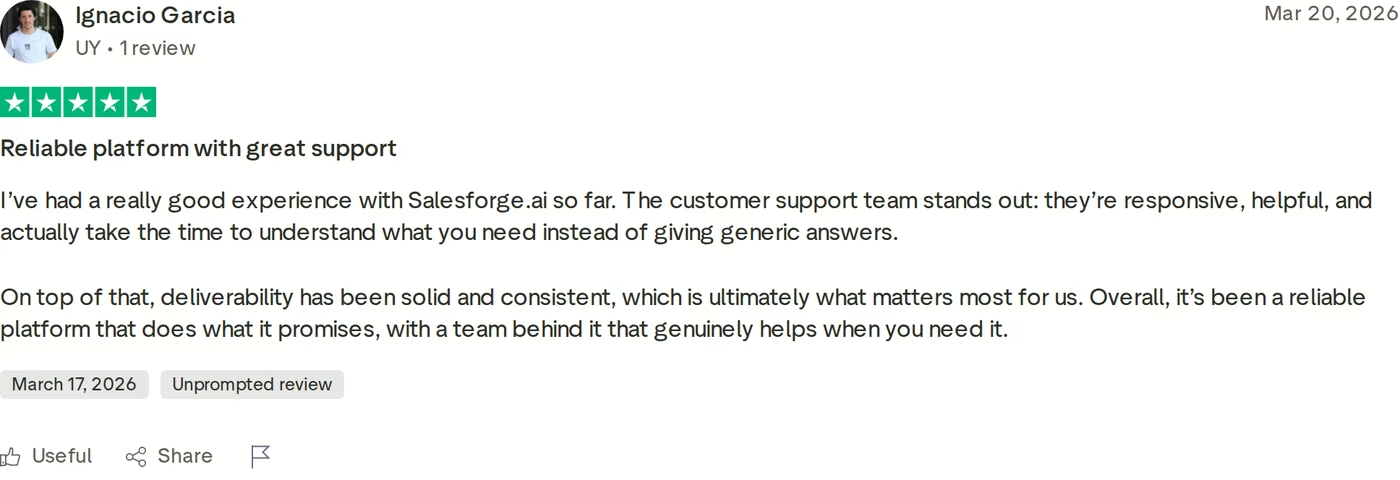
On the customer side, ChannelCrawler reached an 85.71% positive reply rate running Salesforge with Infraforge and Warmforge. The 5-star review above echoes the theme that shows up most in Salesforge feedback: deliverability that stays consistent, backed by responsive support.
Start Your 14-Day Free Trialin Action

Head-to-Head Feature Comparison: Linked Helper vs Octopus CRM
This is where the three tools separate. I've grouped the comparison into the areas that decide outbound results.
Multi-channel outreach
This is the clearest gap. Both Linked Helper and Octopus CRM are LinkedIn-only, so email is simply not part of the picture. Salesforge runs email and LinkedIn in one conditional sequence, so a prospect can get a LinkedIn touch and a follow-up email in the same play.
If your buyers live in both channels, one platform beats stitching two tools together. Phone outreach is on the Salesforge roadmap, which would extend the same sequence to a third channel. The walkthrough below shows how that multi-channel motion is built.
Email deliverability and warm-up
Neither competitor touches email deliverability, because neither sends email. Salesforge includes Warmforge free and unlimited on every plan: a premium warm-up pool of aged Google and Microsoft mailboxes, a per-mailbox Heat Score™, blacklist and DNS health checks, and monthly placement tests.
Salesforge also publishes clear guardrails: keep bounce rate under 1%, pause at 5%, and hold each mailbox's Heat Score™ above 97. Its warm-up traffic is multilingual, so it looks natural to Gmail and Outlook. On Linked Helper and Octopus CRM this row is empty; if you later add cold email, you also buy a separate warm-up service.
AI, personalization, and data
Salesforge personalizes with Overdrive Mode, drafting from a prospect's website, blog, and LinkedIn posts, and it can run the whole motion through Agent Frank in Auto-Pilot or Co-Pilot. Agent Frank writes in 9 tonalities across 21+ languages and is modeled on the top 1% of reps in your industry, while Overdrive Mode pulls from every source at once for two personalization credits per preview.
Linked Helper has added AI messages and AI ICP detection plus enrichment credits, which is more than Octopus offers on the AI front. Octopus CRM has no AI SDR and no built-in enrichment.
Salesforge also has a Chrome extension that finds verified emails and phone numbers from LinkedIn, powered by Leadsforge and its 500M+ database, with 100 free credits to start. If you also weigh data-led platforms, the Salesforge vs Apollo breakdown goes deeper. For a wider look at this category, see these AI email agents.
Inbox and reply management
Salesforge ships Primebox™ free: one inbox for email and LinkedIn replies, sentiment tags, and AI-drafted replies on Growth. Primebox™ runs three reply modes - Co-Pilot, Auto-Pilot, and Reply-as-Human - and it catches replies even when a prospect answers from a different address than the one you contacted.
Linked Helper keeps conversations inside each account's local database, so running several accounts means switching between them with no shared view. Octopus CRM has no unified inbox at all. Managing replies across accounts is a real bottleneck the competitors leave to you.
Pricing and scalability
Both competitors price per LinkedIn account. Ten accounts on Linked Helper Pro means ten licenses; ten seats on Octopus CRM Unlimited means ten subscriptions. At ten accounts, that is about $450/mo for Linked Helper Pro or $400/mo for Octopus CRM Unlimited month-to-month (roughly $248 and $250/mo on annual terms), each seat billed separately.
Salesforge Growth stays flat at $96/mo ($80 annual) for the whole team - unlimited users, senders, and mailboxes, with email and warm-up included. The more you scale, the wider that gap opens.
Integrations, infrastructure, and the Forge Stack
Salesforge integrates natively with HubSpot, Salesforce, Pipedrive, and Clay, plus Zapier, an API, and an MCP server on Growth, and it offers three email-infrastructure products. Linked Helper exports by CSV and webhooks (Zapier). Octopus CRM adds Zapier and HubSpot only on the Unlimited tier.
The infrastructure products cover different needs: Mailforge for shared IPs from $2-$3 per mailbox, Infraforge for dedicated IPs from $3-$4, and Primeforge for real Google and Microsoft mailboxes from $3.50-$4.50. Salesforge recommends a hybrid of two providers to diversify sending risk. Neither competitor sells sending infrastructure, so scaling volume safely is on you.
Salesforge also ships a CLI and MCP server, so teams can build sequences from the terminal or drive outreach straight from Claude. For the wider ecosystem, Salesforge keeps a large sales tools directory as well.
Pricing Comparison: What Each Platform Costs
Headline prices favor the competitors until you account for what is missing. Here is the side-by-side, with vendor prefixes on shared plan names.
| Plan / cost | Salesforge | Linked Helper | Octopus CRM |
|---|---|---|---|
| Entry plan | Salesforge Pro - $48/mo monthly ($40/mo annual) | Linked Helper Standard - $15/mo (~$8.25/mo on 12-month term) | Octopus CRM Starter - $9.99/mo ($6.99/mo annual) |
| Top self-serve plan | Salesforge Growth - $96/mo monthly ($80/mo annual) | Linked Helper Pro - $45/mo (~$24.75/mo on 12-month term) | Octopus CRM Unlimited - $39.99/mo ($24.99/mo annual) |
| Billing unit | Per workspace; unlimited users and senders on Growth | Per LinkedIn account (1 license = 1 account) | Per LinkedIn account (1 subscription = 1 account) |
| AI SDR | Agent Frank from $599/mo billed quarterly ($499/mo annual) - separate | Not available | Not available |
| Email included | Unlimited mailboxes (infrastructure sold separately) | No email | No email |
| Free warm-up | Yes (Warmforge) | No | No |
The pricing math changes when you scale. Say you run a 3-person outbound team working email and LinkedIn. On Salesforge Growth that is $80/mo billed annually - flat, all three users, unlimited LinkedIn senders and mailboxes, with warm-up and Primebox™ included.
On Linked Helper Pro, three LinkedIn accounts need three licenses: roughly $74/mo on 12-month terms ($135/mo month-to-month), and still no email. On Octopus CRM Unlimited, three seats run about $75/mo annual ($120/mo monthly), also LinkedIn-only. To add email to either competitor, you bolt on a separate cold email tool and a warm-up service on top, which erases the headline savings.
Who Should Use Which Tool
No single tool wins every scenario, and you can browse more head-to-heads in the comparison library. Here is how I'd route the decision.
You might consider Linked Helper if:
- Your outreach is LinkedIn-only and runs on a single account you control.
- You want prospect data stored locally on your own machine.
- You're a power user who wants deep campaign control at a low price and don't need email.
You might consider Octopus CRM if:
- You're a solo user who only needs basic LinkedIn connection requests and follow-ups.
- You want the cheapest entry point (Octopus CRM Starter at $6.99/mo annual) and nothing more.
Choose Salesforge if:
- You sell B2B at $5K-$100K ACV to SMB or mid-market and target 3,000+ businesses.
- You want email and LinkedIn in one workflow, not two disconnected tools.
- You're scaling and don't want per-seat or per-account pricing to punish growth.
- You run an agency and need multi-client workspaces plus isolated infrastructure.
- You want the option to hand outbound to an AI SDR (Agent Frank).
Final Verdict: Which Outreach Tool to Choose
Linked Helper and Octopus CRM are both capable at one narrow job: automating LinkedIn from software on your own machine. Linked Helper is the deeper, more configurable of the two for a single-account power user.
Octopus CRM is the cheapest way to send basic connection requests. Neither sends email, neither warms up an inbox, and neither has an AI SDR or a unified inbox.
For multi-channel B2B outbound that scales, Salesforge is the stronger choice. At $80/mo for the Growth plan billed annually ($96/mo monthly), you get email and LinkedIn together, unlimited users and senders, unlimited mailboxes, free Warmforge warm-up, and Primebox™ - a combination neither competitor offers at any price.
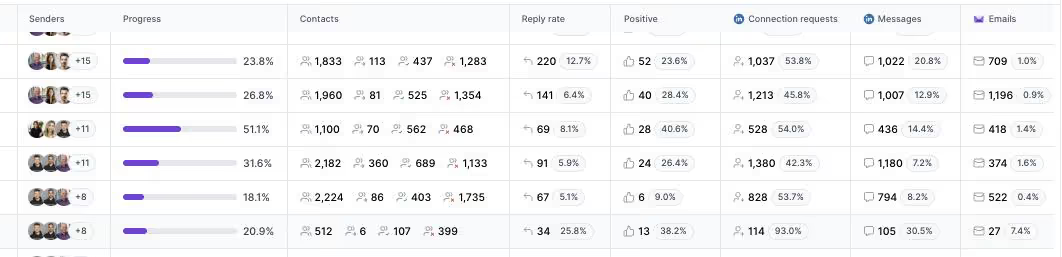
One falsifiable benchmark: VAI Consulting booked 3 calls in a single week with Agent Frank, and UniteSync ran Salesforge to an 85.26% positive reply rate at a $2.86 CAC. Both case studies are public.
Frequently Asked Questions
Is Salesforge better than Linked Helper or Octopus CRM?
For multi-channel B2B outbound, yes. Salesforge runs email and LinkedIn together, includes free Warmforge warm-up and the Primebox™ unified inbox, and offers an AI SDR. Linked Helper and Octopus CRM are LinkedIn-only tools that run on your own machine and send no email. If your outreach is strictly LinkedIn on one account, a competitor can be enough, but Salesforge covers far more of the outbound stack.
What's the main difference between Salesforge, Linked Helper, and Octopus CRM?
Channel and architecture. Linked Helper is a desktop app and Octopus CRM is a Chrome extension, and both automate LinkedIn only from hardware you keep switched on. Salesforge is a cloud platform that runs email and LinkedIn in one conditional sequence, warms up inboxes, and manages replies in Primebox™. In short, the competitors automate one channel; Salesforge runs a full multi-channel motion.
Which is cheapest: Salesforge, Linked Helper, or Octopus CRM?
Octopus CRM has the lowest sticker price, with a Starter plan at $6.99/mo billed annually, and Linked Helper Standard runs about $8.25/mo on a 12-month term. Salesforge Pro starts at $40/mo annual. But the competitors bill per LinkedIn account and include no email, so once you add seats or a cold email tool, Salesforge's flat, all-in pricing often wins on total cost.
Do Linked Helper and Octopus CRM support email outreach?
No. Both are LinkedIn automation tools with no cold email sending. Linked Helper includes enrichment credits that can find email addresses (620 per month on Standard, 3,100 on Pro), and Octopus CRM's Unlimited plan can send LinkedIn invites by email, but neither runs email campaigns. Salesforge runs both email and LinkedIn from one platform with unlimited mailboxes.
Can I switch from Linked Helper or Octopus CRM to Salesforge easily?
Yes. Both competitors export contacts to CSV, and Salesforge imports contacts by CSV or Google Sheets, so your prospect lists move over quickly. You connect your mailboxes, which start warming up automatically within 24 hours, link your LinkedIn account, and rebuild sequences. A 14-day free trial lets you run a test campaign before you commit.
Which tool has better email deliverability?
Salesforge, by default, because it is the only one of the three that sends email. It includes Warmforge warm-up on a premium pool, per-mailbox Heat Score™ monitoring, smart mailbox rotation, and three infrastructure options. Linked Helper and Octopus CRM have no email and no deliverability tooling, so any email you send would run through a separate stack you set up yourself.
Does Salesforge offer a free trial?
Yes. Salesforge has a 14-day free trial with no credit card required, capped at 50 contacts and 100 emails, and it includes warm-up and unlimited mailbox connections during the trial. Agent Frank is the exception: he requires a sales-led demo and a 2-week warm-up rather than a self-serve trial. Linked Helper offers a 14-day trial and Octopus CRM a 7-day trial.
Are Linked Helper and Octopus CRM safe for my LinkedIn account?
Both aim to mimic human behavior with delays and daily limits, but running automation on your own machine carries risk. Linked Helper reviewers report account restrictions even at recommended limits, and Chrome extensions like Octopus CRM inject code into your LinkedIn session, which detection systems watch for. Staying within safe daily volumes matters regardless of which tool you use.
.jpg)

.jpg)

.jpg)