Most sales teams are still prospecting as if every account in their ICP is equally likely to buy.
But they're not.
There are some companies that are actively evaluating new vendors today. And others won't be in the market for another six months.
GTM signals help you tell the difference by revealing the buying intent buyers leave behind, whether it's a funding round, a new leadership hire, competitor research, or a spike in product interest.
In this guide, I'll break down what GTM signals are, which ones actually matter, and how to turn buyer intent into booked meetings.
Here is the workflow at a glance. The rest of the guide unpacks each step with examples, pro tips, and the exact stack I use.
💡The core insight: teams that invest in signal capture but ignore the execution layer lose to competitors who moved first. A signal you cannot act on inside an hour is a signal your competitor already got to.
GTM signals are real-time data points telling you a company is ready to buy or facing a change that creates a need.
Think of them as the digital clues buyers leave before they raise their hand. Instead of guessing who fits based on static firmographics, you watch the market in real time and move when buyers show intent.
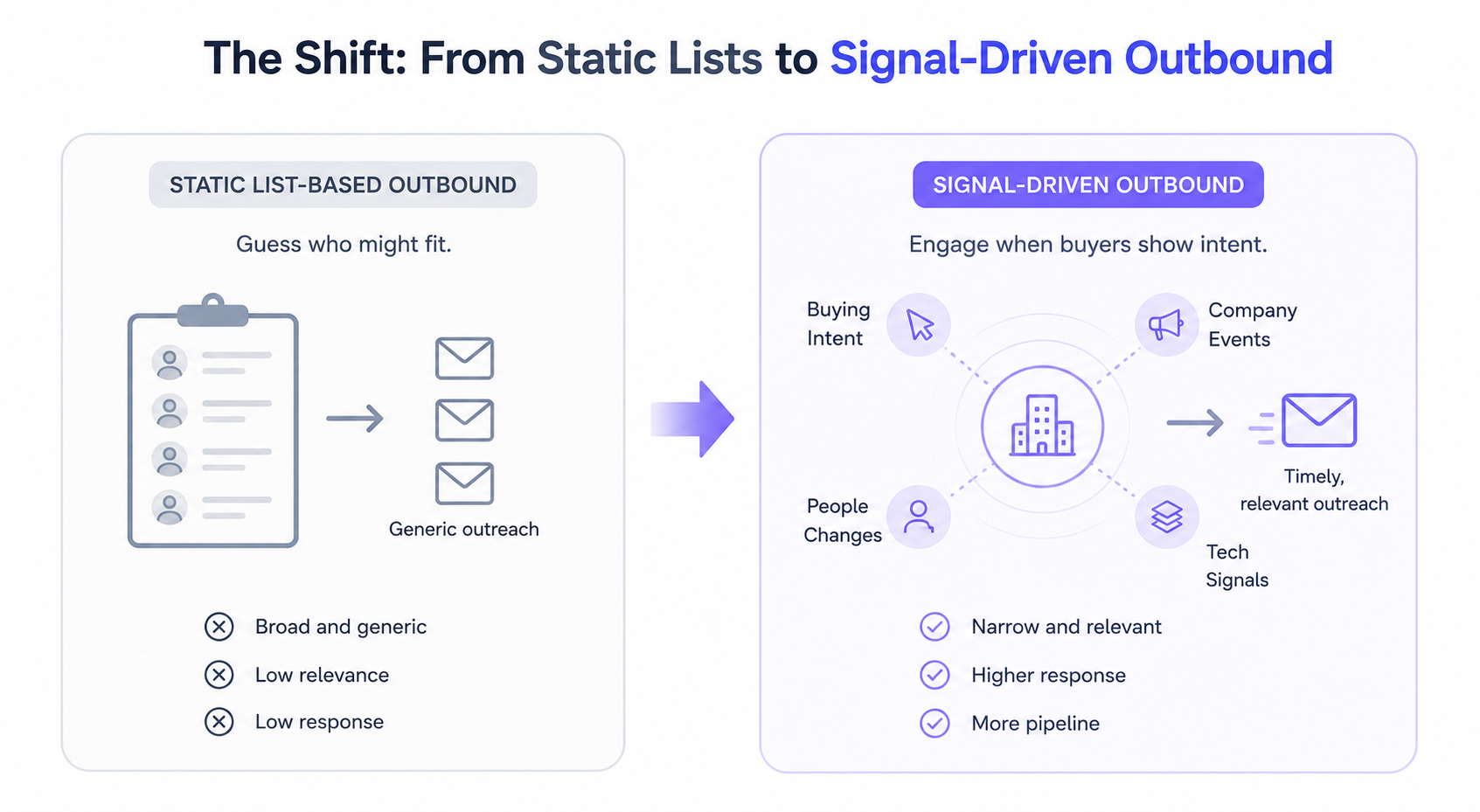
If you want a broader read on the tools that surface signals across the market, my best GTM tools breakdown covers the top platforms sales teams are running in 2026.
There are four core types of GTM signals most teams work with. I will walk through each one with examples, sources, common mistakes, and my honest take on how to actually use them in sales.
First-party signals come from direct interactions with your own assets. Someone visited your pricing page. Someone requested a demo. Someone downloaded a comparison PDF. Someone hit a usage threshold inside your free trial. These signals are the highest-intent you will ever get, because the buyer put your name in the same sentence as their problem.
Where these signals come from:
The catch is that most teams underuse these signals. They wait for a form fill. But a pricing page visit without a form fill is still worth acting on. If a prospect visits your pricing page twice in three days, you should be reaching out inside the hour, not the next business day.
The other mistake I see is treating first-party signals in isolation. A single pricing page visit could be a competitor doing research. Layer it with LinkedIn matching, and you separate real intent from noise fast.
💡Pro tip: Set up a reverse IP tool to catch anonymous account visits, then match those accounts against your CRM. If it is a target account already, that is a high-priority alert to your SDR. If it is not in your CRM yet, that is a fresh account to add to Leadsforge for enrichment.
Second-party signals come from partners or platforms where your ideal customers spend time. This includes co-marketing content clicks, partner platform activity, integration marketplace listings, and shared audience data with integration partners.
Real examples that convert:
The strongest second-party signal I have seen is integration adoption.
If a prospect just installed the integration that connects your product with a partner tool, they are actively working on the problem your product solves.
To maximize the value of co-marketing events, you can use Riverside webinars to plan, stream, edit, and repurpose webinars from a single platform. Partner referral traffic tagged in your analytics tells you the account is in-market and researching partner-recommended solutions.
Second-party signals are underused because most teams do not have partner relationships mature enough to share data.
But if you do, they are cleaner than third-party signals. Buyers self-identify on partner platforms, which cuts the noise. That is the whole reason to build partner data pipes into your CRM as early as possible.
💡Pro tip: If you have integrations with two or three key platforms, build a shared reporting layer with those partners. You do not need a formal data-share agreement to get visibility into who installed what. A monthly Slack drop of new integration installs is often enough to run a signal-driven play against.
Third-party signals come from external platforms where buyers research solutions without telling you. G2 category searches, ZoomInfo intent spikes, Bombora topic clusters, competitor comparison searches on Reddit, and podcast listens all live here.
The main sources you can pull from:
The dark funnel is where most of the buying research actually happens now. A prospect will read four G2 reviews, compare six vendors, and shortlist two before they ever visit your website. Third-party signals let you catch them earlier in that process.
The trade-off is that these signals are noisier. Someone reading about your category could be your prospect, a competitor doing research, or a job seeker studying the space. You have to layer third-party signals with fit data to separate signal from noise.
💡Pro tip: If your third-party intent budget is tight, start with G2 category views only. It is the cleanest signal in the dark funnel because the intent is explicit. Someone reading four competitor reviews on G2 is not just casually browsing.
Trigger events are point-in-time changes that create a new need. Funding rounds, hiring spikes, executive changes, layoffs, mergers, product launches, and compliance changes all qualify.
The trigger events I actually run plays on:
The one I have found consistently underrated is the past champion job change. If someone who bought your product at their old company just joined a new one, you have a warm entry point most reps miss. Set up a saved search on LinkedIn or Leadsforge and check it weekly. The reply rates on these outreaches are 3 to 5 times higher than cold outreach on the same account, in my experience.
The one I have found most overrated is the funding round without any layering. Every SDR in the market pounces on funding announcements. A cold email tied only to "congrats on the raise" is the most saturated signal in outbound right now. Layer it with a hiring spike or an executive change, and you have something worth chasing. On its own, it is table stakes.
Not every signal is worth chasing. In my experience, the signals that convert best combine urgency with specificity. A pricing page visit is high-intent because it points to a specific vendor. A funding round is medium-intent because it points to a general need.
Here is how I weight signals in practice, and the play I run against each.
The pattern I have noticed is that the signals nobody else is watching outperform the ones everybody is watching.
Past champion job changes still get very little attention from most SDR teams, which is exactly why they work.
Free trial activation is another one most teams treat as a marketing signal instead of a sales trigger, and that gap is a huge missed opportunity.
The other pattern is that signals stack multiplicatively, not additively. A funding round on its own is a medium-intent signal.
A funding round paired with a VP of Sales hire in the last 60 days becomes a high-intent signal, because both cues point at the same buying moment. Two stacked signals are worth ten single ones.
The workflow breaks into two moves: identifying the signal, then acting on it in your outbound campaigns. Capturing a signal is easy. Acting on it inside an hour is where most teams fall down.
Which brings me to how I actually run this stack.
Leadsforge is where I run the signal discovery layer. It works like a search engine for B2B leads with 500M+ contacts, and the features that matter for signal work are ICP search, competitor followers, lookalikes, and native buying signals.
Here is the workflow inside Leadsforge specifically.
Instead of building filters manually, I describe my ideal customer in plain language. Something like: SaaS companies between 50 and 200 employees, based in North America, with a VP of Sales hired in the last 90 days. Leadsforge returns matched accounts that fit the description, with contacts already enriched.
The reason this matters for signal work is that ICP search lets you combine fit data with a trigger in one query. You are not just finding companies that recently hired a VP of Sales. You are finding companies that fit your buyer profile and just hired a VP of Sales. That is where the signal actually predicts pipeline.
Example queries I run weekly:
Each of these queries produces a list of accounts already carrying two or three intent signals baked in. That is the whole point.

You can target the followers of any competitor's LinkedIn company page and pull them as leads. These people voluntarily raised their hand as interested in your category. That is a stronger fit signal than most third-party intent data you can buy.
I use this for two plays specifically. The first is anti-incumbent outreach. If you have a positioning angle against a specific competitor, competitor followers are the fastest way to build a list that will actually respond to that message. The second is category-adjacency plays. Followers of a competitor in your same category are almost certainly interested in the problem you solve, even if they are not evaluating your product directly.
The trick to competitor followers is filtering. A LinkedIn company page has thousands of followers, but only a subset match your ICP. Layer competitor follower data with role, seniority, and company size filters inside Leadsforge, and you drop from 10,000 followers to 200 highly qualified accounts.
Lookalikes let you take your best existing customers and find companies that match them across firmographic, technographic, and behavioral dimensions. It is not just industry and headcount. It is the underlying pattern that made those customers close and expand.
The step most teams skip is auditing which customers to seed the lookalike from. If you seed lookalikes off your entire customer base, you get lookalikes of your median customer, not your best one. Seed lookalikes off your top 20 accounts by expansion revenue instead. The output is a list of accounts you would not have found through standard filtering, and it is far more likely to convert.
💡Pro tip: Refresh your lookalike seed list every quarter. The pattern of what makes a good customer shifts as your product evolves and your ICP tightens.
Leadsforge surfaces intent signals natively, which means you do not need a separate Bombora or 6sense subscription to get started. The signals you get are broad enough to run most outbound plays without adding another tool to your stack.
The signals you can pull include hiring activity, funding events, technology adoption, and category-level intent. The value of having these inside Leadsforge is that they are already tied to enriched contact data. You are not stitching together three tools to get from signal to sendable list.
Once you have your signal-matched accounts, the real question is how fast you can execute. That is where Salesforge takes over.
Salesforge is where the signal turns into a sequence.
The reason I run execution here instead of stitching separate tools for email and LinkedIn is that signal-driven outbound only works when the response is multi-channel and fast.
Salesforge is an all-in-one outbound stack without per-seat pricing. You get unlimited mailboxes, unlimited LinkedIn senders, and Agent Frank as the AI SDR layer, all inside one platform.
If you want to see how it stacks up against other tools in this category, my best email outreach tools comparison walks through the trade-offs across the top nine options.
Here is how the execution layer works in practice for signal-driven plays.
A signal-triggered play should hit the prospect on both email and LinkedIn, ideally inside the same 24-hour window. If you only respond on one channel, you are cutting your response rate in half before the sequence even starts.
Salesforge runs email and LinkedIn from the same sequence builder.
You can send an email touch, follow with a LinkedIn connection request, layer in a LinkedIn message a day later, and drop back to email.

It stays coordinated because it lives in one platform. If you want more depth on how multi-channel plays actually work, my LinkedIn outreach guide breaks down the channel-mixing patterns that convert best.
Here is a sequence I run for a high-intent signal like a pricing page visit from a fit account:
The key detail is unlimited mailboxes and LinkedIn senders. If you are running high-signal outbound, you will hit sender limits fast on other tools. Salesforge does not cap you on either.
Agent Frank is Salesforge's AI SDR.
In Auto-Pilot mode, he prospects, writes personalized emails, sends them, and follows up without waiting for human approval. He works 24/7, which is exactly what signal-driven outbound needs.
You can see how he compares against other AI SDRs in my outbound AI sales agents review.
The reason this matters is decay. A signal that fires at 2 am on a Tuesday should not wait until 9 am for a rep to see it.
Agent Frank picks it up in the moment, checks fit against your ICP, and sends the outreach in the same window the signal is still fresh.

How the two modes actually differ:
I have not seen another tool where an AI SDR sits inside the same platform as the sequencing engine.
Everywhere else it is a separate product, or a stitched-together workflow. That gap is exactly why signal-driven outbound stalls at most companies.
My SDR tools breakdown walks through the broader category if you want to see how the pieces normally fit together.
This is the framework I use with teams moving off static lists.
Four steps, in order, with the mistakes to avoid at each stage.
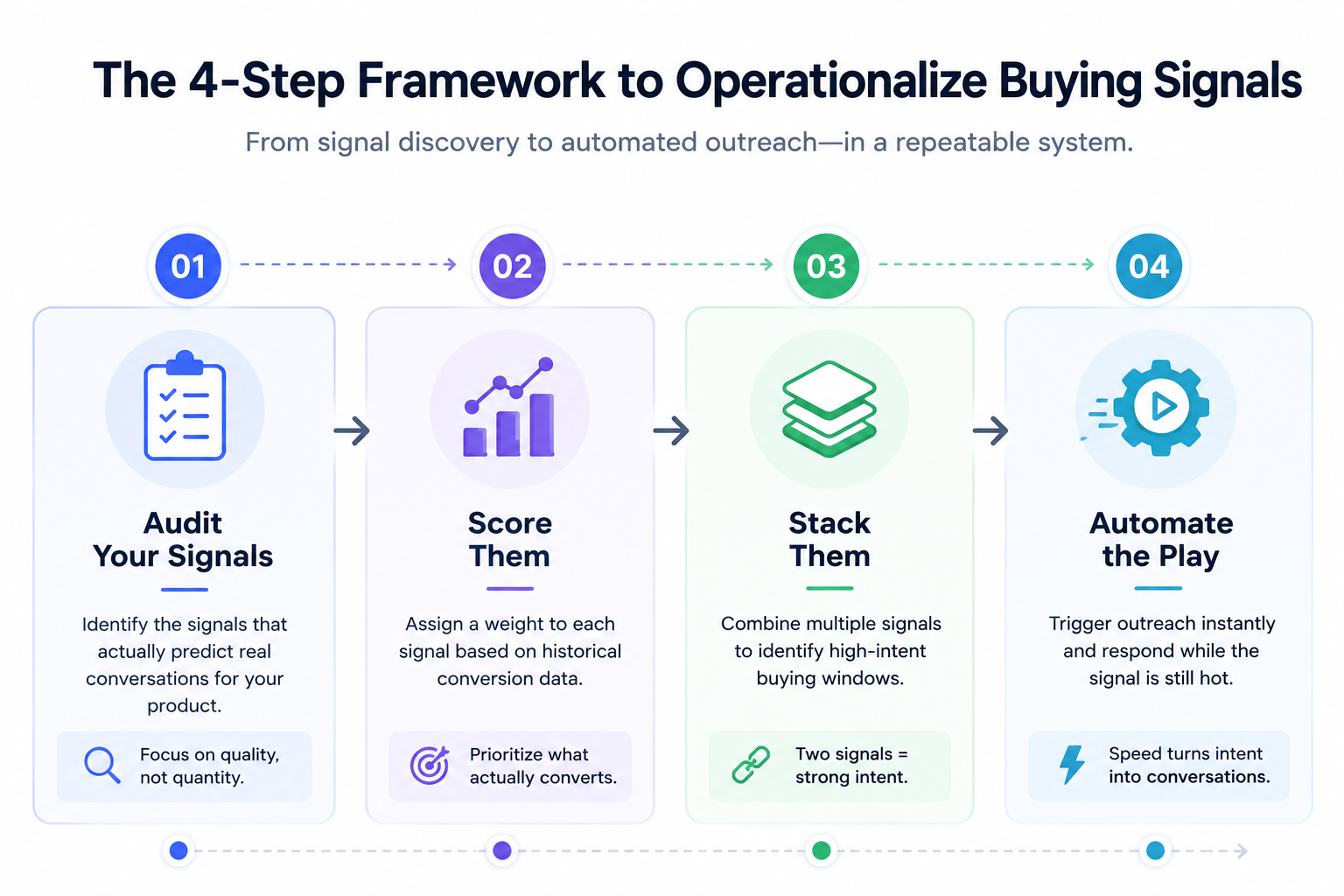
Start with five or six signals that most often lead to real sales conversations for your product. Do not track 30 signals. You will drown in noise and miss the ones that matter.
For most B2B teams, the starting set looks like this: pricing page visits, past champion job changes, hiring spikes in target roles, recent funding, competitor comparison research on G2, and free trial signups. Adjust based on your own conversion data.
The mistake most teams make in the audit stage is tracking signals because they are easy to capture, not because they predict conversion. Funding rounds are easy to pull from Crunchbase, which is why every SDR chases them. But if your data shows funding rounds convert at the same rate as cold outreach, that signal is not earning its place in the workflow.
✅ How to audit properly: pull your last 100 closed-won deals. Look at what signals fired in the 90 days before the first sales conversation. The signals that appear repeatedly are the ones worth tracking. Everything else is noise.
Assign a weight to each signal based on how well it correlates with real conversion in your pipeline. Look at closed-won deals from the last two quarters and reverse-engineer which signals fired before those conversations started.
The point of scoring is not to be scientifically perfect. It is to give your reps a way to prioritize when 40 signals fire on the same day. A simple 1-to-5 scoring model works fine.
High-intent signals like pricing page visits and past champion job changes get a 5. Medium-intent signals like funding rounds and hiring spikes get a 3. Low-intent signals like anonymous IP visits get a 1.
The scoring model needs to feed into your CRM or workflow tool so accounts crossing a threshold get flagged automatically. Manual scoring is where signal-driven outbound dies at scale. Once you have more than 20 signals firing per day, no rep will keep up with manual triage.
A single signal is noise. Two stacked signals are intent. If a company just raised a Series B and just hired a VP of Sales, that is a stronger buying window than either signal alone.
Build your workflows to require at least two signals before triggering direct outreach. This filters out low-quality plays without adding manual review. The stacking logic looks something like this:
The compounding effect of stacked signals is what turns signal-driven outbound from a novelty into a real pipeline engine.
Connect discovery to execution so the response happens in minutes. This is where the Leadsforge to Salesforge handoff comes in. Signals identified in Leadsforge feed accounts directly into Salesforge sequences, and Agent Frank handles the response inside the decay window.
Manual handoffs are where signal-driven outbound dies. If your rep has to see a Slack alert, log into a CRM, build a list, upload it to a sequencer, and write copy, the signal is already stale before the first email sends. Automation is not a nice-to-have here. It is the whole point.
The rule I follow: if a signal fires and takes more than 15 minutes to trigger an outreach, the automation is broken. That is the benchmark to hold your workflow to.
If you want to run this stack the way I have described it, the fastest way to get started is with a Salesforge free trial.
You can set up multi-channel sequences, connect Agent Frank, and start responding to signals inside the decay window from day one.
GTM signals are real-time data points indicating a company is ready to buy, actively researching solutions, or going through a change that creates a need. They replace static targeting with dynamic, behavioral context. Instead of guessing which accounts might fit, you watch the market in real time and move when buyers show intent.
First-party signals come from direct interactions with your own assets, like pricing page visits, demo requests, and free trial signups. Third-party signals come from external platforms like G2, Bombora, or 6sense, where buyers research solutions without telling you directly. First-party signals have higher intent because the buyer has already put your name in front of their problem, while third-party signals are noisier but let you catch buyers earlier in the process.
The highest-converting signals I have seen combine urgency with specificity. Pricing page visits, past champion job changes, and multiple stakeholders on your site consistently outperform broader signals like funding rounds or category research alone. Stacked signals convert dramatically better than single signals, so build workflows that require at least two signals before triggering direct outreach.
Decay windows vary by signal type. A pricing page visit is fresh for about 90 minutes. A funding announcement is fresh for 48 hours. A job change is fresh for about a week. Response speed inside the decay window matters more than volume of signals captured.
You need both a discovery layer and an execution layer, but they should be tightly integrated. Manual handoffs between separate tools kill response time and let signals go stale. I use Leadsforge for identification and Salesforge for execution because the handoff is native. If you are stitching four tools together to go from signal to sent sequence, the signal is already dead by the time your outreach lands.
An AI SDR like Agent Frank continuously monitors signals against your ICP criteria and triggers personalized outreach the moment a match fires. He works 24/7, which means signals firing outside business hours still get responded to inside the decay window. Auto-Pilot mode lets him send without waiting for approval, while Co-Pilot mode holds messages for human review before sending on high-value accounts.
Yes, but you will lose speed. Signals firing at 2am on a Saturday wait until Monday morning if a human is doing the response. That is often past the decay window. An AI SDR closes the response-time gap that manual outbound cannot cover at scale.
Start with five signals that map to your closed-won deals over the last two quarters. Score each signal from 1 to 5 based on how well it predicts conversion. Build a workflow that requires two stacked signals before triggering direct outreach. Automate the handoff from identification to execution so response happens inside the decay window. That is the whole playbook.
Intent data is a subset of GTM signals. It usually refers to third-party research signals from platforms like Bombora or 6sense. GTM signals are broader and include first-party website behavior, second-party partner data, third-party intent data, and point-in-time trigger events. Running outbound on intent data alone leaves three out of four signal categories on the table.
.jpg)


.png)

