

Personalized Outbound Strategy
Get The Right Outbound Strategy In Minutes
Enter your email to get a custom plan & stack recommendation for your business
It's being carefully crafted by AI
Please check your mailbox in 5 minutes
I’ve been running automated LinkedIn outreach since 2021. Back then, getting replies was much easier.
Expandi was one of the tools that defined LinkedIn automation in 2021 and 2022. Agencies were using it everywhere, and it helped prove that LinkedIn outreach could be automated without completely sacrificing personalization.
But the market looks very different today.
Dozens of LinkedIn automation tools now compete on safety, inbox management, personalization, multichannel outreach, and pricing. So if you landed on this Expandi review, you’re probably wondering one thing:
Is Expandi still as good as it used to be, or have newer tools caught up?
That question matters even more because Expandi users have raised complaints around things like:
I’ve used LinkedIn automation for years, so in this review I’ll look beyond Expandi’s feature list.
I’ll break down how Expandi works today, what it still does well, where it falls short, how much it really costs, and whether I’d still choose it in 2026.
By the end, you should have a clear answer on whether Expandi is worth paying for or whether an alternative makes more sense for your workflow.
Let’s get into it.
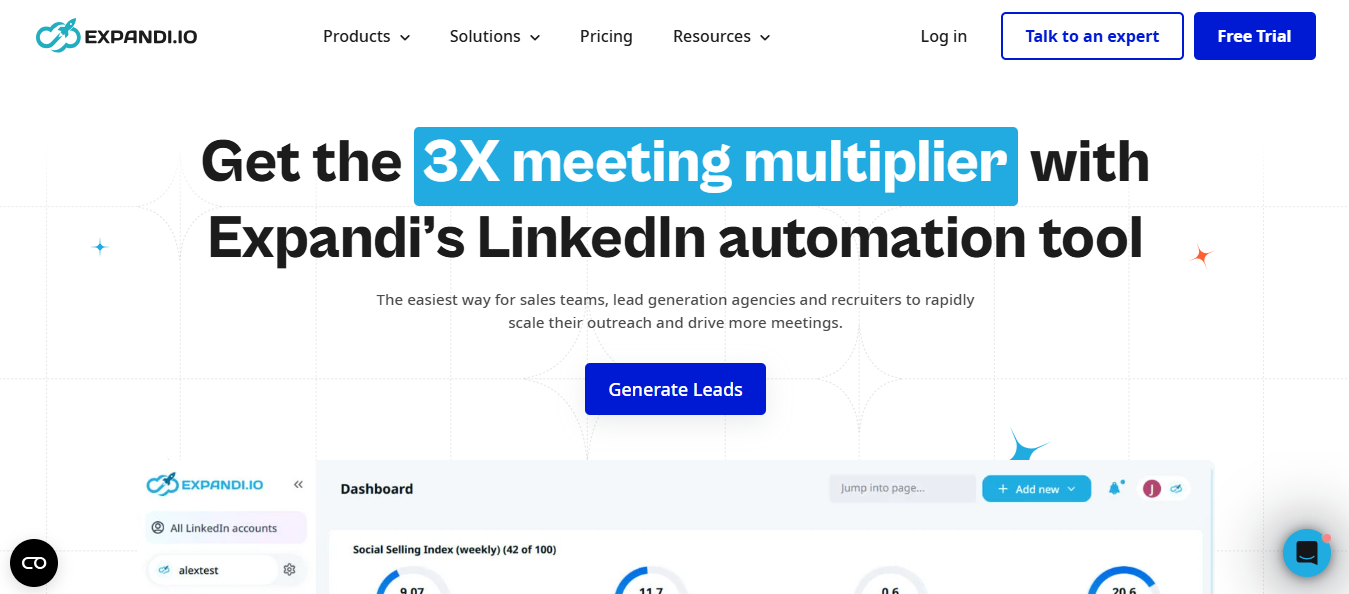
Expandi gives you a lot of surface area. Eleven campaign types, intent triggers, AI messaging, and a full multi-account layer.
What you do not get is multichannel sequencing. You get the send step, you bring the mailboxes.
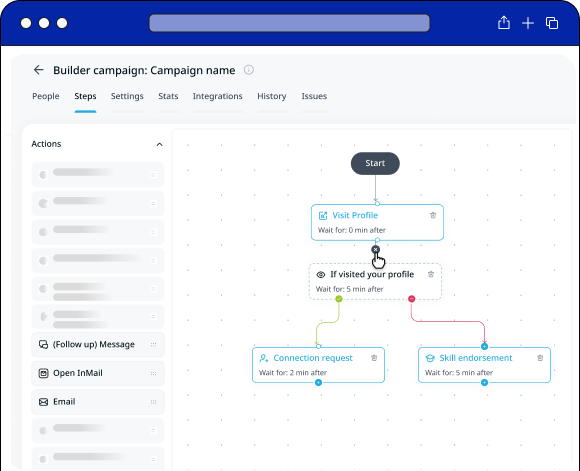
There are eleven, and you'll probably use four. Connector for people you have not met. Messenger for people you already know.
Open InMail for the ones who left their profile open, so you can message them without spending a request.
Builder is where you will actually live. You drag the steps you want and tell it what to do when someone replies, ignores you, or accepts.
Someone views your profile, or someone comments on your post. Signals catches them and drops them into a campaign while you are doing something else.
You can narrow it further. Say only pull the people who commented "interested," and everyone else stays out.
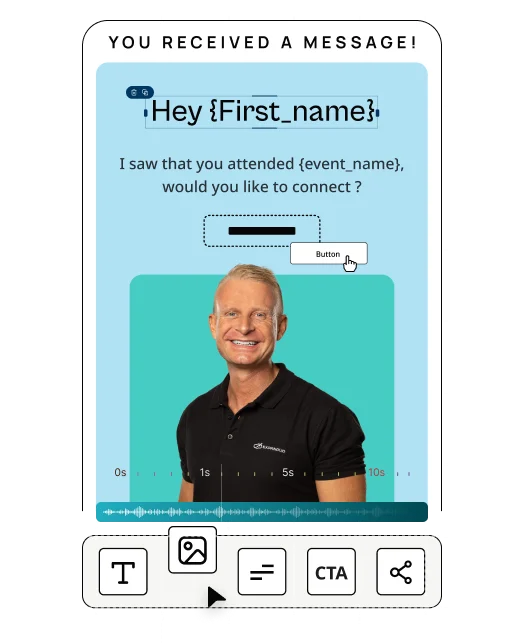
You describe the message you want instead of writing it. Expandi reads the person's profile and writes something that fits them.
Try it before you trust it. One button shows you what it generates for a real person.
You won't have to send 50 requests on day one. Expandi eases you in over two weeks, caps daily volume, and runs only during the hours you choose.
It also quietly pulls back requests nobody accepted, so you don't have to clean that up yourself.
One dashboard, one inbox, every account in one place. Connect your CRM once instead of five separate times.
You can add an email step. Expandi will not hand you a mailbox to send it from.
That part is yours. Find a provider, buy the domains, warm them up, then come back.
A post can only feed one campaign at a time. Same for your profile and your company page.
Worth knowing before you plan the second one.
You cannot drop a CSV into a Signals campaign. Your list-based outreach has to live somewhere else.
It also starts empty and only pulls new people in once a day, so day one looks like nothing happened.
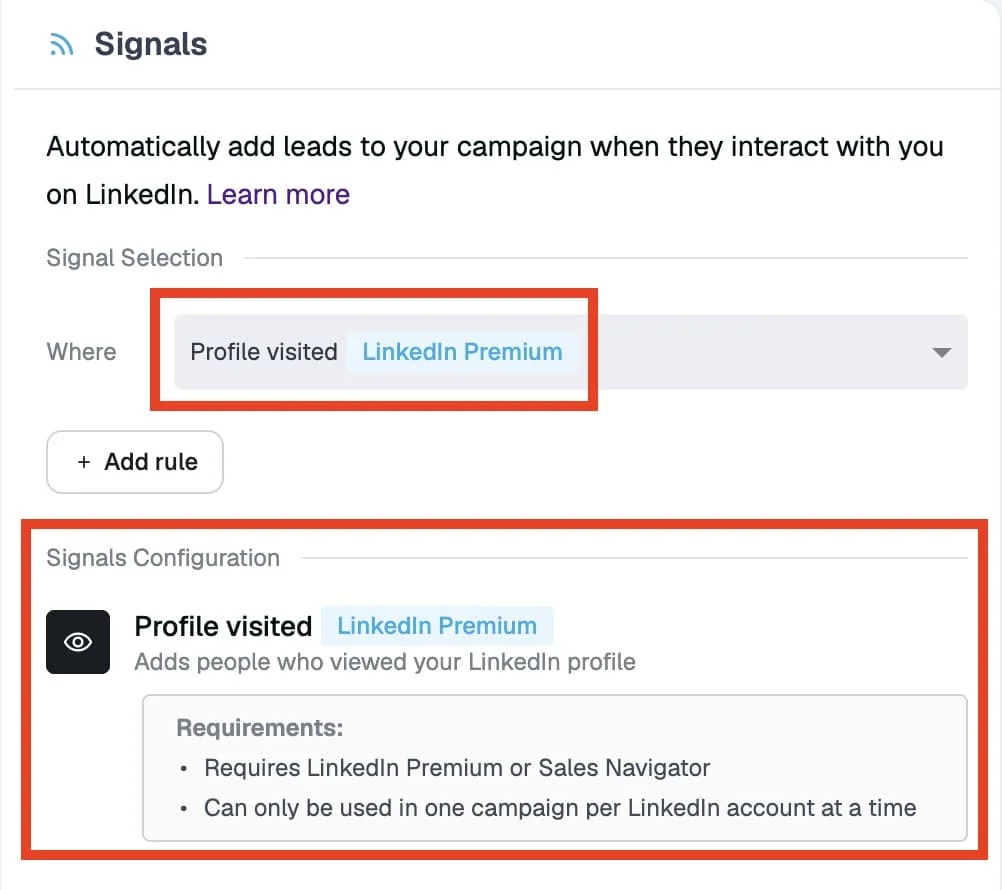
Want the profile visitor and company page triggers? You need Premium or Sales Navigator, and admin rights on the page.
Turn that campaign on, and the page you picked is locked in permanently, so check it twice.
The AI skips Connector campaigns. In InMails, you still write the subject line yourself.
Shared Campaigns lose a few actions, and your team gets the leads in daily batches rather than all at once.
I read ten Expandi reviews posted on G2 between April and August 2026.
Praise clusters around support and setup speed. Complaints cluster around account safety and campaign reliability.
Ten reviews are a narrow slice, so treat this as what these ten reviewers said.
Four of the ten reviews name a specific Expandi employee. Neville Achare Ebai appears in three of them.
Brandon G. is the telling case. He had ten to twelve months of Expandi use and still felt he was underusing it.
A 30-minute call on 5/11/2026 changed that. He rated Expandi 5/5.
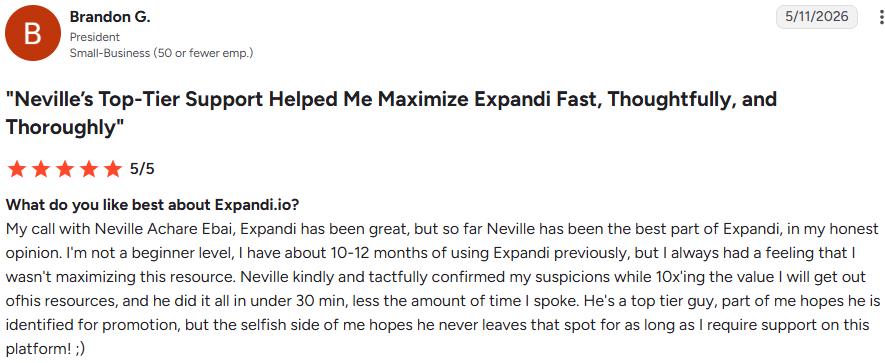
That says something good about the support team and something less good about the product's self-serve depth.
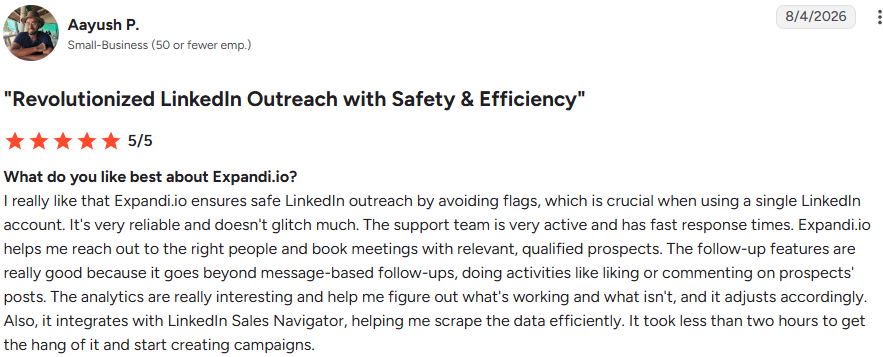
Aayush P. went from signup to building campaigns in under two hours. He rated Expandi 5/5 on 8/4/2026.
Even Talha A., who left the harshest review in the set, called the initial setup easy.
Aayush P. likes that follow-ups do more than send messages. Expandi can also like or comment on a prospect's posts.
James T. runs automated follow-ups with people who interact with his content. That spares him from scrolling through hundreds of DMs.

Talha A. ran Expandi for roughly six weeks at $99 per month.
LinkedIn restricted his account in the second month. He lost more than 1,400 connections.
He says support answered promptly until he asked for a refund, then stopped replying. He rated Expandi 0.5/5 on 6/15/2026.

Aayush P. says the opposite. He praises Expandi specifically for keeping his single LinkedIn account unflagged.
Two reviewers, two months apart, opposite outcomes on the same question.
LinkedIn Account Suspended? 12 Proven Ways To Protect Your LinkedIn Account in 2026
Mike K. raises campaign failures twice in one review. He calls them recurring and ties his frustration to what he pays.
His overall rating is still 5/5, posted 4/20/2026.

James T. wants a view showing how campaign limits roll up into his global account limits. He also asks for a campaign-level blacklist.

Limit management is central to Expandi's safety pitch. A 5/5 reviewer says he cannot see the full picture.
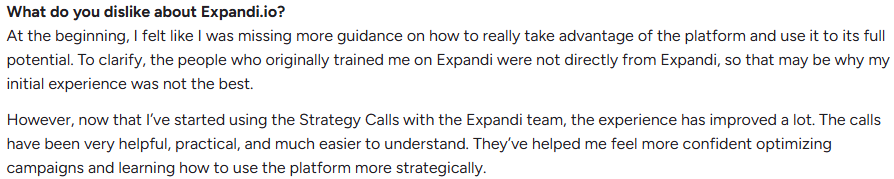
Maria G. felt she lacked guidance early on, though Strategy Calls fixed it. She rated Expandi 4/5 on 5/27/2026.
I walked through Expandi the way a new user would: connect an account, set the safety rails, and build one signal-based campaign end to end.
I split the walkthrough into two halves. First, the account setup that has to happen before any outreach runs, then the campaign build itself.
Expandi starts you with a 7-day free trial and asks you to connect a LinkedIn account.
Once connected, the dashboard shows an action-item checklist with five steps: connect the account, check active hours, create a lead list, create a campaign, and activate it.
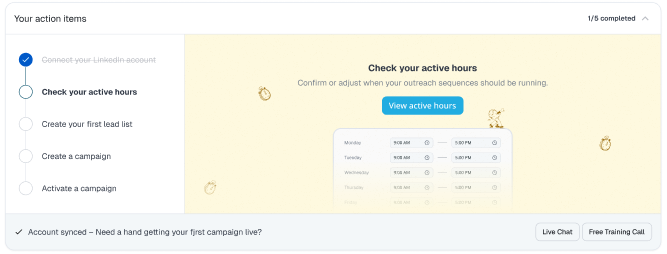
The checklist disappears once you finish everything. I found it useful because it tells you what comes next instead of dropping you into an empty campaign builder.
This is the part I would not skip. Expandi puts warmup and daily limits in a LinkedIn settings page before campaigns run.
New accounts get a Gradual Warmup option that ramps activity over 14 days. There is also a Custom pace, and Expandi flags that higher limits raise restriction risk.
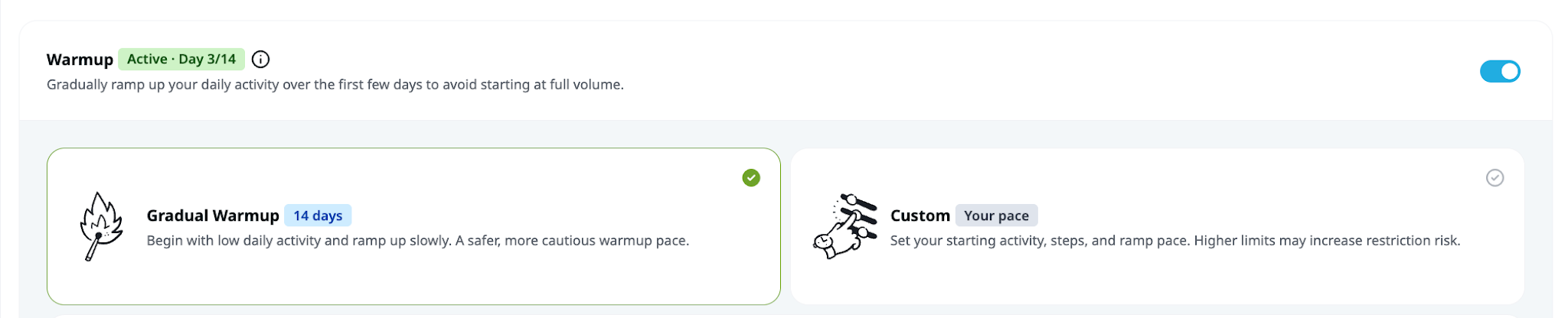
If you already use LinkedIn heavily every day, Expandi lets you skip warmup and set daily limits instead. The Safe Preset applies preset limits across all actions.
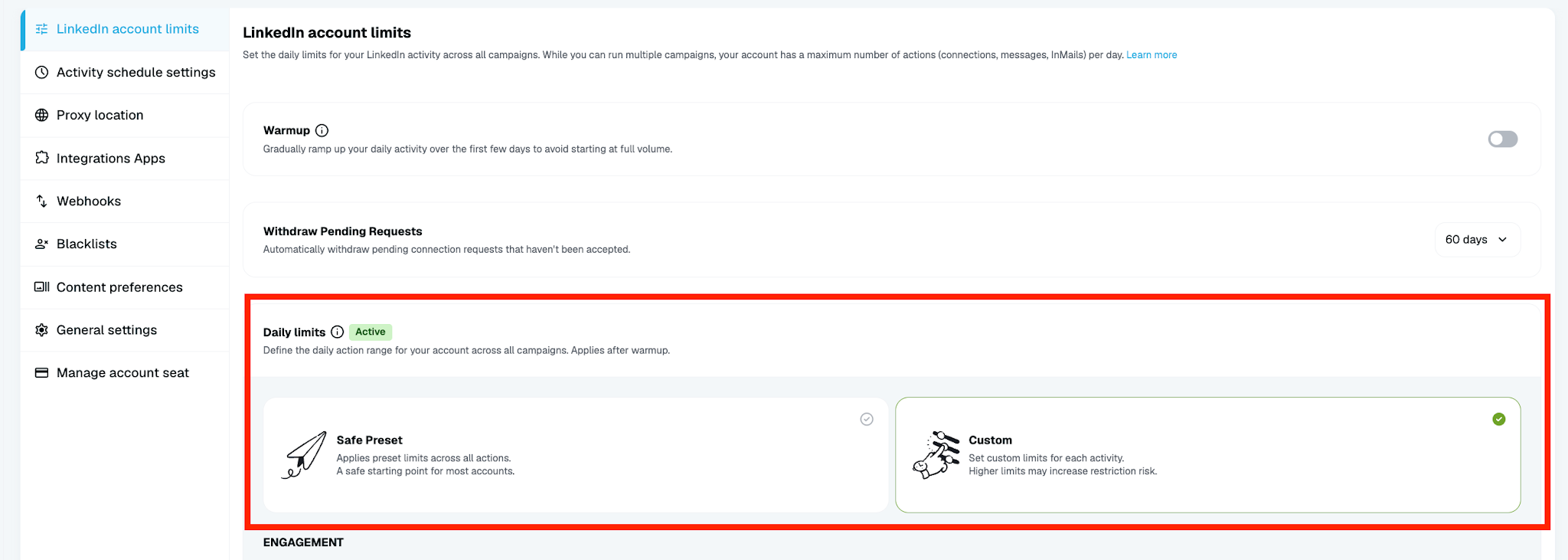
Then you set timezone, active days, and hours. Expandi recommends running it when you are not on LinkedIn manually, with at least two inactive days per week.
I would treat these defaults as the floor, not a suggestion. Automation risk is the single largest complaint in the review set.
Expandi ships eleven campaign types. Connector sends connection requests, Messenger works your existing first-degree connections, and Builder gives you a drag-and-drop if-then sequence.
It also offers Group, Event Invite, Mobile Connector, Inbound, Open InMail, Company Follow Invite, and Recovery campaigns.
I picked Builder because two features I wanted only run there.
Signals adds leads automatically when someone interacts with you on LinkedIn. Three sources feed it: profile visits, company page visits, and post engagement.
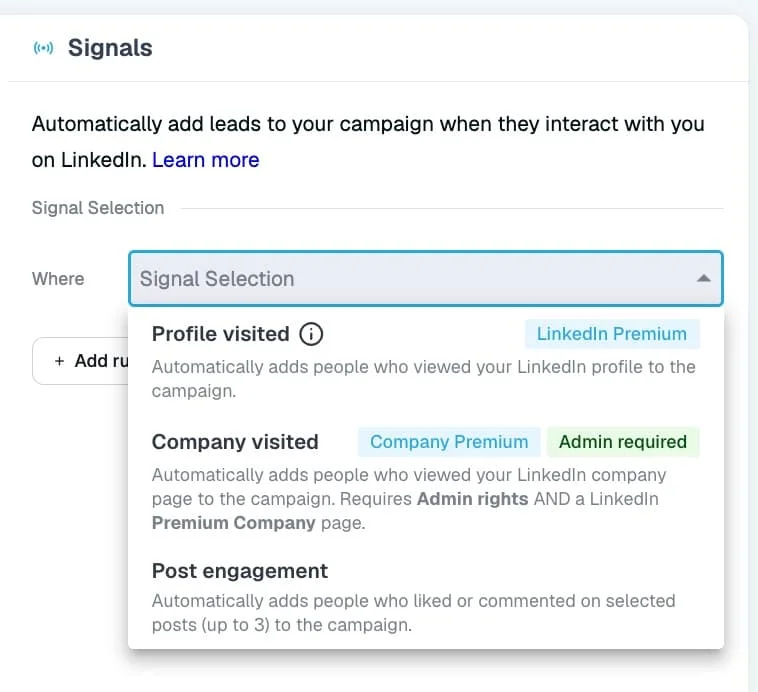
The setup has one firm rule. The Signals action must sit as the first step after Start, or it will not work.
Two of the three sources have access requirements. Profile visits and company page visits need LinkedIn Premium or Sales Navigator, and company pages also need admin rights.
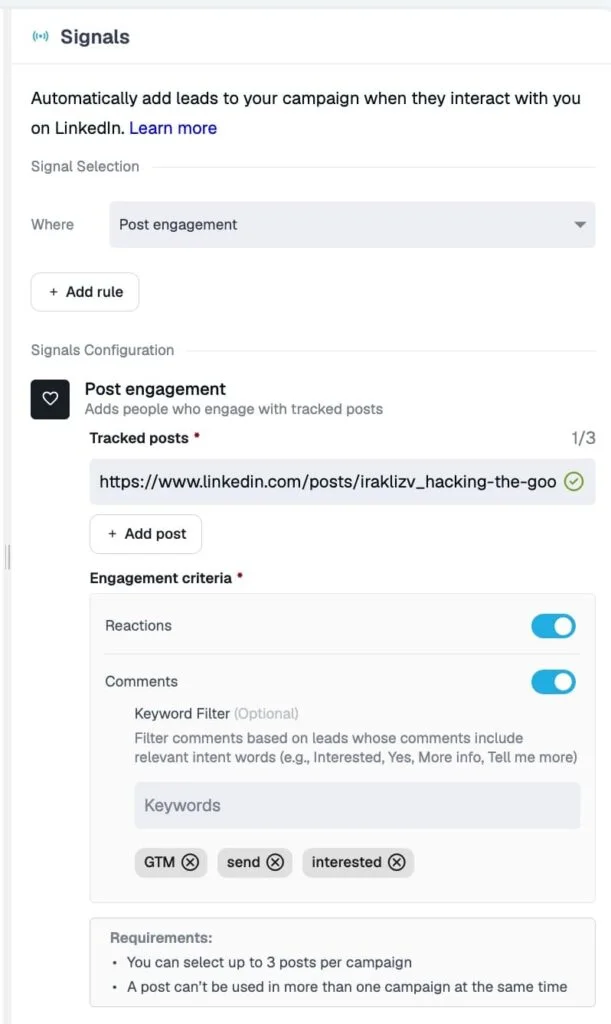
Post engagement needs only a post URL and runs on a free LinkedIn account. That makes it the easiest of the three to test first.
I added a keyword filter on comments, which pulls in only commenters whose comment contains a word you specify. Then I added an ICP Filter after the signal step.
That second filter matters. Profile visitors arrive unfiltered by default, so recruiters, students, and competitors land in the same pool as buyers.
One thing to expect: the campaign starts empty. Expandi syncs new matches roughly every 24 hours, so nothing happens on day one.
Each messaging step has a Classic and an AI Hyper-personalization toggle. Switching to AI replaces the message box with a prompt field capped at 275 characters.
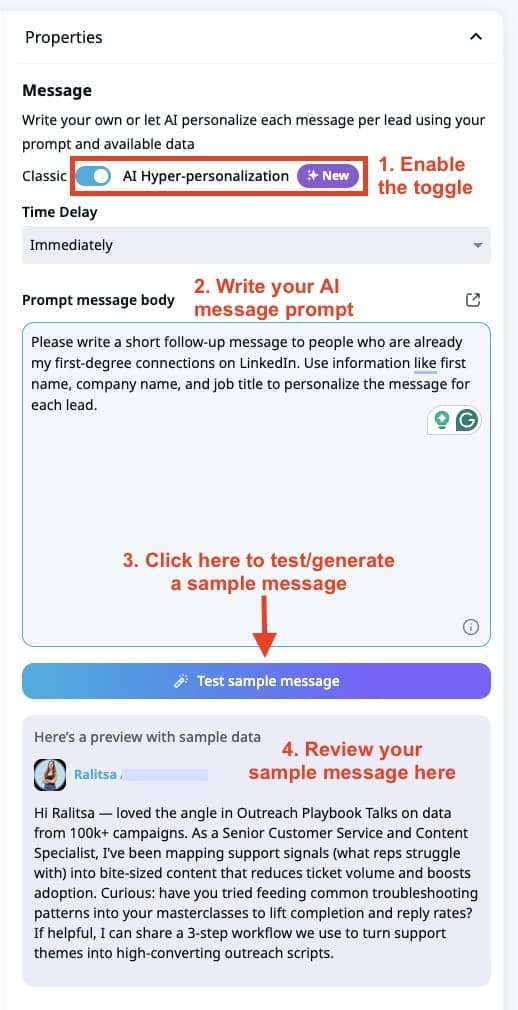
Two dropdowns appear once you click in. Placeholders cover first name, company name, job title, and location.
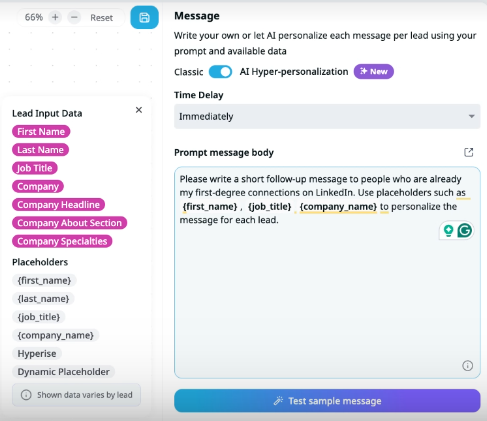
Lead input data pulls the company about section, specialties, lead headline, lead about section, and signal type.
That last field is the one I would use. It lets the message reference why the lead entered the campaign.
The Test sample message button generates output against one of ten sample profiles. Expandi suggests running 10 to 15 samples before launching.
I would treat that as a minimum. One sample tells you nothing about whether the prompt holds up across different profile types.
If you use Open InMail, note that AI writes only the body. You write the subject line yourself.
Before activation, Expandi asks for daily limits and working hours. Its recommendations sit at 20 to 50 connection requests and 30 to 70 messages per day.
Working hours default to a weekday window in the lead's timezone.
After activation, Expandi suggests checking back after the first 50 to 100 actions. Campaign Stats shows acceptance rate, reply rate, and errors.
The doc gives you a rough read: under 25% acceptance means something is off; 30% or higher means it's running as expected.
In short, the flow is consistent: warm the account, set limits, build the sequence, filter the audience, test the prompt, then activate and watch the first hundred actions.
The setup itself is not hard. What takes judgment is the limit configuration, because that is where account risk lives.
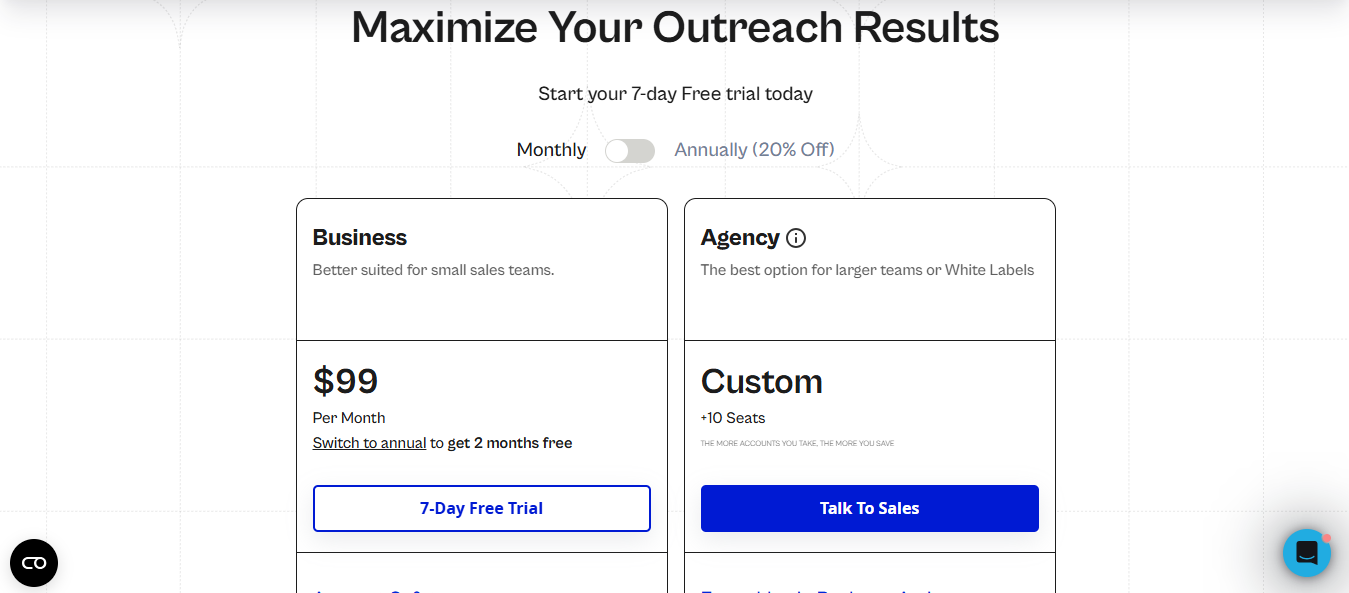
Expandi runs two plans. Business costs $99 per month, and Agency is custom-priced starting at 10 seats.
Switch to annual, and Business drops to $79 per month, which Expandi frames as two months free. Both come with a 7-day free trial.
Business is not a stripped tier. You get unlimited campaigns and templates, the sequence builder, multichannel outreach, profile auto warm-up, and smart limit ranges.
Agency adds roles and permissions, client reports, a dedicated Customer Success Manager, and white label.
The $99 looks reasonable on its own. But Workspaces bills one seat per LinkedIn account, and profile and company page signals need Premium or Sales Navigator on top.
Use email steps, and you source mailboxes and warm up elsewhere. That is the number I would calculate before committing.
10 Best LinkedIn Automated Messaging Tools for Safe Outreach in 2026
Expandi fits teams running LinkedIn as a primary outbound channel, especially those managing several accounts at once.
It fits poorly for anyone who cannot afford to lose a LinkedIn account.
You group accounts by client, then filter your dashboard and inbox to just that client's work. Give clients a view-only role, and they see their own accounts.
Around five accounts, keeping track of everything starts eating real hours each week. That is where the shared inbox pays for itself.
You only need a post URL, and it works on a free LinkedIn account. Every post you publish turns into a campaign you can launch that day.
You find out who is checking your company page, which usually means someone is researching you. You will need admin rights on the page.
HubSpot, Pipedrive, and Salesforce connect natively. Every request, message, and reply lands on the contact's timeline without you having to touch it.
Warm-up and daily limits lower the odds. They do not remove them, and Expandi says as much on its own settings screen.
Profile and company page visits need Premium or Sales Navigator. Post engagement is the only free option.
You cannot mix Signals with a CSV upload. And a post or profile only feeds one campaign at a time.
The AI writing only works in Builder and Inbound. Connector campaigns get templates.
You'll test prompts, tune limits, and watch the first week closely. That is the job.
With Expandi, each LinkedIn account requires its own Workspace seat. That can become expensive for agencies or sales teams running outreach from multiple profiles.
Salesforge takes a different approach. You can connect unlimited LinkedIn senders and unlimited email mailboxes within the plan, which makes it much easier to scale outreach across multiple reps, clients, or sender identities without your software cost increasing every time you add another account.
So if you only need automation for one LinkedIn profile, Expandi can still make sense.
But if you want to run LinkedIn and email together across multiple senders, Salesforge gives you considerably more room to scale.
Here is how the two line up.
Expandi gives you an email step inside Builder campaigns. Sourcing the mailboxes behind that step is your job.
That is the part you feel later. You go find a mailbox provider, buy domains, set up DNS, then warm everything before you send.
With Forge Stack, you stay in one place.
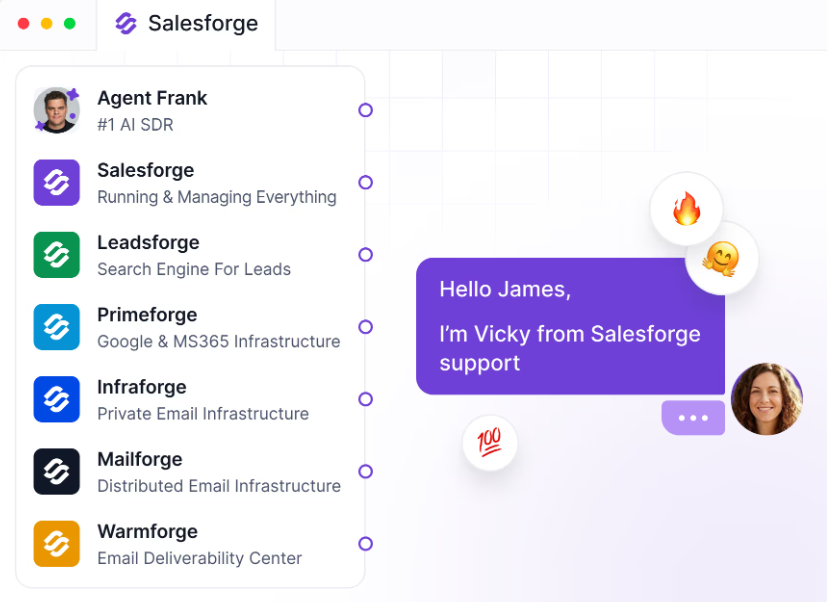
Primeforge gives you Google Workspace and MS365 mailboxes, Mailforge and Infraforge cover domains and private infrastructure, and Warmforge warms your senders while testing where your emails land.
The pricing gap widens as you add accounts. Expandi bills per seat, one seat per LinkedIn account.
At one account, you would barely notice the difference. At ten, you are paying for ten Expandi seats.
For $96 per month, the Salesforge Growth plan gives you 10,000 active contacts, 50,000 emails, 1,000 personalization credits, 1,000 validation credits, and 1,000 social actions.
You also stop shopping for the pieces on either side of sending.
Leadsforge builds your enriched lead lists and pulls competitor followers at scale, so your sequences have something to run on.
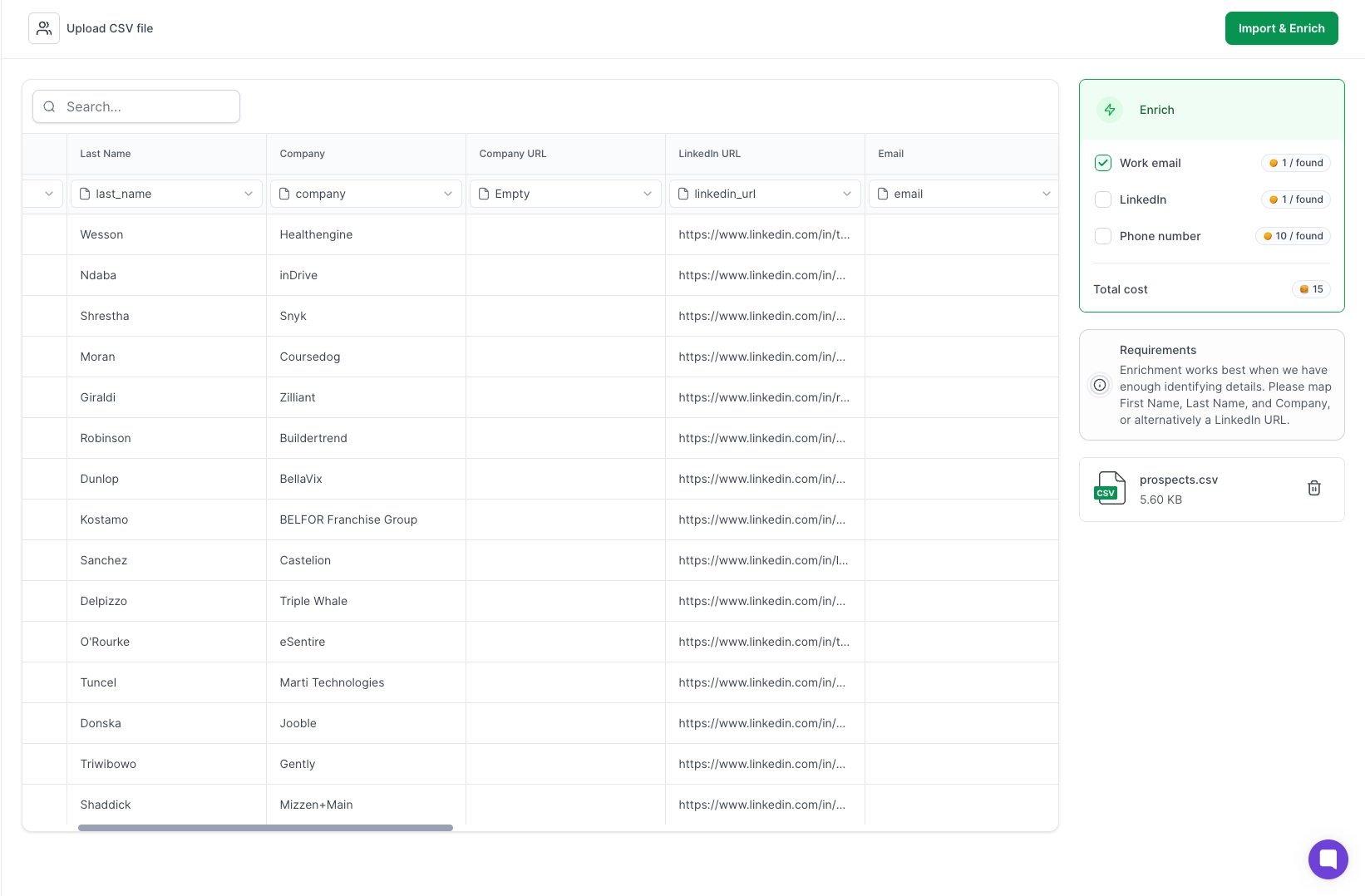
Everything connects at the system level. You won't have to maintain Zapier flows or n8n automations to keep the pieces talking.
You get one login and one support team instead of chasing four vendors when something breaks.
Agent Frank is an autonomous AI SDR at $499 per month. Expandi has nothing like it.
Think about what you actually do in Expandi. You pick the leads, write the prompt, set the delays, then check the replies.
Agent Frank takes those decisions. He finds prospects, writes outreach, follows up, and handles replies while you focus on booked meetings.
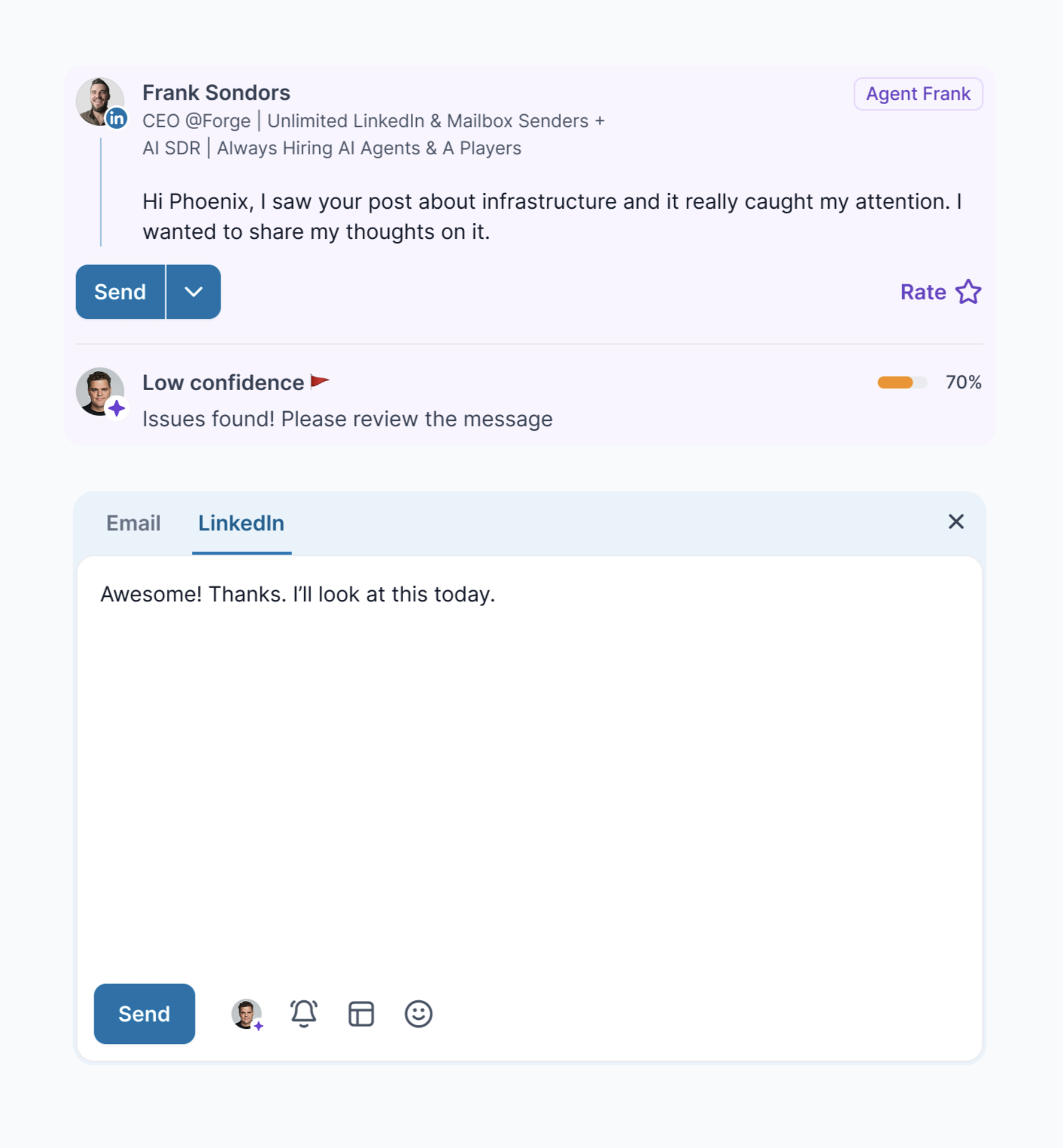
You pick how he runs: LinkedIn and email, email only, or LinkedIn only. He taps into every Forge product behind the scenes, so you set up nothing extra.
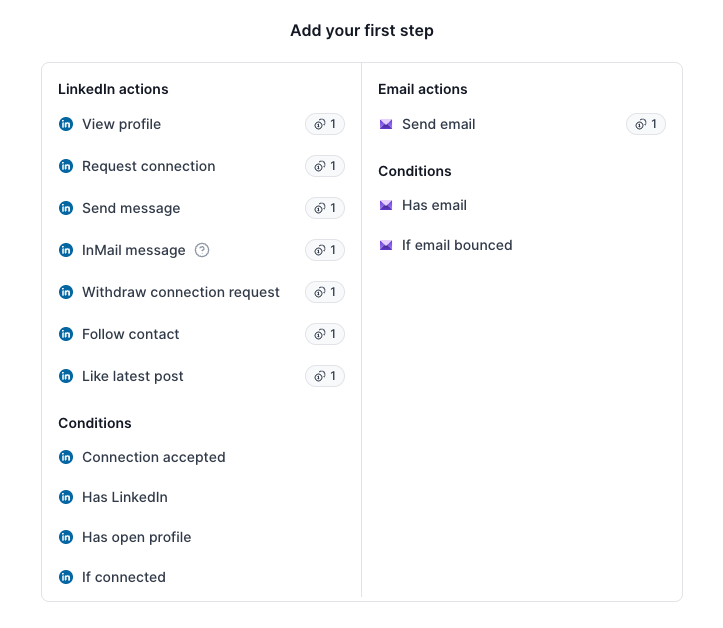
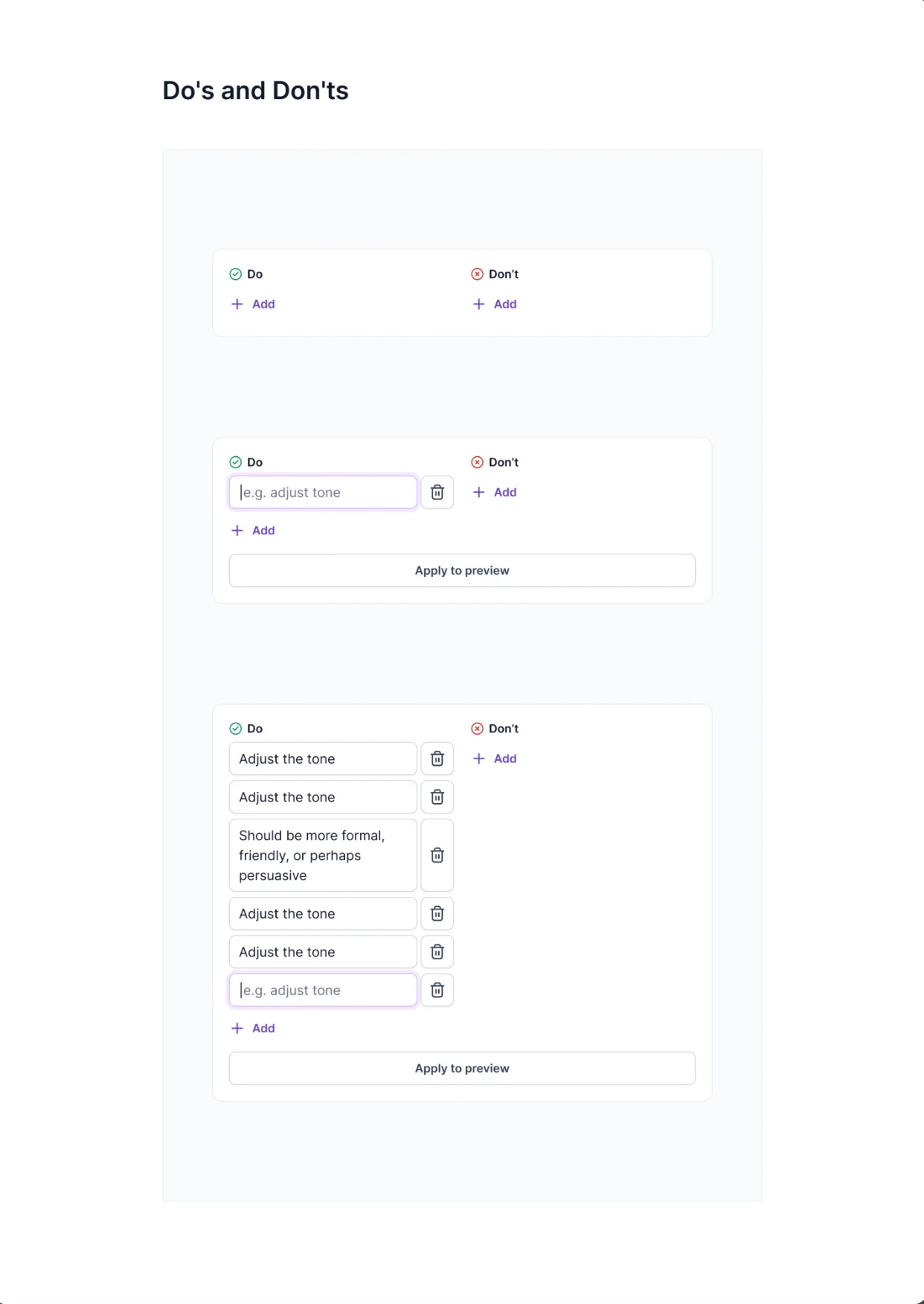
Onboarding walks you through Training, Targeting, Qualification, Channels, Customization, and Preview. You give him writing rules with Do's and Don'ts, then read his opening message before anything goes out.
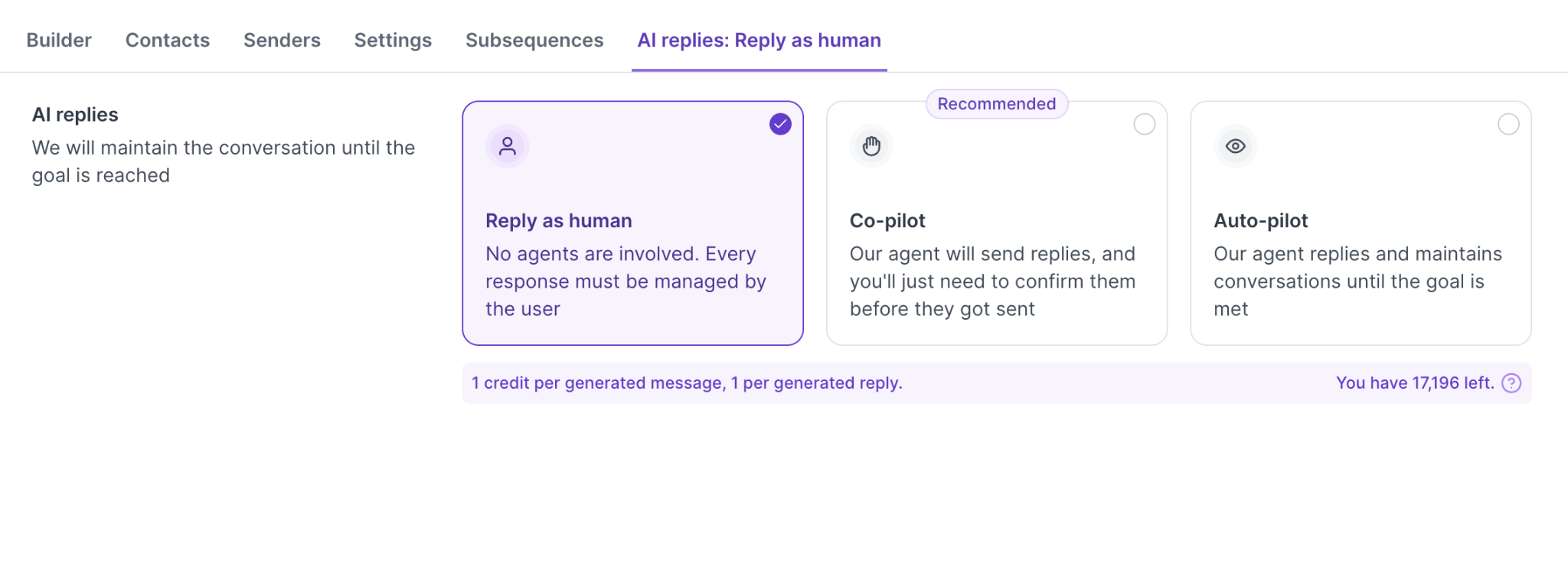
You also choose how much control to keep. Auto-pilot runs without you, Co-pilot sends you every message to approve or edit.
Sender Profiles group your mailboxes and LinkedIn accounts together, so both channels run from one setup.
Enter your email to get a custom plan & stack recommendation for your business
Please check your mailbox in 5 minutes

Yes, if LinkedIn is your main channel and you run one or two accounts. At that size, $99 buys you a capable tool.
The answer changes as you scale. Ten accounts means ten seats, plus Premium or Sales Navigator on each one running visitor signals.
Add email, and you are sourcing mailboxes and warming up elsewhere.
If that sounds like where you are heading, Salesforge runs the same LinkedIn and email sequences with unlimited senders on one plan. Start your 14-day free trial and compare the numbers against your current stack.
.jpg)

.jpg)

.jpg)
