Table of contents
Get insights delivered straight into your inbox every week!

LinkedIn Account Suspended? 12 Proven Ways To Protect Your LinkedIn Account in 2026

If your LinkedIn account is suspended or restricted, you’re probably trying to figure out one thing, what went wrong and how to fix it fast.

I’ve personally seen this happen with founders, SDRs, and even people who weren’t very active. The pattern is always the same: LinkedIn shows a restriction, but doesn’t clearly explain why.

user talking about his LinkedIn account suspension on Reddit
This image shows the user talking about his LinkedIn account suspension on Reddit

You’ll probably start thinking things like:

  • Did I send too many requests?
  • Were my messages a problem?
  • Did some tool cause this?
  • Or did I just cross a limit without knowing?

This confusion is normal.

In most cases, it’s not one big mistake. It’s small things adding up, activity, patterns, engagement, that start to look risky from LinkedIn’s side.

If you use LinkedIn for outreach, this directly affects your leads and daily workflow.

In this guide, I’ll keep it simple and practical:

  • What actually causes LinkedIn restrictions
  • What to do if your account is already suspended
  • And how to keep your account safe while continuing your outreach

No guesswork. Just clear steps.

12 Ways To Protect Your LinkedIn Account in 2026

  1. Keep daily activity consistent - avoid sudden spikes
  2. Stay within safe request limits - don’t push volume
  3. Avoid sending identical messages - keep slight variation
  4. Focus on acceptance rate - fix targeting before scaling
  5. Space out your actions - don’t do everything at once
  6. Avoid using multiple tools together - keep setup clean
  7. Use one device and stable IP - avoid frequent switching
  8. Warm up new or inactive accounts - start slow
  9. Stay active beyond outreach - engage like a normal user
  10. Track your daily outreach - know your numbers
  11. Keep your setup consistent - avoid random changes
  12. Use a system like Salesforge - keep your outreach controlled and predictable

Why LinkedIn Accounts Get Suspended in 2026

If your LinkedIn account got restricted, it’s not random.

In almost every case, it means one thing:

Your activity crossed what LinkedIn considers “normal.”

Not because of one action, but because of how your behavior looks over time.

Here are the exact triggers.

1. Sudden Spike in Activity

LinkedIn doesn’t flag effort; it flags sudden change.

You don’t get restricted for being active.

You get restricted when your activity increases too fast.

Example:

  • 10 connection requests per day → suddenly 60–80
  • Sending a few messages → suddenly sending many

From your side, it feels like you’re scaling.

From LinkedIn’s side, it looks like unusual behavior.

That sudden jump gets flagged.

2. Repetitive Messaging

If your messages look the same, your behavior looks automated.

You write one message that works… and reuse it everywhere.

  • Same structure
  • Same wording
  • Same flow

At first, it saves time.

But over time, it creates a clear pattern.

And if people don’t reply?

That pattern becomes a strong negative signal.

10 Best LinkedIn Cold Message Templates & Examples You Can Use

3. Low Acceptance or Reply Rate

If people ignore you, LinkedIn assumes your outreach is low quality.

This is one of the strongest signals, and most people miss it.

If:

  • Your connection requests are not accepted
  • Your messages don’t get replies

LinkedIn starts losing trust in your account.

Low engagement = higher risk.

4. Bulk Actions in a Short Time

Doing everything at once doesn’t look human.

This usually happens when you try to finish outreach quickly.

  • Sending many requests in one sitting
  • Messaging multiple people back-to-back

It feels productive, but LinkedIn expects natural gaps between actions.

No gaps = unnatural behavior.

5. Using Multiple Tools Together

Multiple tools create mixed signals.

A lot of people stack tools:

  • Automation tools
  • Chrome extensions
  • Scraping tools

Each tool behaves differently. Together, they create:

  • Irregular timing
  • Inconsistent activity patterns

That’s what increases risk.

6. Frequent Login or Location Changes

If your access pattern changes too much, it looks suspicious.

If your account is accessed from:

  • Different IP addresses
  • Different devices
  • Different locations

LinkedIn may think this account is not being used normally. That can trigger restrictions.

7. Weak Engagement Signals

No replies, no conversations = low trust.

If your activity leads to:

  • No replies
  • No real conversations
  • No interaction

LinkedIn sees your outreach as low value.

Low value activity increases the chances of getting flagged.

What You Should Understand Clearly

You don’t get restricted for one mistake, you get restricted for patterns.

  • Slightly higher activity
  • Repeated messaging
  • Low engagement

Individually, these seem fine.

Together, they create risk.

What is LinkedIn API? Types, Access, and Honest Review

How To Fix a Suspended LinkedIn Account

If your LinkedIn account is suspended, follow this flow exactly in order.

1. Open Your Account → Check the Exact Message

Do this first. Don’t skip.

  • Log in
  • Read the restriction message fully

You will see one of these:

  • Identity verification required
  • Temporary restriction
  • Suspension with appeal

Your next step depends on this.

2. If You See “Verify Your Identity” → Complete It Now

This is the fastest way to unlock your account

Do this:

  1. Click verification
  2. Upload your government ID
  3. Make sure:

    • name matches your LinkedIn profile
    • image is clear and not cropped
  4. Submit

Then:

  • close LinkedIn
  • wait

If done correctly, access usually comes back after review
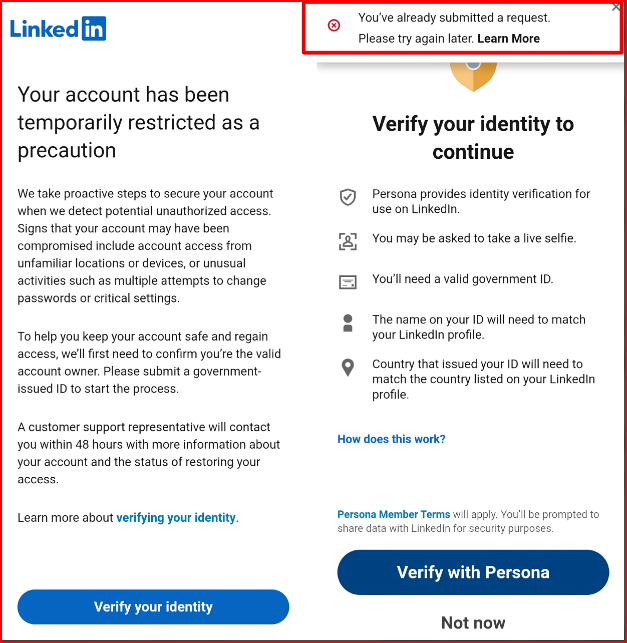
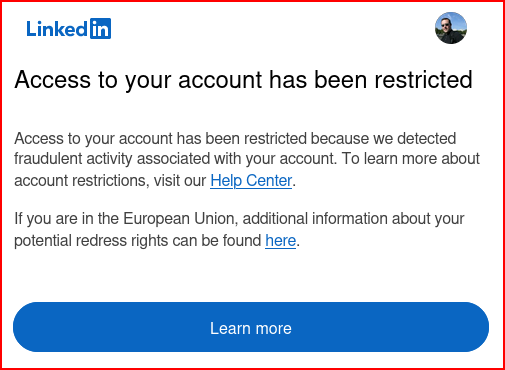
3. If You See “Temporarily Restricted” → Don’t Touch Anything

LinkedIn account Temporarily Restricted
This image shows the LinkedIn account Temporarily Restricted

You don’t fix this manually

Do this:

  1. Log out
  2. Do nothing for 24–72 hours
  3. Don’t retry actions

After that:

  • log in again
  • check access

This usually clears automatically

4. If You See “Account Suspended” → Submit Appeal

LinkedIn account Restricted
This image shows the LinkedIn account Restricted

This is required. There’s no other option.

Do this:

  1. Click appeal option
  2. Paste this (or similar):

“I use LinkedIn for professional networking. If any activity caused this, I will correct it. Please review my account.”

  1. Submit once

Then:

  • don’t resubmit
  • don’t modify

Wait for response

5. Stop All Activity Until It’s Fixed

Any activity now delays recovery

Do not:

  • send requests
  • send messages
  • use tools
  • switch devices or IPs

Keep account idle

6. If No Response in 3–5 Days → Contact Support

Only do this if nothing happens

Steps:

  1. Go to LinkedIn Help Center
  2. Submit ticket under “Account Access”
  3. Attach ID
  4. Use same simple message

Submit once and wait

7. When Account Is Back → Restart Like This

This prevents getting suspended again

Day 1–3:

  • 10–15 connection requests max
  • no bulk messaging

Day 4–7:

  • slowly increase activity
  • avoid repeating same messages

Don’t jump back to old volume

Getting your account back doesn’t mean it won’t happen again. 

I’ll show you what actually helps in preventing this so you don’t face it again, especially if you’re using LinkedIn for outreach, even at a larger scale.

7 Ways You Can Manage Multiple LinkedIn Accounts [+3 Tools Recommended]

12 Proven Ways To Protect Your LinkedIn Account in 2026

If you’re using LinkedIn for outreach, this is what actually keeps your account safe.

It comes down to keeping your activity controlled, predictable, and within safe limits every day.

From experience, keeping this level of control manually does not last long. If you are serious about your outreach, I would always advise using a structured setup. 

Tools like Salesforge help you stay consistent and avoid mistakes without handling every small detail yourself.

In this guide, I’ll show you how to protect your account manually, and also how  Salesforge help you maintain this automatically without constant effort.
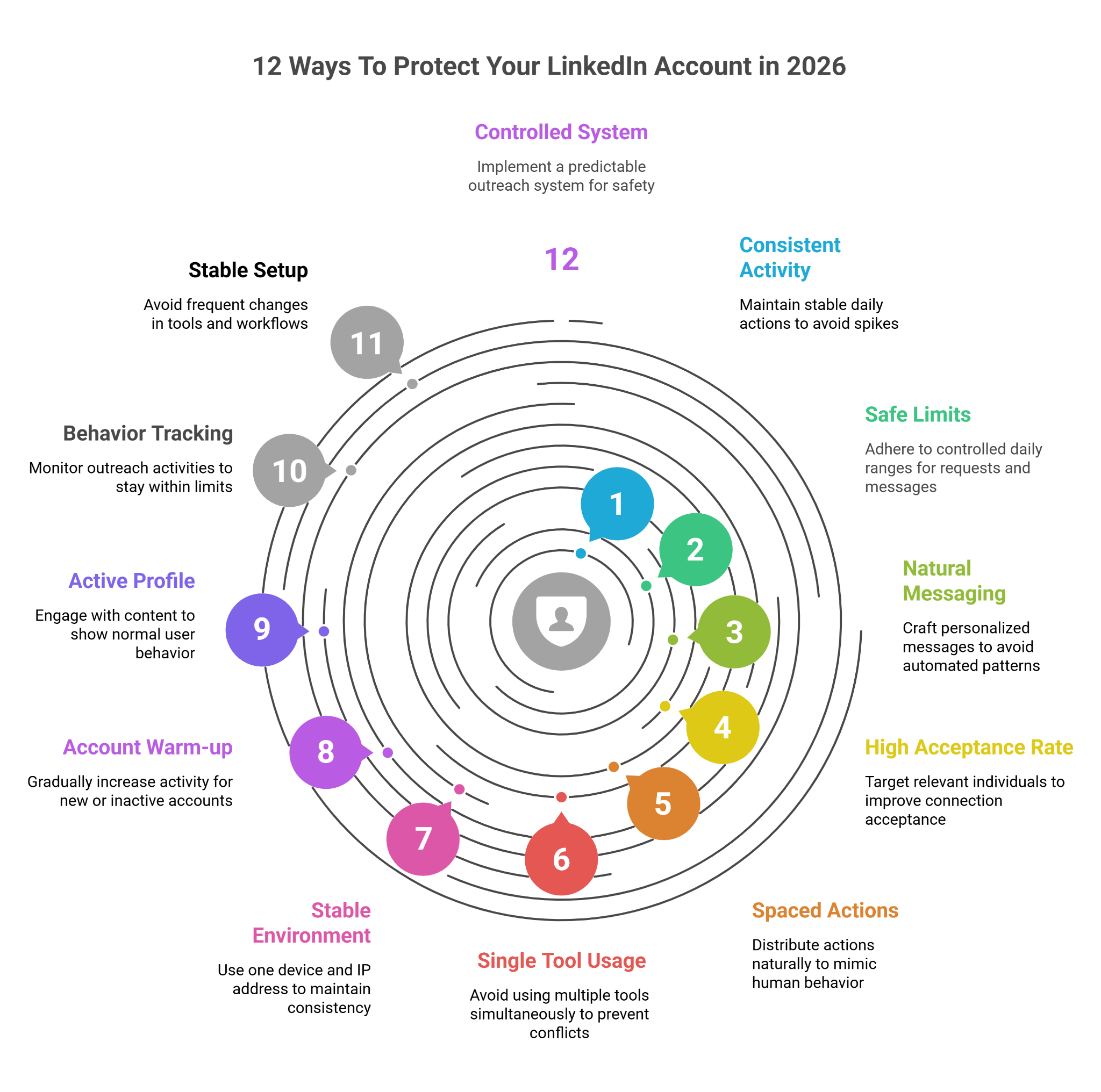
12 Ways to Protect Your Linkedin Account from Suspension
This image shows the 12 Ways to Protect Your Linkedin Account from Suspension

1. Keep Your Daily Activity Consistent

  • Sudden spikes = fastest trigger (10 → 60 requests overnight is risky)
  • Increase only after 3–5 days of stable activity
  • Think in weekly growth, not daily jumps

Salesforge helps keep your activity even day-to-day, so you don’t accidentally increase too fast

2. Follow Safe Connection Request Limits

  • Stay in a controlled daily range (20–40 max) instead of pushing volume
  • Acceptance rate matters more than count
  • If acceptance drops, stop increasing immediately

Salesforge helps you stay within limits without manually tracking numbers 

3. Write Messages That Don’t Look Automated

  • Same message = detectable pattern (even if it works)
  • Change opening line + 1 sentence minimum
  • Avoid template-style structure across all messages for linkedin comments

Salesforge helps you maintain variation so your messages don’t look repetitive

4. Improve Your Acceptance Rate

  • Low acceptance = direct risk signal
  • Target people who are actually relevant to your offer
  • If acceptance <30–40%, fix targeting before sending more

Salesforge helps by keeping outreach relevant and consistent, which improves response over time

5. Space Out Your Actions Naturally

  • Bulk sending = non-human behavior
  • Avoid sending all requests/messages in one session
  • Keep natural gaps (10–20 mins) between actions

Salesforge helps spread your actions, so activity doesn’t happen all at once

6. Avoid Using Multiple Tools Together

  • Tool stacking = mixed behavior patterns
  • Different tools = different timing + signals
  • Keep one controlled setup, not multiple overlapping tools

Salesforge lets you manage outreach in one place, avoiding conflicting patterns

7. Stick to One Device and Stable IP

  • IP switching = security flag
  • Avoid logging in from multiple locations/devices daily
  • Keep one primary device + consistent network

8. Warm Up New or Inactive Accounts

  • New accounts = low trust score
  • Start with 5–10 actions/day, not more
  • Increase only after engagement starts coming in

Salesforge supports controlled sending, so you don’t scale too quickly.

9. Keep Your Profile Active

  • Accounts doing only outreach = high risk pattern
  • Add basic engagement (likes, comments, replies)
  • Show normal user behavior, not just outbound activity

10. Track Your Outreach Behavior

  • Most people get restricted because they don’t track limits
  • Track:
    • daily requests
    • messages sent
    • replies received
  • Stay aware of your actual activity numbers

Salesforge helps you stay aware of activity without manual tracking 

11. Keep Your Setup Stable and Predictable

  • Changing tools, devices, or workflows creates risk signals
  • Avoid frequent changes in how you run outreach
  • Keep everything simple, consistent, and repeatable
  • Salesforge help you manage sending, timing, and activity flow in one place, so your behavior stays predictable

12. Build a Controlled Outreach System

  • Safe teams focus on predictability, not volume
  • Avoid:
    • sudden scaling
    • repeated patterns
    • aggressive sending
  • Balance outreach across channels + timelines
10 LinkedIn Sales Tools B2B Teams Are Using to Book More Meetings in 2026
Personalized Outbound Strategy

Get The Right Outbound Strategy In Minutes

Enter your email to get a custom plan & stack recommendation for your business

It's being carefully crafted by AI

Please check your mailbox in 5 minutes

Conclusion

If you’re using LinkedIn for outreach, keeping your account safe comes down to one thing:

your activity should stay consistent, controlled, and natural over time

Most restrictions happen when this breaks.

Activity increases too fast, messages start repeating, or daily usage becomes uneven.

So the focus should be simple:

  • keep your daily activity stable
  • avoid sudden jumps
  • keep messages slightly varied
  • stay within safe limits

Do this consistently, and your account stays safe.

If you’re doing outreach regularly, managing all of this manually becomes hard to maintain.

A setup like Salesforge helps you keep your activity consistent without tracking everything yourself. 

It keeps your outreach controlled, avoids risky patterns, and helps you stay within safe limits automatically.

Start your free trial with Salesforge and see how it keeps your LinkedIn outreach safe.