Personalized Outbound Strategy
Get The Right Outbound Strategy In Minutes
Enter your email to get a custom plan & stack recommendation for your business
It's being carefully crafted by AI
Please check your mailbox in 5 minutes
You send LinkedIn messages. But most get ignored. Either they sound too generic. Or they feel too salesy.
I’ve seen this a lot while running outbound campaigns. Even good tools don’t fix bad messaging.
I remember a demo call where a prospect said, “we send 100 messages a week… but barely get replies.”
And honestly, that’s common. Most people struggle with:
That’s exactly why you’re here.
In this blog, you’ll get:
Let’s fix your reply rates.
Here are 4 simple templates I’ve seen work again and again:
You’ll find more templates like these in the blog below.
A LinkedIn message works when it feels like it was written for one person, not a list.
The biggest shift is this: stop starting with yourself. Most people open with “I run…” or “we help…”. That gets ignored.
Start with something real you noticed, a post, their role, or what their team is doing.
Next is length. If your message takes more than a few seconds to read, it won’t get read. The messages that get replies are usually 2–3 lines. Clear and direct.
Then comes intent. You don’t need to sell in the first message.
Most people make the mistake of pitching too early. That kills replies.
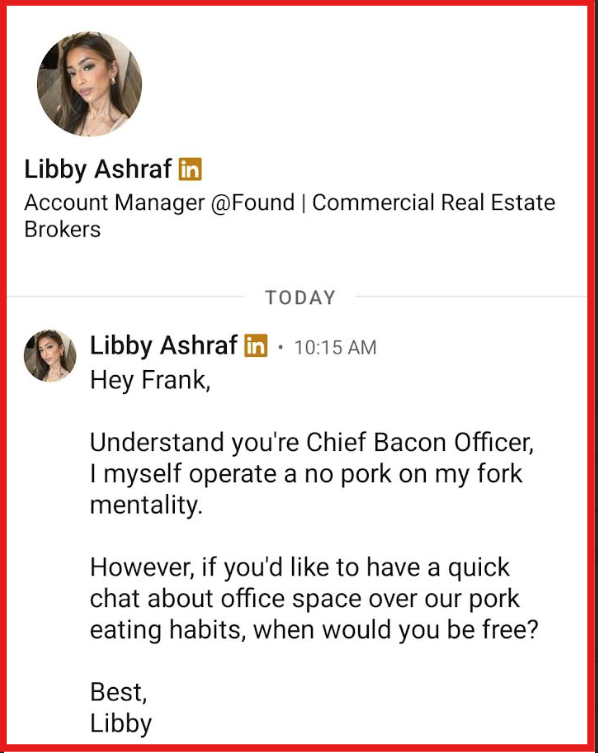
This is what happens when there’s no context, too much text, and a call ask too early.
The first message should only start a conversation, not sell anything.
And finally, the close. Don’t ask for a call. Ask something simple they can reply to.
If your message feels natural and easy to respond to, you’ll start getting replies.
LinkedIn works well for outbound when the message is relevant.
Most people you’re reaching out to are already getting multiple messages every week.
If your message looks similar, it gets ignored.
From what I’ve seen, reply rates improve when the message matches the situation, whether you’re connecting, following up, or starting a sales conversation.
Below are LinkedIn templates based on specific use cases.
If your connection requests are getting ignored, it’s usually because your message gives no clear reason to accept.
What has worked consistently for me is simple, anchor your message to something they actually did. A comment, a post, or a company update.
That does two things:
When to use: You’re reaching out to a cold prospect with zero interaction.
Template:
“Hey [Name],
Saw your comment on [topic] under [post/person]. We’ve been dealing with something similar on our side. Would love to stay in touch.”
Why this works: It gives context immediately by referencing something they engaged with. It’s also short enough to read in one glance.
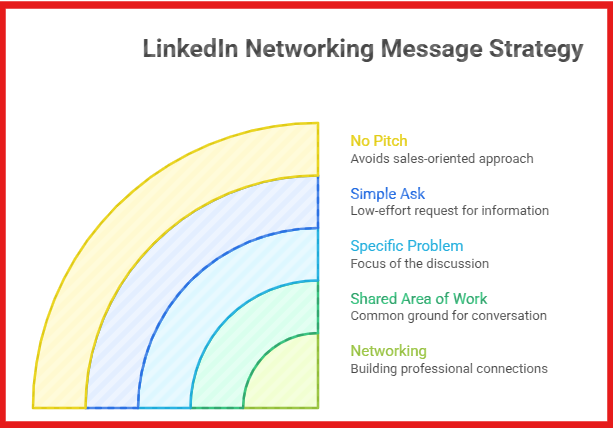
For networking messages, I keep it tied to a shared area of work.
If the message doesn’t show what you and the other person have in common, it gets ignored.
When to use: You’re actively working on a specific area and want to learn from someone in the same space.
Template:
“Hi [Name],
I’m currently working on [specific area, e.g. outbound messaging] and came across your profile.
Saw you’re also doing [specific thing]. Curious, what’s been working for you here?”
Why this works: It clearly shows you’re working on the same thing, not just in the same industry, but on a similar problem. It tells them exactly why you reached out, so the message doesn’t feel random.
The ask is simple and low effort, so it’s easy to reply. And since there’s no pitch, it feels like a normal conversation
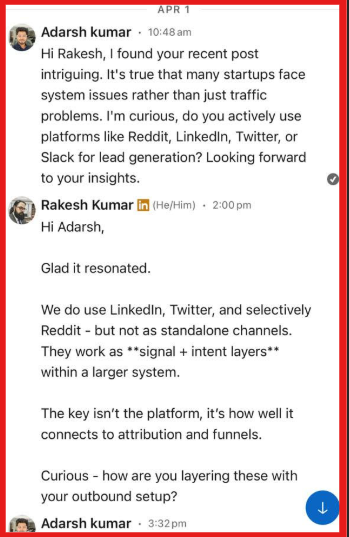
When you message someone based on a post they just made, the conversation is already half open.
You don’t need a clever opener. You just need to show you actually read what they shared.
Most people say “great post” and stop there. That adds no value. What works better is picking one specific point and building from it.
When to use: You saw a recent post, comment, or share and want to start a conversation around it.
Template:
“Hi [Name],
Saw your post on [topic], especially your point on [specific detail]. Curious, how are you handling [related problem] right now?”
Why this works: It references something they posted recently, so the message feels timely. You’re calling out a specific point, which shows you actually read it.
Reconnecting only works when the other person can instantly remember you. If they have to think “who is this?”, you’ve already lost.
What I’ve seen work is bringing up one very specific moment you both shared, even if it’s something small.
When to use: You’ve spoken before, a past lead, ex-colleague, or someone you had a real interaction with.
Template:
“Hi [Name],
How are you?
I was revisiting [specific thing: doc, campaign, idea] and it reminded me of our chat on [exact topic]. Especially the part where you mentioned [specific detail].
Curious, are you still working on that?”
Why this works: The message feels personal because it includes a specific detail.
And instead of pushing an agenda, it simply opens the conversation again, which makes it easy to reply.
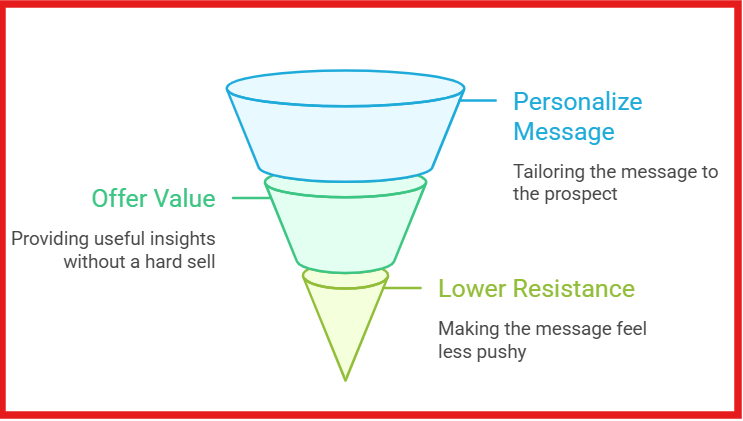
This is where you introduce what you do, but without sounding like a pitch.
If your message reads like a sales script, it gets ignored.
What has worked better for me is tying the message to something the company is actually doing right now.
When to use: You’re reaching out to a prospect and want to introduce your solution without pushing for a call.
Template:
“Hey [Name],
Saw your team’s work on [specific project / initiative]. We’ve been helping teams improve [specific outcome, e.g. reply rates, pipeline].
Happy to share what’s been working if that’s relevant.”
Why this works: It starts with something specific they’re doing, so the message feels relevant. And instead of pushing a call, it offers something useful, which lowers resistance and increases replies.
Most people either don’t follow up or send the same message again. Both don’t work.
To get a reply, you must add something new in the follow-up, a small insight, example, or context, instead of just “bumping.”
When to use: You’ve already sent a message and didn’t get a reply.
Template:
“Hey [Name],
Sharing one quick insight we noticed while working on [problem]. [Specific insight/result]. Thought this might be useful for you as well.”
Why this works: It gives a new input, not a reminder. The message is short and focused on one idea. And it feels useful, so replying makes sense.
Partnership messages usually fail for one reason, they talk only about what you want. The better ones show why it benefits both sides.
I’ve found this works best when there is a clear overlap in audience, offer, or channel. If that overlap is weak, the message feels forced. If it is clear, the conversation becomes much easier.
When to use: You see a chance to collaborate with someone whose audience, product, or work fits well with yours.
Template:
“Hi [Name],
Came across your work on [specific area] and liked your take on [specific detail]. We’re working on [your focus] for a similar audience, so I thought it was worth reaching out.
Open to exploring a collaboration?”
Why this works: It starts with a real reason for the message. It shows the fit clearly instead of asking for a partnership out of nowhere.
I learned this the hard way.
A while back, I was helping promote a webinar for an outbound audience. The topic was solid. The speakers were good. But the first few LinkedIn invites barely got replies.
The problem was simple, the message sounded like an announcement, not a personal invite.
Once I changed the angle and tied the message to what the person was already working on, replies improved.
When to use: You’re inviting someone to a webinar or event that matches their role, problem, or current focus.
Template:
“Hi [Name],
we’re hosting a session on [topic] next week, and your work on [specific area] came to mind. It’s a focused session on [clear topic], so thought it may be relevant.
Want me to send the link?”
Why this works: It does not read like a bulk invite. It tells them why you reached out to them specifically. This makes the message feel more relevant and worth opening.
If you’re asking for a referral, don’t make it awkward. The best messages are direct. You mention the role, why you thought of them, and make the ask simple.
When to use: You know someone at the company and want to ask for a referral for a specific role.
Template:
“Hi [Name],
just saw the [Role] opening at [Company] and I’m planning to apply. Since you know the team, I wanted to check if you’d be comfortable referring me. No worries at all if not — just thought I’d ask.”
Why this works: It is clear, polite, and easy to respond to. The ask is direct, but the last line gives them space, so it does not feel awkward or forced.
Investor messages work better when they show clear signal fast. You usually have one shot to make the message worth reading.
That is why I’d always include one clear traction number.
When to use: You’re raising and reaching out to an investor who already invests in your space.
Template:
“Hi [Name],
I’m the founder of [Startup], where we help [target audience] solve [core pain point].
We’ve just hit [exact traction milestone, e.g. 10K users in 3 months / $25K MRR / 120 paid customers] and are now preparing for [seed round / pre-seed].
Your background in [relevant investment area] made me think this could be relevant.
Would be happy to share more if you’re open.”
Why this works: It gives the investor three things quickly, what you do, proof that it’s working, and why you picked them. That makes the message easier to trust and easier to reply to.
Before you send any LinkedIn message, make sure the basics are in place.
From what I’ve seen, reply rates depend a lot on what the person sees when they click your profile and how relevant your outreach feels.
Scaling LinkedIn outreach usually breaks at the same point.
You either keep messages personal and move slowly, or you increase volume and your messages start sounding the same.
The fix is not writing every message from scratch. It is building a simple system.
Start by grouping prospects by use case. For example, people who posted recently, cold prospects, or follow-ups.
Then write one message per group and change only what matters, like their post, role, or company.
This is where most teams start losing track. That’s where Salesforge helps.
Salesforge is a tool that helps you run LinkedIn and email outreach from one place.
You can manage multiple LinkedIn accounts, send messages in sequences, and see all replies in one inbox (Primebox™).
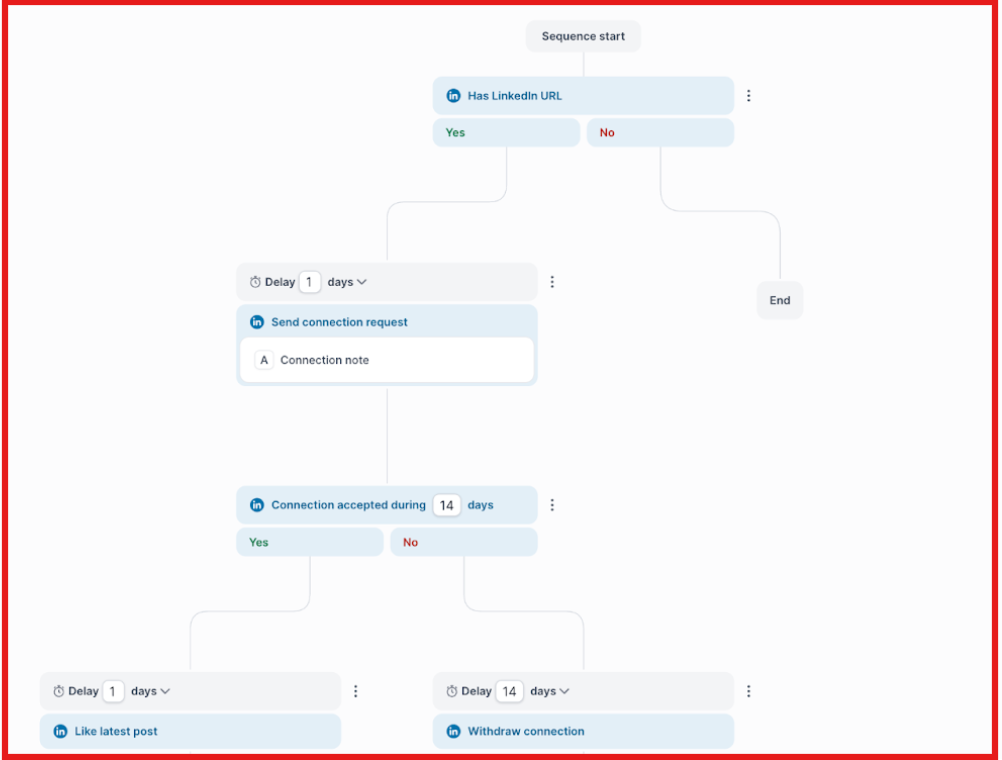
When you scale outreach, things usually break because you lose track of conversations.
Salesforge helps you stay organized, follow up properly, and keep messages consistent across all prospects.
The goal is to keep the structure repeatable, but make the reason personal.
Enter your email to get a custom plan & stack recommendation for your business
Please check your mailbox in 5 minutes

Most LinkedIn cold message templates fail because they feel generic.
What works best, are a few strong templates, a personal first line, and clear intent.
Once you start sending more of them, the hard part is not writing. It is keeping every message, follow-up, and reply organized.
That is where Salesforge is useful. It helps you run LinkedIn and email outreach in one place.
Later, Agent Frank helped handle follow-ups so I didn’t miss conversations.
If you want to use LinkedIn cold message templates in a more practical way, Salesforge is worth a look.