Everyone loves telling you cold email is dead.
They said it would be in 2020. They said it in 2023. They are still saying it in 2026, usually right before I ask them what their reply rate is and they change the subject.
Cold email is not dead. It is just less forgiving than it used to be. The teams still winning at it are running a completely different playbook from the one most guides are teaching, and that gap is why so many people think the channel stopped working.
I have been running outbound for the better part of a decade. I built Salesforge because the tools I was using to run cold email at scale kept breaking at the exact same point, and I got tired of stitching four vendors together to run one workflow.
This is the 6-step system I use to generate B2B leads through cold email in 2026. It is the same system thousands of Salesforge customers run every day.
Let's get into it.
Cold email lead generation is the process of sending targeted, personalized emails to B2B prospects who have no prior relationship with your business. The goal is to start a sales conversation and book a meeting.
The word that separates it from email marketing is consent. Cold email reaches someone who has not opted in. Email marketing reaches someone who has.
That distinction changes everything. Different tools, different rules, different metrics.
The reason cold email still works in 2026 is that it puts a specific message in front of a specific decision-maker. No algorithm in the way. No ad spend. You choose the person, the message, and the moment.
If you are brand new to the channel, my A-Z guide to cold email in 2026 covers the foundations before you go deeper here.
Yes, but only if you run it the 2026 way, not the 2020 way.
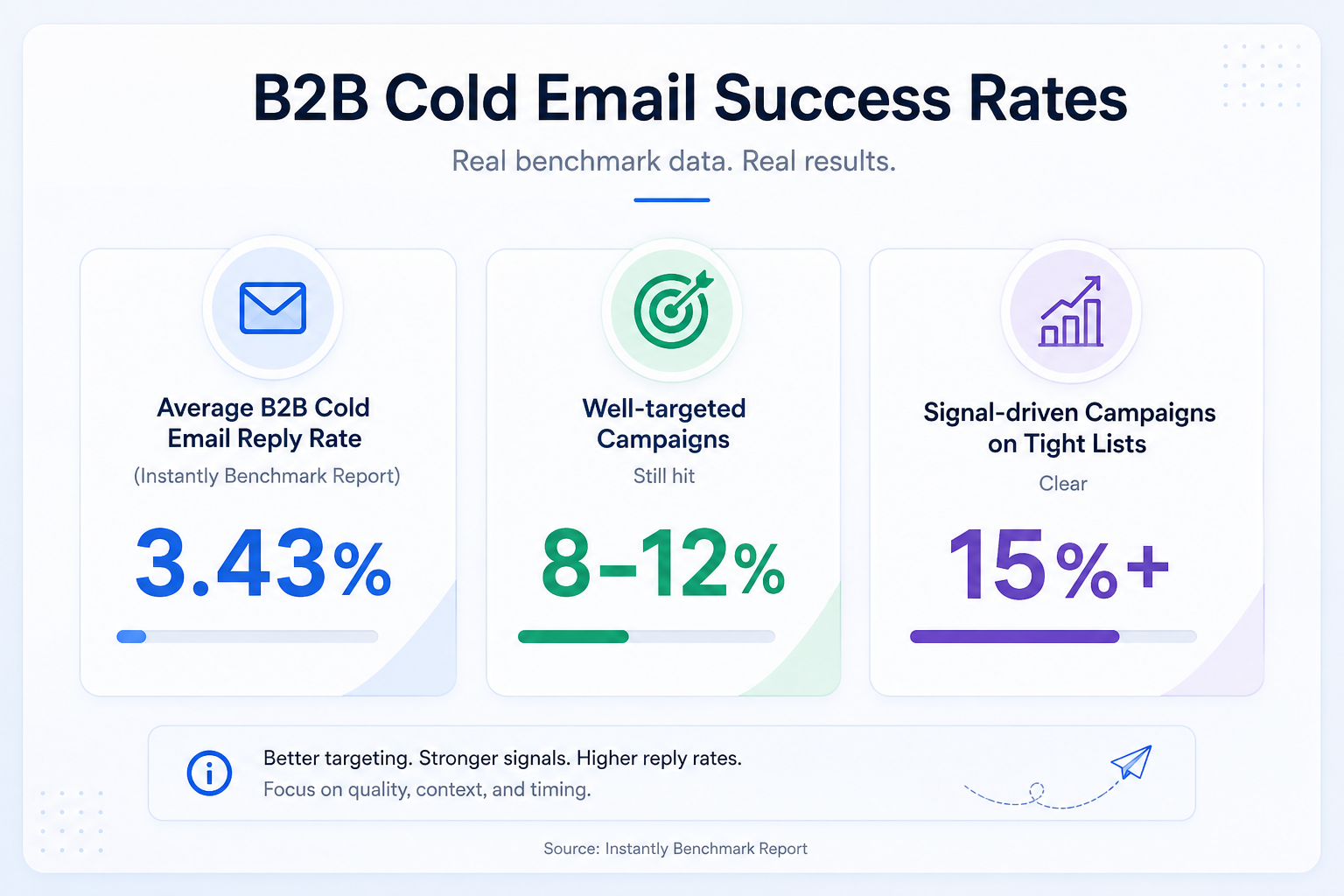
Here is the honest picture:
The gap between average and good is enormous. It comes down to three things: ICP tightness, infrastructure health, and copy that respects the reader's time.
What changed is enforcement. Google and Yahoo rolled out shared bulk sender rules in early 2024. Microsoft followed in 2025. The spam complaint ceiling is now a hard 0.1%.
You cannot get away with sloppy sending anymore. But if you run it properly, the channel still produces pipeline at the same volume it always did.
Cold email runs on six sequential steps. Each one depends on the previous one.
Wrong ICP means wrong list. Wrong list collapses your reply rate. Bad infrastructure means your copy never reaches the inbox.
Order matters. Here is how I run each step.
Every cold email campaign lives or dies on the quality of your ICP definition.
The ICP is a one-paragraph description of your ideal customer. It needs to be specific enough that a stranger could look at any company and tell you in ten seconds whether they fit.
Your ICP needs five fields at minimum:
The pain point field is the one most teams underweight.
"VPs of Marketing at SaaS companies with 50 to 200 employees in North America" describes tens of thousands of people. Most have no reason to reply this week.
The stronger version adds a trigger. "VPs of Marketing at Series B to C SaaS companies with 50 to 200 employees in North America who hired a new CMO in the last 90 days." Now you have a reason to be in that inbox today.
The math also has to work. Cold email needs at least 3,000 to 5,000 prospects who fit your ICP. Any smaller and the sample size is too thin.
If your TAM is under 3,000 accounts, cold email is probably not your channel. Account-based, high-touch outbound is a better fit.
For the full workflow, my guide on how to build a strong sales lead list walks through the process end-to-end.
Once your ICP is locked, turn it into a verified list of real contacts.
There are three sourcing paths:
The concept that separates good data providers from bad ones is waterfall enrichment.
Single-source providers check one database. If the contact is missing there, you get a bounce. Waterfall providers cascade through multiple sources until they find a verified match.
The hit rate difference:
That gap is the difference between a healthy campaign and a spam-flagged mailbox.
Bounce rate under 2% is non-negotiable. Above 2% and mailbox providers treat you as a bad list buyer. Ideally you want under 1%.
This is where Leadsforge fits into the system I run.
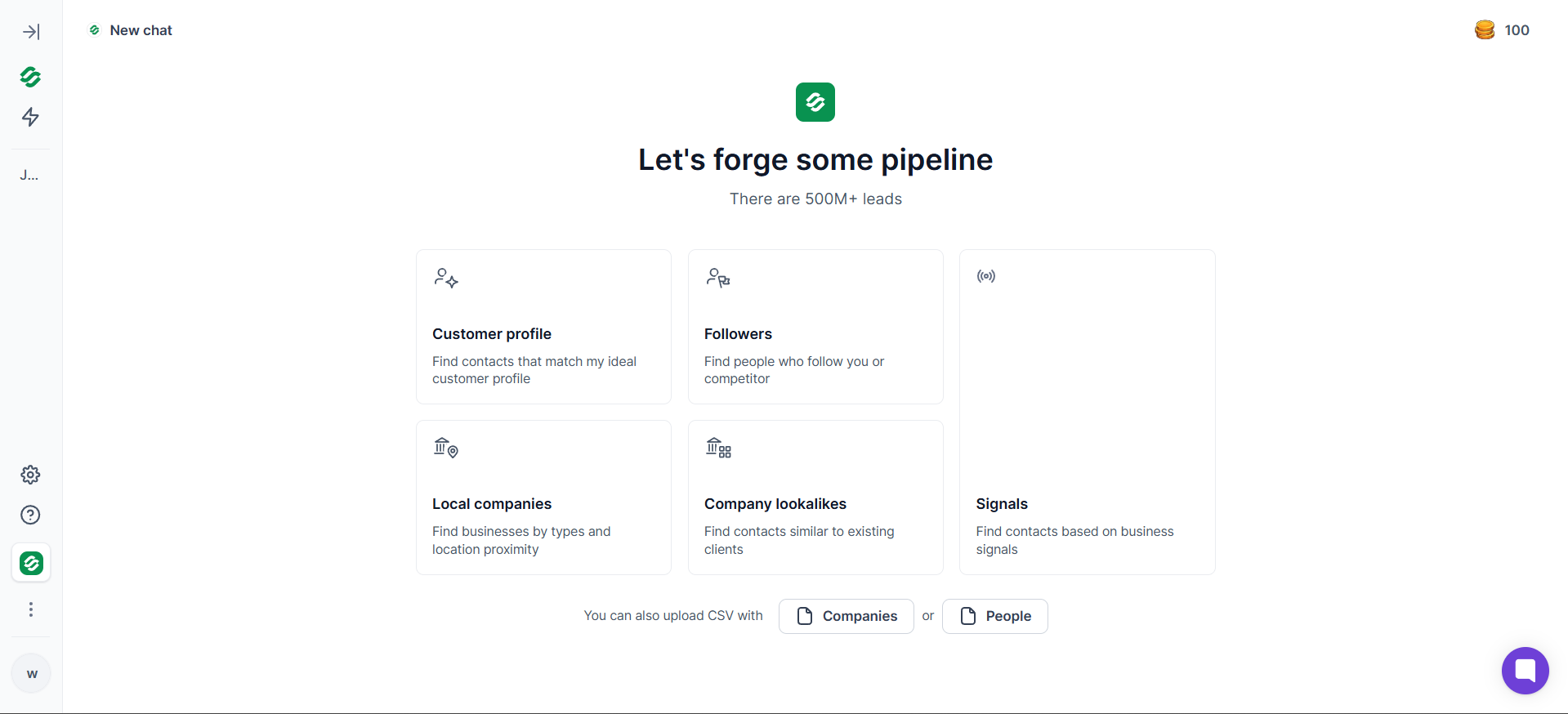
You describe your ICP in plain English. Leadsforge returns verified contacts from a 500M+ database with waterfall enrichment. Leads push directly into Salesforge with one click. No CSV export step.
The Signals feature handles event-based sourcing. Target companies that raised a Series B in the last 30 days, or decision-makers who changed roles last quarter.
New Leadsforge accounts get 100 free credits at signup. Enough to run real ICP searches before committing.
This is the step where most first-time teams fail.
Never send cold email from your primary domain. If your company website is yourcompany.com, that domain is your revenue engine. Burn it and every transactional email, calendar invite, and customer reply suffers.
The fix is simple. Buy 3 to 5 secondary domains that redirect to your primary. Send all cold emails from mailboxes on those secondary domains.
Use alternate spellings or extensions:
Your primary stays clean. Cold sending happens in a walled-off environment.
The next layer is authentication. Three records need to be configured on every domain and mailbox:
If your infrastructure provider does not configure these automatically, you picked the wrong provider. Manual DNS setup is a solved problem in 2026.
Mailbox math to know: each cold mailbox safely sends 30 to 40 emails per day.
For 500 emails per day, you need roughly 15 mailboxes across 3 to 5 secondary domains. That is 2 to 3 mailboxes per domain.
There are three infrastructure paths depending on your needs:
For most teams starting out, Mailforge is the right pick. Fast, cheap, and shared IP is fine for sub-enterprise volume.
Teams past 5,000 emails per day usually shift to Infraforge for dedicated IP control. Primeforge is the pick when your buyers or compliance team specifically want Google Workspace or Microsoft 365 mailboxes.
For the full technical walkthrough with DNS record templates, my deep-dive on cold email infrastructure setup covers every layer.
New mailboxes and new domains have zero sending reputation. Fire cold emails on day one and providers treat you like a spam operation.
Warmup is how you avoid that.
Here is how it works. A warmup tool automates a two-way conversation between your mailbox and a network of trusted mailboxes.
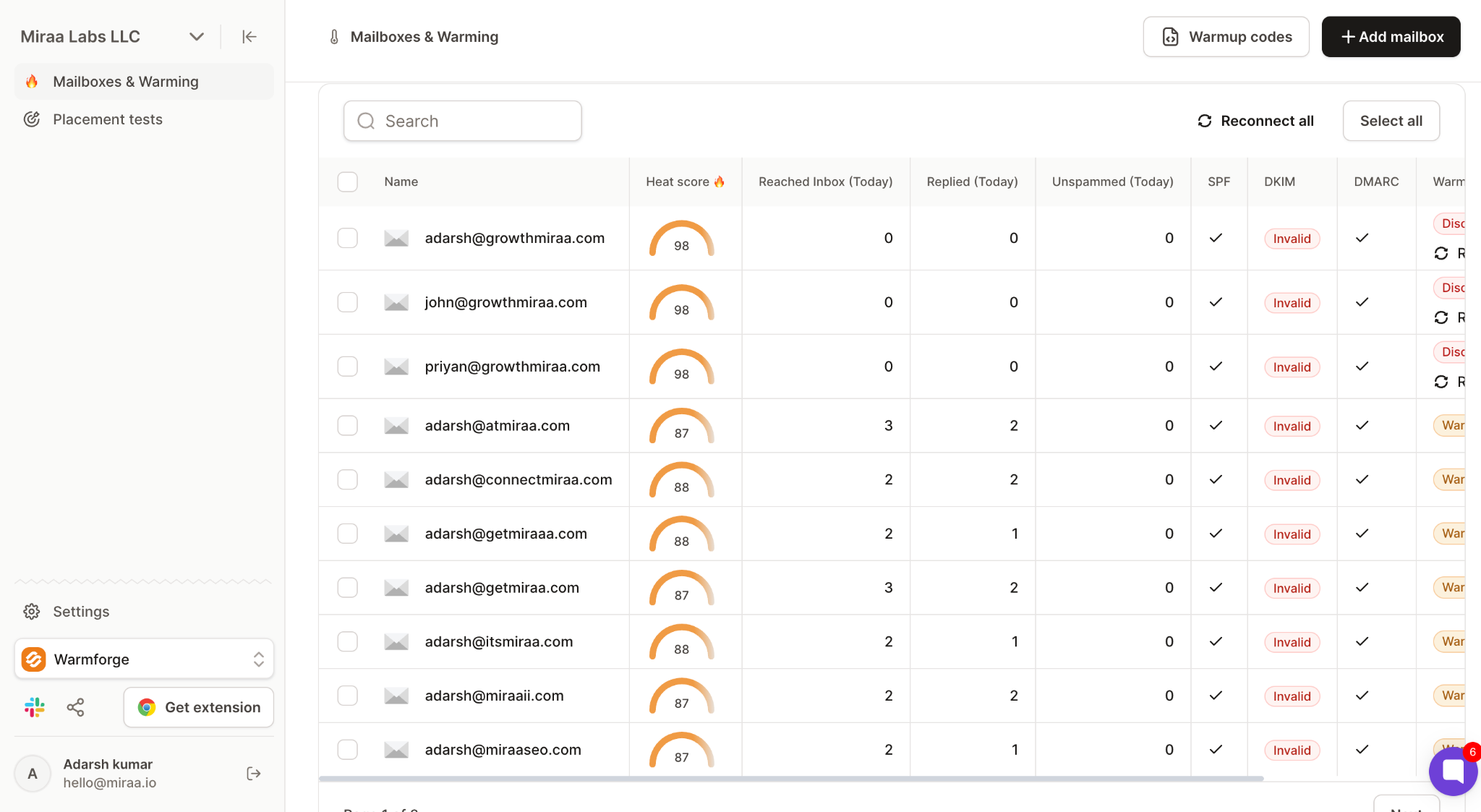
The metric to track is heat score. It measures how healthy your mailbox looks to the outside world on a 0 to 100 scale.
Do not send a single cold email until your heat score is 85 or higher.
Stuck below 85 after two weeks? Something is wrong. Usually a DNS misconfiguration or a blacklist issue. Fix it before sending, not after.
The warmup layer I use is Warmforge. It is free with every Salesforge subscription, which saves outbound teams real money.
Warmforge handles:
New Warmforge accounts get 1 free warming slot plus 1 free placement test. Enough to diagnose whether an existing setup is healthy before you commit.
Warmup is not a one-time setup either. Mailboxes stay in continuous warmup while you send, because cold email alone does not maintain reputation.
For the day-by-day ramp schedule, my complete email warmup guide breaks down the mechanics in full.
Copy matters least until the first four steps are done properly. If your ICP is wrong or your emails are landing in spam, no copy saves the campaign.
But with the foundation in place, copy separates a 3% reply rate from an 8% reply rate.
Cold emails that work in 2026 share three traits:
The 4-part structure I use for every first-touch email:
The CTA is where most cold emails leak reply rate.
A hard demo ask on the first touch underperforms a soft question ask. Compare these two:
The soft ask lowers the commitment barrier. That matters when you are reaching a stranger.
AI personalization is the default in 2026. Here is the honest way to think about it.
AI is excellent at speed and research. Terrible at judgment.
Use AI for prospect research, draft personalization openers, and generate subject line variants. Keep a human review pass for tone, angle, and the final read of whether the email sounds human.
Turn off the human review pass and your reply rate collapses. Buyers spot generic AI copy in three seconds.
For the full copy framework with 8 tested example emails, my guide on how to write a cold email in 2026 has the tactical depth.
The old cold email rule was one email plus two follow-ups. That worked when inboxes got 50 emails a day.
In 2026, decision-makers get closer to 150. Converting a cold prospect to a booked meeting now needs 12 to 15 touchpoints across all channels combined.
Email-only sequences cannot compete.
The sequence I run is a 4 to 5 step multichannel cadence spread across email and LinkedIn over two weeks:
The breakup email gets more replies than the pitch-heavy ones. It releases the pressure.
Why multichannel outperforms email-only: hitting the same prospect on email and LinkedIn triggers a "I keep seeing this person's name" effect. It also gives the prospect two ways to reply, which matters when some people hate LinkedIn DMs and some hate email replies from strangers.
The infrastructure to run this at scale is where teams break first. You are managing:
Salesforge is built to handle all of that. More on that in the Salesforge section below.

For seven tested sequence frameworks with reply rate benchmarks, my guide on sales sequence frameworks that book meetings in 2026 has the deeper library.
Here is the benchmark table I use when I audit a cold email program.
A few notes on how to actually use this.
For the full breakdown of every metric that matters, my guide on B2B cold email metrics has the complete picture.
Once the system produces consistent replies, the next question is how to scale.
Scaling is a systems problem, not an intensity problem. Teams that push existing mailboxes harder get burned. Here is what actually works.
Every mailbox has a safe ceiling of 30 to 40 emails per day. Push it to 100 and you burn the mailbox plus the sender reputation of every other mailbox on the same domain.
For 2,000 emails per day, you need roughly 60 to 70 mailboxes across 15 to 20 secondary domains.
Sounds like a lot, but at Mailforge pricing that runs about $150 to $200 per month in infrastructure. A rounding error compared to the pipeline that volume produces.
Email-only sequences saturate faster than multichannel. A prospect who ignores three emails filters your name out. Add a LinkedIn touch and the pattern resets.
Multichannel is not a nice-to-have at scale. It is the difference between 3% and 8% reply rates on the same list.
Static ICP lists have a shelf life. You can hit the same 3,000 prospects once, maybe twice, then you are into diminishing returns.
Signal-based sourcing pulls prospects based on real-world events:
You catch prospects in their actual buying window. Reply rates climb because timing matches need.
The failure mode that kills scaled cold email is reply handling.
Go from 3 to 15 mailboxes and reply volume follows. Check each inbox by hand and replies slip through. A prospect who says "sure, let's talk" and does not hear back inside 24 hours is a dead lead.
The fix is a unified inbox that consolidates every reply from every mailbox and LinkedIn account into one place. In the Forge stack this is Primebox.
Even with the right system, most programs hit a wall between 10 and 20 mailboxes.
Here is why.
At 2 or 3 mailboxes, everything feels manageable. You check inboxes by hand, eyeball deliverability, write every email personally. It works.
At 10 to 15 mailboxes, everything breaks at the seams:
Then there is the personalization ceiling.
Writing 500 truly personalized emails a day by hand is impossible without hiring five people. Blasting a template kills reply rate. The middle ground is AI drafting with a human review layer, but the tooling to do this well is not something you bolt onto a generic email tool.
Teams usually spend a full quarter patching this with more tools before realizing the problem is fragmentation itself.
Every tool you add is another login, another bill, another support queue, another point of failure.
This is exactly where I stopped stitching together the perfect stack and started building Salesforge.
Cold email lead generation in 2026 is a system, not a tactic.
The 6 steps work if you run each one with discipline. Skip one and the whole thing breaks.
Most teams stall not because their strategy is wrong, but because their execution is fragmented across too many disconnected tools.
Salesforge runs the whole system as one engine. Or if you would rather not run it at all, hire Agent Frank to run it for you.
Start Salesforge free.
Cold email lead generation is the process of sending targeted, personalized emails to B2B prospects who have no prior relationship with your business. The goal is to start a sales conversation and book a meeting. It differs from email marketing because the recipient has not opted in.
Yes, when run properly. The average B2B reply rate is 3.43%, but well-targeted campaigns hit 8 to 12%, and signal-driven campaigns clear 15%+. The gap comes down to ICP tightness, infrastructure health, and copy quality.
30 to 40 emails per mailbox per day is the safe cold ceiling. To send 500 emails per day, you need about 15 warmed mailboxes across 3 to 5 secondary domains.
Two weeks for warmup plus two to three weeks of active sending. First meetings typically land 14 to 30 days after launch, assuming your ICP and copy are solid.
3.43% is the platform average across B2B campaigns. 5 to 8% is solid. 10%+ is top-tier and usually requires signal-based targeting on tight lists.
Warm mailboxes to heat score 85+ before sending. Keep bounce rate under 2% and spam complaint rate under 0.1%. Use secondary domains and authenticate every mailbox with SPF, DKIM, and DMARC.
Depends on stage. Solo founders and small teams can start with Salesforge for sending, warmup, and multichannel out of the box. Teams that want the entire workflow automated can hire Agent Frank, the AI SDR built into Salesforge.


.jpg)