Cold emails still work in 2026. The problem is that most people are writing them the wrong way.
A good cold email does not need to be long, overly personalized, or packed with clever copy. It needs to be relevant, clear, and easy to respond to.
So, how do you write a cold email that actually gets replies?
In this guide, we’ll break down the right structure, subject lines, personalization, real examples, and follow-up strategy to help you write cold emails that feel human and start conversations.
Let’s get into!
The rules that get replies in 2026, boiled down to six lines.
A cold email is an unsolicited business email you send to someone with no prior relationship. The purpose is not to close. It is to start a conversation with someone who has a problem you can solve.
That definition has held since email began. What changes over time is what makes a cold email legal, effective, and worth sending in the year you are sending it.
The three get confused constantly. Here is how they actually differ.
Under CAN-SPAM in the US and GDPR in the EU, cold email to a business address is legal when three conditions are met. The recipient is identifiable, the message discloses who you are, and every email carries a clear opt-out. Miss any of the three and the email is not marketing. It is spam.
Cold email is one channel. Cold outreach is the discipline. Cold DM is the LinkedIn equivalent. Most outbound programs in 2026 blend all three, but the writing rules differ.
This guide is about email, and if you are wondering how the same message performs across channels, my cold email vs LinkedIn message breakdown covers that trade-off. LinkedIn DMs need shorter copy, no subject line, and a different opener rhythm.
💡Pro tip: If you cannot answer "why this person, why now" in one sentence, the outreach is too early. Move the prospect to a nurture list and find a stronger signal. Sending anyway is how reply rates collapse.
Five reasons the channel still pays out for teams that adjust.
The obituary for cold email gets written every year. In 2026 it is louder than ever. And yet cold email is still one of the highest-ROI channels in B2B, with average reply rates of 8 to 12 percent for well-targeted campaigns.
Here is why the channel still works when done right.
The average B2B buyer receives 121 emails per day in 2026. They read the ones that pass three filters in two seconds. Is the subject line specific to me.
Does the first line prove context. Does the ask feel small. The channel is not broken. The bar just moved.
You cannot control the LinkedIn algorithm. You cannot buy your way past a gatekeeper. Cold email is the one channel where the sender controls targeting, timing, and message. That control is why 78 percent of B2B sales teams still list cold email as their top-three pipeline source in 2026.
The teams still winning at cold email are not sending more. They are sending fewer, better emails. A campaign of 200 highly-targeted emails with reply rates above 10 percent outperforms a campaign of 2,000 generic emails at 1 percent. Every time.
The Google and Microsoft rules that shipped between 2024 and 2025 punished lazy senders and rewarded serious ones. Domains with clean SPF, DKIM, DMARC, warm-up, and low complaint rates now land in the inbox at higher rates than in 2022. If you invest in the fundamentals, deliverability is actually easier now.
When most of the inbox is AI-drafted, a human-written email stands out by contrast. An email that references a specific hire, uses a real number, and asks small in your own voice reads distinct within one sentence. Scarcity brought back the value of an email that actually sounds like a person.
💡Pro tip: Track reply rate, not open rate. Open rate has been unreliable since Apple Mail Privacy Protection launched in 2021 and widened in 2024. Reply rate is the only metric that reflects whether the email is actually working.
Every rule that follows makes sense only against this backdrop. Skip this section and the 9-step framework looks arbitrary. Understand it and every rule feels obvious.
Inbox volume roughly tripled between 2022 and 2026. A large share of cold outreach is now AI-drafted. Buyers can spot the pattern in one glance. The flattering opener. The "quick question" subject line. The CTA that says "worth a chat?"
Reading a cold email in 2026 starts with an unconscious question from the reader. Is this AI. If the answer is yes within two seconds, the email is deleted. Not skipped. Deleted.
In February 2024, Google and Yahoo required senders shipping over 5,000 emails per day to a Gmail address to authenticate with SPF, DKIM, and DMARC, and to keep spam complaints under 0.3 percent. Microsoft rolled out similar rules for Outlook in 2025.
The practical impact is that the content of your email now affects whether it lands in the inbox at all. Spam-trigger words, link-heavy signatures, image-heavy bodies, and generic phrases reduce inbox placement. A great email in Promotions is invisible. A great email in Spam is dead.
"Hi {First Name}, I noticed {Company} is doing great things in {Industry}" reads like a scam in 2026. Every buyer has seen that opener a hundred times this month.
Personalization now has to reference something specific. A round they raised. A person they hired. A product they shipped. A post they wrote. If you cannot name something specific about the recipient, the email is not personalized. It is templated.
Over 65 percent of B2B inbox opens happen on mobile. On mobile, anything past the fold gets skipped. The fold on an iPhone is roughly 75 to 100 words. Cold emails over 100 words in 2026 pull about 40 percent lower reply rates than emails under 75 words.
The short email is not a style choice anymore. It is a structural requirement.
The default assumption when opening an unknown email is now: this was written by a machine to hit a quota. Trust has to be established in the first line. Not the third paragraph. The first line.
💡Pro tip: Read your cold email aloud before sending. If it sounds like a press release, rewrite it. If it sounds like you would say it to a colleague at lunch, send it. The mouth-test catches AI-drafted phrasing faster than any tool.
Every cold email that works has six parts. Each part does one job. If you skip one, and the reply rate drops.
Here is what each part actually does.
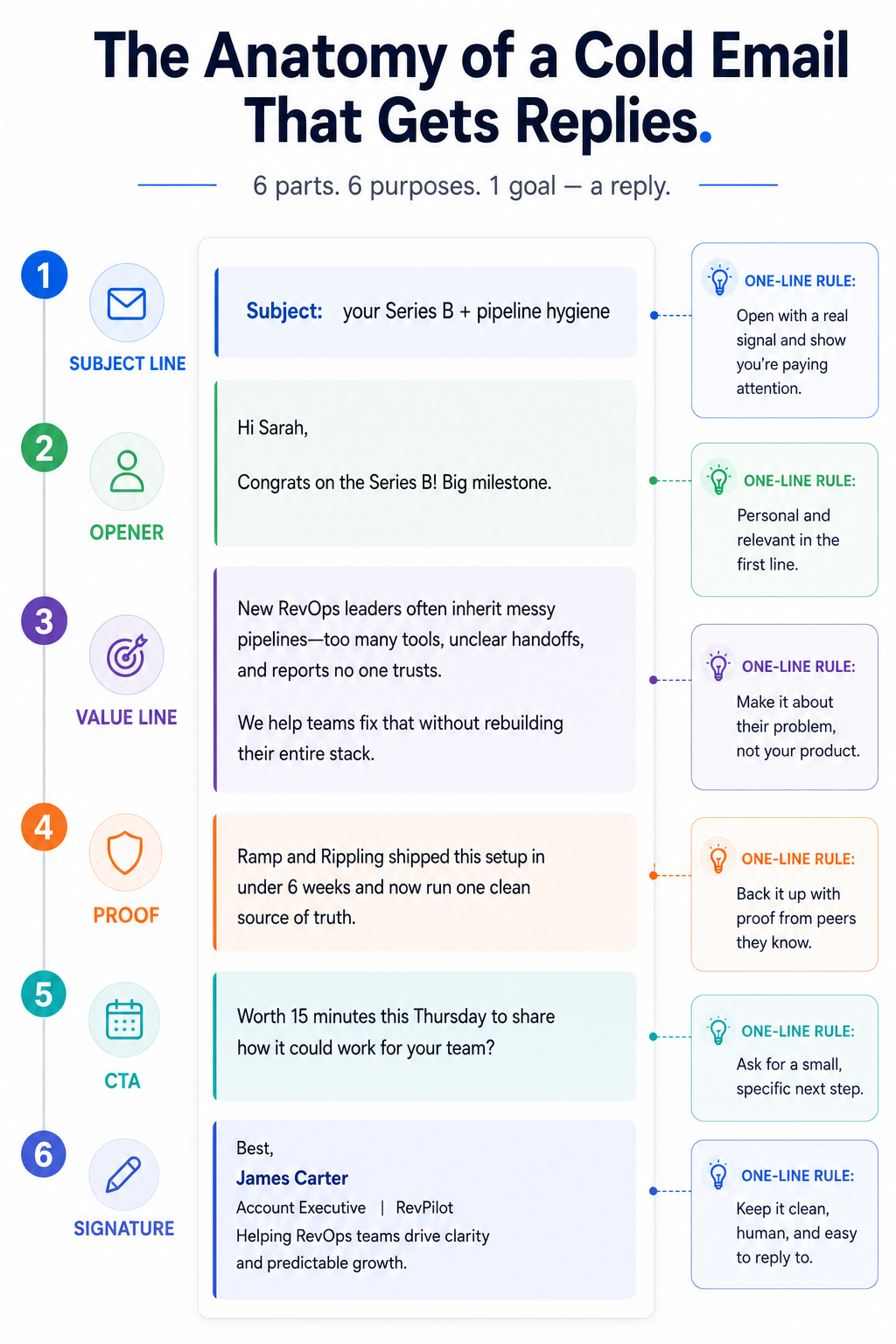
The subject line earns the open. That is its only job. It is not selling, teasing, or personalizing. It is convincing the reader the email is worth clicking. My 30 best cold email subject lines guide has more examples if you want a swipe file.
Rules:
The opener earns the second sentence. It must reference something specific about the reader, not about you or your company. "I saw your post on..." works. "Congrats on the Series B" works. "I hope this email finds you well" does not.
Rules:
One sentence stating the problem you help with, in the reader's language. Not what your
product does. What the reader is trying to fix.
Rules:
One sentence proving you are worth listening to. A named customer, a specific outcome, a shared connection, or the reason you are reaching out to this specific person.
Rules:
The smallest possible ask. "Worth 15 minutes next week?" beats "Would love to explore synergies." A specific ask beats an open-ended one. A low-commitment ask beats a high-commitment one.
Rules:
Three lines. Name, role, company. That is enough. Long signatures with legal disclaimers, social icons, and mobile phone numbers hurt deliverability and read as corporate.
Rules:
💡Pro tip: Write your six parts in this order. Value line first, then proof, then CTA, then opener, then subject line, then signature. People who start with the subject line write for the open, not the reply. Starting with value forces the email to earn its own read.
This is the sequence a practitioner actually follows. The order matters, and each step maps to a specific outcome.
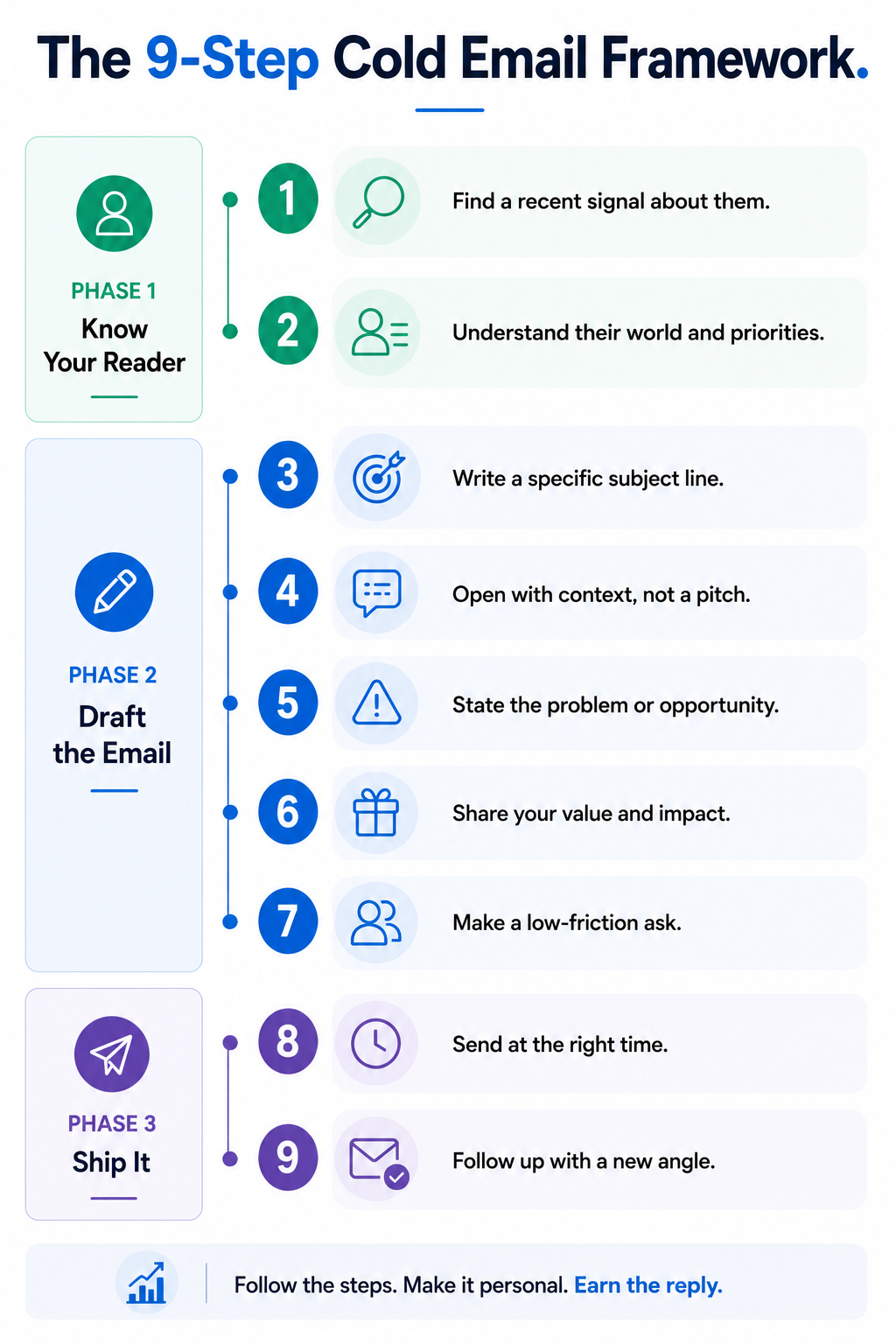
Before typing anything, answer three questions on paper.
If you cannot answer all three, the email will feel generic no matter how well it is written. Bad targeting cannot be rescued by good copy. Ever.
A signal is something the recipient did in the last 30 days that connects to your offer. A funding round. A new hire in a role that owns your problem. A product launch. A tech switch. A LinkedIn post.
Signals live in LinkedIn posts, funding announcements, hiring pages, and news feeds. Pull them yourself or use a signal-based prospecting tool. Either way, the signal is what turns a template into an email.
If you cannot find a signal, the outreach is too early.
People who start with the subject line write for the open, not the reply. Write the body first. Then read it back. The subject line is a compressed version of the value line. It should almost write itself if the body is right.
The first sentence must be about the reader. Not "I'm reaching out because..." or "My name is..." The reader does not care yet. Show them you know something specific about their world first.
Name the problem the reader has, in the words the reader would use. Not "streamlined workflows." Not "actionable insights." The words they would say to a colleague at lunch.
Why you specifically. A named customer in their space. A number you can prove. A shared connection. One line. If you need two, cut something.
The ask determines the reply rate more than any other line. "Worth a quick 15 minutes on Thursday?" outperforms "Would you be open to exploring how we can help?" by a wide margin. Specific time. Small commitment. Easy yes.
Read the draft aloud. Every word that could be removed without losing meaning should be removed. Adjectives are usually the first to go. So are hedges: "just," "quickly," "briefly," "wanted to reach out." My cold email length guide breaks down where the mobile fold cuts and why 75 words is the working ceiling.
The best email in the world lands in spam if the sending domain is not warmed. New domains need 6 to 8 weeks of gradual volume ramp-up before cold sending. Salesforge has warm-up built in, so this happens automatically alongside your sending.
💡Pro tip: Run every draft through a three-question test before sending. Would the reader forward this to a colleague? Would the reader recognize themselves in the first line? Would the reader reply within 90 seconds if the answer is yes? If all three are yes, send. If any is no, rewrite.
The signals that actually move reply rates and the ones to skip.
Personalization in 2026 is the difference between a 1 percent reply rate and a 10 percent reply rate. It is also the most misunderstood word in outbound. Most senders confuse merge tags for personalization. They are not the same thing.
Not every signal is equal. Some carry high buying intent. Others are noise dressed up as personalization.
High-intent signals in order of reply lift:
Low-intent signals to skip:
AI helps with research at scale. It hurts when it writes the actual email. The workflow that works: AI pulls the signal from LinkedIn or news, and a human writes the sentence that references it. That is the split.
Use AI for the research layer. Never for the voice layer. That boundary is what keeps the email human.
The clearest way to see the difference is on the page. Here is a real AI-drafted opener and the rewrite.
AI draft:
Hi Sarah, I hope this email finds you well. I noticed that Acme Corp is doing amazing things in the SaaS space. I wanted to reach out because we help companies like yours streamline their sales workflow. Would you be open to a quick chat?
Rewrite:
Sarah, saw you hired Priya as your first RevOps lead last month. Congrats. The first 90 days of a RevOps hire usually get eaten by cleaning up pipeline hygiene. That is the exact problem I solved for two teams in your space last quarter. Worth 15 minutes on Thursday to compare notes?
Same offer. Same length. One reads like every other email in the inbox. The other names a specific hire, connects it to a real problem, and asks small. That is the personalization shift in one example.
Every high-performing cold email in 2026 has three layers of personalization stacked.
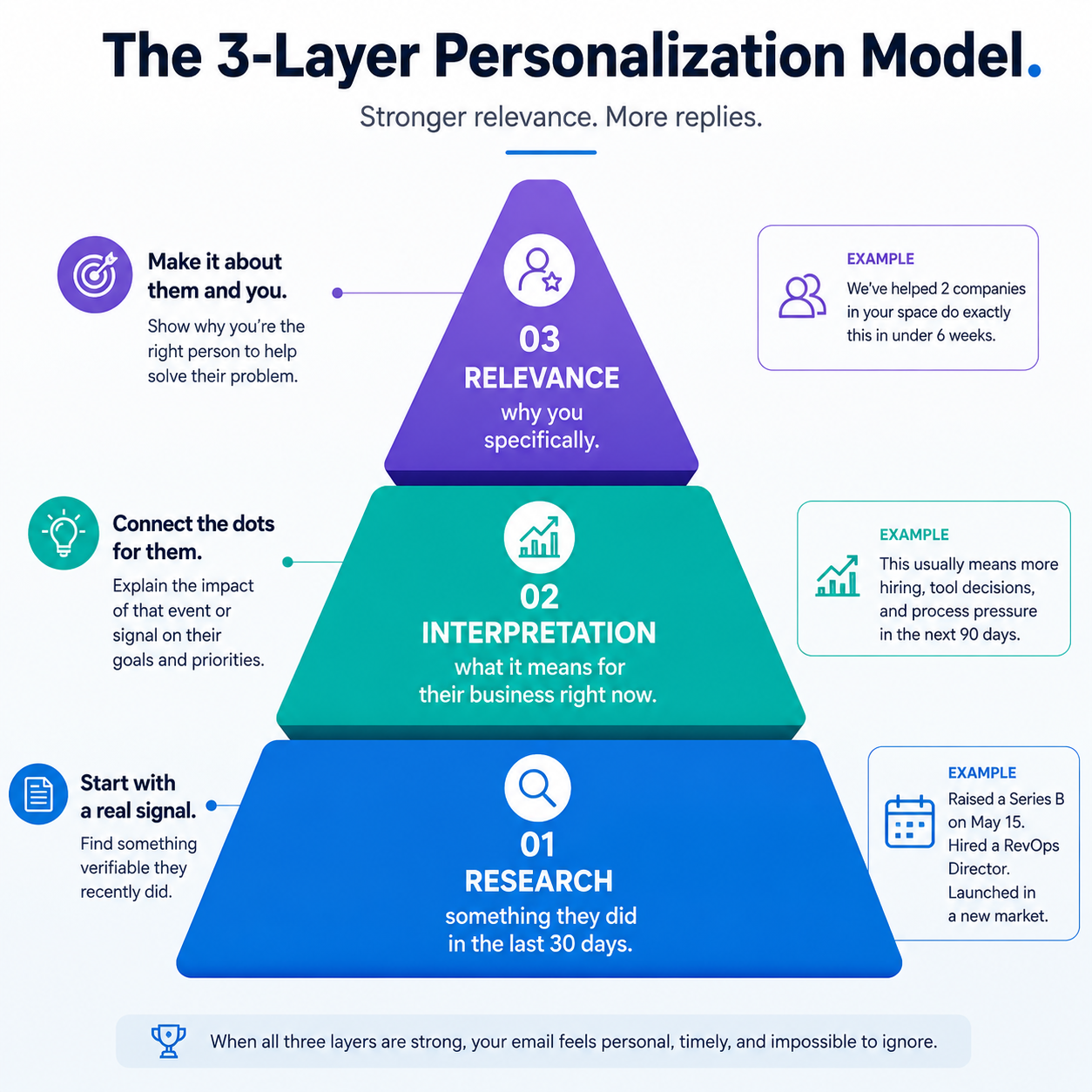
Merge-tag emails have zero layers. Most "personalized" emails have Layer 1 only. Emails that pull double-digit reply rates have all three.
💡Pro tip: If you can copy-paste the personalization line into an email to a different prospect and it still makes sense, it is not personalized. It is a variable substitution. Real personalization breaks the moment you swap the recipient.
The subject line is the smallest, highest-stakes writing in the whole email.
Get it wrong and the body never gets read. Get it right and every other line has a chance.
Mobile inbox previews cut subject lines at roughly 40 characters. That is about five to seven words. Anything past that gets truncated. Write the subject line so the meaning is clear at word five.
Both work. Neither works if used wrong.
Never fake curiosity with clickbait. It kills trust for the rest of the sequence.
Real subject lines pulling open rates above 45 percent in current campaigns:
Check out these 30 Cold Email Subject Lines
💡Pro tip: If your subject line could be sent to any prospect on your list, it is a template. If it only makes sense sent to this one specific person, it is a subject line. Real ones are single-use.
The best cold emails are not just short. They give the prospect a clear reason to care right now.
Each template below follows a simple structure: relevant signal → specific problem → proof → clear CTA.
What it is: Use this when you have a strong buying signal such as a funding round, new executive hire, product launch, or technology change.
Why it works:
What it is: Use this when the prospect has publicly discussed the problem you solve.
Why it works:
What it is: Use this when contacting a hiring manager directly about a specific role.
Why it works:
What it is: Use this when your goal is to build a professional relationship rather than sell something.
Why it works:
What it is: Use this when approaching a professor, researcher, or lab about an internship or research opportunity.
Why it works:
What it is: Use this when a recruiter is actively hiring for a role that matches your background.
Why it works:
What it is: Use this 2 to 5 days after the first email when there has been no response. The goal is to add a new reason to reply, not repeat the original email.
Why it works:
You do not need to copy these emails word for word. The structure is what matters:
1. Find the signal
Funding, hiring, job change, content, product launch, technology change, or another relevant event.
2. Connect the signal to a problem
Explain why that event creates a problem or opportunity for the prospect.
3. Add one piece of proof
Use a customer, result, relevant experience, research project, or specific number.
4. Make the CTA easy
Ask for 15 minutes, offer a useful resource, ask a relevant question, or give them a simple choice.
The strongest cold emails usually feel less like a pitch and more like a timely message written specifically for that person.
Roughly 55% of cold email replies in 2026 come from follow-ups, not first touches. Yet most cold email programs stop at one email or send the same message four times. Both are mistakes.
Send four follow-ups after the first email, spaced day 2, day 5, day 9, and day 14. Then stop. More than four follow-ups from the same sender to the same person reads as harassment.
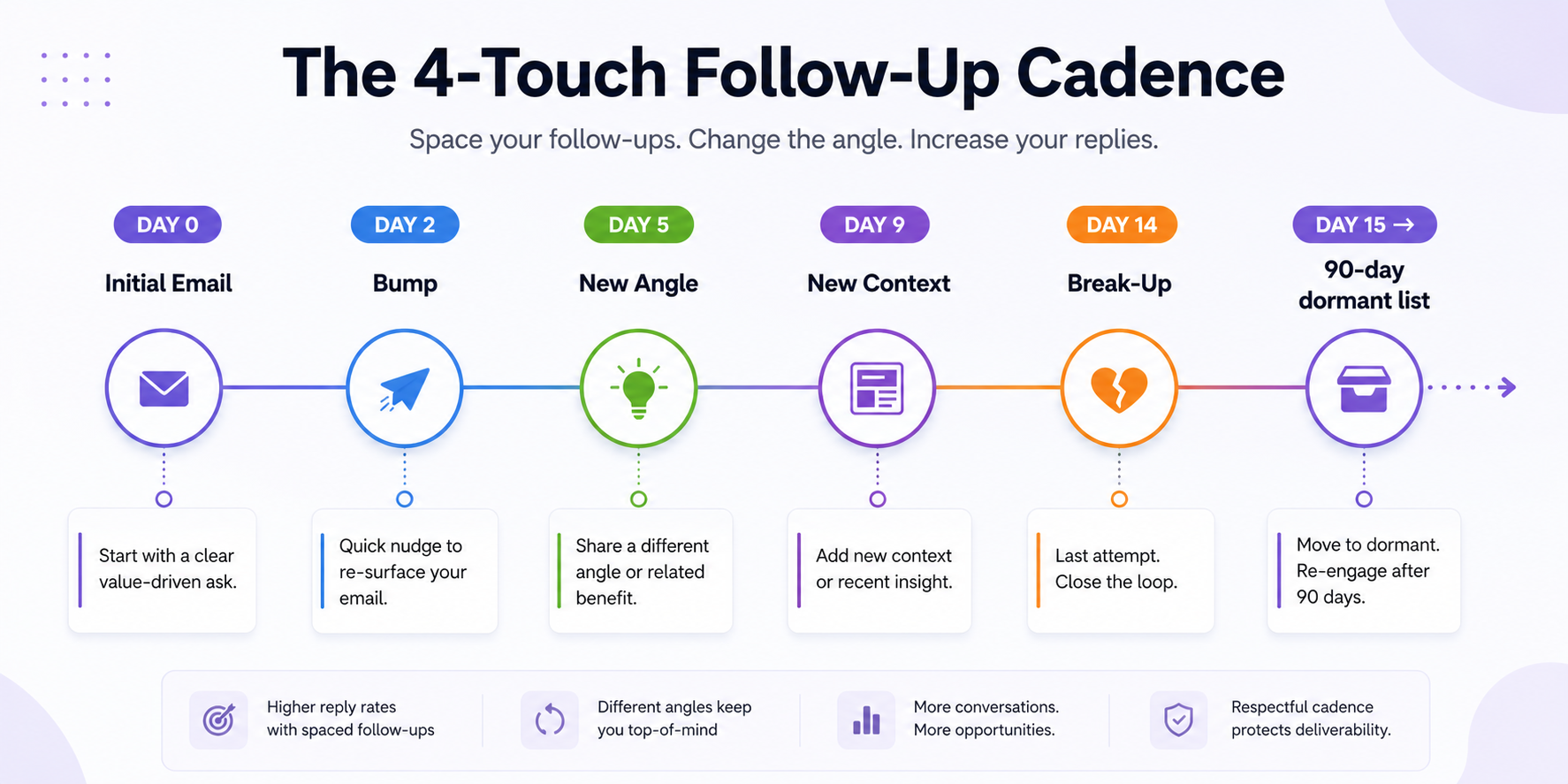
The four follow-ups are not four versions of the first email. They are four different angles.
Stop after four follow-ups. Move the prospect to a 90-day dormant list. Do not send from a second inbox. Do not switch to LinkedIn without a signal. Respect the silence.
Never write "just bumping this up" as a standalone line. It is a delete signal. If you have nothing new to say, do not send. If you have something new to say, lead with that, not with an apology for following up.
💡Pro tip: The break-up email pulls the highest reply rate of the sequence, often 30 percent higher than touch one. Not because it converts. Because it invites the reader to close the loop. Write it like you mean it.
You can write the best cold email of your life and still see zero replies. The reason is almost always deliverability, not the writing.
This section is where most cold email guides end. It should be where every sender starts.
Every domain and IP has a reputation score. New domains start at zero. Sending 100 cold emails on day one from a fresh domain almost guarantees a spam folder.
Fix: warm up the domain for 6 to 8 weeks before cold sending. Ramp volume gradually. Keep spam complaints under 0.1 percent.
Certain words and formats still trigger spam filters in 2026.
Plain text emails land in the primary inbox at roughly 3x the rate of HTML-templated emails.
Sending 500 emails per day from a single inbox in 2026 tanks the sender score within a week. Rotating across multiple inboxes at 30 to 40 per inbox per day preserves deliverability.
Every domain needs SPF, DKIM, and DMARC set up before cold sending. Skip authentication and even a perfect email lands in spam. The Google and Yahoo rules from February 2024 made this a hard requirement, not a best practice.
⭐The one-line takeaway: A perfect email in spam is worthless. Fix the sending infrastructure before rewriting the email.
These are the mistakes I see most often when I audit campaigns. Every one of them lowers reply rates in a measurable way.
💡Pro tip: Every mistake in this list looks small in isolation. Stack three of them in one email and reply rate drops to zero. Audit your last five sent emails against this list before writing your next campaign.
Cold email in 2026 is not dead. It is harder.
The rules changed because the inbox changed, and the senders who kept adjusting kept getting replies. The ones who kept sending 2022-era emails watched reply rates collapse.
Writing one great cold email is a skill. Writing 500 great cold emails a week is a system.
The teams still winning at cold email in 2026 are the ones who built the system.
I run cold email outreach on Salesforge because the writing sits inside the same platform where the sending and reply management happen. That matters most past the 500-emails-a-week mark, which is where most outbound programs break.
Here is what actually helps the writing itself:
Start a free trial.
Snippet-friendly answers to the questions readers actually search for.
Start with a sentence about the reader, not yourself. Reference something specific they did in the last 30 days: a hire, a launch, a post, a funding round. If you cannot find one, the outreach is too early. Move the prospect to a nurture list and find a stronger signal.
Under 75 words for the body. Under 100 words including subject line and signature. Over 65 percent of B2B inboxes open on mobile, and anything longer gets skipped.
Five to seven words, lowercase, no exclamation marks, referencing something specific to the reader. "your Series B + pipeline" outperforms "Quick question" or "Following up." Never send emojis to enterprise buyers.
In the US, yes, under CAN-SPAM, if you identify yourself, use a real business address, and include an opt-out. In the EU, GDPR requires a legitimate business interest and a clear unsubscribe. B2B cold email is generally legal. B2C is much stricter.
Warm up the domain for 6 to 8 weeks. Set up SPF, DKIM, and DMARC. Keep spam complaints under 0.1 percent. Send plain text with two or fewer links. Rotate across multiple sending inboxes.
For research, yes. For the actual email, no. AI-drafted emails get flagged in the first two seconds by experienced buyers. Use AI to pull signals from LinkedIn or news. Write the sentence yourself.
Four follow-ups after the first email, spaced day 2, 5, 9, and 14. After that, move the prospect to a 90-day dormant list. Do not send from a second inbox.
Tuesday through Thursday, between 10 AM and 11 AM in the recipient's timezone. Avoid Monday mornings and Friday afternoons. Never send on major holidays.
Use signal-based prospecting. Pull funding, hiring, and product-launch signals into your prospect list before writing. Build the signal into the list itself, so the personalization layer exists before you open the email editor.
A well-targeted campaign with signal-based personalization pulls 8 to 12 percent reply rate. A generic campaign pulls under 1 percent. The gap is 10x. It is entirely explained by targeting and personalization quality.

.png)
.png)
