The moment you scale outbound, sender costs start adding up.
You add more mailboxes to increase your sending volume, then add LinkedIn so your reps can reach prospects from their own accounts.
Suddenly, you’re paying for every mailbox and every seat you add.
That’s the part of outbound pricing I never liked.
The more you scale your outreach, the more you have to pay just to keep that outreach running.
So I wanted to look at what outbound would look like without those limits.
In this guide, I’ll break down what unlimited cold email mailboxes and LinkedIn senders actually mean, what 50 mailboxes and 5 LinkedIn senders can cost with per-sender pricing, and how Salesforge’s flat-fee model compares.
Let’s get into it.
Unlimited mailboxes for cold email and LinkedIn means one thing. You can connect as many email accounts and LinkedIn profiles to your outreach tool as you need, on any plan, without a per-mailbox or per-seat fee eating into your budget.
The email side covers Google Workspace mailboxes, Microsoft 365 mailboxes, and custom SMTP or IMAP accounts. The LinkedIn side covers individual LinkedIn profiles that send connection requests, messages, InMails, and other native actions inside a sequence.
The word "unlimited" only means something when three things hold together. You get unlimited connections, unlimited warm-up on every connected mailbox, and unlimited rotation inside a campaign. Most tools that market unlimited quietly meter one of those three layers, which I will get into further down.
Salesforge is one of the few platforms that keeps all three unmetered across both channels on the same plan. That is what makes the unlimited claim operational instead of marketing.
Caps exist for two reasons, and only one of them is technical. Both reasons are real, but they land on the buyer the same way.
Every connected mailbox is an IMAP or API connection the platform maintains, syncs, monitors, and warms. Every LinkedIn profile is a browser session or proxy that has to stay stable enough to look like a real user.
Multiply that across thousands of customers, and you get real engineering cost. That part is fair.
The second reason is not technical at all. Mailbox count and seat count are the easiest variables to meter, so they are the easiest ones to use as upsell triggers.
A team that started on a 5-mailbox plan and now needs 50 has nowhere to go but the next tier. Tools that price per user or per mailbox lean into this because once your outbound function depends on the platform, the switching cost protects the price increase.
That is why the search term "unlimited mailboxes for cold email" exists in the first place. The market is asking for the cap to come off.
The LinkedIn cap is the tax most buyers do not see coming. Most outreach tools price LinkedIn per seat, so every rep on your team is a separate line item.
A five-person outbound team paying $79 per user for LinkedIn ends up at $395 a month before adding a single mailbox. Some tools do not even offer LinkedIn as a native channel, so you end up bolting on a second automation tool that costs another $100 to $200 per profile.
That is the double cap. Email cost scales with mailboxes, LinkedIn cost scales with seats, and both grow the moment your team does.
If you want to dig deeper into how multichannel outreach actually plays out inside a sequence.
The answer sits in how Gmail, Microsoft, and LinkedIn actually throttle senders today. Once you understand the platform math, unlimited stops being a nice-to-have and starts being the only safe way to send at real volume.
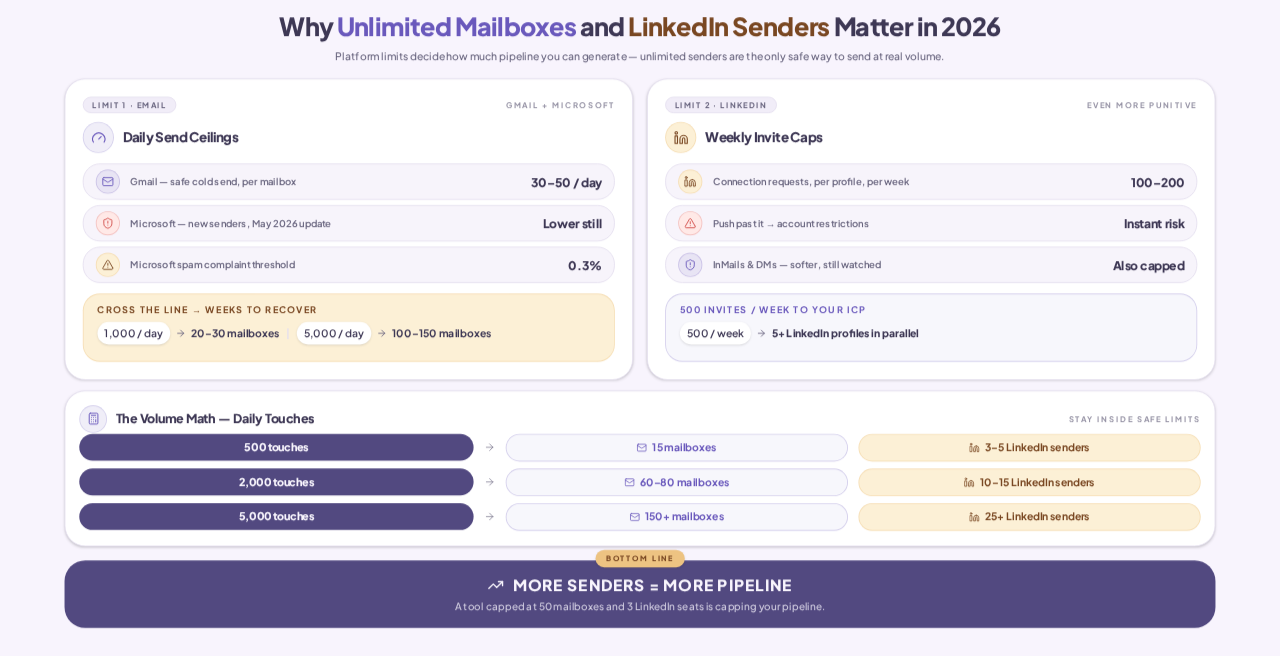
Gmail enforces a soft cap of roughly 30 to 50 cold outbound emails per mailbox per day before engagement signals start to deteriorate. Push a new mailbox past that limit and reply rates collapse.
Microsoft is stricter after the May 2026 enforcement update. The effective ceiling dropped lower for new senders, and the spam complaint threshold now sits at 0.3 percent.
Cross that line and your domain reputation takes weeks to recover. The only safe way to send 1,000 cold emails a day is to spread that volume across 20 to 30 mailboxes. The only safe way to send 5,000 a day is to spread across 100 to 150.
LinkedIn's ceiling is even more punitive. Every LinkedIn profile is capped at roughly 100 to 200 connection requests per week, depending on account age, engagement, and Sales Navigator status.
InMails and direct messages have softer limits, but push any of them and the platform starts restricting your account. If you want to send 500 connection requests per week to your ICP, you need at least five LinkedIn profiles running in parallel.
That is why capped LinkedIn tools break down the moment you scale. If you want the deeper breakdown of how these limits work in practice, I compared LinkedIn automation tools here.
Here is the math I run through with every founder I talk to. If your team wants 500 daily touches across email and LinkedIn combined, you need about 15 mailboxes plus 3 to 5 LinkedIn profiles to stay inside safe limits.
For 2,000 daily touches, you need 60 to 80 mailboxes plus 10 to 15 LinkedIn profiles. For 5,000 daily touches, you need 150 plus mailboxes and 25 plus LinkedIn profiles.
Mailbox count and LinkedIn sender count are no longer vanity numbers. They are the throttle on how much pipeline your outbound team can generate. A tool that caps you at 50 mailboxes and 3 LinkedIn seats is, in practice, capping your pipeline.
Before you compare tools, you need to know what "unlimited" is supposed to cover. Most vendors meter one of these three layers even when their pricing page says otherwise.
You can add as many mailboxes and LinkedIn profiles as you want, on any plan, with no per-mailbox or per-seat fee. This is the layer most tools market, and it is only the first of three.
Every connected mailbox runs warmup at no extra cost. No warmup credit system, no separate warmup tool, no per-mailbox warmup fee.
This is the layer most vendors quietly cap. Tools that offer "unlimited warmup" often throttle the warmup pool once you scale past their expected usage, which shows up as slower warmup times and weaker heat scores.
Inside a single campaign, you can assign any number of mailboxes and LinkedIn profiles to the sequence. The tool rotates the send automatically, respects per-mailbox and per-profile daily limits, and pauses accounts that start to degrade.
Without rotation, unlimited connection is just add throttled mailboxes. And without automated rotation, you end up load-balancing manually, which is not a job any outbound ops person wants.
Salesforge covers all three layers on both channels, on a flat fee. Here is how each piece works.
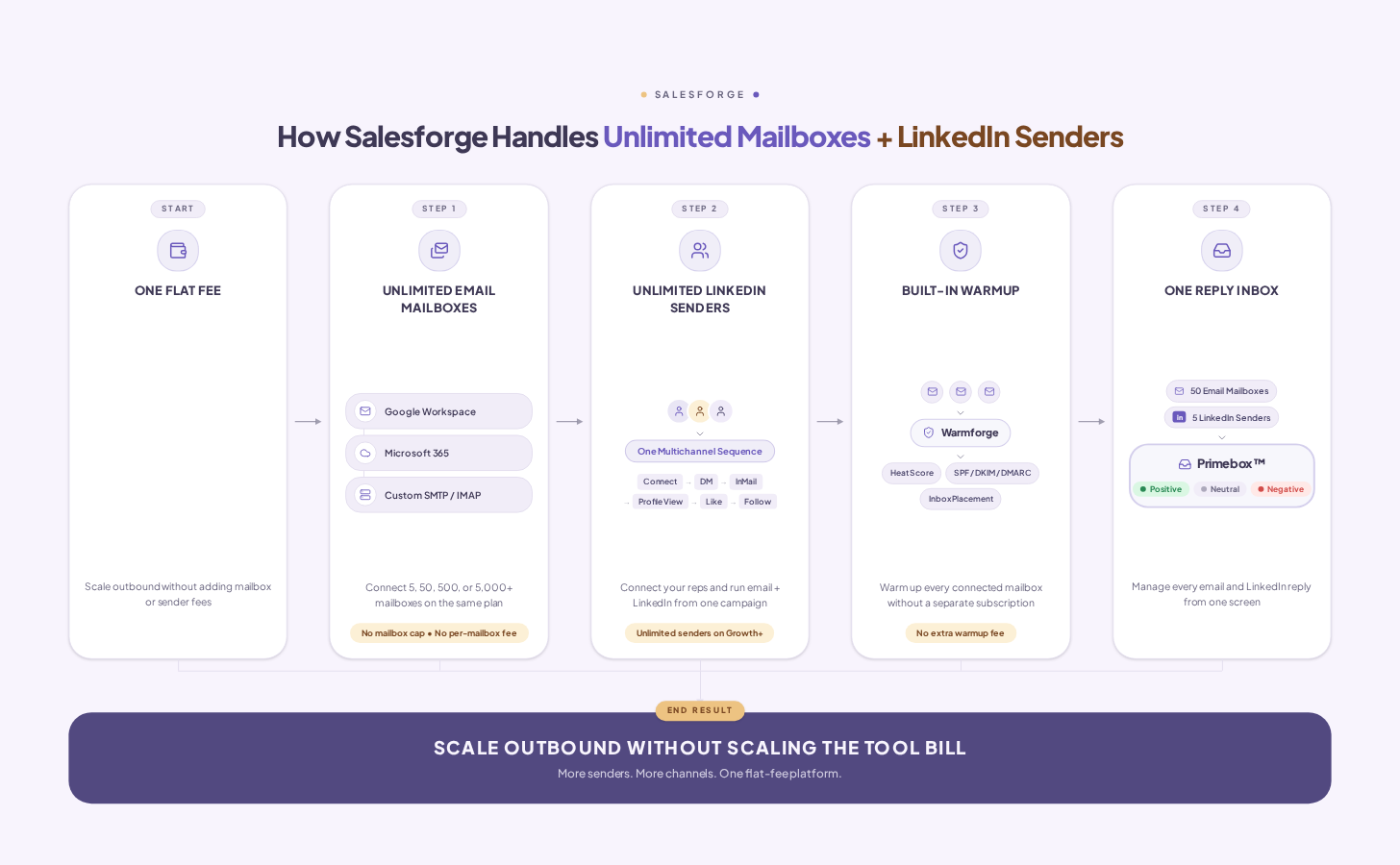
Every Salesforge plan supports unlimited Google Workspace, Microsoft 365, and custom SMTP or IMAP mailboxes. No tier-based cap. No per-mailbox add-on fee. Connect 5, 50, 500, or 5,000 mailboxes on the same plan.
You can also mix mailbox types inside a single campaign. That means a Google mailbox, a Microsoft mailbox, and a custom SMTP mailbox can all rotate on the same sequence, which matters when you are running cross-provider infrastructure.
Every Salesforge Growth plan and above supports unlimited LinkedIn senders inside a single sequence. Every rep on your team connects their LinkedIn profile, and all of them run in the same multichannel campaign without adding a seat fee.
Salesforge covers six native LinkedIn actions inside a sequence. Connection requests, direct messages, InMails, profile views, post likes, and follows. Each action respects per-profile daily limits automatically, which is what keeps accounts safe as you scale.
Every connected mailbox on Salesforge warms up through Warmforge, at no extra cost. The warm-up pool is curated across aged Google and Microsoft accounts, so your mailboxes exchange engagement signals with real inboxes, not spam farms.
Warmforge tracks Heat Score per mailbox, monitors SPF, DKIM, and DMARC configuration, and runs inbox placement tests on a schedule. You do not add warm-up as a separate subscription, and you do not run out of warm-up credits when you scale past 50 mailboxes.
For a deeper walkthrough of how warm-up actually works in 2026.
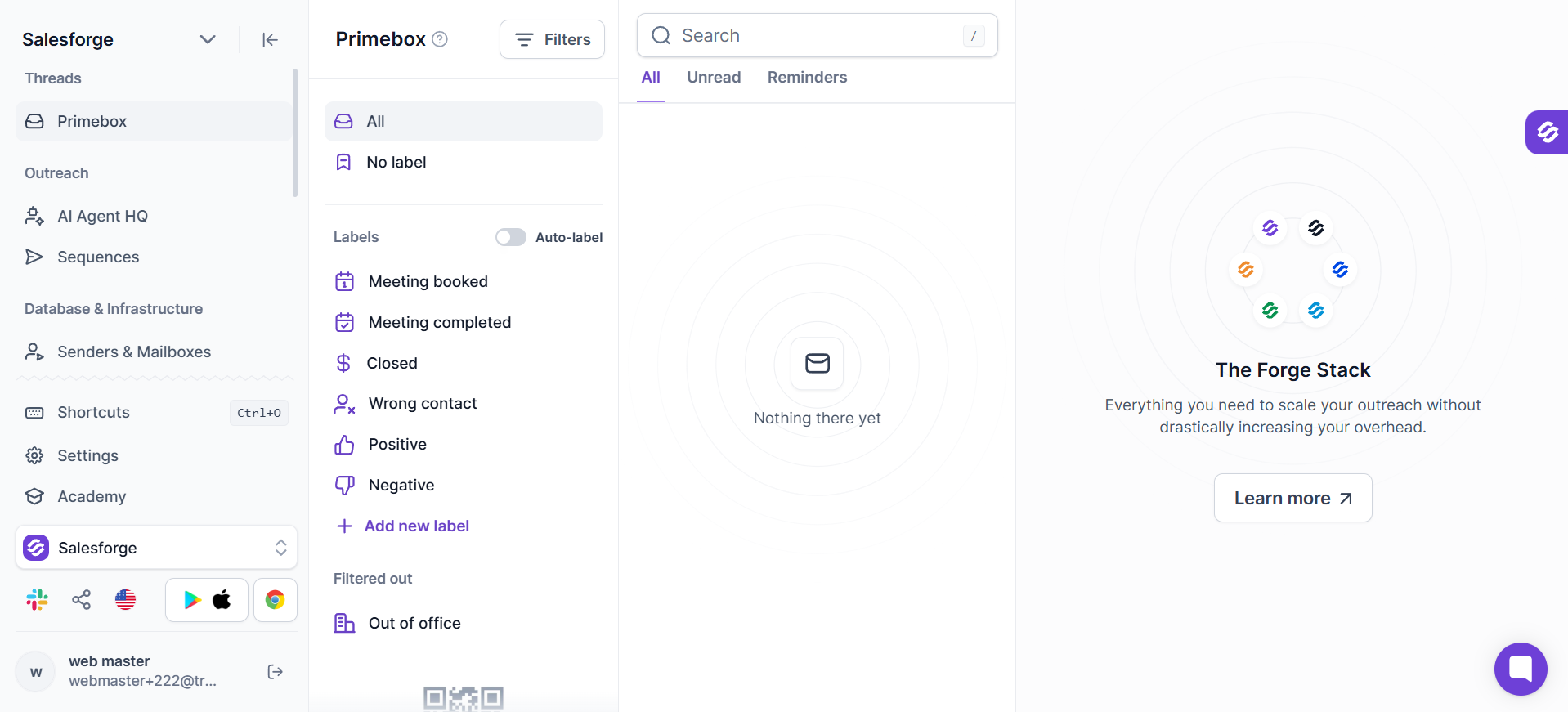
Every reply from every mailbox and every LinkedIn profile lands in one inbox called Primebox™. Sentiment tagging sorts replies into positive, neutral, and negative. The Growth plan adds AI-drafted replies you can approve before sending.
The point is that reply management should not scale linearly with mailbox count. Without Primebox, running 50 mailboxes plus 5 LinkedIn profiles means checking 55 different inboxes. With Primebox, it is one screen. I walked through the full master inbox concept here.
Ready to remove both caps? Start a 14-day free trial. No credit card required.
This is the section every buyer scrolls to first, so I ran the pricing at a realistic mid-market setup. 50 mailboxes plus 5 LinkedIn senders is what a typical outbound team looks like once they cross 1,000 daily touches.
All prices below are pulled from official vendor pages as of September 2026. Verify on each vendor's pricing page before you decide, because plans change.
Two things worth calling out on the table.
So, we’ll be describing Salesforge’s Growth plan.
Apart from offering unlimited mailboxes and LinkedIn senders, the plan also includes the operational layer that helps you to book more meetings.
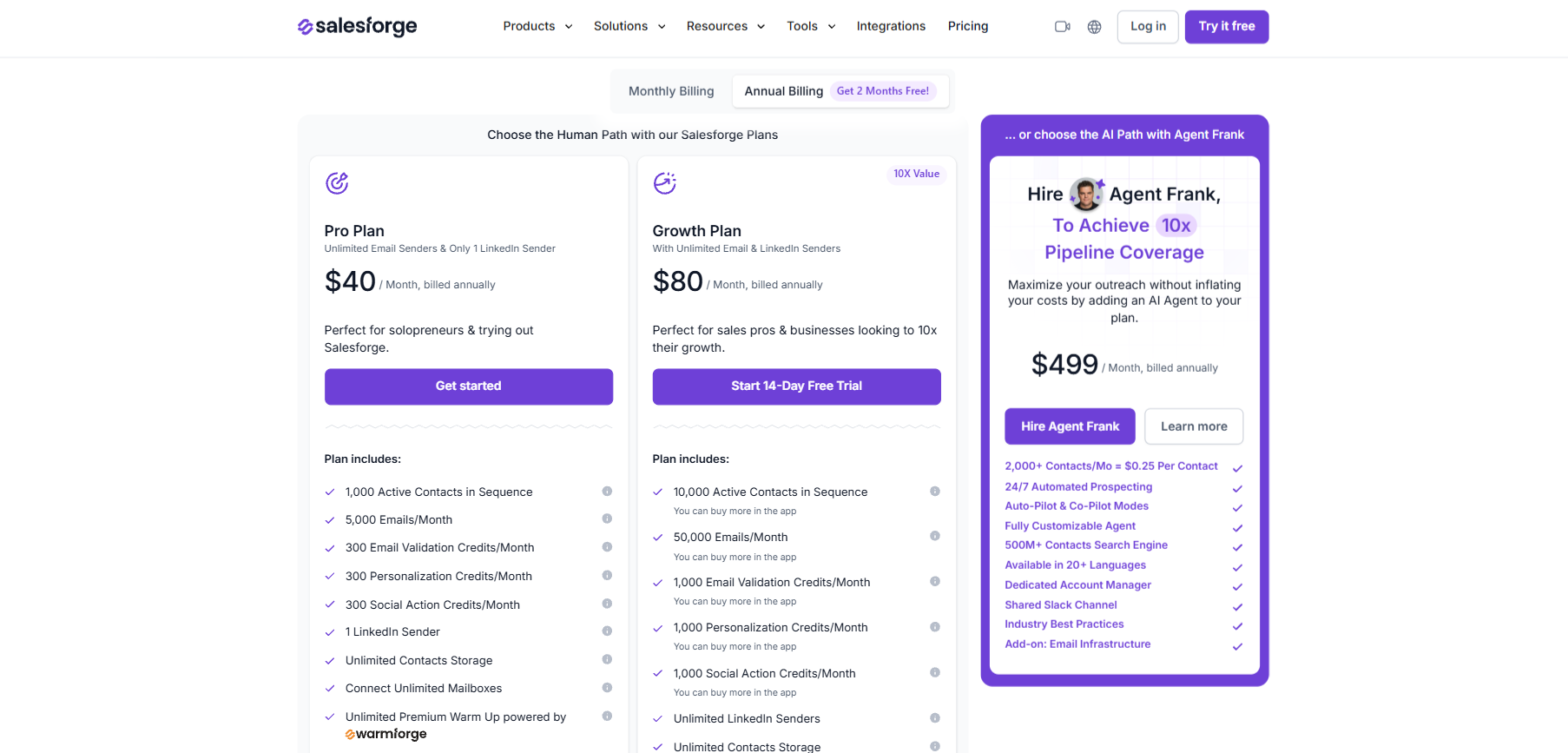
The operational layer is what turns 50 mailboxes and 5 LinkedIn profiles into one outreach system, instead of 55 things to babysit.
Connecting the mailboxes and LinkedIn profiles is the easy part. Running them at scale is where most teams stall. Agent Frank is Salesforge's AI SDR, and he is the layer that takes the operational load off you entirely.
Agent Frank finds prospects that match your ICP, writes personalized email and LinkedIn steps, sends them from your unlimited mailboxes and profiles, follows up, handles replies inside Primebox™, and books meetings on your calendar. He does all of this in 20+ languages, and he uses a Knowledge Base you upload so his messages actually reference your product correctly.
He is not a bot or a workflow. He is closer to hiring an SDR who works 24/7, ramps in a week, and never asks for a raise. Every Agent Frank customer also gets a human Account Manager for setup, optimization, and ongoing performance work.
Auto-Pilot means Agent Frank prospects, writes, sends, and follows up without any human approval. Co-Pilot means he drafts everything and you approve each reply before it goes out.
I lean Co-Pilot for the first two weeks with any new campaign, then move to Auto-Pilot once the message shape is dialed in. It is the safest way to hand off without losing the plot on tone or targeting.
Agent Frank is the reason unlimited actually pays back. A human SDR can run maybe 15 mailboxes and 2 LinkedIn profiles before the operational load takes over.
Agent Frank runs 50, 100, 200 mailboxes and their matching LinkedIn profiles at the same time, tracks Heat Score across every mailbox, rotates volume when one degrades, and adjusts pacing per profile to keep accounts safe. That is not a job a person can do at that scale, and it is why unlimited without an AI operator on top is more mailboxes to manage, not more pipeline. I covered the full Agent Frank review here.
Hire Agent Frank and let him run your unlimited outreach.
The intuition some buyers have is that more mailboxes and more LinkedIn profiles means more risk. The reality is the opposite, as low warm-up and rotation work properly.
Here are the three reasons unlimited actually improves deliverability instead of hurting it.
The same logic applies on LinkedIn. Spreading 500 connection requests across 5 profiles keeps each one at 100 per week, which sits inside LinkedIn's safe zone. Trying to push 500 through a single profile gets that profile restricted fast.
The teams that burn domains and LinkedIn accounts fastest are the ones forcing too much volume through too few senders. Unlimited fixes that by design.
The setup workflow is the same whether you are adding your first 5 mailboxes or scaling to 500. It runs in five steps.

For a team going from 10 to 50 mailboxes, the whole thing takes a few hours of setup plus a warm-up period. For agencies onboarding hundreds of mailboxes across multiple client accounts, bulk import and Agent Frank cut the setup time materially.
Outbound gets expensive when every new mailbox or LinkedIn sender comes with another fee.
Salesforge removes that limitation, so you can add the email accounts and LinkedIn profiles your campaigns actually need without constantly moving to a higher tier. You get the sending infrastructure, multichannel outreach, warm-up, and unified reply management to run it all from one place.
So whether you’re scaling from 10 mailboxes to 50, adding more LinkedIn senders, or building a larger outbound operation, you can keep expanding without the tool cost increasing with every sender.
Start a 14-day free trial and connect your first mailboxes and LinkedIn profiles. No credit card required.
Unlimited mailboxes are on every plan, including Pro at $40/month billed annually. Unlimited LinkedIn senders come in on Growth at $80/month billed annually. Both plans include unlimited warm-up through Warmforge at no extra cost.
Smartlead offers unlimited mailboxes on every plan, but it does not support LinkedIn as a native channel. Salesforge is the only major platform I know of that offers unlimited mailboxes and unlimited LinkedIn senders inside one sequence, on a flat plan. If LinkedIn matters to your motion, Salesforge is the honest pick.
Every connected mailbox runs continuous warm-up through Warmforge from day one, on every plan, at no extra cost. There is no warmup credit system and no per-mailbox warmup fee. Heat Score tracking and SPF, DKIM, and DMARC monitoring are included on every mailbox.
Yes. Salesforge supports mixing all three inside a single sequence. Automated rotation works across mailbox types, so a Google mailbox, a Microsoft mailbox, and a custom SMTP mailbox can all send the same campaign in parallel.
Primebox is Salesforge's unified inbox. Every reply from every mailbox and every LinkedIn profile lands in one screen. Sentiment tagging sorts replies into positive, neutral, and negative automatically. The Growth plan adds AI-drafted replies you can approve before sending.
Yes. Agent Frank runs outreach from your connected mailboxes and LinkedIn profiles inside your Salesforge account. He rotates sends automatically, respects per-mailbox and per-profile limits, and pauses accounts that degrade. Agent Frank starts at $499/month billed quarterly.
Running more profiles actually protects your accounts if the tool respects LinkedIn's per-profile limits. Salesforge caps each LinkedIn action at safe daily thresholds, uses managed proxies to keep profiles geographically consistent, and paces sends to mimic human activity. The teams that burn LinkedIn accounts are the ones pushing too much volume through one profile, not the ones running unlimited profiles at safe per-account limits.


.png)
.jpg)


