"SaaS cold email doesn't work."
I hear this all the time.
And almost every time, the team saying it ran one campaign, sent a few hundred emails, got little to no response, and moved on.
But SaaS companies that approach cold email strategically see a very different outcome. Many consistently achieve 15–25% positive reply rates, attribute 20–30% of new revenue to outbound, and even drive additional free trial signups beyond direct replies.
So SaaS cold email does work. The difference isn't the channel—it's the approach.
In this guide, you'll learn how to build a SaaS cold email strategy that gets results. We'll cover how to:
Whether you're a founder, growth marketer, or SDR, this guide will help you turn cold email into a predictable growth channel.
Let's get into it!
Before getting into the how, it's worth understanding why SaaS cold email is a fundamentally different game than traditional B2B outreach. This context shapes every decision downstream, from how you write your emails to what metrics you track.
Think about what happens when a consulting firm sends a cold email. They're asking for a 30-minute discovery call. That means the recipient has to check their calendar. Evaluate whether it's worth their time. Maybe loop in a colleague. And commit to a conversation with a stranger.
That's a lot of friction for someone who just opened an email from a stranger.
Now compare that to a SaaS cold email. You're asking someone to try a free tool. No calendar coordination. No stakeholder approval. No budget conversation. Just click a link and create an account in two minutes.
That difference changes everything. When the ask is small, more people say yes. I've consistently seen SaaS cold email campaigns hit 20 to 30% positive reply rates when the CTA is simply "reply yes if you want the link to sign up." That number would be extremely unusual in traditional B2B outreach, where 5% is considered strong.
Here's the other thing that makes SaaS cold email unique: your email doesn't need to close the deal. It just needs to get someone through the door.
In traditional B2B, the cold email carries the full weight of persuasion. You need to convince someone your service is worth their time. Explain the value. Handle objections. Get them on a call. All from one email.
That's a heavy lift.
With SaaS, the product does the selling. Once someone signs up for a free trial or sits through a quick demo, the product experience takes over. Your cold email only needs to create enough curiosity for someone to take that first step. That's a much simpler writing challenge. And it's why SaaS cold emails tend to be shorter and more direct than traditional outbound.
This one surprises most teams when they first see it. For every person who replies positively to a SaaS cold email, an additional 1.5 to 2 people sign up without ever replying.
What happens is straightforward. Someone reads your email. Gets curious. Googles your product name. Visits your website. Creates an account on their own. They never reply because they already got what they needed.
This matters. If you're only tracking reply rates, you're undercounting the channel's actual contribution by 40 to 60%. I'll cover proper attribution later. For now, know this: the real impact of your SaaS cold email is significantly larger than what your inbox shows you.
SaaS cold email fails in predictable ways. The most common: teams skip infrastructure setup, send from their primary domain, write a generic pitch that sounds like a marketing brochure, and quit after one week when they don't see results.
It also underperforms when the product itself lacks a clear value proposition. Here's a good test. Can you explain what your product does in two plain sentences? No jargon like "AI-powered platform" or "end-to-end solution"?
If not, SaaS cold email will struggle. The channel rewards clarity. If your value is hard to articulate in an email, it'll be even harder for a stranger to care about.
That said, I've seen early-stage SaaS founders land their first 10 to 20 paying customers entirely through cold email. As a cold email marketing channel, it remains one of the fastest ways to validate positioning, test messaging with real buyers, and build pipeline without waiting months for organic traffic.
With that context, let's get into the actual execution.
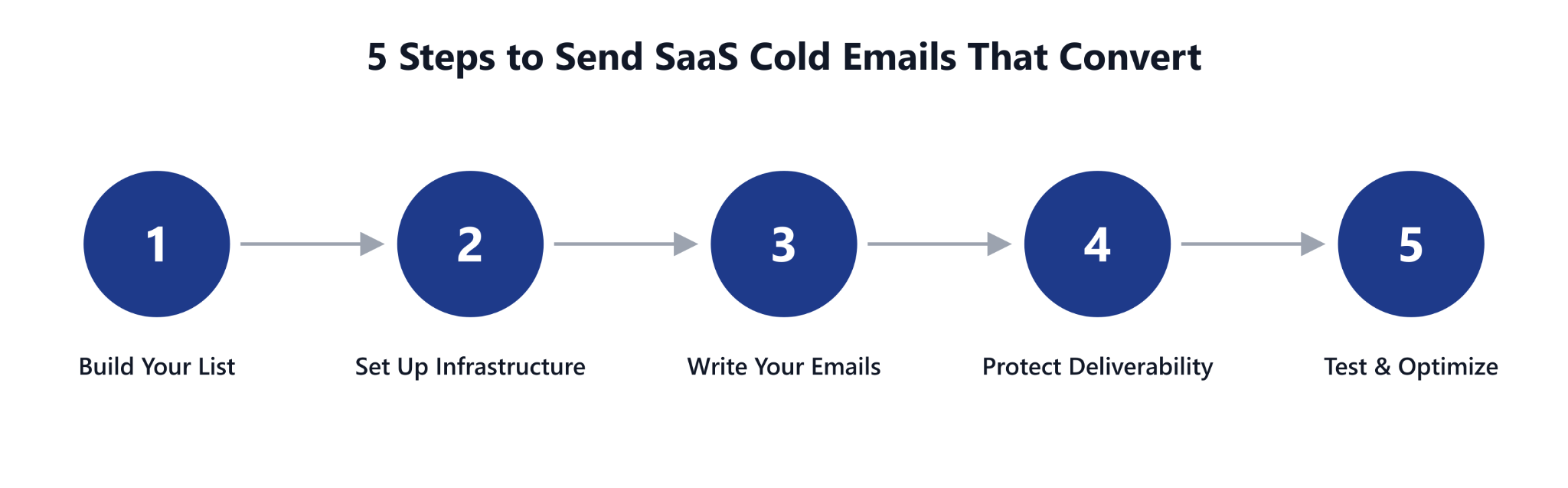
This section covers the full execution stack in the order you should build it. Each step depends on the one before it.
Resist the temptation to jump straight to writing emails. The foundation matters more than the words.
A well-written email sent to the wrong person is still a wasted email. Effective lead generation for SaaS cold email starts with who you're emailing, not what you're writing.
Your ideal customer profile needs to be specific enough that every person on your list could realistically become a paying customer. Vague targeting is the fastest way to burn through your sending infrastructure with nothing to show for it.
For SaaS, a strong ICP includes five variables:
Here's the difference in practice. "All VPs of Marketing" is not an ICP. You'll end up emailing people at 5-person startups and 50,000-person enterprises with the same message. Neither will respond because the email feels generic.
"VPs of Marketing at B2B SaaS companies with 50 to 200 employees who use HubSpot and raised Series A or B in the last 12 months" is an ICP. Every variable narrows the list and increases relevance.
The smaller and more targeted your list, the higher your reply rates.
Here's where SaaS cold email has changed most in the last two years. The best-performing campaigns aren't built on static lists. They're built on buying signals — real-time indicators that a company is in the market for what you sell.
Four buying signals I've seen convert well:
Targeted email leads built on these signals convert at 5 to 10x the rate of a generic list. The difference between "we emailed 10,000 VPs" and "we emailed 500 VPs at companies that just raised a round and are hiring for the exact role our product serves" is enormous.
Every email address on your list must be verified before it enters a campaign. This is non-negotiable. Even if the data source claims contacts are pre-verified, run your own verification pass.
Why this matters so much. A bounce rate above 3% damages your sender reputation with Gmail and Outlook. Once that reputation drops, all your emails start landing in spam. Not just the ones to bad addresses. One dirty list can compromise your entire sending infrastructure.
If you're running the Forge stack, Leadsforge handles this layer. It runs waterfall enrichment across multiple data providers against a 500M+ contact database. Verified emails, LinkedIn profiles, and direct phone numbers at the point of reveal.
That means contacts you pull are ready to send to without a separate verification step. And they push directly into Salesforge sequences without a CSV export in the middle.
Now that your list is ready, the next step is making sure your emails actually reach these people.
This is the step most SaaS teams skip. They write their emails, load a list, hit send from their company inbox, and wonder why nothing works.
Your cold email infrastructure is the foundation everything else sits on. Get this wrong and your copy, your list, your offer — none of it matters. Because your emails never reach the inbox.
Never send cold emails from your primary business domain. This is the single most important rule in cold email infrastructure. And it's the one teams break most often.
Here's what happens when you do. If acme.io is your company domain and you start sending hundreds of cold emails from it, providers may flag that domain. Once flagged, it's not just your cold emails that stop getting delivered. Your customer support emails, billing notifications, and team communication can all be affected.
Instead, follow this rule:
Every single domain needs SPF, DKIM, and DMARC records configured before you send anything. These protocols tell Gmail and Outlook that your messages are legitimate.
Think of it like an ID check. Without these records, providers treat your messages like a bouncer treats someone without ID. They don't get in. Or they get sent to a back room (the spam folder) where nobody checks.
A brand new domain has zero sending history. Providers don't know if you're a legitimate sender or a spammer. If you start sending 200 cold emails on day one, the answer they assume is spammer.
Warm-up gradually builds sending activity and engagement signals over 14 to 30 days before real campaigns start. During this period, the domain sends and receives emails in a pattern that looks like normal business communication.
Once warmed up, cap your volume at 20 to 30 emails per inbox per day. This is a hard ceiling, not a suggestion. Going higher on domains a few weeks old is the fastest way to destroy the reputation you just spent a month building.
As you scale, domain rotation becomes essential. The approach that works best is an odd/even system with 3 sets of domains:
This prevents any single domain from carrying too much volume. And it gives each domain recovery time between sending cycles.
Salesforge handles most of this infrastructure inside the platform. Warmforge is bundled into every plan at no extra cost. Warm-up runs automatically across every connected mailbox. Sender rotation distributes sending volume across your inboxes so no single account overloads.
And because Salesforge doesn't charge per mailbox, you can scale sending capacity across dozens of domains without your tool bill scaling with it. If you'd rather skip the DNS setup entirely, Mailforge (shared IPs) or Infraforge (dedicated IPs) can spin up mailboxes with SPF, DKIM, and DMARC pre-configured. That saves roughly a full day of technical setup per domain.
With your list built and infrastructure in place, now you can focus on what you're actually going to say.
This is the part everyone wants to jump to first. But notice I covered list building and infrastructure before getting here. That's intentional. The best email copy in the world doesn't matter if it reaches the wrong person or lands in spam.
Now those foundations are set. Let's talk about how to write SaaS cold emails that people actually respond to.
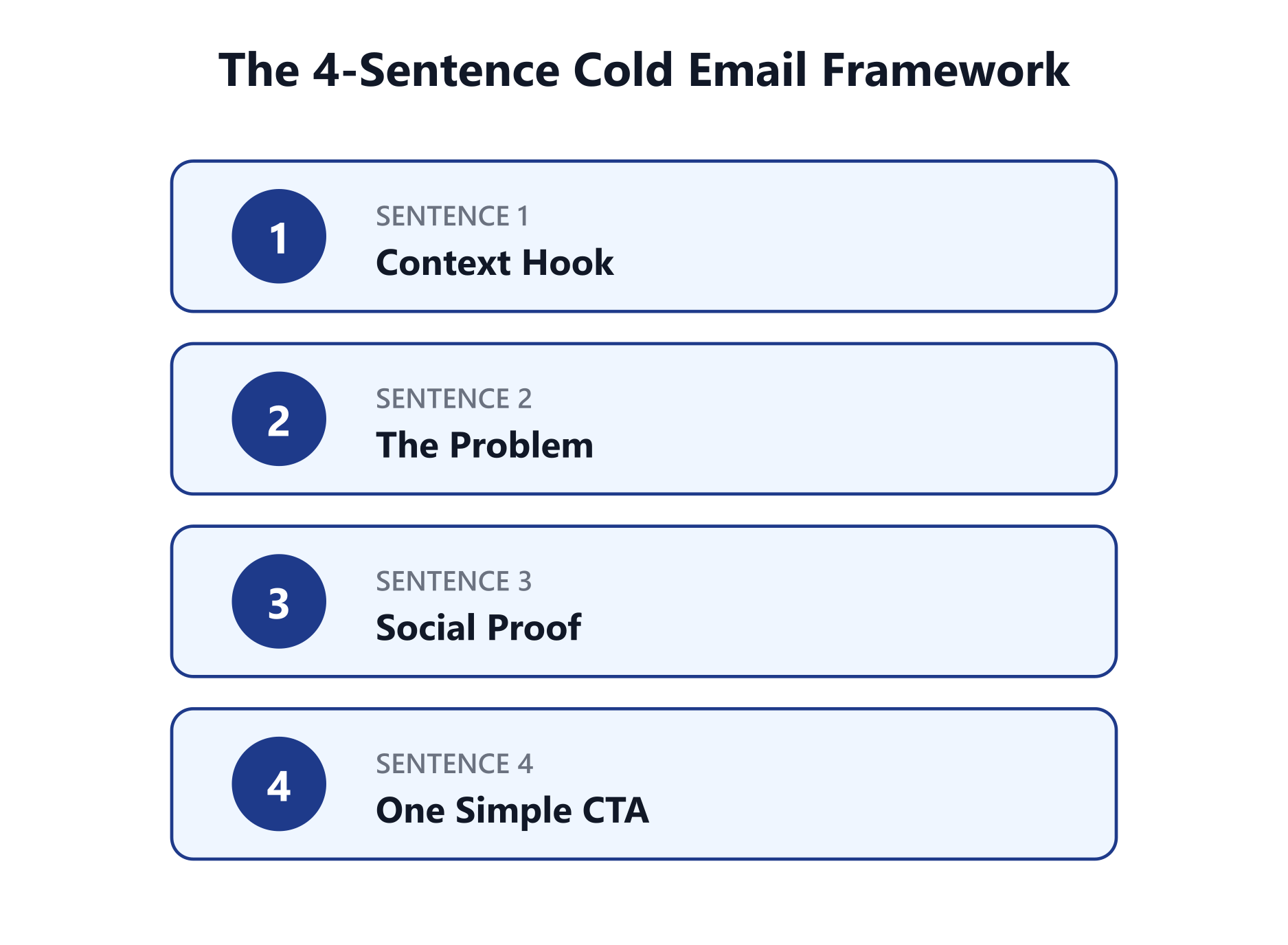
The highest-performing SaaS cold emails I've seen all follow a similar structure. The entire email stays under 75 words. Every sentence serves a specific purpose. If you want the full library of variations, I've broken down ten of the most reliable proven patterns separately.
Here's the shortest version worth using:
A few patterns that consistently tank reply rates:
Your email structure depends on how your product is sold. A SaaS company offering a free trial writes very differently than one selling through demo calls. Here are three cold email templates that work for different motions.
Why this works: The value is obvious in the first line. The risk is zero because it's free. The setup time ("under 5 minutes") removes the "this will take forever" objection. And the CTA is dead simple — reply with one word.
This is the format that consistently produces 20 to 30% positive reply rates for SaaS companies with a free tier. Keep it short. Keep it clear. Make the next step as easy as possible.
Why this works: It opens with a problem the recipient is likely experiencing right now. The social proof is specific and measurable, not vague. And the CTA is low commitment — 15 minutes, not a 45-minute product tour.
The key difference from Template 1: you're asking for the recipient's time, not just a click. So the email needs to do more work upfront. The problem has to be sharp enough that the recipient thinks "yes, that's exactly what we're dealing with."
Why this works: Authenticity cuts through noise better than any optimization trick. This template works because it sounds like a real person talking about something they built to solve their own problem. The origin story creates trust. The tone is casual and confident. No corporate speak. No buzzwords. Just a founder reaching out.
I've seen this founder-voice style outperform highly optimized copy. The reason is simple. It matches how the person actually talks. That genuineness comes through even in a cold email.
There are two approaches to follow-up. Both have real data behind them.
Rule of thumb: If your target market is under 50,000 contacts, use sequences. Over 500,000, single sends with broader reach may outperform.
For building and testing sequences at scale, Salesforge generates full multi-step sequences from your ICP and business context in 20+ languages. And if you want the entire outbound motion handled autonomously, Agent Frank prospects, writes, sends, and follows up on his own. That compresses weeks of manual campaign iteration into days.
You've built your list, set up your infrastructure, and written your emails. But there's one more layer that runs alongside everything: cold email deliverability.
This isn't a one-time setup you do and forget about. It's an ongoing discipline that determines whether your emails land in Primary, Promotions, or Spam. And it needs attention for as long as you're sending.
Every new domain needs 14 to 30 days of simulated email activity before real campaigns begin. During warm-up, the domain sends and receives emails that mimic natural business communication. This builds trust with Gmail, Outlook, and other providers.
Warmforge handles this automatically with unlimited warm-up across every connected mailbox in Salesforge. No separate warm-up subscription. No manual process. Heat scores update in real time so you can see when a mailbox is actually ready to send.
Sending 200 emails from a single inbox in one day is a guaranteed spam trigger. Even on a well-warmed domain. Keep volume at 20 to 30 per inbox per day.
Equally important: your sending intervals should mimic human behavior. A real person doesn't send an email every 60 seconds like clockwork. They send a few. Read something. Reply to a thread. Send a few more. Salesforge spaces out your sends to match this natural pattern, which reduces spam filter detection.
If your bounce rate crosses 3%, pause your campaigns immediately and clean your list. High bounces tell providers you're sending to unverified or purchased lists. Their response? They tank your domain reputation across all your sending accounts. Not just the one with bad addresses.
Salesforge flags problem contacts before they damage your domains. That matters at scale, where a small percentage of bad addresses can affect thousands of legitimate sends.
Sending the exact same email to thousands of recipients triggers duplicate content filters. If Gmail sees 500 identical messages from the same domain in one day, it treats that as spam. Regardless of how good the content is.
Spintax solves this by creating slight wording variations across each send. Instead of "We built a tool that helps SDR teams," some recipients get "We created a tool for SDR teams." Others get "We developed something for teams running outbound." The meaning stays the same. But every email is technically unique.
Salesforge supports Spintax directly inside the sequence builder, along with AI personalization that varies opening lines per prospect.
Here's a problem most teams don't realize they have. They're sending emails and tracking reply rates, but they have no idea whether their emails are actually reaching the Primary inbox, sitting in Promotions, or going straight to Spam. Without this visibility, you're making decisions on incomplete data.
Warmforge tests inbox placement across Gmail, Outlook, and Yahoo. It gives you a heat score for every mailbox. So you can catch deliverability issues before they affect real prospects. If a mailbox drops below 85, pause it. Let it recover. Rotate in a backup.
At this point, your list is built, your infrastructure is ready, your emails are written, and your deliverability is protected. The next step isn't to scale. It's to test.
The single biggest mistake in any SaaS cold email strategy is assuming your first campaign will work and putting all your volume behind it.
Here's what a structured testing process looks like:
Most tests will fail. That's not a problem. That's the process. Some campaigns take 25,000 emails to produce a single positive reply (clear failures). Others take 1,900 emails per positive reply (clear winners). The difference is targeting and copy. Not volume.
You need the failures to find the winners.
Salesforge supports A/Z testing (up to 26 variants, not just A/B). You can test subject lines, opening hooks, CTAs, and copy angles in parallel instead of sequentially. That compresses months of testing into weeks.
Most SaaS teams track the wrong metrics. That leads to decisions based on misleading data.
Once you find your winning campaigns, the natural instinct is to maximize volume. Send more emails. Reach more people. Grow faster. That instinct, if not managed carefully, kills the channel.
If your total addressable market is 500,000 contacts, sending 10,000 emails per month means you're touching just 2% per cycle. At that pace, you can run the same campaigns for years without exhausting your audience.
The teams that see conversion rates drop over time are almost always over-emailing the same people. Sending the same prospect 4 to 5 emails in a two-week sequence. Then re-adding them to a new campaign a month later. That burns goodwill and triggers spam complaints.
One email per prospect every 30 to 60 days keeps the channel sustainable.
Here's the surprising part. The same campaign can work for 12 to 18 months if you're not burning through your market. The copy that works today will still work next quarter. Because the problem you solve doesn't change. Only the people experiencing it do.
As your email volume increases, you need more domains and inboxes to support it. Without overloading any single sending account. The odd/even/burner domain rotation keeps everything balanced.
Work backward from your growth targets. If a winning campaign converts at one signup per 300 emails and you need 100 signups per month, you need to send roughly 30,000 emails. Build your domain and inbox infrastructure to handle that safely. With buffer capacity for testing new campaigns alongside your winners.
Salesforge's unlimited mailboxes and unlimited LinkedIn senders mean you can scale sending infrastructure without multiplying costs. There's no per-seat pricing to burn through as your team grows. And no per-mailbox charge that turns 30 domains into a 30x line item on your invoice.
These are the mistakes I see most often in SaaS cold email campaigns. Every one of them is avoidable.
If your outreach domain gets blacklisted, your customer support emails, billing notifications, and team communication all go down with it. Always use secondary domains for cold email. This is not optional.
New domains with no sending history get treated as spam by default. Budget 14 to 30 days of warm-up before launching any real campaign. Trying to skip this step to move faster will slow you down significantly when your emails start bouncing.
Emails packed with buzzwords, product categories, and corporate language get ignored. "We are an AI-powered sales engagement platform" tells the recipient nothing. Write the way you'd actually explain your product to someone you met at a conference. Plainly. Briefly. In terms of what it does for them.
Sending one email template to 10,000 contacts and hoping it works is not a strategy. Test 15 to 30 variants in the first month. Let the data tell you which 2 or 3 work. Then scale those.
Open rates are inflated by Apple's privacy changes and no longer reliable. Focus instead on positive reply rate, emails per signup (for free-trial SaaS), meetings booked per 1,000 emails (for demo-driven SaaS), and channel-specific LTV-to-CAC.
Sending 4 to 5 follow-up emails in two weeks annoys recipients and drives spam complaints. Each subsequent follow-up has diminishing returns and increasing risk. One well-timed email every 30 to 60 days is more sustainable and often produces better results over the long run.
Deliverability is not a set-it-and-forget-it task. Domain reputation changes over time. Bounce rates fluctuate as your data ages. Inbox placement can shift without warning. Monitor these metrics continuously. Not just during setup.
Running SaaS cold email software requires four layers working together:
Some teams piece this together with separate tools. Apollo or ZoomInfo for data. Clay for enrichment. Instantly or Smartlead for sending. A separate warm-up service. And a CRM for tracking.
This approach works but creates integration complexity. Higher monthly costs. And more points of failure when one tool updates its API or changes its pricing.
The alternative is a single stack that handles the full workflow end to end.
Salesforge sits at the center of the Forge stack and covers outreach, deliverability, and reply management natively. Here's how the layers connect:
For the layers Salesforge itself doesn't own, the Forge stack extends naturally:
Everything pushes into Salesforge without CSV exports in the middle.
Trust signal worth noting: Salesforge holds a 4.6/5 on G2 across 126+ real user feedback reviews. With 10,000+ businesses actively using it.
SaaS cold email is not dead. Lazy SaaS cold email is.
The teams generating real revenue from this channel share three things:
Start with the basics. Set up secondary domains. Authenticate everything. Warm up for 2 to 4 weeks. Build a list filtered by buying signals, not just job titles. Write short emails in plain language with one clear ask. Test at least 15 variants before deciding what works. Track emails per signup, not open rates. And protect your market by not over-emailing the same people.
When it comes to email marketing for SaaS, very few channels match the precision and speed of a well-built cold email system. No algorithm deciding who sees your message. No ad auction inflating your cost per lead. Just the right message, to the right person, at the right time.
If you want the infrastructure, warm-up, sequencing, and AI SDR bundled into one platform without stitching five tools together, Salesforge is built for exactly this.
Yes, in most markets, as long as you follow the relevant regulations. In the US, CAN-SPAM requires a clear unsubscribe option, a physical mailing address, and honest subject lines. In the EU, GDPR requires legitimate interest as a legal basis for B2B outreach. In Canada, CASL has stricter opt-in requirements. The common thread: your emails must be relevant, properly targeted, and easy to opt out of. Mass blasts to purchased lists with no unsubscribe option are where legal issues arise.
Start with 20 to 30 emails per inbox per day. If you have 10 inboxes across 5 domains, that gives you 200 to 300 emails daily. Scale volume gradually over weeks, never overnight. Aggressive increases on new domains get flagged by providers almost immediately. Most SaaS companies running successful cold email campaigns send between 5,000 and 50,000 emails per month, depending on market size and infrastructure maturity.
For outreach to completely cold contacts, a 5 to 10% total reply rate is solid. A 15 to 25% positive reply rate (excluding out-of-office and unsubscribes) is excellent. It typically indicates strong targeting combined with good copy. If you're consistently below 3%, the issue is usually one of three things: poor targeting, deliverability problems, or weak copy. Roughly in that order of likelihood.
Both approaches work. The right choice depends on your situation. Multi-step sequences of 3 to 4 emails over 12 to 14 days can generate up to 3x more replies. They work well for demo-driven SaaS with smaller addressable markets. Single sends to your full market every 30 to 60 days suit free-trial SaaS with large audiences. They produce fewer spam complaints and maintain consistent conversion rates over longer periods. If you're unsure, test both with enough volume to get meaningful data.
The best tool depends on your specific workflow, but look for these five capabilities:
Salesforge covers all of these, with Warmforge bundled free for warm-up, Agent Frank as the AI SDR, and native sync with HubSpot, Salesforce, and Pipedrive.