If your cold emails aren’t reaching inboxes, your SPF record might be the problem. SPF (Sender Policy Framework) is a DNS text entry that tells email servers which servers can send emails for your domain. Misconfigured SPF records cause over 60% of email deliverability issues, and nearly 67% of SPF records contain errors. Fixing these can improve delivery rates up to 99% and reduce bounce rates by 30%.
Key takeaways:
This guide explains how SPF works, how to set it up, avoid common errors, and maintain it for optimal email performance. Whether you send 100 or 10,000 emails, getting SPF right is essential.
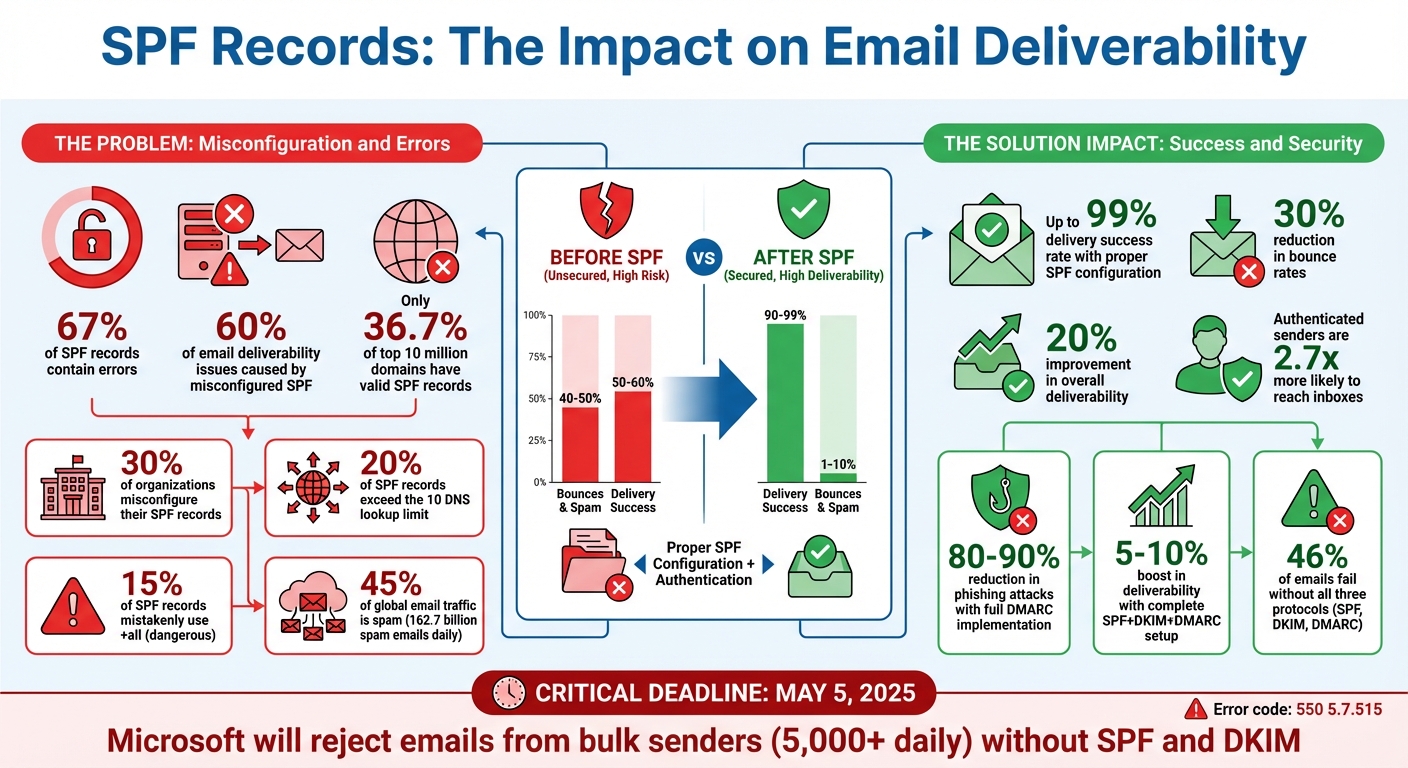
SPF Email Authentication Statistics and Impact on Deliverability
An SPF record is a type of DNS entry that begins with v=spf1, followed by a list of servers authorized to send emails on behalf of your domain. When an email is sent, the recipient's server checks the SPF record during the SMTP transaction. It verifies the "Return-Path" address (a hidden routing address used for bounce handling) rather than the visible "From" address. If the sender's IP address matches an authorized source in the SPF record, the email passes authentication. If not, the receiving server enforces the policy outlined in the record, which could mean flagging the email as spam or rejecting it entirely. This process is essential for maintaining a trustworthy sender reputation, especially in cold email campaigns.
Now that we’ve covered the basics of SPF records, let’s dive into how they enhance email deliverability.
SPF plays a critical role in ensuring your emails land in inboxes instead of spam folders. Authenticated senders are 2.7 times more likely to reach recipients’ inboxes compared to those without proper authentication. Domains with well-configured SPF records often see a 30% drop in bounce rates and can achieve delivery success rates of up to 99%. Simply managing SPF effectively can improve overall deliverability by as much as 20%.
Email providers like Google and Yahoo treat SPF as a non-negotiable standard, particularly for bulk senders who send thousands of emails daily. Without SPF, your emails are far more likely to be flagged or blocked entirely.
But SPF isn’t just about deliverability - it’s a cornerstone for building a solid sender reputation, especially in cold email campaigns.
For cold email campaigns, SPF is the backbone of your sender reputation. With spam accounting for 45% of global email traffic - that’s over 162.7 billion spam emails sent every day - email providers rely on SPF to separate legitimate emails from spam. Despite its importance, only 36.7% of the top 10 million domains have a valid SPF record, and around 30% of organizations misconfigure theirs, leading to over 60% of email deliverability issues.
The stakes are about to get even higher. Starting May 5, 2025, Microsoft will automatically reject emails from bulk senders (those sending over 5,000 emails daily) that lack proper SPF and DKIM authentication. These rejected emails will return the error code "550 5.7.515". Without proper SPF setup, your emails won’t just face deliverability challenges - they may never reach their destination at all. And for cold outreach, this could mean losing critical opportunities to generate leads and book meetings. Utilizing the right top sales tools can help mitigate these risks.
(function(d,u,ac){var s=d.createElement('script');s.type='text/javascript';s.src='https://a.omappapi.com/app/js/api.min.js';s.async=true;s.dataset.user=u;s.dataset.campaign=ac;d.getElementsByTagName('head')[0].appendChild(s);})(document,372145,'tu1or50rqqejh816h1cm');
Start by identifying every server and service that sends emails on behalf of your domain. This includes your primary email provider (like Google Workspace or Microsoft 365), marketing platforms (Mailgun, SendGrid, Amazon SES), CRM systems (Salesforce, HubSpot), sales tools (Outreach.io, Apollo, Reply.io, Salesforge), and even your website's contact forms or password reset emails.
To make this process easier, review your recent email headers and focus on the "Received" section to trace the IP addresses used for sending emails. Keep a detailed spreadsheet to track each email source, its SPF mechanism, and the last time it was verified. This documentation will save you time when adding new tools or making infrastructure changes.
"From a security, operational and deliverability perspective, dmarcian advocates for the segmentation strategy for SPF management. We recommend that different email streams (types of traffic) be separated when possible." - Asher Morin, Director of Deployment, dmarcian
Once you've documented all your email sources, you’re ready to create and publish your SPF record.
A properly configured SPF record is essential for protecting your email campaigns. Begin with v=spf1 and follow it with the authorized mechanisms. For example:
ip4: or ip6: to specify IP addresses or ranges (e.g., ip4:192.0.2.0/24).
include: followed by their SPF domain (like include:_spf.google.com for Google Workspace).
a and mx mechanisms to authorize your domain’s A record or MX record IPs.
End your SPF record with a qualifier:
~all (soft fail) during setup or domain warm-up to flag unauthorized mail without rejecting it.
-all (hard fail) for stricter protection once everything is verified.
To publish your SPF record, log into your DNS host and create a TXT record. Set the Host/Name field to @ for your root domain or specify your subdomain. Paste the SPF syntax into the Value/Content field and set the TTL (Time to Live) to 3,600 seconds (1 hour). For faster troubleshooting, temporarily lower the TTL to 300 seconds when making changes. DNS updates usually propagate within 15–30 minutes but can take up to 48–72 hours in rare cases.
After publishing, validate your SPF record with tools like MXToolbox or by running dig TXT yourdomain.com in the command line. Be meticulous - syntax errors, such as typos in "include" statements or missing spaces, occur in about 30% of SPF records.
Next, make sure your SPF record complies with DNS lookup limits.
SPF records are restricted to 10 DNS lookups per record. This limit prevents overloading DNS infrastructure and avoids "SPF PermError" issues, which can lead to emails being rejected or flagged as spam. Surprisingly, nearly 20% of SPF records exceed this limit, rendering them ineffective.
Here’s how different mechanisms impact the lookup count:
include, a, mx, ptr, exists, and redirect count toward the limit.
ip4, ip6, and all do not count.
To stay within the limit:
include statements with direct IP addresses when possible. Contact your providers for their IP ranges and use ip4: or ip6: instead.
ptr mechanism - it’s outdated, unreliable, and wastes lookups.
For high-volume email campaigns, consider using subdomains to segment your traffic. For example, set up separate SPF records for marketing.example.com and sales.example.com. Each subdomain gets its own 10-lookup limit, giving you more flexibility. SPF flattening tools can also simplify complex records by converting include chains into IP lists, but remember to update these manually when providers change their IPs.
| Mechanism | Counts Toward 10-Lookup Limit? |
|---|---|
include |
Yes |
a |
Yes |
mx |
Yes |
ip4 / ip6 |
No |
all |
No |
Even seasoned professionals can make mistakes when setting up SPF records. In fact, 67% of SPF records contain errors that result in email delivery issues, with syntax problems alone impacting 30% of all records. These missteps can derail your cold email campaigns before they even reach the inbox. Let’s break down the most common SPF problems and how to resolve them.
A domain can only have one SPF TXT record. If you add multiple records without checking for existing ones, it confuses mail servers and triggers an SPF "PermError." This often leads to emails being rejected or flagged as spam.
To fix this, use tools like MXToolbox or Google Admin Toolbox to locate all TXT records starting with v=spf1. Combine all authorized sending mechanisms into a single record. For example, if you have separate entries for Google Workspace and Microsoft 365, merge them like this:
| Incorrect (Multiple Records) | Correct (Consolidated) |
|---|---|
Record 1: v=spf1 include:_spf.google.com ~all Record 2: v=spf1 include:spf.protection.outlook.com -all |
v=spf1 include:_spf.google.com include:spf.protection.outlook.com ~all |
"A domain or subdomain can only have ONE SPF TXT record. If an SPF record already exists, edit it instead of creating a new one. Multiple SPF records will cause email authentication to fail." - Carlos Ascanio
Before you make any changes, audit your DNS records. If you're updating SPF entries, consider temporarily lowering the TTL (Time to Live) to 300 seconds (5 minutes). This lets you quickly revert changes if something goes wrong. After consolidating, check your DNS lookups to avoid future errors.
Another common SPF issue is exceeding the 10-lookup limit, which affects nearly 20% of SPF records. When this happens, mail servers may return frequent PermErrors, reducing inbox placement rates by up to 30%.
Here’s how to stay within the limit:
include statements with direct IP addresses using ip4: or ip6: mechanisms. For instance, instead of include:_spf.sendgrid.net, use ip4:167.89.0.0/17.
ip4:192.168.1.0/24) to group multiple IP ranges into one entry.
ptr mechanism - it’s unreliable and consumes unnecessary lookups.
By managing lookups efficiently, you can ensure your SPF record operates smoothly without compromising email deliverability.
The qualifier at the end of your SPF record defines how mail servers handle unauthorized emails. Alarmingly, 15% of SPF records mistakenly use +all, which allows anyone to send emails from your domain - a dream scenario for spammers.
Here’s a quick breakdown of SPF qualifiers:
| SPF Qualifier | Unauthorized Email Handling | Best Use Case |
|---|---|---|
-all (Hard Fail) |
Rejects the email outright | Established domains with verified sender lists |
~all (Soft Fail) |
Flags email as suspicious or spam | Testing, domain warm-up, or hybrid setups |
?all (Neutral) |
No policy applied | Not recommended for security |
+all (Pass) |
Allows all emails | Dangerous; avoid at all costs |
For cold email campaigns, start with ~all while testing or warming up a domain. This allows you to identify and fix any issues without fully rejecting unauthorized emails. Once your sending sources are verified and your deliverability is stable, switch to -all for stronger protection against spoofing and spam.
Even if your SPF record is set up correctly, it can lose its effectiveness over time without regular updates. In fact, 40% of users neglect routine SPF testing, which can lead to reduced email performance over time. Below are actionable tips to help you maintain and fine-tune your SPF records for consistent cold email success.
Email systems change constantly. Every time you add or remove an email service, your SPF record needs to be updated. To stay ahead of potential issues, review your SPF records monthly - or at the very least, quarterly.
One helpful approach is to document your email sources, SPF mechanisms, and the dates of their last verification in a simple spreadsheet. This makes audits quicker and helps avoid mistakes, especially when multiple team members manage your DNS records. During these reviews, remove outdated IP addresses and unused "include" statements. These obsolete entries not only waste valuable DNS lookups but can also leave your domain vulnerable to spam abuse.
"Review your SPF records monthly to remove outdated IP addresses, update include statements, and ensure you stay within the 10-lookup limit." - Mailforge
When updating your SPF record, temporarily lower the TTL (Time to Live) to 300 seconds to speed up propagation. Once the changes are verified, you can reset it to the standard 3,600 seconds.
For domains that don’t send any emails, it’s a good idea to use a restrictive "deny all" SPF record (v=spf1 -all). This prevents spoofing attempts and strengthens your domain’s security posture. Regular updates are critical to keeping your cold email campaigns out of spam folders and maintaining high deliverability rates.
To protect your primary domain’s reputation, run cold email campaigns through dedicated subdomains (e.g., outreach.yourdomain.com). This separation minimizes risks and keeps your main domain safe from potential deliverability issues.
Keep in mind that each subdomain requires its own SPF record. The SPF record for your root domain does not automatically extend to its subdomains. This separation not only safeguards your main domain but also makes troubleshooting easier. If a subdomain gets flagged or blacklisted, your primary domain remains unaffected. You can also use this strategy to organize email streams (e.g., marketing, transactional, cold outreach) for better management and oversight.
"From a security, operational and deliverability perspective, dmarcian advocates for the segmentation strategy for SPF management. The idea is to separate streams per type, such as bulk marketing, transactional, billing, specific third party vendors, operational entities, and so on." - Asher Morin, Director of Deployment, dmarcian
When setting up an SPF record for a subdomain, make sure to specify the subdomain name in the Host/Name field of your DNS settings (e.g., "outreach"). Avoid using "@" as it refers to the root domain. Just like with your main domain, conduct regular audits for subdomain SPF records. Remove inactive services and consolidate entries to stay within the 10-lookup limit.
After optimizing your SPF record, it's time to integrate DKIM and DMARC to strengthen your email authentication system. These three protocols work together to protect your domain and improve email deliverability. Here's how they function: SPF ensures only authorized servers can send emails on your behalf, DKIM adds a cryptographic signature to prove the email hasn’t been altered, and DMARC determines how to handle authentication failures. Without all three in place, nearly half of your emails - 46% to be exact - might never reach their destination.
The synergy between these protocols is key. DKIM's cryptographic signature remains intact even if an email is forwarded, while DMARC ensures alignment by requiring the domain in the "From" header to match the domain authenticated by either SPF or DKIM.
| Protocol | Primary Function | What It Protects | Resilience |
|---|---|---|---|
| SPF | Authorizes sending servers | Prevents domain spoofing | Can fail during email forwarding |
| DKIM | Verifies message integrity | Prevents email tampering | Survives forwarding |
| DMARC | Enforces authentication policies | Manages authentication failures | Provides reporting capabilities |
By combining these protocols, you not only secure your domain but also improve your email campaigns' success rates.
Start by setting up SPF and DKIM, ensuring they propagate across DNS records (this usually takes about 48 hours). Once these are active, introduce DMARC with a monitoring policy (p=none). After reviewing reports for 2–4 weeks and confirming clean results, gradually enforce stricter policies: move to p=quarantine (sending failures to spam) and eventually to p=reject (blocking unauthenticated emails). This phased approach allows you to catch and resolve issues before they harm your sender reputation. Organizations that fully implement DMARC often see phishing attacks drop by 80% to 90% and enjoy a 5% to 10% boost in email deliverability rates.
"DMARC, DKIM, and SPF are important for protecting your domain. Implemented correctly, they'll boost your deliverability rate and customer experience. Left forgotten, your messages might end up in email purgatory: the spam folder." - Valimail
For cold email campaigns, prioritize configuring DKIM since it holds up better than SPF during forwarding. Use 2048-bit keys for stronger security and rotate them every 6–12 months. Additionally, review your DMARC aggregate reports weekly or monthly to identify unauthorized use of your domain and correct any misconfigurations before they damage your reputation. This proactive monitoring helps keep your emails out of spam folders and ensures a reliable sender reputation.
Getting your SPF setup right is critical for keeping your cold email campaigns secure and ensuring your messages actually land in inboxes. While you've learned about setting up and maintaining SPF records, the next step is to consider tools that automate this process and make managing SPF a breeze.
Why is this so important? Well, more than 60% of email deliverability issues are caused by incorrect SPF configurations. A poorly managed SPF record can be the difference between a stellar 99% delivery rate and your emails being flagged as spam. Here's how platforms like Salesforge can help you avoid these pitfalls.
Salesforge's Forge Stack is designed to take the headache out of email authentication. What used to take hours - like setting up SPF, DKIM, and DMARC records - can now be done in just minutes. Their Warmforge tool, included with every Salesforge subscription, actively monitors your mailbox health score (rated 0–100) and performs monthly inbox placement tests to ensure your authentication records are working properly. If your health score drops below 97%, it’s a clear sign to pause your campaigns and troubleshoot your email content or infrastructure.
Need private email infrastructure? Infraforge provides dedicated IPs and automatically aligns SPF records with your private servers. For teams that need a quicker setup, Mailforge offers shared IP pools at just $2 per mailbox per month - about three times cheaper than Google Workspace - with automated DNS configuration. Meanwhile, Primeforge takes care of managing Google Workspace and Microsoft 365 mailboxes, using "ESP Matching" to send emails from the same provider as your recipient, which can further improve deliverability.
"Procedures that usually took hours (setting DKIM, SPF, etc. records) for multiple domains, now take a few minutes. Mailforge is also cost-efficient since you spend per mailbox ~3 times less than with Gmail."
– Karlo Binda, Founder, Leadsnack.co
Leadsnack.co adopted Mailforge in 2024 to streamline their cold email operations. What once required hours of work - like setting up DKIM and SPF for multiple domains - was reduced to just minutes. On top of that, they slashed their costs by nearly threefold compared to Gmail.
These features don’t just save time - they make Salesforge a standout choice compared to traditional email tools.
When compared to third-party SMTP providers like SendGrid or Postmark, Salesforge offers a much simpler experience. Those services require you to manually add their servers to your SPF record, which can quickly max out the 10 DNS lookup limit. With Salesforge, the Forge Stack automates the entire authentication process, including DNS configuration.
Here’s a quick comparison of Salesforge against manual setups with Gmail or Outlook:
| Feature | Manual Setup (Gmail/Outlook) | Salesforge (Forge Stack) |
|---|---|---|
| Setup Time | 10–30 minutes per domain | 2–3 minutes for bulk domains |
| DNS Configuration | Manual SPF/DKIM/DMARC setup | Fully automated DNS setup |
| Technical Skill Required | High | None |
| Cost per Mailbox | $6–$18/month | $2/month |
| Infrastructure Type | Mainstream (Google/Microsoft) | Shared (Mailforge) or Private (Infraforge) |
For those who prefer to validate and monitor their SPF records independently, tools like MxToolbox can help you detect syntax errors or excessive DNS lookups. Kitterman's SPF Validator is another option, offering RFC-compliant checks to ensure your records meet processing limits.
Getting your SPF configuration right is a game-changer for cold email campaigns. A well-structured SPF record can slash bounce rates by 30% and push deliverability rates up to an impressive 99%. To protect your sender reputation, steer clear of common pitfalls like multiple SPF records, exceeding the 10 DNS lookup limit, or using the insecure +all qualifier. Instead, focus on consolidating all sending sources into a single SPF record, minimizing DNS lookups by replacing include mechanisms with specific IPs when necessary, and starting with ~all during warm-up before switching to -all for tighter security. This setup not only strengthens SPF but also lays a solid foundation for the entire email authentication process.
But let’s not forget - SPF is just one piece of the puzzle. It works hand-in-hand with DKIM and DMARC to create a robust three-layered authentication system. Without all three protocols, nearly half (46%) of emails fail to make it to the inbox. Major email providers like Google, Yahoo, and Microsoft require these protocols for bulk senders, making their implementation non-negotiable.
Equally important is maintaining your SPF records. Quarterly audits are essential to weed out outdated IPs and inactive third-party services. Using dedicated subdomains for cold email campaigns can also shield your primary domain’s reputation. If you’re managing multiple domains, automation tools like Mailforge can save significant time, cutting the setup process from 10–30 minutes per domain to just 2–3 minutes total. This approach can also help reduce the 30% misconfiguration rate that often comes with manual setups.
When combined with strong DKIM and DMARC protocols, proper SPF management can boost deliverability rates by as much as 20%. In cold email marketing, every percentage point of inbox placement counts - it’s the difference between a campaign that converts and one that ends up lost in spam folders.
To stick to the 10 DNS lookup limit for SPF records, simplify your configuration. Stick to only the necessary include mechanisms and swap out unneeded includes with specific ip4 or ip6 ranges. Avoid using nested includes or duplicating mechanisms. Another effective approach is to flatten your SPF record, which reduces the number of lookups and keeps you within the limit. An optimized SPF record not only adheres to DNS restrictions but also helps maintain strong email deliverability.
Using SPF, DKIM, and DMARC together creates a strong defense against email threats like spoofing and phishing. Here's how they work: SPF checks if the email is sent from an authorized server, DKIM ensures the message remains intact and untampered during transmission, and DMARC sets rules for handling any unauthorized emails. When combined, these protocols not only protect your domain but also boost your email deliverability and maintain your sender reputation.
Using subdomains for cold email campaigns is a clever way to safeguard your primary domain's reputation. When you send emails from a subdomain, any potential issues - like spam complaints or deliverability hiccups - are contained to that subdomain. This means your main domain remains unaffected, which is crucial for businesses that depend on it for regular communication or branding efforts.
On top of that, subdomains make it easier to manage email authentication protocols such as SPF, DKIM, and DMARC specifically for your outreach efforts. This setup not only improves deliverability rates but also lowers the chances of your emails landing in spam folders. A dedicated subdomain helps you maintain a polished, professional image while fine-tuning your cold email strategy.