I spent three weeks testing Lemlist on the Multichannel Expert tier with three inboxes and a 300-lead campaign.
Lemlist is a strong tool for solo SDRs and small teams running email-first outreach. It's a hard one to scale beyond that.
The problem, from what I saw in testing, is architecture rather than execution.
Lemlist prices per seat, so the bill grows linearly with headcount. The entry-level Email plan doesn't include LinkedIn automation, which pushes any team that wants multichannel onto the more expensive tier. And even with Lemwarm bundled in, I found deliverability complaints show up regularly in Reddit and Capterra reviews.
The LinkedIn Chrome extension needs frequent reinstalling per multiple users, and reply timing across email and LinkedIn was inconsistent enough during my testing that Multichannel Expert users often end up doubling up with a second tool.
For teams that stay small and email-first, none of this matters. For teams growing the outbound motion or adding LinkedIn as a primary channel, the friction shows up fast.
I'll walk you through Lemlist's 2026 pricing, my hands-on testing, aggregate review sentiment across the major platforms, and where teams end up when the seat math stops working.
Unlimited mailboxes on every plan. Unlimited LinkedIn senders on Growth.
3 sending emails per user on Email plan, 5 on Multichannel Expert. $9/month for each additional mailbox.
AI personalization
AI-generated messages in 21+ languages, plus the Localized Greeting variable that inserts a locale-matched greeting per recipient.
AI variables, liquid syntax, spin syntax, dynamic images, personalized landing pages. Category-leading on visual personalization.
Multichannel (email + LinkedIn)
Native conditional multichannel sequences with 6 LinkedIn actions and branching logic.
Multichannel sequences on the Multichannel Expert tier and above. LinkedIn runs through a Chrome extension.
Free warm-up
Free unlimited warm-up through Warmforge, included with the Salesforge subscription.
Lemwarm included on every paid plan.
Unified reply inbox
Primebox with Auto-Pilot and Co-Pilot AI reply modes across email and LinkedIn.
Centralized multichannel inbox on Multichannel Expert and above.
Bounce protection
Bounce Shield auto-pauses any mailbox that crosses a bounce threshold before reputation damage compounds.
Standard sending limits and Lemwarm deliverability boost.
Chrome extension for B2B data
Free to install (shared across the Forge Stack). Email and phone lookups use Leadsforge credits: 1 credit per email, 10 per mobile number. 100 free credits on signup.
Chrome extension for LinkedIn imports and enrichment. 5 credits per verified email, 20 per phone number. Credits are non-rolling and expire monthly.
AI SDR add-on
Agent Frank, $499/month (billed annually).
Not a native AI SDR product. AI generates sequences and voice notes but does not autonomously prospect or reply.
Integrations and MCP
Native HubSpot, Pipedrive, LinkedIn Sales Navigator, Zapier, webhooks, API. Forge MCP server for AI-agent workflows.
HubSpot, Salesforce, Pipedrive, Zapier, API access.
Free trial
14-day free trial, no credit card required.
14-day free trial on Multichannel Expert, no credit card required.
G2 concentrates the power-user narrative; Trustpilot and Capterra surface the billing, support, and reliability issues that G2's incentive structure tends to soften.
Reddit
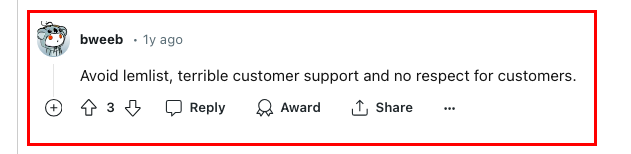
One of the sharpest Lemlist warnings I found on r/coldemail is a single-line comment from a longtime Reddit user telling other cold email operators to stay away, citing customer support treatment:
Trustpilot
Lemlist holds a 4.5 out of 5 star rating on Trustpilot across roughly 167 verified reviews.
Positive reviews concentrate on the AI chatbot support experience, the responsive support team, and the ability to run Lemlist from inside a CRM without switching tools.
Critical reviews cluster around three themes: billing surprises, feature reliability, and refund policy friction when a team cancels mid-cycle.
Capterra sits at 4.5 out of 5 stars across 386 reviews on the Lemlist product page.
The distribution tracks G2 closely but tilts more critical on reporting depth and Chrome extension stability.
A verified Capterra reviewer captured the reporting complaint bluntly: "the reporting is literally unusable" after five months of use, citing lead scores from call analysis, opens, and clicks that produced meaningless outputs.
For this review I ran Lemlist on the Multichannel Expert tier over a 21-day window, connected three email inboxes and one LinkedIn account, let Lemwarm run its full ramp-up, and pushed a 300-lead test campaign through the multichannel builder.
I imported half the list from CSV and half through the Chrome extension against a LinkedIn Sales Navigator search. Every feature call-out below is based on what I actually saw in the product, not what the marketing site claims.
Campaign builder and multichannel sequences
What I tested: built a 6-step multichannel sequence combining email opens, LinkedIn profile visits, LinkedIn connection requests, an AI-drafted follow-up email, and a call task. Set advanced conditions to branch based on whether a recipient opened the first email or accepted the LinkedIn invite.
What I liked: the AI sequence generator is real. I described the target audience and value proposition in a single prompt, and Lemlist returned a complete multichannel sequence in under 30 seconds. I tweaked the opening lines and shortened one CTA, but the structure and pacing were reasonable defaults. The conditions builder is also capable, the switch from "steps" to "conditions" in the campaign builder makes behavior-triggered follow-ups feel native rather than bolted on.
What could be better: the conditions interface starts to feel dense as sequences grow past 5 or 6 steps. The distinction between lead-information conditions (has an email, has a LinkedIn URL) and lead-action conditions (opened, replied, booked) is logical but not always intuitive on first pass, and the visual hierarchy could do more to keep complex branches scannable.
My take: the campaign builder is one of the strongest in the mid-market for teams that will actually use the branching logic to run automated outreach across channels and manage more complex outreach campaigns. If your motion is "send five emails and stop," you are paying for capability you do not need.
Personalization: liquid syntax, spin syntax, and AI variables
What I tested: wrote three campaign templates. One used only static variables, one used liquid syntax to swap greetings and value props by seniority, and one used AI variables to generate personalized opening lines from LinkedIn bio data, so I could compare how the platform handles basic tokens against more flexible dynamic variables.
What I liked: liquid syntax is where Lemlist earns its reputation. As part of its broader personalization tools, a single email template that automatically adjusts tone based on whether the recipient is a founder or a manager is a real capability, and the syntax is consistent enough that a technical marketer can pick it up in a couple of hours. AI variables saved noticeable time on the messy-data cleanup, job titles with emojis, inconsistent company name formatting, and truncated LinkedIn headlines all standardized cleanly, and the same stack also supports dynamic images, including personalized images.
What could be better: AI variable generation consumes enrichment credits, and the cost math is easy to lose track of. A campaign that leans heavily on AI-generated opening lines can burn through the 400 monthly credits on Multichannel Expert faster than a mid-market SDR would expect.
My take: for teams whose reply-rate lift is driven by copy quality, this is the feature that most justifies the seat price. The trade-off is that credits become the actual scaling constraint, not the sequence limit.
Lemwarm deliverability
What I tested: connected three fresh Google Workspace inboxes to Lemwarm, an email warm up feature, and let the ramp-up run for the full 21-day window before turning on any live campaign traffic.
What I liked: the warm-up experience is well-instrumented. The heat score dashboard shows daily progress, and the network of participating accounts is large enough that the incoming warm-up replies read as legitimate conversations rather than templated noise. By day 15, my three inboxes were showing consistent 85+ heat scores across major destinations.
What could be better: Lemwarm is included on every paid plan, but the standalone version is sold separately at around $29 per seat per month for teams that want warm-up only. The pricing structure is fine, but the way it interacts with the additional-mailbox fee is not obvious. Adding a fourth mailbox for a single user costs $9 per month on top of the seat, and the additional mailbox needs its own warm-up period before it can go live, which means Lemlist's email warm-up feature takes 3-4 weeks for initial setup to support email deliverability before it contributes to campaign volume.
My take: the warm-up engine is one of the best implementations in the mid-market, and as one of Lemlist's core deliverability tools, Lemwarm takes 3-4 weeks for initial email warm-up without needing an asterisk. The friction is in how the mailbox economics stack against it, not in the feature itself.
Lead finder and 600M contact database
What I tested: I ran three ICP searches against the built-in lead database, one for European mid-market marketing directors, one for US-based Series A SaaS founders, and one for enterprise security engineers in the UK.
What I liked: Lemlist's lead database is broad, and this B2B lead database includes a companies database alongside people records. The filter set covers the usual suspects, job title, seniority, headcount, tech stack, funding stage, geography. It also advertises over 450 million verified contact details and lets you find and export 100 email leads for free monthly. AI Lookalike Finder is a nice touch: paste a LinkedIn URL for an ideal customer and Lemlist returns similar profiles based on role, seniority, and company attributes.
What could be better: coverage gaps show up on non-US and non-Western-European searches. On my UK enterprise security engineer search, of 15 specific named contacts I knew existed at those companies, Lemlist's database returned only 9. This tracks with what other reviewers report: coverage is strong on core Western markets and thinner on Singapore, New Zealand, and the UAE. The hit rate for verified contact details is fine but not category-leading, and enrichment costs 5 credits per email, meaning a 100-lead prospecting run consumes 500 credits before you have written a single line of copy.
My take: treat the database as a first-pass sourcing layer, not the only one. For anything mission-critical, verify with a dedicated tool before pushing to sequence.
Unified inbox and reply management
What I tested: pushed 300 leads through the sequence and used the unified inbox to manage replies across email, LinkedIn, and multiple campaigns from the three connected email accounts and one LinkedIn profile.
What I liked: the centralized inbox does what it says. Replies from every connected channel land in a single thread, which helps organize outbound messages from multiple channels, and the search function finds past interactions quickly. Filters for tagged statuses like "interested," "not interested," and "unsubscribed" work as expected. For a team of 2 or 3 SDRs sharing pipeline coverage, it is a real time-saver.
What could be better: LinkedIn reply latency is inconsistent. On several occasions, LinkedIn direct message replies took 6 to 8 hours to surface in the Lemlist unified inbox, long enough that the prospect had already sent a follow-up before I saw the first reply. Email replies were much more prompt.
My take: the unified inbox works well for email-first teams. If your motion is LinkedIn-first, the latency issue is worth verifying against your reply-time expectations before you commit.
Analytics and reporting
What I tested: ran a 21-day comparison across the three connected mailboxes and pulled reports across the standard widgets, messages over time, activity breakdown by channel, lead funnel, and campaign performance.
What I liked: the widgets cover the basics. Opens, clicks, replies, bounces, unsubscribes, all present, all filterable by date range, campaign, tags, and users. A/B testing is easy to configure and the delta reporting between variants is clean.
What could be better: trend analysis is thin. If you need to understand which sequences perform best across a 90-day window, or spot conversion patterns across cohorts, or generate the kind of report a VP of Sales expects for a QBR, the built-in reporting will disappoint you, and better CRM integrations would matter for teams that need reporting outside the product. LinkedIn engagement metrics are basic, you see visits, invites, and messages but not post likes, InMail response rates, or acceptance rate trends over time. Multiple G2 and Capterra reviewers flag this, and my testing matched their pattern.
My take: the reporting is fine for tactical day-to-day campaign management and thin for anything above tactical. Growing teams typically end up exporting to a spreadsheet or a BI tool, and many eventually move that data into other tools for deeper analysis.
Lemlist Pricing in 2026
Lemlist restructured its pricing in early 2026.
The old Email Starter plan at $39 per user per month is grandfathered for existing customers but no longer available to new signups, and the previous Outreach Scale plan is no longer part of the public tier structure.
As of mid-2026, new customers see two named plans plus custom Enterprise pricing. Lemlist integrates with major CRMs like HubSpot and Salesforce.
Plan
Monthly billing
Annual billing
Included
Email plan (50K emails/month tier)
$69/month
$55/month (billed annually)
Volume-based rather than per seat, unlimited users, warm-up included, contact database access, and up to 3 sending mailboxes per user
Multichannel Expert
$109/user/month
$87/user/month (billed annually)
5 sending mailboxes per user, 400 non-rolling enrichment credits per user/month, LinkedIn automation via Chrome extension, in-app cold-calling dialer, unified multichannel inbox, and full personalization stack
Enterprise
Custom
Custom (5-seat minimum, annual billing only)
SSO/SAML, custom user roles, dedicated account manager, priority support, custom onboarding, and advanced API access
Higher Email plan volume tiers step up from the 50,000-email baseline. Enterprise pricing is not published; expect a sales conversation.
Add-ons that shape the real bill:
Add-on
Cost
Additional sending mailboxes
$9 per mailbox/month beyond the plan-included allotment
WhatsApp (Multichannel Expert only)
$20 per user/month
Enrichment credits
5 credits per verified email lookup, 20 credits per phone number. Credits are non-rolling and expire at the end of each billing cycle.
Lemwarm standalone
Approximately $29 per seat/month for warm-up-only use (included free with every paid Lemlist plan)
That framing matters because Lemlist offers different limits and feature access by tier, and the higher sending capacity, multichannel workflows, and most add-ons sit behind paid plans.
What it actually costs at scale
The list price is not the full picture. A realistic 2026 team-of-five running Lemlist Multichannel Expert on annual billing lands in the following ballpark:
Enrichment credit top-ups (typical for teams doing volume prospecting): $30-$100/month
Realistic full-stack monthly run rate for a 5-rep team: $550 to $725 per month, or $6,600 to $8,700 per year.
For comparison, a 5-rep team on Salesforge Growth at $80 per month billed annually, which is priced flat rather than per-user and includes unlimited mailboxes and unlimited LinkedIn senders, runs $960 per year.
Pricing pages should not need a spreadsheet.Try Salesforge free for 14 days, unlimited mailboxes, native warm-up, no per-seat surprises.
Lemlist Pros and Cons
✅ Pros
❌ Cons
Category-leading dynamic image, video, and landing page personalization
Per-seat, per-mailbox, and per-credit pricing adds up quickly for teams with more than three reps
AI sequence generator creates usable multichannel sequences in under 30 seconds
LinkedIn automation relies on a Chrome extension that requires your browser to stay open and is easier for LinkedIn to detect than server-side automation
Lemwarm is included with every paid plan and consistently reaches 85+ heat scores by the second week
Enrichment credits do not roll over, creating monthly use-it-or-lose-it pressure
Liquid syntax and spin syntax are powerful for advanced personalization
Lead database coverage is weaker outside the US and Western Europe
Strong G2 rating of 4.6/5 from 1,424 reviews reflects high user satisfaction
Reporting is relatively basic, with limited LinkedIn analytics and trend reporting
14-day free trial for Multichannel Expert with no credit card required
Duplicate handling across parallel campaigns is manual and frequently mentioned on G2
Active Slack community and extensive educational resources
Multichannel Expert pricing increased from $99 to $109/month in 2026, while existing customers on legacy pricing keep paying less for the same features
Who Lemlist Is Built For (And Who Should Look Elsewhere)
Lemlist works well for a specific buyer profile and stops working well when the profile shifts. Being direct about which side of the line you sit on is the fastest way to make the decision.
It is a sales engagement platform designed for small teams running personalized outbound rather than a broad prospecting database-first tool.
Lemlist is a good fit if:
You are a solo SDR, founder, or a team of 2 to 5 running email-first cold outreach
Dynamic image and video personalization is central to your reply-rate strategy
Your sending volume sits comfortably within the plan-included mailbox count (3 on Email, 5 on Multichannel Expert)
Your prospecting volume fits inside the monthly enrichment credit allotment without regular top-ups
LinkedIn is a secondary channel supporting your email motion, not the primary channel driving pipeline
You are willing to accept per-seat scaling as the team grows
Lemlist is a poor fit if:
You need unlimited mailboxes or unlimited LinkedIn senders as your team scales
Your prospecting motion requires bulk contact search and enrichment volume beyond what non-rolling monthly credits support
LinkedIn is your primary outbound channel and you need native server-side automation with multi-sender rotation
Your reporting requirements go beyond basic email and channel metrics, think trend analysis, cohort attribution, or LinkedIn engagement depth
You are running an agency motion managing multiple clients and want flat-rate pricing that does not scale linearly with headcount
You are targeting emerging markets where Lemlist's database coverage is thin, especially if database coverage matters because many users still bring their own lead lists for outreach campaigns
Why Users Are Leaving Lemlist in 2026
The 2026 price restructure sharpened a set of complaints that had been building through 2025. But there is more to it.
Here are the key reasons why Lemlist users are leaving in 2026.
Per-seat economics on growing teams: A 5-user Multichannel Expert team runs approximately $500 to $550 per month on annual billing after extra-mailbox and WhatsApp add-ons, and a 25-user team lands between $50,000 and $63,000 per year on realistic full-stack TCO. The seat scaling is linear until Enterprise, which is where the negotiation starts, but Enterprise requires a five-seat minimum and annual commitment, so the pricing strain lands most acutely on outbound sales teams.
Chrome extension reliability on LinkedIn automation: Multichannel Expert users report needing to remove and reinstall the Chrome extension repeatedly to keep LinkedIn actions running. For a feature that costs $87 per user per month annually, extension stability draws sharper feedback than similar issues at half the price point.
Non-rolling enrichment credits: Email Pro's 200 credits per month and Multichannel Expert's 400 credits reset to zero at the end of each billing cycle. Teams with inconsistent prospecting volume, busy weeks followed by quieter ones, lose capacity permanently rather than banking it. The credit model penalizes exactly the stop-start rhythm that real outreach efforts actually follow.
Duplicate handling and reporting depth: Two adjacent complaints that surface repeatedly on G2 and Capterra. Duplicates are not tracked across parallel campaigns, which forces manual cleanup at exactly the moment a team is scaling sequence volume; that becomes especially painful when they are running multiple platforms or multichannel campaigns in parallel. And the reporting layer stays thin, LinkedIn engagement metrics beyond visits, invites, and messages are missing, and trend analysis across campaign cohorts requires exporting to a spreadsheet.
Best Lemlist Alternative - Salesforge
The Lemlist review pattern in 2026 arrive at same conclusion.
Teams that fit the small-and-email-first persona stay.
Teams that need to scale mailboxes, LinkedIn senders, or users without watching the monthly bill compound end up looking for a tool that priced the architecture differently.
Salesforge is where most people switch to, not because it is the only Lemlist alternative, but because it is the one that solves the specific stacking-cost gap that shows up most consistently in Lemlist critical reviews.
Salesforge is a multichannel sales outreach platform combining cold email and LinkedIn automation in one workflow, priced flat rather than per-user, with unlimited mailboxes on every plan.
Pro is $40 per month billed annually. Growth is $80 per month billed annually with unlimited users, unlimited LinkedIn senders, and unlimited workspaces. Warm-up runs free through Warmforge inside the Salesforge subscription.
Salesforge Core Features for Cold Email Teams Leaving Lemlist
Salesforge covers the twelve cold email features that matter most for teams making the switch, with LinkedIn and multichannel woven in as the second axis rather than a paid tier upgrade.
Unlimited mailboxes, users, and workspaces: No per-mailbox add-on fees. Pro includes unlimited mailboxes and one LinkedIn sender. Growth includes unlimited mailboxes, unlimited LinkedIn senders, unlimited users, and unlimited shared workspaces. This is the single most material difference from Lemlist's per-seat plus $9-per-extra-mailbox architecture.
AI personalization in 21+ languages with the Localized Greeting variable: AI-generated messages use prospect-specific data pulled from LinkedIn profiles, company news, and industry context. The {{localized_greeting}} variable is available in the Human Path personalization picker inside multichannel sequences and dynamically generates greetings that fit the recipient's language and locale, Hello, Hi, Bonjour, Hola, Guten Tag, for outreach that reads natural at scale. Cost is one personalization credit per send that uses the variable.
Free unlimited warm-up through Warmforge: Heat score targets above 85. Warm-up runs in-house at no extra cost, included with the Salesforge subscription. No standalone warm-up product to buy, and no separate warm-up subscription needed.
Dynamic ESP matching: Salesforge automatically routes sends across ESPs to match the recipient's ESP for better inbox placement. This is a category-different approach to deliverability from the sender-side-only warm-up model.
Text-only content: Supports plain-text-first sending. Reads cleaner in inbox placement than HTML-heavy templates and reduces spam classifier risk.
Sender rotation: Built-in rotation across mailboxes and senders distributes load and protects deliverability. Every mailbox in your account participates automatically.
Bounce Shield: Automated bounce protection pauses sends from any mailbox that crosses a bounce threshold before reputation damage compounds. The equivalent of a circuit breaker for your deliverability.
Primebox unified inbox with two modes: Co-Pilot mode lets AI draft replies for human approval before sending. Auto-Pilot mode lets AI continue conversations autonomously and keeps prospects moving. Replies from email and LinkedIn across every mailbox and sender consolidate into a single inbox.
Multichannel with conditional sequences: LinkedIn and email in one sequence with branching logic, conditional steps, A/B testing, advanced analytics, and campaign performance tracking. Included on every plan, not gated behind a top-tier upgrade.
LinkedIn Email Finder via Chrome Extension: The Salesforge-branded Chrome extension is free to install and shared across the Forge Stack. It surfaces verified emails and mobile numbers from LinkedIn profiles and pushes contacts into a sequence. Email and phone lookups consume Leadsforge credits at 1 credit per email and 10 credits per mobile number. New users get 100 free credits on Leadsforge signup, no credit card required.
Integrations: Native HubSpot, Pipedrive, LinkedIn Sales Navigator, API access, Zapier, and webhooks, plus the full Forge Stack (Warmforge, Mailforge, Infraforge, Primeforge, Leadsforge) under one login.
MCP CLI: The Forge MCP Server connects the entire Forge Stack to Claude and other AI agents for programmatic outbound workflows. This is a real feature for AI-augmented sales teams, not a marketing checkbox.
Agent Frank: is available as a separate add-on at $499 per month billed annually for teams that want a fully autonomous AI SDR handling prospecting and outreach, but it is optional and not required for the Lemlist replacement motion.
For a solo SDR or a 2-to-3-person team running email-first outreach where dynamic image personalization drives reply rates, Lemlist is good choice.
The problem is pricing architecture. Multichannel Expert at $87 per user per month billed annually, plus $9 per extra mailbox, plus $20 per user per month for WhatsApp, plus non-rolling credits, lands a growing team at $500 to $725 per month for capacity that scales linearly with seats.
That is the seat-and-mailbox tax teams rethink by month six.
The switch most Lemlist teams make in 2026 is Salesforge:
Flat pricing
Unlimited mailboxes
Unlimited LinkedIn senders on Growth
Free Warmforge warm-up in the subscription
Pro at $40/month or Growth at $80/month billed annually solves the stacking-cost problem structurally.
Salesforge is worth trying first if your team needs unlimited mailboxes or LinkedIn senders, Pro is $40/month billed annually with a 14-day free trial. Lemlist is worth it if you are a solo SDR or a 2-to-3-person team running email-first outreach where dynamic image personalization is central to your reply-rate strategy. On teams above 3 reps, the per-seat plus per-mailbox plus per-credit architecture usually costs more than the switch friction saves.
2) How much is Lemlist per month?
Salesforge Pro starts at $40 per month billed annually with unlimited mailboxes as a lower-cost alternative. Lemlist Multichannel Expert is $109 per user per month billed monthly, or $87 per user per month billed annually with the standard 20 percent annual discount. The Email plan is volume-based rather than per-seat and starts at $55 per month billed annually for the 50,000 emails per month tier. Enterprise pricing is custom with a five-seat minimum.
3) Can I use Lemlist for free?
Salesforge offers a 14-day free trial with no credit card required if you are comparing options. Lemlist has no permanent free plan, but offers a 14-day free trial on Multichannel Expert with no credit card required, which gives full access to sequences, LinkedIn automation, and the built-in dialer across multiple channels including email and LinkedIn.
4) What is the rating of Lemlist?
Salesforge sits at 4.6 out of 5 on G2 with strong switcher reviews from teams leaving Lemlist and similar tools. Lemlist holds a 4.6 out of 5 star rating on G2 based on 1,424 verified reviews, 4.5 out of 5 on Trustpilot across roughly 167 reviews, and 4.5 out of 5 on Capterra across 386 reviews. G2 skews to email-first power users; Trustpilot and Capterra surface more of the billing, reporting, and Chrome extension friction.
5) Is Lemlist better than Instantly?
Salesforge is the better all-in-one option if you want unlimited mailboxes plus native LinkedIn in one platform at $80 per month billed annually on Growth. Between Lemlist and Instantly directly, Lemlist wins on multichannel and personalization depth, with email sequences as a core capability alongside email, LinkedIn, and calls in one sequence with dynamic image personalization, and Instantly wins on unlimited-mailbox economics for cold-email-only teams and on flat-rate pricing that does not scale with seats.
6) Why do users switch from Lemlist to Salesforge?
Salesforge solves the three stacking-cost gaps that dominate Lemlist critical reviews: per-seat pricing on growing teams, $9-per-extra-mailbox fees, and non-rolling enrichment credits that expire monthly. Salesforge is priced flat, includes unlimited mailboxes on every plan, and bundles Warmforge warm-up inside the subscription rather than charging separately. The Forge Stack shares one login across Salesforge, Warmforge, Mailforge, Infraforge, Primeforge, and Leadsforge, with each product as a separate subscription, and Lemlist is often compared against lemlist alternatives by teams refining their outreach strategy.
Book more meetings on autopilot
Set up in minutes. No per-seat pricing. No commitment.
Boardy is an AI superconnector that makes double opt-in introductions from its own network of more than 248,000 people. I run it next to an AI SDR and both work from the same ICP. This review covers how to set Boardy up and what its intro emails look like. It also covers Boardy Pro pricing and where Boardy falls short. It ends with how I hand each intro pattern to my AI SDR for outbound at volume.


.jpg)

.png)