Instagram cold DM automation sounds like a fast way to get an account banned. I assumed the same until I saw an account send 100 cold DMs a day without a single suspension.
That changed how I look at the channel. Owners of salons and clinics check their DMs many times a day because that is where their own customers reach them.
Very few sales teams reach those owners there. Plenty of SDRs and setters still send every Instagram message by hand, and many skip the channel completely.
The account belongs to my friend Tymoteusz, who has spent seven months building an Instagram outreach tool. I went through the numbers with him to see how Instagram can add pipeline next to email and LinkedIn.
Below I break down the safe daily limits, the workflow and the templates that get replies.
Yes, you can automate them. It helps to define what cold means on Instagram first.
On email, a cold message goes to someone who does not know you. Instagram adds a technical definition on top of that.
Meta's official messaging API only lets a business reply to people who messaged it in the last 24 hours or who just commented on its post. Every conversation outside that window is one you start yourself, and that includes conversations with your own followers.
You message a follower the same way you message a stranger. Both messages go out from your account and count toward the same daily limits.
So messaging followers is technically cold outreach, but in practice it is much warmer. A follower knows who you are, and your message lands in their main inbox instead of message requests.
Tymoteusz built a tool called DM Hero, and its campaigns show followers replying far more often than strangers. The gap is often several times over.
Tymoteusz explained it to me as a spectrum with four levels of warmth:
Only the last group can be reached through the official API. The further along the spectrum a lead sits, the higher the reply rate you can expect.
Instagram outreach works best when buyers are hard to reach through other channels or when you have followers to monetize. In practice that covers three groups.
Instagram does not publish its limits. It does publish the principles behind them.
Meta's spam policy targets very high-frequency activity and repetitive content. The Community Guidelines also ask users not to contact people repeatedly for commercial purposes without their consent.
According to Tymoteusz, the most important signal is reply rate. When people answer your messages, Instagram has little reason to treat them as spam.
A campaign with strong replies can run at volumes that would get an ignored campaign flagged within days.
Activity spikes are a bigger trigger than total volume. Sending 30 DMs every weekday is safer than sending 5 on Monday and 80 on Tuesday.
Spreading sends across the day also raises how much an account can safely send. Identical messages form a pattern too, so every template needs a few variations.
One DM Hero customer tested this by hand before using any tool. Pasting lightly personalized messages, that customer found about 40 a day to be the safe maximum.
Instagram is sensitive to pasted text. Typing messages character by character and spacing them across the day allows noticeably more on the same account.
A few other signals matter as well. Instagram looks at spam reports and at whether your profile looks real.
It also watches where you log in from, because frequent location changes look like an account takeover. Links in first messages are one of the biggest risk factors, so they belong later in the conversation.
Instagram's detection focuses on behavior patterns more than technical signals. The device or software you use matters less than whether the whole activity looks like a person using the app.
That covers the pace and rhythm of your sends across the day. It also covers how repetitive your messages are and how recipients react to them.
Early flags are warnings to slow down. The most common one is a "Try again later" message when you hit send.
Another early sign is when lead accounts stop showing up in the search bar inside your messages. Both warnings usually clear within a few hours.
You may also see an automated behavior notice or a security check after a login from a new location. When Instagram suspends messaging, the block usually lasts 48 hours or 7 days.
Account Status in Settings shows which features are limited. From what the DM Hero team has seen, an account goes through at least a couple of suspensions before a ban.
This is the recovery routine Tymoteusz recommends after a flag:
Cold email follows a simple rule about new senders. Warmforge recommends 14 days of email warm-up before a new mailbox sends its first campaign.
An Instagram account needs a similar runway. Use it normally for a week or two before you send any cold DMs.
Then switch to a Business or Creator account and turn on two-factor authentication. Keep using your usual device and network during this period.
Your profile matters because many recipients check it right after reading your DM. Make sure the bio says who you help, and pin a few posts that explain what you do.
The account does not need a big following or a polished feed to work.
New outreach should start at around 30 cold DMs a day and increase gradually. A new account typically handles 40 to 60 a day once it settles in.
For an account with history, 100 DMs a day has been a very safe limit. At that level the DM Hero team has not had a single account suspended, even for a short period.
The team has also tested more than 200 a day without suspensions. Campaigns aimed at followers who reply often are safer still, and their limits can go higher.
Here is the step-by-step workflow Tymoteusz runs for every campaign.
Start with accounts that decision-makers check often and personally. A salon owner who answers customer DMs every day is a better lead than a brand page run by a large team.
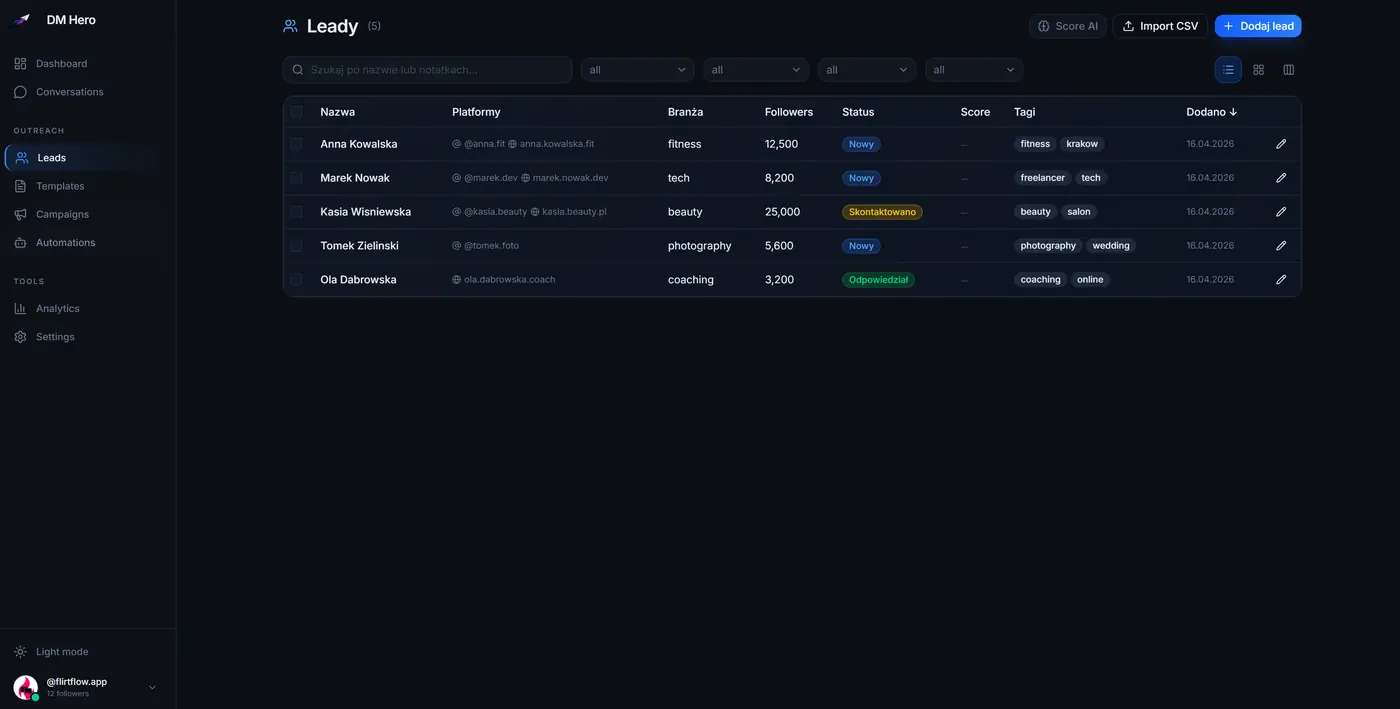
The opener should be short and end with a question. It carries no link and no pitch, and it fits the niche of the lead.
Follow-ups matter more on Instagram than many senders expect. In some DM Hero campaigns the follow-ups earned higher reply rates than the first message.
This is especially true when an agency runs some of the accounts you contact. The owner still checks the account, but the chance that they miss your message is higher.
A second or third touch pays off in that situation. The catch is that the number of messages you can send depends on the recipient.
The logic is close to a cold email follow-up sequence with one difference. On Instagram the account type of the recipient decides whether a sequence is even possible.
Sending should follow a human pattern. That means a daily cap and quiet hours, random gaps between messages and an automatic pause whenever Instagram pushes back.
A reply opens the API window I described at the start. From there the rest of the conversation can run through the official API with almost no limits.
That window is what made it possible to build an AI setter into DM Hero. The setter responds and asks two or three qualifying questions before it presents the offer.
You still do not want to look like a bot at this stage. The setter adjusts its reply speed to the pace of the conversation and splits longer answers into a few bubbles.
It also sends reactions and types at a human words-per-minute rate.
Automate the repetitive work, which means sending openers and replying to leads. Reply speed matters a lot here.
Answering within about five minutes makes it much more likely that a conversation turns into a meeting. That pace is hard to hold by hand across dozens of threads.
At the start, Tymoteusz still recommends replying by hand or running the setter in copilot mode. In copilot mode the setter drafts each reply and you approve it before it goes out.
This phase shows you what real conversations look like, and you need that knowledge to configure the setter well. I give the same advice for Co-Pilot mode in Agent Frank when a new email campaign goes live.
Do not copy LinkedIn sequences that open with a connection step. Many LinkedIn automation tools start that way because a LinkedIn connection is mutual.
On Instagram a follow rarely earns a follow back, and it does not change how your message is delivered. Swings in your following count and follow-unfollow patterns only add risk.
The safer approach keeps actions outside the official API to a minimum. Send the message and skip the follows and likes.
For the same reason, do not scrape leads with the account you send from. Use a separate account or an external API for list building.
Some parts of a conversation should never be left to the AI alone. Pricing negotiations and complaints belong to a person, along with unusual requests and anything the setter is unsure about.
A good system supports a human handoff and pings you when a thread needs a person. That way you can step in while the lead is still engaged.
The most common mistake is pitching in a DM the way you would pitch in a cold email. It falls flat here.
Email is the most formal channel and LinkedIn sits somewhere in the middle. Instagram is the most personal of the three because people there mostly get short messages from friends.
So DM Hero openers stay under 30 words. They have one job, which is getting a reply. Qualification comes next in the conversation and the offer comes last.
This format has a hidden advantage. You do not have to guess what the lead needs because you can simply ask, and the real pain point usually comes out within a few messages.
Local business owners also rarely get B2B messages in their DMs. A simple question stands out.
Tymoteusz shared a real example with me. The DM Hero team was reaching out to an online fitness coach with a solid following.
A cold email would pack the entire pitch into one long message. On Instagram the same pitch becomes a short back-and-forth that starts with the opener his co-founder Kuba uses:
Notice what the questions do. They qualify the lead and surface the problem before any offer appears.
By the time the pitch arrives, the lead has already described the problem in their own words. Holding back the pitch also cuts the risk that they report the message as spam.
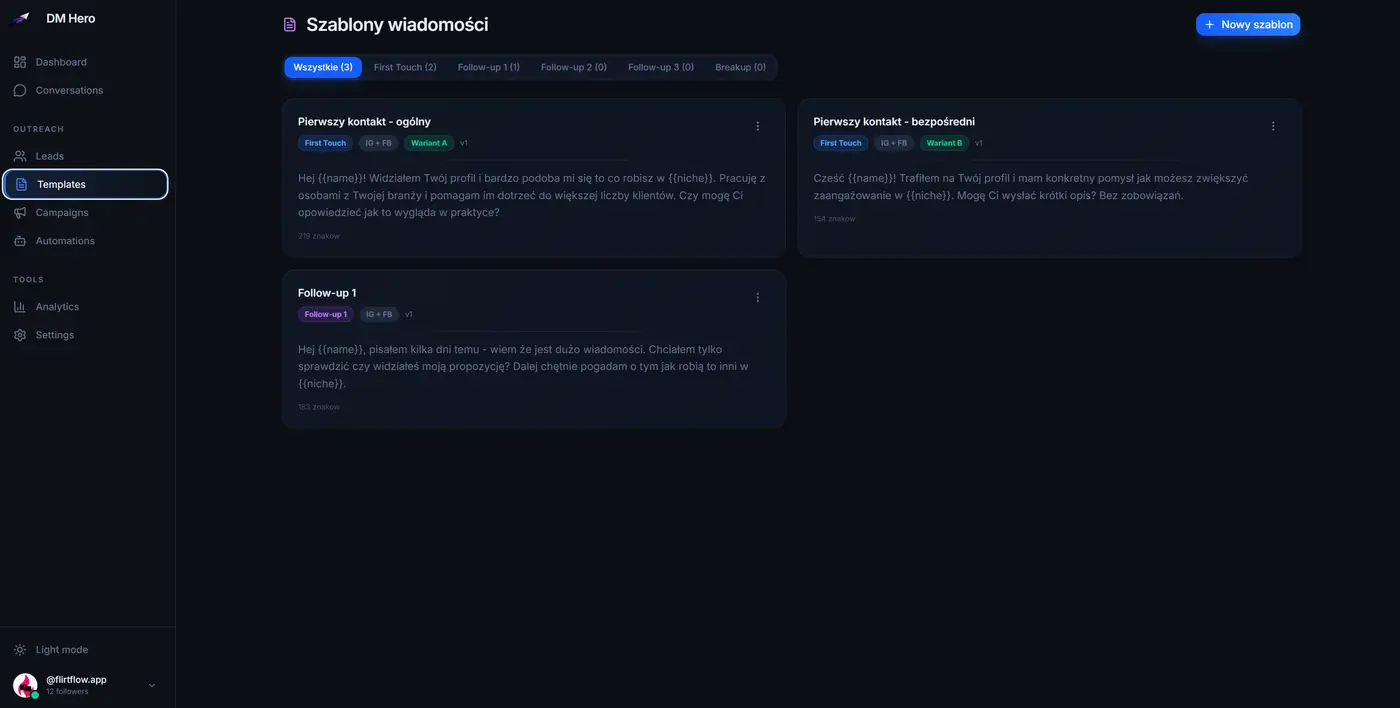
Personalization can stay light. A name and a business type plus one question that fits the niche is enough.
Template variety matters far more. If everyone gets the same sentence, Instagram notices the pattern.
Followers need an even softer start. A simple greeting works, and the conversation shows whether they have a problem your offer solves and what stopped them from buying.
A message like this helps you learn who your followers are and turns some of them into clients:
Hey John, I noticed you have been following for a while. I am curious, what caught your attention?
Instagram DM tools usually automate one of two stages. Some send the first messages, while others handle the conversation once a lead replies.
Below I cover one tool for each stage plus DM Hero, which connects both. DM Hero is my friend's product, which is how I came across this whole approach.
DM Hero combines outreach and conversations in one tool. A Chrome extension sends openers and follow-ups from your own account and types each message the way a person would.
Sending runs under daily caps and quiet hours with random pacing. The extension pauses automatically when Instagram shows an error.
Template variants and A/B tests let you compare openers side by side. Once someone replies, the AI Setter takes over through Meta's official API.
The setter behaves like a human setter by matching reply speed to the conversation and splitting messages into several bubbles. It qualifies the lead and answers questions before it books the call.
In copilot mode you approve its replies, and it hands the thread to a person when needed. The built-in CRM and analytics show how each campaign performs along with the sales conversations that follow.
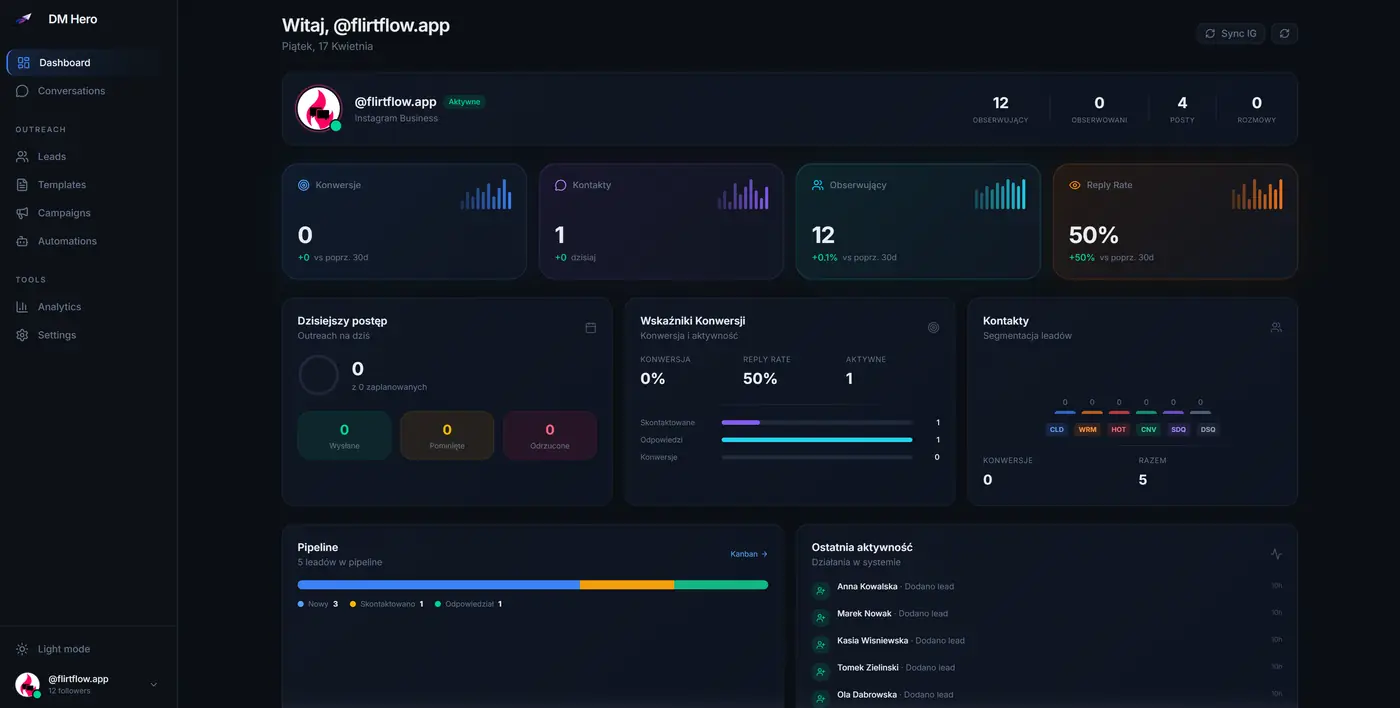
Comment-to-DM automation covers inbound lead generation. Account connection runs through the Meta API.
Plans with the AI Setter run from $199 to $499 a month for one account, and an outbound-only plan costs $299 a month. Extra reps cost $149 or $299 each depending on the plan.
There is a 7-day free trial. The trade-off is price, since DM Hero costs more than a sending-only extension.
ColdDMs is an outreach-focused Chrome extension that sends from your own account. Its sequences support up to 10 follow-ups and stop automatically when a lead replies.
You can A/B test up to 15 message variants per step and manage replies in a shared inbox. There is no AI for conversations, so every reply is handled by hand.
The Pro plan costs $99 a month for one account and allows up to 100 messages a day. Scale and Enterprise plans cover more accounts and higher volume.
Its biggest strength is sequencing depth at a low entry price.
SetterFlo is an AI setter built for high-ticket coaches, and it automates the conversation stage. It runs on Meta's official API, so it does not send cold first messages.
It answers inbound DMs instead and uses comment-to-DM to message people who comment on your posts or reels. It qualifies leads in your voice and handles objections before it books calls into your calendar.
SetterFlo also offers a copilot mode for approving replies. It integrates with CRMs such as HubSpot, GoHighLevel and Pipedrive.
Its analytics cover booking rates and response times along with lead qualification. It costs $297 a month after a $997 onboarding fee.
Beyond these tools, plenty of simple Chrome extensions send DMs in bulk from a single template. They are cheap and quick to start with.
The problem is what they leave out. Most of them lack pacing controls and message variation, and few pause on errors or connect through the official API.
That gap puts the account at considerable risk.
Instagram reaches people that email does not. The Salesforge multichannel outreach playbook makes the point that extra channels lift replies when the buyer already checks them.
Owner-run businesses check Instagram constantly, so the channel fits that rule well.
Here is how I would set it up. Run your email sequence in Salesforge and add LinkedIn steps where your buyers are active.
Salesforge covers email and LinkedIn, so the Instagram step runs in a separate DM tool. Send a personal DM to non-responders who have an active Instagram account that the owner runs.
Start a fresh conversation instead of referencing the email. Move the details back to email once the lead is interested.
The email side needs its own groundwork. I would find verified contacts in Leadsforge and set up domains and mailboxes in Mailforge before warming them up.
If you would rather not write and send the email sequence yourself, Agent Frank can run that half for you as your AI SDR.
Open rates are already a shaky number in cold email metrics, and on Instagram they do not exist at all. Someone can read your message request without you knowing unless they accept it.
Plenty of users also keep read receipts turned off.
The first number to watch is reply rate, which is any reply divided by first messages sent. It tells you whether targeting and openers work, and it is also the main thing protecting your account.
Next to it sits positive reply rate. That number counts the replies that show interest and leaves out the polite refusals.
Next comes reply rate per opener, which shows which template variant to keep. It also helps to split that number by segment because followers and strangers behave very differently.
Business and personal accounts differ as well, and so do niches. One combined number hides what is working.
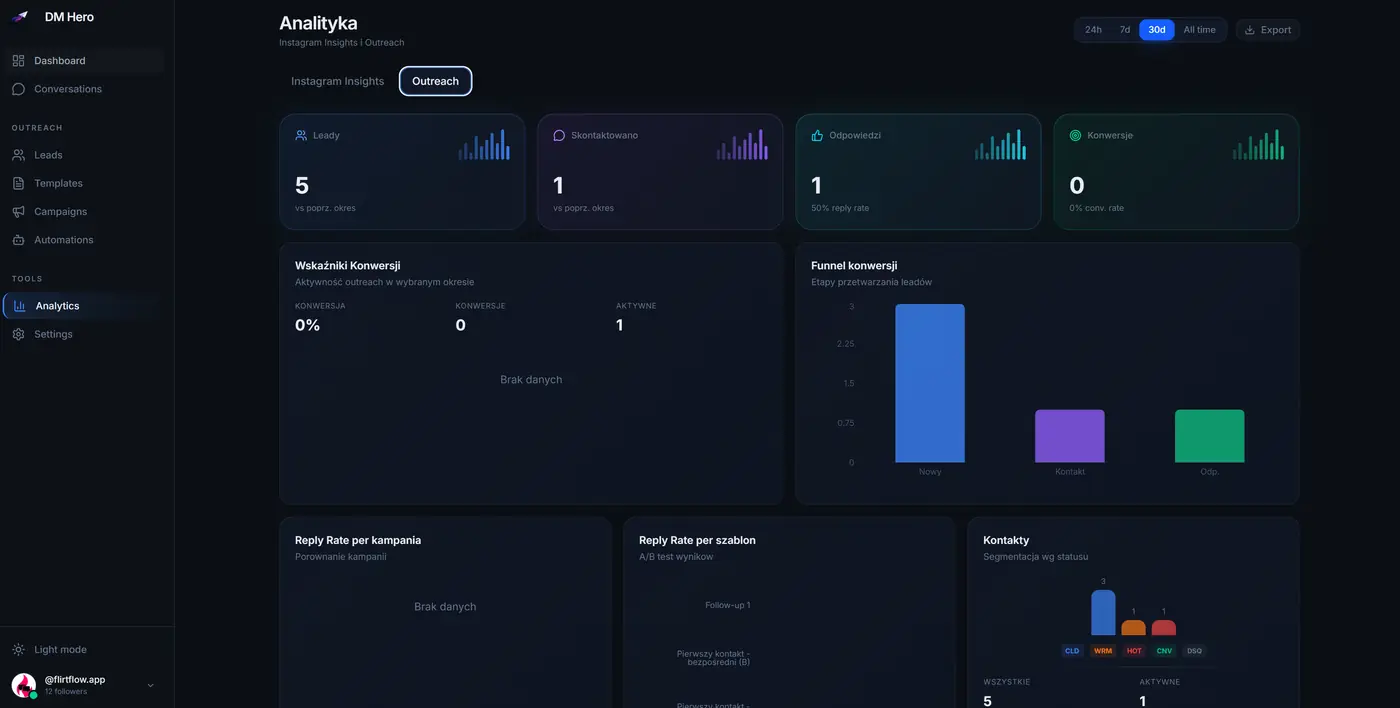
Further down the funnel, the goal for time to first response is minutes instead of hours. Qualified conversations and booked calls matter next, along with the share of replies that become a booked call.
Account health is the last check. Compare messages sent per day with the daily cap, and treat any action block or notice in Account Status as a signal to lower daily volume first.
Reply rates vary a lot between campaign types. These are the ranges Tymoteusz sees across DM Hero campaigns:
Many of these mistakes come from treating Instagram like email or LinkedIn. These are the ones that come up most often:
Technically yes. Followers count as cold unless they messaged you recently, so these DMs go out the same way as cold ones and share the same limits. In practice followers reply much more often.
Start at about 30 a day on a warmed-up account. New accounts typically handle 40 to 60 a day. Accounts with history ran 100 a day in DM Hero tests without a single suspension.
People reply more readily to a person than to a logo, so a founder or sales rep account usually works best for cold outreach. Some companies set up personal sales profiles with a handle like name_company. For the brand's own followers, the brand account is the better choice.
Spread messages across the working hours of the recipient in their own time zone. Pause at night and on weekends.
Stop right away when someone says so. This matters even more than on email, because burning an account through spam reports costs more than burning a mailbox. It also helps to cap each sequence at two or three follow-ups.
It can be safe when the extension types like a person and paces sends across the day. Look for daily caps and quiet hours plus an automatic pause on errors before you trust it with your main account.
Yes. A reply moves the conversation into the official Meta API, and an AI setter can qualify the lead and book a call from there. A good setter also hands tricky threads to a person.
After going through the data with Tymoteusz, I see Instagram as one of the most underused outbound channels for anyone selling to local businesses or agencies. It is just as valuable for creators and brands sitting on an untapped audience.
Safe automation comes down to making the account behave like a person. Know where each lead sits on the cold-to-warm spectrum and prepare the account before the first campaign.
Send varied openers at a human pace and never paste the same text in bulk. Most of all, write messages that people actually want to answer.

.jpg)

