If you're trying to find someone's phone number, you're in the right place.
I've run outbound sales for over a decade, which means most weeks I need to reach someone who never gave me their number and has no reason to.
Earlier, I just used to call the office and ask for someone, and I'd usually get through. I can't remember the last time that worked.
But people are still reachable. I use several methods now, and each one works on a different kind of person.
Below are the 8 methods I use today, ranked by how fast they are and how often the number is right.
I ran all eight methods against the same list of contacts. I judged each one on three things.
Some methods give you a number in 30 seconds. Whether that number reaches the right person is a separate question.
So I called every number I found, or checked it against one I already had. I wanted to know how often each method was actually right.
A method that gives you a wrong number fast is worse than one that gives you nothing. You only find out after you've made the call.
Free methods cost you time instead of money. That trade works on one contact. It falls apart on fifty.
I timed each method on a single lookup. I started with a blank tab and stopped when I had a number I'd be willing to dial.
I looked at both kinds of cost. What you pay for a subscription or credits, and what you pay in your own time.
A free method that eats 20 minutes isn't really free. That's why the table above shows time next to accuracy.
The fastest way to find someone's phone number online is a dedicated lookup tool.
A lookup tool does one job well. You tell it who you want by name, location and job title. It gives you back a number it has checked against several sources, so you're not dialing a dead line.
There are a lot of these tools. They all work. Most of them charge per seat, tie you to an annual contract, or both.
I use Leadsforge instead. It does the same job and costs me less.
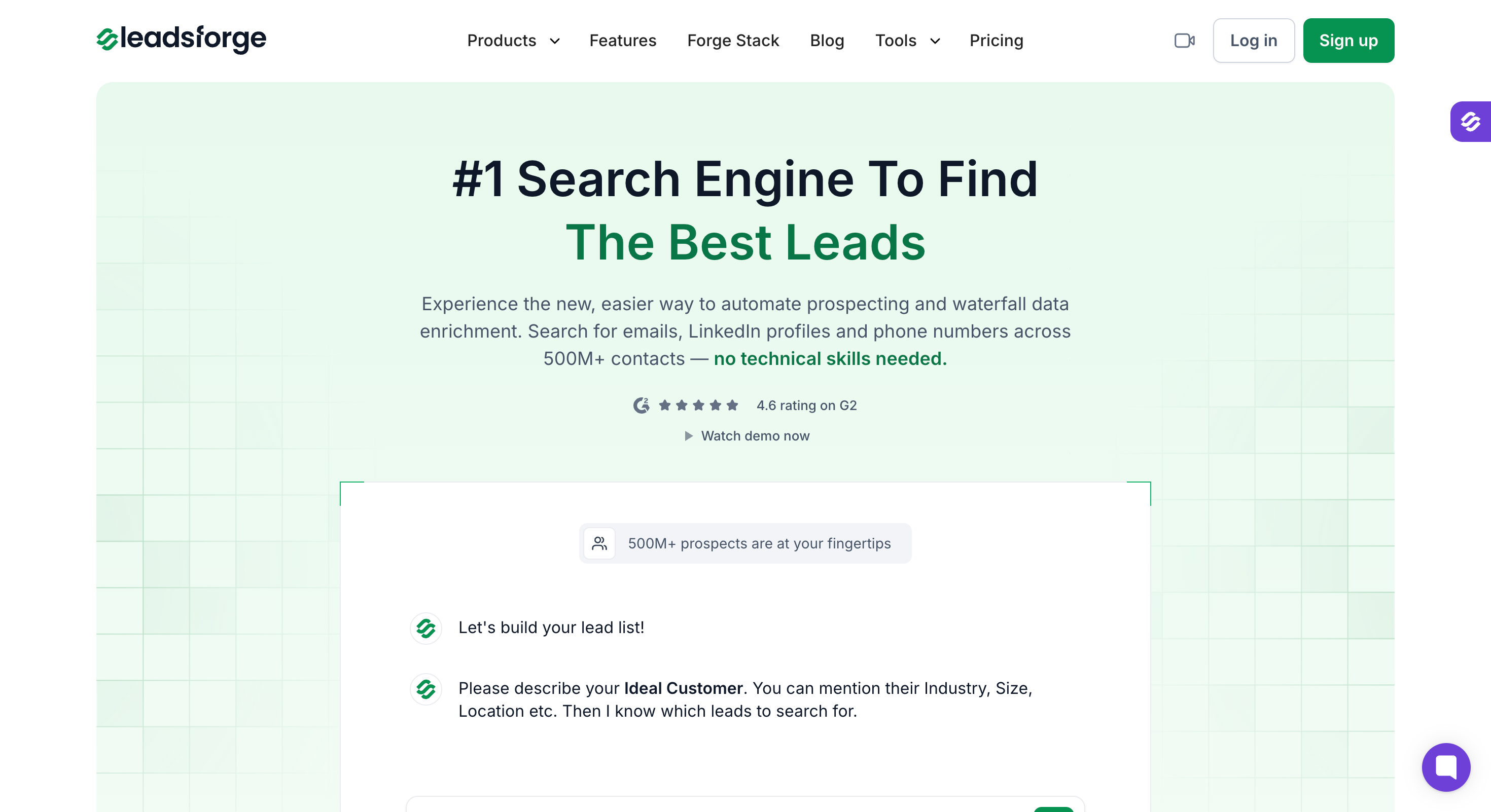
I've tried most of the tools in this category. Leadsforge is the one I keep going back to.
Here's why.
The whole process takes under three minutes, and larger B2B databases often compete on scale, with Saleshandy searching over 800 million contacts for verified phone numbers and Cognism's database including 70 million mobile numbers.
Step 1: Log in to Leadsforge
Sign in and open a new search from the dashboard.
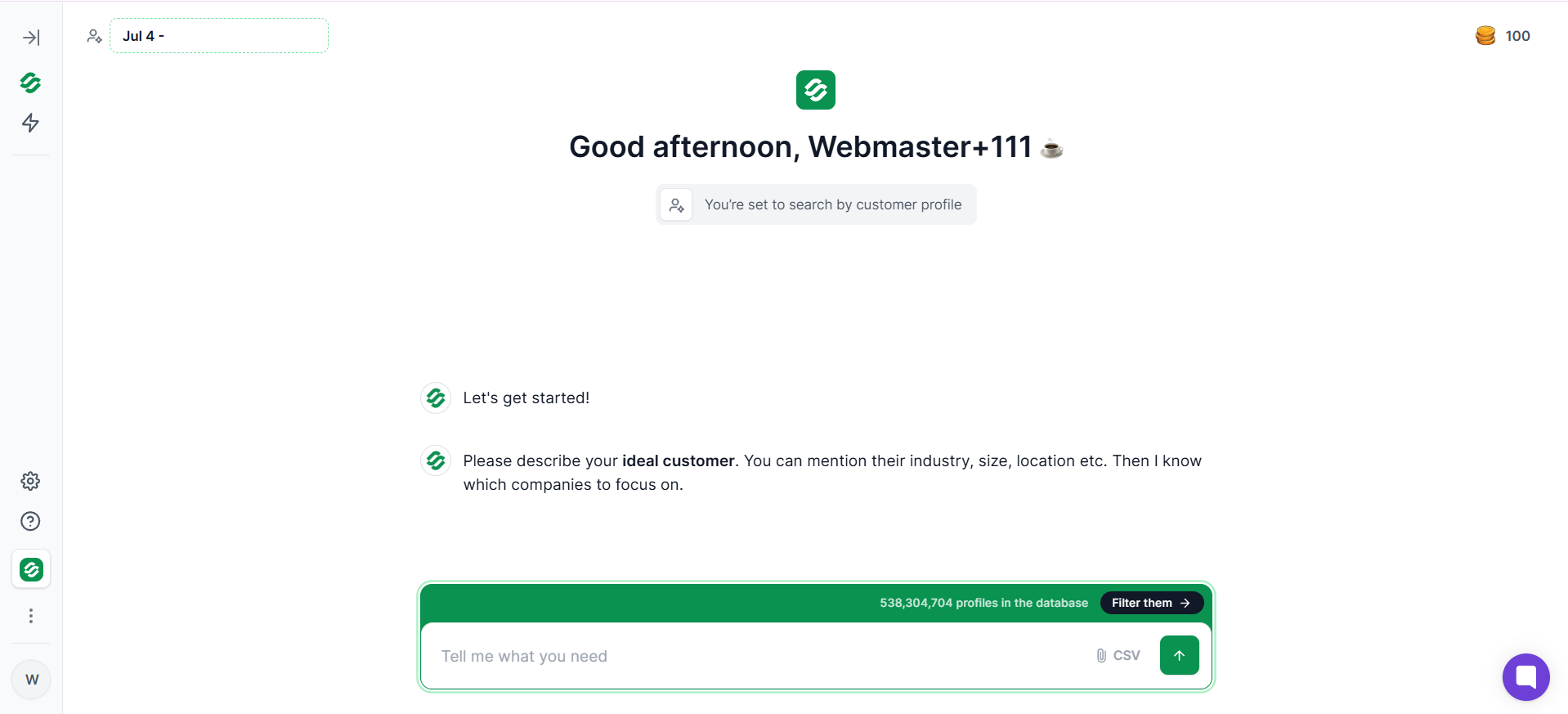
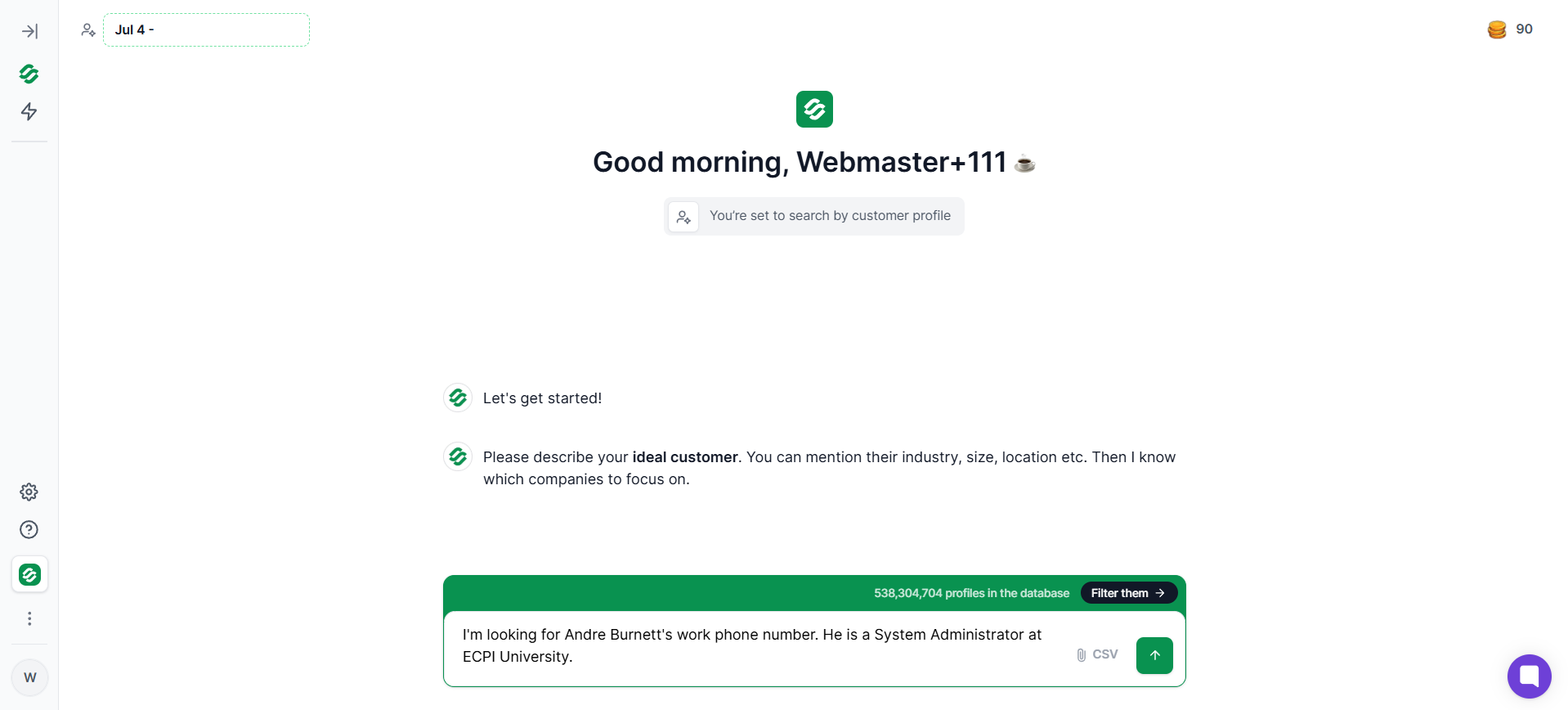
Step 2: Ask the AI to find the phone number
The search works like a chatbot. For example: "I'm looking for Andre Burnett's work phone number. He is a System Administrator at ECPI University."
You can start with just a name, but additional details like company, location, or job title help narrow the right professional contacts and separate work lines from a cell phone number.
Step 3: Review the results
Within a few seconds you get matching contacts and their phone numbers, plus email addresses and LinkedIn profiles.
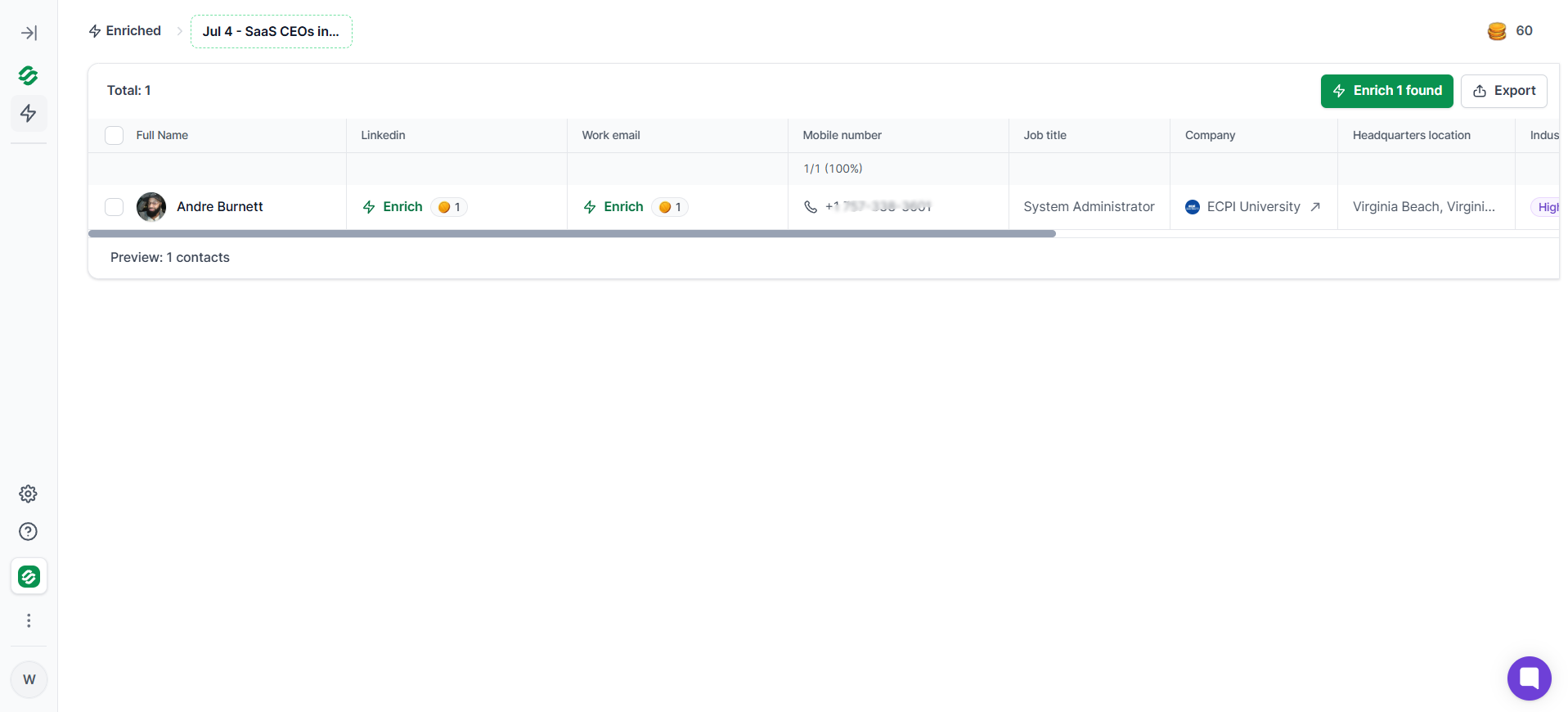
Step 4: Use or export the contact
If you need one number, use it. If you're building a list, export it and start your outreach. Some tools also use waterfall enrichment to verify phone numbers instead of relying on a static database; for example, BetterContact uses waterfall enrichment to verify phone numbers. Chrome extensions can also reveal phone numbers from a person's LinkedIn profile or company page with instant access, and API or workflow options fit into an existing tech stack.
If you're prospecting across the UK or Europe, I covered the region-specific options in 11 Best Mobile Number Finders in UK and Europe.
Unused credits roll over, and you get a refund on any number that turns out to be invalid.
Try Leadsforge free with 100 credits. No credit card required.
Almost anyone who knows a name and roughly where the person works.
I compared the rest of this category side by side in 10 Best Phone Number Finders in United States.
Try Leadsforge free with 100 credits, no credit card required.
The best way to find someone's phone number on LinkedIn is a Chrome extension. It reveals verified contact info right on the profile.
If the person you want has a LinkedIn profile, LinkedIn is a goldmine. Like other social media platforms, it holds their name, job, company, location and career history. Any decent lookup tool can use that context to find their number in seconds.
Before I get to tools, there's one manual way to check.
If you're a first-degree connection, open their profile and click Contact info under their name. Some people list their phone number right there.
Not many do. But it takes 10 seconds, so check before you install anything.
For everyone else, you need a LinkedIn Chrome extension. The one I use is the free Salesforge extension for finding B2B emails and phone numbers.
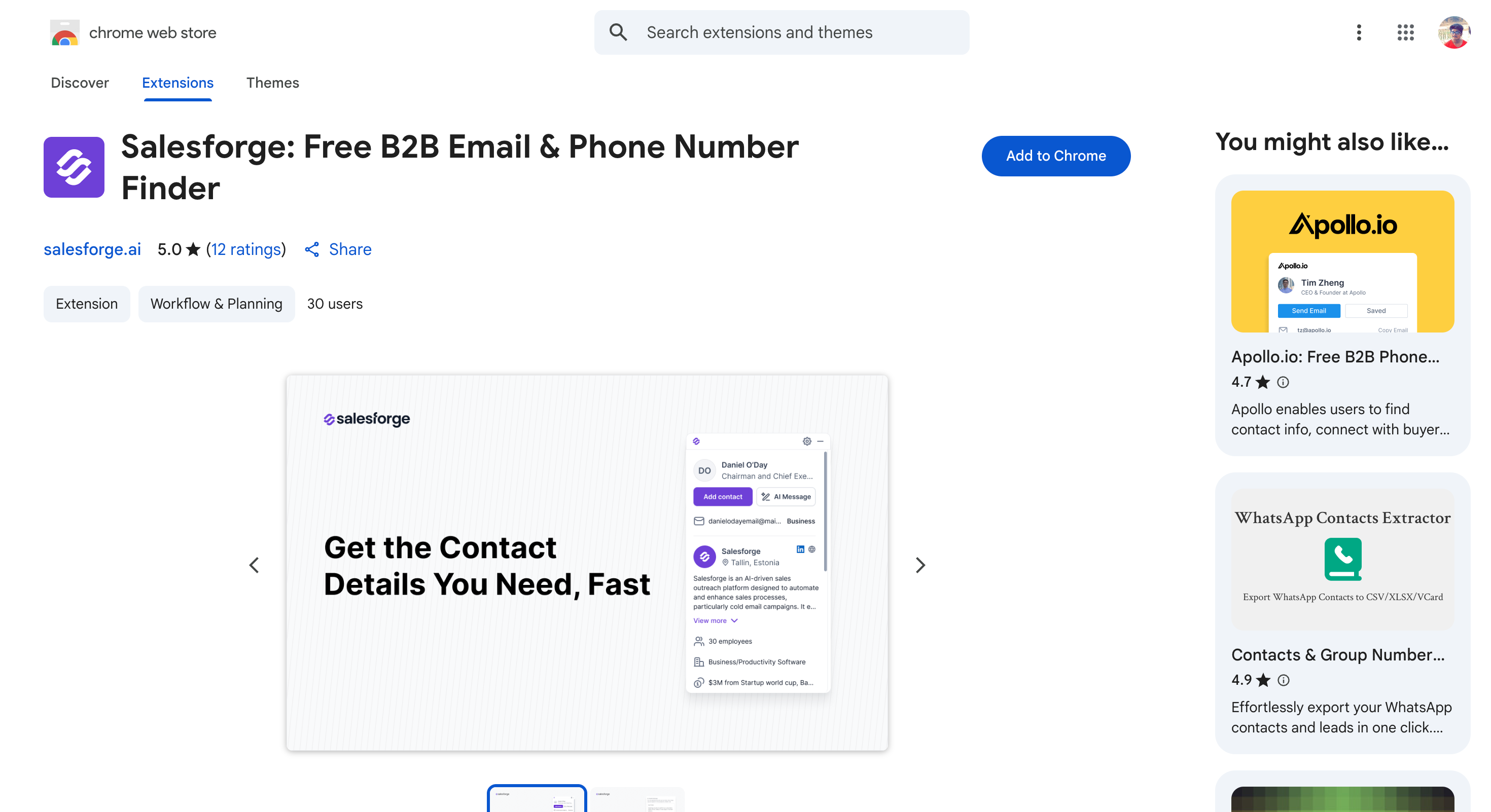
You can install the extension from the Chrome Web Store in one click. No credit card, and no paywall stopping you from using it.
Step 1
Open the LinkedIn profile of the person you want to reach.
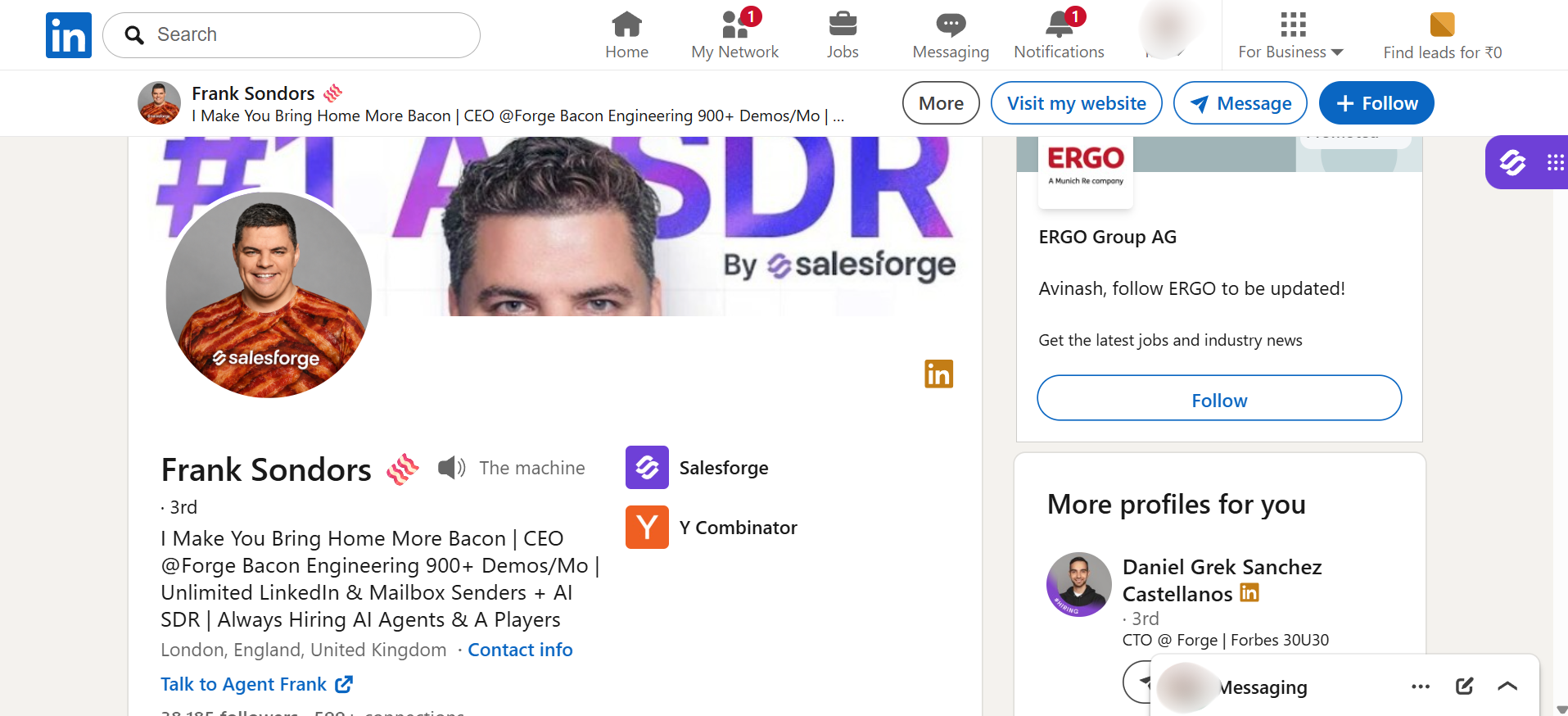
Step 2
Click the Salesforge icon. A sidebar opens on the right, and the extension already knows who you're looking at.
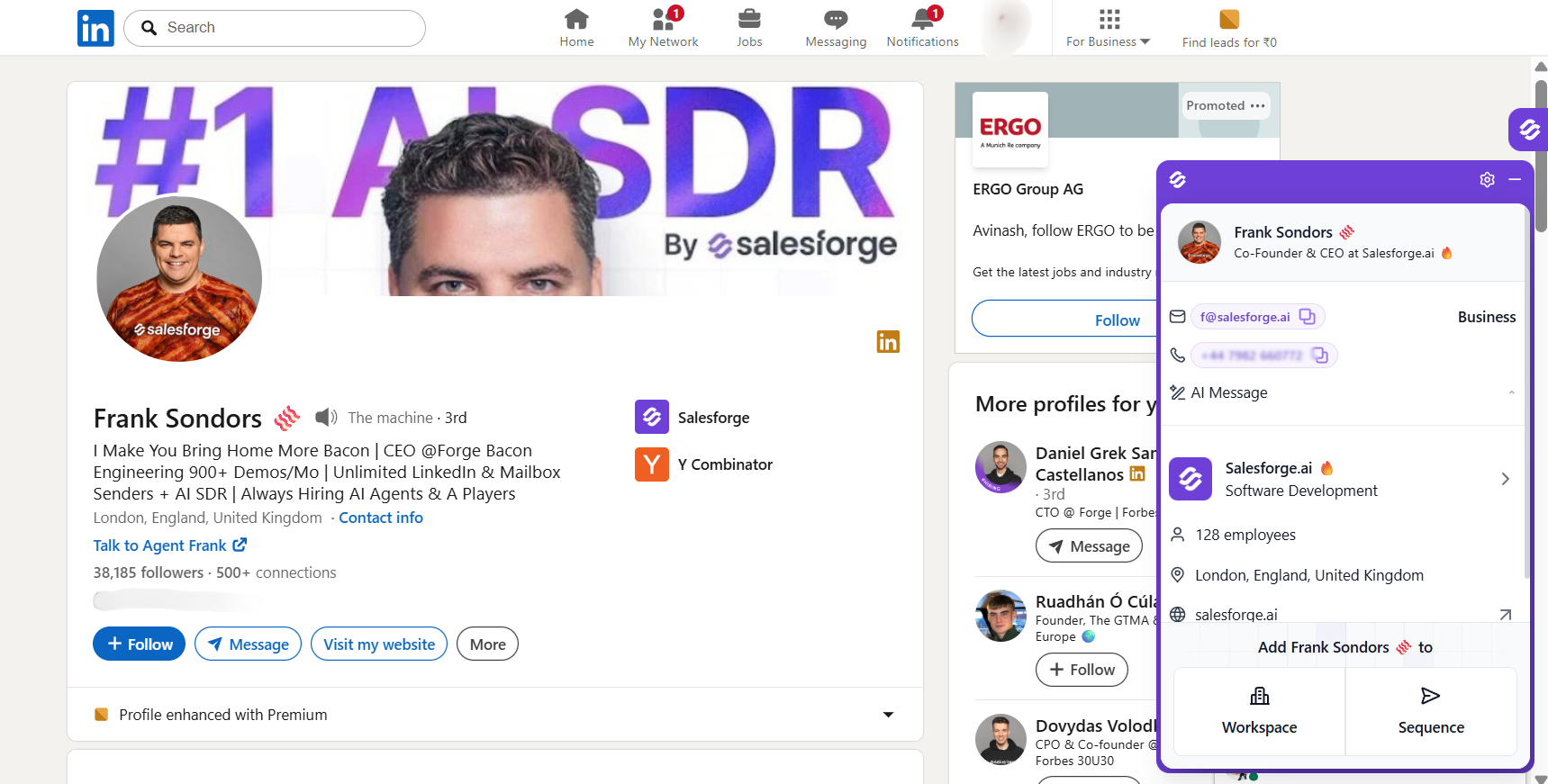
Step 3
Click Find Phone. The verified number appears in the sidebar within a few seconds.
Step 4
Copy the number, or click Add Contact to push the person into your outreach pipeline.
The whole thing takes under a minute per profile.
It isn't just LinkedIn. The extension also runs on:
The extension used to be a LinkedIn automation tool. It now works on any website. That matters, because plenty of people have a company site and a thin LinkedIn profile.
Three reasons it became my daily driver alongside Leadsforge.
The extension holds a 4.9 out of 5 rating on the Chrome Web Store, which is high for this category.
I wrote longer breakdowns of the Chrome extensions worth installing:
Anyone whose target has a LinkedIn profile.
Sometimes the problem runs the other way. Someone called, you didn't pick up, and you want to know who it was before you call back.
A reverse lookup answers that in seconds, and the first step costs nothing.
Put the number in quotes and search it.
"512-555-0147"
Try it twice, once with the country code and once without. Google treats each format as a different string.
This resolves more unknown numbers than any paid tool. Business numbers sit on their own websites, and spam numbers get reported on complaint forums within days.
Truecaller is the biggest option here. Its database comes from what its own users have saved, which is why it knows numbers no official directory lists.
It reported 500 million monthly active users in March 2026.
Two limits matter. The web version gives you about three free searches before it pushes you to the app. And searching by name only works inside the app.
Google's Phone app added a Lookup shortcut in June 2024. Open the call log, tap the unknown number, and it runs a search without leaving the app.
Try this before you install anything else.
These vary enormously. Free tools like TruePeopleSearch can work for finding phone numbers, especially for one-off lookups, but they handle landlines and business numbers more reasonably well and often struggle with mobiles.
Watch for the pattern where a site shows a partial result, confirms it has a record, then asks for payment.
Anyone holding a number rather than a name.
It will not work on new numbers, prepaid mobiles, or anyone who has kept their number unlisted.
Most people type a name into Google, scroll past a few results and give up. That isn't searching. That's guessing.
Search operators are the commands that turn Google into something closer to a database query. They're free and they take about a minute to learn.
One rule makes the difference. Every search needs a contact word in it. A name on its own finds the person. A name plus "phone" or "contact" finds the number.
I use these when the person isn't in any database. Local business owners, contractors, people quoted in a trade publication.
Here are the seven searches I actually run.
Put the name in quotes and add a contact word and a location.
"Sarah Whitfield" "phone" "Austin"
The quotes force Google to match that exact name. The contact word filters out every page that mentions her without a number. The city removes the other four thousand people with her name.
"Sarah Whitfield" "Acme Corp" "contact"
This surfaces team pages, press releases and company directories where a name and a contact detail sit together.
Search one website at a time.
site:linkedin.com "Sarah Whitfield" "phone"
Some profiles that hide a number in the LinkedIn interface still have it indexed by Google. This works on any domain, including company sites and professional registries.
This is the one that finds numbers nobody else finds.
"Sarah Whitfield" filetype:pdf "phone"
Conference programs, committee minutes, tender documents and membership lists all get published as PDFs and forgotten. They carry contact details, and Google ranks them poorly, so nobody looks.
Try filetype:xlsx and filetype:doc too.
"Sarah Whitfield" "phone" "512"
If you know roughly where someone is, the area code filters out matches from every other region.
If you have an email but no number, search the email in quotes. Conference registrations, author bios and directory listings often carry both together.
"512-555-0147"
Paste any number into Google in quotes and it returns every indexed page carrying it. This is a free reverse lookup and it works on most business numbers.
The operators work together, and that's where they get useful.
"Sarah Whitfield" "Austin" "phone" filetype:pdf
Start broad and add one operator at a time. If you start narrow you'll get zero results and won't know which command caused it.
If a page used to carry the number and doesn't anymore, check the Wayback Machine.
Paste the URL into web.archive.org and look at an older version. Companies remove contact details during redesigns, and the old version often still has them.
People whose details live on the open web rather than in a sales database.
It will not work on private mobile numbers that were never published, or on very common names without extra detail.
Everything above works best on people with a job title. This method covers the rest.
People search engines pull public records, old marketing data and voter files into a single profile. You search a name and a state, and you get an address history, relatives, and sometimes a number. I use them when the person has no professional footprint at all.
Set your expectations first. The data is patchy and cell numbers are harder to keep current than landlines. Most sites show a partial result, then ask for payment.
Four sources cost nothing and often beat the paid sites.
I try these before any paid search engine. The hit rate is higher and the data is fresher, because somebody had a legal reason to keep it current.
People without a professional profile.
If someone wants to be reached, they've usually said so somewhere on their own website.
This sounds too obvious to bother with. I skip it more often than I should. Then I find the number on a contact page after twenty minutes elsewhere.
It works best on small companies. The smaller the business, the more likely a real number sits on the site rather than a contact form.
Anyone whose business depends on being reachable.
This method has the lowest hit rate on the list. I still try it, because for some people it's the only place a number exists.
It works on anyone who treats a public profile as a shopfront. Freelancers, creators, tradespeople taking bookings, and anyone who wants strangers to call them. It fails on everyone else.
Check the bio first. Freelancers, photographers, designers and consultants often put a contact number there, right next to the email.
Then search their posts. On X, use from:username phone or from:username call me. People post their number when they're launching something or hiring.
Local buy-and-sell groups are full of numbers people posted themselves. So are marketplace listings.
Business pages are the other route. They carry a contact section, and small businesses fill it in more often than they build a website.
These work backwards. Already have a number and want the name? Save it to your contacts and open the app.
A profile photo and display name often appear, which confirms who you're about to call.
Creators list business emails more often than numbers. Check the About tab on YouTube and the bio on TikTok.
If there's a business email there, that's often a faster route than chasing a number.
People who want to be contacted by strangers.
This is the most accurate method on the list, and it's the one people skip.
The reason it works is simple. A number in an email signature was put there by the person themselves. Nobody scraped it, nobody guessed it, and it was correct on the day they sent it.
I check this first now. It takes under two minutes and it beats every database I pay for.
If anyone at your company has ever emailed this person, the number is probably sitting in your mail.
Search their name, then search their email domain, which catches colleagues who may have it in their own signature.
Scroll to the bottom of anything you find. Signatures sit below the message and most people never read them.
In Gmail, from:[email protected] finds everything she sent you. In Outlook, use the search bar and filter by sender.
If your inbox comes back empty, someone else's might not.
Post the name in your team channel and ask whether anyone has emailed them. A colleague forwarding a signature takes ten seconds.
This works better at bigger companies, where someone in another department has usually spoken to the person you want.
Numbers hide in documents nobody thinks to search.
This feels like giving up. It's usually the fastest thing on this page.
Check LinkedIn for shared connections, then ask one of them directly. Most people will pass on a number or make an introduction if you give them a reason.
For anyone who has deliberately stayed off the internet, this is the only method that works at all.
Anyone you or your company has dealt with before.
Finding a number is half the job. Calling a wrong one wastes your time, and at volume it damages your caller reputation.
Here is how I check a number before I use it.
A tool that runs waterfall enrichment has already cross-checked the number against several providers before you see it.
That removes most of the work below. If you pulled the number from Google or a directory instead, the next four steps matter more.
If you found a number on a directory, look for the same number somewhere else. A company website, a LinkedIn profile, a press release.
Two sources agreeing is the cheapest confidence you can buy.
A number in the wrong format will not connect, and you will blame the data rather than the digits.
Always include the country code when calling internationally.
On a mobile, a one-line message confirms the number is live before you dial. "Hi Jane, is this the best number to reach you?"
It also warns them a call is coming, which lifts your pick-up rate.
If you have hundreds of numbers, a verification service flags the disconnected and reassigned ones before your team starts dialing.
That protects two things. Your team's time, and the connect rate you get judged on.
This one catches people out.
Carriers score phone numbers. Wrong-person calls, repeat dials to dead lines and spam reports all feed that score.
Collect enough and your own number shows as "Spam Likely" to the people you need to reach. You then have a deliverability problem instead of a data problem, and it is much harder to fix.
This is the decision that saves the most time, so make it before you start.
If the person runs a business, sells a service or holds a licensed role, a free method will find them. Don't pay.
If they're an employee at a company with no public footprint, free methods will burn twenty minutes and return nothing. Pay.
Most people reading this need one number for one person. Start free. Pay when free fails.
Looking up a published number is lawful across the US, UK and EU. What you do with it is where the rules apply.
Five laws cover almost every situation.
The Telephone Consumer Protection Act governs automated dialing, pre-recorded messages and texts in the US.
Penalties run per call, not per campaign. Manual dialing to a business number sits outside most of it. Autodialers and recorded messages do not.
The National Do Not Call Registry restricts telemarketing calls to registered numbers, including lists used for cold calling. You are expected to scrub your list against it.
Business-to-business calling has more room than consumer calling, but the exemptions are narrower than most people assume. The TCPA imposes fines of $500 to $1,500 per call.
The Fair Credit Reporting Act limits how you use consumer data for employment, tenancy and credit decisions.
People search engines are not consumer reporting agencies, and their terms say so. Looking someone up is fine. Screening a job applicant on that data is not.
GDPR allows direct marketing under legitimate interest, and that is not automatic.
You have to show the interest is real, the contact is necessary, and it does not override the person's rights. Calling a work number about that person's job is far easier to defend than calling a personal mobile.
Keep a record of where the data came from, because you may be asked for it.
California treats a phone number as personal information. The CCPA and CPRA give residents the right to know what a business holds and to have it deleted.
The Delete Act goes further. Data brokers have to register with the state and honor deletion requests through one central system. California shut down Background Alert entirely for failing to register.
In the UK, the equivalents are TPS for individuals and CTPS for corporate numbers.
Use a number for the reason it was published.
A number on a company contact page is there to receive business calls. A mobile you found in a leaked dataset is not.
This isn't legal advice. Check the rules where your recipient is, not where you are.
Look back at what these eight methods have in common.
Every free route depends on the person having published their number somewhere. On a page, in a directory, in a signature, in a bio. That works when they wanted to be found.
The people you actually need to reach are rarely in that group. A decision maker at a real company has no reason to publish a mobile number, and usually hasn't.
That is why I stopped treating this as a research problem years ago.
Now I open a profile and the number is already there. I run a search in plain English and get back a list with numbers attached. What used to take me fifteen minutes a person takes seconds, and the numbers are verified before I dial.
Two things do that work for me.
The Salesforge Chrome extension handles one person at a time. I'm on a LinkedIn profile or a company website, I click the icon, and the sidebar returns a verified number. Free to install, 100 credits on signup, no card.
Leadsforge handles everything bigger than that. I describe who I'm after the way I'd prompt ChatGPT. It searches 500M+ contacts and runs each lookup through 20+ providers.
Both run on the same credits, so the 100 you get at signup work across both.
Here's what I'd do. Take twenty contacts whose numbers you already have. Run them through and count how many come back correct.
That gives you a hit rate on your own market instead of mine, and it costs nothing to find out.
Start with 100 free credits. No credit card required.
1. How can I find a phone number by name?
Quote the name, add a contact word and a city, then try filetype:pdf to catch documents Google buries. If the person works in a professional role, LinkedIn and a lookup tool are faster. Name alone rarely works for private individuals.
2. How do I find a telephone number for a person free?
Quote the name with "phone" and a location, then check their company website and footer. Look at LinkedIn Contact info if you're connected. Those three cover most people with a public presence. Free professional registries catch many of the rest.
3. How do I look up a phone number for free?
To identify an unknown number, Google it in quotes first, then try Truecaller. Truecaller allows about three free web searches before requiring the app. To find someone's number, use search operators and their company website before paying for anything.
4. Can you look up someone's phone number on Google?
Often, if the number was published anywhere. Quote the name, add "phone" and a location, and try searching the area code as a string. Google won't return unlisted numbers, and typing a number into Facebook hasn't worked since 2018.
5. What's the most accurate way to find someone's phone number?
An email signature from a previous exchange, because the person wrote it themselves. Failing that, a verified lookup tool for work numbers. People search engines are the least reliable of the common options.
6. Is it legal to look up someone's phone number?
Looking up a published number is legal in the US, UK and EU. Restrictions apply to what you do next. The FCRA limits using this data for employment or tenancy screening. The Do Not Call Registry and TCPA restrict marketing calls.
7. How do I find someone's work phone number?
Check their email signature and company contact page first, then LinkedIn Contact info. If those fail, a lookup tool returns a direct dial from a name and company. Expect a phone number to cost several times what an email costs on any credit plan.
8. Why can't I search a phone number on Facebook anymore?
Facebook pulled the feature in April 2018, following the Cambridge Analytica scandal, and never brought it back. CTO Mike Schroepfer said bad actors had abused it. They submitted numbers they already held and scraped the profiles that came back.
9. What else stopped working recently?
Three things. LinkedIn removed Apollo.io's and Seamless.AI's company pages in March 2025 and blocked their access to profile data. It also sued Proxycurl, which shut its LinkedIn API down permanently on 4 July 2025. And California forced Background Alert to stop operating through 2028, in a settlement approved in February 2025.
10. What should I do once I have the number?
Segment your list before you dial, and spend two minutes on each person so you have a reason to call. Open with that reason rather than a script, then stop talking. Pair the call with email, because both together convert better than either alone. Track connect rate, conversation rate and meetings booked.
.jpg)

.jpg)

.png)

