

Personalized Outbound Strategy
Get The Right Outbound Strategy In Minutes
Enter your email to get a custom plan & stack recommendation for your business
It's being carefully crafted by AI
Please check your mailbox in 5 minutes
Claude Code can help you build and operate a B2B lead generation workflow, but it should not be treated as another contact database.
On its own, Claude Code can research companies, process prospect lists, apply your Ideal Customer Profile criteria, remove duplicates, score accounts, and prepare personalised outreach.
When connected to lead data and sales platforms through the Model Context Protocol, or MCP, it can also search for contacts, enrich emails and phone numbers, and move approved prospects into an outreach campaign.
A practical workflow looks like this:
Leadsforge finds and enriches prospects → Claude Code cleans, researches, and prioritises them → Salesforge prepares and runs the outreach → your email infrastructure and deliverability tools support sending.
Claude Code becomes the operating layer between these systems. It translates your instructions into actions, applies your rules consistently, and reduces the manual work involved in moving from an ICP to an outreach-ready prospect list.
This guide explains how to set up that workflow, what Claude Code can realistically automate, and where human review is still necessary.
Yes, Claude Code can help generate and qualify B2B leads, but it does not contain a proprietary database of verified business contacts. Depending on the tools and permissions available, Claude Code can research companies using public information. However, if you need verified work emails, phone numbers, LinkedIn profiles, firmographic data, or scalable contact search, you will need to connect it to an external lead data platform.
With the right connections, Claude Code can help you:
Claude Code can determine whether a contact appears to match your ICP. It cannot confirm that the person has an active budget, purchase authority, or genuine interest in buying until you receive stronger intent signals or engage them in a sales conversation.
Claude Code is an agentic tool that can read and create files, run commands, execute scripts, use web tools, and interact with external services. Through MCP, it can connect directly to tools, databases, and APIs rather than relying only on information pasted into a chat.
For lead generation, its role can be divided into three areas.
Claude Code can take a written ICP and convert it into structured rules. For example, you might describe your audience as:
Heads of Sales and Revenue Operations leaders at B2B SaaS companies in the United States with 50 to 500 employees.
Claude Code can turn this into:
This makes your prospecting process more repeatable than manually rebuilding the same filters every time.
Claude Code can work with prospect data stored in CSV files, spreadsheets, databases, or connected sales tools.
It can:
It can also run scripts when a task requires deterministic processing, such as validating a CSV structure or applying a fixed scoring formula.
Once Claude Code is connected to your sales tools, it can take actions rather than merely recommend them.
The Forge MCP Server, for example, provides access to supported capabilities across Leadsforge, Salesforge, Mailforge, Primeforge, Infraforge, and Warmforge through one MCP endpoint.
Available capabilities include contact search, enrichment, lookalike search, contact and sequence management, mailbox operations, and deliverability data. You only need to provide API keys for the products you use.
This means a single Claude Code session can potentially move through the entire process:
Define the ICP → search for contacts → enrich approved records → qualify the results → research accounts → prepare the campaign.
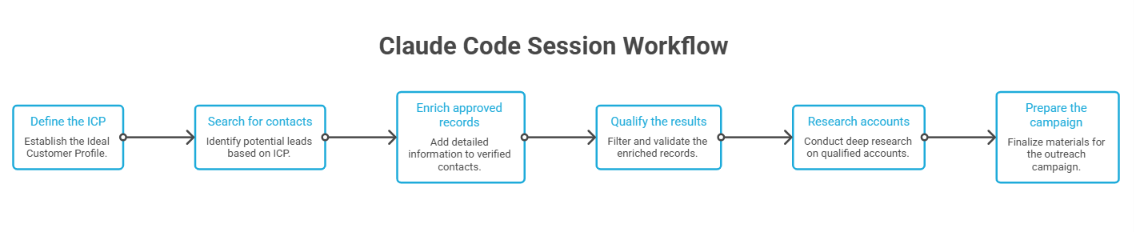
The important distinction is between fit and qualification. Claude Code can assess whether someone fits your documented ICP based on available information. A prospect only becomes genuinely qualified once you have stronger evidence, such as confirmed need, authority, timing, budget, engagement, or a relevant buying signal.
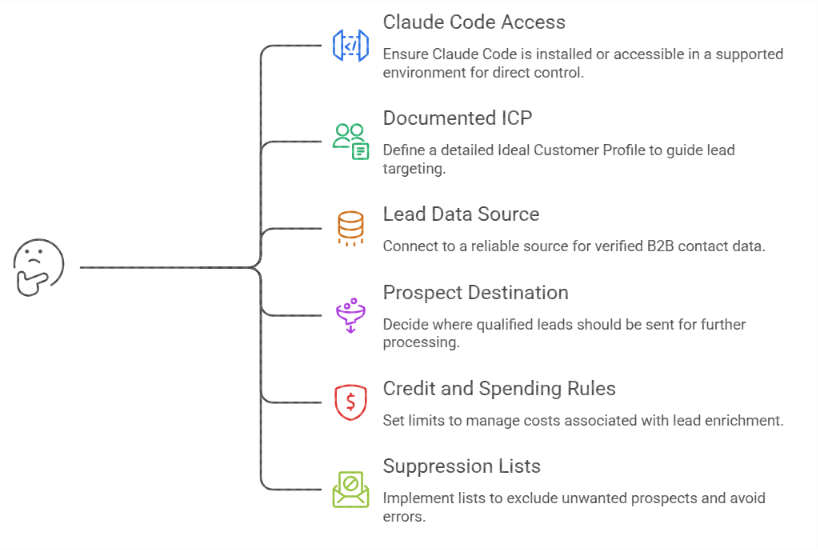
You do not need to build a complicated sales system before starting. However, Claude Code needs clear instructions and controlled access to the right tools. Prepare the following first.
Install Claude Code or use one of its supported environments. The terminal version gives you direct control over local files, commands, scripts, and MCP configurations.
Your ICP should define more than an industry and job title. Include:
Claude Code needs a connected source if you want it to retrieve verified B2B contact data at scale. Leadsforge supports natural-language ICP search, contact enrichment, lookalike search, competitor-follower search, intent signals, and exports to Salesforge or CSV.
Its enrichment options include work emails, LinkedIn profiles, and mobile numbers.
Decide where qualified records should go. This could be:
Lead enrichment can become expensive when an automated workflow enriches every returned record. Define:
Your workflow should check prospects against:
Without this step, automation can make your workflow faster while also making your mistakes faster.
Claude Code connects to external tools through MCP. MCP servers allow it to discover and use the actions exposed by a connected platform.
Anthropic currently recommends HTTP for remote MCP servers. Claude Code supports authentication headers, environment-variable expansion, local or project-level configurations, and the /mcp command for checking server status.
Generate API keys for the Forge products you intend to use.
For a basic lead generation workflow, you will normally need:
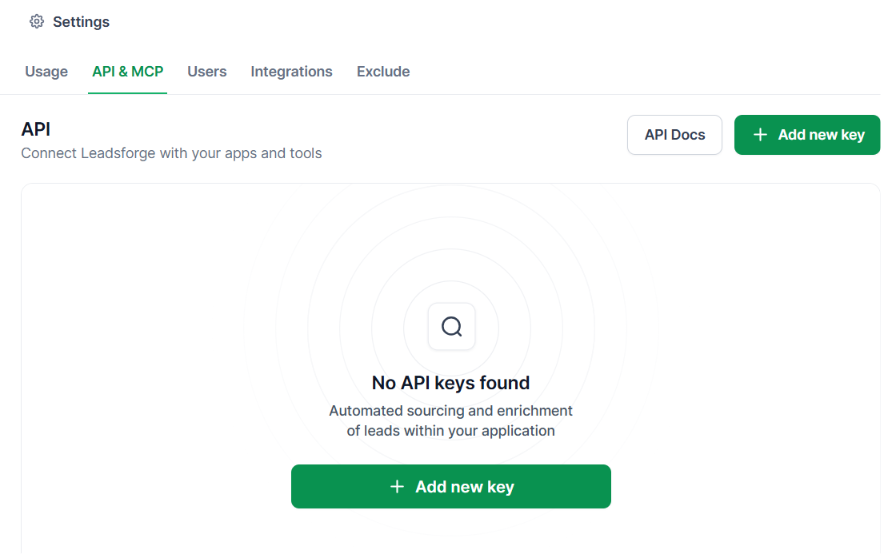
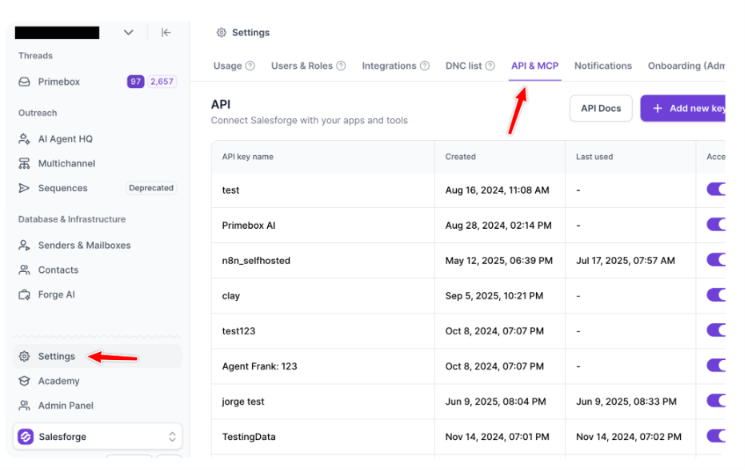
You do not need to connect products that are not part of your workflow.
You can add the server through the Claude Code command line.
claude mcp add --transport http \
--header "X-Leadsforge-Key: YOUR_LEADSFORGE_API_KEY" \
--header "X-Salesforge-Key: YOUR_SALESFORGE_API_KEY" \
forge https://mcp.salesforge.ai/mcp
Remove the Salesforge header if you only want to use Leadsforge. For frequent or team usage, avoid placing credentials directly in a shared configuration file. Claude Code supports environment-variable expansion inside .mcp.json, allowing you to keep the configuration shareable without committing the underlying keys.
An example configuration looks like this:
{
"mcpServers": {
"forge": {
"type": "http",
"url": "https://mcp.salesforge.ai/mcp",
"headers": {
"X-Leadsforge-Key": "${LEADSFORGE_API_KEY}",
"X-Salesforge-Key": "${SALESFORGE_API_KEY}"
}
}
}
}
Set the keys as environment variables on your machine:
export LEADSFORGE_API_KEY="your-leadsforge-api-key"
export SALESFORGE_API_KEY="your-salesforge-api-key"
Do not paste API keys into ordinary Claude Code prompts, store them in prospect files, or commit them to a public repository.
Start Claude Code and run:
/mcpConfirm that the Forge server is connected and that its tools are available.
You can also run a read-only test prompt:
List the available Leadsforge and Salesforge tools.Do not search for contacts, enrich data, create records, or make any
changes. Only explain what each available tool can do.
This confirms the connection before you spend credits or make changes to your workspace.
One-off prompts are useful, but they are not enough for a repeatable workflow.
Create a dedicated project folder for lead generation and add a CLAUDE.md file containing your permanent prospecting rules.
Here is a template:
# B2B Lead Generation Rules
## Our product
We sell:
[Describe your product in two or three sentences.]Primary outcome:
[Explain the business result your product creates.]## Target companies
Industries:
- B2B SaaS
- Sales technology
- Marketing technology
Company size:
- 50 to 500 employeesLocations:
- United States
- Canada
- United Kingdom
Required characteristics:
- Sells to other businesses
- Has an established sales team
- Uses outbound or account-based sales
## Target contacts
Priority roles:
- VP of Sales
- Head of Sales
- VP of Revenue
- Head of Revenue Operations
- Director of Sales Development
Minimum seniority:
- Director## Exclusions
Exclude:
- Agencies
- Recruitment firms
- Consultants
- Freelancers
- Companies with fewer than 50 employees
- Existing customers
- Open opportunities
- Competitors
- Contacts on our suppression list
## Required output fields
For every prospect, return:
- Full name
- Job title
- Company
- Company domain
- Location
- Employee range
- LinkedIn URL
- Work email, when approved for enrichment
- Phone number, only when explicitly requested
- Fit score
- Data-confidence level
- Reason for inclusion
- Missing information
- Recommended next action
## Credit rules
- Search before enriching.
- Do not enrich more than 25 contacts without approval.
- Do not enrich phone numbers unless explicitly instructed.
- Do not enrich records with a fit score below 70.
- Show the estimated action and record count before using credits.
## Approval rules
Always request approval before:
- Enriching more than 25 records.
- Creating or updating a Salesforge sequence.
- Enrolling contacts into a campaign.
- Sending or scheduling outreach.
- Deleting or merging uncertain records.
## Data-quality rules
- Never invent missing values.
- Mark unknown fields as unknown.
- Separate verified facts from assumptions.
- Flag uncertain duplicate matches for manual review.
- Do not describe a prospect as sales-qualified based only on ICP fit.
This file gives Claude Code a stable operating policy. You can update the ICP, exclusions, scoring rules, or credit limits without rewriting them in every prompt.
Once your tools and rules are connected, you can operate the workflow in stages.
Do not ask Claude Code to search, enrich, qualify, research, and launch a campaign in one uncontrolled instruction. Separate the work into reviewable steps.
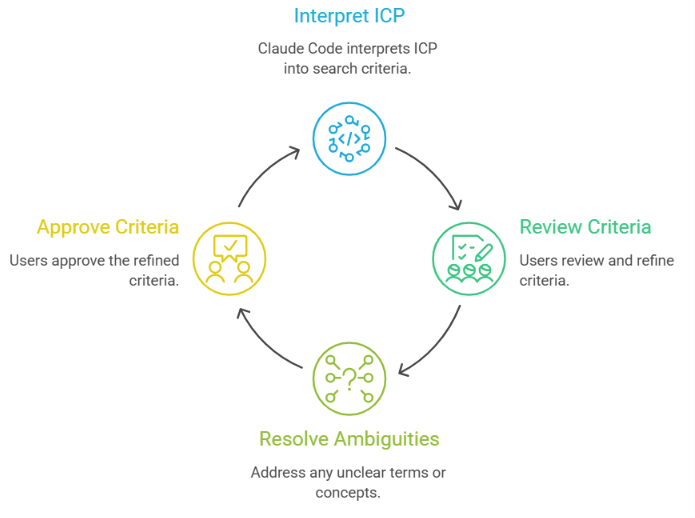
Start by asking Claude Code to interpret your ICP. Read our CLAUDE.md file and convert the ICP into proposed company and contact search criteria.
Return:
1. Company filters.
2. Contact filters.
3. Included job titles.
4. Excluded job titles.
5. Company exclusions.
6. Any ambiguous criteria that could affect the results.
Do not search for contacts yet. Wait for approval. Review the proposed criteria carefully.
Claude Code may interpret phrases such as “mid-market,” “technology company,” or “decision-maker” differently from you. Resolving those ambiguities before running the search will produce a cleaner list.
Once the criteria are approved, run an initial search without unnecessary enrichment. Use the approved criteria to search Leadsforge for up to 100 matching contacts.
At this stage:
- Do not enrich phone numbers.
- Do not create records in Salesforge.
- Do not enrol anyone into a sequence.
- Do not use more than the minimum data required for the initial search.
Return:
- The total number of matches.
- The filters used.
- A sample of 20 contacts.
- Any filters that were unavailable or interpreted differently.
- Missing fields that may affect qualification.
The purpose of this step is to inspect the quality of the search before using additional credits. Check whether:
Refine the search before moving forward.
Do not enrich every contact returned by the search.
Ask Claude Code to score the initial records using only the available company and contact data.
A simple 100-point model could look like this:
Example instructions:
Score each prospect against the qualification model in CLAUDE.md.For every record:
- Show the total score.
- Explain the reason for the score.
- Mark every missing value as unknown.
- Do not infer employee count, revenue, funding, or technology usage.
- Flag prospects that require manual review.
Group the results into:
- Priority A: 80 to 100
- Priority B: 65 to 79
- Priority C: Below 65
Do not enrich any contact yet.
This is pre-qualification, not final sales qualification. The score tells you how closely the available record matches your ICP. It does not prove that the prospect is actively looking for your product.
Once the shortlist looks accurate, enrich the contacts you realistically intend to approach.
Enrich the Priority A prospects with:
- Verified work email.
- Confirmed LinkedIn profile.
Do not enrich phone numbers.
Before taking action, report:
- The number of contacts that will be enriched.
- The fields that will be requested.
- Any records that should be excluded.
- The expected credit impact, when available.
Wait for my approval before running the enrichment. For phone-based campaigns, create a separate enrichment step. Phone data normally has a different cost and should not be retrieved automatically for every contact.
Leadsforge supports contact search together with email, phone, and LinkedIn enrichment, while also offering lookalike and competitor-follower workflows. This makes it possible to restrict enrichment to the specific data required for each campaign.
After enrichment, clean the records before they reach your outreach platform. Clean and deduplicate the enriched prospect list. Use the following matching order:
1. Work email.
2. LinkedIn profile URL.
3. Company domain plus full name.
4. Normalised company name plus full name.
Standardise:
- Company names.
- Job titles.
- Country names.
- LinkedIn URLs.
- Website domains.
Do not delete uncertain matches. Create a separate manual-review group for records that may be duplicates but cannot be matched confidently.
Claude Code can also compare the records against existing customer, opportunity, unsubscribe, and suppression files. Do this before creating contacts in Salesforge.
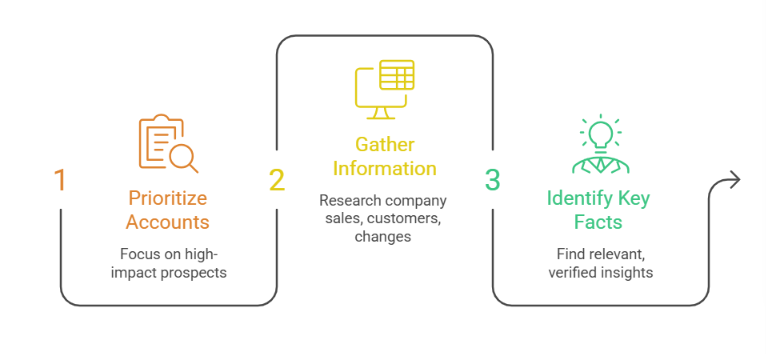
Not every shortlisted prospect needs extensive account research. Focus deeper research on the accounts where personalisation is most likely to improve the message or help the sales representative understand the opportunity.
Research the Priority A accounts using current, publicly available information. For every company, provide:
- What the company sells.
- Its primary customer type.
- Relevant recent company changes.
- Current hiring activity related to sales or growth.
- Confirmed technology or process signals.
- A potential outreach angle.
- Source and publication date for every time-sensitive claim.
Rules:
- Use only information that can be verified.
- Do not infer a problem merely because the company fits our ICP.
- Label assumptions separately.
- Do not use generic compliments.
- Do not mention information that would feel intrusive in an email.
The goal is not to generate a long company report. It is to find one or two confirmed facts that make the outreach more relevant.
Once the data has been reviewed, Claude Code can prepare or create the relevant records in Salesforge. Prepare the approved Priority A prospects for Salesforge.
Before creating anything:
- Check the suppression list again.
- Exclude existing customers and open opportunities.
- Exclude records without a verified email.
- Show the final number of contacts.
- Show the field mapping.
- Flag any records with incomplete required fields.
Wait for approval before creating contacts.
After the contacts are approved, you can ask Claude Code to create a campaign draft.
Create a draft two-step email sequence for the approved contacts.
Use:
- Our value proposition from CLAUDE.md.
- The approved messaging guidelines.
- Only verified personalisation details.
- Plain-text emails.
- One clear call to action.
Do not enrol contacts, activate the sequence, or schedule sending.
Create the sequence as a draft for manual review.
The Forge MCP Server supports Salesforge operations involving contacts, sequences, mailboxes, sender profiles, enrolments, email validation, and do-not-contact lists. Write actions should still be protected by clear approval rules.
The following prompt combines the research and qualification stages while preserving approval gates.
Act as a B2B lead operations agent.
Read and follow every rule in CLAUDE.md.
Objective:
Build a shortlist of prospects matching our ICP and prepare the approved
records for outreach.
Workflow:
1. Convert the ICP into structured company and contact filters.
2. Show the filters and exclusions before searching.
3. Wait for approval.
4. Search Leadsforge for up to [NUMBER] prospects.
5. Do not enrich phone numbers.
6. Do not create or update Salesforge records.
7. Score every prospect against our qualification model.
8. Mark missing information as unknown.
9. Separate the results into Priority A, B, and C.
10. Recommend which contacts should be enriched.
11. Report the number of records and requested fields before using
    enrichment credits.
12. Wait for approval.
13. Enrich only the approved contacts.
14. Clean and deduplicate the enriched results.
15. Check every contact against our exclusions and suppression list.
16. Research only the approved Priority A accounts.
17. Use verified public information and include the source date for
    time-sensitive claims.
18. Prepare the final contacts for Salesforge.
19. Wait for approval before creating contacts, sequences, or enrolments.
Required output for every prospect:
- Full name
- Job title
- Company
- Company domain
- Company location
- Company size
- LinkedIn URL
- Work email
- Fit score
- Data-confidence level
- Reason for inclusion
- Missing information
- Research angle
- Recommended next action
Never:
- Invent missing information.
- Treat an ICP match as sales-qualified.
- Spend enrichment credits without approval.
- Contact existing customers or suppressed prospects.
- Create or launch outreach without approval.
This prompt is intentionally restrictive. A useful lead generation workflow should prevent incorrect or expensive actions, not merely execute tasks quickly.
Ask Claude Code to return results in a consistent structure.
A consistent format makes it easier to export the results, compare batches, audit decisions, and identify where your workflow is producing weak leads.
Claude Code workflows can be implemented in several ways.
Anthropic describes the CLI as suitable for interactive and one-off work, while the Agent SDK is designed for custom applications, CI/CD, and production automation. The SDK can also connect to external MCP servers and restrict which tools an agent is allowed to use.
You do not have to choose only one method. A common approach is:
Claude Code currently supports recurring tasks through local scheduled tasks and cloud routines. Cloud routines can include configured connectors and run on schedules or supported triggers, although the routines feature is currently described as a research preview.
This instruction is too vague. Define what “good” means using company, contact, signal, exclusion, and data-quality criteria.
Search and shortlist first. Enriching every result wastes credits and creates unnecessary data.
A Head of Sales at a 200-person SaaS company may match your ICP perfectly and still have no reason to buy your product. Call the record an ICP match or a pre-qualified prospect until genuine interest or need has been confirmed.
Missing data should remain missing. An unknown employee count is safer than an invented employee range that gives the prospect an artificially high score.
Searching and reading are lower-risk actions. Creating contacts, updating sequences, enrolling prospects, and launching outreach are materially different. Require approval before every consequential write action.
Your exclusion process should run immediately before records are created or enrolled, not only at the beginning of the workflow.
Do not let Claude Code turn weak clues into confident claims. “Your team is clearly struggling to scale outbound” is not valid personalisation unless the company has directly indicated that problem.
Start with one small, observable workflow. For example:
Expand the workflow only after the results are consistently accurate.
Claude Code is useful for lead generation when the main problem is fragmented work. It is particularly suitable for:
It is less suitable when:
Claude Code does not eliminate the need for specialist sales tools. Its value comes from coordinating them. Leadsforge can provide the contact search and enrichment layer.
Claude Code can apply your rules, process the results, and manage the workflow. Salesforge can handle approved contacts and campaign execution. The rest of your infrastructure can support sending and deliverability.
That is a stronger use case than asking Claude Code to replace your entire sales stack.
Enter your email to get a custom plan & stack recommendation for your business
Please check your mailbox in 5 minutes

Claude Code can make B2B lead generation faster, more consistent, and easier to operate, but only when the workflow is designed properly. It is not a hidden database of prospects. It is an agentic operating layer that can research, reason, process data, and interact with the platforms that provide your contact information and sales infrastructure.
The most reliable setup is to:
For teams already using the Forge ecosystem, connecting Claude Code to Leadsforge and Salesforge creates a practical path from a natural-language ICP to an outreach-ready prospect list without manually moving data between several dashboards.
The quality of the result will still depend on the quality of your ICP, data source, qualification logic, and review process. Claude Code makes the workflow easier to run. It does not remove the need to design the workflow well.
.jpg)

![How to Use Jev for Cold Email Agents [Step-by-Step Guide]](https://cdn.prod.website-files.com/6436c3ac9f9fd0594d00b9fc/6acbd25fa19716f481a8dc43_Duplicate-me-open-graph%20(67).jpg)

![How to Use Jev for LinkedIn Outreach [Step-by-Step Guide]](https://cdn.prod.website-files.com/6436c3ac9f9fd0594d00b9fc/6acbc875da442e046e263670_Duplicate-me-open-graph%20(66).jpg)