
Personalized Outbound Strategy
Get The Right Outbound Strategy In Minutes
Enter your email to get a custom plan & stack recommendation for your business
It's being carefully crafted by AI
Please check your mailbox in 5 minutes
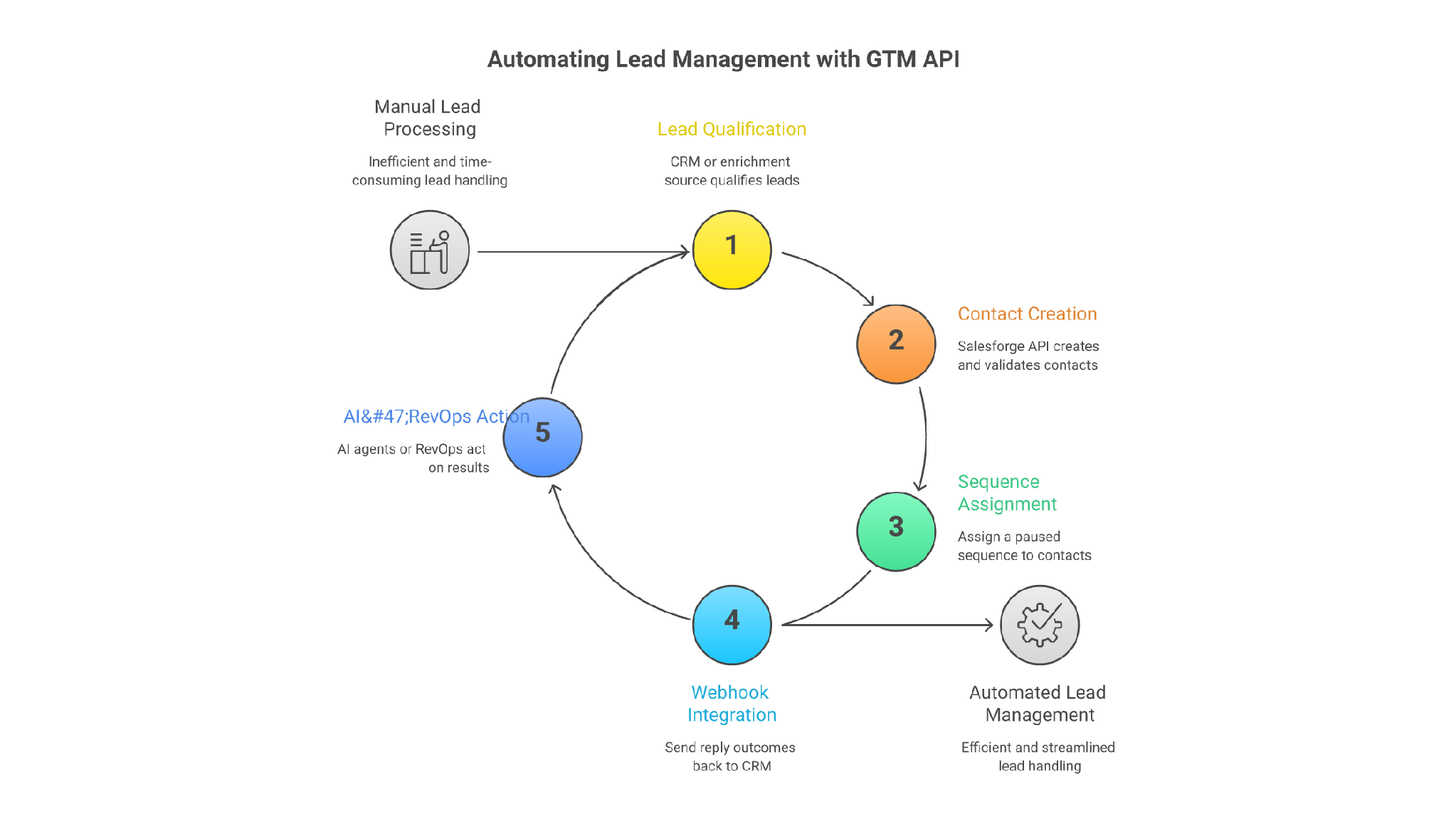
If your GTM team is still exporting HubSpot lists, cleaning fields in spreadsheets, importing contacts into outreach tools, and asking reps to update CRM after replies, you do not have a connected outbound system.
You have manual middleware.
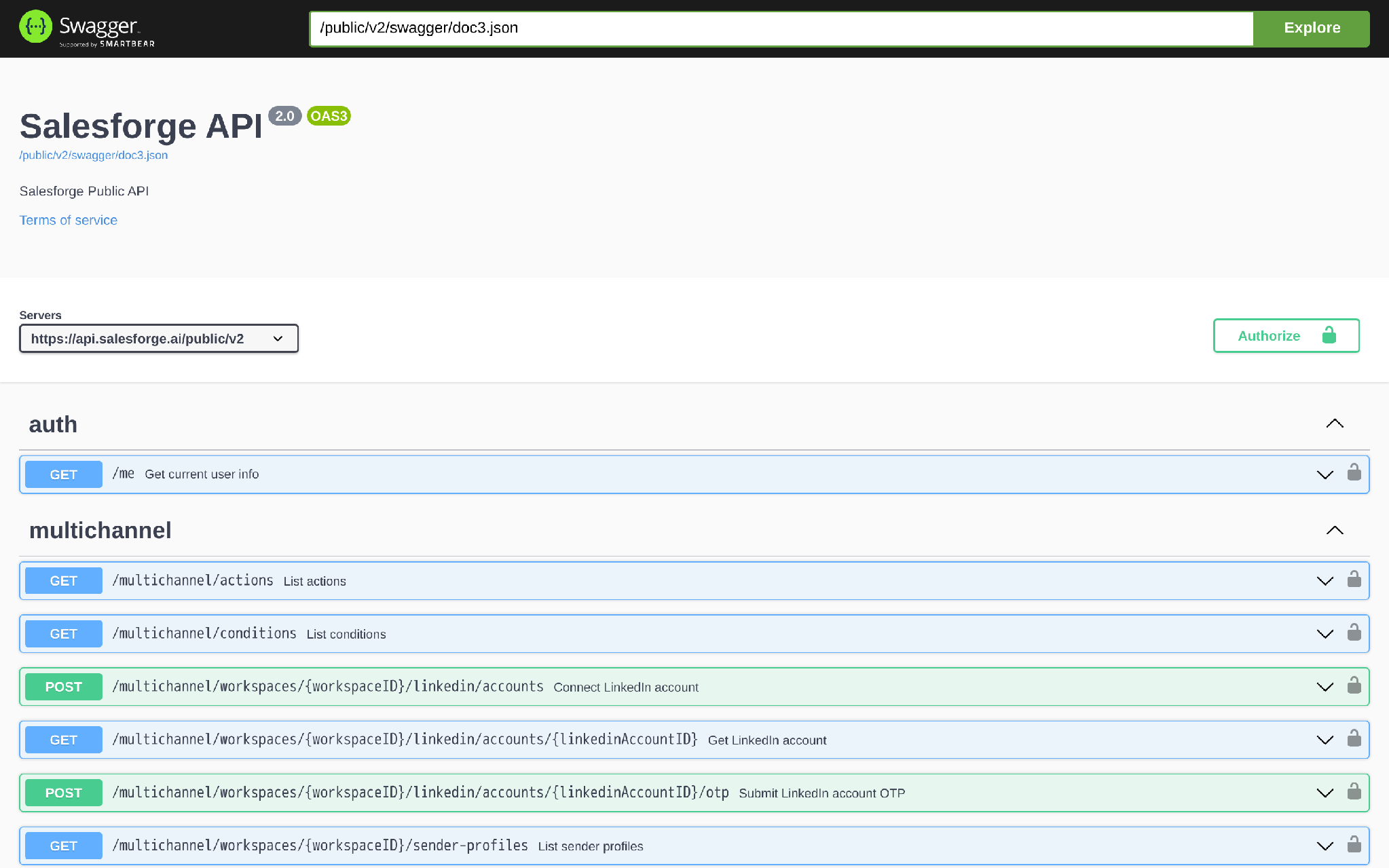
The Salesforge API is how I would connect Salesforge to the rest of a GTM stack: CRM, enrichment, data warehouse jobs, workflow tools, AI agents, and reporting. The implementation starts with a simple pattern: authenticate, find the workspace, create or update contacts, assign them to a sequence, validate before launch, then send reply events back through webhooks.
Here is the direct shape of the REST API:
curl --request POST \
  --url "https://api.salesforge.ai/public/v2/workspaces/WORKSPACE_ID/contacts" \
  --header "Authorization: YOUR_SALESFORGE_API_KEY" \
  --header "Content-Type: application/json" \
  --data '{
    "firstName": "Sarah",
    "lastName": "Jones",
    "email": "[email protected]",
    "company": "Acme",
    "position": "VP Sales",
    "linkedinUrl": "https://www.linkedin.com/in/sarah-jones",
    "tags": ["hubspot", "outbound-qualified"],
    "customVars": {
      "pain_point": "manual CRM cleanup",
      "source_system": "hubspot"
    }
  }'
Use the API when your workflow needs custom routing, governance, retries, and feedback loops. Use the native Salesforge integrations when standard sync is enough.
The base URL for the Salesforge v2 API is:
https://api.salesforge.ai/public/v2Authentication uses an API key in the Authorization header:
Authorization: YOUR_SALESFORGE_API_KEYAuthorization: YOUR_SALESFORGE_API_KEYFor a normal GTM workflow, I would build this order:
That is the minimum useful connection. Anything less usually becomes another brittle lead handoff.
Do not build custom API plumbing just because you can.
Salesforge already supports native or packaged integrations for common GTM tools. If the standard integration handles your sync, use it. Custom code should earn its keep.
The API makes the handoff layer programmable, but it does not replace the ownership, field definitions, and routing rules required to make that layer work.
If CRM ownership is confused, qualification is vague, DNC rules are unclear, or nobody owns sequence logic, the API will only move bad decisions faster.
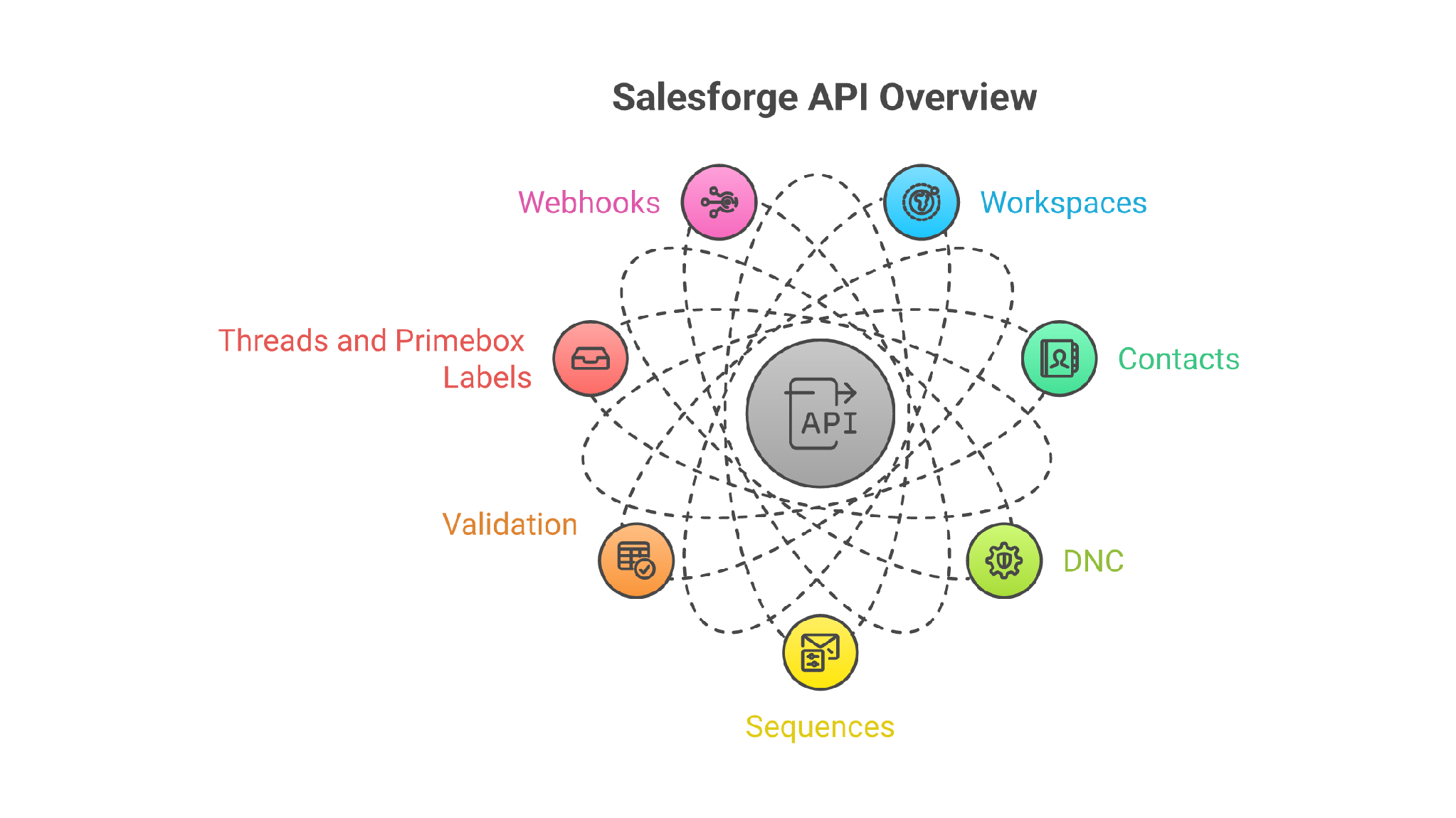
Here is the practical map I would give a GTM engineer before implementation.
For multichannel sequence building, Salesforge also exposes a separate multichannel surface on https://multichannel-api.salesforge.ai/public. That includes actions, conditions, LinkedIn accounts, sender profiles, sequences, nodes, branches, enrollments, launch, settings, schedule, analytics, and validation runs.
The important distinction: do not claim every UI capability is available through a public REST operation unless you can map it to an endpoint. The table above is the practical build surface.
Salesforge API keys are generated inside Salesforge under Settings -> API. Store the key in a secret manager, not in Zapier notes, local scripts, or a shared spreadsheet.
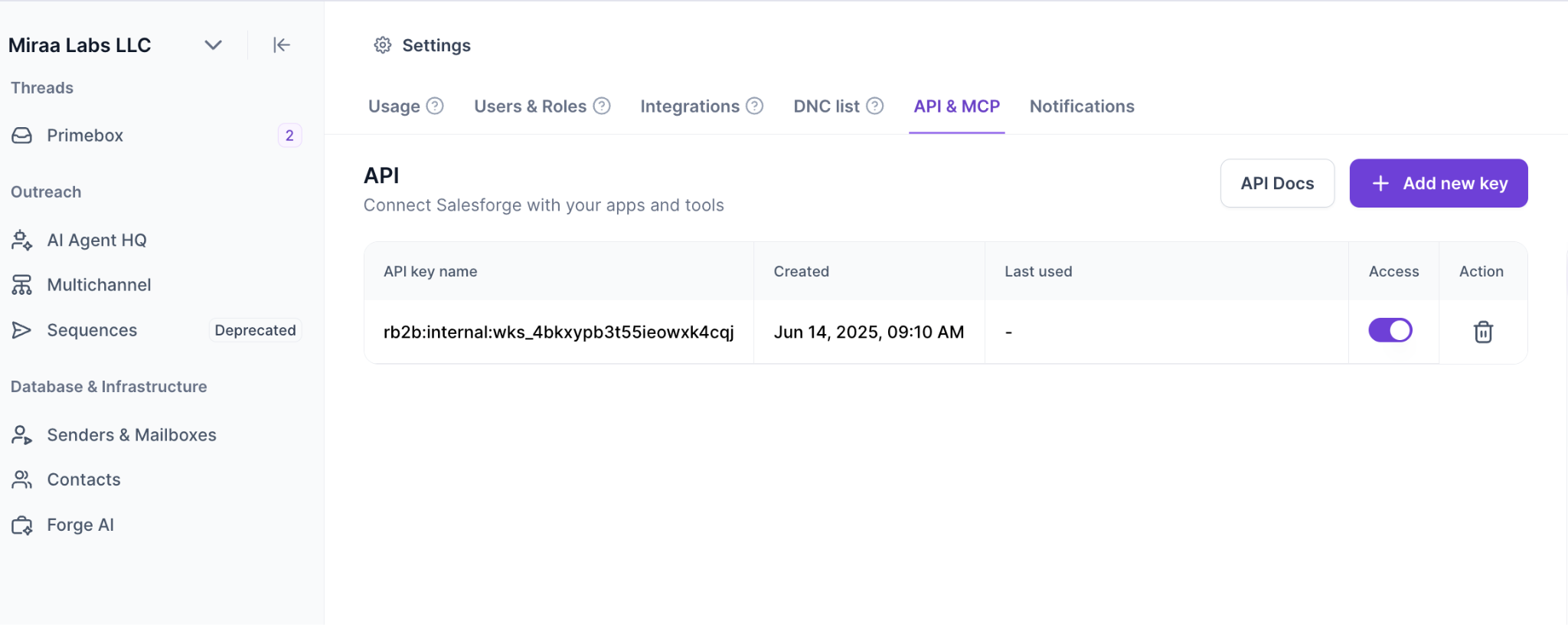
I would first verify the key:
curl --request GET \
  --url "https://api.salesforge.ai/public/v2/me" \
  --header "Authorization: YOUR_SALESFORGE_API_KEY"
Then list workspaces:
curl --request GET \
  --url "https://api.salesforge.ai/public/v2/workspaces?limit=10&offset=0" \
  --header "Authorization: YOUR_SALESFORGE_API_KEY"
Example response shape:
{
  "data": [
    {
      "id": "wk_123",
      "name": "North America Outbound",
      "slug": "north-america-outbound",
      "accountId": "acct_123"
    }
  ],
  "limit": 10,
  "offset": 0,
  "total": 1
}
If your company has multiple regions, clients, products, or agencies inside Salesforge, this workspace decision matters. It controls the boundary for contacts, sequences, mailboxes, labels, DNC entries, and webhooks.
For an agency, I would usually separate workspaces by client. For a GTM team, I would separate only when permissions, sender infrastructure, reporting, or campaign ownership need a real boundary.
This is where many API projects go wrong.
They create contacts first, then worry about exclusions later. I would do the opposite.
Sync do-not-contact entries before assigning anything to a campaign:
curl --request GET \
  --url "https://api.salesforge.ai/public/v2/workspaces/WORKSPACE_ID/dnc?limit=100&offset=0" \
  --header "Authorization: YOUR_SALESFORGE_API_KEY"
Use your own CRM, legal, and customer lists too. Salesforge can store DNC records, but your integration should still check internal exclusion rules before creating outreach work.
The API does not decide who you are allowed to contact. Your GTM governance does.
A single contact request is the easiest first test.
curl --request POST \
  --url "https://api.salesforge.ai/public/v2/workspaces/WORKSPACE_ID/contacts" \
  --header "Authorization: YOUR_SALESFORGE_API_KEY" \
  --header "Content-Type: application/json" \
  --data '{
    "firstName": "Sarah",
    "lastName": "Jones",
    "email": "[email protected]",
    "company": "Acme",
    "position": "VP Sales",
    "linkedinUrl": "https://www.linkedin.com/in/sarah-jones",
    "tags": ["hubspot", "tier-1", "q3-outbound"],
    "tagIds": ["tag_123"],
    "customVars": {
      "crm_contact_id": "hubspot-98765",
      "territory": "NA",
      "segment": "B2B SaaS",
      "pain_point": "manual lead routing",
      "source_system": "hubspot"
    }
  }'
The request body supports firstName, lastName, email, company, position, linkedinUrl, tags, tagIds, and customVars. The spec requires firstName; in real GTM work, I would also require email or LinkedIn URL at the workflow layer so the contact can actually be used.
Example response shape:
{
  "id": "contact_123",
  "firstName": "Sarah",
  "lastName": "Jones",
  "email": "[email protected]",
  "company": "Acme",
  "linkedinUrl": "https://www.linkedin.com/in/sarah-jones",
  "tags": ["hubspot", "tier-1", "q3-outbound"],
  "customVars": {
    "crm_contact_id": "hubspot-98765",
    "territory": "NA",
    "segment": "B2B SaaS"
  }
}
The customVars object is where your GTM stack becomes useful. If HubSpot, Salesforce, Clay, Leadsforge, or your warehouse has a buying signal, pain point, competitor mention, hiring trigger, or account tier, pass it into Salesforge as a field your sequence can use.
Otherwise personalization stays trapped upstream.
For campaign loading, use bulk creation.
The endpoint supports 1 to 100 contacts per request:
curl --request POST \
  --url "https://api.salesforge.ai/public/v2/workspaces/WORKSPACE_ID/contacts/bulk" \
  --header "Authorization: YOUR_SALESFORGE_API_KEY" \
  --header "Content-Type: application/json" \
  --data '{
    "contacts": [
      {
        "firstName": "Sarah",
        "lastName": "Jones",
        "email": "[email protected]",
        "company": "Acme",
        "position": "VP Sales",
        "tags": ["hubspot", "tier-1"],
        "customVars": {
          "crm_contact_id": "hubspot-98765",
          "source_system": "hubspot"
        }
      },
      {
        "firstName": "Dev",
        "lastName": "Patel",
        "email": "[email protected]",
        "company": "Northstar",
        "position": "Head of Growth",
        "tags": ["clay", "intent-signal"],
        "customVars": {
          "intent_signal": "new sales hiring push",
          "source_system": "clay"
        }
      }
    ]
  }'
Do not use bulk creation as an excuse to dump every record into Salesforge.
I would batch only contacts that passed:
Good automation is not “send everything.”
Good automation is “move only the records that already passed the rules.”
You can list sequences in a workspace like this:
curl --request GET \
  --url "https://api.salesforge.ai/public/v2/workspaces/WORKSPACE_ID/sequences?limit=20&offset=0&statuses[]=paused" \
  --header "Authorization: YOUR_SALESFORGE_API_KEY"
Once your workflow selects the right sequenceID, assign contacts:
curl --request PUT \
  --url "https://api.salesforge.ai/public/v2/workspaces/WORKSPACE_ID/sequences/SEQUENCE_ID/contacts" \
  --header "Authorization: YOUR_SALESFORGE_API_KEY" \
  --header "Content-Type: application/json" \
  --data '{
    "contactIds": ["contact_123", "contact_456"]
  }'
A successful assignment returns 204 No Content.
That lack of response body is normal. Your integration should log the request, contact IDs, sequence ID, timestamp, and returned status code so you can audit what happened later.
If you are using multichannel sequences, there is also a multichannel enrollment endpoint:
curl --request POST \
  --url "https://multichannel-api.salesforge.ai/public/multichannel/workspaces/WORKSPACE_ID/sequences/123/enrollments" \
  --header "Authorization: YOUR_SALESFORGE_API_KEY" \
  --header "Content-Type: application/json" \
  --data '{
    "filters": {
      "contactIds": ["contact_123", "contact_456"]
    },
    "limit": 2
  }'
Treat this as the key implementation point: legacy sequence contact assignment and multichannel enrollments are not the same endpoint family. Pick the one that matches the sequence type you are operating.
Start validation after contacts are assigned:
curl --request POST \
  --url "https://api.salesforge.ai/public/v2/workspaces/WORKSPACE_ID/sequences/SEQUENCE_ID/contacts/validation/start" \
  --header "Authorization: YOUR_SALESFORGE_API_KEY"
A successful start returns 202 Accepted.
Then poll the result endpoint with a bounded retry loop:
curl --request GET \
  --url "https://api.salesforge.ai/public/v2/workspaces/WORKSPACE_ID/sequences/SEQUENCE_ID/contacts/validation/result" \
  --header "Authorization: YOUR_SALESFORGE_API_KEY"
Example response shape:
{
  "status": "completed",
  "progress": 100,
  "result": {
    "safe": 87,
    "invalid": 4,
    "catch_all": 6,
    "unknown": 3
  }
}
Then confirm only the statuses you want to send to:
curl --request POST \
  --url "https://api.salesforge.ai/public/v2/workspaces/WORKSPACE_ID/sequences/SEQUENCE_ID/contacts/validation/confirm" \
  --header "Authorization: YOUR_SALESFORGE_API_KEY" \
  --header "Content-Type: application/json" \
  --data '{
    "esps": ["gsuite", "ms365"],
    "statuses": ["safe"]
  }'
This is where Salesforge’s deliverability controls need to be respected. Salesforge includes built-in email validation, Bounce Shield, text-only sending defaults, sender rotation, ESP matching on Growth, and unlimited warmup through Warmforge.
Those controls work best when your API workflow follows the send order.
Infrastructure first.
Warmup second.
Clean list third.
Personalized copy fourth.
Volume last.
If your integration skips validation because someone wants “full automation,” you are not improving GTM operations. You are scaling a deliverability problem.
A sequence is not ready just because contacts are attached.
Assign sending mailboxes:
curl --request PUT \
  --url "https://api.salesforge.ai/public/v2/workspaces/WORKSPACE_ID/sequences/SEQUENCE_ID/mailboxes" \
  --header "Authorization: YOUR_SALESFORGE_API_KEY" \
  --header "Content-Type: application/json" \
  --data '{
    "mailboxIds": ["mailbox_123", "mailbox_456"]
  }'
Update the schedule if the workflow controls send windows:
curl --request PUT \
  --url "https://api.salesforge.ai/public/v2/workspaces/WORKSPACE_ID/sequences/SEQUENCE_ID/schedules" \
  --header "Authorization: YOUR_SALESFORGE_API_KEY" \
  --header "Content-Type: application/json" \
  --data '{
    "schedules": [
      { "weekday": 1, "fromHour": 9, "toHour": 17 },
      { "weekday": 2, "fromHour": 9, "toHour": 17 },
      { "weekday": 3, "fromHour": 9, "toHour": 17 },
      { "weekday": 4, "fromHour": 9, "toHour": 17 },
      { "weekday": 5, "fromHour": 9, "toHour": 15 }
    ]
  }'
Keep new sequences paused by default:
curl --request PUT \
  --url "https://api.salesforge.ai/public/v2/workspaces/WORKSPACE_ID/sequences/SEQUENCE_ID/status" \
  --header "Authorization: YOUR_SALESFORGE_API_KEY" \
  --header "Content-Type: application/json" \
  --data '{
    "status": "paused"
  }'
Then move to active only after review:
curl --request PUT \
  --url "https://api.salesforge.ai/public/v2/workspaces/WORKSPACE_ID/sequences/SEQUENCE_ID/status" \
  --header "Authorization: YOUR_SALESFORGE_API_KEY" \
  --header "Content-Type: application/json" \
  --data '{
    "status": "active"
  }'
For first-time workflows, I prefer create, assign, validate, pause, review, then activate.
Once the playbook is proven, you can allow trusted workflows to activate automatically.
Webhooks are what make the integration feel connected.
Create one webhook per event type or per workflow destination. The request requires name, type, and url. sequenceID is optional when the webhook should be scoped to a sequence.
curl --request POST \
  --url "https://api.salesforge.ai/public/v2/workspaces/WORKSPACE_ID/integrations/webhooks" \
  --header "Authorization: YOUR_SALESFORGE_API_KEY" \
  --header "Content-Type: application/json" \
  --data '{
    "name": "HubSpot positive replies",
    "type": "positive_reply",
    "url": "https://gtm.example.com/webhooks/salesforge/positive-reply",
    "sequenceID": "sequence_123"
  }'
Example response shape:
{
  "id": "webhook_123",
  "name": "HubSpot positive replies",
  "type": "positive_reply",
  "url": "https://gtm.example.com/webhooks/salesforge/positive-reply",
  "sequenceId": "sequence_123",
  "sentCount": 0
}
Useful webhook types include:
Do not send every event to CRM. Send the events that change ownership, routing, compliance, forecasting, or follow-up.
For most GTM teams, I would sync positive replies, negative replies, meetings, bounces, unsubscribes, DNC additions, and label changes.
Here is the end-to-end implementation I would build first.
Trigger from HubSpot when a contact enters a list like Outbound Qualified - NA - VP Sales.
Your automation receives:
{
  "hubspotContactId": "98765",
  "email": "[email protected]",
  "firstname": "Sarah",
  "lastname": "Jones",
  "company": "Acme",
  "jobtitle": "VP Sales",
  "linkedin_url": "https://www.linkedin.com/in/sarah-jones",
  "territory": "NA",
  "lifecycle_stage": "lead",
  "owner_id": "hubspot-owner-44",
  "intent_signal": "hiring SDRs"
}
Before calling POST /contacts, check your own database for prior sync history.
Then call Salesforge contacts and DNC endpoints:
curl --request GET \
  --url "https://api.salesforge.ai/public/v2/workspaces/WORKSPACE_ID/contacts?limit=10&offset=0" \
  --header "Authorization: YOUR_SALESFORGE_API_KEY"

curl --request GET \
  --url "https://api.salesforge.ai/public/v2/workspaces/WORKSPACE_ID/dnc?limit=100&offset=0" \
  --header "Authorization: YOUR_SALESFORGE_API_KEY"
Because the public contacts endpoint supports filters such as tags, validation status, and not-in-sequence, I would still keep a local sync table keyed by CRM contact ID, email, workspace ID, and Salesforge contact ID.
That gives you idempotency even if a webhook or CRM trigger fires twice.
Use a deterministic mapping:
The key rule: if the sequence copy or routing needs a value, map it before the contact enters Salesforge.
curl --request POST \
  --url "https://api.salesforge.ai/public/v2/workspaces/WORKSPACE_ID/contacts" \
  --header "Authorization: YOUR_SALESFORGE_API_KEY" \
  --header "Content-Type: application/json" \
  --data '{
    "firstName": "Sarah",
    "lastName": "Jones",
    "email": "[email protected]",
    "company": "Acme",
    "position": "VP Sales",
    "linkedinUrl": "https://www.linkedin.com/in/sarah-jones",
    "tags": ["hubspot", "outbound-qualified", "na"],
    "customVars": {
      "crm_contact_id": "98765",
      "crm_owner_id": "hubspot-owner-44",
      "territory": "NA",
      "intent_signal": "hiring SDRs",
      "source_system": "hubspot"
    }
  }'
Store the returned Salesforge contact ID in your integration table and, if useful, back in HubSpot.
curl --request PUT \
  --url "https://api.salesforge.ai/public/v2/workspaces/WORKSPACE_ID/sequences/SEQUENCE_ID/contacts" \
  --header "Authorization: YOUR_SALESFORGE_API_KEY" \
  --header "Content-Type: application/json" \
  --data '{
    "contactIds": ["contact_123"]
  }'
Keep the sequence paused until the first cohort has been reviewed. This gives the campaign owner a chance to catch bad mapping, weak copy variables, wrong territory, or a sender issue before live outreach starts.
curl --request PUT \
  --url "https://api.salesforge.ai/public/v2/workspaces/WORKSPACE_ID/sequences/SEQUENCE_ID/contacts" \
  --header "Authorization: YOUR_SALESFORGE_API_KEY" \
  --header "Content-Type: application/json" \
  --data '{
    "contactIds": ["contact_123"]
  }'
When validation completes, confirm the statuses your policy allows. I would start with safe only.
curl --request PUT \
  --url "https://api.salesforge.ai/public/v2/workspaces/WORKSPACE_ID/sequences/SEQUENCE_ID/status" \
  --header "Authorization: YOUR_SALESFORGE_API_KEY" \
  --header "Content-Type: application/json" \
  --data '{
    "status": "active"
  }'
A positive_reply webhook should update HubSpot with a clear outcome:
{
  "event_type": "positive_reply",
  "workspace_id": "wk_123",
  "sequence_id": "sequence_123",
  "contact_id": "contact_123",
  "email": "[email protected]",
  "thread_id": "thread_123",
  "occurred_at": "2026-07-18T11:30:00Z"
}
Your handler should then:
That is a real connection. Not a CSV import with nicer branding.
Here is the same basic workflow in JavaScript.
const API_BASE = "https://api.salesforge.ai/public/v2";
const API_KEY = process.env.SALESFORGE_API_KEY;

async function salesforge(path, options = {}) {
  const res = await fetch(`${API_BASE}${path}`, {
    ...options,
    headers: {
      Authorization: API_KEY,
      "Content-Type": "application/json",
      ...(options.headers || {})
    }
  });

  if (res.status === 204) return null;

  const body = await res.json().catch(() => ({}));

  if (!res.ok) {
    const message = body.message || `Salesforge API error: ${res.status}`;
    const error = new Error(message);
    error.status = res.status;
    error.body = body;
    throw error;
  }

  return body;
}

async function createAndAssignContact({ workspaceId, sequenceId, hubspotContact }) {
  const contact = await salesforge(`/workspaces/${workspaceId}/contacts`, {
    method: "POST",
    body: JSON.stringify({
      firstName: hubspotContact.firstname,
      lastName: hubspotContact.lastname,
      email: hubspotContact.email,
      company: hubspotContact.company,
      position: hubspotContact.jobtitle,
      linkedinUrl: hubspotContact.linkedin_url,
      tags: ["hubspot", "outbound-qualified"],
      customVars: {
        crm_contact_id: hubspotContact.id,
        territory: hubspotContact.territory,
        intent_signal: hubspotContact.intent_signal,
        source_system: "hubspot"
      }
    })
  });

  await salesforge(`/workspaces/${workspaceId}/sequences/${sequenceId}/contacts`, {
    method: "PUT",
    body: JSON.stringify({ contactIds: [contact.id] })
  });

  return contact;
}
Do not run this straight from a browser. Keep the API key server-side.
The public spec shows common response patterns you should handle:
Most list endpoints use limit and offset. Build pagination like this:
async function listAllWorkspaces() {
  const pageSize = 50;
  let offset = 0;
  let all = [];

  while (true) {
    const page = await salesforge(`/workspaces?limit=${pageSize}&offset=${offset}`, {
      method: "GET",
      headers: { "Content-Type": undefined }
    });

    all = all.concat(page.data || []);

    if (all.length >= page.total || !page.data?.length) break;
    offset += page.limit || pageSize;
  }

  return all;
}
If you receive a 429 rate-limit response in production, treat it as backpressure even if your current spec view does not publish a numeric limit. Use exponential backoff, respect any retry headers returned by the API, and avoid retry storms.
For write operations, do not assume retries are safe unless your integration owns idempotency.
Here is the checklist I would use before letting a Salesforge API workflow touch live campaigns.
Tools are not the strategy. The workflow is the strategy.
The API just makes the workflow enforceable.
Primebox™ is the inbox layer. It brings email and LinkedIn replies into one place, lets you work with labels and threads, and supports AI-assisted reply work inside the inbox.
Agent Frank is different. Agent Frank is the autonomous AI SDR layer that can operate prospecting, outreach, follow-ups, and meeting booking. Co-pilot and Autopilot are Agent Frank operating modes, not Primebox label names.
That distinction matters in an API guide.
Use Primebox endpoints when your integration needs to read threads, update labels, reply to emails, reply to LinkedIn messages, or push reply outcomes back to CRM:
curl --request GET \
  --url "https://api.salesforge.ai/public/v2/workspaces/WORKSPACE_ID/threads?limit=10&offset=0&positive=true" \
  --header "Authorization: YOUR_SALESFORGE_API_KEY"
Update a thread label:
curl --request PUT \
  --url "https://api.salesforge.ai/public/v2/workspaces/WORKSPACE_ID/mailboxes/MAILBOX_ID/threads/THREAD_ID/label" \
  --header "Authorization: YOUR_SALESFORGE_API_KEY" \
  --header "Content-Type: application/json" \
  --data '{
    "labelId": "label_123"
  }'
Use Agent Frank when you want autonomous execution rather than just an API-connected workflow. Because current public materials have shown inconsistent Agent Frank pricing language, I would not print a fresh exact number in this API implementation guide without product-team verification. Pricing verified: July 2026 required before final pricing reuse.
For AI agents, the direct API and Forge MCP can both matter.
An API can power an AI agent. MCP can execute deterministic operations. The real difference is the interface and execution environment, not “API equals reliable” and “MCP equals judgment.”
If I owned RevOps, I would not start with a huge automation program.
I would ship one narrow loop:
Then I would measure three things:
That gives you an operating loop, not just an integration.
Once that works, expand into Clay, Salesforce, Pipedrive, Make, n8n, Zapier, warehouse jobs, Leadsforge, and AI-agent workflows.
Do not use the API when a native integration already solves the job.
Do not use it when your CRM fields are messy and nobody owns cleanup.
Do not use it when the team has not agreed on DNC, territory, lifecycle, or ownership rules.
Do not use it to auto-launch unreviewed sequences from untrusted lead sources.
And do not use it as a shortcut around deliverability discipline.
Salesforge gives you useful controls: unlimited mailboxes, unlimited warmup through Warmforge, sender rotation, Bounce Shield, built-in email validation, ESP matching on Growth, Primebox™, multichannel sequences, API access, and integrations. But those controls still need a sane GTM process around them.
The better question is not “Can we automate this?”
The better question is “Should this action happen without a human, and what proof do we need first?”
Enter your email to get a custom plan & stack recommendation for your business
Please check your mailbox in 5 minutes

The Salesforge API is useful when it turns your GTM workflow into a connected system: qualified lead in, validated contact created, sequence assigned, replies captured, CRM updated, and the next action routed to the right owner or agent.
That is the job.
Not “API access.”
Not “sync everything.”
Not “make the campaign team faster at moving CSV files.”
If your team wants Salesforge to sit inside your GTM stack, start with one workflow and build it properly. Generate the key, find the workspace, create contacts with useful custom variables, assign them to a paused sequence, validate before launch, create webhooks for real outcomes, and add production guardrails before volume goes up.
If your reps are still stitching outbound together manually, Salesforge helps turn that work into a repeatable workflow your CRM, RevOps team, and AI agents can operate without losing control of deliverability or reply handling.
.jpg)

![How to Use Jev for Cold Email Agents [Step-by-Step Guide]](https://cdn.prod.website-files.com/6436c3ac9f9fd0594d00b9fc/6acbd25fa19716f481a8dc43_Duplicate-me-open-graph%20(67).jpg)

![How to Use Jev for LinkedIn Outreach [Step-by-Step Guide]](https://cdn.prod.website-files.com/6436c3ac9f9fd0594d00b9fc/6acbc875da442e046e263670_Duplicate-me-open-graph%20(66).jpg)