

EmailBison is an email-only sequencer for agencies and high-volume teams: $599/month for 500,000 emails on dedicated IPs. Unify is an AI prospecting tool with paid plans from $20/seat/mo that sends email but leaves LinkedIn steps to reps as manual tasks.
For SMB and mid-market teams that want email and LinkedIn in one sequence, Salesforge is the stronger choice. It starts at $48/mo monthly ($40/mo annual), with free Warmforge warm-up and every reply in Primebox™.
I priced Salesforge vs Unify GTM vs EmailBison for one job: a five-rep team sending about 20,000 cold emails a month, with LinkedIn steps from two rep profiles. Each tool handles a different part of that job.
EmailBison is built for sending volume on its own dedicated IPs. Unify is built for research, with a chat agent that builds lists and drafts sequences. Salesforge is the outreach layer of the Forge Stack, and it runs email and LinkedIn in one sequence.
On that job, Salesforge Growth plus 30 Mailforge mailboxes costs about $170/mo billed annually. EmailBison's plan alone is $599/month, before mailboxes or a LinkedIn tool.
Outbound Tool Comparison at a Glance: Unify GTM vs EmailBison
| Feature | Salesforge | Unify | EmailBison |
|---|---|---|---|
| Sending | Email and LinkedIn in one conditional sequence | Automatic email; LinkedIn and calls run as manual tasks | Email sequences only |
| 6 native actions, each capped at 30 a day per profile | Profile views, connection requests, and messages are manual tasks | No native LinkedIn steps; integrations with HeyReach and Aimfox | |
| Entry price | Salesforge Pro: $48/mo monthly ($40/mo annual) | Unify Free: $0 for up to 3 seats; Unify Base: $20/seat/mo | EmailBison Base Plan: $599/month |
| Top plan | Salesforge Growth: $96/mo monthly ($80/mo annual), 50,000 emails a month | Unify Pro: $60/seat/mo; Unify Business: custom, billed annually | One plan with 500,000 emails a month; extra volume in monthly buckets |
| Warm-up | Free, unlimited (Warmforge) | Business only, with managed mailboxes | Private warm-up pools included |
| Infrastructure | Unlimited mailboxes; Mailforge, Infraforge, and Primeforge sold separately | 1 mailbox per seat; managed mailboxes $25/mailbox/mo on Business | Isolated instance with at least 2 dedicated IPs; you connect Gmail, Outlook, or SMTP inboxes |
| Personalization | AI variables in 21+ languages; Overdrive Mode | AI copywriting, with AI usage paid in credits | Custom variables and spintax; AI copy added as lead variables |
| Enrichment | Built-in email validation; Leadsforge waterfall enrichment (separate) | Email and phone waterfalls from 40+ data sources | Lead storage only; native Clay integration |
| Inbox | Primebox™: email and LinkedIn replies in one inbox | Email replies per sequence, sorted by intent | Master Inbox for connected email accounts; AI tags interested replies |
| Analytics | Open, reply, positive reply, and meeting rates; A/B tests on Growth | Sequence analytics on Pro and Business | Live campaign stats; step-level A/B tests with an automatic winner |
| AI SDR | Agent Frank: $499/mo billed quarterly, separate subscription | Agents run inside the chat, paid in credits | None built in; API and MCP server (beta) to build your own |
| Free trial | 14 days | Free plan; 14-day Pro trial with no card | No trial listed; demo request |
| SOC 2 | Yes | SOC 2 Type II | SOC 2 Type II, plus GDPR and HIPAA |
| Best for | SMB and mid-market B2B, $5K-$100K ACV | Reps who want lists and drafts from one chat | Agencies and high-volume email teams |
Unify GTM Overview: Chat-Based Prospecting, Signals, and Per-Seat Pricing
Unify is a prospecting platform founded in January 2023 and backed by a $40M Series B. Since its June 24, 2026 relaunch, reps work from one chat: describe the accounts you want, and Unify builds the list, enriches it, and writes the sequence.
Its signals flag an account when something changes, such as new hires or a website visit, which is the core of signal-based outbound.
Unify core features
- Chat agent: 50+ native skills for list building, research, and copywriting. The chat is on every plan, and AI email copywriting starts on Base.
- Contact data: 1.1B+ people and 65M+ companies from 40+ data sources, with email and phone waterfall enrichment starting on Base.
- Signals: tech stack, funding, news, paid ad activity, and job changes. Job change and hiring signals start on Base, and website intent and product usage signals need Business.
- Sequences: automatic email steps, plus manual email, call, and LinkedIn steps that become tasks for reps.
- Calling: Click-to-Call on every plan and a Power Dialer on Business.
- CRM sync: HubSpot and Salesforce, read-only on Pro and read/write on Business.

Unify pricing
- Unify Free: $0 for up to 3 seats, with limited credits.
- Unify Base: $20/seat/mo, with 800 credits per seat each month, AI email copywriting, job change and hiring signals, and email and phone enrichment.
- Unify Pro: $60/seat/mo, with 2,400 credits per seat, CRM sync, and a 14-day free trial with no card.
- Unify Business: custom pricing, billed annually, with a shared credit pool for the workspace.
Base and Pro bill monthly. Email enrichment costs about 1 credit per record and phone enrichment about 4, and AI usage draws from the same credits.
Who Unify is best for
Unify fits AEs and SDRs who start from research and want signals, contact data, and a first draft in one place. Click-to-Call on every plan also covers phone, a channel Salesforge hasn't shipped yet.
Unify limitations
- LinkedIn is manual. Unify's API defines only three LinkedIn step types, all manual: profile view, connection request, and message.
- Free, Base, and Pro include 1 mailbox per seat, with no warm-up, rotation, or bounce prevention.
- Managed Gmail and Outlook mailboxes need Business and cost $25/mailbox/mo.
- A connected work mailbox defaults to 150 sends a day, so sending capacity grows only with seats or Business mailboxes.
What reviewers say about Unify
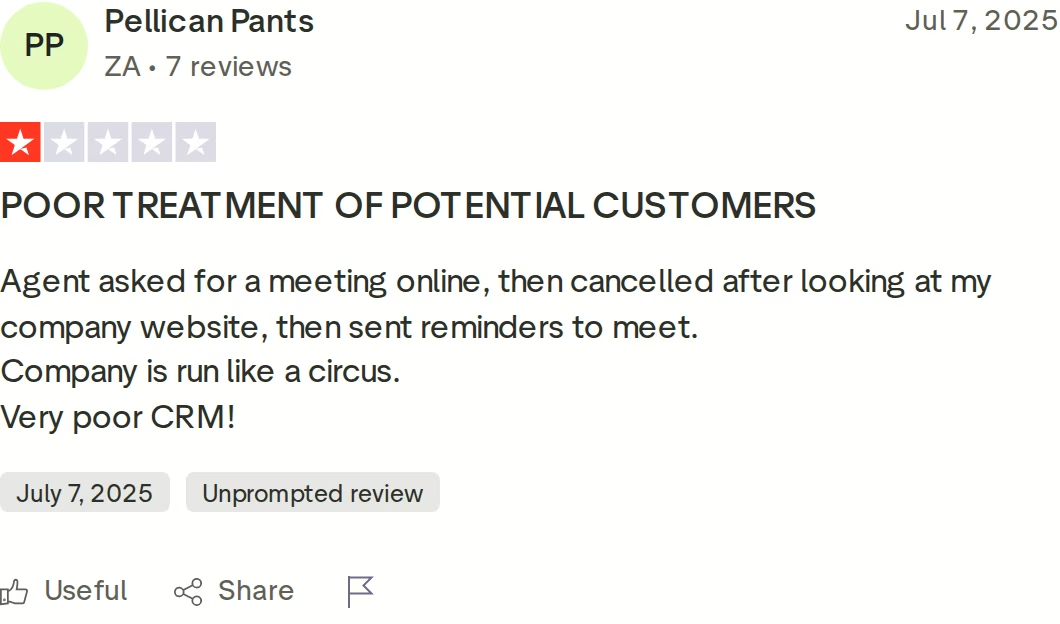
Unify still has just one Trustpilot review: a 1-star from July 2025 about a meeting that was cancelled and then followed by reminders to meet.
See these Unify alternatives for other options.
EmailBison Overview: Isolated Cold Email Infrastructure at Volume
EmailBison is a cold email sequencer built for agencies and GTM teams that send at volume. Its core pitch is isolation: each customer runs on a white-labeled instance with dedicated IPs, away from other senders' reputations.
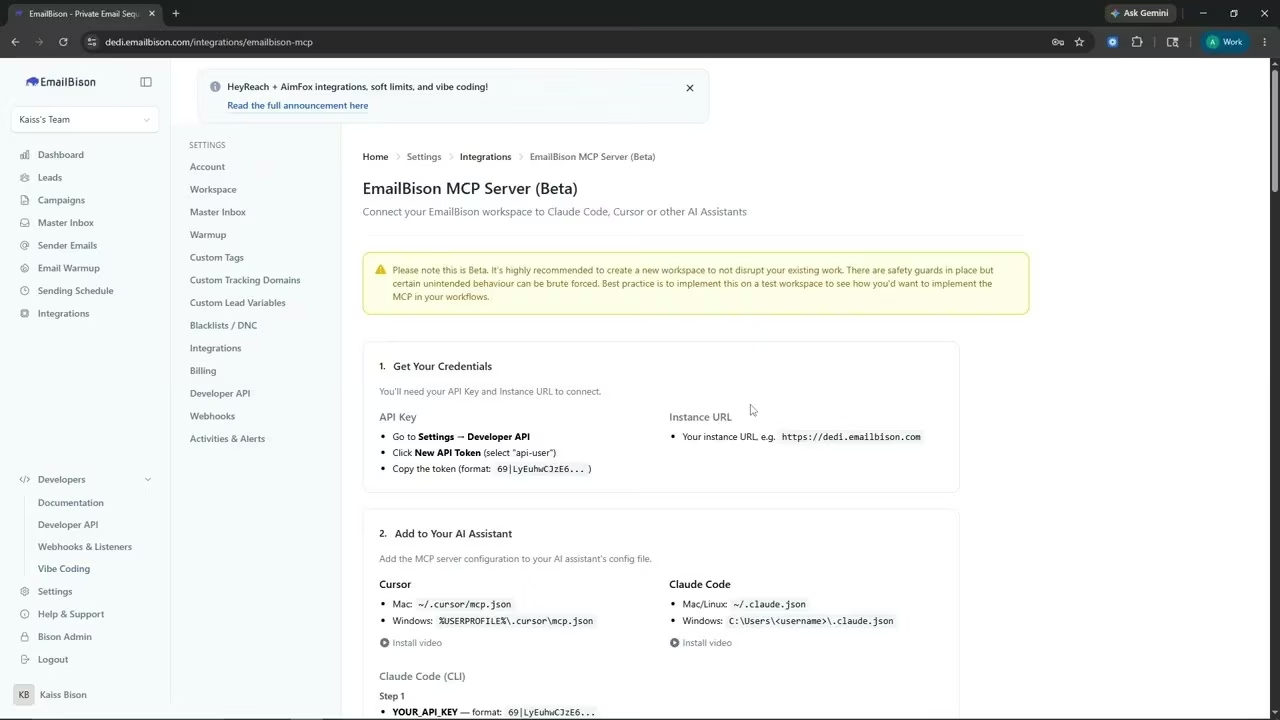
It is email-only. Its site lists no LinkedIn steps, though an in-app announcement and a June 2026 live stream show integrations with HeyReach and Aimfox, two separate LinkedIn tools.
EmailBison core features
- Isolated network: single-tenant infrastructure that starts with at least two dedicated IPs, with warm-up, daily caps, and send speeds set per client.
- Email sequencing: multi-step campaigns with spintax, custom variables, custom tracking domains, and reply follow-up campaigns.
- A/B tests: subject and body variants at every step, with an automatic winner.
- Inbox placement tests: one-click tests through a native EmailGuard integration, using a network of Google Workspace and Microsoft 365 accounts.
- Master Inbox: one inbox for every connected Gmail, Outlook, or SMTP account, where GPT-4o-mini tags first replies as Interested.
- Private warm-up: simulated conversations with provider-aware pacing for Gmail and Outlook, plus auto-healing that pauses an account after a spike.
- Unlimited leads, workspaces, and teammates: with isolated data per client workspace.
- Developer tools: a REST API, webhooks, and an MCP server (beta) for Claude Code and Cursor.
EmailBison pricing
- EmailBison Base Plan: $599/month, with 500,000 emails a month, dedicated IPs, warm-up, the API, and a private Slack channel for onboarding and support.
- Extra volume: sold as additional monthly buckets. EmailBison doesn't publish their price.
The plan includes unlimited leads, workspaces, and teammates, with no per-seat fees. Signup starts with a demo, and its site lists no free trial.
Some older reviews list $499/month. The live pricing page shows $599, so that is the figure I use.
Who EmailBison is best for
EmailBison fits cold email agencies and high-volume teams that care most about sender isolation. If you send close to 500,000 emails a month, its flat price covers volume that Salesforge Growth's 50,000-email cap can't.
EmailBison limitations
- No LinkedIn steps of its own. LinkedIn runs through a separate tool such as HeyReach or Aimfox.
- Its site lists no contact database or built-in AI writer, so per-lead AI copy goes in as a custom variable.
- The plan covers sending volume, not mailboxes. You connect your own Gmail, Outlook, or SMTP inboxes.
- $599/month is the entry price, so a small team pays for 500,000 emails whether it sends them or not.
What reviewers say about EmailBison
Public reviews are thin. In one Reddit comment, a user said EmailBison's team sent a recorded demo instead of a live call, and passed on a second-hand report of daily mailbox disconnections.

For more user feedback, read these EmailBison reviews, or see Instantly vs EmailBison.
Salesforge Overview: Email and LinkedIn Outreach on the Forge Stack
Salesforge is a multichannel outreach platform. It runs cold email and LinkedIn as two channels of one sequence and puts every reply in one inbox.
Against EmailBison, the difference is scope: Salesforge adds LinkedIn, AI personalization, and its own mailbox options. Against Unify, the difference is execution: LinkedIn steps run automatically instead of landing in a task list.
Salesforge core features
- Conditional multichannel sequences: if a connection request is accepted, send a LinkedIn message; if not, fall back to email.
- Six native LinkedIn actions: connection requests, messages, InMails, post likes, follows, and withdraw requests, each capped at 30 a day per profile.
- Account safety as standard: high-quality shared proxies, optional custom proxies, and session-token login, so LinkedIn passwords are never stored.
- Unlimited mailboxes and workspaces: on every plan, plus unlimited users and LinkedIn senders on Growth.
- AI personalization across 21+ languages: AI variables pull company news, LinkedIn activity, and industry context, and Overdrive Mode combines every source.
- Deliverability controls: free Warmforge warm-up, sender rotation, Bounce Shield, built-in email validation, text-only sending, and ESP matching on Growth.
- Primebox™: email and LinkedIn replies in one inbox, with Autopilot and Co-pilot AI reply modes on Growth.
- LinkedIn email & phone finder Chrome Extension: powered by Leadsforge, with 100 free credits for new users.
- A/B testing and analytics: A/B tests on Growth, plus open, reply, positive reply, and meeting rates.
- Integrations: native CRM, data, and automation integrations, plus the API, MCP server, and CLI on Growth.
The Forge Stack behind Salesforge
Salesforge sits on a wider stack: Mailforge runs on a shared IP pool, Infraforge on dedicated servers, and Primeforge provides Google Workspace and Microsoft 365 mailboxes. Warmforge handles warm-up, Leadsforge finds leads, and Agent Frank works as the AI SDR, all under one roof.
Most are separate subscriptions, but Warmforge comes free with every Salesforge plan. The stack also runs three ways: your team operates it, Agent Frank operates it, or a Forge Expert agency runs it for you.
ChannelCrawler reached an 85.71% positive reply rate on Salesforge with Infraforge and Warmforge.
Salesforge pricing
- Salesforge Pro: $48/mo monthly or $40/mo annual, with 1 user, 1 LinkedIn sender, 1,000 active contacts, and 5,000 emails a month.
- Salesforge Growth: $96/mo monthly or $80/mo annual, with unlimited users and LinkedIn senders, 10,000 active contacts, and 50,000 emails a month.
- Agent Frank: a separate subscription from $499/mo billed quarterly ($416/mo billed annually), sold after a demo.
Both plans include unlimited mailboxes, free Warmforge warm-up, and Primebox™. Growth includes 1,000 social action credits a month for LinkedIn steps, against 300 on Pro, and you can verify the live price anytime.
Try Salesforge Free for 14 DaysWho Salesforge is best for
Salesforge fits B2B teams selling at $5K-$100K ACV to startups, SMBs, or mid-market companies, with 3,000+ target businesses. Salesforge itself says it's a poor fit for Fortune 500 targets, long RFP cycles, or six- and seven-figure deals.
Salesforge limitations
- Growth caps sending at 50,000 emails a month, a tenth of EmailBison's included volume.
- Mailboxes aren't in any plan. They come from Mailforge, Infraforge, Primeforge, or your own provider.
- The API, ESP matching, A/B testing, Primebox™ AI replies, and unlimited LinkedIn senders all need Growth.
- Agent Frank needs a sales demo and a 2-week warm-up before he sends, and phone outreach is still on the roadmap.
in Action

Head-to-Head Feature Comparison: Unify GTM vs EmailBison
I compared the three tools on six areas: channels, deliverability, AI, reply handling, pricing at scale, and integrations.
Multichannel outreach: email and LinkedIn
Unify: automatic emails send on their own, and its homepage pitches email, calls, and social in one sequence. But LinkedIn steps land in a rep's task dashboard, and Unify's API lists only manual LinkedIn step types, so a rep sends every connection request and message by hand.
EmailBison: email only. For LinkedIn, it points to integrations with HeyReach and Aimfox, which means running a second tool alongside it. Its feature pages cover sequencing, warm-up, and the Master Inbox, with no LinkedIn step type.
Salesforge: runs email and six LinkedIn actions in one conditional sequence, which is what most teams mean by multichannel outreach. A step can branch on whether a connection request was accepted, then fall back to email. One subscription covers both channels, with no separate LinkedIn tool.
Email deliverability and warm-up
Unify: warm-up, rotation, and bounce prevention come only with Business managed mailboxes, which take about three weeks to warm and default to 25 sends a day. Below Business, reps send from work mailboxes that default to 150 sends a day.
EmailBison: deliverability is its core. Every instance gets at least two dedicated IPs, private warm-up pools, bounce protection, and one-click placement tests through EmailGuard. Warm-up runs simulated conversations, including moving mail out of spam, with pacing tuned per provider.
Salesforge: every mailbox gets free warm-up in Warmforge's premium pool of aged IMAP/SMTP, Google Workspace, and Microsoft 365 mailboxes, tracked by Heat Score™. Bounce Shield blocks risky sends, and Infraforge offers dedicated servers when you want isolation. Salesforge's guideline of 30-50 cold emails a day per inbox is a core rule of cold email deliverability.
For a quick primer, watch this Salesforge video on deliverability:
AI and personalization
Unify: its chat agent researches accounts and writes copy, with AI use billed from the same credits as data. The Free plan runs on standard models (GPT 5.4), and Unify describes the relaunched product as a Claude-style assistant for outbound sellers.
EmailBison: personalization runs on custom variables, spintax, and liquid syntax. For per-lead AI copy, its FAQ says to add the AI-generated sequence as a custom variable on each lead, and GPT-4o-mini tags interested replies. Its API and MCP server also let teams build their own AI reply agents.
Salesforge: AI variables personalize each email and LinkedIn message in 21+ languages, and Overdrive Mode uses every source for 2 credits per preview, against 1 for a single source. Agent Frank can also run the whole workflow 24/7, on Auto-Pilot or on Co-Pilot when you want to approve drafts first.
Reply handling and inbox management
Unify: captures email replies per sequence and tags them, for example as willing to meet, needing more information, or an objection. An out-of-office reply pauses outreach, with a 14-day hold when no return date is found. It also spots replies sent outside the original thread.
EmailBison: its Master Inbox syncs every connected Gmail, Outlook, or SMTP inbox in real time, including non-campaign threads. You can filter out warm-up traffic, send one-off emails, and push interested replies to webhooks. Bulk actions mark leads, add them to a blacklist, or push them to a follow-up campaign.
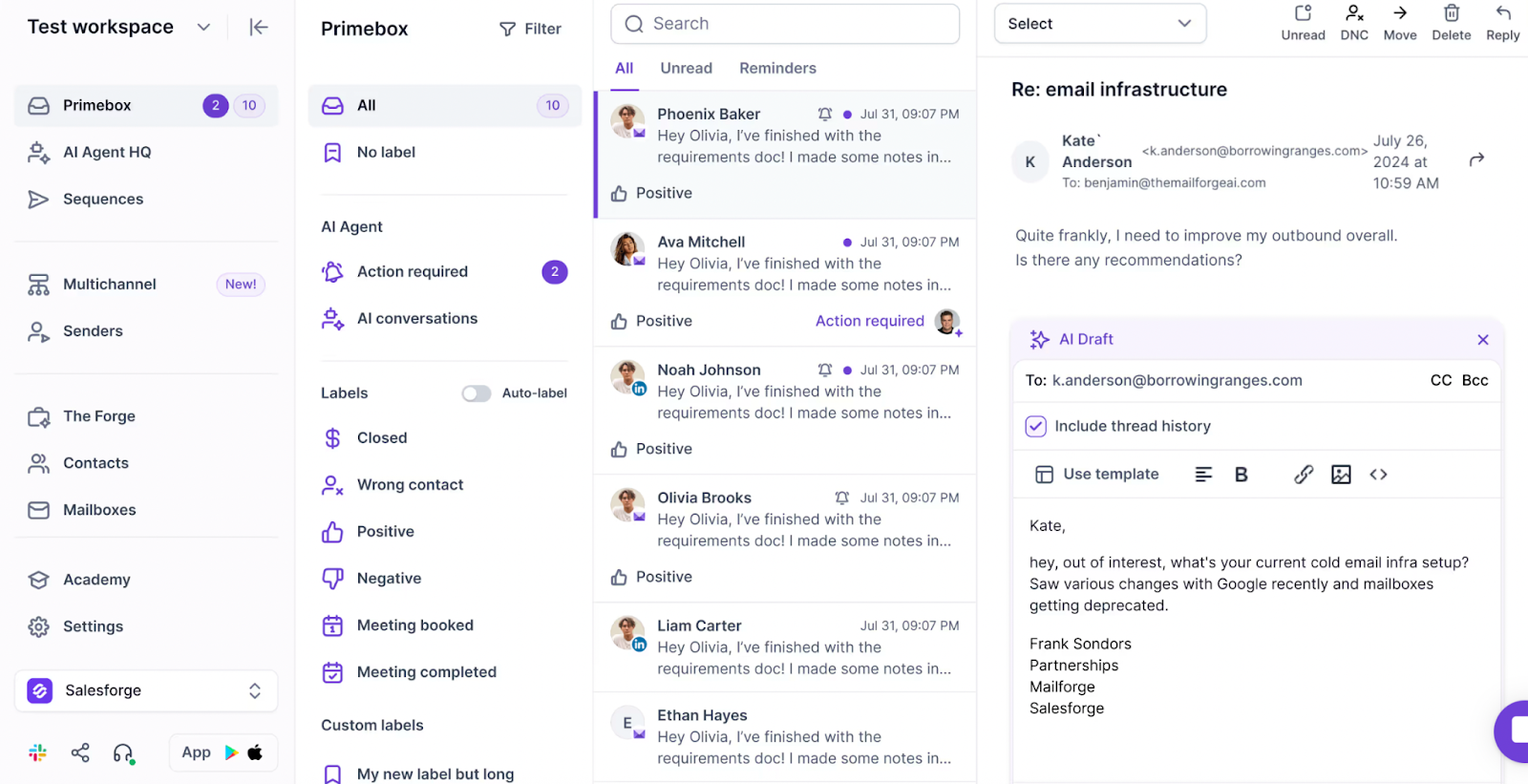
Salesforge: Primebox™ is a unified inbox for email and LinkedIn replies. It tags sentiment, catches replies from a different address, and offers Co-pilot, Autopilot, and Reply-as-Human modes, plus a mobile app.
Pricing and scalability
Unify: price follows headcount. Five reps on Unify Pro cost $300/mo, and their 12,000 monthly credits are allocated per seat. Business adds managed mailboxes at $25 each on a custom annual contract.
EmailBison: price follows volume. $599/month covers 500,000 emails with unlimited teammates and workspaces, which is cheap per email at volume and expensive for a small team. Volume past 500,000 comes in extra monthly buckets, priced on request.
Salesforge: no per-seat fees on Growth. $96/mo monthly ($80/mo annual) covers unlimited users, LinkedIn senders, mailboxes, and workspaces, up to 50,000 emails a month. Pro covers one user and 5,000 emails a month for teams just starting out.
Integrations and the Forge Stack
Unify: HubSpot and Salesforce sync, Slack notifications on Pro, and an open API with webhooks on Business. It holds SOC 2 Type II, and SSO is a Business add-on.
EmailBison: native Clay, EmailGuard, and HubSpot integrations, with Salesforce, OutboundSync, n8n, and Make also listed. It adds an MCP server (beta) and is SOC 2 Type II, GDPR, and HIPAA compliant. Every account also gets a private Slack channel with 1:1 onboarding and migration help.
Salesforge: native integrations with HubSpot, Salesforce, Pipedrive, HighLevel, Attio, folk, and Breakcold, plus Clay, Zapier, Make, and webhooks. Leadsforge lists flow into sequences with no CSV export, every Forge product exposes an MCP server, and the stack is SOC 2 compliant.
Pricing Comparison: Per Seat, Per Volume, or One Flat Plan
| Pricing detail | Salesforge | Unify | EmailBison |
|---|---|---|---|
| Free option | 14-day free trial | Unify Free: $0, up to 3 seats | None listed; demo first |
| Entry plan | Salesforge Pro: $48/mo monthly, $40/mo annual | Unify Base: $20/seat/mo, monthly | EmailBison Base Plan: $599/month |
| Main plan | Salesforge Growth: $96/mo monthly, $80/mo annual | Unify Pro: $60/seat/mo, monthly | EmailBison Base Plan (the only plan) |
| Top tier | Salesforge Growth (unlimited users) | Unify Business: custom, billed annually | Extra monthly volume buckets (price not published) |
| Pricing model | Flat plan; no per-seat fees on Growth | Per seat, plus credits | Flat, by email volume; no per-seat fees |
| Email volume | 5,000 a month on Pro; 50,000 on Growth | No listed cap; 1 mailbox per seat at 150 sends a day by default | 500,000 a month included |
| Mailboxes | Mailforge $3-$2, Infraforge $4-$3, Primeforge $4.50-$3.50 per mailbox/mo, billed annually | 1 per seat; managed $25/mailbox/mo on Business | Bring your own Gmail, Outlook, or SMTP inboxes |
| Warm-up | Free, unlimited (Warmforge) | Business only | Included (private pools) |
| AI SDR | Agent Frank: $499/mo billed quarterly ($416/mo annual), separate | AI usage paid in credits | None built in |
Unify charges per seat, EmailBison charges per volume, and Salesforge charges one flat plan price. Which is cheapest depends on how many reps you have and how many emails you send.
Cost scenario: five reps, 20,000 emails a month
Here is the job again: five reps, about 20,000 cold emails a month, and LinkedIn steps from two rep profiles. That is roughly 900 emails per working day.
- Salesforge: Growth at $80/mo billed annually plus 30 Mailforge mailboxes at about $90/mo comes to about $170/mo before domains. That is about 30 emails per mailbox a day, and two LinkedIn profiles use about 800-1,000 social action credits, which fits Growth's 1,000.
- Unify: five Pro seats cost $300/mo, but 1 mailbox per seat means about 180 emails per mailbox a day, above Unify's 150-a-day default. Covering that properly means Business managed mailboxes at $25 each, and LinkedIn steps stay manual.
- EmailBison: the Base Plan costs $599/month and includes 25 times the volume you need. You still bring the mailboxes and a LinkedIn tool such as HeyReach or Aimfox.
The math flips at high volume. At 500,000 emails a month, EmailBison's flat $599 covers it, while Salesforge Growth stops at 50,000.
Salesforge vs Unify GTM vs EmailBison: Which Should You Choose?
You might consider Unify if:
- Your reps start from account research and want lists and first drafts from one chat.
- Calls matter now: Click-to-Call is on every Unify plan, and Salesforge's phone channel is still on the roadmap.
- You're a solo rep paying on a personal card: Unify Base is $20/seat/mo, billed monthly.
You might consider EmailBison if:
- You run an agency sending close to 500,000 emails a month across many client workspaces, each with isolated data.
- You want single-tenant sending on dedicated IPs, or you need the HIPAA compliance EmailBison lists on its security page.
Choose Salesforge if:
- You sell B2B at $5K-$100K ACV to SMB or mid-market buyers and target 3,000+ businesses.
- You want email and LinkedIn steps sent automatically in one sequence, without a second LinkedIn tool.
- You send under 50,000 emails a month and want warm-up, Bounce Shield, and three mailbox options under one login.
- Your team is growing, and you'd rather not pay per seat: Growth covers unlimited users for $80/mo billed annually.
- You may want an AI SDR later: Agent Frank runs on the same stack from $499/mo billed quarterly.
Still comparing? Browse the sales tools directory, more Salesforge comparisons, or Instantly vs Salesforge, another email-first matchup.
Final Verdict: The Best Outbound Platform for SMB and Mid-Market Teams
EmailBison is the volume specialist: isolated, high-volume email for agencies, with no LinkedIn steps of its own. Unify is the researcher: signals and drafts in a chat, with LinkedIn left to reps as tasks.
For SMB and mid-market teams that want email and LinkedIn in one sequence, Salesforge is the stronger choice. Growth costs $80/mo billed annually for unlimited users, LinkedIn senders, and mailboxes, with free Warmforge warm-up and Primebox™. The trade-off is volume, since Growth stops at 50,000 emails a month.
One falsifiable benchmark: UniteSync ran Salesforge with Mailforge and Warmforge to an 85.26% positive reply rate and a $2.86 CAC. The case study is public.

Salesforge also says who it isn't for: Fortune 500 targets and long RFP cycles. For B2B teams selling at $5K-$100K ACV, it is the only tool here that automates both channels itself.
Give Salesforge a TryFrequently Asked Questions About Salesforge, Unify GTM, and EmailBison
Is Salesforge better than Unify GTM or EmailBison?
For teams that want email and LinkedIn outreach in one tool, yes. Salesforge runs both channels in one sequence, includes free Warmforge warm-up, and puts every reply in Primebox™, from $48/mo monthly ($40/mo annual).
Unify automates email but leaves LinkedIn to reps as manual tasks. EmailBison is email-only and starts at $599/month. If you send close to 500,000 emails a month, EmailBison's volume pricing is the better fit.
What's the main difference between Salesforge, Unify, and EmailBison?
Each tool is built around a different job. Unify is built around research: a chat agent finds buyers, enriches them, and drafts emails, while LinkedIn steps stay manual.
EmailBison is built around sending volume, with dedicated IPs, private warm-up, and 500,000 emails a month. Salesforge is built around multichannel execution, running email and LinkedIn in one sequence with free warm-up and one inbox.
Which is cheaper: Salesforge, Unify, or EmailBison?
It depends on team size and volume. Unify starts free for up to 3 seats, and Unify Base is $20/seat/mo.
Salesforge Pro is $48/mo monthly ($40/mo annual), and Growth is $96/mo monthly ($80/mo annual) with unlimited users. EmailBison costs $599/month for 500,000 emails, which makes it the cheapest per email only at high volume.
Can Unify or EmailBison send LinkedIn messages automatically?
No. Unify's LinkedIn sequence steps (profile views, connection requests, and messages) are manual tasks a rep completes by hand.
EmailBison has no LinkedIn steps of its own and relies on integrations with tools like HeyReach and Aimfox. Salesforge runs six native LinkedIn actions inside the same sequence as email, with each action capped at 30 a day per profile.
Can I switch from Unify or EmailBison to Salesforge easily?
Mostly, yes. Salesforge imports contacts from CSV files or Google Sheets, and Leadsforge lists push straight into a sequence.
Plan for at least 2 weeks of Warmforge warm-up on any new mailboxes before you launch. Growth adds personal onboarding and the full integrations library, so HubSpot or Salesforce stay connected.
Which tool has better email deliverability?
Salesforge and EmailBison both build deliverability into the product, in different ways. EmailBison isolates each customer on dedicated IPs with private warm-up and placement tests.
Salesforge includes free Warmforge warm-up with Heat Score™ tracking, Bounce Shield, and sender rotation, plus Infraforge's dedicated servers if you want isolation. Unify's warm-up, rotation, and bounce prevention come only with Business managed mailboxes at $25 a month each.
Does Salesforge offer a free trial?
Yes. Salesforge offers a 14-day free trial with no credit card required.
Agent Frank works differently: you hire him after a demo with the Salesforge team, and new mailboxes need a 2-week warm-up before he sends. Unify offers a Free plan and a 14-day Pro trial, while EmailBison starts with a demo and lists no free trial.
Who are Unify and EmailBison best for?
Unify fits AEs and SDRs who want signals, contact data, and first drafts from one chat, and who are fine running LinkedIn steps by hand. EmailBison fits cold email agencies and high-volume teams sending hundreds of thousands of emails a month.
It suits teams that want dedicated IPs, a white-labeled instance, and a separate workspace per client. Neither one automates LinkedIn on its own.
.jpg)

.jpg)
.jpg)