

Personalized Outbound Strategy
Get The Right Outbound Strategy In Minutes
Enter your email to get a custom plan & stack recommendation for your business
It's being carefully crafted by AI
Please check your mailbox in 5 minutes
Someone visited your LinkedIn profile yesterday. They match your ICP. They liked two of your posts last week and followed your company page this morning.
You have no idea they exist.
That is not a one-off. That happens to every B2B sales team running LinkedIn outreach without a signal tracking layer. The intent is there, interest is visible, but just not to you.
Teamfluence is built specifically for this problem.
It tracks who is already paying attention to your team on LinkedIn, scores those signals against your ICP, and routes the right leads to the right people — before anyone has to manually check anything.
The premise is specific: track who is already paying attention to your team on LinkedIn, qualify those signals against your ICP, and act on them before your competitors do.
Before forming an opinion, I went through Teamfluence reviews, their full feature documentation, and real user feedback to understand what the tool actually delivers, and where it stops.
Read this before you decide.
Is Teamfluence worth buying? Yes, if LinkedIn signal monitoring is the specific gap in your outbound motion.
Bottom line: Teamfluence is worth it if your biggest problem is identifying warm LinkedIn leads before your competitors do.
It is a poor fit if you need a complete outbound execution system.
If you need both signal intelligence and outbound execution in one place, Salesforge covers the full motion, from finding and warming leads to booking meetings, across email and LinkedIn, without the per-seat ceiling.

Teamfluence is a LinkedIn signal intelligence platform. It tracks who is engaging with your team on LinkedIn and tells you about it before you reach out.
Most outreach tools help you send messages. Teamfluence helps you figure out who is worth messaging in the first place.
The core idea is simple. People who visit your LinkedIn profile, react to your posts, follow your company page, or comment on your content are showing intent. They noticed you.
Teamfluence captures those signals, scores them, and surfaces the ones that match your ICP.
Teamfluence sits between LinkedIn itself and your outreach tools. LinkedIn shows you some activity, profile visitors, and post reactions, but gives you no way to qualify, score, or act on that data at scale.
Your outreach tool sends messages, but does not know who was already interested before you sent them.
Teamfluence fills that gap. It collects buying signals from across your whole team, not just one profile, and turns them into a shared, qualified lead pipeline.
Every LinkedIn interaction from every connected team member flows into one shared feed. No signal goes unnoticed because one rep missed a notification.
Every ICP match comes with an explanation. Users see exactly why a lead was included or excluded, not just a score.
Signal in, ICP check, Slack alert, CRM update, all without manual input once the workflow is live.
A lead who visited a colleague's profile shows up for the whole team, not just the rep whose profile was visited.
Close the browser, miss the signals. Users working across multiple devices report coverage gaps regularly.
No way around this limit inside the platform. Large account lists hit the ceiling fast.
Warm leads are identified and qualified. Reaching out still requires a separate tool entirely.
Teamfluence is built around one core promise: show you who is already paying attention before you reach out. Every feature connects back to that.
Lead Monitor is the central feed where all signals arrive.
Teamfluence tracks 12 signal types: profile visits, profile followers, post reactions, post comments, comment reactions, new connections, campaign connections, company page followers, company page visitors, company page post reactions, company page post comments, and tracked post engagement on external content.
Every lead in the feed shows engagement history, how many interactions, what types, and when.
You can sort by engagement score, ICP match status, number of interactions, signal source, or target account.
This means you prioritize leads who have touched your team multiple times, not just once.
👉 Run LinkedIn and email outreach from one platform with Salesforge
The AI qualification engine compares every incoming lead against your defined ICP criteria.
You set hard criteria, headcount, location, industry, soft criteria like ARR or department size, and exclusion criteria for industries or regions you do not target.
The engine scores leads on a 1–5 scale with three tolerance levels: Flexible matches rated 3–5, Balanced matches rated 4–5, and Strict matches rated 5 only.
Each scored lead shows full reasoning, so you can see exactly why the AI included or excluded someone.
That transparency helps you refine the profile over time rather than guessing why the wrong leads are coming through.
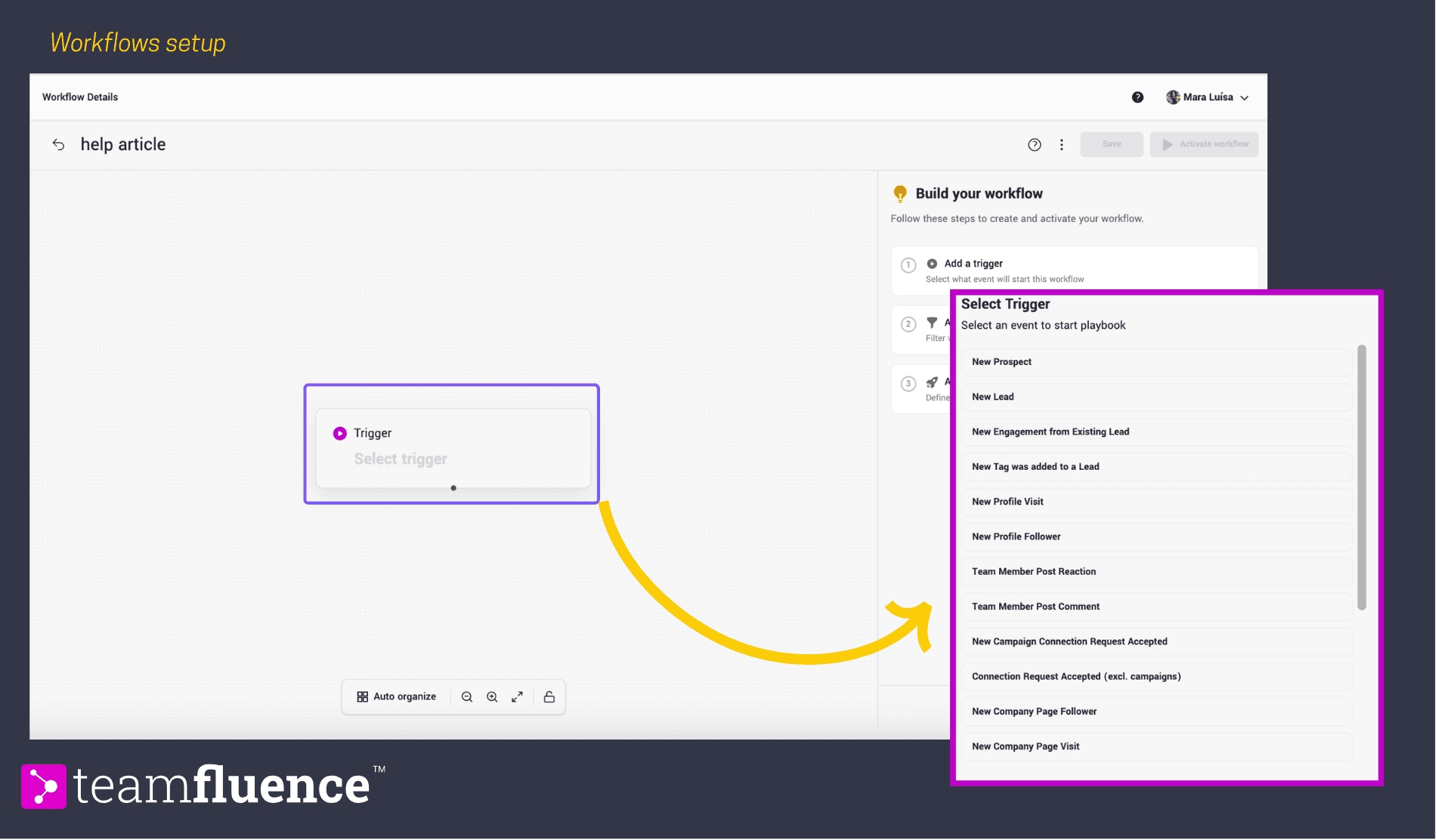
Workflows are if-this-then-that automations built around signals. A signal comes in, meets a filter condition, and triggers an action.
A standard starting workflow looks like this: New Lead → Match ICP with AI Agent → if true → Move to Prospects → Enrich with Email → if email found → Sync to CRM.

That entire sequence runs without manual input
Workflow actions include: Push to Slack, CRM Export/Update, Fire a Webhook, Send LinkedIn DM, Add to Networking Campaign, Enrich with Email, and Move to Prospects.
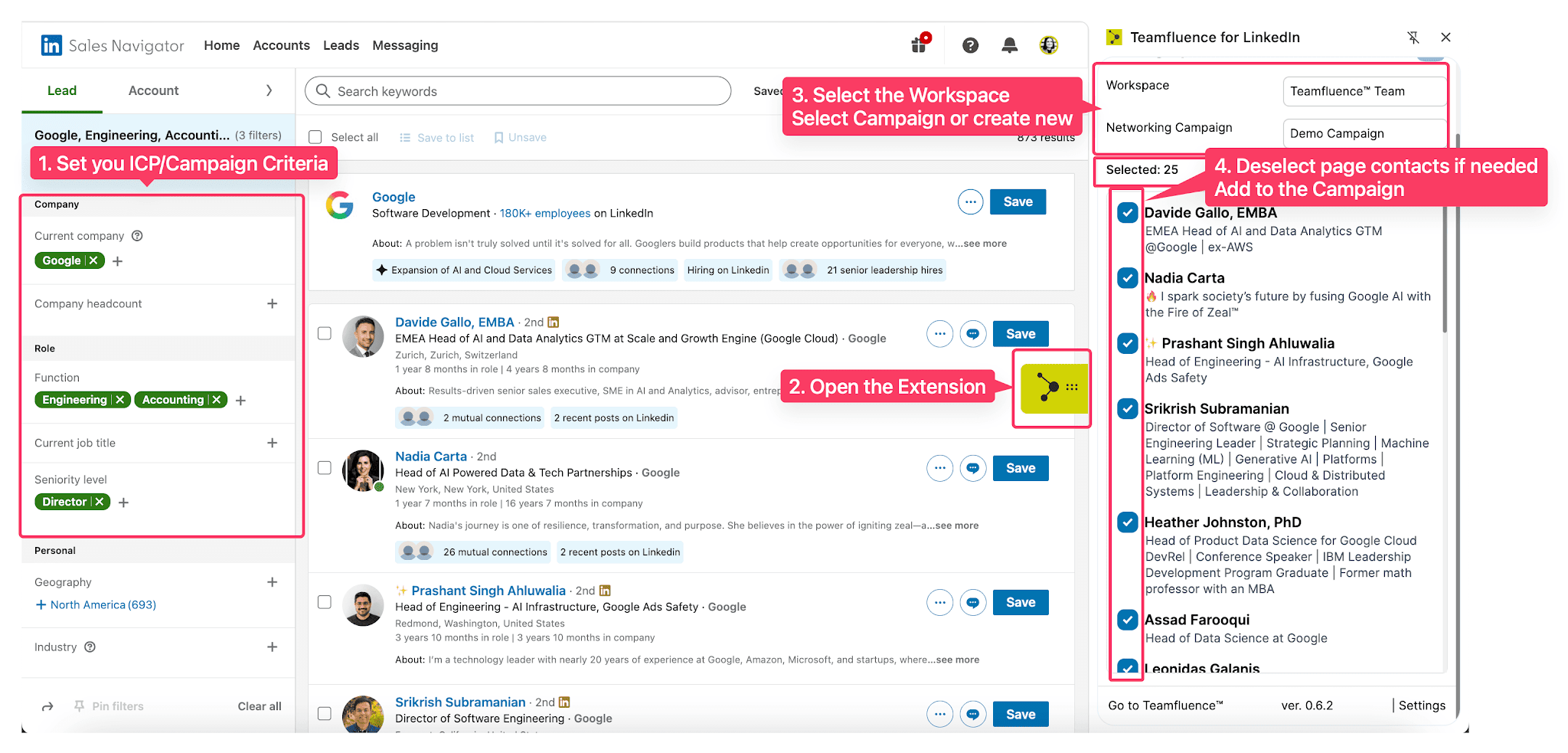
Networking Campaigns let your whole team send coordinated LinkedIn connection requests from a shared target list.
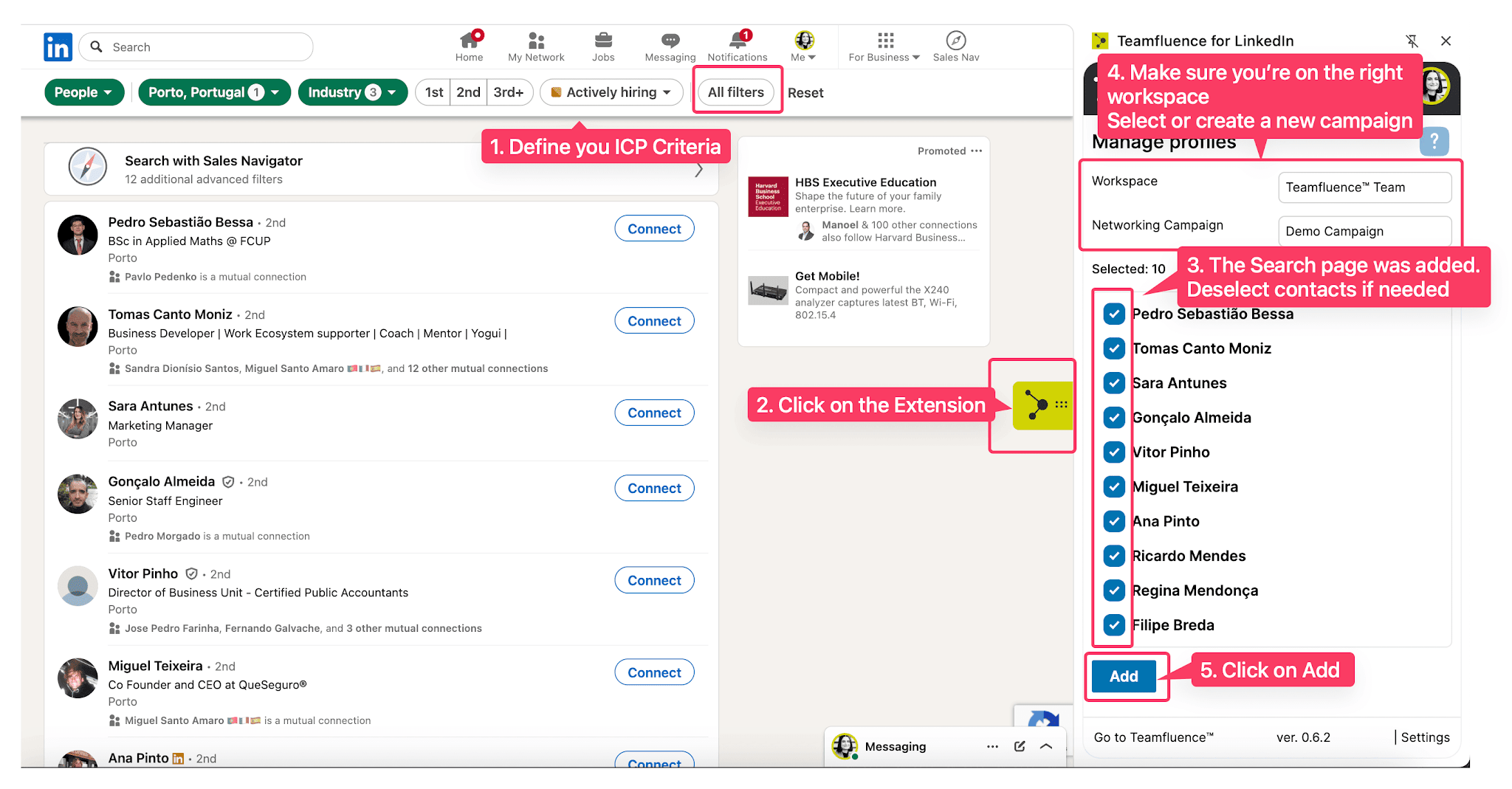
You build the list from LinkedIn search, Sales Navigator, CSV upload, or custom post reactions. Each team member joins the campaign and sends personalized connection requests daily up to their configured limit.
You can also configure a follow-up message to send automatically when a connection request is accepted.
The campaign tracks progress per rep, profiles assigned, invites sent, profiles connected, so you can see which team members are moving through the list and which are not.
One important note: campaign creators are not automatically included. If you want to participate in your own campaign, you have to join it explicitly.
Social Tracking lets you follow specific LinkedIn profiles and see their posts in a shared team feed without those people knowing.
You can like, comment, and engage with posts directly from Teamfluence.
You can also boost a post, alert your team to a relevant piece of content and ask them to engage with it together.
Each user can track up to 60 contacts.
Posts appear in two sections:

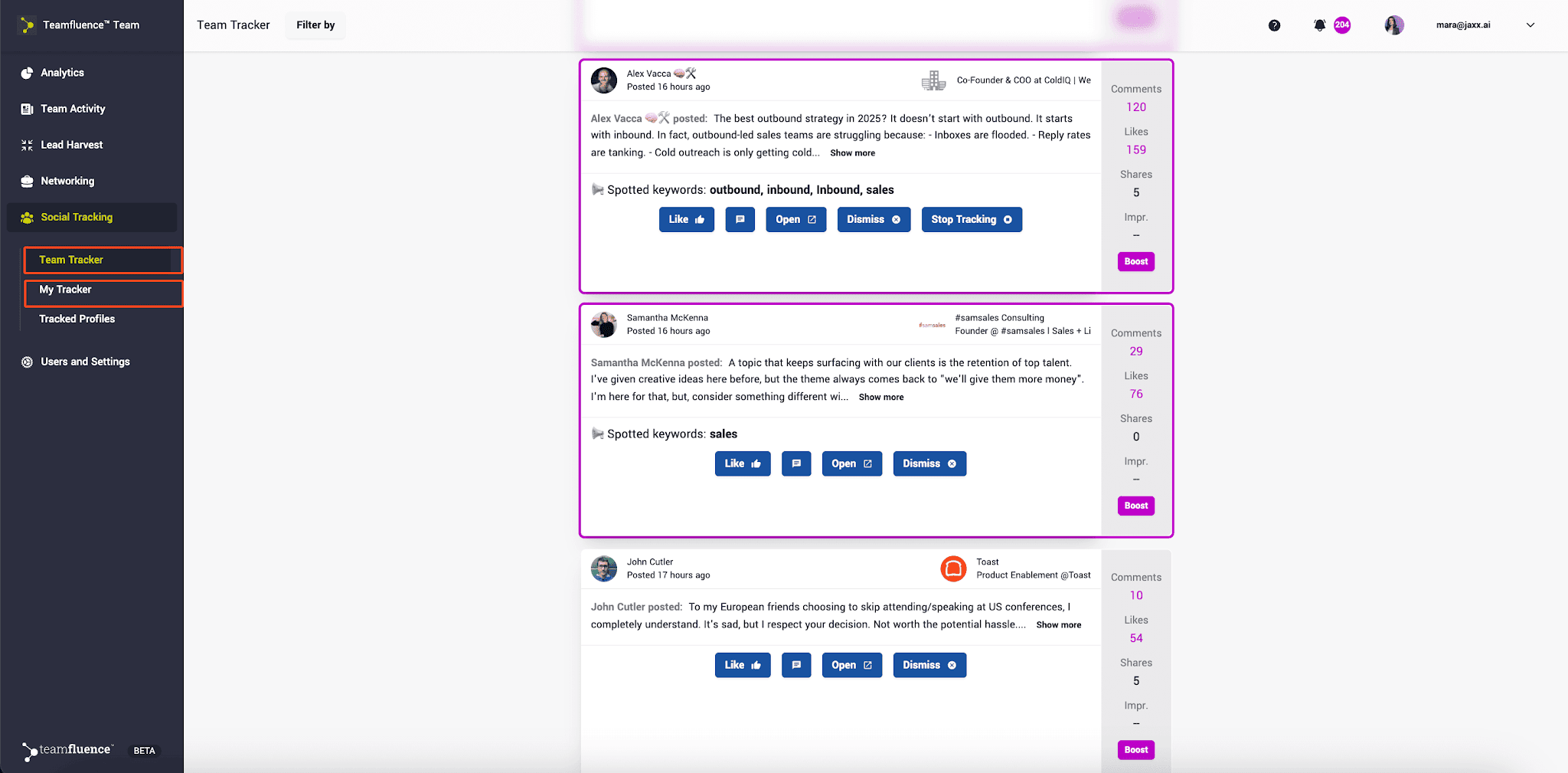
This keeps your team visible with target accounts before outreach begins, which warms up the connection before a cold message ever goes out.
Teamfluence integrates natively with HubSpot and Salesforce.
When a signal meets your workflow criteria, Teamfluence can automatically create or update a contact in your CRM with enriched data, email, phone, and company info, without manual data entry.
For any other CRM, you push data via webhooks. That covers Close, Pipedrive, Twenty, Attio, or any CRM that accepts a webhook payload.
The Chrome extension is the foundation of the whole platform. It runs on any Chromium-based browser, Chrome, Edge, Brave, and Arc, and connects your LinkedIn account to your Teamfluence workspace automatically.
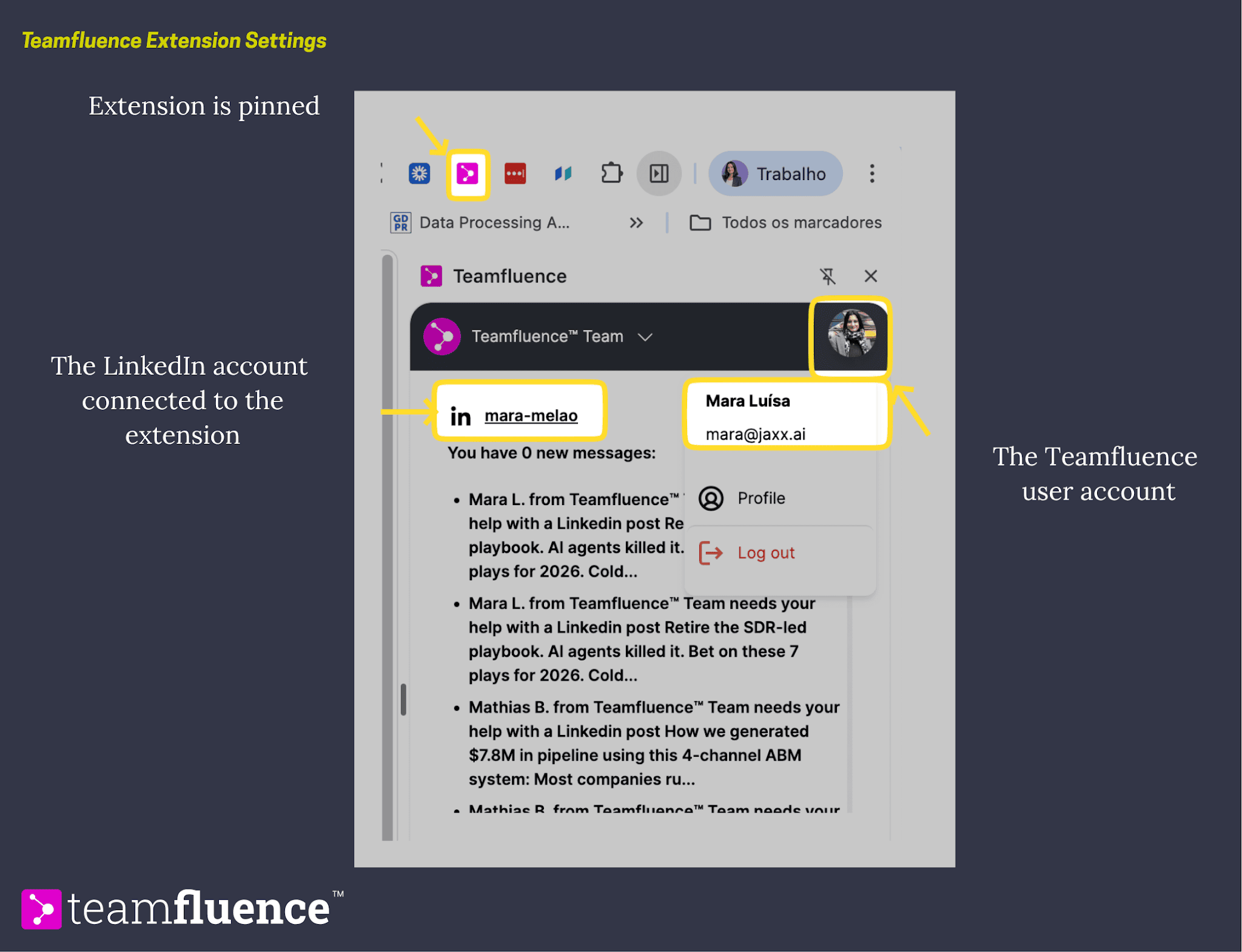
It collects signals while your browser is open and preserves your LinkedIn session so it can run background checks even when the LinkedIn tab is closed.

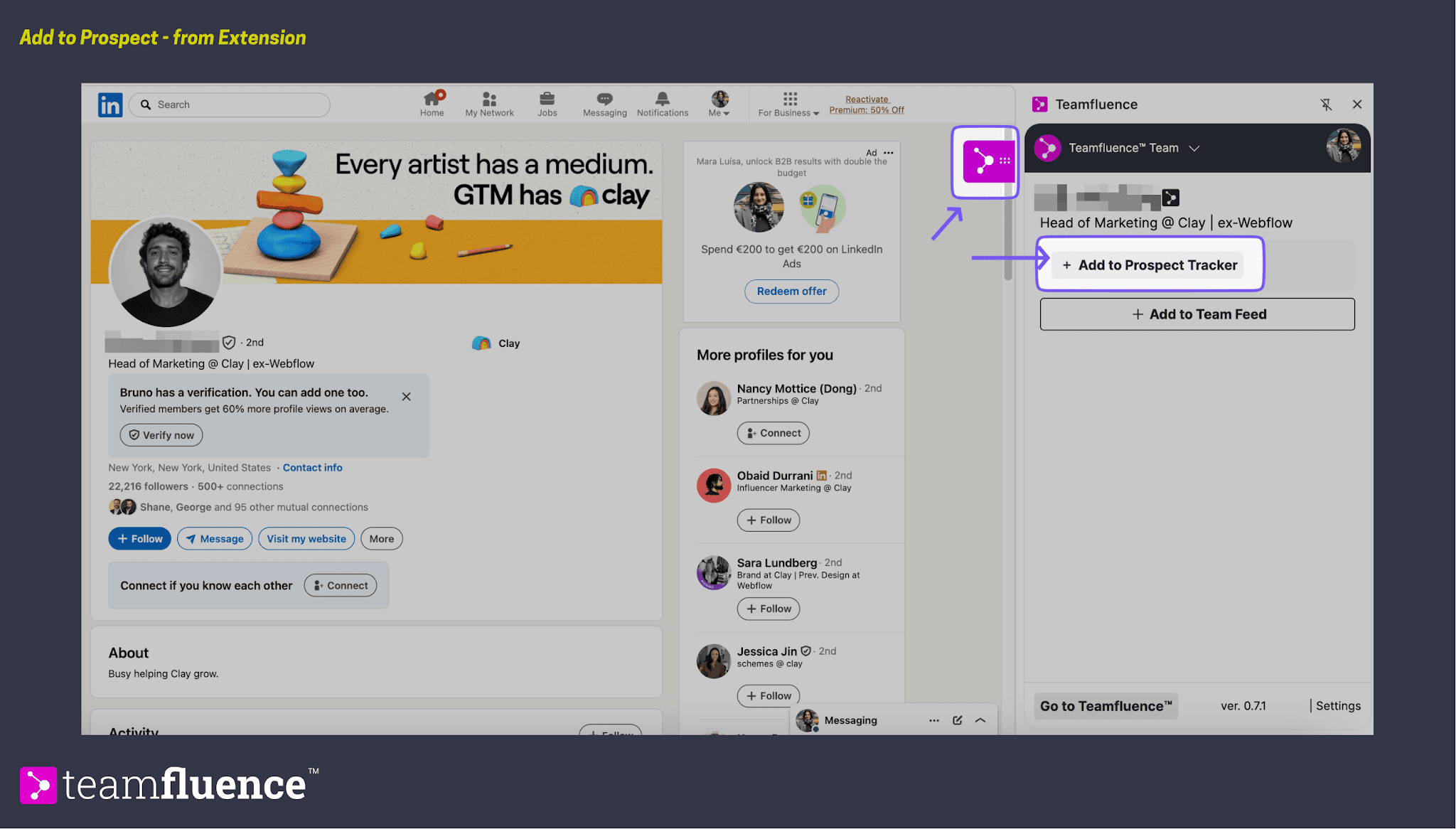
The extension also lets you add prospects directly from any LinkedIn profile, even people who have not engaged with you yet, by clicking Add to Prospect Tracker from the sidebar.
This covers proactive prospecting outside of inbound signals.
Teamfluence runs through a Chrome extension.
Every team member installs it, connects their LinkedIn account, and the extension captures signals automatically while LinkedIn is open in the browser.
The Chrome extension runs in the background during normal browser use. It does not require you to log into a separate platform or manually check who visited your profile.
Signals from every connected team member flow into one shared Lead Monitor dashboard automatically.

This matters because LinkedIn only shows you your own activity. If a VP of Sales visited your colleague's profile, your colleague may never notice.
Teamfluence pools signals across the whole team so nothing disappears because of individual visibility limits.
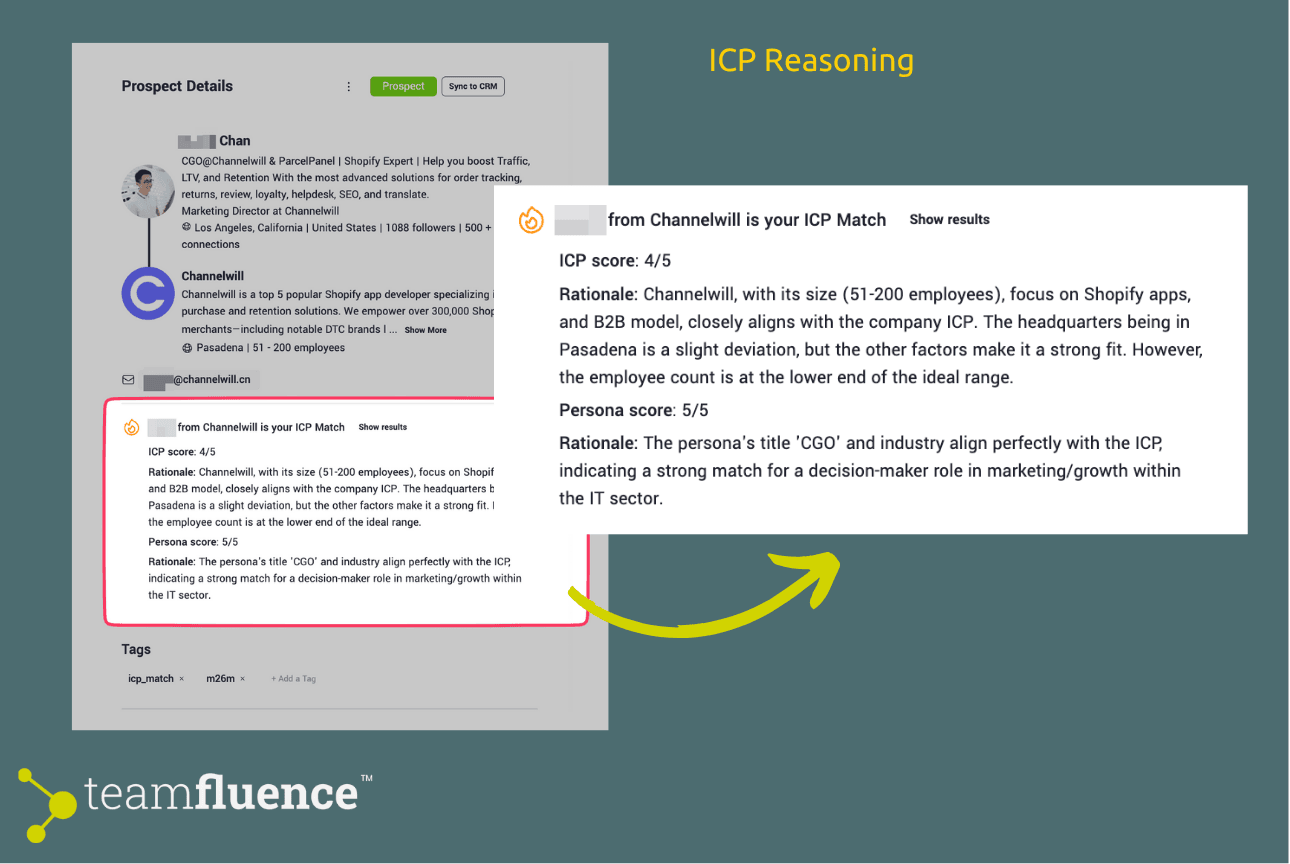
Every incoming signal gets compared against your ICP criteria by an AI agent. You define the criteria once: persona role, job titles, seniority, company headcount, industry, location, and exclusion criteria.
The agent scores each lead and shows you the reasoning behind every match or non-match.
A lead scored 4/5 might show reasoning like: "Company size and industry align with ICP.
Headquarters location is a slight deviation, but other factors make this a strong fit." You can adjust your criteria based on those explanations and improve precision over time.
Workflows are the action layer. Once a signal comes in and meets your conditions, a workflow fires.
That could mean creating a contact in HubSpot, sending a Slack alert to the right rep, firing a webhook to Clay for enrichment, or triggering an automated LinkedIn connection request.
The logic is straightforward: if this signal matches these conditions, take this action. You set the rules once. The platform runs them automatically on every new signal.
The Prospect Tracker is where ICP-matched leads land after qualification. It is not an automation layer; it is a focused view of leads confirmed as worth pursuing.
What happens next is defined by you, either manually or through a workflow.
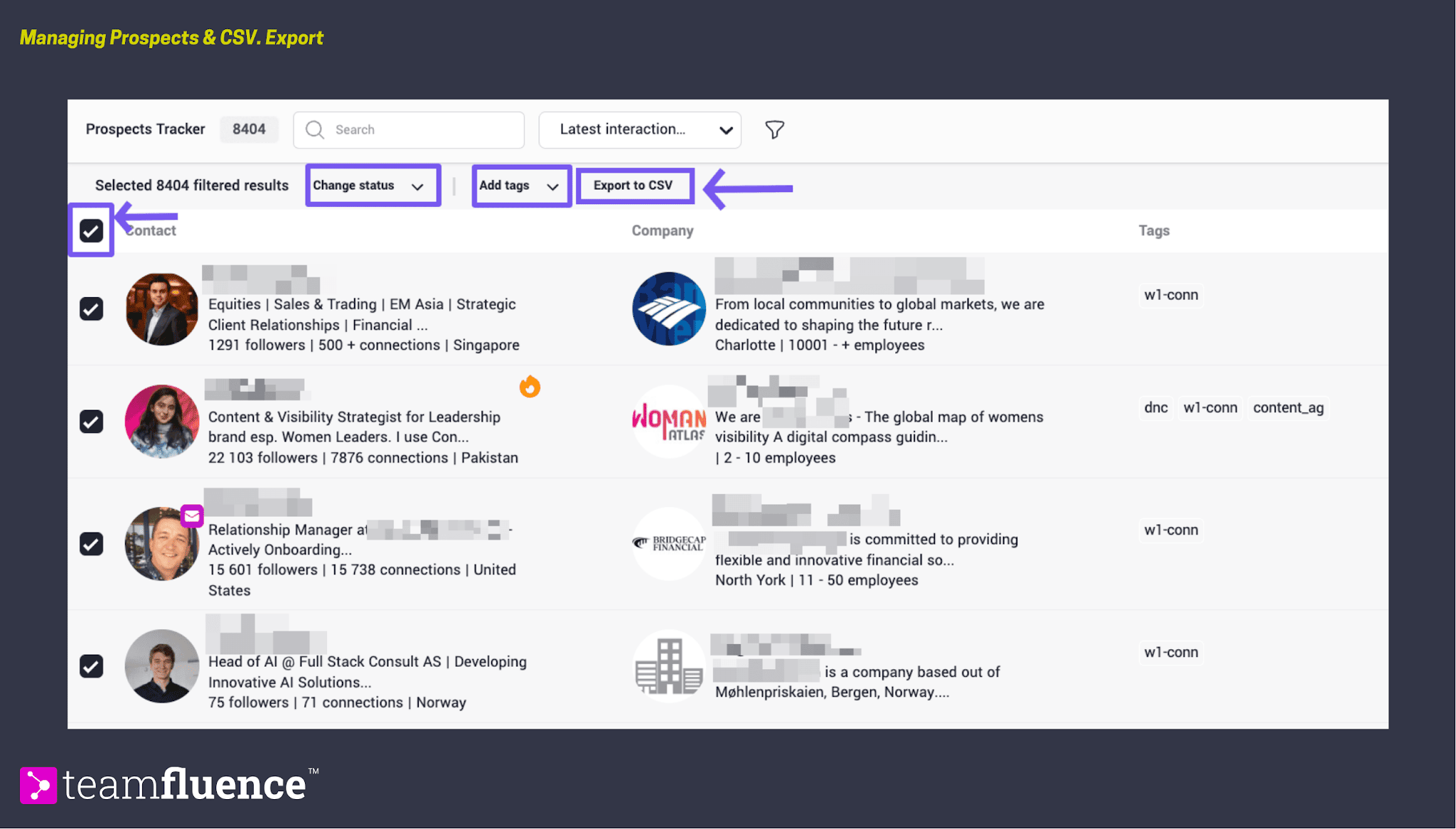
Leads move into the Prospect Tracker in three ways:
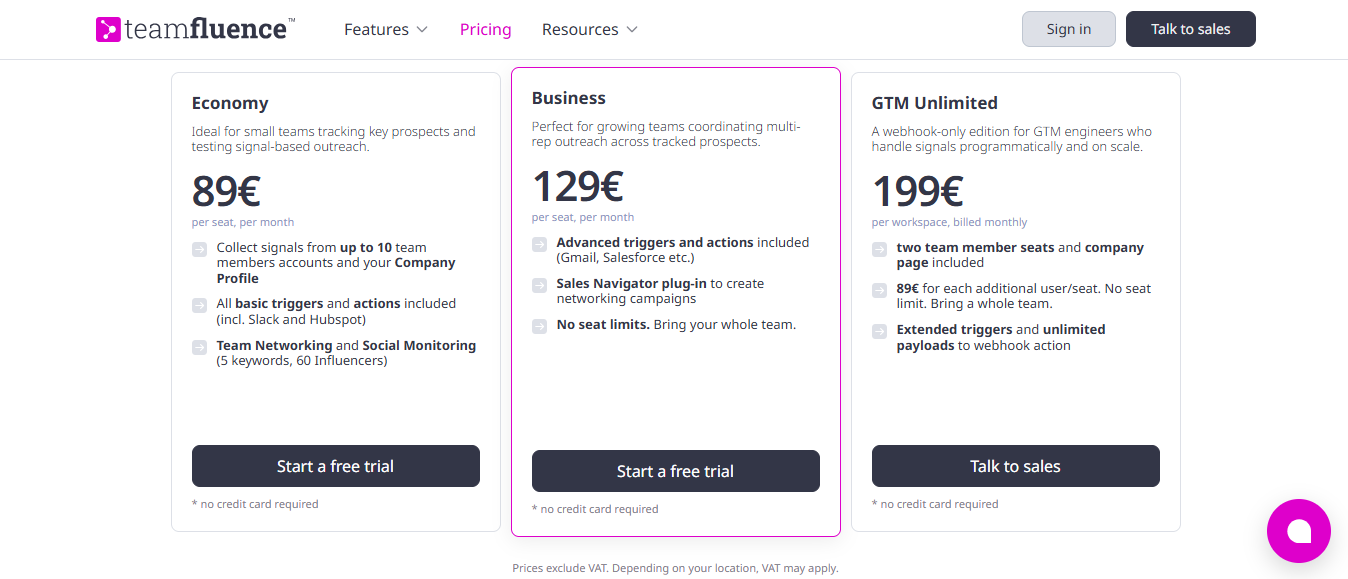
Teamfluence prices per seat per month with three plans.
All plans include a free trial with no credit card required, except GTM Unlimited.
Teamfluence solves a specific problem. If that problem is not yours, the tool will not move the needle.
Reactions, comments, and profile visits from your content have commercial value. Teamfluence tells you which ones match your ICP before that intent disappears.
Each rep only sees their own signals. Teamfluence pools signals from every connected profile into one shared feed, so no warm lead gets missed.
Upload your ABM account list and filter Lead Monitor by those accounts. When a decision-maker from a target account engages, you know immediately.
GTM Unlimited connects Teamfluence into Clay, custom enrichment tools, and outbound sequences via webhooks with extended triggers and unlimited payloads.
Teamfluence tells you who is paying attention. That is genuinely useful. But knowing someone visited your profile does not book a meeting.
Someone still has to reach out, follow up, handle the reply, and get the call on the calendar.
That is where Teamfluence stops and where Salesforge Stack starts.
Teamfluence identifies a warm lead, someone who visited three profiles, reacted to two posts, and followed your company page.
It qualifies them against your ICP. It sends a Slack alert or creates a HubSpot contact. And then it waits for a human to do something.
Salesforge does not wait. Once you have a lead, Salesforge launches a multi-channel sequence across email and LinkedIn outreach from one platform.

If the lead does not respond on LinkedIn, an email goes out automatically. If the email gets no reply, a follow-up sequence runs. The whole motion continues without manual intervention.
That difference matters at volume.
When you are working 50 warm leads at once, manually writing to each one, tracking replies, and sending follow-ups is not realistic. Salesforge handles all of it.
Teamfluence has no outbound execution layer. It identifies warm leads and hands them off. What happens after the handoff depends entirely on what you connect it to and how fast your team acts on those alerts.
Agent Frank inside Salesforge runs the entire SDR workflow from start to finish. You define the ICP, the goals, and the operating rules.
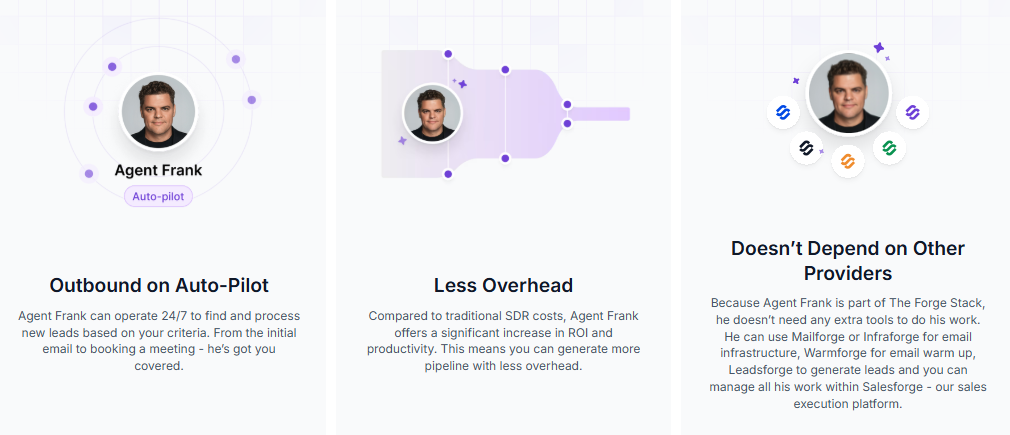
It finds prospects, writes personalized outreach, sends connection requests and emails, follows up, handles replies, and books meetings, all without your team managing any of it.
Salesforge also connects to AI assistants like Claude via the Forge MCP Server. Once connected, you run your full outbound workflow through natural language prompts.
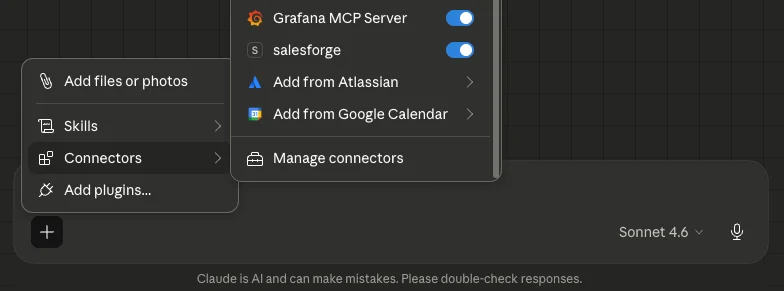
For example, find ICP-matched leads in Leadsforge, build LinkedIn and email sequences, manage domains and mailboxes, or pull campaign performance data, all without clicking through dashboards.

Teamfluence routes signals into your tools via webhooks. Salesforge lets you operate the entire outbound execution layer through a single conversational interface.
Email infrastructure, deliverability monitoring, and warmup all sit inside the same Forge stack through Mailforge, Primeforge, and Warmforge.
You do not stitch tools together. Everything runs from one place.
How to Automate Cold Email With Claude Code and Salesforge MCP
Enter your email to get a custom plan & stack recommendation for your business
Please check your mailbox in 5 minutes

Knowing who visited your profile last Tuesday does not fill your pipeline.
For teams running account-based outreach or generating consistent LinkedIn engagement, that visibility has real value.
But a qualified lead sitting in the Prospect Tracker still needs someone to message it, follow up, handle the reply, and book the call.
That execution gap is where most teams get stuck.
If you already have outreach infrastructure in place, Teamfluence fits cleanly as a signal layer on top. If you do not, you are solving half the problem.
Salesforge covers the full process, email and LinkedIn sequences, Agent Frank handling prospecting and outreach end to end, Leadsforge for lead sourcing, and built-in deliverability through Mailforge, Primeforge, and Warmforge.
Start a free trial, no credit card required. Or hire Agent Frank and let him handle the rest.
.jpg)

.jpg)

.jpg)
