
Personalized Outbound Strategy
Get The Right Outbound Strategy In Minutes
Enter your email to get a custom plan & stack recommendation for your business
It's being carefully crafted by AI
Please check your mailbox in 5 minutes
People are already looking for nearby businesses. The real question is how you get in front of them before a competitor does.
Local lead generation sounds simple until you actually try to make it work. 46% of Google searches have local intent.
You’ve probably heard the usual advice: optimize your Google Business Profile, invest in local SEO, run Google Ads, post on social media, ask for referrals, and send cold emails. All of those can work, but the harder question is where you should spend your time first.
I wanted a clearer answer, so I tested 7 local lead generation methods across both inbound and outbound channels. I looked at how quickly each one generated leads, how much control I had, the quality of the leads, and whether the channel could keep working after the initial effort.
In this guide, I’ll break down what local lead generation is, how inbound and outbound methods compare, what each channel typically costs, which tools are worth using, and which methods I’d actually use again.
Here's a quick summary of what worked best during my testing.
Local lead generation is the process of attracting or finding potential customers within a specific geographic area and turning them into enquiries, calls, bookings, appointments, or sales conversations.
Unlike general lead generation, local lead generation focuses on people or businesses in a defined location. That could mean homeowners within 10 miles of a roofing company, dental patients in Austin, restaurants in Dallas, or small businesses inside a specific city.
The goal is simple: reach people who are close enough to buy from you and likely enough to need what you sell.
Local lead generation usually combines two types of activity:
For example, a plumbing company can generate local leads by ranking its Google Business Profile, running Google Ads for "emergency plumber Austin," collecting reviews, and sending targeted emails to property managers in the same city.
That is what makes local lead generation different from broad marketing. You are not trying to reach everyone. You are trying to reach the right people in the right area.
Local lead generation works best when you combine inbound and outbound channels.
Inbound local lead generation helps people find your business when they are already searching. These leads usually have stronger intent because the person is actively looking for a solution.
Outbound local lead generation gives you more control. Instead of waiting for local customers or businesses to find you, you build a list of prospects and reach out directly.
Most local businesses should not rely on only one side.
Google Business Profile and local SEO can bring in steady inbound leads, but they take time and depend on search demand. Google Ads can create leads faster, but the leads stop when the budget stops. Outbound email and local prospecting give you control over who you contact, but they need better targeting and personalization to work.
If I were starting from scratch, I would use both:
That gives you a more balanced lead generation system. You are not only waiting for Google rankings, and you are not only depending on cold outreach.
Local lead generation costs depend on the channel, niche, city, competition, and how quickly you want results.
Some methods are cheap in terms of money but expensive in time. Others can generate leads quickly, but you pay for every click, call, or enquiry.
The cheapest channel is not always the best channel.
A free Google Business Profile can outperform paid ads if it ranks in the Map Pack and has strong reviews. At the same time, a paid campaign can be worth it if one customer is worth hundreds or thousands of dollars.
The number that matters most is not traffic. It is cost per qualified lead and cost per booked customer.
When testing any local lead generation method, track:
For example, 100 cheap leads from broad ads may be worse than 15 local leads from high-intent keywords if those 15 people are ready to buy.
That is why I tested each method based on cost, speed, lead quality, and whether the channel could keep producing results over time.
Here is how the seven methods compared during my testing.
I started with local prospecting, since every lead generation campaign begins by finding the right businesses.
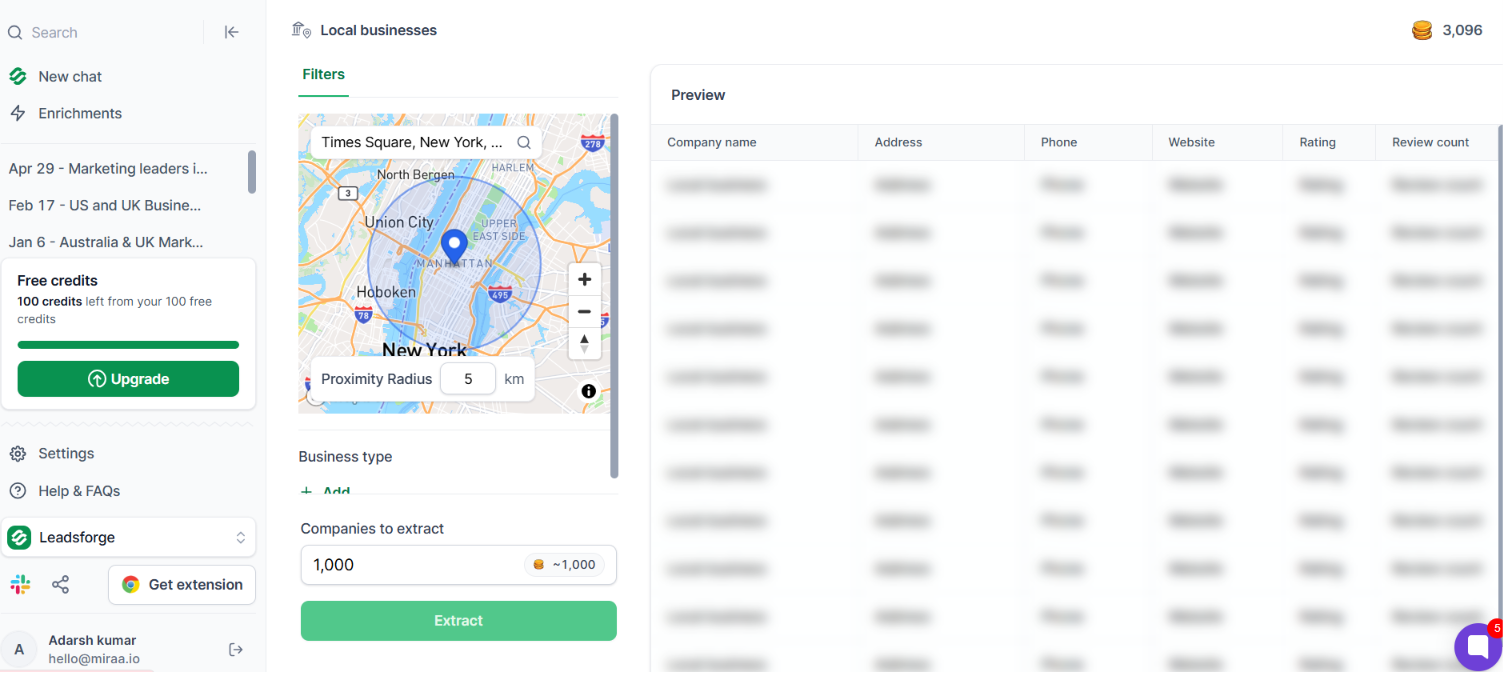
For this, I used Leadsforge’s Local Companies Search. I entered the business type, chose a location, and set a search radius. The feature pulls from Google Maps data to surface businesses that match those filters, so I didn’t have to search Google Maps manually.
For example, I looked for roofing companies in Dallas within a 25-mile radius, and Leadsforge returned matching businesses with their address, website, phone number, rating, and review count.
After that, I enriched the companies with verified email addresses, LinkedIn profiles, and phone numbers. That made it easier to identify the right decision-makers and get the list ready for outreach.
I also tried the feature in different markets. I switched from roofing companies in Dallas to dentists in Austin by changing the location and business type. When I wanted to broaden the search, I used Company Lookalikes to find businesses similar to my existing customers, and Business Signals to surface companies based on hiring, funding, and acquisitions. For local outreach, this method gave me the strongest starting point.
Google Business Profile was the second local lead generation method I tried because it gives you access to people who are already searching for your service. Instead of reaching out to potential customers, you're trying to capture demand that's already there.
That matters because local search is often the last step before someone contacts a business. Google also says customers are 70% more likely to visit and 50% more likely to consider buying from businesses with a complete Business Profile.
For this test, I relied on Google Business Profile as my main source of local enquiries. I kept the profile complete, added fresh photos, replied to reviews, and monitored calls, website clicks, and direction requests through Google's Performance report.
The biggest advantage was lead quality. Most people who found the profile were already looking for a business like mine, so the conversations started with much higher intent than cold outreach.
The downside was that I had very little control over lead volume. If search demand was low or competitors had stronger profiles, enquiries slowed down. Unlike paid ads or outbound outreach, I couldn't increase results simply by spending more or sending more messages.
Google Business Profile only gave me visibility inside Maps and the local pack. I wanted to know if ranking a website for local keywords could bring in additional leads.
So I tested local SEO. Google says 76% of people who search for something nearby on their smartphone visit a business within a day, and 28% of those searches end in a purchase. That made local SEO worth testing because the search intent is already high.
I focused on ranking for keywords with a city or location in them instead of broad national terms. My goal wasn't to get more traffic. It was to attract people who were already looking for a service in a specific area. Compared with Google Business Profile, local SEO took longer to show results.
But once the pages started ranking, they continued bringing in local visitors without paying for every click.
If you want quick leads, local SEO isn't the first method I'd choose. But if you're building a business for the long term, it's one of the few channels that can keep generating local leads month after month.
Google Business Profile and Local SEO generated leads, but I wanted to know how quickly I could create demand with a budget.
I set aside a $1,000 budget and ran Google Ads for a local plumbing business. My first campaign targeted broad keywords like "plumber" and "plumbing services." It didn't take long to realise that wasn't the best approach. The ads picked up clicks from people outside the service area and from users who weren't ready to book.
I paused those keywords and rebuilt the campaign around searches with stronger intent, such as "emergency plumber Austin" and "water heater repair Austin." I also limited the ads to a 20-mile radius so the budget stayed focused on nearby customers.
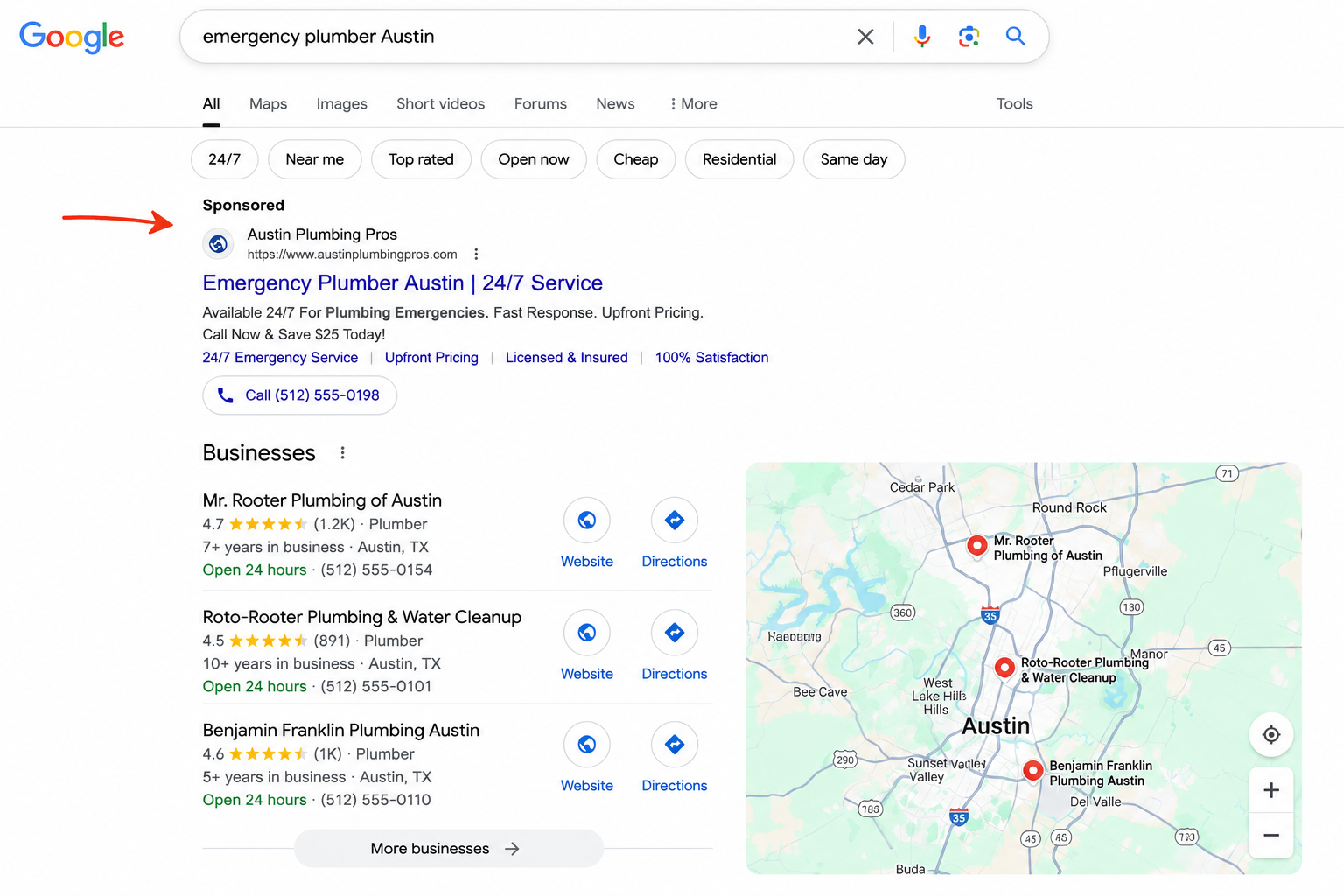
That made the biggest difference. The campaign brought in fewer clicks, but the enquiries were much better because people were searching for a specific service instead of just browsing.
Google Ads was the quickest method I tried. The trade-off was clear, though. Every lead came at a cost, and the enquiries stopped as soon as I paused the campaign.
If I had to launch a new local business tomorrow, I would still set aside part of my budget for Google Ads. It is one of the fastest ways to get in front of customers who are already looking for your service. But I would not rely on it alone, because it does not build long-term visibility the way Google Business Profile or local SEO can.
Social media surprised me more than I expected. People weren't searching for a local business the way they do on Google. That meant the ad had to stop them while they were scrolling.
I used a local dental clinic as the test. Instead of advertising every service, I promoted one simple offer: Free Teeth Whitening Consultation for New Patients.

The campaign only targeted people within a 10-mile radius of the clinic. That one decision made a noticeable difference. There was no point paying for clicks from people who lived an hour away.
The comments told me as much as the leads did. Some people tagged their friends. Others saved the post because they planned to book later. Those signals never showed up when I ran Google Ads.
The catch was that interest didn't always turn into appointments. A lot of people clicked because the offer looked good, not because they were ready to visit the clinic. I came away with one conclusion. Social media works best when you give people a reason to stop scrolling. A strong local offer will usually outperform a generic "Book Now" ad.
Google Ads gave me leads, but every click cost money. I wanted to see if I could reach local businesses without paying for every visitor. I gave myself a $500 budget and picked one niche: roofing companies in Dallas. Instead of buying a generic prospect list, I used Leadsforge to find roofing companies within a 25-mile radius.
I enriched the list with owner and marketing manager emails, then removed businesses that already had modern websites or active lead generation campaigns.
That left me with 312 companies. Every email mentioned something specific. For one company, I pointed out that their Google Business Profile linked to a broken contact page. For another, I noticed they had dozens of Google reviews but no online booking form.
The emails were not long. Most were under 100 words. That made a bigger difference than I expected. The replies were not always positive, but they were real conversations. Business owners replied because the email referred to something they could verify in less than a minute.
Sending 300 relevant emails produced better conversations than sending 3,000 generic ones.
Tool I Used: Leadsforge Local Companies Search
Building this list was the most time-consuming part of the campaign. I used Leadsforge's new Local Companies Search to find businesses by location and business type, enrich them with contact data, and export the list for outreach. It saved me hours of research and gave me more time to write emails and follow up.
Most local businesses attend networking events hoping to collect as many business cards as possible. I took a different approach. Instead of trying to speak to everyone, I focused on one industry that already worked with the kind of customers I wanted to work with.
For this test, I chose real estate agents because they regularly meet homeowners who need roof repairs, painters, plumbers, electricians, and contractors. I went to two local business events in Dallas with one goal: to build relationships with five real estate agents.
I did not lead with my service in the first conversation. Instead, I asked simple questions like:
Those questions changed everything. Instead of trying to sell, I started paying attention to where local businesses actually needed help and looked for ways to add value first. Before I left, I connected with everyone on LinkedIn and sent a short thank-you message the next morning.
A few weeks later, two agents introduced me to roofing companies that needed more leads. I learned that networking events do not generate leads just because you show up. They work when you build genuine relationships with people who already know your ideal customers.
The seven methods above were the main ones I tested, but there are a few other local lead generation tactics worth adding to your strategy.
Local Services Ads are Google's pay-per-lead ads for local service businesses. They usually appear above standard Google Ads and organic results for local service searches.
The main difference is the pricing model. With regular Google Ads, you pay when someone clicks. With Local Services Ads, you usually pay when someone contacts you through the ad.
That makes LSAs useful for businesses like plumbers, electricians, roofers, HVAC companies, lawyers, cleaners, and other service providers.
The biggest advantage is intent. Someone searching for "emergency plumber near me" is not casually browsing. They probably need help now.
The downside is that Local Services Ads are not available for every business category or location. They also require profile setup, verification, reviews, and ongoing lead quality checks.
If your business is eligible, I would test LSAs alongside Google Business Profile and Google Ads. It gives you another way to appear at the top of local search results.
Reviews are one of the strongest trust signals in local lead generation.
People want proof before they call a local business. A clear online review process can help businesses request feedback, respond faster, and turn customer comments into stronger local trust signals. A company with recent positive reviews usually feels safer than a company with no reviews, old reviews, or unanswered complaints.
Reviews also support local SEO because Google uses prominence, relevance, and distance when ranking local results. A business with better reviews and more activity often has a stronger chance of appearing in local search and Maps.
To generate more reviews:
Referrals work the same way. People trust recommendations from friends, neighbors, and local businesses more than ads. Build a simple referral process so happy customers and partners know exactly who to send your way.
Local citations are mentions of your business name, address, and phone number across the web.
These can appear on directories, review sites, local blogs, chamber of commerce pages, industry directories, and social profiles.
The most important thing is consistency. Your business name, address, phone number, website, and opening hours should match across every listing.
Start with the basics:
For local service businesses, citations help customers discover you and help search engines verify that your business is real.
If you serve multiple cities or neighborhoods, create dedicated location pages.
Do not copy the same page and swap the city name. That usually creates thin, duplicate content.
A useful location page should include:
For example, a roofing company should not only have one generic roofing page. It can create pages like "Roof Repair in Dallas" or "Emergency Roof Leak Repair in Austin" if those are real service areas.
These pages help you rank for high-intent local searches and convert visitors better because the page feels relevant to their location.
The right tools depend on whether you are trying to attract inbound leads, find outbound prospects, or track conversions.
For my own test, the most useful tool was Leadsforge because local prospecting is usually the slowest part of outbound lead generation.
Instead of manually searching Google Maps, copying business names, checking websites, and looking for contact details one by one, I could search by business type and location, then enrich the companies with contact data.
That matters because the quality of a local outreach campaign depends on the quality of the list.
A small, specific list of relevant local businesses will usually beat a large generic list. For example, "roofing companies in Dallas with weak websites and strong review counts" is much more useful than "all construction companies in Texas."
The tool stack I would use today:
Local lead generation works better when you treat it like a system instead of a list of random tactics.
Start with one clear market.
Do not target "local businesses" in general. Pick a business type, city, and service area.
For example:
The tighter the market, the easier it is to write relevant copy, build a better prospect list, and choose the right channels.
Before launching new campaigns, check where the business already stands.
Look at:
This tells you whether the biggest gap is visibility, trust, conversion, or outreach.
Do not try to do everything at once.
Start with one inbound channel and one outbound channel.
A good starting setup is:
This gives you both long-term visibility and short-term control.
If you need leads quickly, add Google Ads or Local Services Ads. If budget is limited, focus on Google Business Profile, reviews, local pages, and targeted outreach.
For B2B local lead generation, the list matters more than the email copy.
Start by collecting companies that match your target niche and location. Then qualify them before outreach.
Useful filters include:
This is where a tool like Leadsforge helps. You can search for local companies, enrich the list with contact details, and focus your time on writing relevant messages instead of manually building spreadsheets.
More leads do not always mean better results.
Track the numbers that show whether the channel is actually working:
For example, social media ads may produce cheap leads, but Google Ads or Google Business Profile may produce fewer leads that convert better.
After 30-60 days, compare each channel and double down on the one producing qualified conversations, not just clicks.
Yes, local lead generation can also be a business model.
Instead of generating leads for your own company, you create a system that generates leads for another local business. Then you sell those leads, rent the website, or work on a monthly retainer.
This is often called rank-and-rent local lead generation.
Here is how it works:
The advantage is control. You own the lead source and can partner with businesses that want more customers.
The downside is that ranking local pages takes time, and lead quality matters. A business will not keep paying for weak leads, fake enquiries, or people outside their service area.
If you want to build a local lead generation business, focus on high-value services where one customer is worth enough to justify the lead cost. Roofing, HVAC, legal, home improvement, and certain healthcare niches are common examples.
You also need clean tracking. Use call tracking, forms, CRM fields, and clear qualification rules so both sides know what counts as a valid lead.
Local lead generation is not passive at the beginning. You still need keyword research, content, rankings, outreach, and client management. But once a page or profile starts producing qualified leads consistently, it can become a strong recurring revenue channel.
Enter your email to get a custom plan & stack recommendation for your business
Please check your mailbox in 5 minutes

Google Business Profile was the best place to start because it helped local customers find the business without spending on ads. Google Ads worked faster, but the leads stopped when the budget did. Local SEO took longer, though it brought in steady search traffic once the pages began ranking.
Location-specific email gave me the most control. I could choose the city, business type, and exact companies I wanted to contact. Leadsforge made that easier by helping me find local businesses and enrich the right contacts in one place.
If I were starting today, I would use Google Business Profile for inbound leads and location-specific email for outbound leads. I would use Leadsforge to build each local prospect list before launching outreach.
That setup covers both sides. People can find the business on Google, while the business reaches qualified local prospects directly.
.jpg)

.jpg)

.jpg)