
Personalized Outbound Strategy
Get The Right Outbound Strategy In Minutes
Enter your email to get a custom plan & stack recommendation for your business
It's being carefully crafted by AI
Please check your mailbox in 5 minutes
Treg.to has drawn plenty of attention on LinkedIn, where posts call it a "Clay killer" and quote prices below a cent per lead. If you build lists in Claude Code or Codex, the offer is tempting. One key: thousands of data providers and no subscription for any of them.
The details raise questions. The price per call isn't what you pay for an email you can actually send.
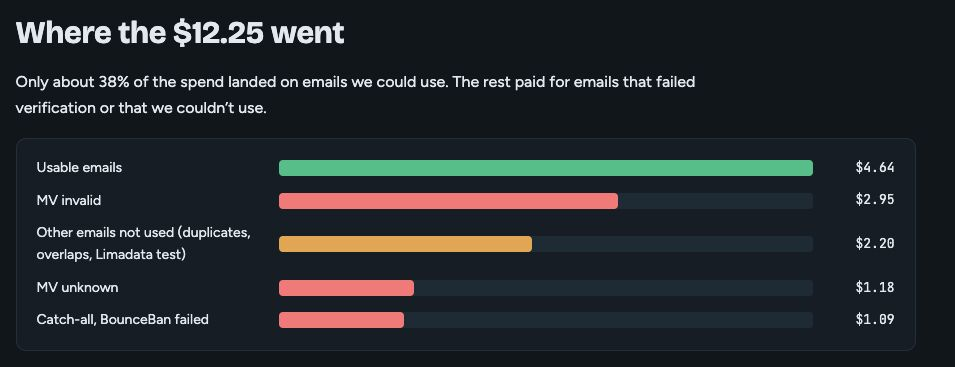
In the most detailed public test, only about 38% of spending went toward usable emails. The rest paid for addresses that failed verification, returned unknown, or never got used.
Treg.to also stops at the data. Once you've built a list, it still needs to reach your mailboxes, sequences, and reply inbox, and none of that happens within Treg.to.
So the question isn't just whether Treg.to is cheap. It's whether it stays cheap after failed lookups, verification, and the work that follows.
Below, I look at where its numbers hold up, where they don't, what a month's use could cost, and which teams it suits.
Treg.to brings thousands of data APIs into your AI agent through one key. I set it up once in Claude Code, then describe the task, like "find work emails for these 30 people" or "pull backlinks for this domain." The agent chooses a provider, shows the price, and makes the call.
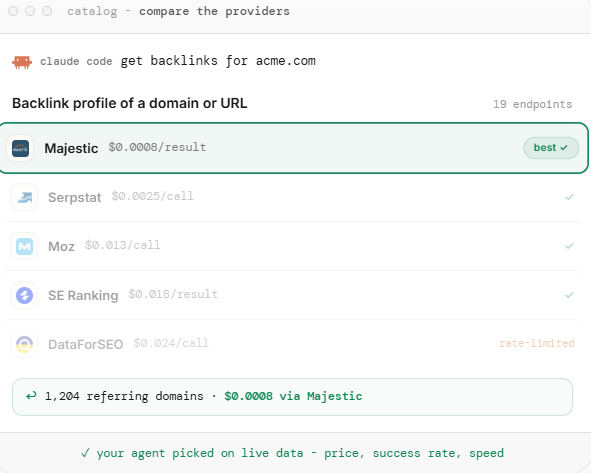
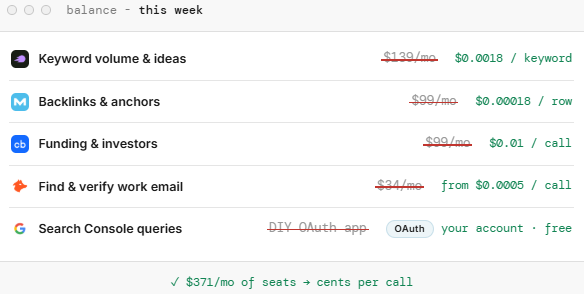
The first benefit is getting data without subscriptions. If a campaign needs Crunchbase funding data or Semrush keywords, I pay cents for that job rather than $99 or $139 for a month. For an agency handling SEO, ads, and lead data, that's several subscriptions I can skip.
I also see the cost before spending anything. Several providers offer free market counts, so I can size an ICP before buying rows. The email finder starts with the cheapest provider and tries the next when one misses. With providers that charge per success, a miss costs nothing.
If my team already pays for Apollo or Hunter, I add those keys once. Calls then use my own account without Treg metering them, and nobody else sees the credentials.
What I don't get is a list that's safe to email. Finding an address doesn't make it deliverable. In Treg's own test, only 53% of found emails verified as deliverable, while the most detailed public review reported 38%. Some providers charge for wrong guesses, and a catch-all guess can stop the search before a better provider tries. Skip verification, and those bounces affect my sending domains.
I also get nothing beyond the data. Mailboxes, warmup, sequences, LinkedIn steps, and replies sit in other tools. My agent finishes with a CSV, and I take it from there.
A few other gaps would come up weekly.
The Forge stack works in the same agents through one MCP connection, so here's how they compare.
Treg.to is a cheap way to bring almost any data into my agent. But if I want that agent to turn a list into sent emails without damaging a domain, I need more than data.
Treg.to isn't listed on G2, Capterra, or Trustpilot yet. Public feedback is on LinkedIn, with nine posts and comments from founders, agency owners, a headhunter, and outbound consultants.
Most describe quick tests. Only one reviewer, Ephraim Austin, shares a full spending and results breakdown, so his numbers carry the most weight here.
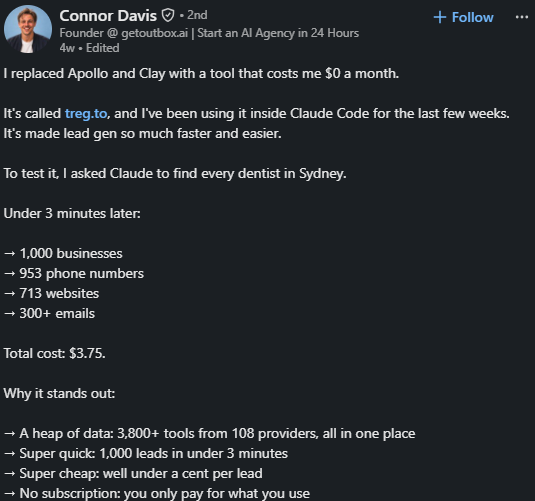
Connor Davis, founder of getoutbox.ai, asked Claude to find every dentist in Sydney. Within 3 minutes, he had 1,000 businesses, 953 phone numbers, 713 websites and 300+ emails for $3.75. He calls it a tool that "costs me $0 a month," meaning there's no subscription, just usage charges.
Abdul Raouf Al Sbeei, who runs a solo marketing agency, found people discussing a tooling problem on X and Reddit, pulled their verified work emails, and organized them in a sheet. He got 40+ leads in under 10 minutes for about $0.80.

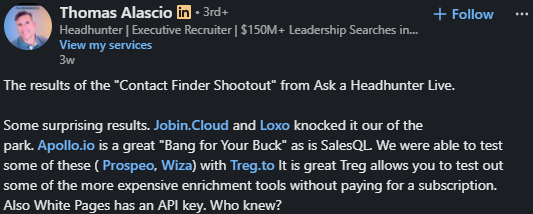
Thomas Alascio, an executive headhunter, ran a "Contact Finder Shootout" using Prospeo and Wiza through Treg.to. His favorite part was testing expensive enrichment tools without subscribing to each.
Romain Duclos, founder of Krafters, uses his agent to track his site's Google rankings and top competitors. He got a useful result in about 10 minutes without opening API docs. He recommends it for freelancers and small teams who don't want ten separate tools.

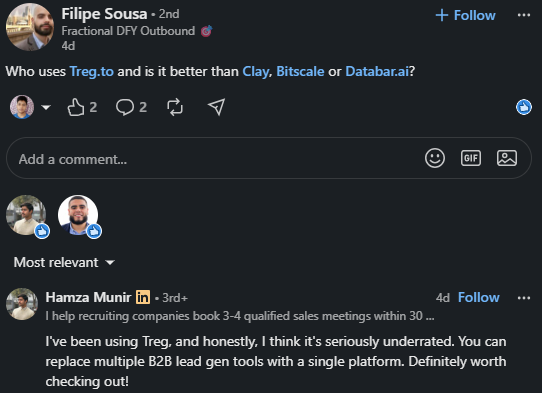
Hamza Munir, who books meetings for recruiting firms, calls Treg.to underrated and says it replaces several B2B lead tools. Lylle Ryals, head of sales development at Blee, points to its open-source people search at $0.0089 per lead with no markup.
Josh Jackson, founder of Gimme Gimme, compares it with tools charging $200 monthly to find LinkedIn leads through post activity. He says Treg.to does it for less than a cent.

Ephraim Austin, an outbound consultant, tested Treg.to on people his usual tools couldn't find. It returned emails for 61% of them.
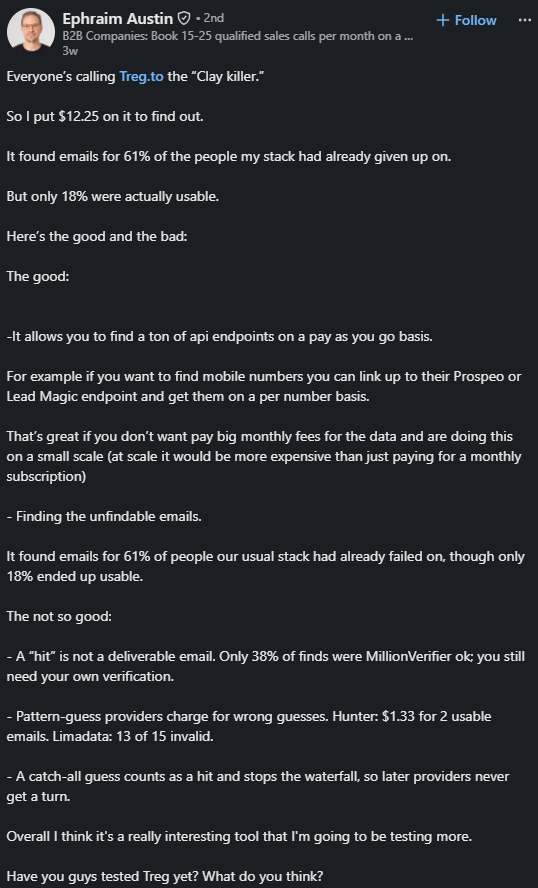
That 61% drops quickly. Only 38% of the emails Ephraim found passed his verification, and just 18% of people ended up with a usable address. Of his $12.25 spend, only about 38% paid for emails he could actually use.
Providers that guess addresses from name patterns charge whether they're right or not. Ephraim paid Hunter $1.33 for 2 usable emails, while 13 of Limadata's 15 emails were invalid.
When a provider guesses an address on a domain that accepts all emails, Treg.to treats it as a find. The search ends there, so later providers never get to look for a confirmed address.
Ephraim likes paying per number for mobile data from providers such as Prospeo and LeadMagic. But he notes that at volume, per-call pricing would cost more than a monthly subscription.
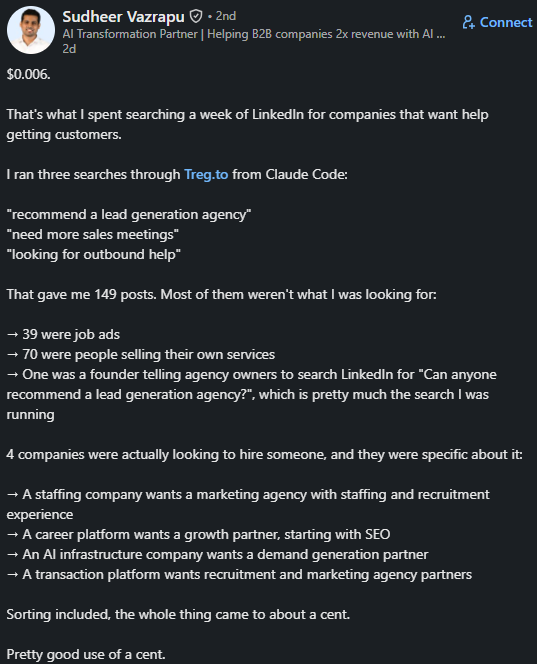
Sudheer Vazrapu searched a week's LinkedIn posts for $0.006. Of 149 results, 39 were job ads, and 70 were people promoting their services. Only 4 were companies looking to hire help. The search cost almost nothing, but he still had to read the rest to find those 4.
I haven't run a paid Treg.to job myself. Instead, I'll walk through how I'd plan a first campaign, using figures from Treg's recorded runs. Each step has a cost, or a mistake that could cost more later.

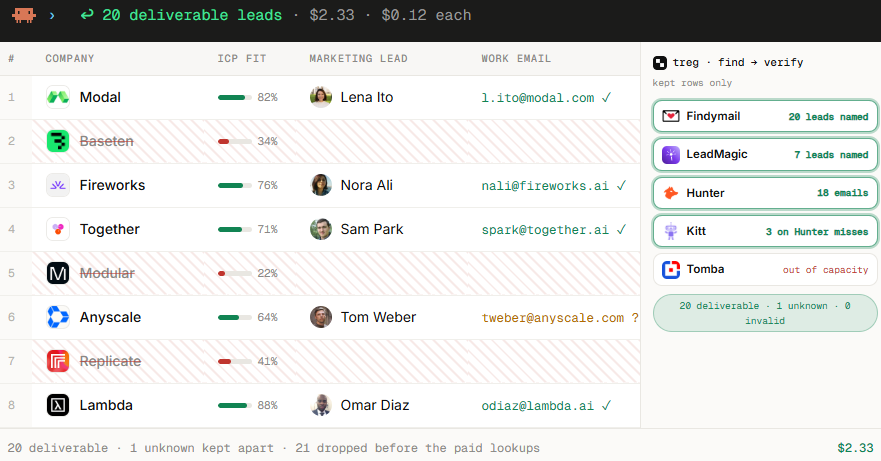
Market counts are free, so I'd spend my first hour there. The credit runs out quickly after that. Treg's lead-list test turned 50 companies into 20 deliverable leads for $2.33, over twice the free credit.
Company lookups are a better use of that $1. At about $0.0026 per domain, I could enrich a few hundred inbound sign-ups and check whether the data suits my routing rules.
I'd turn my ICP into filters providers understand, such as country, headcount, and category. The same ICP returned 10,403 companies from one provider and 15,873 from another. Changing one industry label reduced it to 21.
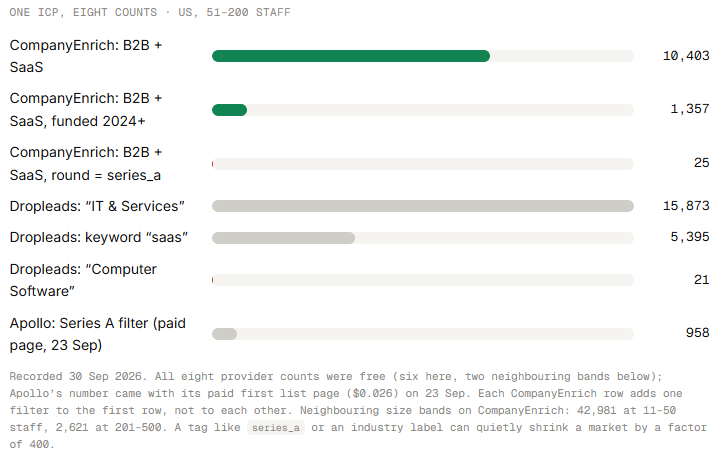
Before paying for rows, I'd check counts on two providers and read ten sample rows from each. If counts differ a hundredfold, a filter isn't working as I expected.
The cheapest row is one I don't enrich. In Treg's run, checking companies against existing list fields removed 21 of 48 before any paid lookup. That brought the cost to $0.12 per deliverable lead.
But my agent only does that if I ask. I'd define the fit check, passing threshold, and spending cap in its instructions before running anything.
A "decision makers" search returned 45 senior people across 5 accounts, but none had marketing titles, the target buyer in that test. Three of 8 accounts also hit rate limits. A role-based search found marketers at all 8 accounts without metered charges.
If I sell to growth teams, I'd ask for "marketing" and "growth" roles at each company, then reveal emails only for people I intend to contact.
All 60 people in Treg's test returned an email, but only 53% verified as deliverable. A blank catch-all field doesn't mean safe, either. It means the status is unknown.
I'd verify separately, send only to deliverable addresses, and keep unknowns and catch-alls in their own smaller list.
Of 675 job postings returned, 355 had closed. Funding data for one list ended in May 2025. Job-change data was worse: most records still showed the previous company a month after a move.
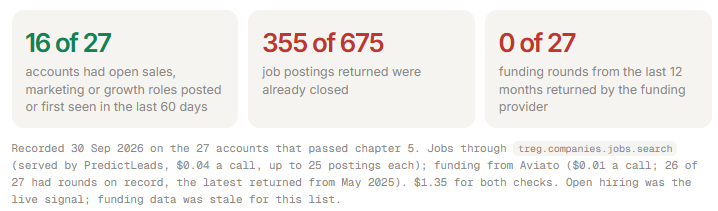
Before my agent mentions someone's "new role," I'd make it check their current company on their live profile. Otherwise, I could congratulate them at the wrong company.
In Treg's runs, two providers ran out of capacity, three calls hit rate limits, and rerunning after a parsing bug cost $1.08. None stopped the job. Each simply returned fewer rows.
I'd have my agent report the row count after every step. If 50 companies produce 8 people rather than 30, I'd want to know before adding them to a sequence.
Treg.to has no plans or seats. I top up a balance, and calls deduct small amounts at each provider's rate, without markup. The important question isn't the listed price. It's how much spending produces usable data.
Some sample rates:
For occasional work, the totals stay small.
Usable emails tell a different story. Treg's benchmark reports $0.0056 per correct email, but on harder contacts, only about 38% of Ephraim Austin's spend produced sendable addresses. I'd budget two to three times the listed rate for each deliverable email.
Per-call pricing works when I need small amounts of varied data, such as backlinks for one client and funding for another. It's less attractive when I need the same data in bulk weekly. Leadsforge's $49 monthly plan charges 1 credit per verified email, only when found, making costs easier to predict.
I'd use Treg.to if I already worked in an AI agent and needed small amounts of varied data.
I'd skip Treg.to for steady volumes of one data type, or if I wanted my agent to take lists through sending.
Treg.to answers one question well. Where does my agent get data? It leaves the next to me. What happens once the list is ready?
Salesforge handles both. Through one Forge MCP connection, the agent finding leads in Leadsforge can verify them, add them to email and LinkedIn sequences, check mailbox health, and track replies. I stay in one conversation from the first search to the first reply.
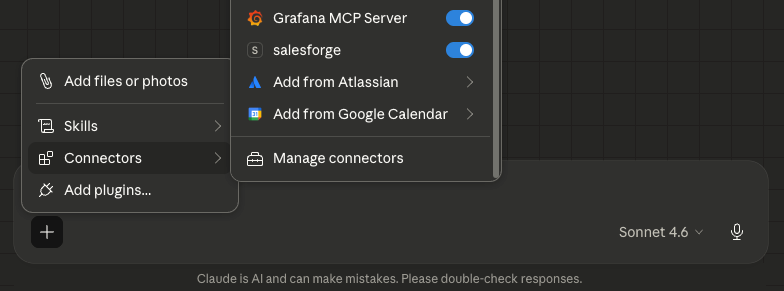
Here's how a campaign works in each.
I can ask my agent to find growth leaders at Series A SaaS companies, enrich them, send LinkedIn requestsmailbox warmup stats , and move non-acceptors into an email sequence. There's no CSV export or second tool to import into.
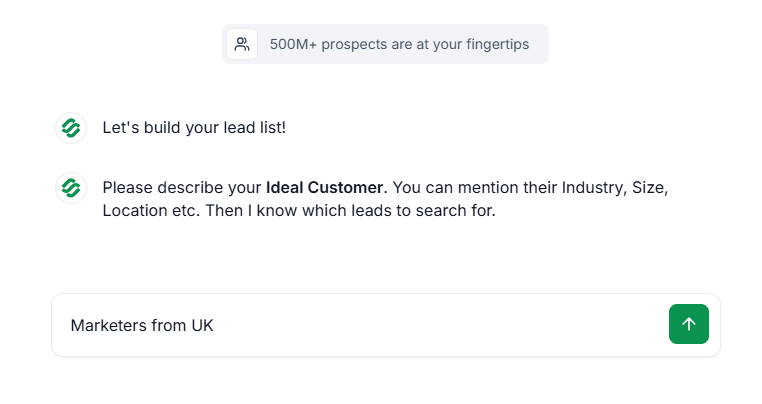
Some Treg.to providers charge even when guesses are wrong. Leadsforge charges 1 credit for a found email and nothing for a miss.
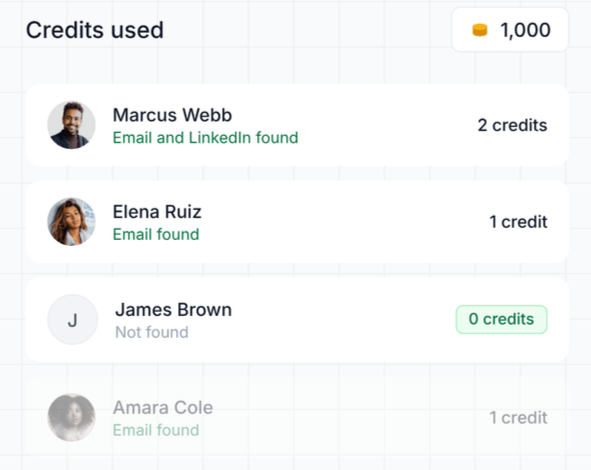
Phone numbers cost 10 credits, also only when found. Bulk jobs reserve credits, then charge for actual results, while retries using the same key don't charge twice.
Before enrolling contacts, my agent runs a preflight check for me to confirm. Salesforge also validates emails and follows my do-not-contact lists. With Treg.to, I'd have to write and maintain those safeguards myself.
Treg.to doesn't cover inboxes or warmup. Through the same connection, I can ask my agent for mailbox warmup stats, DNS health, and blacklist status, then test whether emails reach the primary, promotions, or spam tab.
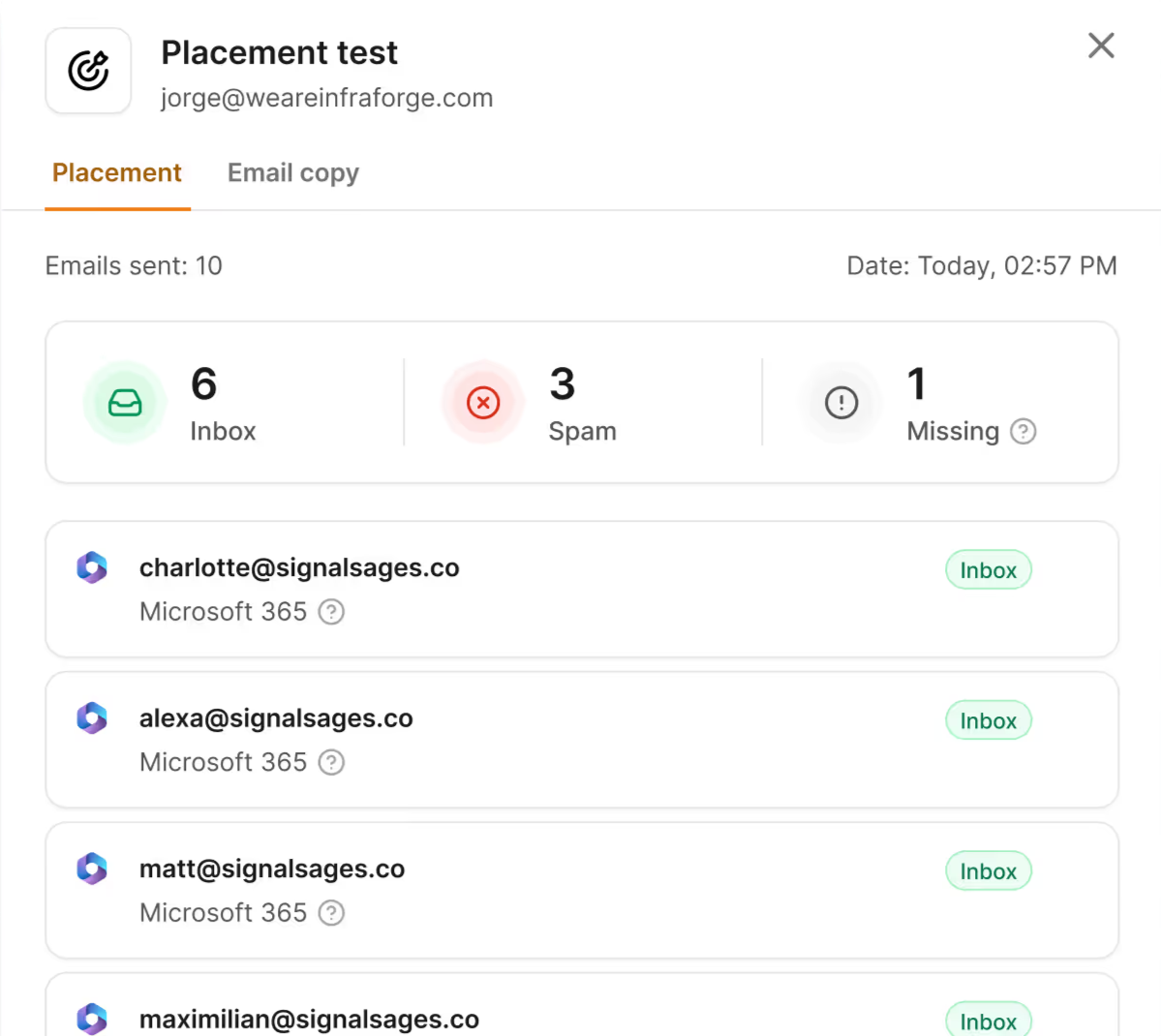
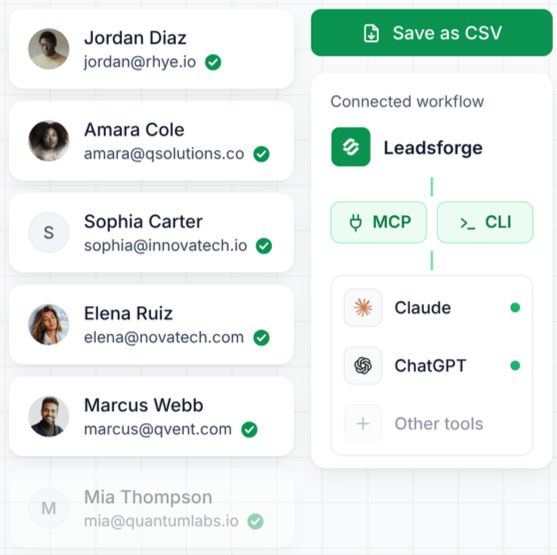
The Forge CLI lets me script weekly tasks. A morning script adds fresh Leadsforge leads to a running sequence, while another posts mailbox warmup and placement results to Slack. Setting up a client becomes one command rather than an afternoon across five dashboards.
I add an MCP entry for each client account, with separate keys, and name the client in my prompt. That prevents my agent from accidentally adding one client's contacts to another's sequence.
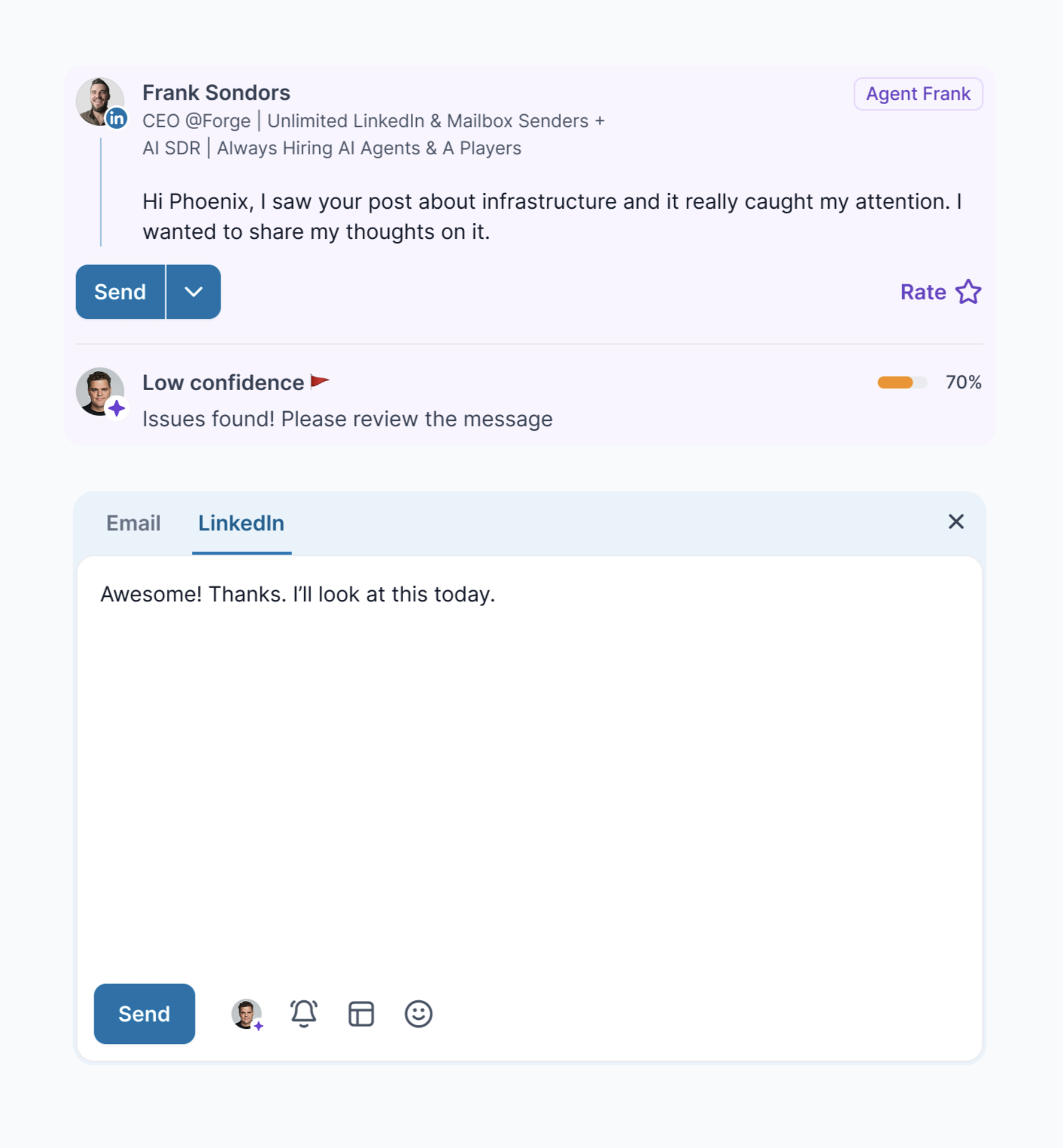
If I don't want to write prompts, Agent Frank finds prospects, writes messages, and books meetings for $499 monthly. I can let it run independently or approve each step.
Enter your email to get a custom plan & stack recommendation for your business
Please check your mailbox in 5 minutes

One number decides it: what you pay for each email you can actually use.
To check, top up $10, run 50 real list rows through your agent, and verify every email. Divide your spending by the number of deliverable addresses.
If that cost stays low and your data needs vary weekly, Treg.to is worth keeping. If it rises, or you mainly need steady contact volumes, I'd use Salesforge instead.
Connect Forge MCP to the same agent, pay 1 Leadsforge credit only when an email is found, and send leads straight into an email and LinkedIn sequence.
.jpg)

.jpg)

.jpg)