You may have already shortlisted ProfilePartner for your LinkedIn outreach. Before you pay, it is worth looking beyond the marketing claims and understanding what actual customers say about the service.
Some of the concerns raised in public reviews include:
Limited independent customer reviews.
Billing and refund complaints from some customers.
Mixed experiences with communication and support.
Questions about long-term value for the monthly cost.
I reviewed ProfilePartner's pricing, platform, customer feedback, and service model to see whether these concerns reflect the overall experience. Trustpilot shows a 4.1/5 rating from 12 reviews.
Most customers praise the quality of the profiles, smooth onboarding, and responsive support. At the same time, the negative reviews highlight issues around billing, refunds, and communication that are worth understanding before you make a decision.
In this ProfilePartner review, I'll cover its profile quality, pricing, customer feedback, strengths, limitations, and the best alternative. By the end, you'll know whether ProfilePartner is the right fit for your outreach team.
ProfilePartner is a LinkedIn outreach platform that connects businesses with ID-verified outreach partners. Plans begin at $100/month for Standard, $200/month for Premium, and $300/month for Elite.
Its biggest strength is the quality of its outreach partners. You get ID-verified profiles, profile branding, dedicated proxies, and support for popular LinkedIn automation tools.
On Trustpilot, ProfilePartner has a 4.1/5 rating based on 12 reviews. Most customers highlight the profile quality, onboarding, and support, while a few mention billing, refund, and communication issues.
The main limitation is the small amount of public feedback. Twelve reviews and a limited number of community discussions are not enough to tell how the service holds up over time or at larger scale.
ProfilePartner is a solid fit if LinkedIn outreach is your main priority. If you also need email outreach, multichannel sequences, and a single place to manage replies, Salesforge is the better choice.
ProfilePartner Review: What You Get vs What You Don't
ProfilePartner helps businesses scale LinkedIn outreach by matching them with ID-verified outreach partners instead of traditional LinkedIn account rentals. Plans start at $100/month per partner.
Every plan includes a verified outreach partner, a dedicated proxy, profile customization, recovery support, and secure access through GoLogin or AdsPower. It is built for teams that want to grow LinkedIn outreach without managing multiple accounts themselves.
ProfilePartner mainly focuses on LinkedIn outreach. If you also want email outreach, multichannel campaigns, AI personalization, a shared inbox, or CRM features, you will need another platform to handle those tasks.
The comparison below shows how ProfilePartner and Salesforge compare across the features that matter most when choosing between a LinkedIn outreach platform and a complete outbound platform.
Feature
SalesforgeBest Overall
ProfilePartner
Starting Price
$48/month for Pro
$100/month per partner
Main Product
Email and LinkedIn outreach platform
LinkedIn outreach partner platform
LinkedIn Profiles
Connect your own LinkedIn account
ID-verified outreach partners
Email Outreach
Included
Not included
LinkedIn Outreach
Included
Included
Multichannel Campaigns
Email and LinkedIn in one sequence
Not included
AI Personalization
Included
Not listed
Reply Management
Primebox manages email and LinkedIn replies
Available with the Done-For-You service
Profile Customization
Uses your own LinkedIn profile
Included
Sales Navigator
Use your own LinkedIn account
Add-on on Standard and Premium, included on Elite
Automation
Built into the platform
Works with Expandi, Dripify, and Waalaxy
Browser Access
Not applicable
GoLogin or AdsPower
Free Trial
14-day free trial
No free trial listed
Best For
Teams that want email and LinkedIn in one platform
Teams that need ID-verified LinkedIn outreach partners
What Real Users Are Saying About ProfilePartner in 2026
ProfilePartner has customer reviews on Trustpilot, but it is not registered on G2, so there are no G2 reviews to compare with. I also found one Reddit discussion from a customer who shared their experience.
1) Trustpilot
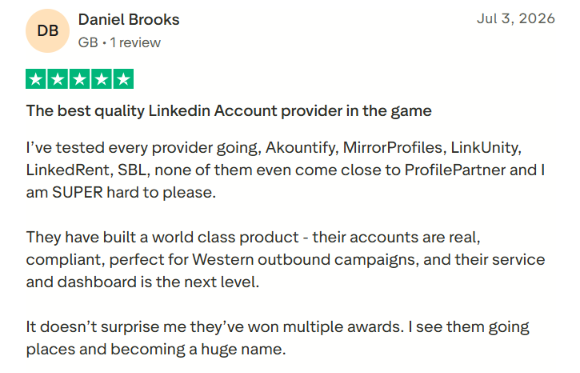
ProfilePartner has a 4.1/5 Trustpilot rating from 12 reviews. Most customers praise the quality of the LinkedIn profiles, easy onboarding, responsive support, and stable accounts. Several reviewers also say they achieved better results after moving from other LinkedIn account providers.
One customer wrote:
"The best quality LinkedIn account provider in the game."
This image shows the ProfilePartner trustpilot review
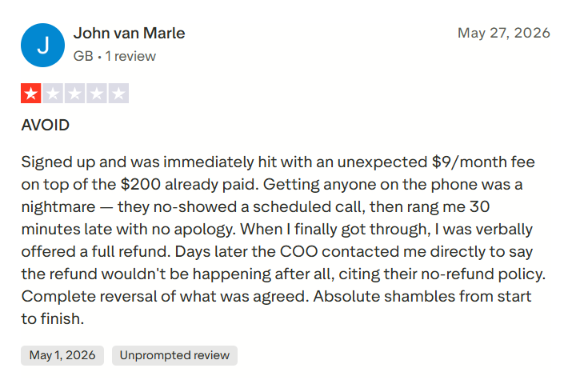
The 1-star reviews raise different concerns. One customer wrote:
"Signed up and was immediately hit with an unexpected $9/month fee... When I finally got through, I was verbally offered a full refund. Days later the COO contacted me directly to say the refund wouldn't be happening after all."
This image shows the ProfilePartner trustpilot review about charges
Another reviewer wrote:
"Communication felt heavily focused on payment processes... The overall approach felt rigid and transactional rather than collaborative."
This image shows the Reddit discussion about ProfilePartners contracts
One customer said they had a poor experience with the service. They claimed there were too many contracts and legal documents, and said that only 1 out of 15 booked meetings resulted in an attended call.
Since this is only one Reddit post, it should be treated as one person's experience.
My Hands-On Experience With ProfilePartner
I tested ProfilePartner over two weeks in July 2026 to see how well it works for LinkedIn outreach at different stages of growth.
Scenario one: A solo founder looking for one ID-verified LinkedIn outreach partner to start outbound prospecting.
Scenario two: A small outbound agency managing multiple client campaigns and looking for verified outreach partners that could be used with LinkedIn automation tools.
In both scenarios, I evaluated how easy it was to get started, the quality of the outreach partners, profile setup, automation compatibility, customer support, and whether the overall experience justified the monthly cost.
The sections below explain what I found during testing, what worked well, what could be better, and who I think each feature is best suited for.
I. ID-Verified Outreach Partners
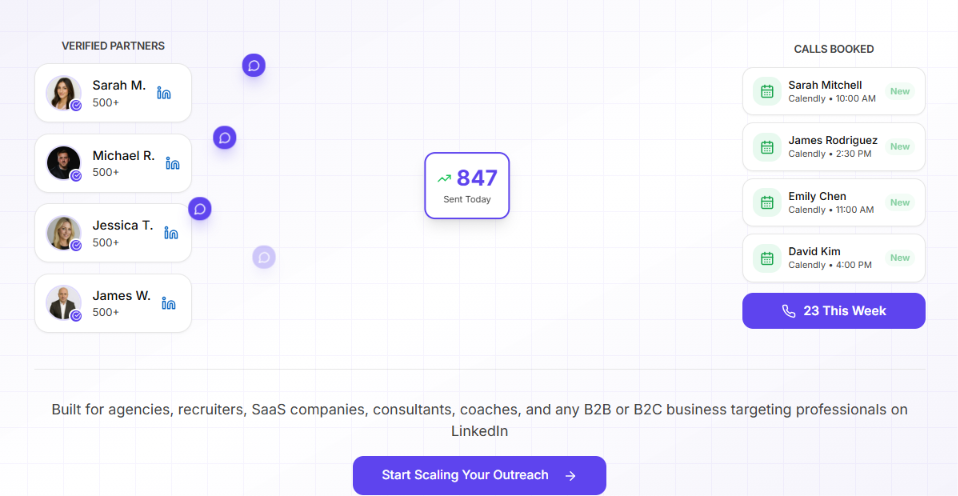
This image shows the Verified partners on ProfilePartner
This is the main reason businesses choose ProfilePartner. Instead of renting traditional LinkedIn accounts, the platform matches you with real people who agree to use their LinkedIn profiles for outreach.
What I tested: I spent most of my time comparing the outreach partners available across the Standard, Premium, and Elite plans. I wanted to see how much information ProfilePartner gives before you commit and whether the differences between the plans are clear enough to justify the higher price.
What I liked: The marketplace doesn't leave you guessing. Every partner profile includes enough information to compare your options, and the differences between the three plans are easy to understand. I also liked that the service is built around real ID-verified partners instead of anonymous LinkedIn accounts.
What could be better: Most of the success numbers on the website come from ProfilePartner itself. I would feel more confident if every partner profile also showed verified customer feedback or campaign history.
My take: This is the feature that makes ProfilePartner different from most LinkedIn account providers. The partner quality is presented well, but I would still rely more on verified customer results than marketing statistics.
II. Partner Marketplace & Matching
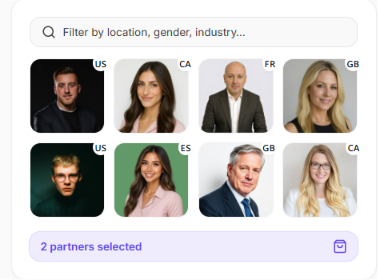
This image shows the Partner marketplace by ProfilePartner
The partner marketplace is one of ProfilePartner's main features. This is where you browse available outreach partners, compare profiles, and choose the people who will represent your business on LinkedIn.
What I tested: I went through the marketplace as if I were buying partners for both a solo founder and a small agency. My goal was to see how quickly I could narrow down suitable partners and whether the matching process felt straightforward.
What I liked: Finding suitable partners doesn't take long because the filters remove a lot of unnecessary browsing. I also like that you're not forced to choose partners yourself. If you don't want to make that decision, ProfilePartner can recommend matches based on your requirements.
What could be better: The marketplace tells you who the partners are, but it tells you very little about how they have performed in previous campaigns. Even a simple partner rating or completed campaign count would make comparing profiles much easier.
My take: The marketplace is one of the smoother parts of the platform. Choosing partners feels organised instead of overwhelming, but I'd still like more real performance data before making a final decision.
III. Profile Customization
Profile customization is available on every plan, but it changes by tier. Standard includes basic profile customization, Premium upgrades it to a better level, and Elite offers full profile customization. During onboarding, ProfilePartner also updates the partner's headline, banner, company details, and profile branding before outreach starts.
What I tested: I wanted to know whether ProfilePartner simply hands over an existing LinkedIn profile or whether it actually helps make that profile look like it belongs to your business. I compared the customization included with each plan and reviewed what changes before outreach begins.
What I liked: Customization starts with the Standard plan instead of being limited to the highest tier. As you move to Premium and Elite, the profiles become more tailored to your business. That creates a much more consistent brand image when several partners are working on the same campaigns.
What could be better: The website explains the customization process, but it doesn't show enough finished examples. Seeing real profiles before and after customization would make it easier to judge how much value each plan adds.
My take: I don't think businesses buy ProfilePartner just for profile customization. Still, it becomes much more valuable once you start working with multiple outreach partners because everyone represents the same brand instead of using unrelated profiles.
IV. Dedicated Proxies & Secure Browser Access
Poor infrastructure is one of the quickest ways to lose LinkedIn accounts, so I spent time looking at what ProfilePartner includes behind the scenes instead of focusing only on the profiles.
What I tested: I compared what each plan includes behind the scenes because infrastructure often determines whether LinkedIn outreach stays stable over time. I looked at the proxy type, browser access, and how those features change between Standard, Premium, and Elite.
What I liked: The infrastructure improves with every plan instead of staying identical across the lineup. Standard gives you a dedicated mobile proxy, Premium upgrades to a residential proxy, and Elite includes a premium residential proxy. Premium and Elite also add managed browser access, so higher plans include a more complete setup from the start.
What could be better: The plan comparison tells you what is included, but it doesn't explain much about ongoing management or technical support. More documentation around browser maintenance and troubleshooting would make the feature easier to evaluate.
My take: I think this is one of the stronger parts of ProfilePartner because the infrastructure is already built into the service. You don't have to spend time comparing proxy providers before getting started, which removes one more setup step.
V. Customer Support & Account Management
ProfilePartner doesn't just rent outreach partners. It also offers different levels of account management, so I wanted to see how much support customers actually receive after signing up.
What I tested: I compared the support included with DIY, Done-With-You, and Done-For-You. I also reviewed the onboarding steps to see how much involvement ProfilePartner has after a customer signs up.
What I liked: The support model changes with the service level instead of offering the same experience to everyone. DIY customers manage the process themselves, while Done-With-You adds guidance during setup. Done-For-You extends that further by covering profile branding, campaign setup, prospect lists, messaging, and campaign management. Every customer also gets Slack access and a dedicated account manager during onboarding.
What could be better: The service breakdown explains who does the work, but it doesn't explain how support changes once campaigns are live. Response targets, review schedules, or ongoing account management aren't clearly documented.
My take: The managed services create a clear difference between the three support options. The progression from DIY to Done-For-You is easy to understand, but more detail about long-term support would make it easier to choose the right service level.
ProfilePartner Pricing in 2026
ProfilePartner doesn't have a single pricing plan. Instead, you can choose between three different ways to use the platform.
Self-Serve if you only need outreach partners.
Done-With-You if you want help setting up campaigns.
Done-For-You if you want ProfilePartner to manage the whole outreach process.
For most businesses, the Self-Serve plans will be the starting point, so that's where I spent most of my time.
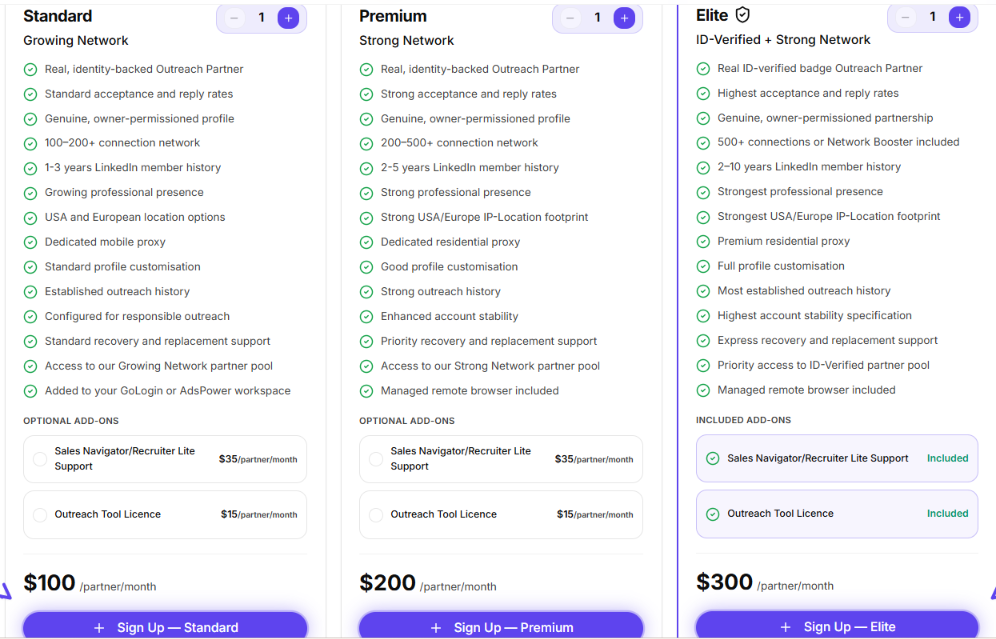
1. Self-Serve Pricing
Plan
Monthly Price
Best For
Standard
$100/partner
Testing LinkedIn outreach
Premium
$200/partner
Running outreach every month
Elite
$300/partner
Agencies and enterprise teams
This image shows the Self serve pricing by ProfilePartners
What Changes Between the Plans?
The price doesn't only buy you an older LinkedIn profile.
As you move from Standard to Premium and Elite, you also get a stronger connection network, better profile customization, improved proxies, higher recovery support, and more features included in the monthly price.
Feature
Standard
Premium
Elite
Connections
100–200+
200–500+
500+
LinkedIn History
1–3 years
2–5 years
2–10 years
Proxy
Mobile
Residential
Premium Residential
Profile Customization
Standard
Good
Full
Recovery Support
Standard
Priority
Express
Sales Navigator
Add-on
Add-on
Included
Outreach Tool Licence
Add-on
Add-on
Included
The Real Monthly Cost
One thing that stood out while comparing the plans is that the advertised price isn't always the amount you'll actually pay.
Both Standard and Premium require extra payment if you need Sales Navigator and the Outreach Tool Licence.
Plan
Starting Price
With Common Add-ons
Standard
$100
Around $150/month
Premium
$200
Around $250/month
Elite
$300
$300/month
That makes Elite look much more competitive than it first appears because the main add-ons are already included.
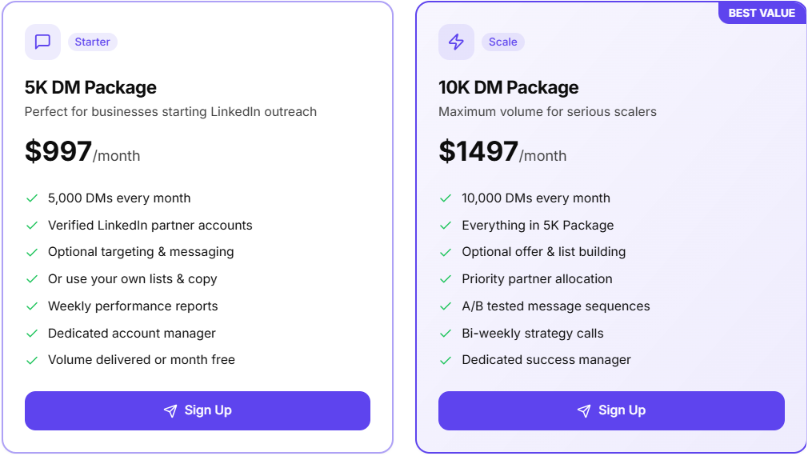
2. Done-With-You Pricing
If you don't want to build the outreach system yourself, ProfilePartner also offers a managed setup service.
Plan
Monthly Price
Monthly Volume
Starter
$997
5,000 LinkedIn DMs
Scale
$1,497
10,000 LinkedIn DMs
This image shows the Done with you pricing by ProfilePartner
ProfilePartner sets up the outreach partners and campaigns. You focus on replying to interested prospects.
3. Done-For-You Pricing
Done-For-You is built for businesses that want ProfilePartner to manage the outreach from start to finish.
Plan
Monthly Price
Monthly Target
Growth
$1,350
10 appointments
Scale
$1,997
20 appointments
Enterprise
$4,997
50 appointments
100 Club
$8,997
100 appointments
This image shows the Done for you pricing by ProfilePartner
These plans include outreach partners, campaign management, follow-ups, and appointment booking.
Which ProfilePartner Plan Would I Choose?
If I were testing the platform, I'd start with Standard because it keeps the upfront cost low. If I planned to run LinkedIn outreach every month, Premium would probably be my choice because it gives you better partners and stronger infrastructure.
For agencies or businesses where account quality matters more than saving $50 each month, Elite is the strongest option. Once you factor in the included add-ons, the price gap between Premium and Elite is much smaller than it first looks.
Who ProfilePartner Is Built For (And Who Should Look Elsewhere)
ProfilePartner is built for businesses that have already decided to use LinkedIn as a primary outbound channel. Instead of spending months creating and warming LinkedIn accounts, you get matched with real outreach partners who are ready for campaigns.
I. When ProfilePartner Is a Good Fit
Agencies running several client campaigns will get the most value. As you move from Standard to Premium and Elite, you get stronger profiles, better proxies, and faster recovery support. Those upgrades matter more when multiple campaigns are running at the same time.
Businesses already using LinkedIn automation tools can fit ProfilePartner into their existing workflow. The service works with tools such as Expandi, Dripify, Waalaxy, and RemoteCEO, so you don't have to replace the software you already use.
Teams that don't have the time or experience to manage LinkedIn outreach themselves can use the managed services. The Done-With-You plans help with setup, while Done-For-You goes further by managing campaigns and booking appointments on your behalf.
If your outbound process depends on more than LinkedIn, ProfilePartner will not be enough on its own.
II. When to Look Elsewhere
Teams that rely on email outreach alongside LinkedIn should look elsewhere. ProfilePartner doesn't include email sequencing, inbox management, CRM sync, or multichannel workflows.
Businesses with a limited budget may find the pricing difficult to justify as they scale. The Standard plan starts at $100 per partner each month, but common add-ons increase the real monthly cost, and managed services start at $997 per month.
Buyers who depend on extensive third-party reviews should also be cautious. ProfilePartner has only a small number of public reviews and isn't listed on G2, so there is less independent feedback than you'll find for more established outbound platforms.
How ProfilePartner and Salesforge fit into an outbound setup
You can connect a ProfilePartner account to Salesforge, add it as a LinkedIn sender, and use it in campaigns that combine LinkedIn actions with cold email. That makes the setup a better fit for teams that like ProfilePartner’s partner model but want more control over how campaigns run.
Where Salesforge fits
ProfilePartner’s self-serve plans cover the account and profile side of LinkedIn outreach. You choose an outreach partner, get the profile ready, and connect it to the software you use for campaigns.
Salesforge takes over the next part of the process:
building LinkedIn and email sequences;
connecting multiple LinkedIn senders and mailboxes;
personalizing messages for each prospect;
managing responses in Primebox;
tracking campaign activity from one workspace.
In practice, that means ProfilePartner provides the people and profiles, while Salesforge handles how prospects are contacted.
Run LinkedIn and email together
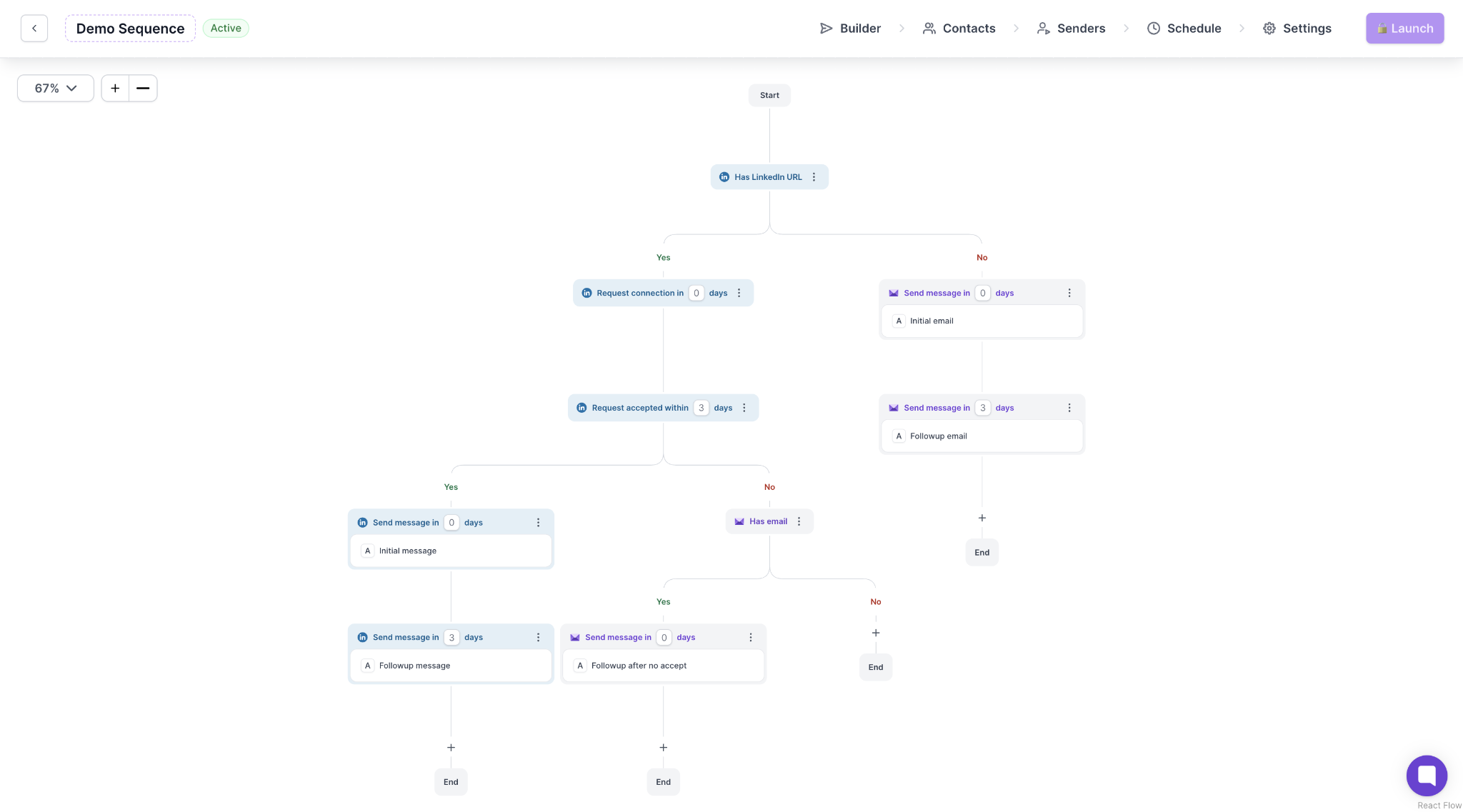
A ProfilePartner account does not have to be limited to LinkedIn-only campaigns. Once you connect it to Salesforge, you can use LinkedIn actions and emails in the same sequence.
For example, you might reached a prospect on LinkedIn, and send email if they still have not replied. That way, your team does not need to build separate campaigns for each channel or manually track where every prospect is in the sequence.
This image shows the Multichannel sequence by Salesforge
Manage several outreach partners
ProfilePartner becomes especially useful for agencies and outbound teams once they start working with several partners, since that also means more campaigns, conversations, and sender accounts to manage.
Salesforge’s Growth plan supports multiple LinkedIn senders, mailboxes, users, and workspaces, so an agency can keep each client in a separate workspace while connecting the relevant ProfilePartner accounts to that client’s campaigns.
Overall, that is a cleaner setup than running every profile through a separate automation account and switching between tools all day.
Keep replies in one place
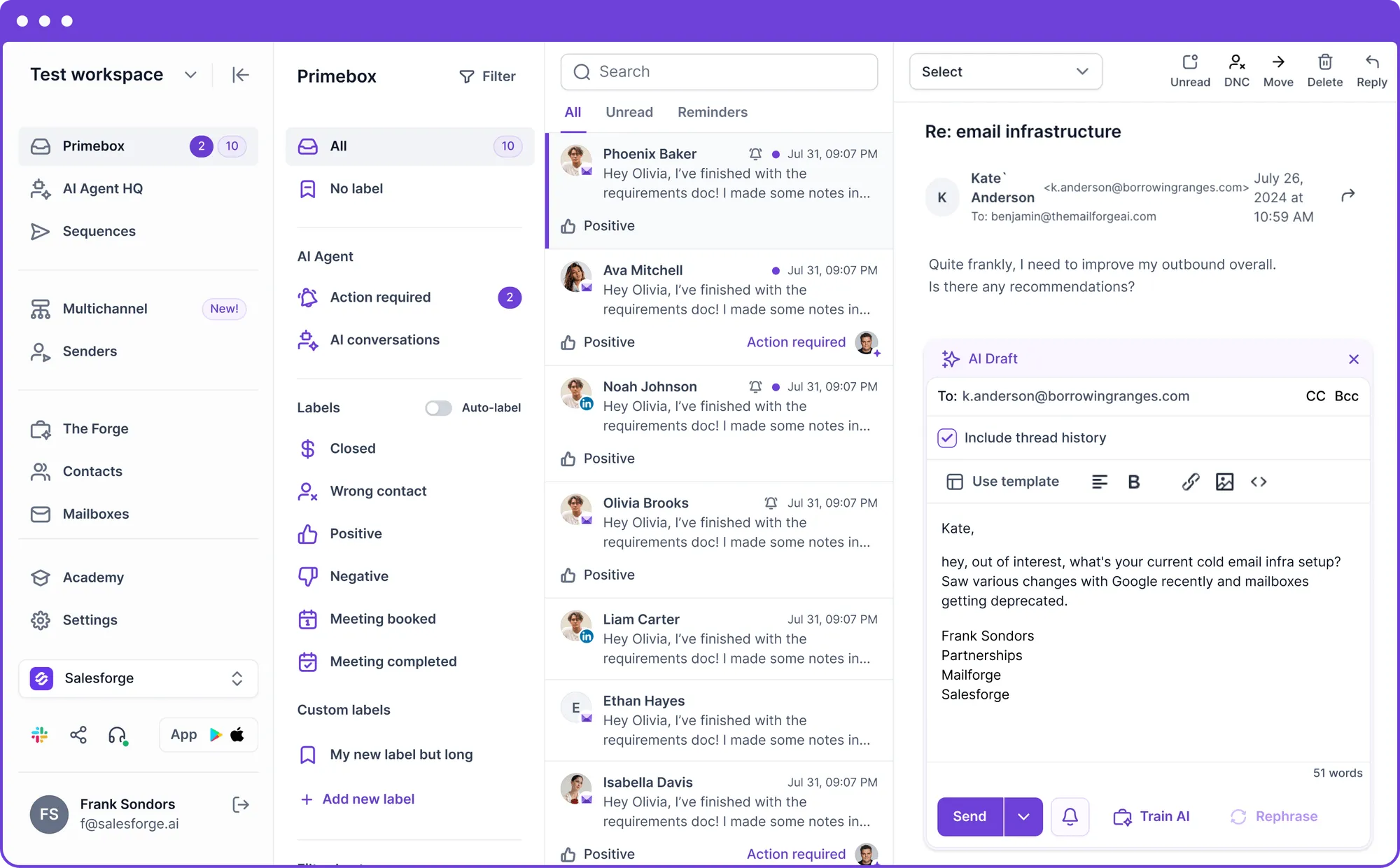
Prospects may reply by email or LinkedIn, depending on which message they see first. Primebox brings those conversations into one inbox, so your team can review replies, assign conversations, and keep follow-ups moving without checking each sender account separately.
This is especially useful for ProfilePartner self-serve customers. Customers on ProfilePartner’s Done-For-You plans may already have campaign management and follow-up handling included in their service.
This image shows the Primebox by Salesforge
Add cold email without changing the LinkedIn setup
ProfilePartner can stay as the LinkedIn account layer, while Salesforge handles the email side of the campaign.
Salesforge lets you connect multiple mailboxes, rotate sending between them, and use Warmforge for mailbox warm-up. You can then line up email activity with the LinkedIn outreach running through your ProfilePartner accounts.
That gives you another way to reach a prospect without adding more LinkedIn actions from each profile.
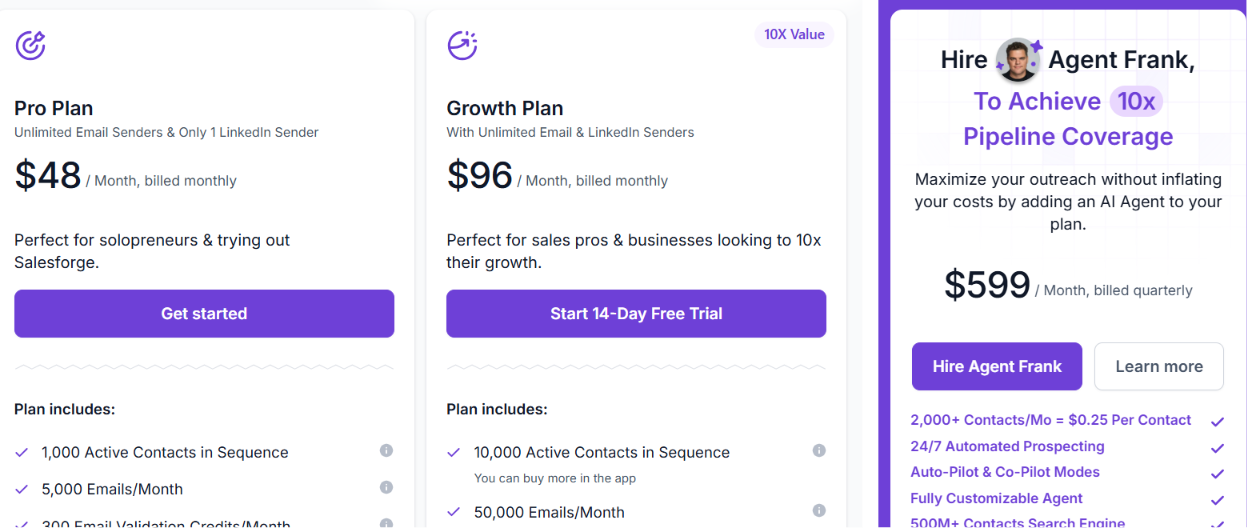
Salesforge Pricing
This image shows the Salesforge pricing
Pro:$48/month. Includes unlimited mailboxes, one LinkedIn sender, Primebox, and unlimited Warmforge warm-up.
Growth:$96/month. Includes unlimited LinkedIn senders, unlimited users, unlimited workspaces, API access, A/B testing, Primebox AI, and everything in Pro.
Agent Frank:$499/month. AI SDR that handles prospecting, outreach, follow-ups, and meeting booking.
Every plan includes a 14-day free trial, so you can test the platform before committing.
ProfilePartner is an excellent choice if your primary objective is to expand your LinkedIn outreach partners. However, once your outbound efforts extend beyond LinkedIn and encompass email deliverability, AI personalization, and reply management, Salesforge emerges as the more practical long-term option due to its unified platform functionality.
Personalized Outbound Strategy
Get The Right Outbound Strategy In Minutes
Enter your email to get a custom plan & stack recommendation for your
business
It's being carefully crafted by AI
Please check your mailbox in 5 minutes
Should you use ProfilePartner with Salesforge?
Use ProfilePartner on its own if you choose one of its managed plans and want its team to handle the setup or run the campaign for you.
If you use ProfilePartner’s self-serve option and want to manage email and LinkedIn outreach in-house, it may also make sense to add Salesforge.
The two products cover different parts of the process. ProfilePartner provides the outreach partners and LinkedIn profile setup, while Salesforge gives your team the tools to build sequences, connect additional channels, and manage campaigns running through those accounts
Is ProfilePartner Worth It in 2026?
ProfilePartner does one job well. It helps businesses increase LinkedIn outreach without spending time building and warming new accounts.
That also defines its biggest limitation. Once your outbound grows beyond LinkedIn, you'll need more software for email campaigns, reply management, deliverability, CRM, and AI personalization.
If LinkedIn is your only outbound channel, ProfilePartner is a reasonable choice. If you want one platform to manage your entire outbound process, Salesforge is the stronger option. It brings email, LinkedIn, Primebox, Warmforge, and AI personalization together, so you don't have to manage several different tools.
Boardy is an AI superconnector that makes double opt-in introductions from its own network of more than 248,000 people. I run it next to an AI SDR and both work from the same ICP. This review covers how to set Boardy up and what its intro emails look like. It also covers Boardy Pro pricing and where Boardy falls short. It ends with how I hand each intro pattern to my AI SDR for outbound at volume.





.jpg)

.jpg)

.png)
