Consider it a practical guide to timing outbound around real buying windows.
Most cold outreach fails on timing, not copy. I can write the sharpest email in the world, but if it lands the week after a prospect solved the problem I sell against, it goes nowhere. Sales trigger events are how I fix that.
A sales trigger event is a specific change within a prospect's business that makes what I sell more relevant today than it was last month, such as a funding round, a new VP, or an acquisition. When I catch one early and reach out while the window is open, a cold email starts reading like a warm one.
This guide covers what sales trigger events are, the types that matter for lead generation, and how I turn each one into a booked meeting.
A sales trigger event is any change at a prospect's company that creates or reveals a need I can solve. It shifts the account's status quo, which is exactly when buyers start looking. The term matters because trigger events get confused with two close neighbors: buying signals and intent data.
These three terms get used as if they mean the same thing. They do not.
A trigger event is a discrete, datable event with a short shelf life, like a Series B or a new CRO. A buying signal is the wider category of anything that hints at purchase intent, including behavior like pricing-page visits. Intent data is the narrow slice built from research behavior aggregated across the web.
The way I think about it: triggers are inputs that come with a shot clock. Intent is what I get after I score those inputs against my ICP. For lead generation, triggers are the sharpest of the three, because they tell me not just who might buy, but when the window opened.
Buyers do most of their research before they ever talk to a vendor. If I wait until they raise a hand, I am already fighting inside a shortlist. A trigger event lets me get in earlier, while the need is still forming.
That is the whole edge. I am not sending more emails. I am sending the same email to the right account on the right week.
Trigger events do two things for a lead generation program: they improve timing, and they make messaging relevant. Both are hard to buy with volume, and both move reply rates more than a bigger list ever will.
Relevance is the biggest lever in cold outreach and the hardest to manufacture. A generic feature pitch reads like every other email in the inbox. A message tied to a specific event the prospect just lived through reads like I did my homework.
When I open with the trigger, I am referencing something true and recent about their business. That single detail is what pushes past the three-second glance most cold emails die in.
A trigger is only useful while it is fresh. A funding round I act on in the first week is a live opportunity. The same round three months later is old news; the account has already been staffed and budgeted around.
High-priority triggers, like new funding or a champion changing jobs, are worth a response within 24 to 48 hours. That speed is only realistic if the sourcing and the sending live close together, which is a point I come back to below.
Not every change is worth chasing. The trigger events that reliably create buying windows fall into a handful of categories, and each one maps to a different reason a prospect suddenly needs what I sell.
A company that just raised has budget it did not have last quarter and pressure to deploy it toward growth. A seed or Series A round often means new hiring, new tooling, and new go-to-market spend.
I treat a fresh round as one of the strongest triggers on the list. The money is there, and the mandate is to spend it on scaling.
When a company gets acquired or merges, systems get consolidated, contracts get renegotiated, and whole categories of tooling come up for review. That churn is an opportunity.
An acquisition can also open a new part of the business to me. If I have already sold to one side of the deal, the other side just became a warm introduction waiting to happen.
A new executive wants to make an impact fast, and they are not attached to the previous regime's vendors. A fresh VP of Sales or CRO in their first 90 days is unusually open to new ideas.
The mirror version is just as useful. When a champion who liked my product moves to a new company, they often bring the need with them. I follow the person, not just the logo.
Companies and people actively making investments signal expansion and appetite. An active investor, or a company backed by one, is usually in build mode.
These are quieter triggers than a headline funding round, but they point at accounts with momentum and money in motion.
When a company posts five new sales roles or opens a second office, it is scaling, and scaling breaks whatever tooling worked at the smaller size. Job postings are also a public tell about what a company is prioritizing.
Five open SDR seats, for example, usually means the account needs data, enablement, and sending infrastructure to support them.
When a prospect adopts or drops a tool that sits next to mine, a need opens up. Adding a platform that integrates with what I sell is a reason to reach out. Dropping a competitor is an even better one.
Tech-stack changes take a little more digging to spot, but they are among the most precise triggers, because they point straight at a specific gap.
There are two ways to track trigger events: by hand and with a signal-based sourcing tool. Both work. Only one of them keeps up once I am running outreach at real volume.
I can track a lot for free. Google Alerts on target company names, a saved LinkedIn search for job changes, an eye on press pages and funding databases. For a short target list, this is genuinely enough.
The problem is scale and speed. Manual monitoring means I find the trigger late, after the alert fires and after I get around to checking it. By then, the 48-hour window is often gone, and the manual route hands me a headline with no contact data attached.
This is where I switch to a sourcing tool built for it. Leadsforge added Signals as a sourcing path, so instead of searching only by ICP, I can build lists around companies and people who just took a meaningful action. The same 500M+ database also powers waterfall enrichment, so a matched account arrives with verified contact data, not just a company name.
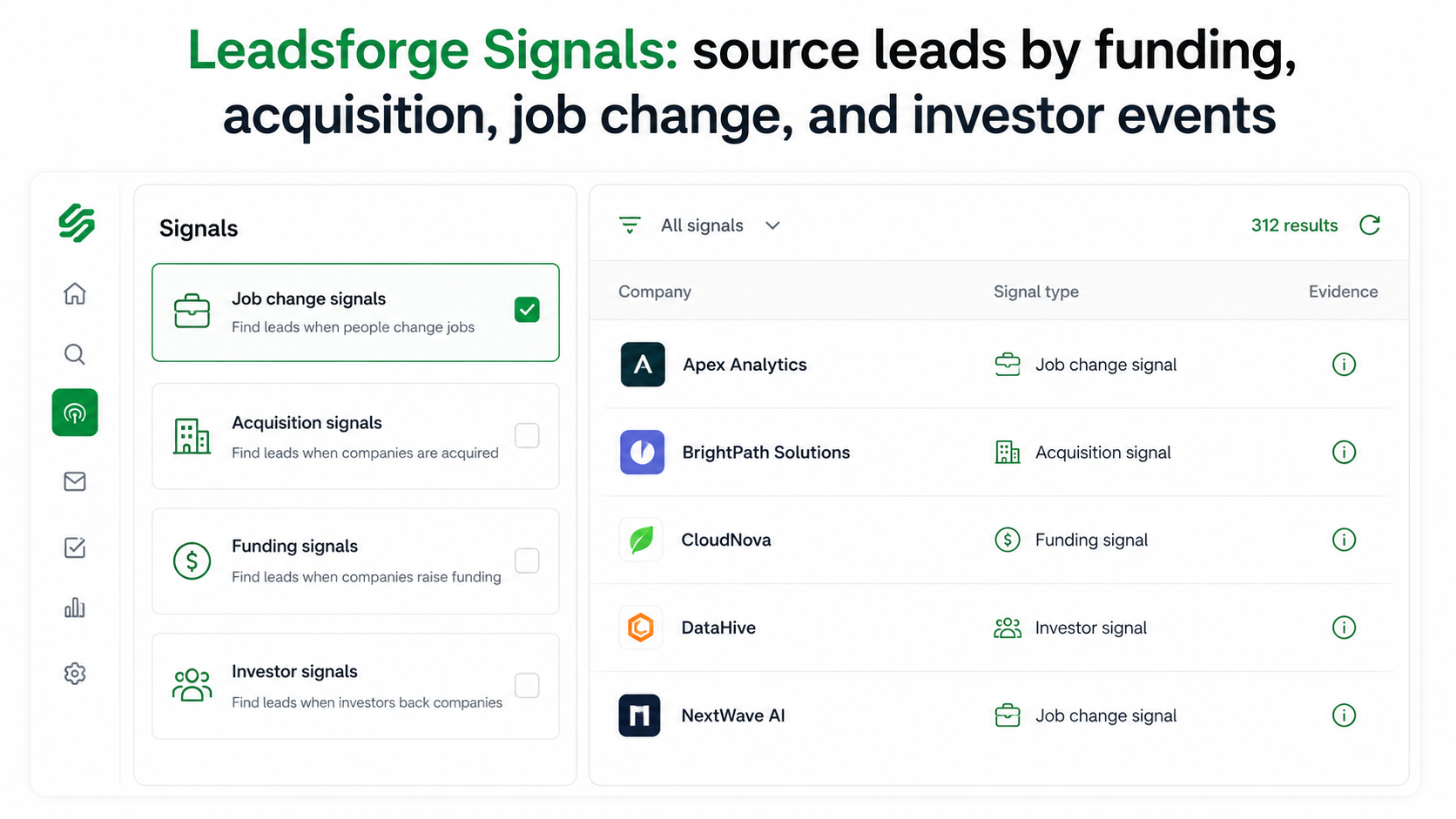
There are four signal types I lean on. Job Change Signals finds people who recently changed roles. Acquisition Signals surface companies that were just acquired. Funding Signals pulls companies that have recently raised, filterable by round and amount. Investor Signals finds companies and people actively investing. Each one carries its own filters, so I can narrow a funding search to, say, Series A software companies in a specific country and headcount band.
Two things make this practical rather than just a feed. First, every extracted company or contact comes with supporting evidence. I can open the details and see exactly why an account matched the signal, which keeps the list honest. Second, for company-level signals, Leadsforge matches the company against its contact database and surfaces the relevant people, then enriches them before I ever hit send. There is also a Local Companies Search path for triggers that are geographic rather than event-based.
If I would rather pull emails one profile at a time while I browse, the LinkedIn email finder does that straight from a profile, powered by the same Leadsforge database.
Finding the trigger is half the job. The other half is turning it into a booked meeting before the window closes, and that is a sending and reply problem, not a data problem. This is where I run everything inside Salesforge.
Once the matched, enriched contacts land in Salesforge, I drop them into a multichannel sequence that runs cold email and LinkedIn as one flow with conditional logic. If a LinkedIn connection request tied to the trigger gets accepted, the next step is a LinkedIn message. If it does not, the sequence falls back to email.
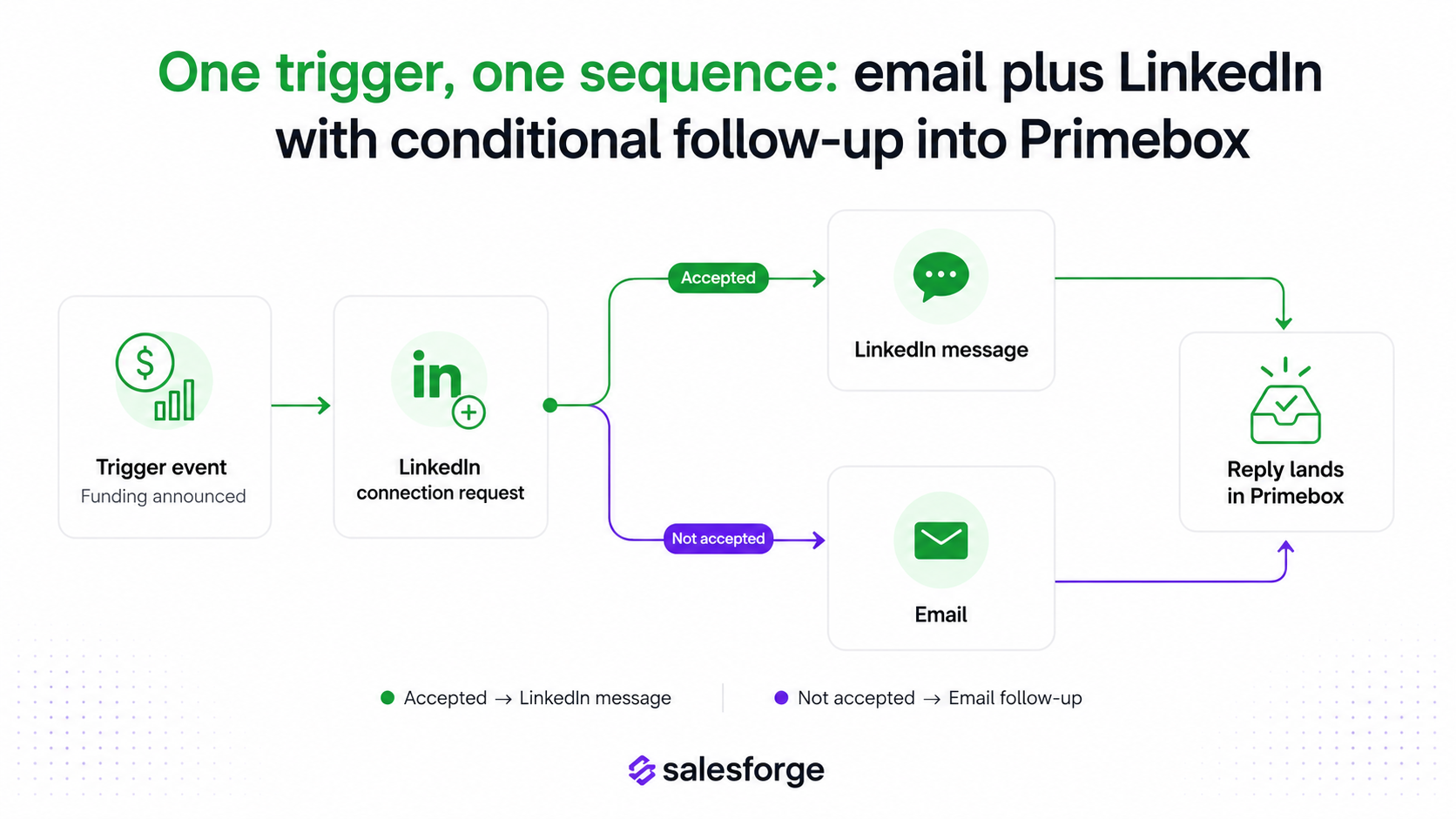
Running both channels in one sequence matters for trigger-based outreach, because a timely LinkedIn touch plus an email referencing the same event hits harder than either alone.
The trigger is the personalization. I build the opening around the event itself, then let AI fill in the prospect-specific detail. Salesforge does AI personalization across 21+ languages, pulling company news, LinkedIn activity, and industry context into each message.
That means I can run a funding-triggered campaign into a dozen countries without a separate copywriter per region, and every email still leads with the reason I am reaching out now.
A perfectly timed email is worthless in spam. Every mailbox connected to Salesforge is warmed continuously through Warmforge at no extra cost, so reputation is built before I send. ESP matching lines up sender and recipient providers to lift inbox placement, Bounce Shield pauses sends that would damage a mailbox, and sender rotation spreads volume so no single inbox burns out.
For trigger-based work, this matters more than usual because I am often sending a burst of outreach the moment a signal fires, and a burst is exactly what tanks deliverability on an unprotected setup.
Trigger campaigns create replies in bunches, so I keep every response, email and LinkedIn in one place with Primebox™. Co-Pilot drafts replies for me to approve. Auto-Pilot carries routine conversations forward on its own.
If I want the whole loop handled without me, Agent Frank runs it end to end. He is an AI SDR who prospects from the signal, writes the personalized outreach, follows up, and books the meeting on my calendar, 24/7. That is the difference between catching a trigger and actually converting it while it is hot.
Here is the loop I run when a signal fires, start to finish. It is deliberately simple because a trigger workflow only works if it is fast enough to beat the decay window.
The reason this loop is quick is that no step leaves the stack. Leadsforge finds the trigger, enrichment happens in the same place, and Salesforge sends and manages replies, all under one login. No CSV export sits between the signal and the send.
I can also run this loop three ways. My own team operates it, Agent Frank operates it autonomously, or a Forge Expert agency runs it for me. Same product, same trigger workflow, whichever level of hands-on I want.
Trigger-based selling is powerful, but it is easy to do in a way that quietly wastes the advantage. These are the three mistakes I watch for.
A trigger I respond to a month late is just a fact about the company, not an opportunity. Slow sourcing and manual handoffs are usually the culprit. If the signal and the send do not live close together, the delay eats the edge.
A funding round at a company that will never buy what I sell is noise, not a lead. The trigger tells me the timing is good. It does not tell me the account is a fit. I always filter the signal through my ICP before it earns a spot in a sequence.
The worst version is sourcing on a trigger and then sending the same generic email I send everyone. If the event that made me reach out does not show up in the first line, I threw away the only advantage the trigger gave me.
To make the trade-off concrete, here is how manual trigger tracking stacks up against running the whole loop on the Forge Stack.
Trigger events are the closest thing outbound has to a timing cheat code. They do not make a prospect buy. They tell me which accounts just had their status quo shaken, which is exactly when a buyer is most open to a conversation.
The teams that win with them are not the ones tracking the most signals. They are the ones who close the gap between the signal firing and the first touch landing. Sourcing the trigger in one tool, enriching in another, and sending from a third builds in delay at every seam, and delay is what kills a trigger.
That is why I run the whole loop on one stack. Leadsforge Signals finds the event, waterfall enrichment attaches the contact, and Salesforge sends the multichannel follow-up, warms the inbox, and manages every reply. When the window opens, I am already moving.
Start with two or three trigger types that matter most for what I sell, build the capture habit, and let the workflow handle the timing.
What is a sales trigger event?
A sales trigger event is a specific, recent change at a prospect's company that makes my product more relevant than it was before. Common examples are a funding round, a leadership hire, an acquisition, or a hiring surge. The event opens a short buying window, which is why timing outreach to it lifts reply rates.
What is the difference between a trigger event and a buying signal?
A trigger event is a discrete, datable event with a short shelf life, like a Series B or a new CRO. A buying signal is the broader category of anything that suggests purchase intent, including behavior like repeated pricing-page visits. Every trigger event is a signal, but not every signal is a trigger event.
What are the best sales trigger events for B2B lead generation?
The highest-value triggers are usually funding rounds, executive and leadership changes, acquisitions, and hiring surges. Funding and leadership changes tend to be the strongest because both come with fresh budget and a mandate to change how things are done.
How do I track sales trigger events at scale?
Manual tracking with Google Alerts and LinkedIn works for a small list, but is slow and gives you no contact data. For scale, a signal-based sourcing tool like Leadsforge Signals surfaces the matching companies and people, shows the evidence behind each match, and enriches the contacts so you can act inside the window.
How fast should I act on a trigger event?
For high-priority triggers like new funding or a champion changing jobs, aim to reach out within 24 to 48 hours. The value of a trigger decays quickly, so a workflow where sourcing and sending live in the same place makes a fast response realistic.
Can I automate trigger-based outreach?
Yes. After sourcing the signal and enriching the contact, you can run a multichannel sequence in Salesforge with AI personalization built around the event. If you want it fully hands-off, Agent Frank can prospect from the signal, write and send the outreach, follow up, and book the meeting for you.

.jpg)
