Buying domains is not the hard part of cold email. The hard part is getting inboxes that can actually send without getting flagged. If you are setting up 20, 50, or 100 inboxes for B2B outbound, you cannot just create fresh Google Workspace or Outlook accounts today and start sending tomorrow.
You need the right DNS records, clean domains, warmed inboxes, proper sending limits, and a setup that does not collapse after the first campaign.
That is why pre-warmed email account providers are useful. They help you skip the slow setup phase and start with inboxes that are already prepared for outreach. But not every provider is worth trusting.
Some sell inboxes that look ready but have poor domain history, weak warmup, no admin control, or unclear replacement terms.
In this guide, we compare Primeforge, Infraforge, Mailforge, Mailscale, Maildoso, and Instantly so you can choose a pre-warmed email account provider that fits your outbound volume, budget, and deliverability needs.
TL;DR: Best Pre-Warmed Email Account Providers in 2026
Primeforge: Best for scalable pre-warmed Google Workspace and Outlook inbox infrastructure for cold outreach.
Infraforge: Best for managed cold email infrastructure and pre-configured inbox setup.
Mailforge: Best for pre-warmed domains and mailboxes at the lowest cost per inbox on shared infrastructure.
Mailscale: Ideal for scaling high-volume outbound campaigns across multiple inboxes and domains.
Maildoso: Best budget-friendly pre-warmed inbox provider for startups and smaller outbound teams.
Instantly: Best all-in-one platform for cold email outreach, inbox warmup, and campaign management.
What Makes the Best Pre-Warmed Email Account Providers?
The best pre-warmed email account providers do not just sell warmed inboxes. They provide inboxes that are properly configured and stable enough for real cold outreach campaigns.
One of the biggest things to check is infrastructure quality. Good providers usually offer Google Workspace or Outlook inboxes with SPF, DKIM, and DMARC already configured correctly. Poor DNS setup can hurt deliverability very quickly, even if the inboxes are warmed.
Inbox stability also matters. Some providers create inboxes in bulk with weak setup quality, which often leads to spam placement, restricted accounts, or poor inboxing once sending volume increases.
Scalability is another major factor for agencies and outbound teams managing many inboxes and domains together. The setup should be easy to manage as campaigns grow.
Ownership and control are equally important. Some providers give full admin access to inboxes and domains, while others keep partial control, which can become difficult later when accounts need recovery or replacement.
The best providers also focus on long-term deliverability instead of only selling inboxes. That includes replacement support, sending guidance, and infrastructure designed specifically for cold email outreach.
How I Evaluated These Pre-Warmed Email Account Providers?
For this list, I focused on platforms that can actually help B2B teams launch cold outreach faster without spending weeks preparing inboxes manually. I mainly evaluated these tools based on:
inbox setup quality
Google Workspace and Outlook account stability
SPF, DKIM, and DMARC configuration
warmup reliability
long-term deliverability
scaling across multiple domains and sending accounts
admin access and ownership control
inbox replacement handling
MCP Server
I also looked at how these platforms fit into real cold outreach workflows. Some are better for large outbound operations managing many inboxes, while others work better for smaller teams that want a simpler setup process.
6 Pre-Warmed Email Accounts Providers For B2Bs: Quick Comparison
Provider
Starting Pricing
Google Workspace / Outlook
Private Infrastructure
MCP Server Support
Full Ownership
Best For
Primeforge
$3.5–$4.5/mailbox
✓
✗
✓
✓
Scalable Google Workspace & Microsoft 365 outreach
Infraforge
$3–$2/mailbox
✗
✓
✓
✓
High-volume outbound with dedicated IPs
Mailforge
$4/mailbox
✗
✗ shared pool
✓
✓
Lowest cost per mailbox at volume
Mailscale
$1–$2/mailbox at scale
✗
✓
✗
Partial
Fast low-cost inbox scaling
Maildoso
$1.8–$2.5/mailbox
✓
✓
✗
✓
Budget-friendly SMTP & Google Workspace scaling
Instantly
$10/pre-warmed account
Google-only
✗
✓
✗
Outreach + warmup + pre-warmed inboxes in one platform
1. Primeforge – Best Pre-Warmed Email Account Provider for Scalable Cold Email Infrastructure
This image shows the Primeforge homepage
Primeforge helps B2B teams get pre-warmed Google Workspace and Microsoft 365 inboxes for cold outreach without manually setting up the entire email infrastructure themselves.
The platform automates domain setup, mailbox creation, SPF/DKIM/DMARC configuration, and DNS setup, making it easier to launch outbound campaigns faster. It is mainly built for agencies, SDR teams, founders, and outbound operators that need scalable cold email infrastructure with stronger deliverability and easier mailbox management.
Primeforge supports the Forge MCP Server, allowing outbound teams to create and manage pre-warmed mailboxes, domains, DNS setup, and cold email infrastructure directly through AI assistants like Claude and Cursor using natural language prompts.
Key Features of Primeforge
Primeforge provides pre-warmed Google Workspace and Microsoft 365 inboxes optimized for cold outreach.
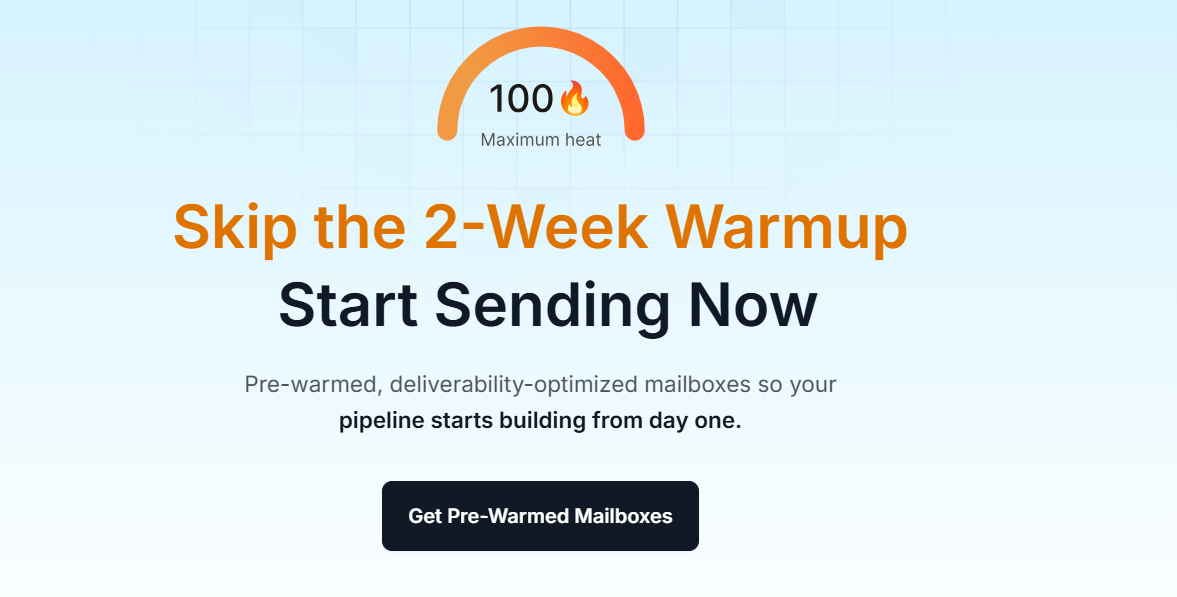
This image shows Get pre-warmed mailboxes on Primeforge
The platform automatically configures SPF, DKIM, DMARC, and tracking records during setup.
Inboxes can be ready in around 30 minutes instead of taking days to prepare manually.
Primeforge supports bulk DNS updates and large-scale mailbox management for outbound teams.
The platform gives full ownership and control over domains and inboxes.
Primeforge works with Salesforge and other cold email sending tools without requiring a complicated setup.
Primeforge uses US-based IP addresses and focuses heavily on deliverability optimization for outbound campaigns.
Pros and Cons of Primeforge
Pros
Cons
Automated DNS and mailbox setup saves significant setup time
Real Google Workspace and Microsoft 365 infrastructure
Full ownership of domains and inboxes
Bulk mailbox and domain management is useful for agencies
No free trial for active mailboxes
Better suited for cold outreach than regular business email
Mailbox slot pricing may become expensive at very large scale
Primeforge Pricing
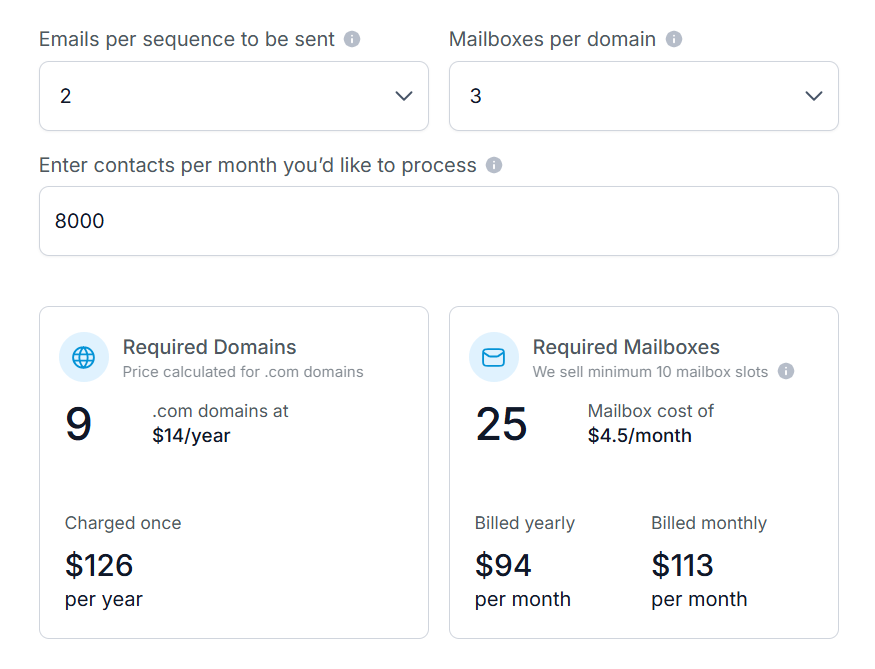
This image shows the Primeforge pricing
Primeforge pricing starts at around $4.5 per mailbox per month and can go closer to $3.5 per mailbox with yearly billing. Domains are priced separately at roughly $14 per .com domain yearly. Pricing also includes automated DNS setup, mailbox hosting, maintenance, API access, and infrastructure support.
If you are planning to scale cold outreach, mailbox costs can increase quickly as you add more domains and sending accounts. Here’s a rough example of Primeforge how pricing may scale based on mailbox volume:
Mailboxes
Estimated Monthly Cost
30 Mailboxes
$105–$135/month
60 Mailboxes
$210–$270/month
100 Mailboxes
$350–$450/month
250 Mailboxes
$875–$1,125/month
500 Mailboxes
$1,750–$2,250/month
Use Primeforge if you want pre-warmed Google Workspace or Microsoft 365 inboxes with automated setup, stronger deliverability infrastructure, and easier cold email scaling for outbound campaigns.
Personalized Outbound Strategy
Get The Right Outbound Strategy In Minutes
Enter your email to get a custom plan & stack recommendation for your
business
It's being carefully crafted by AI
Please check your mailbox in 5 minutes
2. Infraforge – Best Private Pre-Warmed Email Infrastructure for High-Volume Cold Outreach
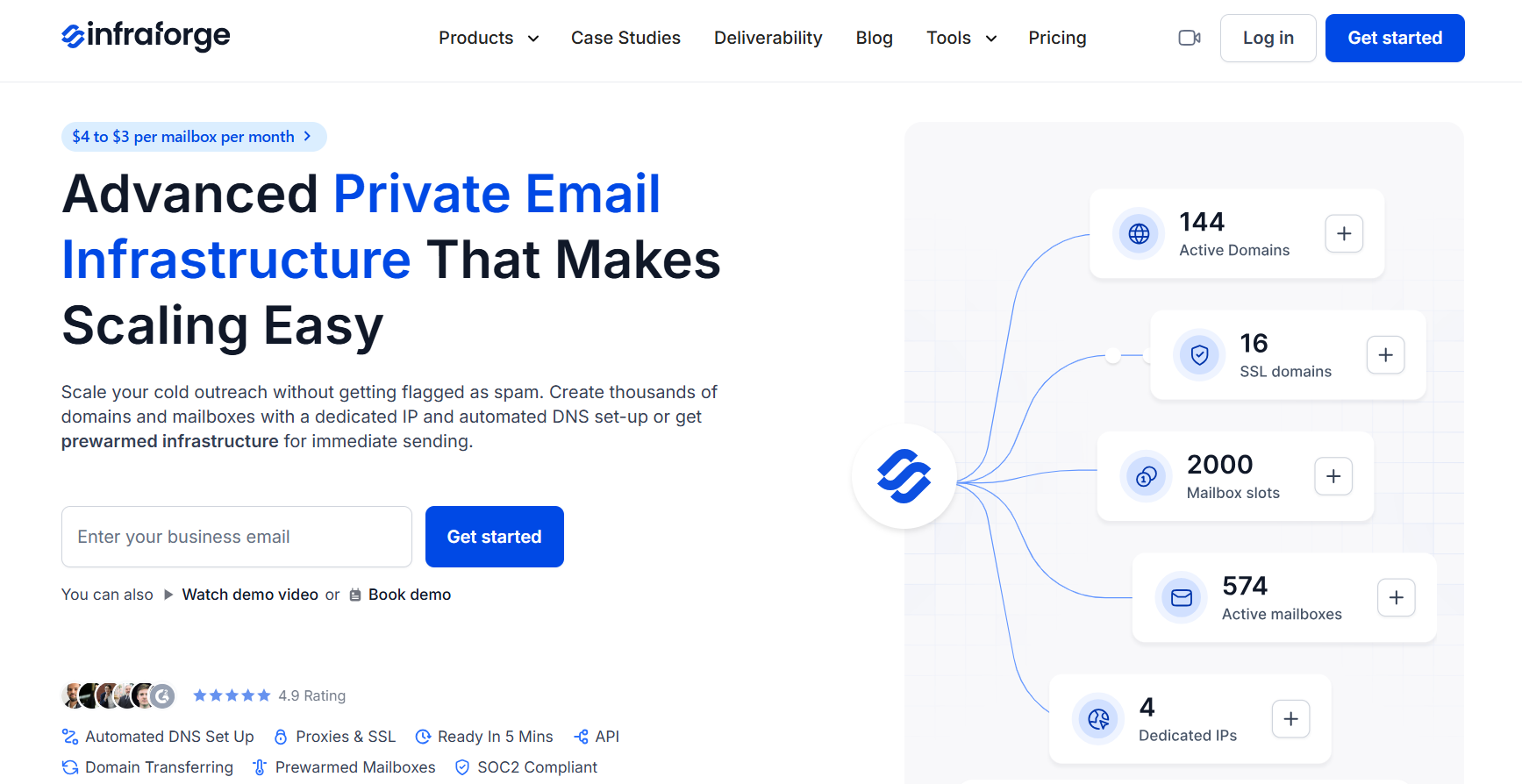
This image shows the Infraforge homepage
Infraforge is a private email infrastructure platform built for teams that need more control over deliverability while scaling cold outreach. Unlike traditional Google Workspace or Outlook setups, Infraforge uses a dedicated IP infrastructure designed specifically for outbound email campaigns.
The platform helps teams create and manage domains, mailboxes, DNS configuration, and pre-warmed infrastructure without handling the technical setup manually.
It is mainly built for agencies, outbound teams, consultants, and businesses running high-volume cold email campaigns that need stronger deliverability control and scalable private infrastructure.
Key Features of Infraforge
Infraforge provides private email infrastructure with dedicated IPs for cold outreach campaigns.
The platform supports pre-warmed mailboxes and infrastructure for faster outbound campaign launches.
Infraforge automatically configures SPF, DKIM, DMARC, and DNS records during setup.
Domains and mailboxes can be prepared in around 5 minutes instead of requiring manual infrastructure setup.
Infraforge can also be managed through the Forge MCP Server, making it easier for outbound teams to create mailboxes, manage domains, handle DNS setup, and scale pre-warmed email infrastructure workflows more efficiently.
Infraforge supports multi-IP provisioning for teams managing larger outbound operations.
The platform works with Salesforge and other cold email sending tools through direct integrations and API access.
Pros and Cons of Infraforge
Pros
Cons
Dedicated IP infrastructure gives more deliverability control
Automated DNS and technical setup save manual work
Better suited for outbound teams with infrastructure knowledge
No free trial for active domains and mailboxes
Dedicated IP infrastructure may cost more than shared setups
Infraforge Pricing
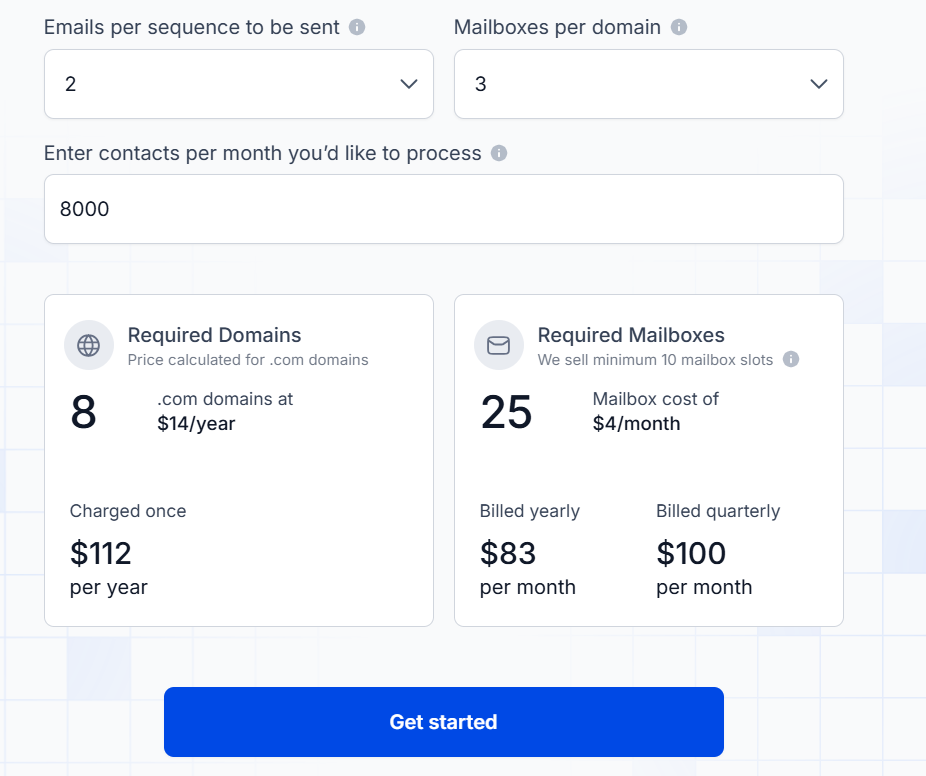
This image shows the Infraforge pricing
Mailbox pricing starts at around $4 per mailbox per month with annual billing.
The pricing calculator example shows around $83/month annually or around $100/month quarterly for 25 mailbox slots.
Domains cost around $14 per .com domain yearly.
Dedicated IPs cost around $99 per IP monthly.
SSL and domain masking cost around $2/domain monthly or around $6/domain yearly.
Masterbox workspace management starts at around $7/workspace monthly annually or around $9 monthly, quarterly.
Infraforge is usually more suitable for teams running larger outbound operations with private infrastructure and dedicated IP setups. As mailbox volume grows, pricing mostly depends on infrastructure size, number of domains, and IP requirements.
Here’s a rough example of how Infraforge pricing can scale for larger outbound operations:
Mailboxes
Estimated Monthly Cost
30 Mailboxes
$120–$150/month
60 Mailboxes
$240–$300/month
100 Mailboxes
$400–$500/month
250 Mailboxes
$1,000–$1,250/month
500 Mailboxes
$2,000–$2,500+/month
Use Infraforge if you want private pre-warmed email infrastructure with dedicated IPs, automated setup, stronger deliverability control, and scalable cold outreach infrastructure for high-volume outbound campaigns.
3. Mailforge – Best for Pre-Warmed Domains and Mailboxes at the Lowest Cost Per Inbox
Mailforge provides pre-warmed domains and mailboxes for cold outreach on shared email infrastructure. You can buy them in the app or through the public API and start sending without the usual two to four week warmup wait.
Mailforge runs a shared mailbox pool used by more than 10,000 businesses, and that pool was built for cold outreach rather than everyday office email. Sharing the infrastructure is why the cost per mailbox is the lowest of the three Forge options.
It is mainly used by agencies, lead generation teams, and outbound operators that need a high mailbox count without a high monthly bill.
Key Features of Mailforge
Mailforge sells pre-warmed domains and mailboxes in the app or through its public API.
Pre-warmed mailboxes cost the same per mailbox as fresh ones, with no separate premium plan.
The platform configures SPF, DKIM, DMARC, and custom domain tracking automatically on every domain.
Full setup finishes in under 10 minutes, with bulk domain and mailbox creation built in.
Bulk DNS updates change records across every domain in a few clicks.
Domains transfer in and out freely, so there is no platform lock-in.
Workspaces keep clients and projects separate.
Pair Mailforge with Salesforge and Warmforge warms every connected mailbox for free, with unlimited slots.
Mailforge supports the Forge MCP Server, CLI, and API for provisioning through Claude, Cursor, or your own scripts.
Pros and Cons of Mailforge
Pros
Cons
Lowest cost per mailbox of the Forge infrastructure products
Shared IP pool means placement partly depends on other senders
Pre-warmed mailboxes cost the same as fresh ones
No ESP matching, unlike Primeforge
Free unlimited warmup through Warmforge with any Salesforge plan
Minimum 10 mailbox slots
Domains transfer in and out with no lock-in
No free trial, though the app is free to explore
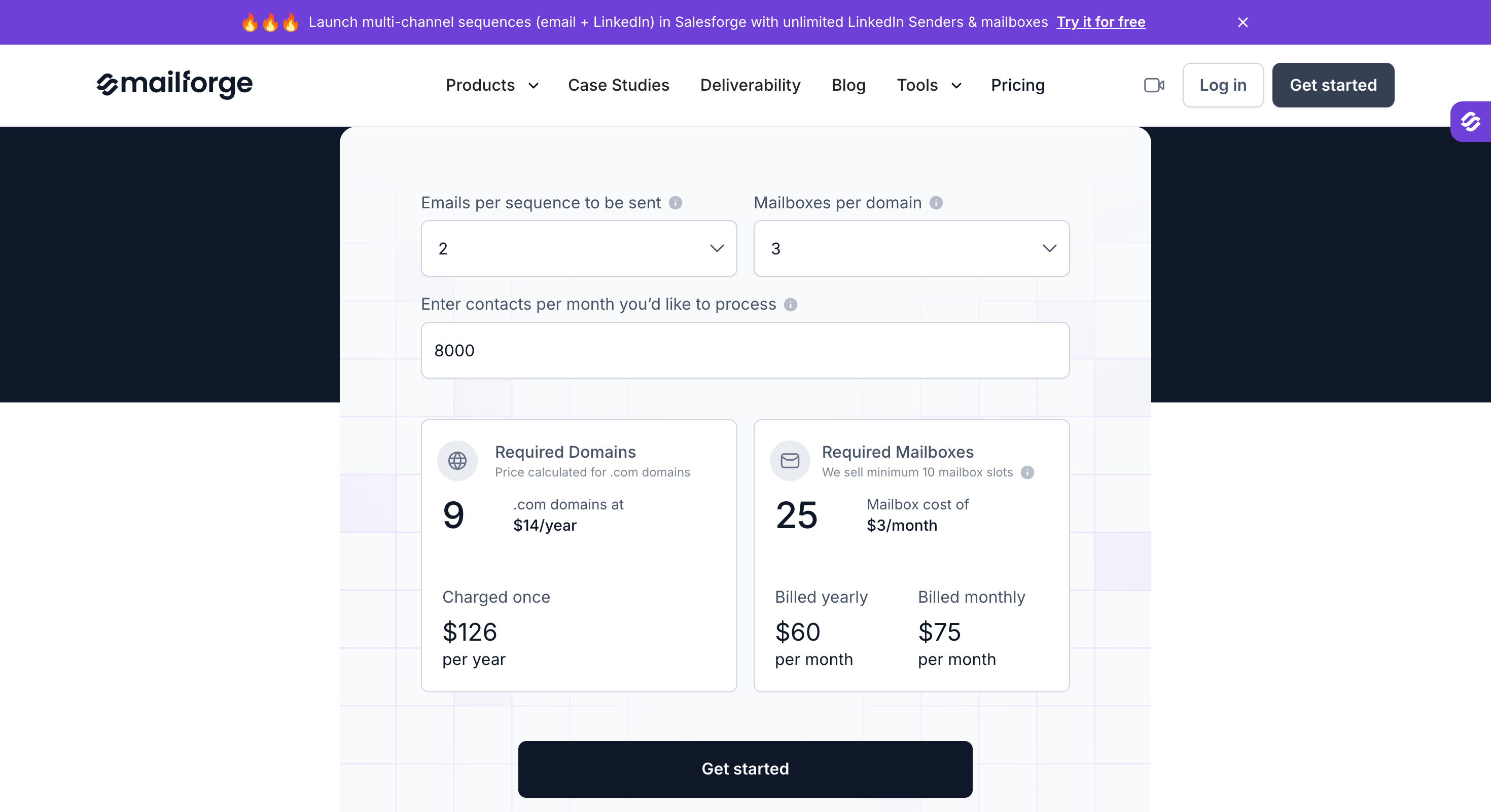
Mailforge Pricing
$3 to $2 per mailbox per month, with the rate dropping at higher volume
Minimum 10 mailbox slots
Domains priced separately by TLD
SSL and domain masking at $2 per domain per month, or $6 per domain per year
Pre-warmed mailboxes carry no premium here. Zapmail sells pre-warmed mailboxes on separate plans that work out at $6 to $8 each, so 30 of them cost $180 a month against $72 on Mailforge.
Mailboxes
Estimated Monthly Cost
30 Mailboxes
$72–$90/month
60 Mailboxes
$132–$180/month
100 Mailboxes
$210–$300/month
250 Mailboxes
$500–$750/month
500 Mailboxes
$1,000–$1,500/month
Use Mailforge if you want pre-warmed mailboxes at the lowest cost per inbox and shared infrastructure suits your volume.
4. Mailscale – Best Pre-Warmed Inbox Provider for Scaling Cold Email Outreach
This image shows the Mailscale homepage
Mailscale is a cold email infrastructure platform that helps B2B teams create and manage large numbers of inboxes for outbound campaigns without manually handling technical setup.
The platform focuses heavily on helping agencies, consultants, SaaS companies, and outbound teams scale cold outreach faster with lower inbox costs and easier infrastructure management.
Mailscale also offers pre-warmed inbox options, managed deliverability support, automated DNS setup, and dedicated deliverability guidance for teams scaling high-volume cold email campaigns.
Key Features of Mailscale
Mailscale helps teams generate large numbers of inboxes for cold outreach in minutes instead of manually configuring everything.
The platform supports pre-warmed inboxes and private email infrastructure for faster cold email scaling.
Mailscale automatically configures SPF, DKIM, DMARC, forwarding, and DNS records during setup.
The platform integrates with Instantly, Smartlead, Apollo, Lemlist, Reply.io, and other cold email sending tools.
Mailscale includes managed deliverability support and deliverability monitoring.
The platform supports bulk inbox creation and scalable outbound infrastructure for larger campaigns.
Pros and Cons of Mailscale
Pros
Cons
Large-scale inbox creation is much faster than manual setup
Includes automated DNS and technical configuration
Managed deliverability support is included
Integrates with most cold email tools
Lower inbox costs compared to Google Workspace or Outlook
Better suited for high-volume outbound teams
Some pre-warmed inbox offers have limited availability
Generic rented domains may not fit every brand
Full ownership is limited for rented inbox plans
Mailscale Pricing
Solopreneur plan starts at around $63/month for 15 inboxes with yearly billing.
Business plan starts at around $95/month for 50 inboxes with yearly billing.
Enterprise plan starts at around $199/month for 200 inboxes with yearly billing.
Pre-warmed inbox rental plans start at around $99/month for 20 pre-warmed inboxes.
Domains usually cost around $10–15/year per domain.
Here’s a quick pricing breakdown based on mailbox volume:
Mailboxes
Estimated Monthly Cost
30 Mailboxes
$63–$80/month
60 Mailboxes
$95–$120/month
100 Mailboxes
$120–$160/month
250 Mailboxes
$250–$350/month
500 Mailboxes
$500–$700+/month
Use Mailscale if you want affordable pre-warmed inboxes, managed deliverability support, and infrastructure built for scaling high-volume cold email outreach quickly.
5. Maildoso – Best Budget-Friendly Pre-Warmed Mailbox Provider for Cold Outreach
This image shows the Maildoso homepage
Maildoso is mainly used by B2B outbound teams looking for affordable pre-warmed SMTP and Google Workspace mailboxes for cold outreach. The platform focuses heavily on helping teams scale outbound volume with lower mailbox costs, automated DNS setup, IP rotation, mailbox health monitoring, and self-healing infrastructure.
It is commonly used by agencies, lead generation teams, and outbound operators that need large numbers of mailboxes without handling the technical setup manually.
Key Features of Maildoso
Maildoso provides both SMTP and Google Workspace mailboxes optimized for cold outreach.
The platform automatically configures SPF, DKIM, and DMARC records during setup.
Mailboxes can be prepared in around 10–15 minutes with automated setup workflows.
Maildoso supports IP rotation to help reduce spam filter visibility during outbound campaigns.
The platform includes inbox placement tests and mailbox health monitoring every few days.
Burned mailboxes can automatically pause and recover through Maildoso’s self-healing system.
Maildoso supports automatic sequencer connection for tools like Instantly, Smartlead, and Saleshandy.
Teams can buy domains directly inside the platform or connect external domains.
Pros and Cons of Maildoso
Pros
Cons
Lower mailbox pricing compared to many competitors
Automated DNS and technical setup saves manual work
Supports both SMTP and Google Workspace inboxes
Automatic mailbox recovery system is useful for outbound teams
Google Workspace mailbox limits are lower per domain
SMTP infrastructure may require deliverability knowledge at scale
Some advanced setup features may feel technical for beginners
Maildoso Pricing
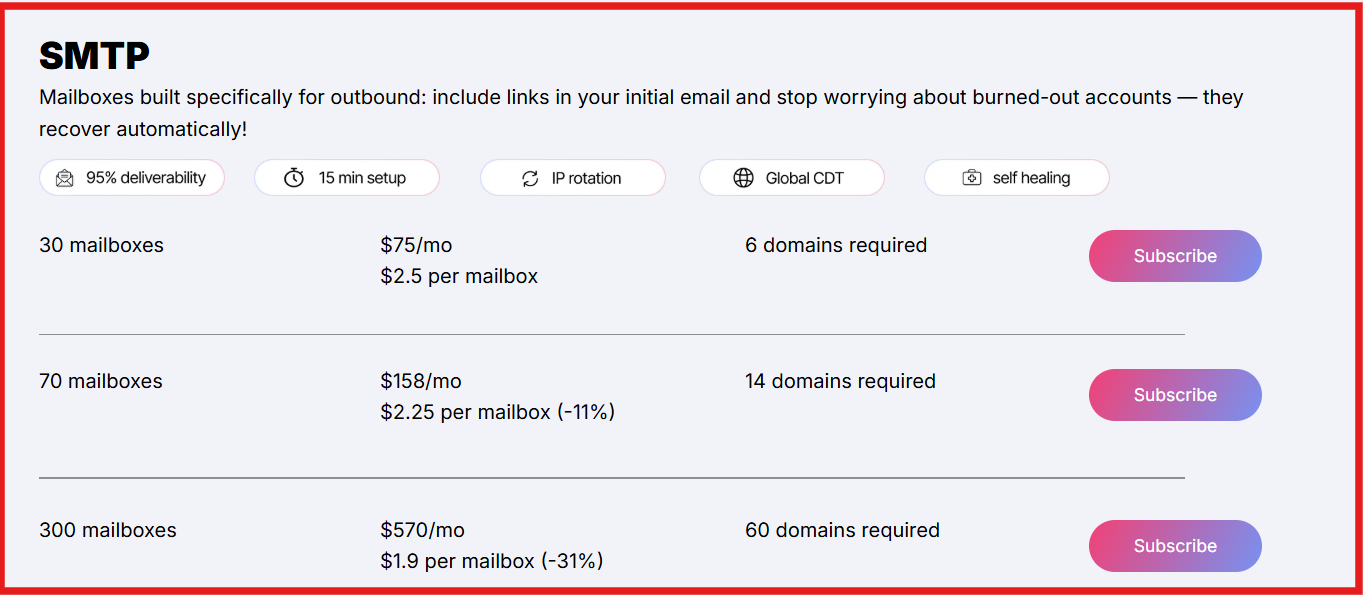
This image shows the Maildoso SMTP pricing
SMTP mailbox pricing starts at around $1.8–$1.9 per mailbox monthly.
Google Workspace and SMTP combo plans start at around $90/month for 30 mailboxes.
Quarterly SMTP plans start at around $299/quarter for 32 mailboxes with domains included.
Domains usually cost around $12/year per domain.
Maildoso also offers custom pricing for teams needing very large mailbox volumes.
Maildoso pricing is usually more attractive for teams trying to scale larger outbound volume without spending heavily on mailbox infrastructure.
Mailboxes
Estimated Monthly Cost
30 Mailboxes
$75–$90/month
60 Mailboxes
$135–$175/month
100 Mailboxes
$190–$250/month
250 Mailboxes
$475–$625/month
500 Mailboxes
$950–$1,250+/month
Use Maildoso if you want affordable pre-warmed SMTP or Google Workspace mailboxes with automated setup, IP rotation, and scalable cold email infrastructure for outbound campaigns.
6. Instantly – Best All-in-One Platform With Pre-Warmed Accounts for Cold Outreach
This image shows the Instantly homepage
Instantly is mainly known as a cold email outreach platform, but it also offers pre-warmed Google email accounts designed for teams that want to start outbound campaigns without handling manual setup and warmup themselves.
It also offers its own MCP server, allowing outbound teams to manage pre-warmed accounts, warmup workflows, campaigns, sending accounts, and deliverability operations through AI assistants like Claude and Cursor using natural language prompts.
The platform provides pre-configured domains and inboxes with SPF, DKIM, and DMARC already configured, along with built-in warmup automation and deliverability monitoring. Instantly is mainly used by agencies, SDR teams, founders, and outbound operators that want outreach software, warmup, and pre-warmed inboxes inside the same platform.
Key Features of Instantly
Instantly offers pre-warmed Google email accounts that are optimized for cold outreach.
The platform automatically configures SPF, DKIM, and DMARC records for pre-warmed accounts.
Pre-warmed accounts are already warmed up and ready for outbound campaigns from day one.
Instantly includes unlimited email warmup inside its outreach plans.
The platform provides deliverability insights and warmup monitoring, inbox placement insights, and warmup health scores.
The platform includes built-in integration between outreach campaigns, warmup, and inbox management.
Pros and Cons of Instantly
Pros
Cons
Outreach, warmup, and pre-warmed accounts are available inside one platform
Unlimited warmup is included in outreach plans
Pre-configured DNS setup reduces technical work
Built-in deliverability monitoring is useful for outbound teams
Strong ecosystem for scaling cold outreach campaigns
Pre-warmed accounts only work inside Instantly
Domain ownership remains with Instantly
Pre-warmed accounts are currently Google-only
Higher pre-warmed account pricing compared to some infrastructure-only providers
Instantly Pricing
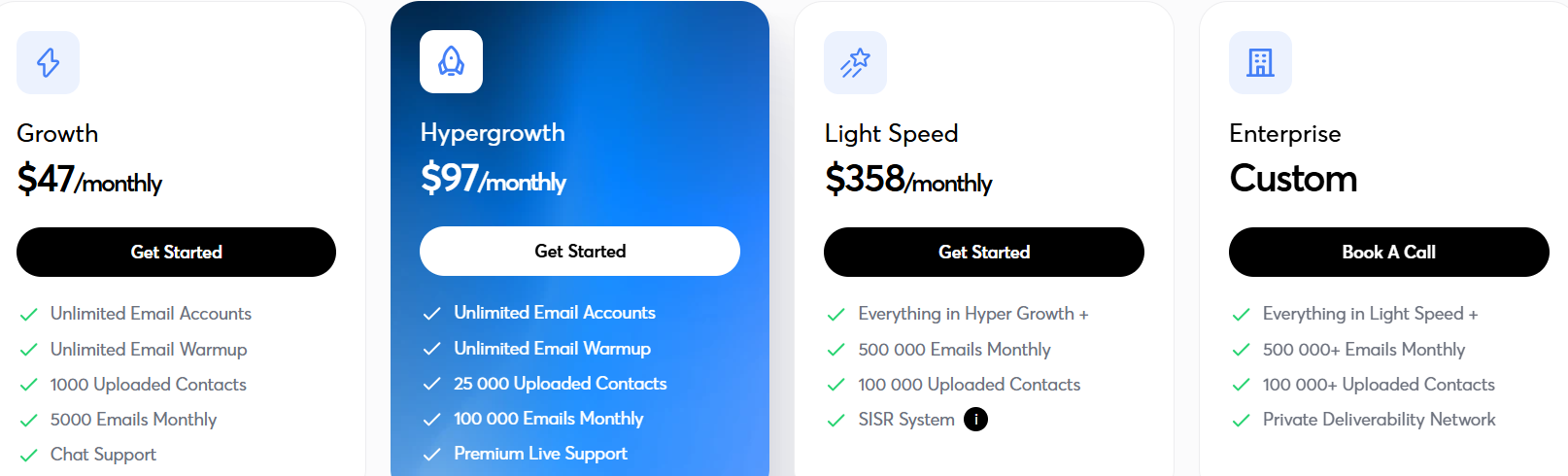
This image shows the Instantly pricing
Growth outreach plan starts at around $47/month.
Hypergrowth plan starts at around $97/month.
Light Speed plan starts at around $358/month.
Pre-warmed email accounts cost around $10/month per account.
Pre-warmed domains renew at around $15/year per domain.
Done-For-You email accounts cost around $5/month per account.
Instantly pricing can increase quickly when adding large numbers of pre-warmed accounts for scaling outbound campaigns.
Mailboxes
Estimated Monthly Cost
30 Mailboxes
$300/month
60 Mailboxes
$600/month
100 Mailboxes
$1,000/month
250 Mailboxes
$2,500/month
500 Mailboxes
$5,000+/month
Use Instantly if you want pre-warmed inboxes, built-in warmup automation, and cold outreach software inside one platform without managing separate deliverability tools manually.
Which Pre-Warmed Email Account Provider Should You Choose?
The right provider mostly depends on how you run cold outreach. Some teams need fully managed Google Workspace inboxes with easier setup, while others care more about scaling large outbound volume with lower mailbox costs or private infrastructure control.
If you are running high-volume outbound campaigns, infrastructure quality and deliverability stability usually matter more than simply getting cheap inboxes. But if you are just starting outbound or want something easier to manage, simpler pre-warmed inbox solutions may be enough.
If You Want
Best Choice
The lowest cost per mailbox at volume
Mailforge
Scalable Google Workspace and Microsoft 365 infrastructure
Primeforge
Private infrastructure with dedicated IPs
Infraforge
Fast large-scale inbox generation
Mailscale
Lower-cost SMTP and Google Workspace mailboxes
Maildoso
Outreach software + warmup + pre-warmed inboxes together
Instantly
Agencies managing many outbound campaigns
Infraforge or Primeforge
Teams wanting simpler setup with less technical work
Instantly or Mailscale
Teams focused heavily on deliverability monitoring
Maildoso or Infraforge
Personalized Outbound Strategy
Get The Right Outbound Strategy In Minutes
Enter your email to get a custom plan & stack recommendation for your
business
It's being carefully crafted by AI
Please check your mailbox in 5 minutes
Conclusion
Pre-warmed email accounts can save a huge amount of time when setting up cold outreach. Instead of spending weeks buying domains, configuring DNS records, warming inboxes, and fixing deliverability issues manually, teams can start campaigns much faster with infrastructure that is already prepared for outbound sending.
The right provider depends on how you run outbound. Some teams need lower-cost inbox scaling, while others care more about deliverability control, private infrastructure, or fully managed setup. But in most cases, stable infrastructure matters much more than simply buying more inboxes.
If cost per mailbox is the number you are optimizing, Mailforge is the cheapest way on this list to run a large sending setup. Pre-warmed domains and mailboxes cost the same as fresh ones, and Warmforge keeps warming them for free once your campaigns are live.
If you want scalable Google Workspace and Microsoft 365 inboxes built specifically for cold outreach, Primeforge is one of the strongest options in this list. And if you also want to run outbound campaigns, manage sequences, and scale cold email from the same workflow, you can connect those inboxes directly with Salesforge to manage outreach at scale more easily.
A practical playbook for link building outreach in 2026. Learn how to build verified prospect lists, set up warmed sending domains, write short pitches, run email and LinkedIn sequences, handle replies, and track the links you earn.
Cold email best practices work in a fixed order: infrastructure first, list second, copy third. I cover domain setup, warmup, list quality, short plain-text copy, sending limits, follow-up timing, and the few numbers that show a campaign is healthy.
A sales cold email is one step in a deal, not a pitch. I cover who to email first, the short structure that earns replies, four templates for real selling situations, follow-up timing, and the deliverability basics that keep your emails out of spam.