Link building outreach is the stage of SEO where good strategy usually dies in an inbox.
I have watched solid campaigns fail for boring reasons: a bounced list, a spammy subject line, or a follow-up nobody sent.
This playbook walks through link-building outreach end to end, from prospecting and inbox setup to copy, sequencing, and reply handling. It also shows how I would run it as a coordinated email and LinkedIn motion in Salesforge.
Link building outreach is the process of contacting site owners, editors, and writers to earn backlinks. In 2026, it works best as a small, targeted, multichannel campaign instead of a mass email blast.
Build a short list of relevant, verified contacts, and time each pitch with signals such as job changes and funding.
Send from separate, warmed domains with validation and plain-text emails so the pitch reaches the inbox.
Run email and LinkedIn in one conditional sequence with two or three follow-ups.
Track positive reply rate, link placement rate, and cost per link instead of opens.
What Link Building Outreach Is and Why It Is Harder in 2026
Link building outreach is more selective than it used to be, so the fundamentals decide whether a campaign earns links or gets ignored.
What counts as link building outreach
Link building outreach means contacting the owner or editor of a relevant site and asking for a link, a mention, or a placement.
The ask usually falls into one of five types: a guest contribution, a link insertion into an existing article, a resource page addition, a broken link replacement, or a digital PR pitch.
Why replies keep getting harder to earn
Editors and marketers receive dozens of pitches a week, and they spot a template in the first line. Published benchmarks put the average cold email reply rate at roughly 3 to 4%, and very large batches perform worse than small, targeted ones.
That is why I treat link building outreach as a precision job: fewer emails, better contacts, cleaner delivery, and a second channel when email goes quiet.
Why it works like outbound sales
The mechanics match cold email for sales. You build a list, set up inboxes, write copy, follow up, and manage replies.
That overlap is why purpose-built cold email software fits link building better than a generic mailing tool.
One boundary worth stating: Salesforge does not audit backlinks or score domain authority. I still use a dedicated SEO tool to choose which sites are worth pitching, then run the outreach itself in Salesforge.
Build a Prospect List Editors Will Respond To
A short, verified list of relevant contacts matters more than list size, and timing signals make the pitch land.
Choose the link type before the contact
Each link type has a different right person. Guest contributions go to editors, link insertions go to the writer of a specific article, resource pages go to the page owner, and digital PR goes to journalists.
I decide the link type first, because it tells me which job title to look for and which email to write.
Find and verify the right contact
Once I have a target site, I look for the person behind it. The LinkedIn email and phone finder Chrome extension, powered by Leadsforge, pulls verified emails from LinkedIn profiles and searches.
It is free to install; new users get 100 free credits on signup, and further lookups use Leadsforge credits. Behind it sits the Leadsforge database of 500M+ contacts, with waterfall enrichment that queries multiple data providers in sequence to fill in emails and other fields.
Time the pitch with Signals
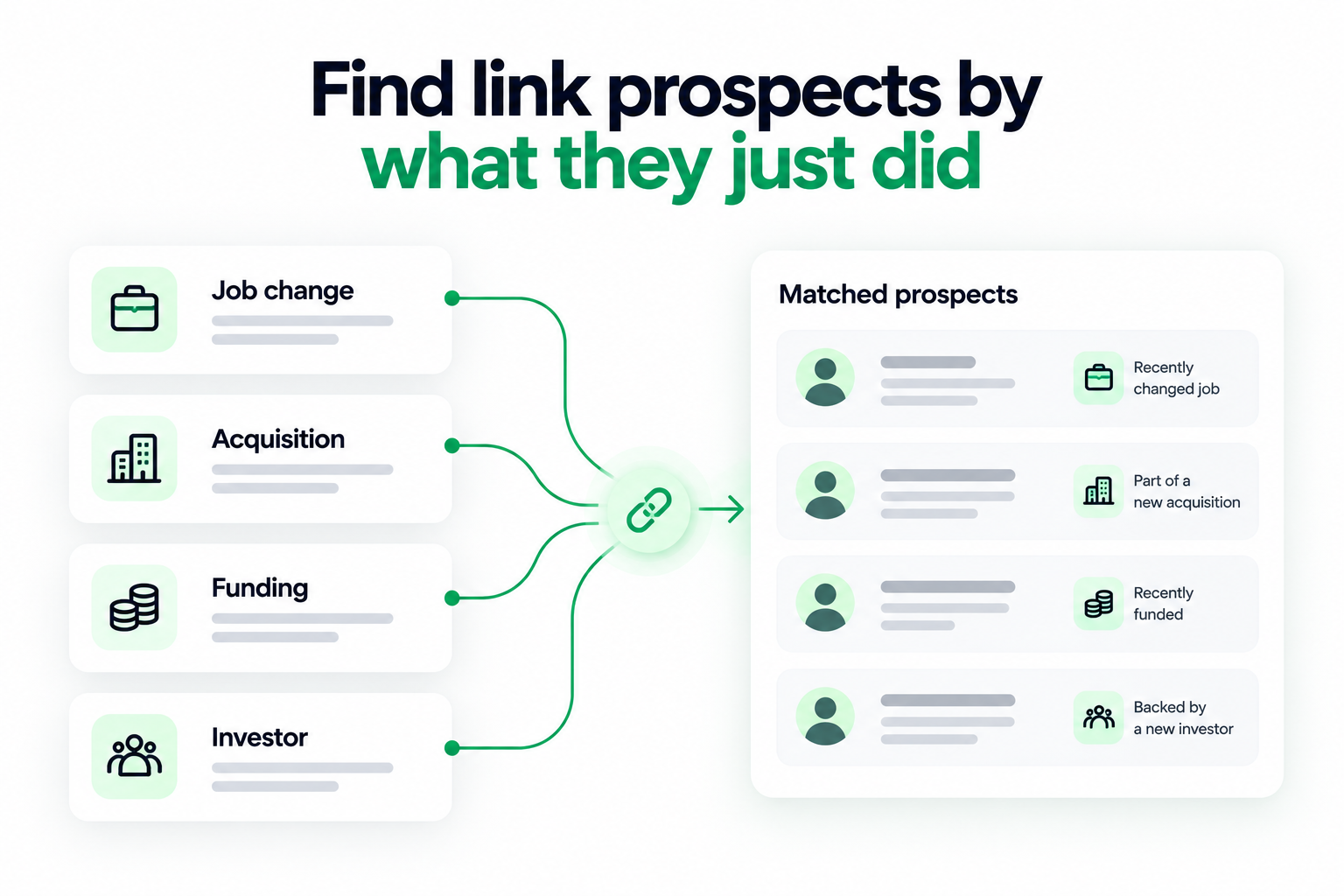
Leadsforge now includes Signals, a sourcing path that builds lists around real events instead of static filters. You pick a signal type, set provider-specific filters, see the estimated number of matches, and extract results with credits.
Every extracted company or contact carries evidence you can open in the Details view, so you can see why it matched before you write a word.
Job change signals: A new content or marketing lead often refreshes resource pages and welcomes new partners, so the first weeks in a role are a good window.
Funding signals: Recently funded companies publish more and look for credible mentions, which suits guest contributions and digital PR.
Acquisition signals: Acquired companies often change domains or restructure sites, which can leave broken links on pages that mention them.
Investor signals: Firms that are actively investing tend to publish newsletters and portfolio news, which can suit PR-style pitches.
The signal period filter runs from the last 7 days up to the last 365 days. I keep it short, because a pitch tied to something that happened last week reads as relevant, while one tied to last year does not.
For company-based signals, Leadsforge first finds the matching companies, then matches them against its lead database and surfaces relevant employees. Credits are charged at extraction, based on how many companies or contacts you select.
Do not skip local opportunities
Local Companies Search is another Leadsforge sourcing path, powered by Google Maps data. You set a location and radius, search by business type, then extract matching businesses or enrich them to find the right contacts.
For link building, that suits local sponsorship pages, partner directories, and neighborhood business guides.
One honest limit: Leadsforge is a B2B database, so it fits company blogs, SaaS resource pages, and agency sites better than solo hobby bloggers.
Set Up Sending So Your Pitch Reaches the Inbox
Even a perfect pitch fails if it lands in spam, so I set up sending before I write a single email.
Use separate sending domains
I never send outreach from my primary domain. The Forge Stack offers three email infrastructure options under one login, so you can match the setup to your volume and budget.
Mailforge: Shared infrastructure built for cold outreach, with bulk domain and mailbox creation and automated SPF, DKIM, and DMARC.
Infraforge: Private infrastructure with dedicated IPs, plus pre-warmed mailboxes (sold separately) if you want to skip the two-to-four-week warmup wait.
Primeforge: Real Google Workspace and Microsoft 365 mailboxes, with pre-warmed options available.
I pair Primeforge with Mailforge or Infraforge. The most successful teams run two or more email providers so they always have a mailbox that matches their prospect's provider.
Warm every mailbox
Warmforge is included free with Salesforge, with unlimited slots on both plans. Its email warm-up uses a premium pool that mixes SMTP, Google Workspace, and Microsoft 365 mailboxes.
Heat Score™ tells me when a mailbox is healthy enough to scale, and Inbox Placement Tests show whether mail lands in primary, promotions, or spam before a campaign goes live.
Protect deliverability inside the sequence
These Salesforge settings do most of the protective work for link outreach:
ESP matching: Google senders reach Google recipients and Microsoft senders reach Microsoft recipients, which improves inbox placement (Growth plan).
Text-only content: Emails go out without heavy HTML, tracking pixels, or attachments by default, which keeps the payload clean.
Sender rotation: Volume spreads across mailboxes and domains, so no single mailbox burns its reputation.
Bounce Shield: Sends to addresses likely to bounce are blocked before they damage your sender reputation.
Built-in email validation: Every contact is validated before sending, which matters because editor and webmaster addresses are often outdated.
Watch the wording too. Phrases such as "guest post" or "link exchange" are common spam triggers in subject lines, so I run drafts through a free spam checker before launch.
Write Link Building Outreach Emails That Get Replies
Link building emails win when they are short, specific to one page, and offer something before they ask.
The structure I use every time
Each email has four parts: one specific detail about their site, one sentence on the value you offer, a single ask, and an easy way to say no.
I keep the body short, usually under 125 words, and I leave the link out of the first email. The goal of email one is a reply, not a click.
Personalize at scale without sounding templated
Salesforge supports AI personalization across 21+ languages, with AI variables that pull prospect-specific details such as company news, LinkedIn activity, and industry context. That helps when you pitch international sites without hiring a copywriter per region (multi-language sequences are on the Growth plan).
I still read the first line of every email before it goes out. AI drafts the variable, and I decide whether it sounds like a person wrote it.
Three templates I would start with
These are starting points, so rewrite them in your own voice. Variables sit in double braces.
Template 1: Link insertion
Subject: Quick idea for your {{article_topic}} guide
Hi {{first_name}},
I read your guide on {{article_topic}}, especially the section on {{specific_section}}.
I recently published {{asset_name}}, which adds {{specific_value}}. It might fit right after that section.
Happy to send a short summary if that helps. If not, no worries at all.
{{sender_name}}
Template 2: Guest contribution
Subject: Idea for {{site_name}}: {{topic}}
Hi {{first_name}},
I have followed {{site_name}} since your piece on {{recent_post}}.
I would like to contribute an article on {{topic}}, built on {{experience_or_data}}. I can send a two-line outline this week.
Would that be useful?
{{sender_name}}
Template 3: Digital PR data pitch
Subject: New data on {{topic}}
Hi {{first_name}},
I analyzed {{dataset}} and found {{one_finding}}.
Since you cover {{beat}}, I thought it might be useful for a future piece. I can share the full data and a short summary.
Want me to send it over?
{{sender_name}}
For follow-up wording and more subject line ideas, the cold email templates library is a good place to borrow structure from.
Run a Conditional Email and LinkedIn Sequence
Link prospects ignore plenty of emails, so a conditional sequence gives each pitch a second route.
Why add LinkedIn to link building outreach
Editors and content marketers are active on LinkedIn, and published B2B benchmarks suggest replies there often run higher than on cold email. Salesforge runs email and LinkedIn as coordinated channels inside one sequence, which is what multichannel outreach should mean.
There are six native LinkedIn actions available as sequence steps: connection requests, messages, InMails, post likes, follows, and withdraw requests. Each action type is capped at 30 per day per profile, which keeps activity within LinkedIn's safe usage thresholds.
Account safety is built in. Actions route through shared proxies with optional custom proxy support; authentication uses a session token so your password is never stored, and there is no Chrome extension injection. If you are comparing LinkedIn automation tools, that architecture is the part worth checking first.
A sample conditional sequence
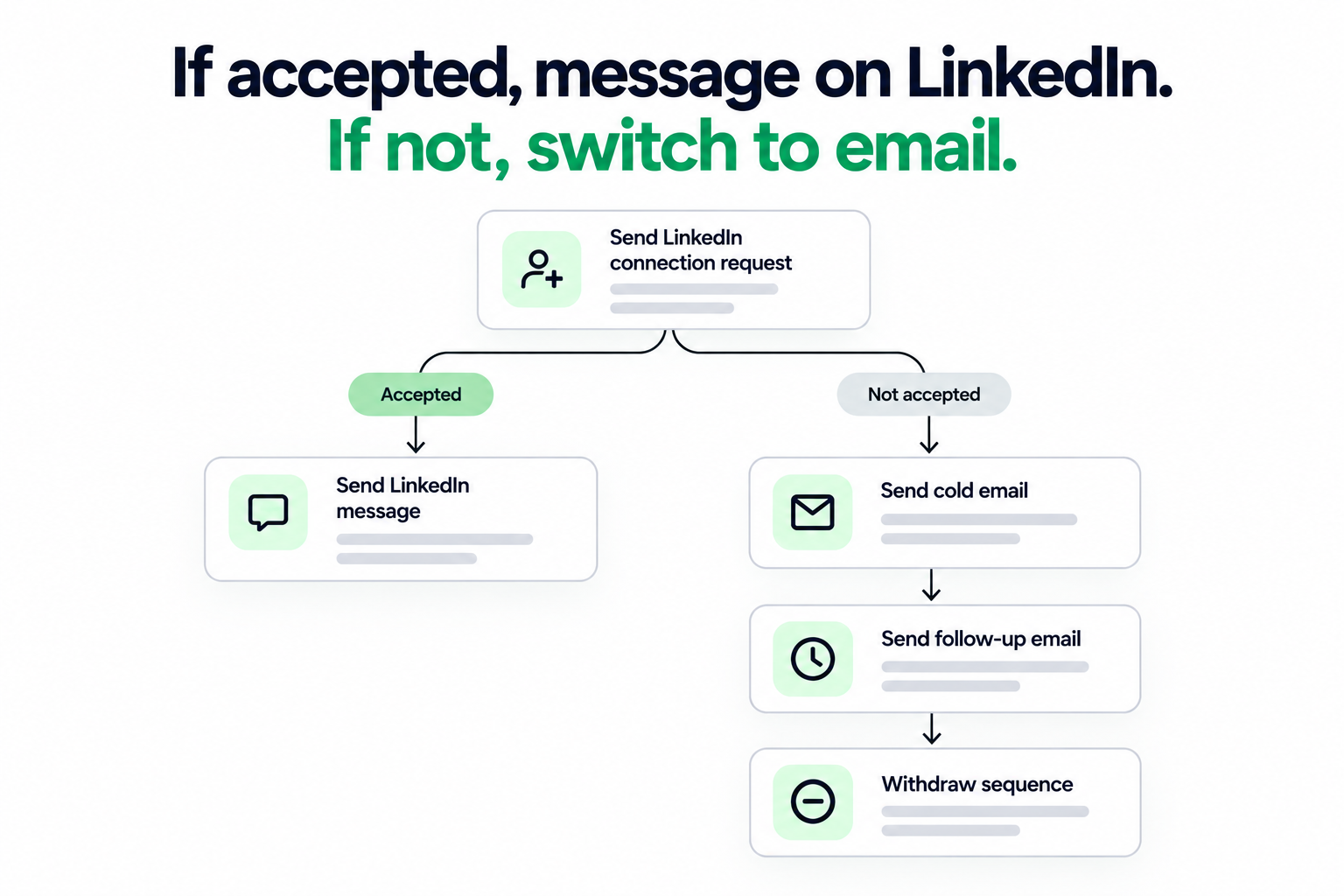
This is the shape I would use for a link insertion pitch. The branching is real if/then logic, not two campaigns stitched together by hand.
Day
Channel
Action
Condition
1
LinkedIn
Follow the contact and like a recent post
None
2
LinkedIn
Send a connection request with a short note
None
4
LinkedIn
Send a short message about the specific article
If the request was accepted
4
Email
Send the first pitch email
If the request was not accepted
8
Email
Send a short follow-up with one new detail
If no reply
12
Email or LinkedIn
Send a final, low-pressure follow-up
If no reply
14
LinkedIn
Withdraw the pending connection request
If never accepted
The withdraw step cleans up stale invites, and InMail is useful for senior editors you cannot reach any other way.
Keep batches small and test one thing at a time
I keep each batch small enough to personalize by hand. On the Growth plan, A/B testing lets me compare subject lines or opening lines, and campaign analytics show send volume, reply rate, and where the sequence stalls.
Run your first link outreach sequence
Combine email and LinkedIn steps in one conditional sequence, with free unlimited warmup included.
Handle Replies and Follow-Ups Without Dropping Threads
Link building is a negotiation, so reply handling needs speed and a human touch.
One inbox for every reply
Primebox™ brings every email and LinkedIn reply into one inbox, so I am not switching between LinkedIn tabs and mail clients to find a thread.
It has two modes. Auto-Pilot lets AI handle replies end to end, and Co-Pilot drafts a reply for a person to approve before it sends.
For link outreach, I default to Co-Pilot. Requests about anchor text, placement, or payment deserve a human decision, while Auto-Pilot suits simple replies such as sharing an asset or confirming a contact.
Follow-ups that stay polite
Most links come from the second or third touch, not the first. I use two or three automated follow-ups, each adding something new, such as a data point or a one-line summary of the asset.
Whatever tool you use, confirm that a sequence stops the moment someone replies. Nothing damages a relationship faster than a follow-up sent after a yes.
Measure What Actually Matters
Opens say little, so I track the numbers that connect outreach to earned links.
Metric
What it tells you
How I read it
Bounce rate
List quality and validation
Keep it under 2%
Positive reply rate
Whether the pitch is relevant
Compare against your own baseline per link type
Link placement rate
Share of outreach that ends in a live link
Track per campaign and per link type
Cost per link
Tool cost plus time for each earned link
Compare against other link building channels
Heat Score™
Mailbox reputation strength
Scale volume only when the score is healthy
Salesforge analytics cover send volume, reply rate, and conversion, and native CRM integrations (HubSpot, Salesforce, Pipedrive, HighLevel, Breakcold, Attio, and Folk) let me log placements next to each contact.
I review the numbers after each batch, then change one variable at a time: the target list, the first line, or the follow-up timing.
Scale the Playbook: Team, Agent Frank, or Forge Expert
Once the playbook works, the next question is who runs it: your team, Agent Frank, or a Forge Expert agency.
Three ways to run it
Your own team operates it. You build lists, write copy, and manage replies in Salesforge.
Agent Frank operates it.Agent Frank is an autonomous AI SDR that prospects, enriches, writes, sequences, replies through Primebox, and books meetings, 24/7. I think of him as a teammate who augments your team, and for link building I would start him in Co-Pilot mode with your own uploaded list.
A Forge Expert agency operates it. Certified Forge Experts run the stack for you if you would rather buy the result than build the process.
If you want a deeper look at the autonomous option, this guide to AI sales agents explains where it fits.
Connect it to the rest of your stack
Salesforge offers open API access on the Growth plan, native integrations with CRMs, data providers, and automation platforms (Slack, Zapier, Make, and webhooks), and an MCP CLI. With the MCP CLI, Claude, Cursor, or a custom agent can create sequences, manage contacts, and trigger actions from your own AI workflows.
Why one stack helps
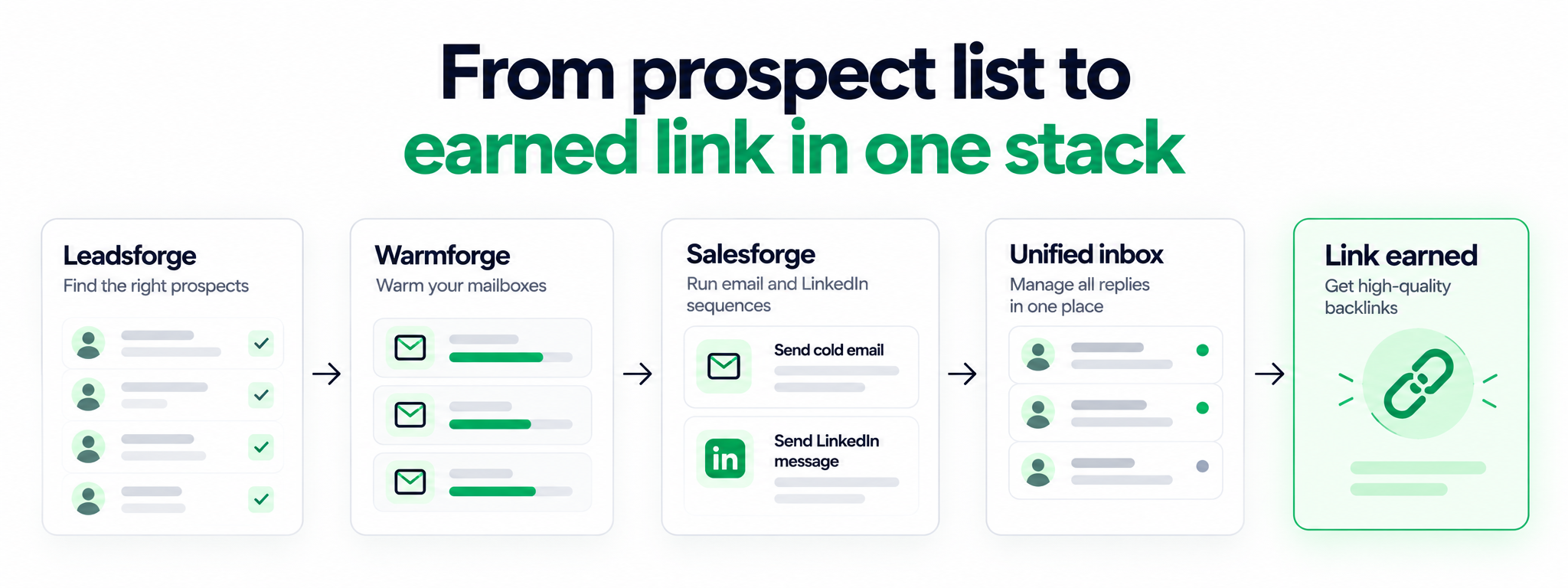
No competitor I know of offers lead finding, infrastructure, warmup, multichannel outreach, and an autonomous SDR as one integrated stack. Each product has its own subscription, but they share one login and feed each other directly.
Shared, dedicated, or Google and Microsoft mailboxes
Warm up
Warmforge
Free unlimited warmup with Salesforge, Heat Score™, placement tests
Run outreach
Salesforge
Email and LinkedIn sequences, Primebox™, analytics
Automate end to end
Agent Frank
Autonomous AI SDR using the full stack
Leadsforge lists move straight into Salesforge sequences with no CSV export. You can also move between the three infrastructure options as your volume grows without switching platforms or migrating.
Which plan fits link building outreach
Both plans include unlimited mailboxes, unlimited Warmforge warmup, smart mailbox rotation, Primebox™, and a 14-day free trial with no credit card required. Pro covers one LinkedIn account.
Growth adds A/B testing, multi-language sequences, ESP matching, API access, unlimited LinkedIn senders, and unlimited users. Check the pricing page for current plan details before you choose.
Final Verdict
Link building outreach rewards small, well-timed, well-delivered campaigns, and the tooling should make that easier instead of heavier.
If I had to boil the playbook down, I would keep three rules. Pitch fewer, better-matched contacts, protect deliverability before you write, and give every prospect more than one route to reply.
Salesforge covers the outreach side well: conditional email and LinkedIn sequences, free Warmforge warmup, Bounce Shield, ESP matching, and Primebox™ for replies. It does not replace an SEO tool for backlink research, and I would not pretend otherwise.
If you are still weighing platforms, this roundup of Instantly alternatives compares the main options side by side.
Turn your link prospect list into a live campaign
Find contacts in Leadsforge, send through Salesforge, and keep every reply in Primebox™. Prefer a hands-off route?
Link building outreach is the process of contacting site owners, editors, and writers to earn backlinks to your content. The ask is usually a guest contribution, a link insertion, a resource page addition, a broken link replacement, or a digital PR pitch.
How many follow-ups should I send for link building outreach?
Two or three follow-ups spaced several days apart is a sensible range. Each follow-up should add something new, such as a data point or a short summary of the asset, rather than repeating the first email.
What is a realistic reply rate for link building outreach emails?
Published cold email benchmarks put average reply rates at roughly 3 to 4 percent, and link outreach to busy editors can sit below that. Small, well-targeted batches usually outperform large blasts, so compare results against your own baseline for each link type.
Is cold email or LinkedIn better for link building outreach?
Neither wins on its own. Email is easier to scale, while LinkedIn often gets noticed by marketers and editors who ignore their inbox. Running both in one conditional sequence gives each prospect a second route without doubling your workload.
Can I automate link building outreach without hurting quality?
Yes, if you automate the mechanics and keep the personalization human. Automate list enrichment, validation, sending, and follow-ups, then keep batches small, personalize the first line, and review replies before sending anything that involves negotiation.
Can Agent Frank run link building outreach?
Agent Frank is an AI SDR built for B2B outbound, and he can work from a contact list you upload plus a knowledge base about your content. For link building, I would start him in Co-Pilot mode so a person approves replies that involve placement or anchor text.
Book more meetings on autopilot
Set up in minutes. No per-seat pricing. No commitment.
A practical playbook for link building outreach in 2026. Learn how to build verified prospect lists, set up warmed sending domains, write short pitches, run email and LinkedIn sequences, handle replies, and track the links you earn.
Cold email best practices work in a fixed order: infrastructure first, list second, copy third. I cover domain setup, warmup, list quality, short plain-text copy, sending limits, follow-up timing, and the few numbers that show a campaign is healthy.
A sales cold email is one step in a deal, not a pitch. I cover who to email first, the short structure that earns replies, four templates for real selling situations, follow-up timing, and the deliverability basics that keep your emails out of spam.