If you are reading La Growth Machine reviews, you have probably either talked yourself into buying it or you are still on the fence. Let me help you decide.
La Growth Machine (LGM) is a multichannel outreach tool. It runs LinkedIn, email, and X (formerly Twitter) from one visual sequence, and unlike most outreach tools it ships with its own company database and waterfall enrichment, so you can build and message a list without bolting on a separate data tool.
But there are a few things you need to consider first.
LGM bills per identity, so a three-person team on the Pro plan pays €300/month (billed annually), which is €3,600 a year before a single add-on. Bugs like sync errors and random logouts are still the most common complaint in its reviews. And CRM sync, the X channel, and unlimited campaigns all sit behind the top Ultimate tier at €150 per identity.
I ran LGM through its trial, built real campaigns, and read its current G2, Capterra, and Reddit feedback.
Below is what you get, what you do not, what it truly costs annually, and the one alternative I would hand a multichannel team if LGM is not the fit.
TL;DR: La Growth Machine Reviews at a Glance
What LGM does well: the most flexible multichannel sequence builder around, native LinkedIn voice messages, strong LinkedIn safety, and a unified inbox that pulls LinkedIn, email, and X replies into one view.
Where it falls short: per-identity pricing punishes growth, bugs and sync errors are the top user complaint, email personalization is shallow, and there is no native email warm-up.
What it costs: Basic €50/month per identity, Pro €100/month per identity, Ultimate €150/month per identity (all billed annually). A three-identity Pro team pays €3,600 a year.
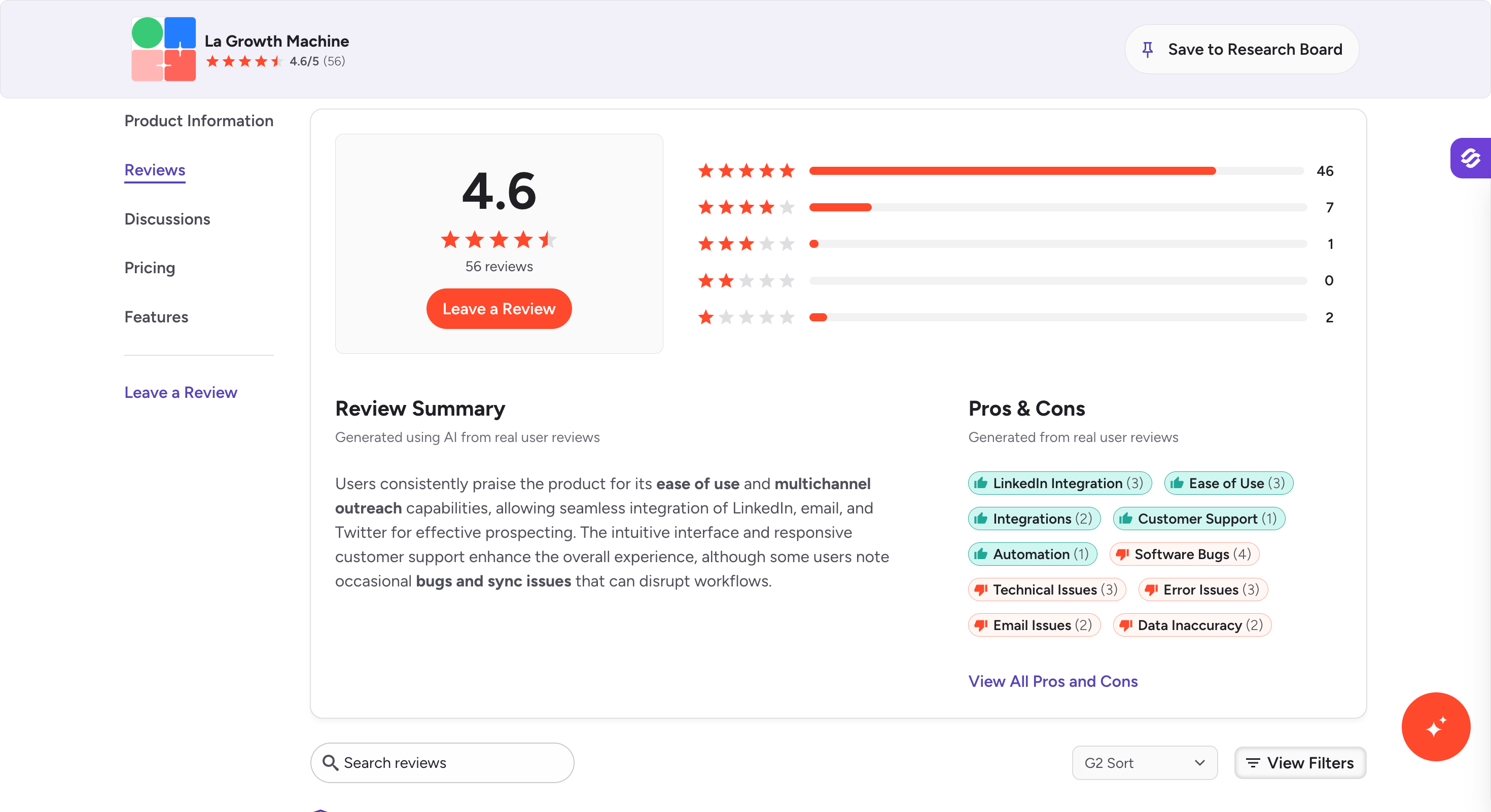
Community read: 4.6/5 on G2 (56 reviews) and a high Capterra score sit against a much lower Trustpilot average, and Reddit threads question the value for LinkedIn-only use.
Best alternative for multichannel teams:Salesforge runs email and LinkedIn from one platform with unlimited mailboxes and senders, AI personalization in 21+ languages, and free warm-up built in, from $40/month (billed annually). 14-day free trial, no credit card required.
What Real Users Are Saying About La Growth Machine in 2026
I read through the current review profiles instead of trusting a single score.
People who run true multichannel sequences like LGM, and people who scale it or only need LinkedIn tend to push back on the price and the bugs.
People doing multichannel sales outreach and LinkedIn outreach tend to like the flexibility, while users trying to scale for larger teams push back on price and stability.
Positive: "manually doing linkedin sales is extremely tedious and all the other tools just get me banned."
Positive: "Nice interface, with cool features like voice messages on LinkedIn with IA."
Balanced: "The sequence builder has a learning curve, but it is amazingly flexible." (Christina P.)
Critical: "Recurring complaints around broken contact handling show up in reviews: its incredibly buggy software, it cannot handle contacts properly..."
Critical: "You really just can't customize your emails all that much. An insane limitation in the age of AI."
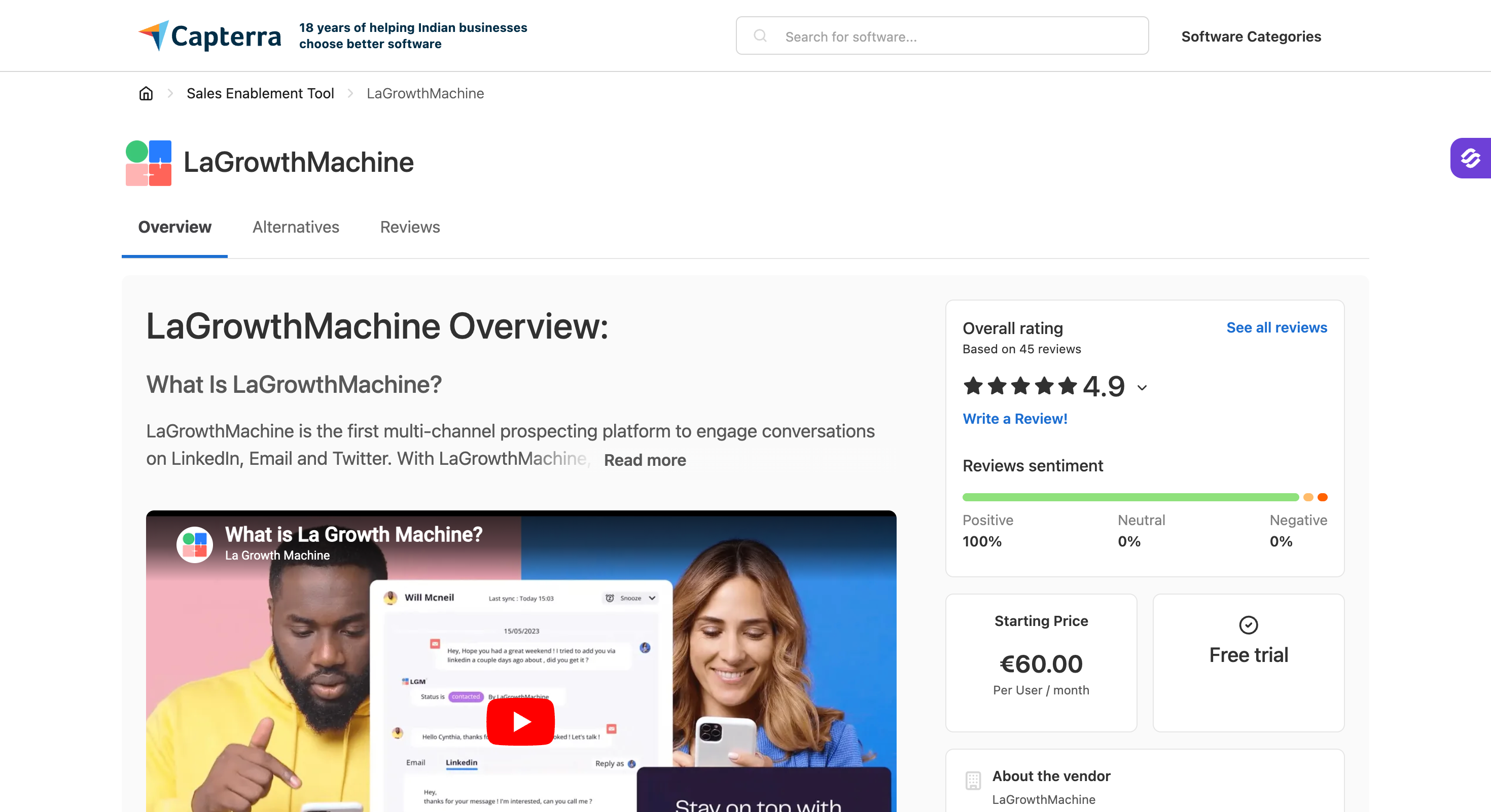
Capterra runs warmer, at 4.9/5 from 45 reviews (updated June 2026, Ease of Use 4.7, Customer Service 5.0), though the sample skews toward invited and long-tenured users.
Positive feedback often comes from sales teams that value the platform's key features, though some users still mention a steep learning curve.
Positive: "La Growth Machine is an exceptional sales automation tool that stands out for its intuitive interface and comprehensive feature set." (Jérémy R., CEO, Non-Profit Organization Management)
Critical: "Sometimes LGM didn't follow the limits that I had set for a LinkedIn profile." (Aniruddh G., Founder, Marketing and Advertising)
Balanced: "The management of the widget can be difficult." (Luc F., Growth Outbound Expert)
Teams wanting multichannel plus deliverability under one login without per-seat costs
Teams committed to LinkedIn + email + X and willing to pay per identity
Pricing
$40/month (billed annually), flat fee
€50/month per identity (billed annually); price scales with every added identity
Mailboxes & Senders
Unlimited mailboxes; unlimited LinkedIn senders on Growth, no per-seat fee
1 sending email per identity on Basic; each identity billed separately
AI Personalization
AI writes unique messages from scratch in 21+ languages
Magic Messages optimize copy; you still write the initial templates
Multichannel (Email + LinkedIn)
Conditional email and LinkedIn branching, not linear chains: if a connection request is accepted, trigger a LinkedIn message; if not, fall back to email. A/B testing included
Email + LinkedIn + X sequences; X channel requires Ultimate
No native warm-up; you add a separate tool to warm new domains
LinkedIn Actions
6 native actions inside automated sequences: connection requests, messages, InMails, post likes, follows, withdraws. Each capped at 30/day per profile to stay within LinkedIn's safe limits
Connection requests, messages, profile visits, likes, follows; no account auto-rotation
Unified Inbox
Primebox with Co-Pilot (AI drafts, you approve) and Auto-Pilot (AI continues) modes
Unified inbox on Pro and up; users report logouts and sync issues
Integrations (CRM, Sales Nav, API)
HubSpot, Pipedrive, Sales Navigator, API, Zapier, webhooks across plans
HubSpot and Pipedrive sync locked behind Ultimate
Free Chrome Extension
Free LinkedIn email finder extension, no paid tool required
No Chrome extension; cloud-only
AI SDR
Agent Frank, autonomous AI SDR, $499/month (billed annually)
No autonomous AI SDR
MCP + CLI
Forge MCP server connects the whole Forge Stack to Claude and AI agents
MCP server and Claude skills available
Free Trial
14-day free trial, no credit card required
14-day free trial, no credit card required
My Hands-On Experience With La Growth Machine
I signed up for the 14-day trial, connected a LinkedIn profile and an email inbox, imported a test list, and ran a multichannel sequence for two weeks. Here is the feature-by-feature read.
The visual sequence builder
What I tested: I built a four-step sequence that opened with a LinkedIn visit and connection request, branched to email if the connection was not accepted, then followed up on LinkedIn for accepted contacts.
What I liked: the drag-and-drop editor is the cleanest I have used for multichannel. Conditional branching is easy to reason about, and you can see the whole flow at a glance.
What could be better: custom sequences are locked to the Ultimate plan. The team enabled it on request during my trial, but a core capability should not require asking.
My take: this is LGM's strongest feature and the main reason to pay the premium.
Multichannel and LinkedIn automation
What I tested: LinkedIn connection requests, messages, profile visits, post likes, and follows, plus email steps in the same sequence.
What I liked: LGM bakes LinkedIn limits into its default actions and simulates human-like patterns, so account safety felt handled. Replies from LinkedIn and email landed in one unified inbox.
What could be better: there is no LinkedIn account auto-rotation, so scaling volume across many profiles is clunky for agencies; teams that need to operate multiple linkedin profiles may prefer tools designed for that workflow. Some users also value dedicated proxies for safer, lower-visibility linkedin prospecting, which LGM does not foreground.
My take: solid for one or two identities, awkward to scale. Flat-rate options like HeyReach can be more practical for multiple linkedin profiles, especially for agencies that manage multiple client accounts or need visibility across multiple client accounts.
Waterfall enrichment
What I tested: I used the sales navigator integration to import leads from csv files before running data enrichment for verified emails.
What I liked: Waterfall Enrichment is a multi-step process that uses multiple API providers for data accuracy, so coverage is decent without leaving the app. It also uses Dropcontact for lead enrichment during campaigns, and results usually come back within a few hours.
What could be better: Basic includes 250 enrichment credits a month, and full enrichment costs five credits per lead, so you only fully enrich about 50 leads before campaigns pause for more credits. Several users also flag data accuracy, and verified email retrieval looks weaker at large companies, with about a 30% accuracy rate.
My take: helpful if you need to add professional email addresses and enrich contact details after upload, but it is still not a native lead database for lead generation or a way to find leads and capture new leads directly inside the platform.
Magic Messages and AI voice notes
What I tested: Magic Messages for copy and the AI voice feature that clones your voice for LinkedIn voice notes.
What I liked: the voice notes are a genuine differentiator. You record one sample, and the AI swaps in each prospect's first name.
What could be better: Magic Messages optimize copy you have already written. There is no "describe your target and let AI write the campaign" mode, so AI content assistance feels limited next to tools that generate full drafts, and that is one of the advanced features some buyers may expect in higher tier plans.
My take: clever on LinkedIn, where it helps with personalized outreach more than fully AI-written email copy, but still thin on email.
Unified inbox and analytics
What I tested: managing replies across channels and reading the campaign analytics.
What I liked: one inbox for LinkedIn, email, and X replies saves real tab-switching, and the platform gives you detailed analytics plus reporting tools to track response rates alongside opens and conversions per channel.
What could be better: running campaigns across multiple channels is useful, but reporting still makes you select identity-level views manually, which makes it harder to compare outreach campaigns and broader outreach efforts cleanly, and I hit a couple of UI lags that match the bug reports in the reviews.
My take: useful day to day; the multichannel capabilities help with monitoring performance, but it still feels rough for teams managing lots of activity.
La Growth Machine Pricing in 2026
LGM prices per identity, where an identity is one sending profile (a LinkedIn account plus its email).
Annual billing gives you two months free, so the rates below are the effective monthly cost when billed annually, and the basic plan starts at €50/month per identity.
LGM bills in euros by default, with USD and GBP options on the pricing page.
Plan
Price (Billed Annually)
Channels
Enrichment Credits / Month
Active Campaigns
Key Limits
Basic
€50/month per identity
LinkedIn, Email
250
3
1 sending email per identity, up to 3 identities, no CRM sync
Pro
€100/month per identity
LinkedIn, Email, Calls
400
6
5 sending emails per identity, custom workflows, unified inbox, lookalikes
Ultimate
€150/month per identity
LinkedIn, Email, X, Calls
1,000
Unlimited
HubSpot/Pipedrive sync, CRM enrichment, 10 sending emails per identity
The pricing structure splits essential features across the basic and pro plans, with advanced integrations and other advanced features reserved for higher tier plans.
There is also an Agency plan (custom pricing for lead-gen agencies and freelancers, adding dedicated support, onboarding, and discounted rates) and a Custom plan from €150/month per identity for teams that want to pick exact features and limits.
Both are quote-based through sales. For larger teams comparing outreach tools, this setup can get pricey versus most outreach tools with flatter pricing.
La Growth Machine Pros and Cons
✅ Pros
❌ Cons
Most flexible multichannel sequence builder in the category
Per-identity pricing becomes expensive as teams scale
Native AI voice messages with voice-cloning capabilities
Bugs and synchronization issues are the most common user complaint
Strong LinkedIn account safety through human-like activity limits
Email personalization is less advanced than AI-first outreach platforms
Unified inbox for LinkedIn, email, and X (Twitter) replies
No native email warm-up functionality; requires a separate tool
Built-in waterfall enrichment across nine data providers
CRM sync, X channel access, and unlimited campaigns are restricted to the Ultimate plan
GDPR-friendly and hosted within the EU
No automatic LinkedIn account rotation for high-volume scaling
Who La Growth Machine Is Built For (And Who Should Look Elsewhere)
LGM is a good fit if you run true multichannel sequences across LinkedIn, email, and X, you have one or two identities rather than a large pool, and your team is comfortable building visual workflows. It also suits European teams that want EU data residency by default.
Look elsewhere if you only need LinkedIn automation, where dedicated LinkedIn tools cost less and scale across senders more cleanly. The same goes if you are a budget-conscious SMB, if you want plug-and-play simplicity without a learning curve, or if you are an agency adding identities every month and watching the per-identity bill compound.
Best La Growth Machine Alternative - Salesforge
If LGM's per-identity bill and gated features are what pushed you here, the alternative you should test first is Salesforge.
It covers the multichannel ground, email and LinkedIn in one sequence, but prices outreach flat instead of per identity, and it folds email warm-up and deliverability into the base plan rather than gating them or sending you to a second tool.
For a multichannel team leaving LGM, the three things that change immediately are the pricing model, the deliverability stack, and AI that writes from scratch.
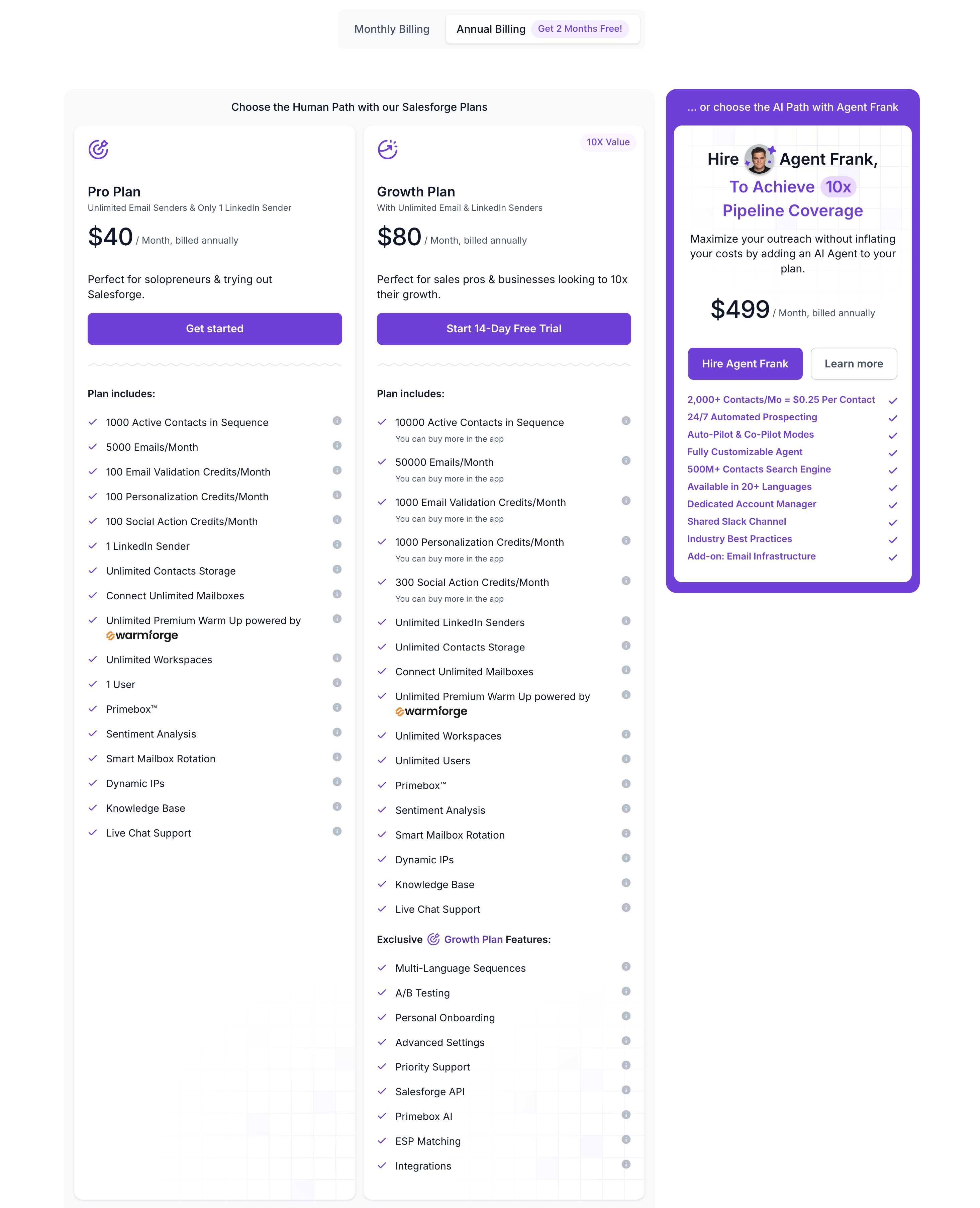
Salesforge starts at $40/month (billed annually), and it holds a 4.6/5 rating on G2.
Here is how it lines up for someone coming off LGM.
Salesforge Core Features for Multichannel Teams Leaving La Growth Machine
Salesforge leads where LGM makes you pay per profile, so the LinkedIn and multichannel story comes first; these are the key features for teams replacing a linkedin automation tool with stronger crm integrations.
Unlimited senders and mailboxes: No per-identity or per-seat fee. The Growth plan adds unlimited LinkedIn senders, unlimited users, and unlimited workspaces, which is the direct answer to LGM's identity multiplier.
Multichannel conditional sequences: Email and LinkedIn in one sequence with branching logic, A/B testing, and campaign analytics, matching the workflow depth LGM is known for. That makes it fit for multi channel outreach, with coordinated outreach campaigns rather than isolated LinkedIn steps.
AI personalization in 21+ languages: Salesforge writes unique messages from prospect data, rather than only optimizing templates you already wrote, which is where LGM's email personalization runs thin.
6 LinkedIn actions: Connection requests, messages, InMails, post likes, follows, and withdraw requests, run from one platform.
Primebox unified inbox with two modes: Co-Pilot drafts replies for you to approve, and Auto-Pilot continues conversations on its own, across every mailbox and sender.
LinkedIn email finder via Chrome extension: Pull verified emails directly from LinkedIn profiles using Leadsforge credits, with 100 free credits available upon Leadsforge signup, something LGM lacks since it does not offer a browser extension.
Integrations on every plan: Native HubSpot, Pipedrive, and Sales Navigator, plus API, Zapier, and webhooks, so CRM sync is not paywalled behind the top tier. These crm integrations also support broader advanced integrations for sales teams moving more of their sales outreach into one system.
MCP CLI: The Forge MCP server connects the whole Forge Stack to Claude and other AI agents for programmatic outbound.
Every plan includes unlimited warm-up, sender rotation, email validation, and Primebox. 14-day free trial, no credit card required.
Final Verdict: Is La Growth Machine Worth It in 2026?
LGM spent 2026 making the demo better.
Voice cloning, real chat mode, lookalike search, all of which lands well in a sales call.
None of it touches the three things that make people leave:
Per-identity bill
CRM sync locked to the €150 Ultimate tier
Bugs that surface mid-campaign
If you like the multichannel idea but not the per-seat math, Salesforge runs email and LinkedIn from one platform with unlimited mailboxes and senders, AI personalization in 21+ languages, and warm-up included rather than bolted on the way LGM requires. It starts at $40/month (billed annually).
Try it on a live campaign before you commit to LGM. 14-day free trial, no credit card required.
It is worth it if you run LinkedIn, email, and X in a single sequence, especially for sales teams doing multichannel outreach, and keep your identity count low. At €50 to €150 per identity per month (billed annually), it gets expensive for teams that scale or only prospect on one channel, so it is less compelling for simple LinkedIn-only use.
2) How much does La Growth Machine cost?
Basic is €50, Pro is €100, and Ultimate is €150 per identity per month, all billed annually with two months free. Each identity is billed separately, so costs rise with team size.
3) What is an "identity" in La Growth Machine pricing?
An identity is one sending profile, a LinkedIn account paired with an email, used for running campaigns. If five people prospect, you need five identities, and each one is charged on top of the last.
4) Is La Growth Machine good for LinkedIn-only outreach?
Not cost-effectively. You pay for email and X channels you will not use, and dedicated LinkedIn tools usually offer deeper LinkedIn features and cleaner multi-account scaling at a lower price. LinkedIn-only users may get better value from tools built to manage multiple LinkedIn profiles at scale.
5) Does La Growth Machine include email warm-up?
No. LGM has no native warm-up, so you add a separate tool to warm new domains before sending. By contrast, Salesforge includes free unlimited warm-up in its subscription.
6) What is the best La Growth Machine alternative?
For multichannel teams, Salesforge is the closest fit: email and LinkedIn in one platform, unlimited mailboxes and senders, AI personalization in 21+ languages, and built-in warm-up, from $40/month (billed annually), with a 14-day free trial and no credit card required.
7) Is La Growth Machine safe for LinkedIn?
LGM builds LinkedIn limits into its default actions and simulates human-like behavior, which keeps accounts safer than aggressive tools. As with any automation, heavy or careless use still carries some risk.
Book more meetings on autopilot
Set up in minutes. No per-seat pricing. No commitment.
Read this OutreachFox review for a clear look at its cold email and LinkedIn outreach, pricing, lead enrichment, deliverability, limitations, and best alternative.
Read this Hunter by Sales Cloud review to see how Salesforce’s new AI sales agent works, what it can automate, its pricing, limitations, and best alternative.
Read this Outzeach review for a clear look at its LinkedIn account rentals, pricing, safety risks, restrictions, what you get, and whether it is worth using in 2026.

.jpg)

.jpg)

.jpg)

