Running outbound from five separate tools sounds manageable until you are three months in and spending more time maintaining the stack than working the pipeline.
Your lead database does not talk to your enrichment tool. Your enrichment tool exports to a CSV, which you then import into your sequencer. Replies come in across two inboxes. Meeting prep happens manually the morning of the call.
By the time everything is running, you have a coordination job, not a sales job.
Jeeva AI is built to remove that friction by putting lead generation, enrichment, outreach, inbox management, and meeting prep in one platform.

But before you move your entire workflow over, you want to know whether it actually delivers on that promise, where the data quality holds up, and where real users run into problems.
I went through 30+ Jeeva AI reviews on G2 and the full product documentation to give you one honest answer.
This covers what the platform does, what breaks down in practice, and whether it fits a sales team running outbound at volume.
Jeeva AI is not a bad product. The positive reviews make it clear that many users like the promise: one AI sales platform that helps with lead discovery, enrichment, email outreach, LinkedIn outreach, inbox handling, and meeting booking.
But the negative reviews point to a different problem. The issue is not only whether Jeeva AI can automate outbound. The bigger question is whether you can confidently predict the cost, control the AI, manage deliverability, and avoid friction when they want to cancel or change plans.

Jeeva AI is an agentic AI sales platform that runs the full outbound workflow from one place. It finds leads, enriches contact data, runs personalized outreach across email and LinkedIn, manages replies, and books meetings.
The core idea is replacing the fragmented stack most sales teams run today. One user said it replaced four or five separate tools he was using before and cut his prospecting time by 60%.

Jeeva AI is not a single-purpose tool. It covers lead generation, data enrichment, campaign management, inbox organization, and meeting preparation from one dashboard.
Three AI agents are running inside the platform. Jason handles outbound campaigns across email and LinkedIn. Gigi qualifies inbound leads automatically. Ada runs as a chatbot on your website to engage visitors in real time.
On top of that, there is a full research module. You can pull company insights, analyze earnings calls, run pre-call research on contacts, score and tier leads, and generate outreach angles before you send a single message.
One thing worth knowing upfront. Jeeva AI is not just a lead database or a sequencer. It is built to cover the full motion from finding a prospect to booking a meeting, without you leaving the platform to do any part of it.
Jeeva AI runs as one connected workflow. Each layer feeds into the next without you moving data between tools or managing separate logins.
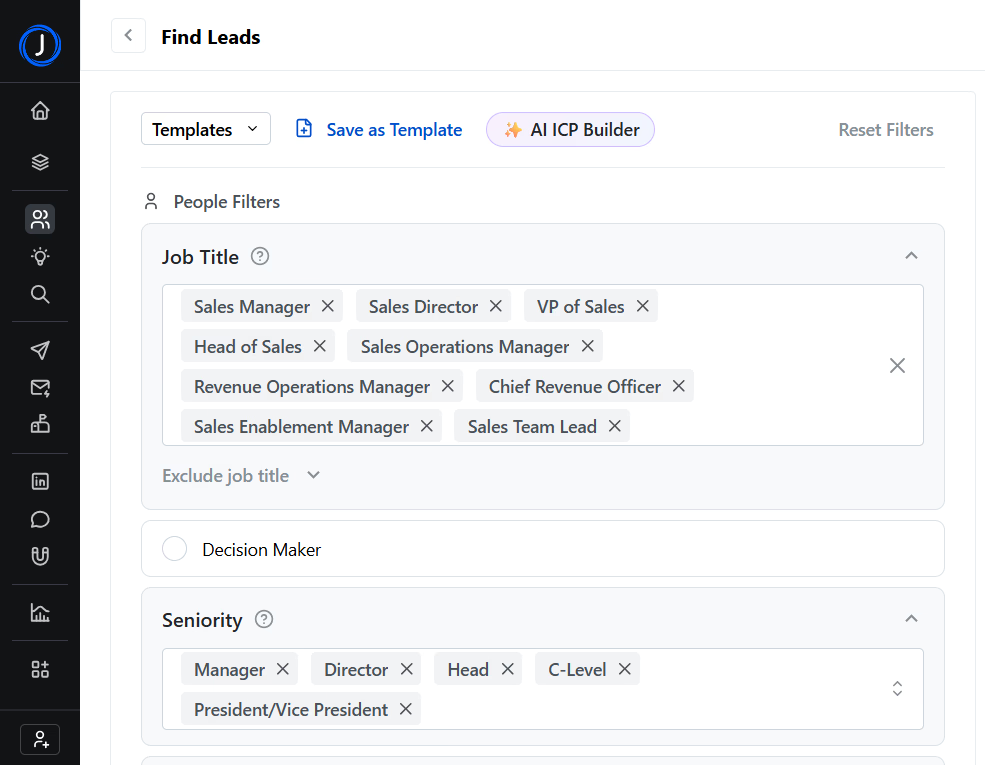
You start with lead generation. You define your ICP, run a search, and Jeeva builds a prospect list.
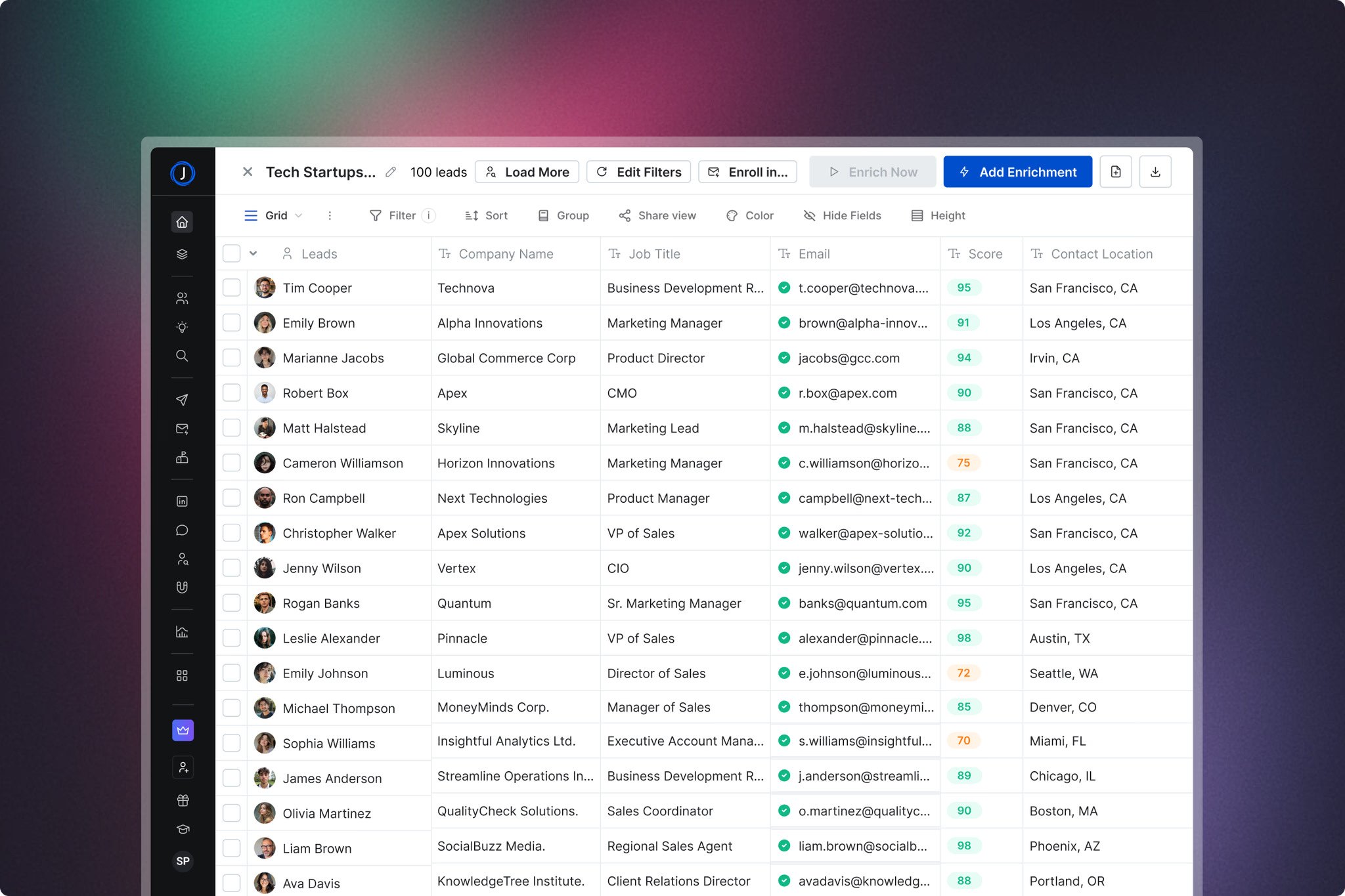
Once the list is ready, you move it to enrichment, where Jeeva appends verified emails, phone numbers, LinkedIn profiles, and real-time signals like job changes and promotions.
From there, the list goes into a campaign.
You choose your personalization method, set your sending schedule, and Jeeva runs outreach across email and LinkedIn automatically or waits for your approval before each message goes out.
Replies come back into Unibox, a single inbox that pulls in everything across email and LinkedIn and categorizes each response automatically. When a prospect shows interest and agrees to a meeting, the AI Calendar handles the booking, sends the confirmation, and preps you with a briefing before the call.
The whole motion runs from one dashboard. You define the audience at the start and Jeeva moves each prospect through the workflow from first touch to booked meeting.
Jeeva gives you multiple ways to build a prospect list depending on what you already know about your target audience.
If you know your ICP, you use the Find Leads workflow. You filter by job title, seniority, decision-maker status, company size, industry, and location.
The AI ICP Builder fills in your criteria automatically based on three questions about what you sell and who buys it.
If you want to start with accounts before contacts, you use Find Companies. You filter by industry, employee count, revenue range, funding stage, technology used, and headcount growth.
Once you have your account list, you pull decision makers from inside those companies with one click.
For expanding into new markets, Find Similar Companies takes one of your best-fit accounts and surfaces companies that share the same firmographic and industry characteristics.
Find Companies by Technology lets you target organizations running specific tools like Salesforce, HubSpot, or any other platform relevant to your pitch.

One user shares how he uses it specifically to identify companies running NetSuite, which is a use case the tool handles directly from the technology filter.

Jeeva appends verified work emails, phone numbers, LinkedIn profiles, and company data to any list you bring in or build inside the platform.
You can enrich from a CSV upload, an existing table, CRM records from Salesforce, HubSpot, or Zoho, LinkedIn URLs, or individual email addresses.
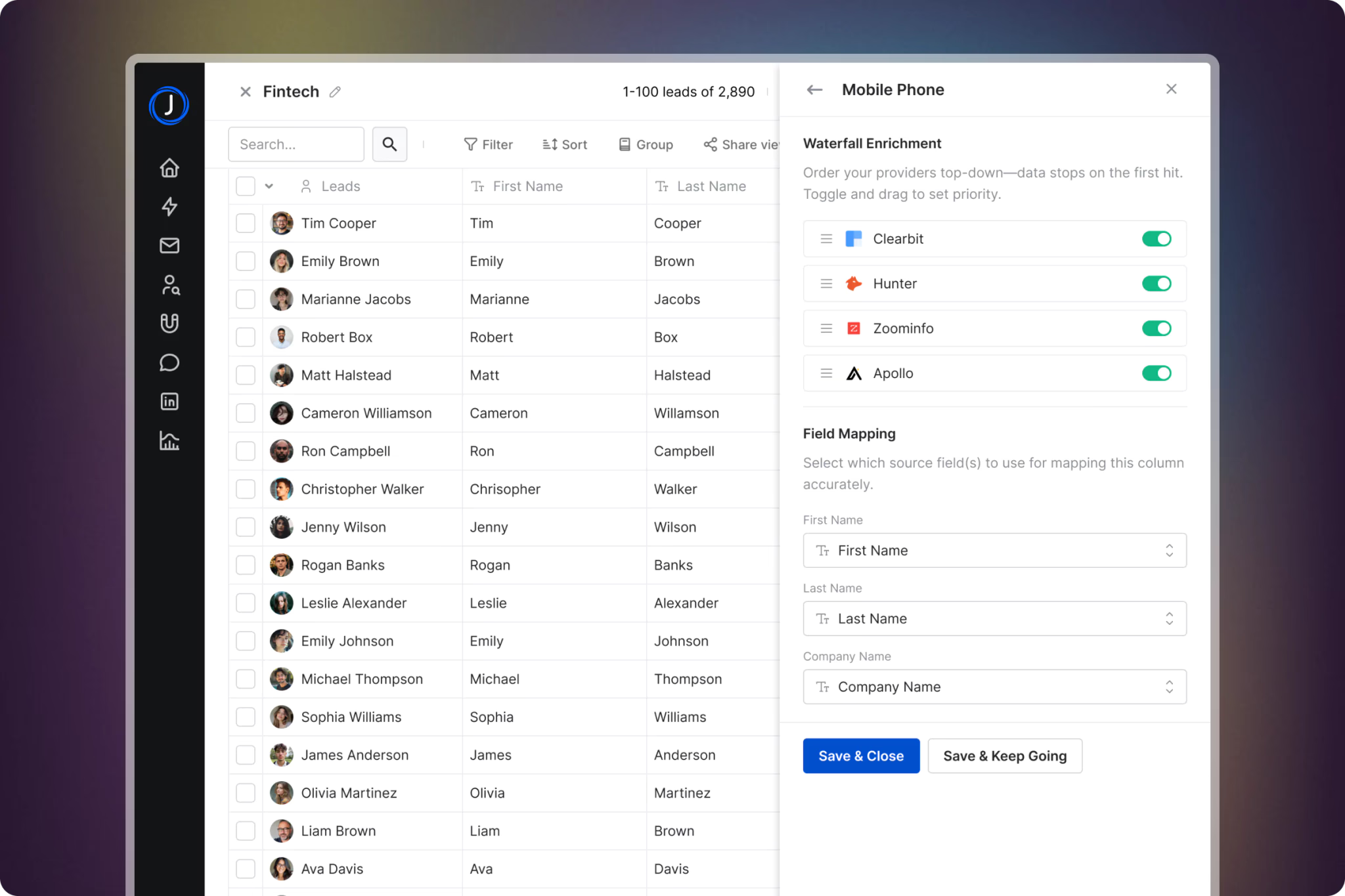
For single lookups, you type a name and company into a prompt, and Jeeva returns the contact details.
The Signals feature adds a real-time intent layer on top of standard enrichment. Job changes, promotions, and company news get appended to your leads automatically.

A user shares that this is what makes outreach feel timely rather than generic, referencing a prospect's recent promotion or company news in the opener rather than sending a cold template.
Campaigns in Jeeva run across email and LinkedIn from one place. You choose your data source first: precision targeting using ICP filters, LinkedIn Sales Navigator search URL, CSV upload, website inbound traffic, or CRM sync.
From there, you set up product information so the AI knows what you sell and how to position it. Then you choose your personalization method.
AI-Crafted generates a unique message for each lead using your tone, language, and the lead's profile data.
It produces the most variety but gives you less control over individual drafts. Template-Based uses reusable frameworks; the AI adjusts per recipient, giving you consistency with some personalization.
DIY lets you write your own copy and plug it into the sequence with full control over every word.
It's worth paying attention to what users mentioned in the review that AI-generated outreach can start sounding templated fast if you are not careful about reviewing drafts before they go out.

The quality depends on how well you set up your product information and personalization inputs upfront.

Follow-up sequences run across email, LinkedIn Connect, and LinkedIn InMail. You set the intervals between steps and choose whether messages are sent automatically or wait for manual approval.
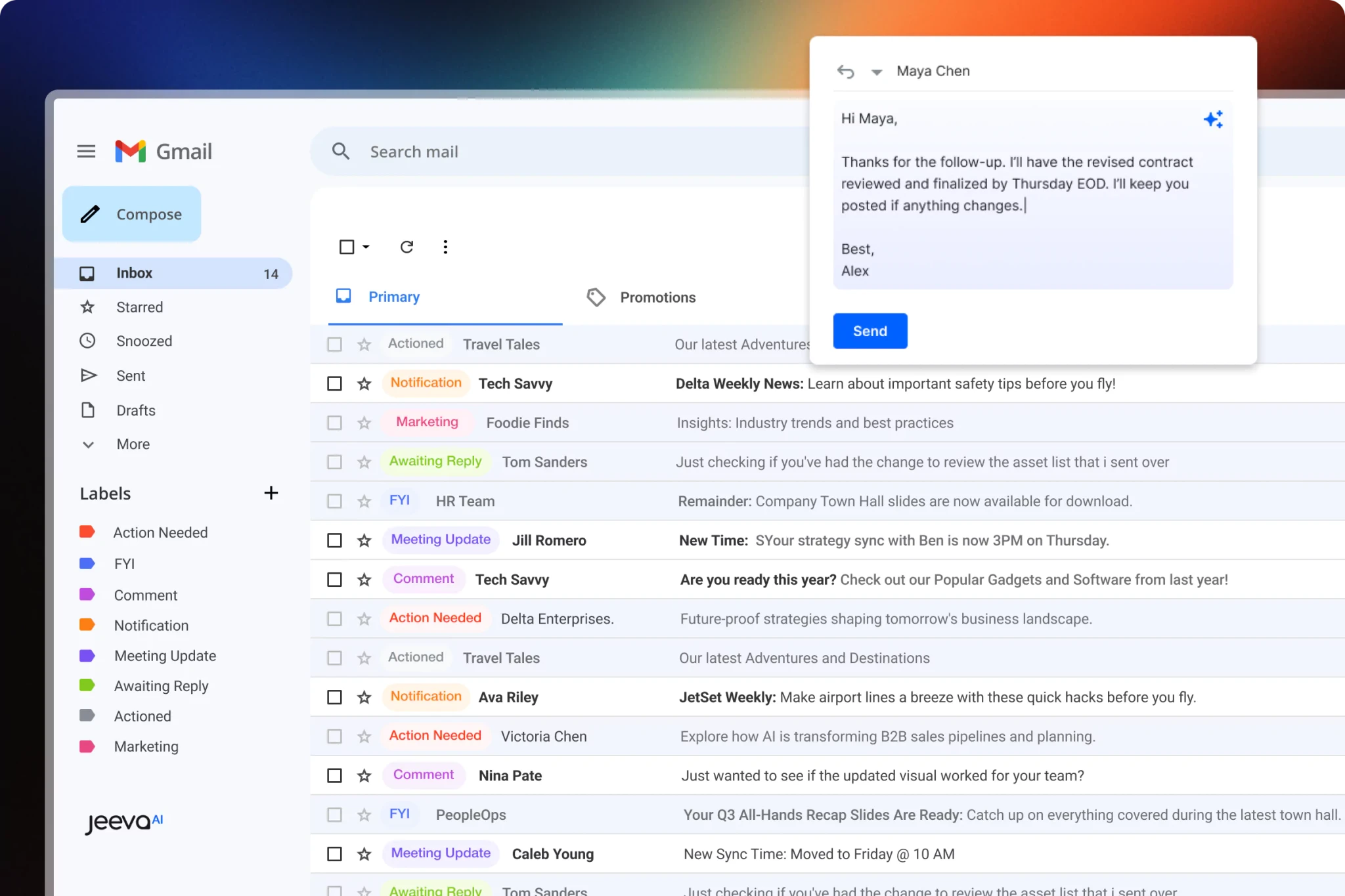
Unibox pulls every email and LinkedIn reply into one inbox. Replies are auto-categorized into labels, including Interested, Out of Office, Wrong Person, Bounce, and more. You filter by user, campaign, category, or connected inbox to find what needs attention.
AI Drafts writes suggested replies based on the context of the thread. You review, edit if needed, and send.
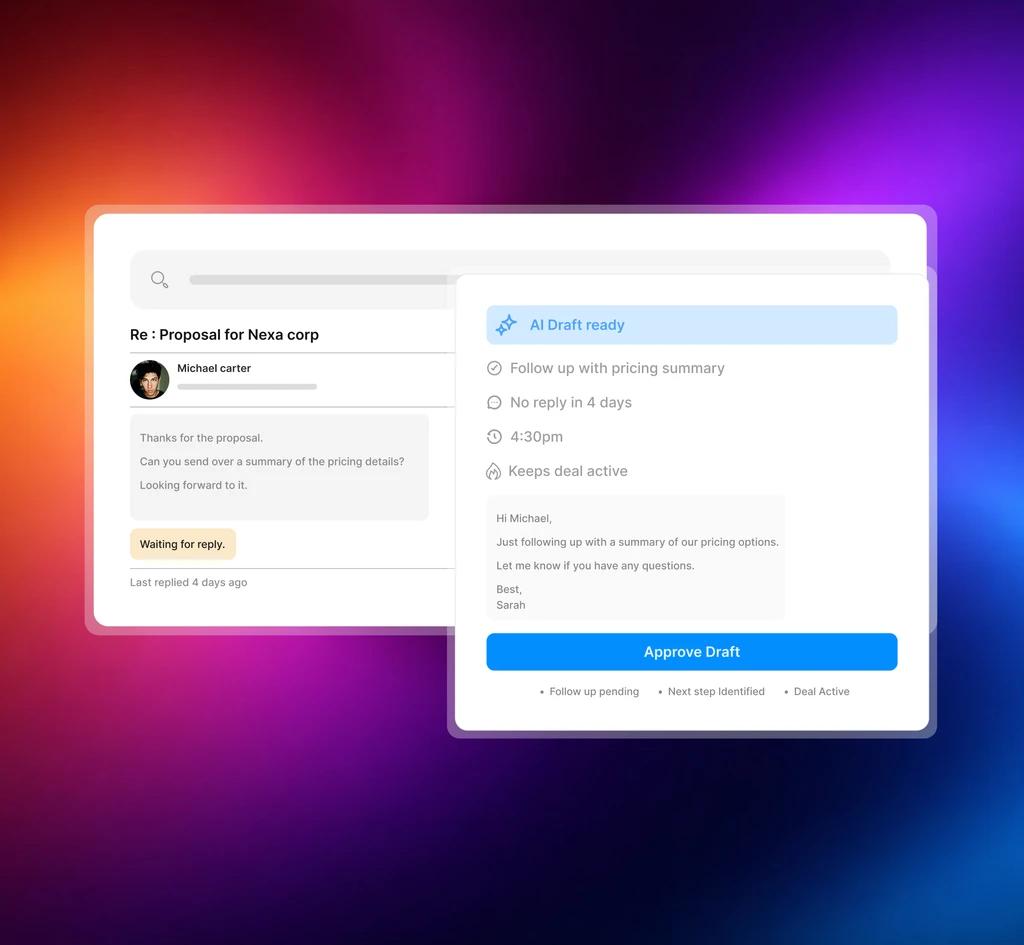
AI Labelling organizes your inbox automatically so you are not manually sorting through replies to find the ones that matter.
Users suggest Unibox saves them time looking for important emails by categorizing them into subfolders automatically.

Another reviewer flagged that AI-drafted replies sometimes miss the context of a conversation, which means reviewing drafts before sending is worth the extra minute.
The AI Calendar generates a personalized booking link based on your availability and inserts it into outbound emails automatically.
It syncs in real time with Google and Outlook to avoid double-booking and updates your calendar instantly when a meeting is confirmed.
AI Meeting Prep sends a daily briefing before each call.

It pulls the participant's LinkedIn profile, role, company description, recent activity, and key talking points, and delivers everything to your inbox at a set time each morning.

The AI Note-Taker joins your calls automatically, transcribes the conversation in real time, tags objections and decisions, and sends a meeting summary with action items to your dashboard when the call ends.
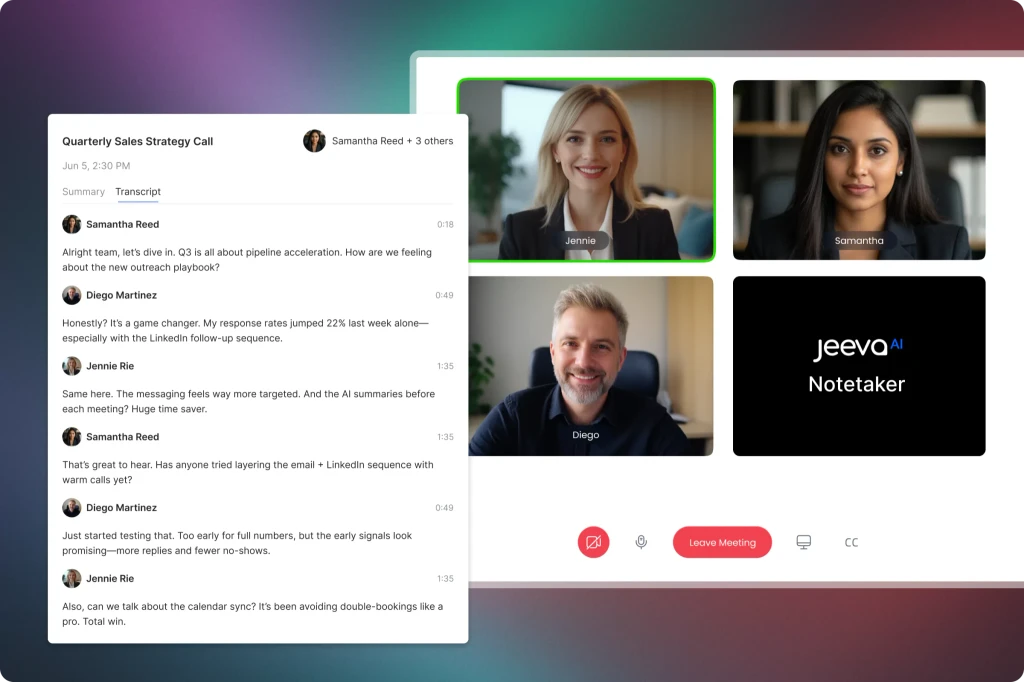
It also drafts a follow-up email based on what was discussed.
This combination frees up significant time by handling scheduling, inbox management, and meeting notes so you can focus on the work that actually moves deals forward.
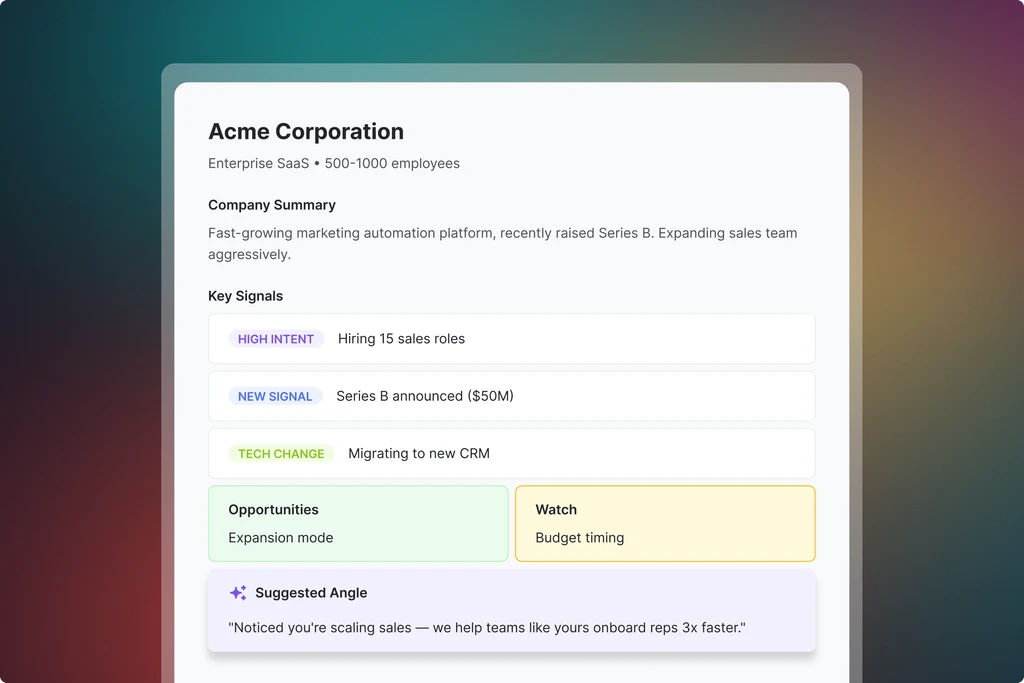
The Research module sits separately from lead generation and enrichment. It gives you deeper intelligence on accounts and contacts before you reach out or get on a call.
Jeeva Agent sits across all of this as a natural language interface.
You type a command like "Find 100 leads in healthcare in California" or "How did my last campaign perform?" and Jeeva executes the task without you navigating through menus.
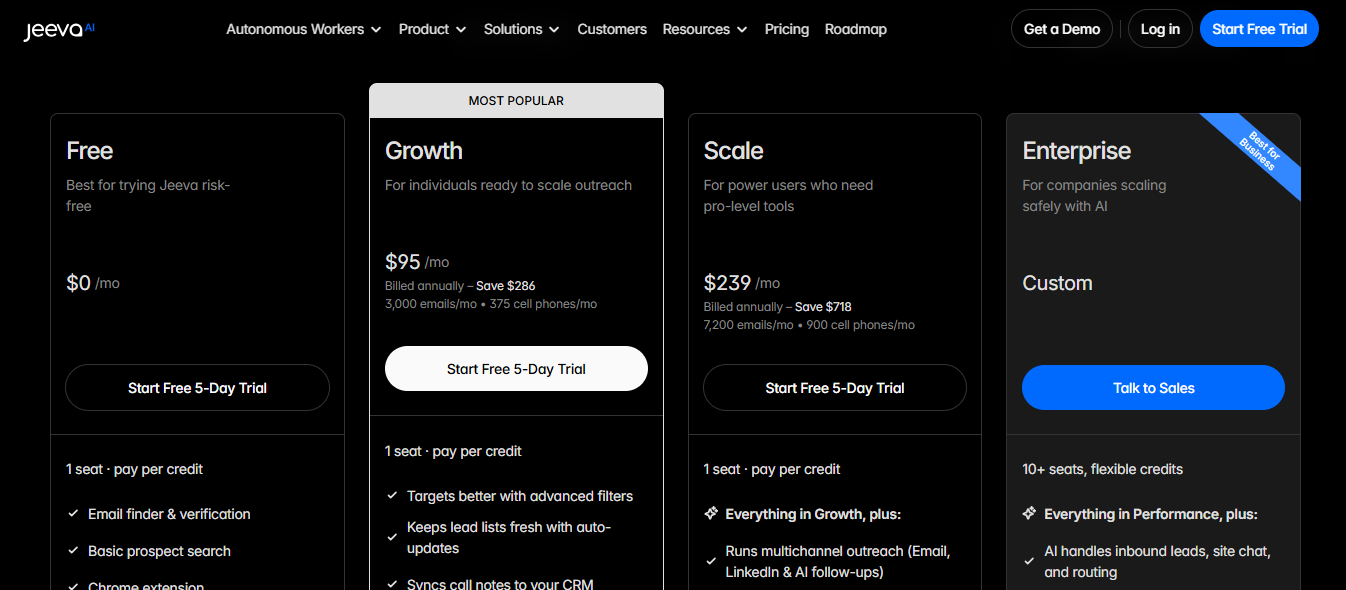
Jeeva AI has four plans. All are billed per seat on a pay-per-credit model. Annual billing saves 20%.
Jeeva consolidates the entire sales workflow into one place, replacing the fragmented stack he was running before.

It replaces four or five separate tools he was previously managing. Both flagged that the consolidation alone saved significant time on daily workflow management.

As a user said she values how organized the platform keeps her and how it delivers accurate contact information for key decision makers.
Jeeva scans huge databases and web sources to find real decision makers instead of manually sifting through spreadsheets or LinkedIn.

Setup consistently gets praised across reviews. Any beginner can do it and get acclimated to the platform really fast.
Customer service was amazing, responding quickly and setting up video meetings to walk him through the platform. A verified user in hospital and health care specifically named a support team member who helped get the most out of the platform.

Jeeva cut prospecting time by at least 60%. It is like having four or five tools in one place for lead research, data enrichment, and follow-ups.

Multiple reviewers flagged this. One user said it would help to have a clear notice of how many credits each action will consume before running it.
Another said the free version has a tight credit limit that interrupts workflow and limits experimentation.

Alt Text: User Review
A third said the credits system is flawed overall.

User shares that about 20% of emails in the database were wrong because people had changed jobs.
Information sometimes needs fact-checking because dates and details can be incorrect.
Another user said the platform sometimes repeats the same data across searches.

Sometimes the platform is slow and takes time to load.
Links to email and LinkedIn sometimes broke and required reconnecting integrations to get campaigns working again.

If you currently run separate tools for lead generation, enrichment, sequencing, and inbox management, Jeeva AI consolidates all of that into one place.
A sales consultant on G2 said it replaced four or five tools he was previously managing across his daily workflow.
If you run email and LinkedIn outreach together, Jeeva handles both channels from one campaign setup.
The Scale plan adds multichannel sequences across email, LinkedIn Connect, and LinkedIn InMail with AI follow-ups built in.
If you are building prospect lists and need verified emails, phone numbers, and intent signals appended automatically without exporting to a separate tool, Jeeva handles both steps in one place.
If calendar booking, pre-call research, and meeting notes are currently manual tasks your team handles separately, the AI Calendar, Meeting Prep, and Note-Taker features remove that work without adding another tool.
If any of those last five points describe your situation, Jeeva AI will require workarounds that add friction back into the workflow it was supposed to remove.
Jeeva AI works best when you stay within its lead generation and enrichment layers. The further you go into outreach, the more gaps appear.
When bad contact data flows directly into your outreach sequences, you are sending to dead addresses from day one.
Salesforge separates these layers. Leadsforge finds and enriches your prospects.
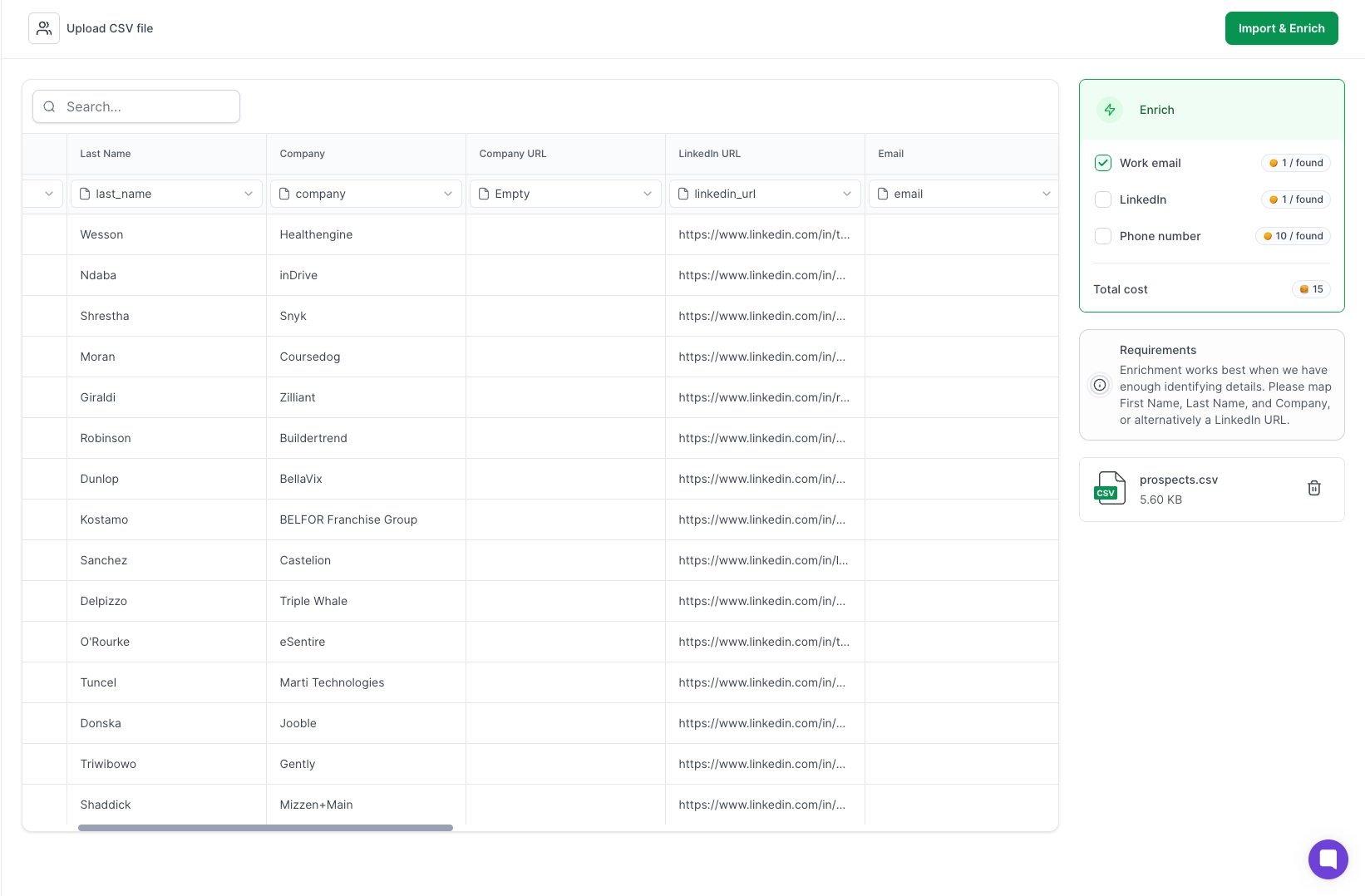
Warmforge monitors mailbox health, runs inbox placement tests, and tracks heat scores before a single email goes out.

Jeeva AI drafts start sounding templated fast without careful manual review of every message.
At volume, that manual review becomes the bottleneck.
Agent Frank inside Salesforge runs the entire SDR workflow without you reviewing every touchpoint.
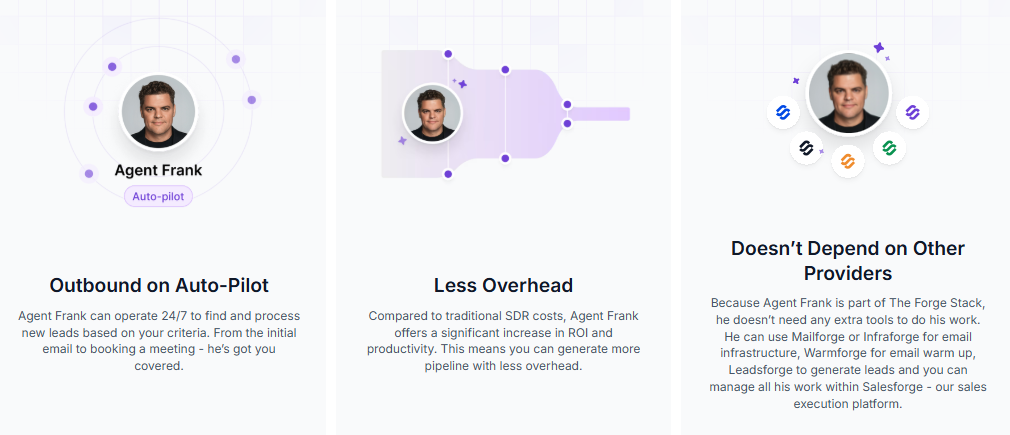
He finds prospects, writes outreach, sends emails and LinkedIn messages, follows up, handles replies, and books meetings based on your ICP and goals.
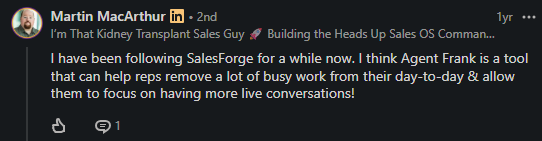
Your mailboxes, domains, DNS configuration, and deliverability sit outside the platform entirely.
Salesforge stack connects directly to Mailforge, Primeforge, and Infraforge so infrastructure, warmup, and outreach run from one system without you managing any of it separately.
And there is the Salesforge MCP server. You connect Salesforge to Claude and run your entire outbound workflow through natural language.
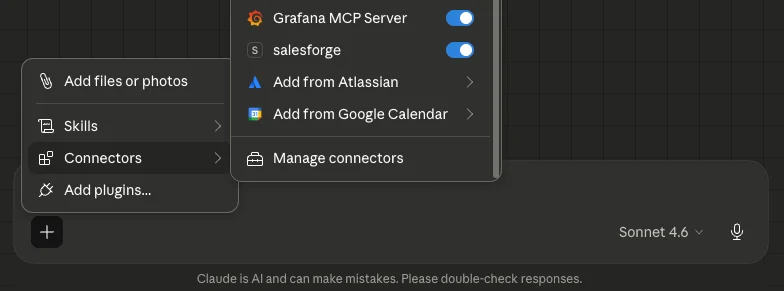
Find leads, build sequences, manage domains, and track performance without clicking through dashboards. Jeeva AI has nothing equivalent to this.

Jeeva AI delivers on the prospecting side. Finding leads, enriching contact data, and running basic sequences from one place works well for small teams tired of managing five separate tools.
The problems start when you push into outreach at volume.
As a user put it well: bad ICP inputs mean you just automate confusion faster. The same applies to the platform itself. Jeeva AI works well when your inputs are clean and your expectations match what it actually does.
If your outbound motion needs more than lead generation and basic sequencing, the gaps will cost you time you were trying to save.
Salesforge covers the full motion without the credit unpredictability, data accuracy gaps, or missing infrastructure layer.
Start your 14-day free trial on Salesforge.

.jpg)

.jpg)
