A cold email list decides most of what happens in a campaign. I have watched strong copy fail on a weak list, and average copy book meetings on a tight one.
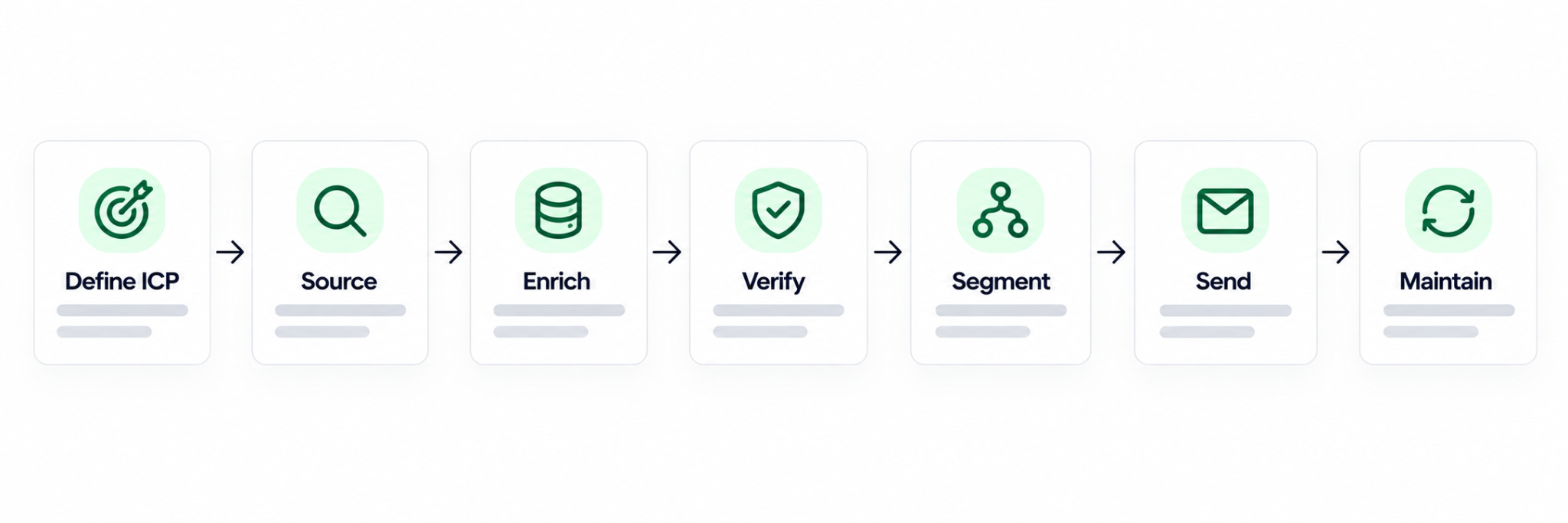
This guide walks through the full build in the order I follow it: ICP, sourcing, enrichment, verification, segmentation, sending, and maintenance.
I also cover the newer Leadsforge sourcing paths, including Signals and Local Companies Search, because they change where a list should start.
TL;DR
To build a cold email list, define your ICP, source contacts from a B2B database or buying signals, enrich and verify every email, segment by role and trigger, then load the list into a sending tool with warmed mailboxes.
In the Forge stack, Leadsforge sources and enriches, Salesforge validates and sends, and Warmforge warms the mailboxes. Your team can run it, or Agent Frank can.
What's in this blog
What a Cold Email List Is and What Each Record Needs
Define Your ICP Before You Pull a Single Contact
Choose the Sourcing Path That Fits Your ICP
Enrich and Verify Every Contact Before It Enters a Sequence
Segment the List So Each Group Gets Its Own Message
Load the List Into Salesforge and Set Up Sending
Maintain the List After You Launch
Common Cold Email List Mistakes
Final Verdict
FAQs
A cold email list is a set of verified business contacts who fit your buyer profile but have never heard from you.
Each record needs a full name, a verified work email, a job title, and a company name. Company size, industry, and location make personalization much easier later.
A cold email list is outbound. Nobody on it has opted in, which is why list quality matters more than list size.
A newsletter list works the other way around. Those subscribers asked to hear from you, so the expectations and the rules are different.
I start with 200 to 500 contacts for a first campaign. That is enough to read reply data without burning a whole market.
A tight list also keeps segmentation honest. If I cannot write a specific first line for a group, the group is too broad.
Pre-built lists save time, but the data is often stale. People change jobs, companies rebrand, and addresses go inactive.
The same list is also sold to many buyers. When ten companies email the same contacts, reply rates fall and spam complaints rise.
There is a compliance risk too. Data collected without a proper basis can create GDPR or CAN-SPAM exposure. I am not a lawyer, so check your markets with counsel.
Your ideal customer profile is the filter every later step depends on, so I write it down before opening any tool.
Without an ICP, you pull in contacts and most of them turn out irrelevant. With one, every sourcing path below becomes a faster, narrower search.
These describe the business: industry, employee count, location, funding stage, and the tools it already uses.
These describe the person: job title, seniority, department, and how long they have been in the role.
Newer hires often revisit tools early in a role, so tenure can be a useful filter for some products.
Look at the customers you already close. What industry, size, and buyer title do they share? That pattern is your first ICP draft.
If you have no customers yet, read competitor case studies. The companies they serve will overlap with yours.
I compress the ICP into a single sentence, such as: Heads of Sales at B2B SaaS companies with 50 to 200 employees in the US.
That sentence becomes the prompt for the first sourcing path in the next step.
Leadsforge searches a 500M+ B2B contact database, and each sourcing path suits a different starting point.
When I open Leadsforge, the starting screen offers four paths: Customer profile, Followers, Company lookalikes, and Signals. There is also an option to upload a CSV of companies or people.
The table below shows when I reach for each one. For the wider picture of AI in prospecting, I cover it in AI lead generation strategies.
Sourcing path
Best when
What I give it
What I get back
Customer profile (chat)
I can describe the ICP in a sentence
A plain-English description
A list of matching contacts
Company Lookalikes
I already close a certain type of account
Accounts I have won
Similar companies
Competitor Followers Search
A competitor has an audience I want
A competitor page
People who follow that page
Signals
Timing matters more than fit alone
A signal type and filters
Companies or people who just did something
Local Companies Search
I sell to local businesses
A location, radius, and business type
Businesses based on Google Maps data
CSV upload
I already have a list
A file of companies or people
My own list inside the same workflow
Chat-based lead discovery is the path I use most for a first list. I type the ICP sentence and Leadsforge returns a matching list.
There is no filter stacking and no boolean query to debug. If the first result is off, I rephrase the sentence and run it again.
Company Lookalikes starts from accounts you already close. Leadsforge surfaces similar companies based on firmographic and behavioral signals.
I use it when I have ten or more happy customers and want more companies that look like them.
Competitor Followers Search pulls the people following a competitor, which is their exact audience.
Followers are not all buyers, so I layer the ICP filters on top before extracting anything.
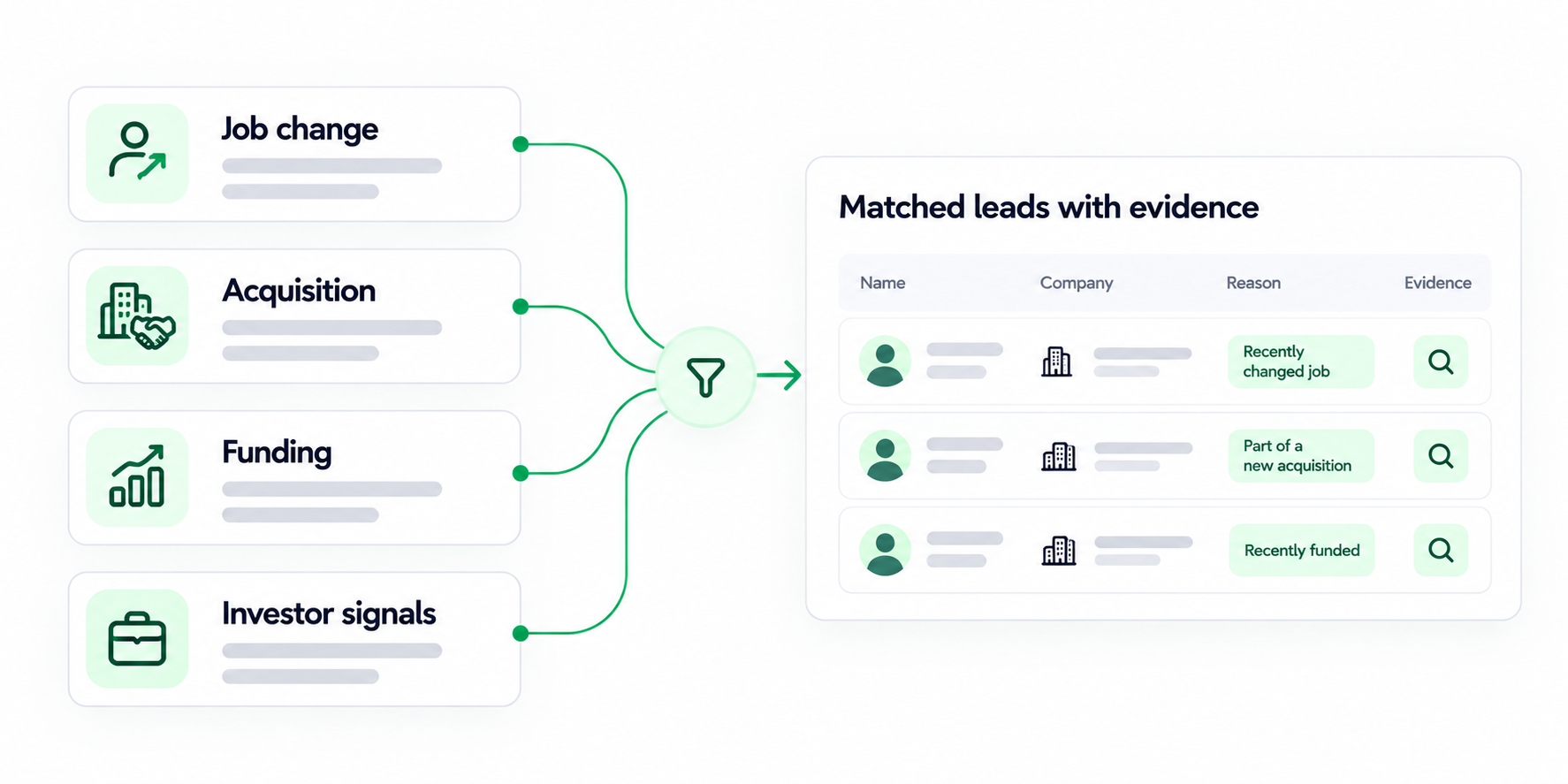
Signals is the path that changed my list building the most. Instead of searching only by ICP, I build around companies and people who recently did something meaningful.
That gives me prospects with stronger intent and better timing. Leadsforge offers four signal types, each with its own filters.
Signal type
Finds
Filters available
Job change
People who recently changed jobs
Signal period, contact location (countries), positions, seniorities, departments
Acquisition
Companies that were recently acquired
Signal period, company location (countries), categories, subcategories, employee count (min/max), founded year (min/max)
Funding
Companies that recently raised funding
Signal period, company location (countries), categories, subcategories, industries, funding round, funding amount (USD), employee count (min/max), founded year (min/max)
Investor
Companies and people actively making investments
Signal period, company location (countries), headquarters, type, ticket size (USD)
Here is the workflow, start to finish:
The signal period is where I spend the most thought. The presets run from the last 7 days to the last 365 days, and I can set a custom date range.
For job changes, I keep the window short so the move is still fresh. For funding, I widen it a little, since budget and hiring plans take time to form.
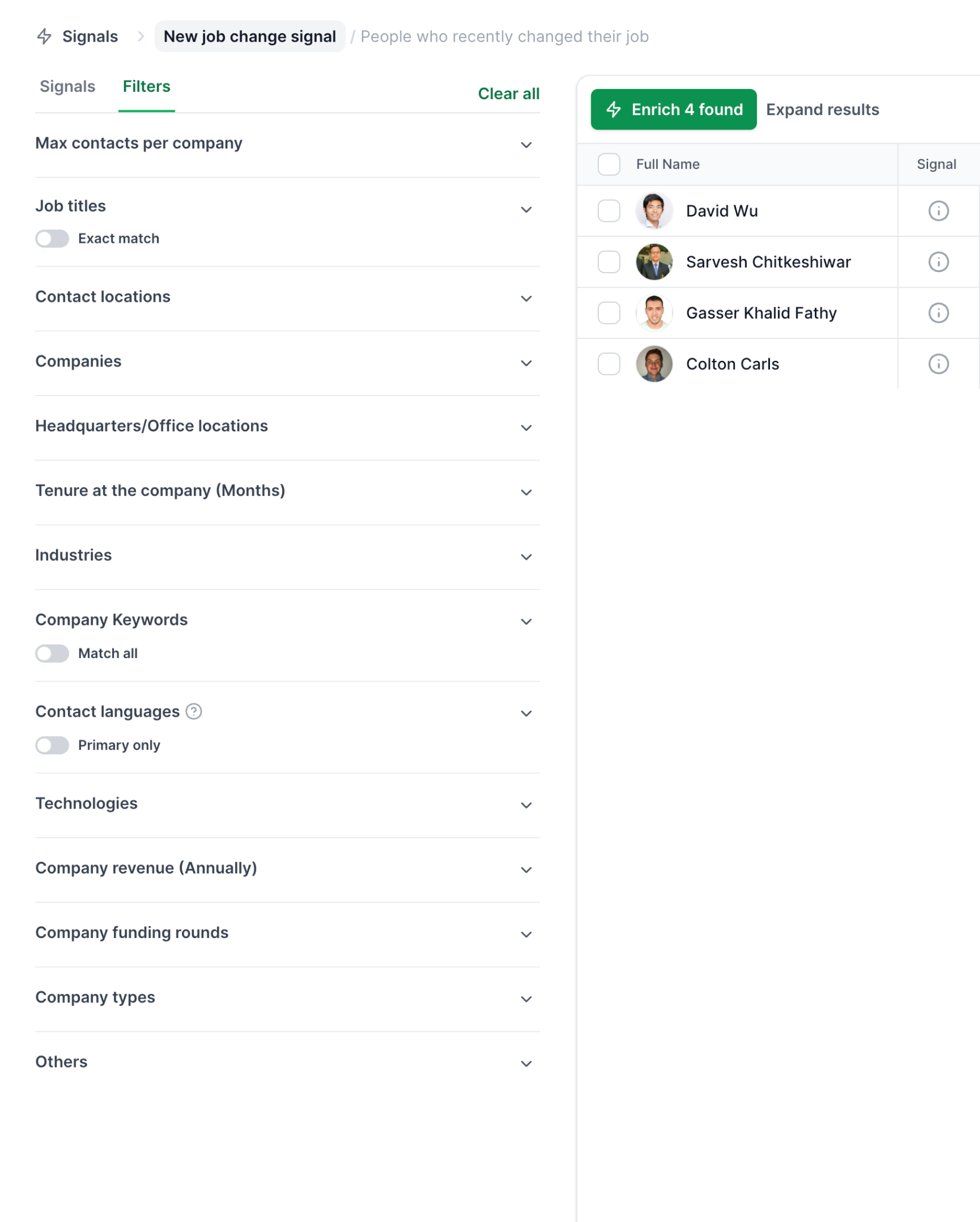
Company signals also need people to email. Leadsforge first identifies the matching companies, matches them against its lead database, and then surfaces the relevant employees.
Every extracted company or contact carries evidence. Opening the Details view shows why that record matched the signal, which I check before I write a single message.
Credits are charged at extraction, based on how many companies or contacts I select. The estimate before extraction lets me size the spend first.
Local Companies Search finds businesses by location and type, using data from Google Maps. It suits agencies and vendors that sell to local firms.
I set a location, define a search radius, and search by business type, such as dentists, restaurants, marketing agencies, or law firms.
From there I can extract the businesses or enrich them further to find the right contacts. Lists can be exported right after extraction or after enrichment.
Sometimes the ICP lives on LinkedIn. The Salesforge Chrome Extension is a LinkedIn email finder that pulls verified emails from profiles and searches.
It connects to your Leadsforge account and draws on the same 500M+ contact database. The extension is free to install, new users get 100 free credits on signup, and further lookups use Leadsforge credits.
For 20 to 50 high-value accounts, Sales Navigator and a spreadsheet still work. It is slow, and it does not give you emails.
If you go this route, my breakdown of how to find company email addresses compares the methods by hit rate.
Source your first cold email list in Leadsforge
Describe your ICP or pick a signal, check the estimated matches, and review the evidence before you send. New accounts get 100 free credits.
Button: Get 100 free credits
Sourcing gives you names, and enrichment plus verification turn them into addresses that are safe to send to.
Waterfall enrichment queries several data providers in sequence for each contact. It fills in emails, phone numbers, and other fields at the highest coverage and confidence available.
The benefit is that I am not stuck with one provider's hit rate. If the first source misses, the next one tries.
In Leadsforge, I run enrichment from the Enrich button after extraction. Enriched leads land in the Enriched table, ready to move on.
A verified email means the address exists and can receive mail. The edge cases are where bounces hide.
For a quick check of one address, the free email verifier returns a 0 to 100 score with a breakdown of each signal. The free version covers up to ten emails a month.
For a full list, Salesforge has built-in email validation that checks every contact before send. Bounce Shield then blocks sends to addresses likely to bounce, which protects sender reputation before it takes damage.
Prospects use different mailbox providers, and that affects placement. Salesforge supports ESP matching, which pairs sender and recipient providers: Google to Google, Microsoft to Microsoft.
To see what your list looks like, I run it through the ESP checker. It identifies the provider behind each address, so I know how many mailboxes of each type I need.
Gmail and Yahoo addresses do not belong on a B2B list. They signal loose targeting and can raise spam complaints.
Segmentation splits one list into smaller groups, so each group reads a message written for its situation.
Five hundred contacts should not all get the same email. I split the list until I can write one specific first line per group.
A VP of Sales cares about pipeline and revenue. A sales operations manager cares about workflow and tool sprawl. Same company, different message.
If you sourced with Signals, the trigger is your best opener. A recent job change, a funding round, and an acquisition each call for a different first line.
The evidence in the Details view gives me the specific fact to reference, which keeps the message from sounding generic.
Local language lifts relevance. Salesforge supports AI personalization across 21+ languages, so localized campaigns do not need a separate copywriter per region.
AI variables pull prospect-specific details like company news, LinkedIn activity, and industry context. Multi-language sequences are a Growth plan feature.
I schedule sends for the prospect's morning, not mine. Once the segments are set, writing the email is the next job, and I cover it in my guide to a sales cold email.
Once the list is clean, Salesforge turns it into sequences, with infrastructure and warmup handled inside the same stack.
Any piece of cold email software can send. What decides results in 2026 is deliverability and reply handling, so I set those up before launch.
Leadsforge feeds Salesforge directly. Lists move from discovery to campaign in the same environment, with no export and no import.
Salesforge connects to three infrastructure options under one login. You can move between them as scale and budget shift, without migrating.
My advice is to run two or more providers. Then you always have a matching mailbox for the prospect's inbox. Primeforge pairs well with Mailforge or Infraforge for that reason.
The full range is on the email infrastructure page.
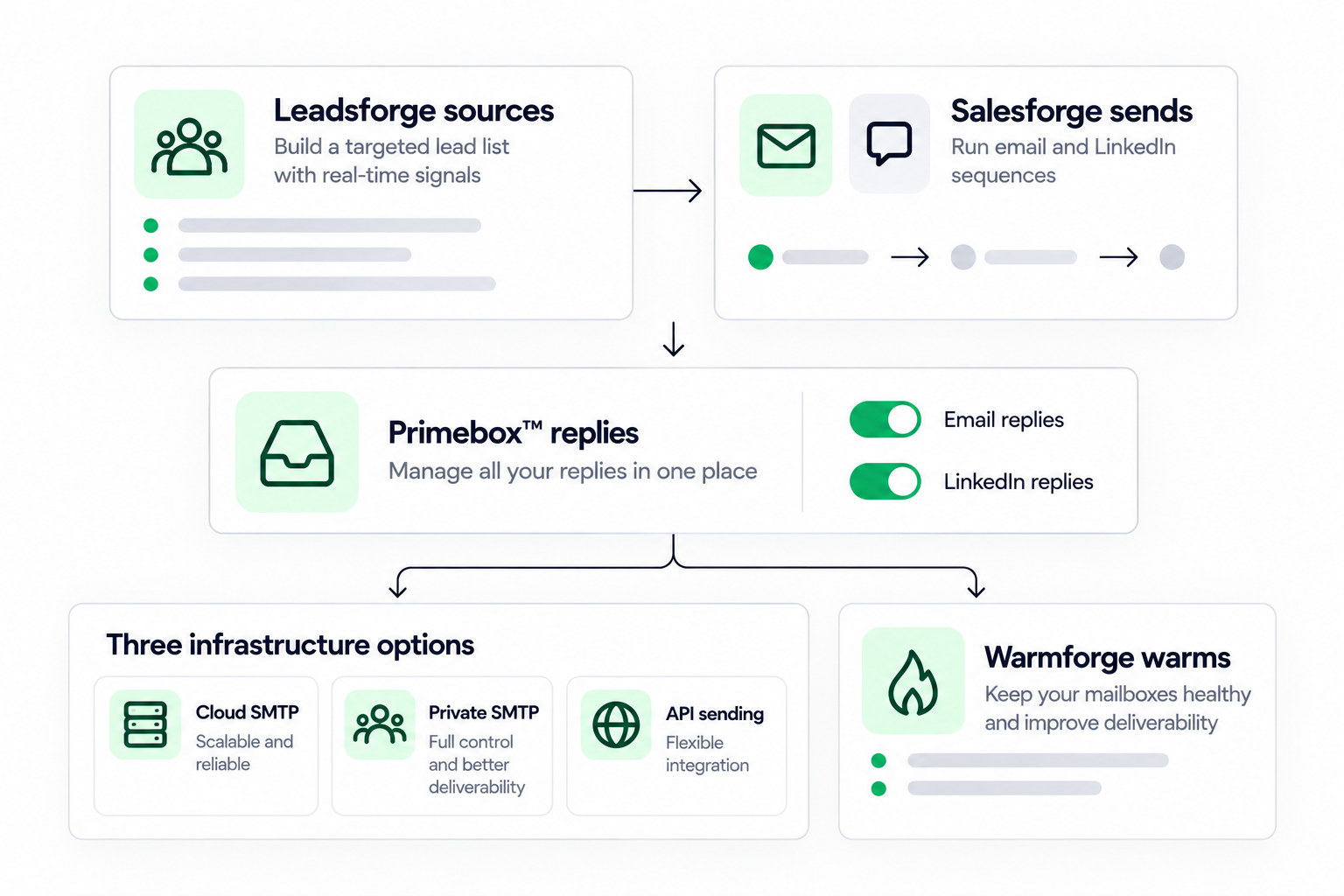
A clean list does not fix a cold mailbox. I run a Warmforge warmup for about 14 days before any campaign goes live.
Every connected mailbox is warmed free with unlimited slots on Salesforge. The pool uses aged Google Workspace and Microsoft 365 mailboxes, and warmup runs across multiple languages.
I watch the Heat Score™ for each mailbox and scale volume once it reaches 85 or higher. Inbox Placement Tests show where emails land, and Health Checks monitor DNS, MX, and blacklist status. The broader email warm-up page explains the process.
Sequences in Salesforge combine email and LinkedIn with real if/then logic. If a connection request is accepted, a LinkedIn message follows. If not, the sequence falls back to email.
That is multichannel outreach in one sequence rather than two campaigns stitched together. LinkedIn steps include connection requests, messages, InMails, post likes, follows, and withdraw requests.
For deliverability, emails ship as text-only by default, and sender rotation spreads volume across mailboxes and domains. Follow-ups run through automated follow-ups so no prospect depends on my memory.
A/B testing on subject lines and body variants is a Growth plan feature. For the wider checklist, see my guide to cold email best practices.
Primebox™ collects every reply across mailboxes and channels in one inbox, LinkedIn included.
It has two modes. Co-Pilot drafts replies for me to approve before sending. Auto-Pilot lets AI handle replies end to end.
Agent Frank is an AI SDR who runs this whole process. He prospects from the Leadsforge database, enriches contacts, and writes personalized email and LinkedIn messages.
He also runs the sequences, handles follow-ups, manages replies through Primebox™, and books meetings on the rep's calendar, 24/7. The base plan handles up to 1,000 active contacts.
I see Agent Frank as a teammate who augments a sales team, not a replacement. He is built for B2B teams selling to startups, SMBs, and mid-market buyers at scale.
He is not the right fit if you sell six or seven-figure deals to a few bespoke accounts. In that case, a hand-built list and a human SDR make more sense.
The same stack runs three ways: your team operates it, Agent Frank operates it, or a Forge Expert agency operates it.
Salesforge integrates natively with CRMs such as HubSpot, Pipedrive, HighLevel, Attio, and Folk, plus data tools like Clay and automation tools like Slack, Zapier, Make, and webhooks.
Open API access is on the Growth plan. The MCP CLI lets Claude, Cursor, or your own agents create sequences and manage contacts directly.
Pro includes unlimited mailboxes and one LinkedIn account. Growth adds unlimited LinkedIn accounts and users, A/B testing, ESP matching, multi-language sequences, and API access. Current rates are on the pricing page, and there is a 14-day free trial with no credit card required.
See Agent Frank work a list like this
Book a demo to watch him prospect, write, follow up, and book meetings while you focus on closing.
Button: Book a demo for Agent Frank
A cold email list decays over time, so maintenance keeps bounce rates and reputation healthy between campaigns.
B2B contact data decays at roughly 2% to 3% a month, from job changes, closures, and deactivated mailboxes. A list built six months ago can have lost a noticeable share of valid contacts.
I re-verify before every new campaign, and always for a list that has sat unused for 90 days or more.
A hard bounce means the address does not exist. I remove it the moment it appears and keep a suppression list for anyone who unsubscribed or complained.
Signal lists go stale fastest. I rerun the same signal search with a short period, such as the last 7 or 14 days, so each run adds only new triggers.
Salesforge tracks open, reply, positive reply, and meeting rates per campaign. If numbers drop across the board, the cause may be deliverability rather than the list.
I check the Heat Score™ and run an Inbox Placement Test first. If a mailbox slipped below 85, I give it a few days of warmup before reloading it.
If a list has been through two or three full sequences with no engagement, I retire it. Emailing silent contacts drags down domain reputation.
These are the mistakes I see most often, and each one is cheaper to fix before the first send than after.
All marketing managers in the US is not a list, it is a spray. Narrow the ICP until the list feels almost too small.
A 3% bounce rate on 500 daily sends means 15 bounces a day. That is enough to damage reputation within a week.
A generic message flattens reply rates. Thirty minutes of segmentation is some of the cheapest lift in outbound.
A verified list sent from an unwarmed mailbox still lands in spam. Warm first, then load the list.
A good fit with bad timing gets ignored. Signals help here, because they point to prospects who just changed something.
The list is the foundation, and the stack you build it with decides how much of the work you do by hand.
You can build a cold email list manually with Sales Navigator, a spreadsheet, and a verifier. It works for a few dozen accounts and it is slow after that.
Most teams end up stitching together a database, a verifier, a warmup tool, a sender, and an inbox. Each handoff adds a CSV and a chance for errors.
The path I now prefer runs inside the Forge stack. Leadsforge sources and enriches, Salesforge validates and sends, and Warmforge warms every mailbox for free.
Mailforge, Infraforge, and Primeforge sit under one login, Primebox™ unifies every reply, and every Forge product exposes an MCP server for agent workflows. The whole thing can be run by your team, by Agent Frank, or by a Forge Expert agency.
I have not seen another setup that offers infrastructure, deliverability, lead finding, multichannel outreach, and an AI SDR as one integrated stack.
If your list is tiny, or your deals are few and bespoke, you may not need all of it. For everyone else, start with the ICP sentence and a small, verified first list.
CTA 3
Send your first campaign to a clean list
Start a 14-day Salesforge free trial. No credit card required.
Button: Start your free trial
These are the questions I get asked most about building a cold email list.
1. What is a cold email list?
A cold email list is a set of verified business contacts who fit your ideal customer profile but have never interacted with you. Each record needs a name, a verified work email, a job title, and a company. Nobody on the list has opted in, so targeting and verification matter more than size.
2. How do I build a cold email list from scratch?
Define your ICP, source contacts from a B2B database or buying signals, enrich missing fields, verify every email, segment by role and trigger, then load the list into a sending tool with warmed mailboxes. In the Forge stack, Leadsforge handles sourcing and enrichment, and Salesforge handles validation and sending.
3. Can I build a cold email list for free?
Yes, on a small scale. LinkedIn search can identify prospects by title and company, and the Leadsforge Chrome Extension is free to install with 100 free credits on signup. The free Salesforge email verifier checks up to ten addresses a month. Larger lists need paid credits or a trial.
4. Is it legal to buy a cold email list?
Buying a list is not illegal in most countries, but using one carries risk. If the data was collected without a compliant basis, you can run into GDPR or CAN-SPAM problems. Purchased lists are also stale and shared across buyers. I am not a lawyer, so check the rules for your markets with counsel.
5. How many contacts should a cold email list have?
There is no fixed number. I start with 200 to 500 well-targeted, verified contacts for a first campaign. That is enough to read reply data without burning a whole market. A tight list with strong ICP fit beats a large, loosely targeted one.
6. How often should I clean a cold email list?
Before every new campaign. B2B contact data decays at roughly 2% to 3% a month, so a list left idle for 90 days can lose a meaningful share of valid addresses. Re-verify, remove hard bounces, and retire contacts who stay silent after two or three full sequences.
7. What are buying signals and how do I use them to build a list?
Buying signals are real-world events that suggest a prospect may be in a buying window, such as a job change, a funding round, an acquisition, or new investments. Leadsforge Signals lets you pick a signal type, set filters like signal period and location, extract matches with credits, and review the evidence for each match.
8. Do I need to warm up mailboxes before sending to a new list?
Yes. A clean list does not fix a cold mailbox. New or idle mailboxes have no sender reputation, so I warm them for about 14 days and wait for a Heat Score™ of 85 or higher. Warmforge warmup is included free with unlimited slots on every Salesforge plan.
.png)