

Personalized Outbound Strategy
Get The Right Outbound Strategy In Minutes
Enter your email to get a custom plan & stack recommendation for your business
It's being carefully crafted by AI
Please check your mailbox in 5 minutes
If you need 10 LinkedIn accounts for outbound, Outzeach will rent them to you. At its cheapest tier, that is $750 every month before you pay for the LinkedIn automation tool you plan to connect.
What are you getting for that money? Outzeach says its accounts are at least 24 months old, NFC passport-verified, manually warmed, and supplied with a dedicated static residential proxy and a preconfigured antidetect browser profile.
Prices range from $75 per month for an account with up to 50 connections to $120 for one with 200+ connections.
The part that needs more scrutiny is safety. Outzeach promotes these accounts as infrastructure for scaling LinkedIn outreach, but its own material also includes a 30-day replacement policy for accounts that get restricted.
More importantly, there is not enough independent customer feedback yet to tell us how often restrictions happen or how long these rented accounts reliably last in real outreach campaigns.
That is what I wanted to understand in this Outzeach review, whether the extra accounts, proxies, and browser setup genuinely make scaling LinkedIn outreach easier, or whether you are simply adding another expensive and uncertain layer to your outbound stack.
When you rent from Outzeach, you are not starting with a fresh LinkedIn profile. Outzeach gives you an account that it says is at least 24 months old, NFC passport-verified, and manually warmed, along with the proxy and browser setup needed to access it.
Here is exactly what is and is not included with the standard rental:
Once you receive the account, running the outreach is up to you. You can send messages manually or connect the account to an automation tool. Outzeach lists HeyReach, Lemlist, Expandi, and Dripify as compatible options.
If you also need email and LinkedIn outreach in the same campaign, Salesforge can handle both through compatible LinkedIn accounts you connect. It supports LinkedIn connection requests, messages, follow-ups, and email steps in multichannel sequences. Outzeach simply provides the additional LinkedIn account.
Outzeach also offers a done-for-you campaign management service, but it is not included with the standard rental. Plans start at $2,495 per month, with the Starter plan covering one sending account and one ICP. Outzeach handles the ICP list, copy, sequences, replies, weekly reports, and monthly optimization.
In short, renting an account gives you the account, proxy, browser profile, warmup, and replacement coverage, but you manage the campaign yourself. If you want Outzeach to manage it, pricing starts at $2,495 per month for one sending account.
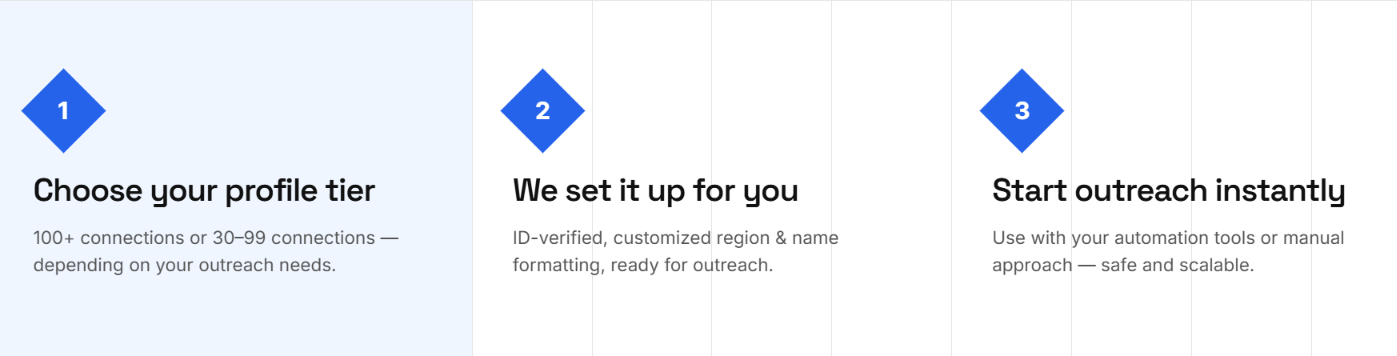
Outzeach does most of the account setup before you start using the profile. You choose the type of account you need, Outzeach prepares it, and then you use it manually or connect it to your outreach software. Here is how the process works:
You choose an account based on its existing number of LinkedIn connections. You also tell Outzeach which region you need, such as US East, US West, EMEA, or APAC, and your expected weekly outreach volume.
Outzeach says its rental accounts are at least 24 months old and NFC passport-verified by the real account owner. They also come with manual warmup history rather than being handed over as newly created profiles.
Outzeach then pairs the account with a dedicated static residential proxy and prepares an Adspower or GoLogin antidetect browser profile. The proxy is matched to the account's region and is not shared with another account.
Outzeach says you receive the account credentials, proxy details, and preconfigured antidetect profile within 24 hours. You then follow its day-one setup instructions before using the account.
There are some restrictions on what you can change. Outzeach says you cannot change the first or last name, and changing the profile photo is prohibited because it may lead to an account restriction.
After setup, you can use the LinkedIn account manually or connect it to an automation platform. Outzeach specifically lists HeyReach, Lemlist, Expandi, and Dripify as compatible tools.
This is the point where the rented account becomes part of your existing outbound setup. Outzeach provides the LinkedIn profile, proxy, and browser environment. Your outreach tool handles the actual campaign.
Outzeach is built to reduce some of the risks that come with using rented LinkedIn accounts. But I would not call it risk-free. LinkedIn accounts can still be restricted, and Outzeach's own replacement policy accounts for that possibility.
Here’s how Outzeach tries to reduce account risk:
Outzeach does not rely on one safety measure. It combines several things around each rented account:
These measures give you a more prepared account setup, but they should not be read as a guarantee against LinkedIn restrictions.
Yes. The clearest evidence is Outzeach's own replacement policy. If an account is restricted during the guarantee period and you followed its usage rules, Outzeach says it will recover or replace the account within 24 hours at no extra cost.
Outzeach also warns that certain changes can cause problems. For example, changing the profile photo is prohibited because it may lead to a restriction, and you cannot change the account owner's first or last name.
So you should go into the rental knowing that a restriction is still possible even when you follow Outzeach's setup.
No. Outzeach can give you the account and supporting setup, but it cannot guarantee what LinkedIn will do with that account.
I would also be careful with Outzeach's published ban-rate numbers. Its homepage shows a 0.01% ban rate, while its rental page reports a 1.4% monthly ban rate for verified Outzeach accounts. The site does not explain the difference, and both numbers are company-reported rather than independently verified.
That is why I would view Outzeach as a way to get a more controlled setup for running LinkedIn outreach, not as a way to make automation completely safe.
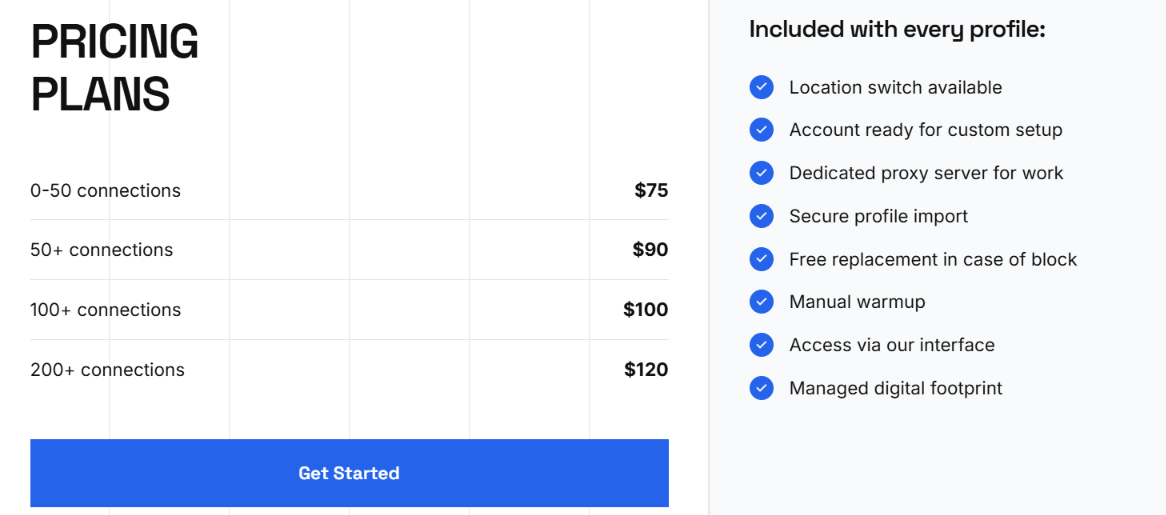
Outzeach charges for account rentals based on how many LinkedIn connections the profile already has.
Agencies and higher-volume outreach
Every rental includes the LinkedIn account, a dedicated static residential proxy, a preconfigured Adspower or GoLogin profile, manual warmup history, region selection, and a 30-day replacement guarantee with a 24-hour SLA. There are no setup fees, but the rental does not cover the rest of your outbound stack.
You still need to pay separately for things such as:
Sales Navigator is also not included with the standard rental. If you need it, Outzeach currently offers it separately for $35 per month.
Outzeach also sells a few other LinkedIn add-ons:
If you do not want to manage the outreach yourself, Outzeach also offers a separate done-for-you service:
The done-for-you service also includes ICP list building, campaign copy, sequences, reply handling, reporting, and monthly optimization.
One more thing to keep in mind is that Outzeach does not offer volume discounts on standard rentals. If one account costs $100 per month, 10 accounts cost $1,000 per month.
So the standard rental is fairly simple to price. You pay $75 to $120 per LinkedIn account each month, then add the tools you need to actually run the campaign. If you want Outzeach to manage the outreach for you as well, pricing starts at $2,495 per month.
Outzeach gives you the LinkedIn account, dedicated residential proxy, and preconfigured browser profile. But with the standard rental, the actual outreach is still your responsibility.
Once the account is ready, this is where Salesforge can help you control how it is used for outreach.
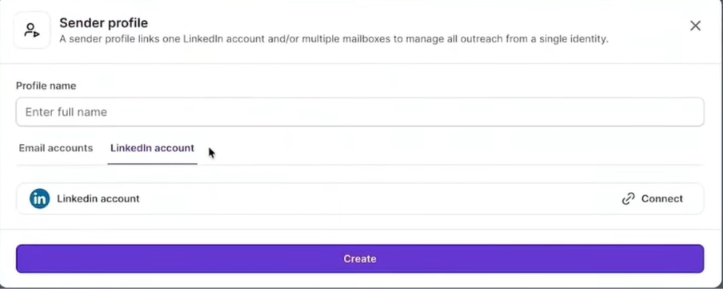
After your LinkedIn accounts are ready, you can connect them as sender profiles in Salesforge.
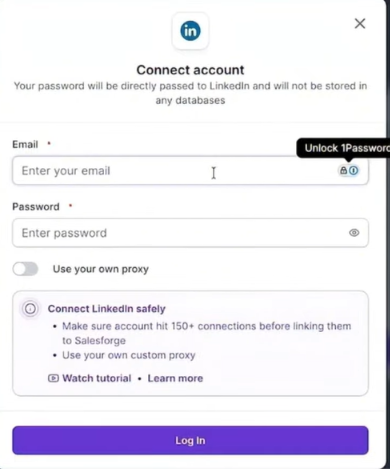
Salesforge supports unlimited LinkedIn senders, which is useful when you are running outreach across several accounts.
Instead of simply sending connection requests at scale, you can control the sequence of actions. For example, a prospect can receive a profile view, then a connection request, followed by a LinkedIn message and an email.
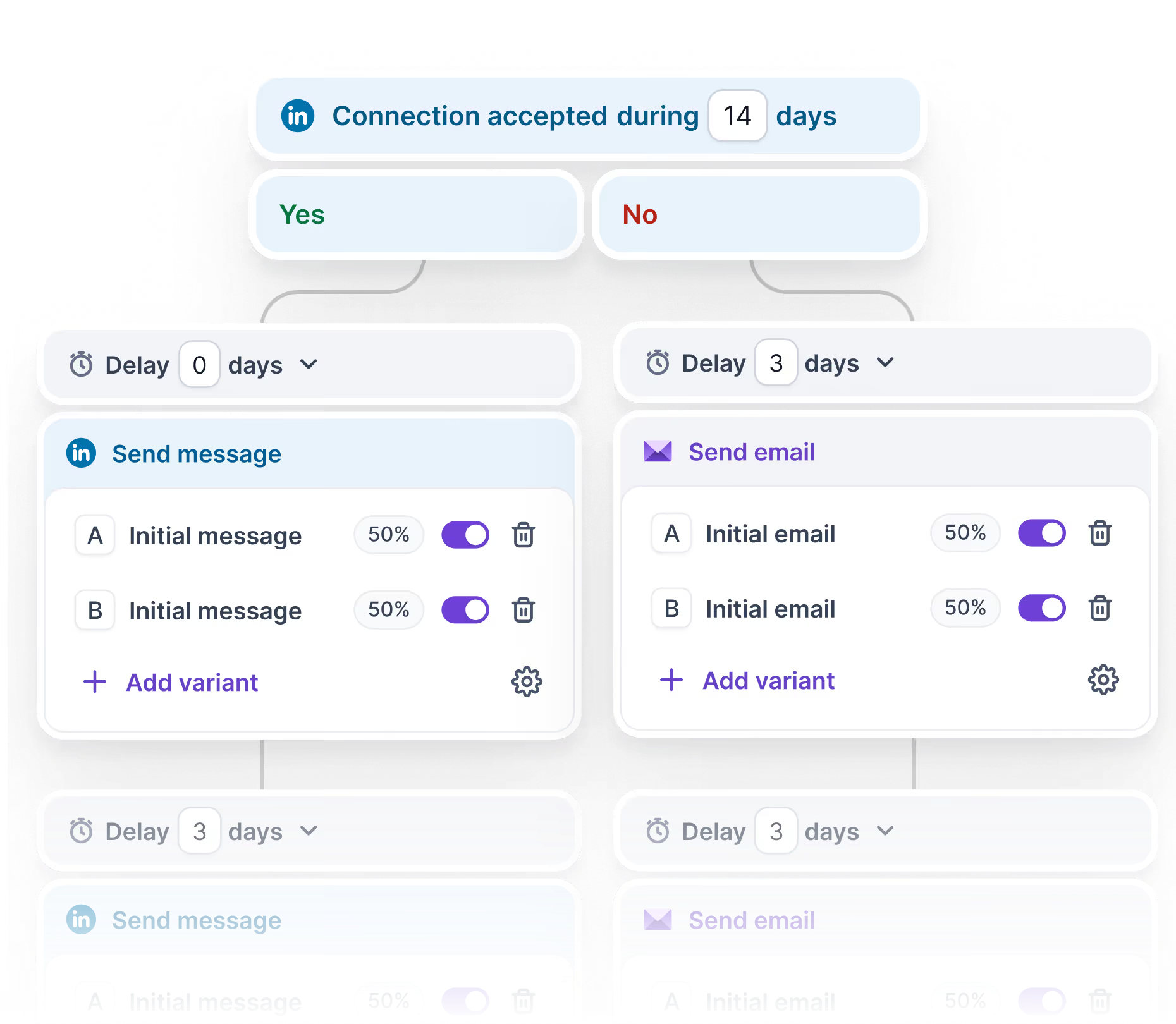
Salesforge supports connection requests, messages, InMails, profile views, follows, post likes, and email in multichannel sequences.
Salesforge caps automation at 30 actions per type every 24 hours, including 30 connection requests, 30 messages, 30 InMails, 30 profile views, 30 follows, and 30 post likes.
It also recommends running only one automation tool per LinkedIn account to avoid conflicting activity.
Outzeach provides a dedicated static residential proxy for each rented account. On the outreach side, Salesforge also supports custom proxy settings if you want more control over the IP address and location used for a connected LinkedIn account.
When prospects reply, Salesforge brings your LinkedIn and email conversations into Primebox, where you can manage responses and follow-ups together.
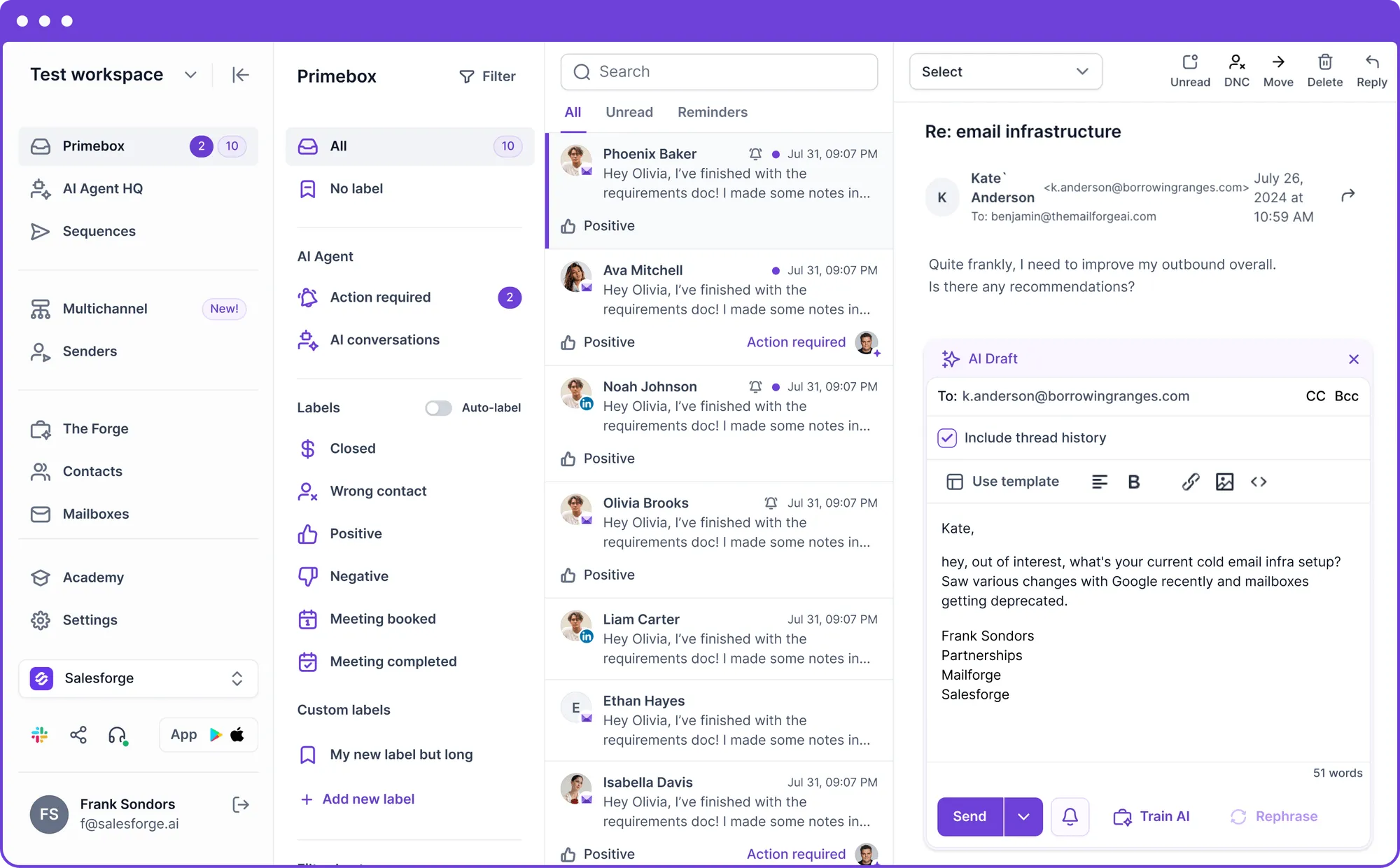
So the roles are clear. Outzeach provides the LinkedIn account and its supporting infrastructure, while Salesforge handles the outreach through the LinkedIn accounts you connect.
Salesforge cannot guarantee that an account will never be restricted, but its action limits, single-tool guidance, and other account controls give you more control over how your LinkedIn outreach is automated.
Outzeach is mainly for teams that need extra LinkedIn accounts for outbound and do not want to set up the account infrastructure themselves.
Overall, Outzeach is most useful when access to additional LinkedIn accounts is what is limiting your outreach.
Enter your email to get a custom plan & stack recommendation for your business
Please check your mailbox in 5 minutes

Outzeach is worth considering if you need more LinkedIn accounts for outbound but don’t want to source and prepare them yourself.
The biggest concern is reliability. Account restrictions can still happen, and there aren’t enough independent reviews to show how well these accounts hold up over time.
You’ll also need a way to contact prospects. That’s where Salesforge helps. Connect your LinkedIn accounts to run connection requests, messages, InMails, and email follow-ups in the same sequence, with limits to keep automated activity under control.
Once your accounts are ready, use Salesforge to build sequences, reach prospects through LinkedIn and email, and manage replies in one place.
.jpg)

.jpg)

.jpg)