
Personalized Outbound Strategy
Get The Right Outbound Strategy In Minutes
Enter your email to get a custom plan & stack recommendation for your business
It's being carefully crafted by AI
Please check your mailbox in 5 minutes
I used Outscraper to pull local business leads from Google Maps and see how useful the data was for real outreach. Scraping the listings was easy, but getting businesses from Google Maps was only part of the job. I still needed enough contact info to turn those results into prospects I could actually reach.
Similar concerns also come up in Outscraper reviews and user discussions:
That matters because Outscraper uses pay-as-you-go pricing. The Google Maps Scraper is free for the first 500 businesses, but email enrichment and other services can increase the final cost as your list grows.
Outscraper can save you the hassle of manually collecting local businesses from Google Maps. But the real question is how useful that scraped data actually is when you are ready to build a lead list.
In this Outscraper review, I will walk you through what I found while testing its Google Maps Scraper, what real users are saying, and whether it is worth paying for in 2026.
My take: Outscraper does a solid job of turning Google Maps searches into large business lists. But if you plan to use those businesses for outreach, it is worth looking beyond the scraping price and thinking about how much enrichment you will need before the list is ready to use.
Outscraper offers more than basic Google Maps scraping. You can search for businesses by category and location, then refine the results with advanced filters and export them to CSV, Excel, Parquet, or JSON.
It also includes contact enrichment, so you can add emails and other contact details to the businesses you find. The difference is even clearer when you compare it with Leadsforge.
Both tools can find local businesses, but they serve slightly different purposes. Outscraper is more about pulling public data, while Leadsforge is designed to turn that search into an enriched lead list for outreach.
Outscraper is a good fit when Google Maps data is what you need most. You can pick a location and business category, then pull matching listings without having to collect them manually.
Leadsforge goes a step further. Its Local Companies search also lets you choose a location, business type, and proximity radius, then find the right contacts and enrich them with verified contact data.
Leadsforge also gives you more ways to find prospects. You can describe your ICP in plain language, find lookalike companies, search competitor followers, and use business signals. Outscraper is the better choice if your main goal is to extract public data at scale. Leadsforge makes more sense if you want to find local businesses and turn them into enriched leads for outreach.
The review data is positive overall. But the same concerns keep coming up around cost at scale and how much of the scraped data is actually usable.
Outscraper has a 4.5/5 rating from 290 Trustpilot reviews. The rating is strong, but the breakdown is worth looking at. 88% of reviews are 5-star while 8% are 1-star.
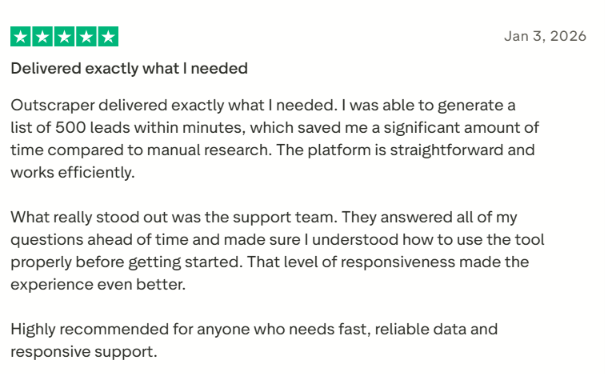
The reviews point to two very different experiences. Users who are happy with Outscraper often mention fast scraping, responsive support and useful Google Maps data. One reviewer said they generated 500 leads within minutes. Another reported roughly 85% contact-data accuracy from their own testing.
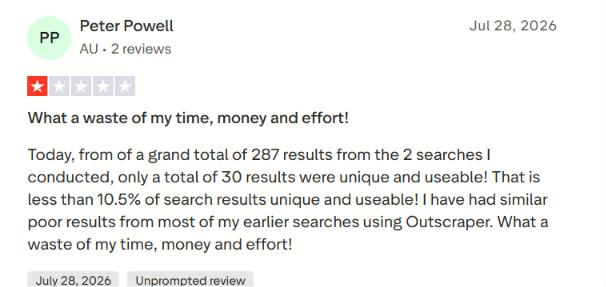
But the negative reviews raise a more important issue for lead generation that is how much of the scraped data is actually usable. One reviewer said two searches returned 287 results but only 30 were unique and usable. That is less than 10.5% in that user's specific test.
That makes the Trustpilot score useful but not enough on its own. Outscraper can pull a lot of data quickly. The bigger question is how much cleaning and enrichment your list needs before you can actually use it for outreach.
Outscraper has a 4.9/5 rating from 4 G2 reviews. Users mainly praise the easy setup, data-rich reports and API access.

Alt text: Outscraper G2 review about user-friendly interface
One reviewer also pointed to the platform’s data accuracy across Google Maps and other sources, while another appreciated the contact enrichment and straightforward pricing.
The feedback is still limited because the sample is small. One reviewer mentioned that the API can feel slow at times, and others wanted support for more scraping sources. Overall, the G2 reviews are encouraging, but four reviews aren’t enough to draw a firm conclusion on their own.
The Reddit discussions are more focused on pricing and workflow. One user said Outscraper worked well for them but they were looking for a cheaper option for high-volume scraping. Another user said advanced filters helped reduce wasted spend by limiting the scrape to the data they actually needed.
A separate cold email user said the base scraping price looked low at first. But once they added email enrichment and verification, the total cost for 10,000 leads came out much higher than expected.
That does not mean Outscraper is expensive for every use case. It shows why you need to calculate the full cost of scraping, enrichment, and verification rather than looking only at the Google Maps scrape price.
Users generally like Outscraper for fast Google Maps extraction and responsive support. The two areas I would watch are data quality on individual searches and the total cost once enrichment gets added.
I tried Outscraper with a simple local prospecting test. My goal was to build a list of businesses in one city and see how much useful contact information I could gather without doing all the research by hand.
I split the test into two parts, first, finding the right businesses on Google Maps; then enriching those businesses with contact details.
I started by typing in the type of business and the location I wanted to target. Outscraper lets you search by category along with a city, ZIP code, and country.
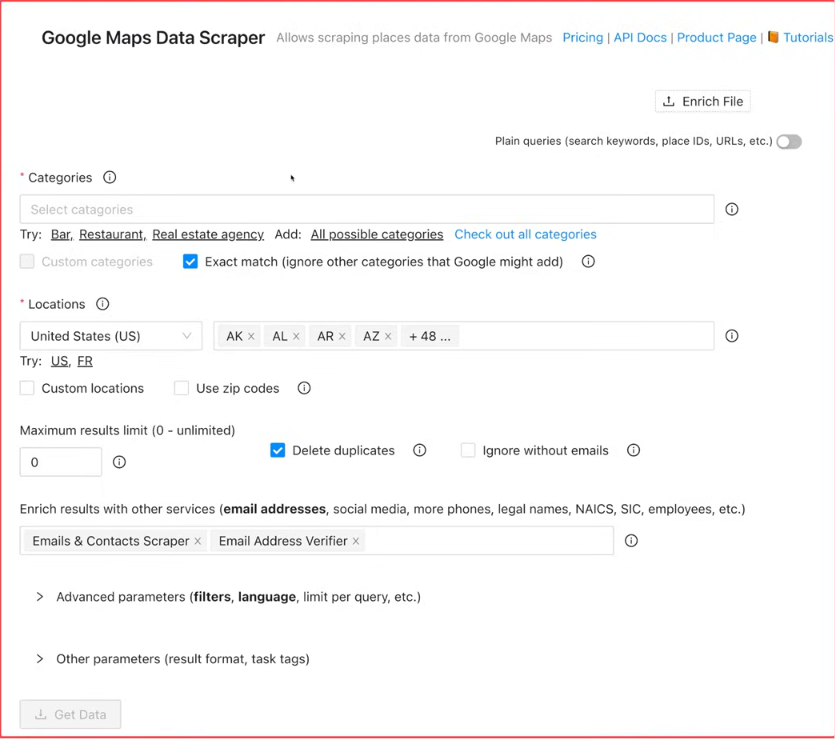
For example, I could search for dentists in Austin or roofing contractors in Dallas. This setup is helpful when you already know the local market you want to reach. Instead of gathering businesses manually from Google Maps, I could set the search parameters and let Outscraper build the list.
Outscraper also offers advanced filters once you move beyond the free tier. That gives you more control when you need a more specific list instead of every business that matches the initial search.
Once I had my search set up, the next thing I wanted to know was what data I could actually get. Outscraper can pull public Google Maps business information like the business name, website, and phone number, and its Google Maps dataset can also include other available details from the listing.
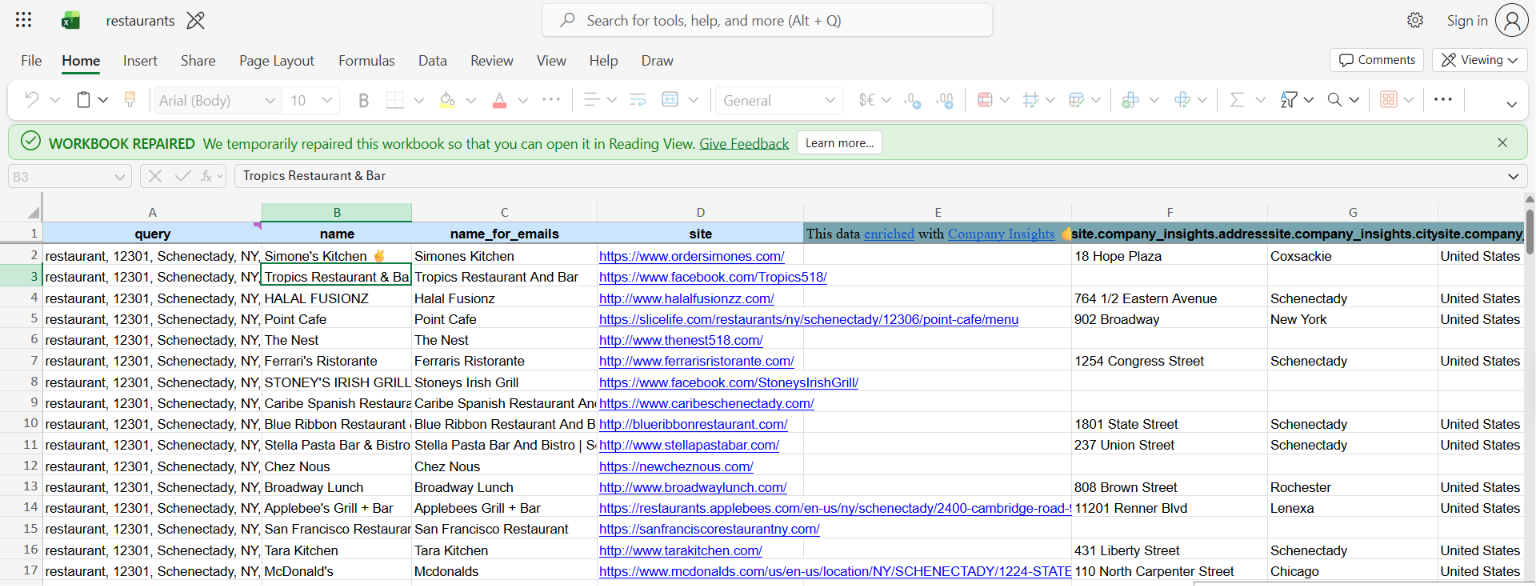
This is where the scraper really helps with local prospecting. Instead of clicking through businesses one by one on Google Maps, you get the information back in a structured dataset. That said, Google Maps data is just the starting point. A business website and phone number might be enough for research, but for cold outreach, I would usually want email and contact details too.
This is where Outscraper's enrichment really started to matter for my use case. Outscraper can enrich Google Maps results with emails, phone numbers, social media links, contact information, and company insights.
That meant I could start with a list of businesses from Google Maps and add more contact data without having to rebuild the list somewhere else. I would still be selective about which businesses I enrich. Enrichment adds another step to the workflow, so there is little reason to enrich businesses that do not match the audience I want to reach.
As your business lists get larger, filtering matters even more. Outscraper’s paid Google Maps Scraper tiers include advanced filtering, and it also offers an Exact Match category option to keep results closer to the business category you searched for.
I’d use these controls before working with the final list. A smaller list of businesses that actually match my target market is more useful than a bigger export full of companies I’d just remove later.
It also helps before enrichment. I’d rather narrow the business list first and only add contact data to the companies I might actually reach out to.
Once the list is ready, you can export the data from Outscraper instead of keeping it in the platform. The Google Maps Scraper supports CSV, Excel, Parquet, and JSON exports. For most prospecting workflows, CSV or Excel will usually be the easiest choice. JSON and Parquet make more sense when the data needs to move into a technical workflow or another system.
In short, the Google Maps Scraper follows a straightforward process: define the local search, collect the business data, filter the results, add enrichment where needed, and export the list. The first 500 businesses are free. After that, Outscraper charges $3 per 1,000 records from 501 to 100,000 businesses, then $1 per 1,000 records after that.
That base scraping price looks pretty low. But if contact data matters for your campaign, I’d judge Outscraper by the cost of the fully enriched list, not just its Google Maps scraping rate.
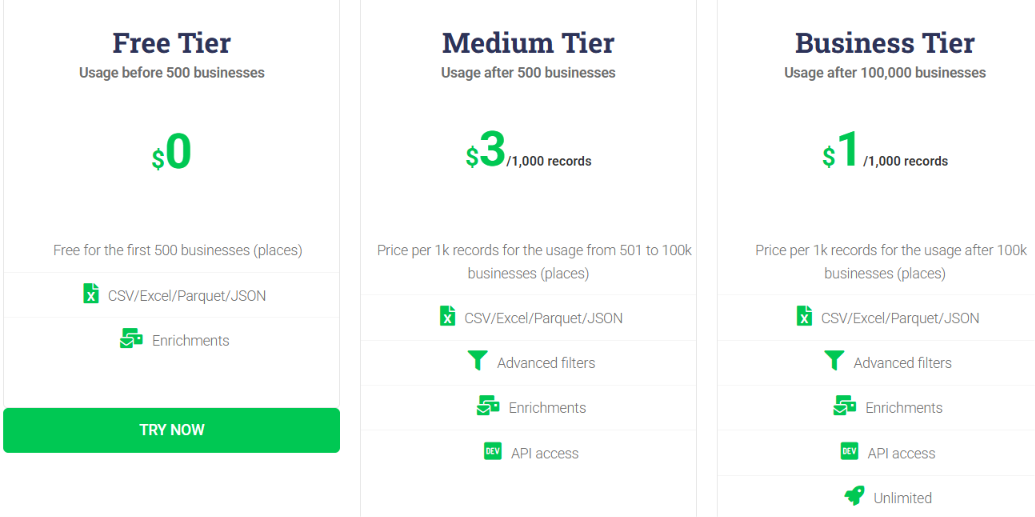
Outscraper doesn’t use a monthly subscription for these services. Instead, it runs on a pay-as-you-go model, so your cost depends on how much data you process. Usage tiers reset every 30 days. For local lead generation, these are the main costs to keep in mind:
The Google Maps Scraper is pretty affordable on its own. Outscraper’s calculator shows 10,000 businesses at $28.50, since the first 500 are covered by the free tier. But that doesn’t necessarily reflect the cost of a complete outreach list. Emails & Contacts Scraper and Email Addresses Verifier are priced separately based on usage.
So if you need business data, contact details, and email verification, you’ll want to factor in each service you use. That’s the part I’d calculate before kicking off a large local prospecting campaign. You can pay in two ways. With prepaid credits, nothing expires. With postpaid billing, your card is charged once monthly usage goes past the free tier.
Outscraper makes the most sense when you need public business data from Google Maps and want control over how much data you pull. Its pay-as-you-go pricing also works well if your usage changes from month to month.
Outscraper shines when Google Maps is your starting point. But if your main goal is to find specific decision-makers with verified contact details already attached, a B2B prospecting platform may be a better fit.
Outscraper makes sense when your main goal is to scrape public data from Google Maps. But if you are using that data to build lead lists for outreach, Leadsforge is a more direct alternative. Both can help you find local businesses. The difference is what you can do after finding them.
With Outscraper, the Google Maps Scraper collects business records. Contact enrichment and email verification can add extra billing layers depending on the services you use.
Leadsforge brings prospecting and enrichment into one smooth workflow. With its Local Companies search, you can enter a location, pick a business type, and set a radius around that area. For example, you could search for dental clinics within 5 km of a specific part of New York, then preview the matching companies before extracting them.
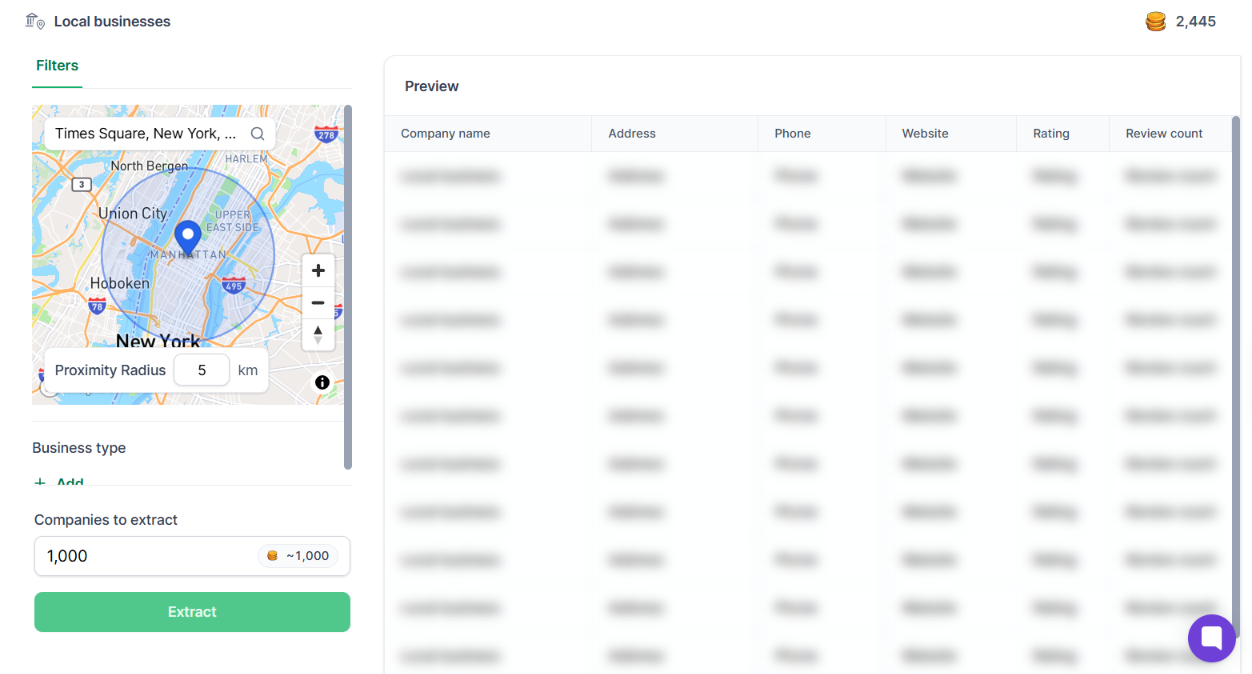
From there, you can find contacts and enrich them with emails, LinkedIn profiles, or phone numbers. What stands out most is the enrichment engine. Leadsforge uses waterfall enrichment across multiple data providers, so if one source comes up short, it can try others.
It also goes beyond local search. You can search its 500M+ contact pool by describing your ICP, or find company lookalikes, competitor followers, and signal-based leads.
Leadsforge starts at $49 per month for 2,000 credits, and any unused credits roll over instead of expiring. You also get 100 free credits when you sign up. So if your main goal is collecting Google Maps data, reviews, or other public data, Outscraper is the better fit.
But if you’re trying to find local companies and turn them into outreach-ready contact lists, I’d go with Leadsforge. It takes you further from business discovery to the actual person you want to reach.
Enter your email to get a custom plan & stack recommendation for your business
Please check your mailbox in 5 minutes

Outscraper makes it simple to pull business data from Google Maps without having to check each listing one by one. It also gives you advanced filters, contact enrichment, and a range of export options. Its pay-as-you-go pricing is especially handy if you only need data now and then.
If you only want Google Maps scraping, Outscraper is definitely worth a look. The first 500 businesses are free, and after that, the Google Maps Scraper costs $3 per 1,000 records for up to 100,000 businesses. That said, scraping businesses and building an outreach-ready lead list are not quite the same thing.
If your goal is local prospecting, I’d probably look at Leadsforge instead.
Leadsforge combines prospecting with waterfall enrichment, so you can find local companies and then pull emails, LinkedIn profiles, or phone numbers for outreach. It also gives you several ways to build lists, including ICP search, Lookalikes, competitor followers, and Signals. Its search spans more than 500 million contacts.
So the choice is pretty simple: use Outscraper if you want public Google Maps data, and use Leadsforge if you want prospects you can actually use in an outreach campaign.
Try Leadsforge with 100 free credits and compare the workflow with building and enriching your Outscraper lists.
.jpg)

.jpg)

.jpg)
