
Personalized Outbound Strategy
Get The Right Outbound Strategy In Minutes
Enter your email to get a custom plan & stack recommendation for your business
It's being carefully crafted by AI
Please check your mailbox in 5 minutes
OutreachFox starts at $29 per month. That sounds cheap for a cold outreach platform until you realize the Starter plan is email-only.
If you want email + LinkedIn outreach, lead enrichment, API access, and dedicated infrastructure, you need the $89 Growth plan.
So, what are you actually getting for the extra $60 per month?
OutreachFox brings lead data, waterfall enrichment, mailboxes, warm-up, email and LinkedIn sequences, and a unified inbox into one platform.
That could replace several tools in your outbound stack. But with so much packed into one platform, the bigger question is how well each part actually works.
In this OutreachFox review, I’ll look at its features, email infrastructure, pricing, user feedback, and the limitations you should know before signing up.
The easiest way to understand OutreachFox is to look at how much of a campaign you can run without leaving the platform.
You can find prospects in its B2B database, use its 50+ provider waterfall to find and verify work emails and phone numbers, and move those contacts straight into an email + LinkedIn sequence. Replies from both channels can then be handled from the same inbox.
What you still need to pay for separately are the actual sending mailboxes. OutreachFox sells Google Workspace and Microsoft 365 mailboxes as add-ons, or you can connect mailboxes you already have through IMAP/SMTP.
Here is how that setup compares with Salesforge:
So, OutreachFox includes the prospecting and enrichment layer that Salesforge does not bundle into its subscription. Salesforge instead lets you pair the outreach platform with Leadsforge for prospecting and Mailforge, Infraforge, Primeforge, or your existing mailboxes for infrastructure.
OutreachFox keeps the main steps of a cold outreach campaign connected, so a lead can move from prospecting to outreach without being exported between tools.
You can search OutreachFox’s B2B database by title, company size, industry, and region. If you already have a list, you can upload a CSV or send contacts through the API.
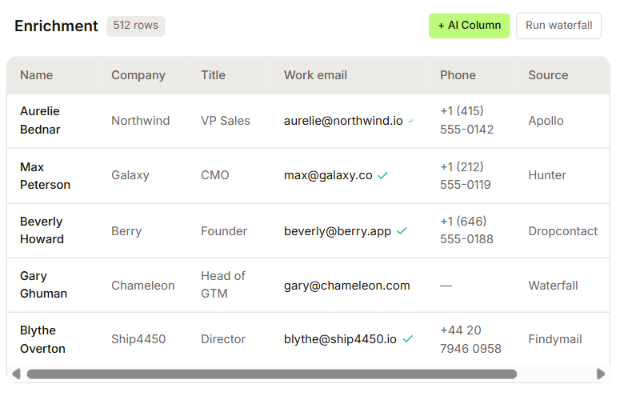
OutreachFox runs leads through 50+ data providers to find work emails, phone numbers, LinkedIn profiles, and firmographic data. It stops checking providers once it finds verified data.
Next, connect your existing mailboxes or buy Google Workspace or Microsoft 365 mailboxes through OutreachFox. For its native mailboxes, SPF, DKIM, and DMARC are configured automatically.
You also connect your own LinkedIn account if you want to add LinkedIn steps to the campaign.
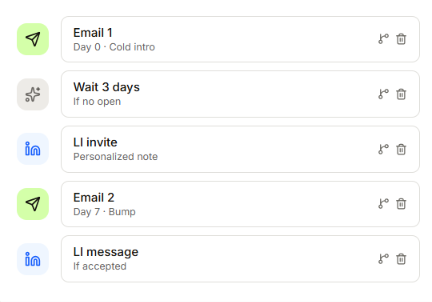
Now you decide how OutreachFox should contact each lead. You can add emails, LinkedIn profile visits, connection requests, and LinkedIn messages to the same sequence.
You can also set rules for what happens next. For example, if someone does not open your email after three days, OutreachFox can send them a LinkedIn connection request. If they accept it, the next step can be a LinkedIn message.
Once the campaign is running, you do not have to check every sending mailbox and LinkedIn account separately. Their replies appear in OutreachFox’s unified inbox.
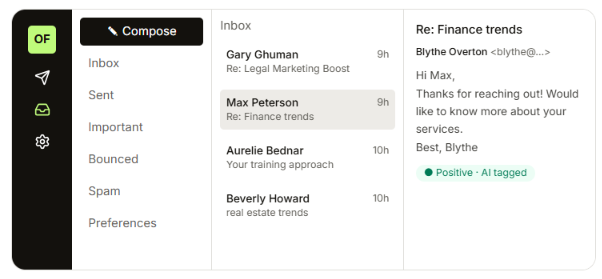
Each conversation can show the lead’s details, campaign history, and previous touches. OutreachFox also tags replies such as Interested, Objection, Not now, Wrong person, OOO, or Referral and can draft a response for you to review.
If a lead replies through either channel, OutreachFox automatically stops the remaining steps for that lead, so they do not keep receiving automated follow-ups.
In practice, this means an email reply or LinkedIn response stops the same sequence automatically. You do not have to pause the lead manually in another campaign.
OutreachFox has a fairly broad feature set for cold outreach. Here are its main features and what you can actually do with each one.
OutreachFox covers the main areas I would look at for email deliverability, especially the sending infrastructure.
From the Growth plan onward, you get dedicated campaign IPs and isolated infrastructure, which keeps your sending environment separate from other customers.
OutreachFox also sets up SPF, DKIM, and DMARC for its Google and Microsoft mailboxes. It monitors each mailbox and can slow down or rotate an inbox if its health starts to drop.
Emails are checked during enrichment and again before sending, which helps catch bad addresses before they bounce.
OutreachFox says its customers typically see 95%+ inbox placement. However, I could not find independent test data to confirm that figure, so I would not treat it as a guaranteed result.
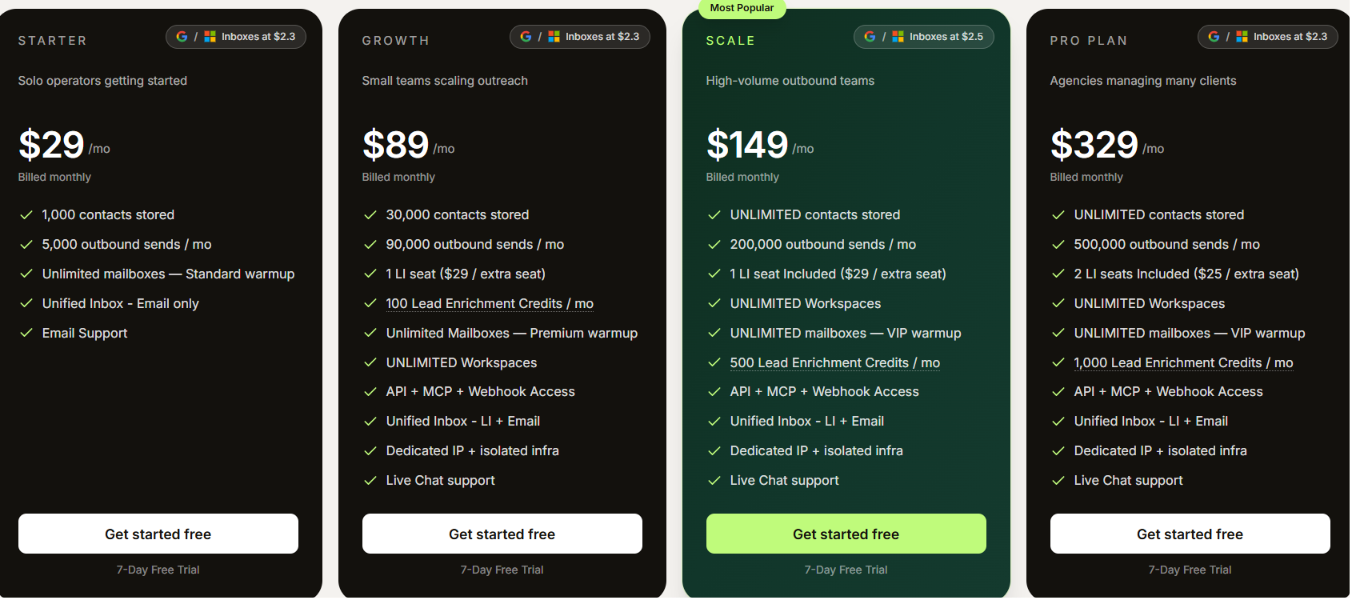
OutreachFox starts at $29 per month, but there is a big jump between what you get on Starter and Growth.
Starter is mainly an email outreach plan. The features that make OutreachFox more interesting, including LinkedIn outreach, enrichment, API access, and isolated infrastructure, start at $89 per month.
Here is what changes as you move up the plans.
The $89 Growth plan is the one I would use when judging OutreachFox as a full outbound platform. It gives you 90,000 monthly sends, 30,000 stored contacts, one LinkedIn seat, 100 enrichment credits, unlimited workspaces, Premium warmup, API access, and the dedicated infrastructure discussed earlier.
There is one extra cost that is easy to miss. “Unlimited mailboxes” does not mean OutreachFox gives you unlimited Google or Microsoft inboxes for free. You can connect unlimited mailboxes, but if you buy Google or Microsoft inboxes through OutreachFox, they cost extra. The pricing shown ranges from $2.30 to $2.50 per inbox, depending on the plan.
Enrichment has its own usage cost too. A found email uses 0.5 credit, a phone number uses 2 credits, and verification uses 0.1 credit. If your included credits run out, top-ups are listed at $0.012 per credit, with packs starting at $25.
OutreachFox also has separate LinkedIn-only plans from $39 to $299 per month. Those make more sense if LinkedIn automation is your main use case. If you are evaluating OutreachFox for the combination of cold email, LinkedIn, enrichment, and email infrastructure, the Multichannel plans above are the more relevant ones.
OutreachFox will not make sense for every outbound setup. The deciding factor is how much of your current stack you actually want it to replace.
If OutreachFox appeals to you mainly because it combines email and LinkedIn outreach, Salesforge is the alternative I would look at first.
It covers the same core part of your outbound workflow, but the setup is different. Salesforge handles the outreach itself.
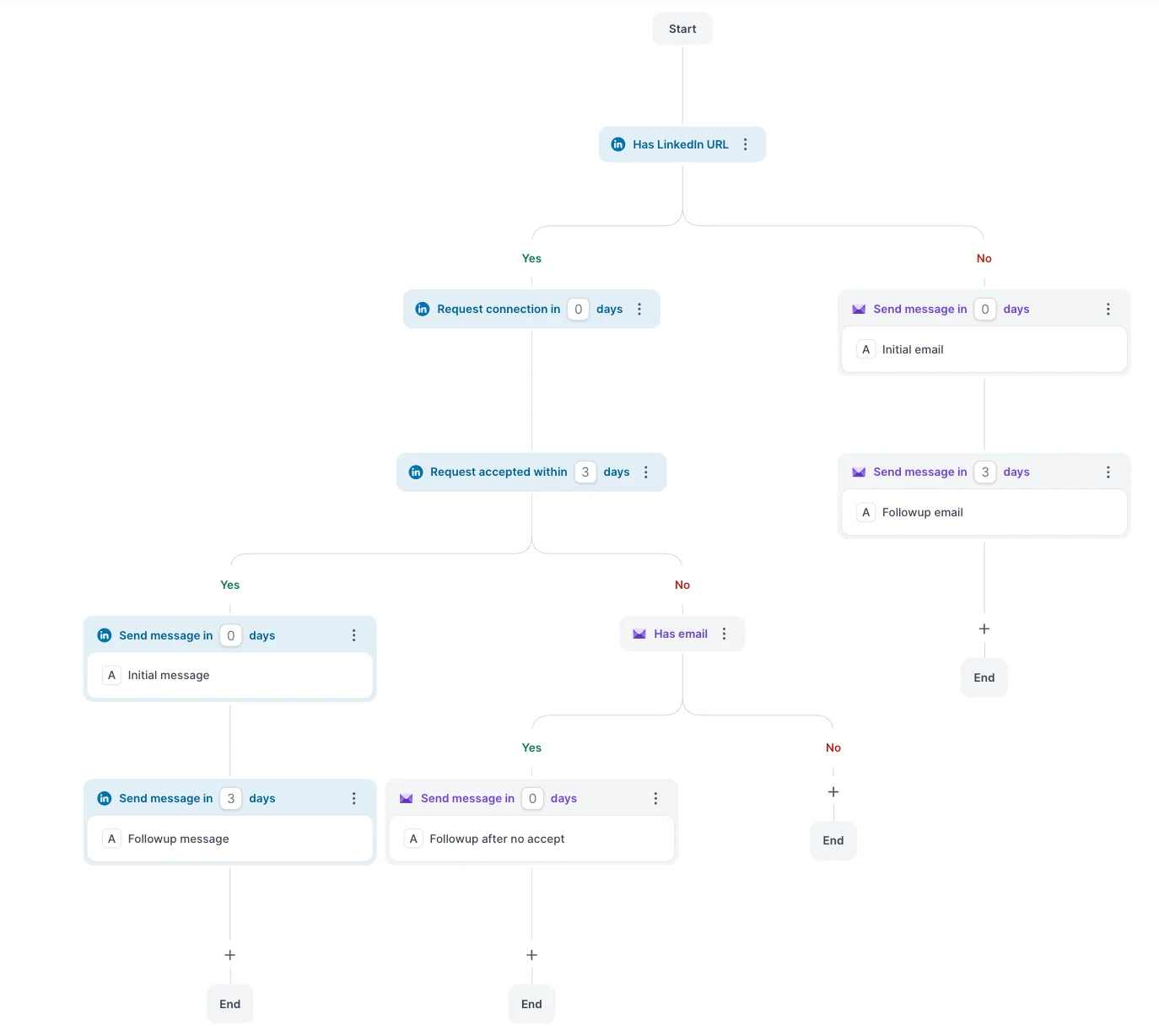
You can connect your mailboxes and LinkedIn accounts, build sequences across both channels, personalize and validate emails, and manage replies through Primebox. Your lead source and email infrastructure do not have to come from Salesforge.
OutreachFox Growth costs $89 per month, but it includes only one LinkedIn seat. Salesforge Growth costs $96 per month and includes unlimited LinkedIn senders and unlimited users.
That $7 difference matters once more than one person needs to run outreach.
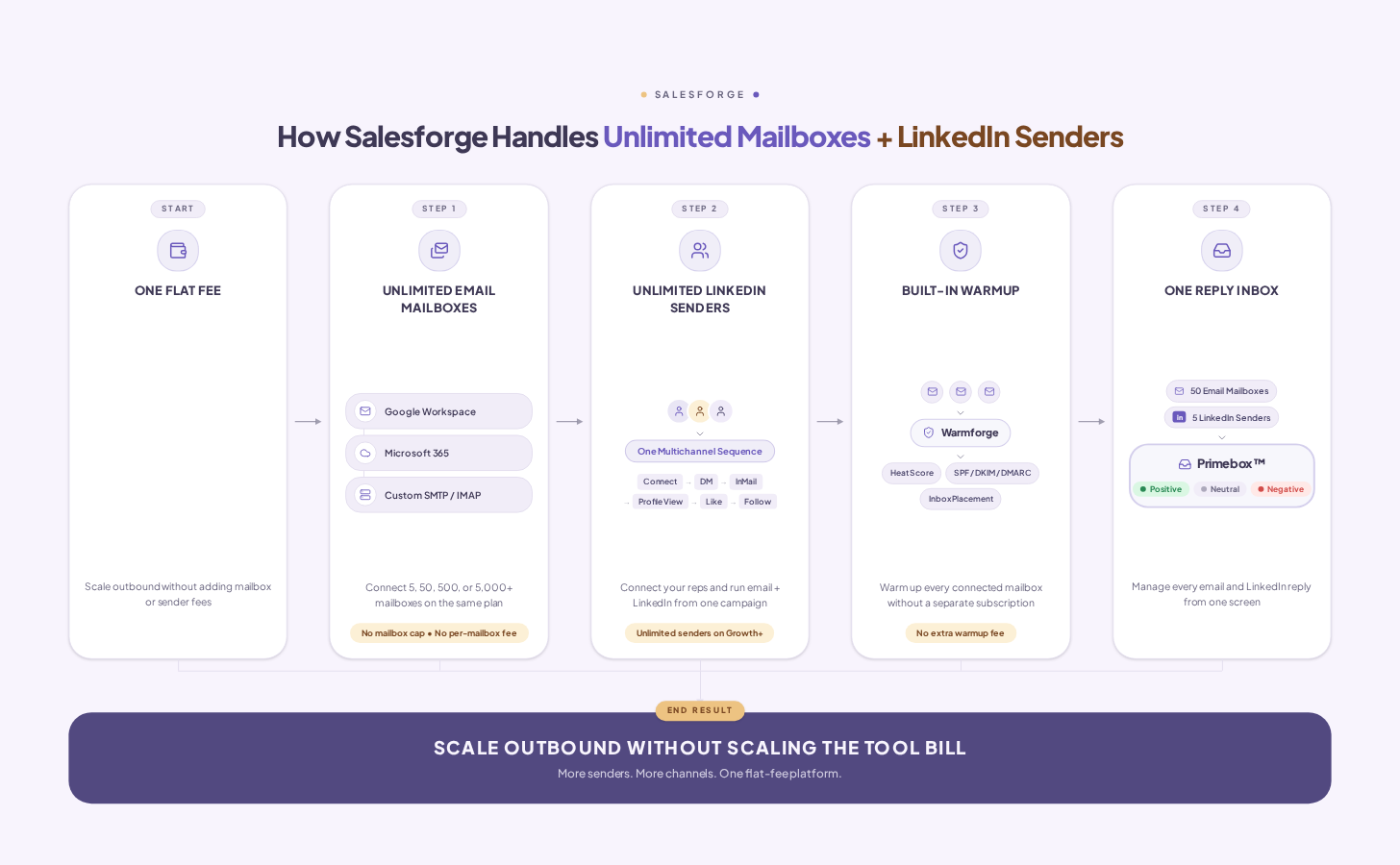
The trade-off is that Salesforge does not bundle the same built-in prospect database and 50+ provider enrichment layer you get with OutreachFox. Leadsforge and Forge email infrastructure are separate products and subscriptions.
So, if you want prospecting, enrichment, outreach, and infrastructure under one product, OutreachFox has the cleaner setup. If you already have your lead source and need multiple people or LinkedIn accounts running outreach, the extra $7 for Salesforge Growth starts to make more sense.
Enter your email to get a custom plan & stack recommendation for your business
Please check your mailbox in 5 minutes

Yes, OutreachFox is worth considering if you want one platform to handle most of your cold outreach setup.
The bigger question is how you plan to scale LinkedIn outreach. OutreachFox limits the number of LinkedIn seats included with each plan, which can become a problem as you add more sending accounts.
If you expect to run outreach from several LinkedIn accounts, Salesforge gives you unlimited LinkedIn senders on its Growth plan. That means you can add more LinkedIn accounts without the number of senders becoming the constraint.
If you want that flexibility as you scale, try Salesforge for your email and LinkedIn outreach.
.jpg)

.jpg)

.jpg)