
Personalized Outbound Strategy
Get The Right Outbound Strategy In Minutes
Enter your email to get a custom plan & stack recommendation for your business
It's being carefully crafted by AI
Please check your mailbox in 5 minutes
You may have found LinkUnity while searching for more LinkedIn accounts for outreach. Before paying, you should know whether the accounts are stable and what happens if one gets restricted.
A poor account provider can cause several problems:
I reviewed LinkUnity’s pricing, customer feedback, and service terms. Trustpilot shows a 4.3 rating from nine reviews. Customers often mention stable accounts, smooth setup, and quick support. Still, nine reviews are not enough to show how the service performs across larger teams or longer campaigns.
In this LinkUnity review, I will cover its account quality, pricing, and replacement terms. I will also look at customer feedback, main risks, and the best alternative. By the end, you will know whether LinkUnity fits your outreach needs.
LinkUnity rents out ID-verified LinkedIn accounts with at least 100 existing connections. Each account is warmed up before delivery and includes a recovery-first replacement policy.
The service is built to slot into an existing outreach workflow. After you receive an account, you connect it to a compatible automation platform and run your campaigns from there.
If your team runs email and LinkedIn together, you could also connect the account to a multichannel platform like Salesforge. That means your total cost will include both the LinkUnity rental and the outreach software you choose.
Real users' feedback on LinkUnity is limited, but the available reviews are mostly positive.
The company has a 4.3/5 rating on Trustpilot from 9 reviews, and all of the current public reviews are 5-star. Most customers mention account stability, responsive support, and a smooth onboarding experience.
Still, nine reviews is a very small sample, so it does not offer the same level of confidence as platforms with hundreds of verified reviews. The biggest talking points across Trustpilot reviews are:
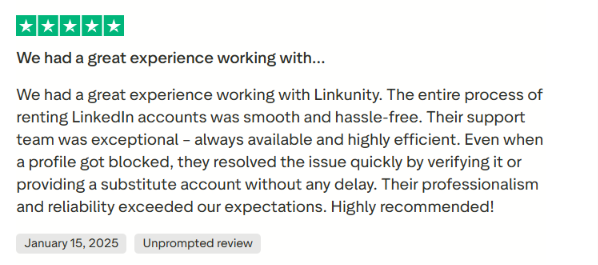
There is very little independent discussion about LinkUnity on Reddit. I could find only a small number of mentions rather than long discussion threads or detailed user reviews.
One recent thread in r/coldemail includes a comment from a user claiming their agency has used 30+ LinkUnity accounts for around six months without ban issues. The commenter also praised the ID-verified accounts and recovery process. However, this is one unverified Reddit comment, so it should be treated as anecdotal rather than strong evidence.

LinkUnity's G2 profile has been permanently removed with a notice stating that the vendor, its products, and its reviews were removed due to a violation of G2's Terms of Use. Because of that, buyers cannot compare Trustpilot feedback with reviews from G2, leaving Trustpilot as the primary public review source at the time of writing.
I tested LinkUnity over two weeks in July 2026 using rented LinkedIn accounts for outbound outreach.
I used two different setups:
Both setups focused on the issues buyers care about most before renting LinkedIn accounts: account quality, onboarding, account stability, automation compatibility, support responsiveness, and the recovery process if an account became restricted. The following sections cover the features that stood out during my testing.
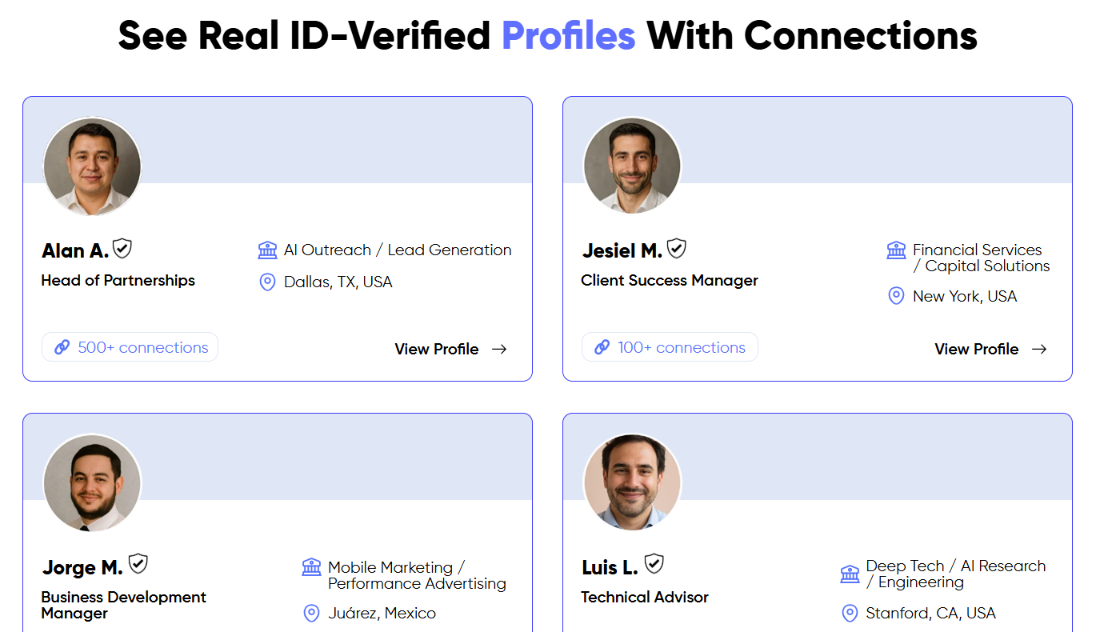
LinkUnity rents LinkedIn accounts that belong to real people instead of newly created profiles. Every account completes NFC passport verification before it becomes available for rent. This feature focuses on account authenticity rather than account age or outreach activity.
Building trust on a new LinkedIn profile takes time. LinkUnity provides accounts with existing activity, account history, and at least 100 connections. It also follows a warm-up process before accounts are rented.
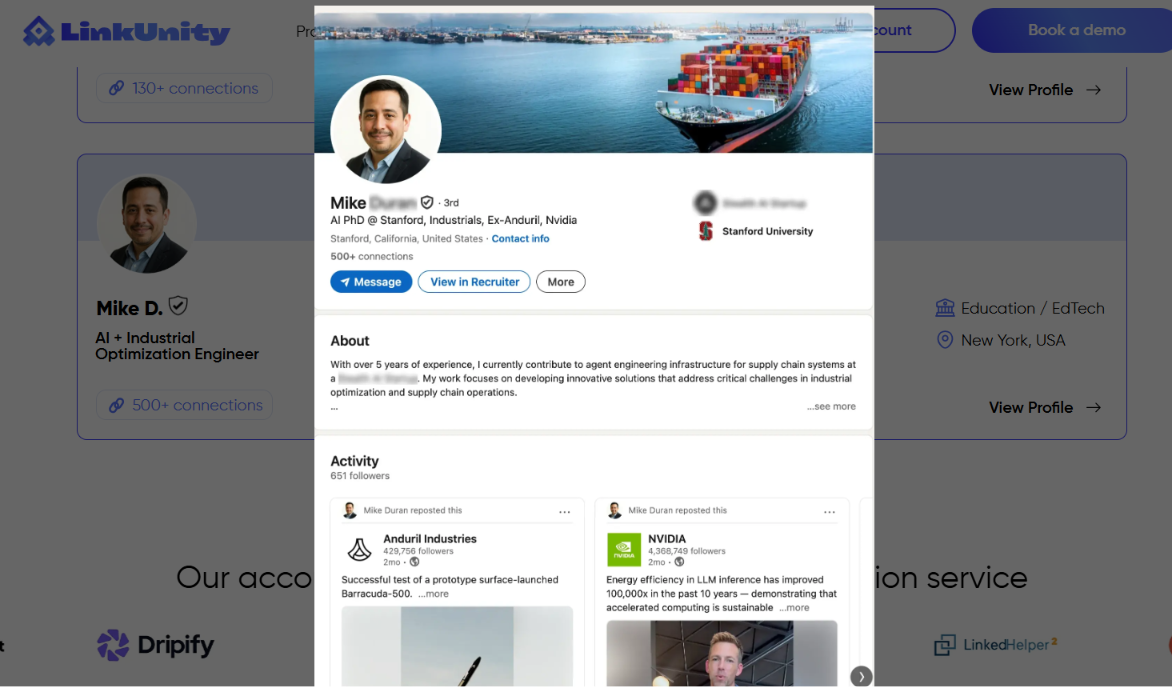
LinkUnity lets buyers look at sample profiles before placing an order. The examples show the kind of LinkedIn accounts available instead of asking buyers to rely on product descriptions alone. That makes it easier to understand what the service offers.
LinkUnity explains what happens if a rented account becomes restricted. It first attempts to recover the account. If recovery is not possible, it provides a replacement according to its published Terms of Use.
Read - How to Automate LinkedIn Outreach
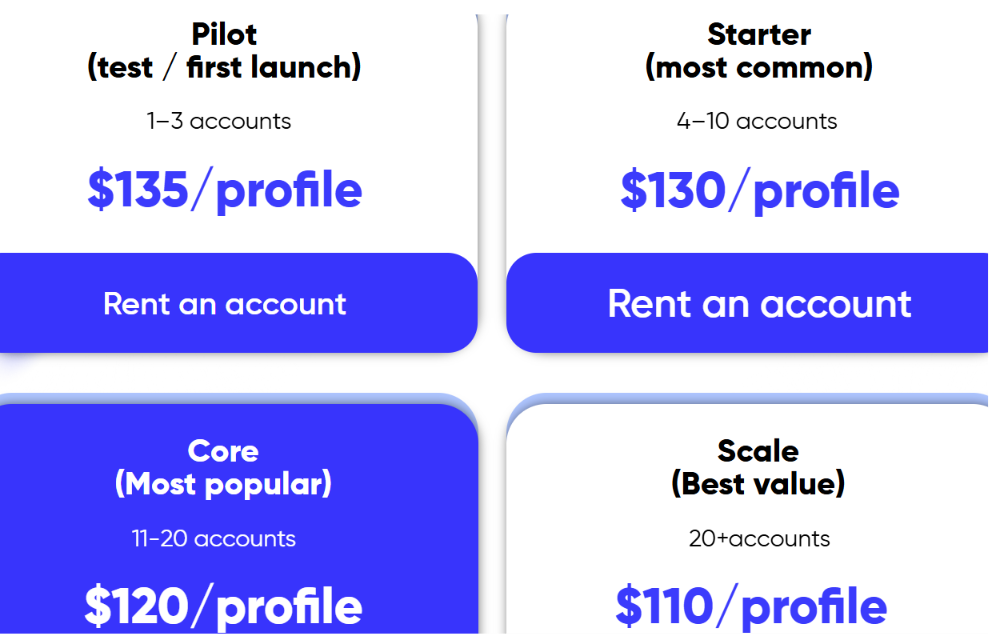
LinkUnity charges a monthly fee for each rented LinkedIn account. The price drops as you rent more profiles, so larger teams pay less per account. Every pricing tier includes the same core account features, including ID verification, 100+ connections, aged accounts, warm-up, and a replacement guarantee.
The main benefit is that LinkUnity does not hide features behind more expensive plans. Whether you rent one profile or more than twenty, you get the same kind of ID-verified LinkedIn account.
The lower tiers are a better fit for smaller teams that only need a few accounts, while the higher tiers bring down the cost per profile for agencies and larger outbound teams.
If you already use tools like Expandi, HeyReach, SalesRobot, or Prosp, LinkUnity also offers partner discounts that can help reduce your overall software costs. These discounts are separate from the account rental price.
When it comes to pricing, LinkUnity keeps things straightforward. Your choice really depends on how many LinkedIn accounts you need, since every pricing tier includes the same features.
LinkUnity is most useful for teams that already know how they want to run LinkedIn outreach but need more accounts to make it happen.
LinkUnity takes care of the LinkedIn account side of the setup. You rent an ID-verified profile that already has connections, then plug it into the outreach software your team is already using.
LinkUnity works with tools like HeyReach, Expandi, SalesRobot and Prosp. You can also use a platform like Salesforge when your campaigns include both LinkedIn and cold email.
That difference matters because LinkUnity does not need to replace your outreach platform. It can sit alongside it.
Once you receive a LinkUnity account, you will still need a place to build sequences, add prospects and manage campaign activity.
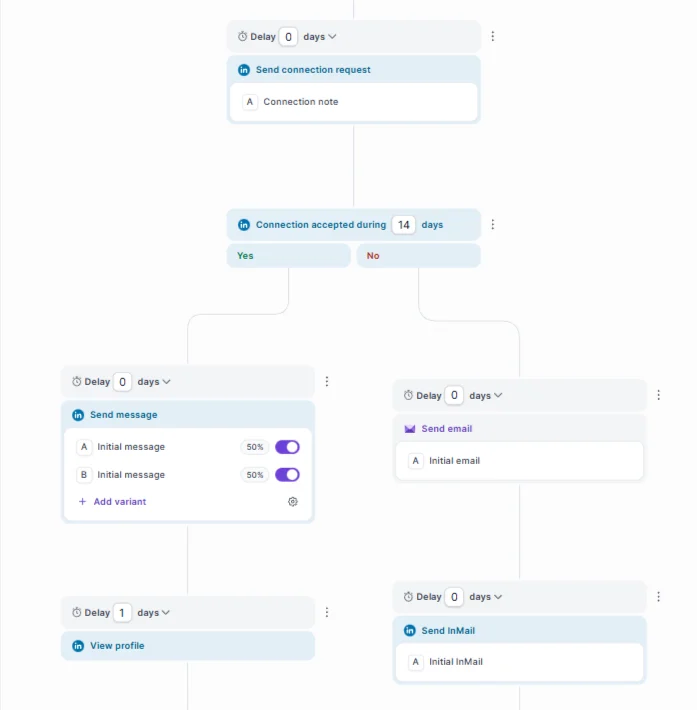
Salesforge can handle that part of the workflow. You can connect the rented profile as a LinkedIn sender and combine LinkedIn actions with email steps in the same sequence.
For example, a campaign could:
This gives the rented account a clear role within a broader campaign instead of treating it as a separate LinkedIn-only channel.
LinkUnity is especially useful for agencies and outbound teams that manage multiple profiles. Each additional account can serve a different client, market or campaign.
Salesforge can help keep that setup organized by connecting several LinkedIn senders and mailboxes in one platform. Agencies can also use separate workspaces to keep client campaigns separate.
LinkUnity still handles account verification, recovery and replacement, while Salesforge manages the sequences running through those accounts.
LinkUnity suggests using rented accounts with compatible LinkedIn automation tools, but your outreach does not have to depend only on connection requests and messages.
Adding email steps gives you another way to reach prospects without putting all the activity on the LinkedIn profile. Salesforge can rotate email sending across connected mailboxes and keep those messages aligned with the LinkedIn steps in the sequence.
That can be especially useful if you want to keep daily LinkedIn activity low while still following up across more than one channel.
When a campaign uses both email and LinkedIn, replies can land in different places. Salesforge’s Primebox brings those conversations into one inbox, so it is easier to review replies across connected senders. It becomes even more useful as the number of LinkUnity accounts and email mailboxes grows.

Salesforge keeps pricing simple with two outreach plans and one optional AI SDR.
All plans include a 14-day free trial with no credit card required.
Enter your email to get a custom plan & stack recommendation for your business
Please check your mailbox in 5 minutes

Not always.LinkUnity works with several outreach tools, so if your current setup already handles campaigns well, there is no need to switch platforms.
Salesforge becomes useful when you want to run email and LinkedIn in the same sequence, connect multiple senders, and keep replies in one place.
In that setup, LinkUnity provides the LinkedIn accounts, while Salesforge handles the outreach running through them.
LinkUnity is worth considering if you need rented LinkedIn accounts for outbound outreach. It gives you ID-verified profiles with existing connections, sample profiles before payment, and a recovery process if an account gets restricted. Its volume pricing also suits agencies that need more than a few accounts.
Still, LinkUnity only solves the account side of LinkedIn outreach. If you need to scale your outreach, Salesforge is the perfect fit. You can run email and LinkedIn outreach from one platform, manage replies in Primebox, and connect unlimited LinkedIn senders on the Growth plan. It also comes with unlimited Warmforge warm-up and a 14-day free trial.
Start your 14-day Salesforge trial and see whether it fits your outreach setup.
.jpg)

.jpg)

.png)
