Personalized Outbound Strategy
Get The Right Outbound Strategy In Minutes
Enter your email to get a custom plan & stack recommendation for your business
It's being carefully crafted by AI
Please check your mailbox in 5 minutes
I used LinkedFusion to send 500 LinkedIn messages and see how well its automation held up in a real outreach campaign. The setup was simple, but once the campaign was underway, I started noticing issues and bugs that became harder to ignore.
The similar issues also come up in LinkedFusion's G2 reviews:
That matters because LinkedFusion starts at $65.95 per user per month for Professional, while Grow costs $95.95 per user per month.
So LinkedFusion can save you the hassle of sending messages and follow-ups manually. But the bigger question is whether that automation still makes sense once LinkedIn limits and scaling issues come into play.
In this LinkedFusion review, I'll walk you through what I found after 500 messages, what users are saying, and whether it’s worth paying for in 2026.
My take: LinkedFusion does a solid job of handling the repetitive LinkedIn work for you. But if you are planning to run outreach at a higher volume, it is worth keeping LinkedIn limits and the per-user cost in mind before you commit.
LinkedFusion gives you more than basic LinkedIn message automation. You can automate connection requests, messages, and follow-ups. You also get unlimited concurrent sequences, a smart inbox, and CRM integrations.
Email is supported too. You can connect an email inbox and add email steps to your sequences, so LinkedFusion is not just a LinkedIn-only tool. The difference becomes clearer when you compare it with Salesforge.
LinkedFusion keeps LinkedIn at the center of the workflow and lets you add email steps, while Salesforge is designed to run email and LinkedIn together in multichannel sequences.
LinkedFusion makes sense if LinkedIn is doing most of the heavy lifting in your outreach. You can run campaigns in the cloud and automate repetitive LinkedIn tasks. It also supports multiple LinkedIn accounts, which makes it easier for teams and agencies to manage more outreach from one place.
But Salesforge gives email a much bigger role. You can connect unlimited mailboxes and combine email with LinkedIn in conditional sequences. The Growth plan also includes unlimited LinkedIn senders.
Salesforge also includes unlimited Warmforge warm-up. That gives you an extra layer for email deliverability if cold email is a major part of your outbound strategy.
LinkedFusion is a better choice if LinkedIn is your main outreach channel and you want email to be a follow-up step in the sequence. Salesforge makes more sense if you want email and LinkedIn to work together as the two main parts of your outbound setup.
The review data for LinkedFusion is positive overall, but the same limits appear across both G2 and Capterra.
Users like the time saved on LinkedIn outreach. The complaints are mostly around LinkedIn limits, setup and smaller technical issues.
The G2 review page gives LinkedFusion a 4.3/5 rating from 30 reviews. Ease of use and automation are two of the most common positives. Users also mention LinkedIn integration, lead generation and customer support.
One sales manager appreciated being able to manage several LinkedIn accounts at once, but also noted that LinkedIn’s daily limits still make high-volume outreach difficult.
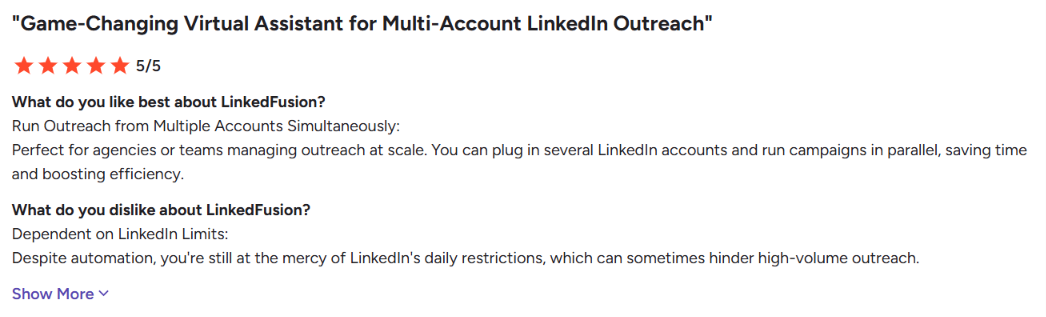
Another user praised the personalized sequences and CRM integrations, though they said setup can require technical know-how and rate limits can become an issue at higher volumes.
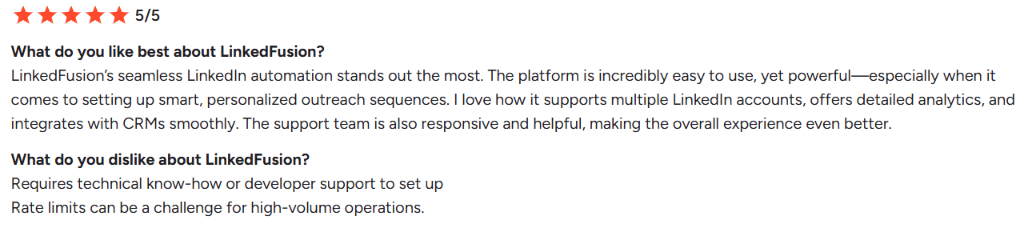
Other G2 complaints mention occasional technical issues, a learning curve, and reporting that could be more in-depth.
Capterra gives LinkedFusion a 4.8/5 rating from 15 reviews. The positive feedback is similar to what you see on G2. People consistently mention the time saved on prospecting, CRM integrations, and inbox management.
One reviewer said LinkedFusion saved at least four hours of work each day, while another said AI Commenting cut two to three hours of manual engagement daily.
The downside seems to be less about the core automation and more about how the workflow feels in practice.
One reviewer said the sequence setup felt confusing because the audience and webhook had to be connected before creating the messaging. Another mentioned there was a learning curve at the start. There were also complaints about limited support docs, a few third-party integration issues, and occasional bugs.
One reviewer said the inbox scroll bar felt unreliable. Another mentioned a bug that sent irrelevant messages, and a third wanted sequences to stop automatically once they started talking with a prospect directly.
So the Capterra feedback is still positive overall, but it suggests LinkedFusion can take some setup time and that the smaller workflow details are not always polished.
I tested LinkedFusion around the workflow it is built for, finding LinkedIn prospects, building sequences and handling follow-ups without doing every step by hand. I wanted to see how much of the outreach process I could actually manage from one place.
LinkedFusion gives you several ways to build a campaign audience. You can search the platform using 40+ filters, or import prospects from Google Sheets, CSV files, and other tools.
This is the part of LinkedFusion I’d test most carefully, since it sits at the heart of the product. It can automate connection requests and send follow-ups after someone accepts, and you can schedule sequences for specific days and times.
Sending the first message is only half the job. What really matters is whether the tool makes replies easier to manage once campaigns are underway. LinkedFusion includes a Smart Inbox where you can manage LinkedIn conversations and schedule messages for later.
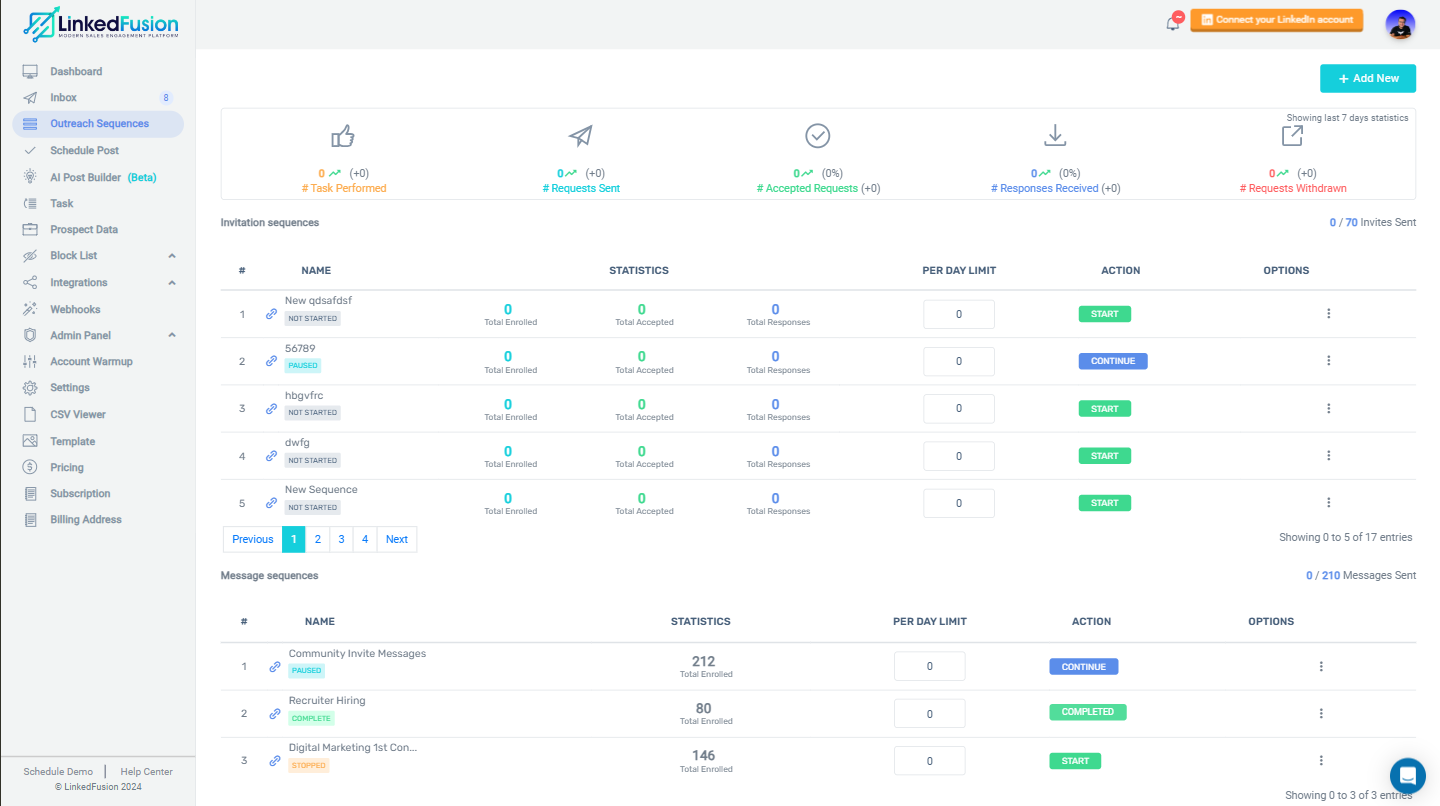
Automation only matters if you can see what’s working. LinkedFusion gives you reporting for individual sequences and helps you track campaign performance.
CRM sync matters more once several people are working in the same pipeline. LinkedFusion offers native integrations with HubSpot, Pipedrive, and Salesforce, and you can also connect other workflows through tools like Zapier.
LinkedFusion works best when you use it as a LinkedIn outreach tool. The prospect search leads into connection requests, those requests flow into follow-ups, and replies land back in the Smart Inbox.
That setup takes a lot of manual LinkedIn work off your plate. LinkedFusion can automate the workflow and add email steps, but LinkedIn still controls how far you can push activity.
If most of your outbound happens on LinkedIn, LinkedFusion handles the core workflow well. If your process relies equally on LinkedIn and cold email, I’d compare it with a broader multichannel platform before deciding.
LinkedFusion has a few features that are meant to make LinkedIn automation safer, but it still isn’t risk-free. One of the main safeguards is the dedicated local IP: each LinkedIn account gets its own IP address, with locations available in more than 190 countries. According to the company, no one else shares that IP.
You also get control over when your sequences run, so you can pick specific days and time windows instead of running campaigns nonstop. For its AI commenting feature, LinkedFusion says it uses smart limits and random timing changes. It also keeps an eye on activity to help prevent over-automation.
Still, there’s an important catch. LinkedFusion is a third-party LinkedIn automation tool, and LinkedIn does not endorse or certify it. LinkedFusion says this plainly in its disclaimer and makes it clear that using the tool is at your own risk.
User reviews point to the same concern: some people say that sending too many messages can cause LinkedIn to slow things down, while others mention limits even when the automation seems to work well.
So I wouldn’t describe LinkedFusion as completely safe. It does give you controls that can help reduce aggressive automation, but your account can still run into restrictions if you push outreach too hard.
LinkedFusion has three paid plans. Pricing changes based on whether you pay monthly, quarterly or annually.
All prices are billed per user, per month. Professional includes the core outreach features, plus HubSpot and Pipedrive integrations. Grow offers higher limits and more CRM integrations. Ultimate gives you the highest daily limits.
LinkedFusion works with a basic LinkedIn account. It recommends LinkedIn Premium or Sales Navigator, but neither is required. One extra cost to keep in mind is prospect data. Email Finder API keys are not included in the subscription.
LinkedFusion is a great fit for people who rely on LinkedIn as a primary prospecting channel. It’s designed for sales teams, recruiters, agencies, and small businesses that want to automate connection requests, follow-ups, and LinkedIn conversations. It also supports teams, CRM integrations, and multiple outreach sequences.
If you already have prospect lists, it works well too. You can import leads from Google Sheets or CSV and move them into LinkedIn outreach.
You may want to look elsewhere if LinkedIn is just one part of a much broader outbound setup. LinkedFusion does support email steps, but LinkedIn is still the main focus of the workflow.
It may also feel restrictive if you need very high outreach volume, since LinkedIn’s own limits still apply and LinkedFusion plans include daily invite and message allowances.
Best for: Teams that mainly want to automate LinkedIn prospecting and follow-ups.
Look elsewhere if: You want email and LinkedIn to carry equal weight or you need a broader outbound stack.
LinkedFusion is a good fit if LinkedIn is your main outreach channel. It automates connection requests, messages, and follow-ups, and you can manage multiple LinkedIn accounts while connecting the platform to CRM tools. The tradeoff is that your outreach still centers on LinkedIn.
Salesforge takes a different approach. It lets you run email and LinkedIn from the same sequence, so you can mix emails with LinkedIn invites, messages, InMails, follows, and profile views. You can also connect unlimited LinkedIn profiles and unlimited email accounts, with no per-seat fees or sender caps.
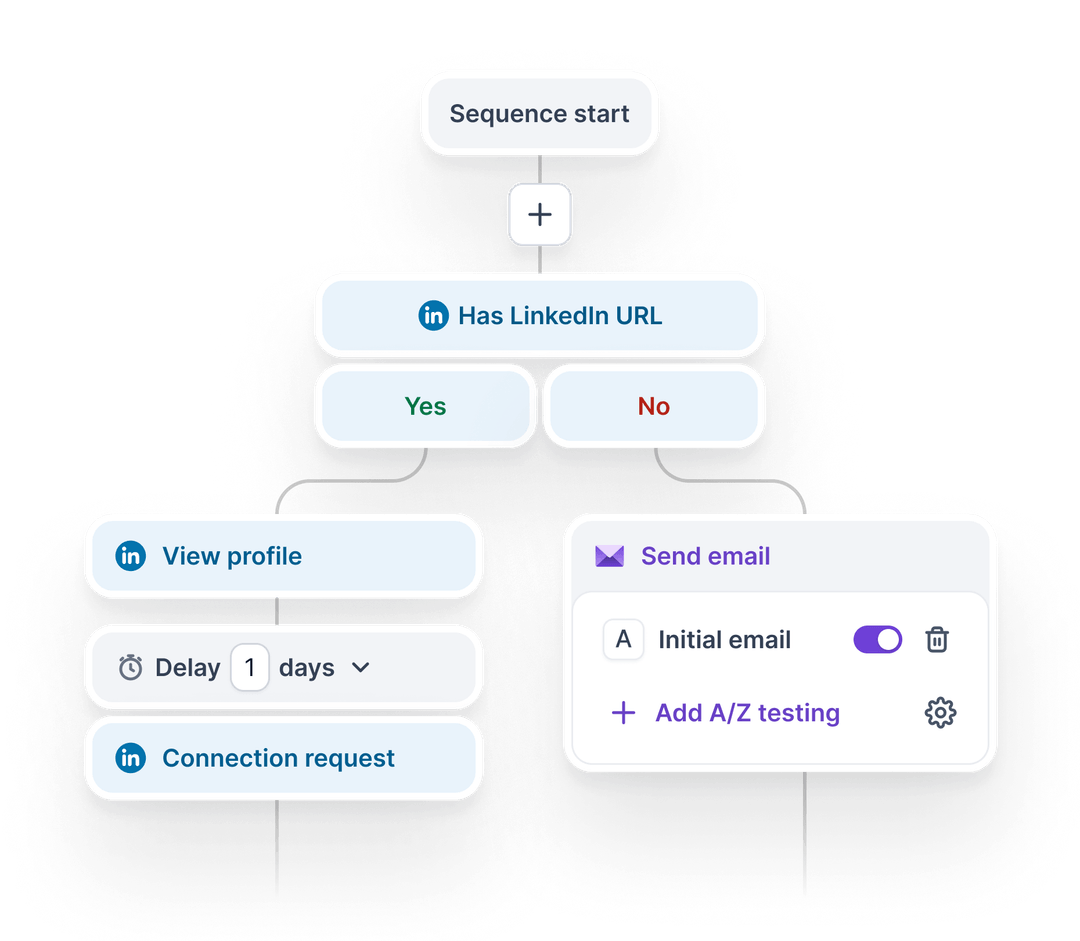
That makes Salesforge a better fit if you want to reach the same prospect across both channels instead of relying on LinkedIn alone.
Salesforge also pulls email and LinkedIn replies into Primebox, so you can manage conversations from both channels in one place.
LinkedFusion is still a good fit for teams that only want to automate LinkedIn. But if you want email and LinkedIn to work together, Salesforge gives you both without forcing you to build everything around a single channel.
Enter your email to get a custom plan & stack recommendation for your business
Please check your mailbox in 5 minutes

LinkedFusion is a solid choice if LinkedIn is the center of your outbound strategy. It automates connection requests, messages, and follow-ups, and it also gives you multiple account support, CRM integrations, and tools for managing replies.
But LinkedIn still sets the limits. Daily activity caps are still part of the picture, and user reviews point to setup headaches, technical issues, and limited reporting.
The bigger question is whether LinkedIn alone is enough for your outbound. If you want to reach prospects through both email and LinkedIn, Salesforge gives you more flexibility. You can run both channels in one sequence, connect unlimited senders, and manage replies from a single inbox.
Start the 14-day Salesforge free trial with no credit card required. Run it against your current LinkedIn workflow and see which setup works better for your outbound.


.jpg)