Personalized Outbound Strategy
Get The Right Outbound Strategy In Minutes
Enter your email to get a custom plan & stack recommendation for your business
It's being carefully crafted by AI
Please check your mailbox in 5 minutes
LinkedIn automation can save time, but it also adds work of its own. Once campaigns start running at scale, the problems become harder to ignore. Connection limits slow outreach, generic follow-ups reduce replies, and poor timing can make activity look unnatural.
Managing multiple accounts only increases the chances that something goes wrong.
LinkedRadar is designed to handle much of that outreach for you. But user reviews point to a few issues that can affect daily outreach:
The reviews are a bit mixed. LinkedRadar has a 4.6/5 score from 30 G2 reviews and a 4.8/5 score from 13 Capterra reviews, while Trustpilot is noticeably lower at 2.8/5 from just 3 reviews.
So saving time is only part of the decision. You also have to consider how much control LinkedRadar gives you and where its automation might get in the way.
In this LinkedRadar review, I’ll walk through the six features that matter most, plus pricing, safety, user feedback, and the main limits you should know before using it.
LinkedRadar gives you a practical set of tools for LinkedIn outreach. It lets you automate connection requests and follow-up messages, and it also includes a LinkedIn CRM, an email finder, and AI-generated icebreakers based on prospect profiles.
The gap becomes clear when your outreach goes beyond LinkedIn. LinkedRadar is mostly focused on LinkedIn automation, while Salesforge brings LinkedIn and cold email together in a single sequence.
The difference is not really about basic LinkedIn automation. It is more about what you can do around it.
LinkedRadar handles the LinkedIn side well on paper. It gives you connection automation, follow-ups, lead organization, and controls for daily activity. Salesforge goes a step further if LinkedIn is only one part of your outbound process. You can combine emails, LinkedIn invites, messages, InMails, follows, and profile views in the same sequence.
Replies from email and LinkedIn also land in Primebox, instead of being split across channels. So it really comes down to how you want to handle outreach. LinkedRadar is a better fit for a simpler, LinkedIn-first workflow. Salesforge makes more sense if you want cold email and LinkedIn to work together without adding separate outreach tools.
The review data for LinkedRadar is positive overall on G2 and Capterra. But the same limits appear across both platforms.
G2 gives LinkedRadar a 4.6/5 rating based on 30 reviews. Users especially like how easy it is to set up and automate LinkedIn connections, and several reviewers also mention the personalized messages and ability to run multiple campaigns.
Some users say connection requests are slow, while others point to the low free-plan limits and the need to keep the browser open while automation runs.

One user mentioned that the second follow-up did not seem to work properly. Another said LinkedRadar could end up sending requests to people they did not want to target.

Overall, the biggest strength seems to be simple LinkedIn automation. The main drawbacks mentioned by reviewers are sending limits, slower connection requests, and a few issues with campaign control.
LinkedRadar has a 4.8/5 rating from 13 Capterra reviews. Users often say it saves them a lot of time on connection requests and bulk messaging. Recruiters also say they use it to find and reach out to potential candidates.
But one reviewer said they could not use LinkedIn for other tasks while LinkedRadar was running. That matters if LinkedIn is already part of your daily sales or recruiting work.
Trustpilot looks much weaker at 2.8/5 from 3 reviews.
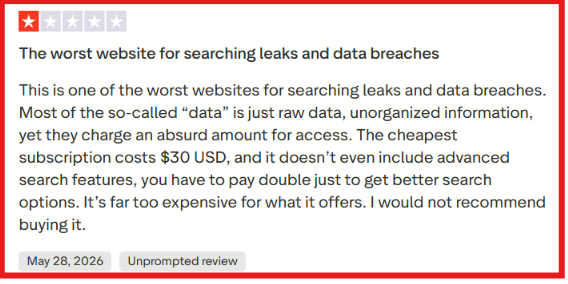
Two of the three reviews are 1-star. One reviewer raised concerns about billing and removing payment details. But the sample is very small. One of the recent reviews also appears to discuss a different type of data-search product rather than LinkedRadar's LinkedIn automation.
So I would not use Trustpilot alone to judge the product. G2 and Capterra give a much larger view of how people actually use LinkedRadar for LinkedIn outreach.
LinkedRadar covers more than sending connection requests. It combines LinkedIn automation with lead management, follow-ups, email finding and AI-written messages. Here are the six features I would look at before paying for it.
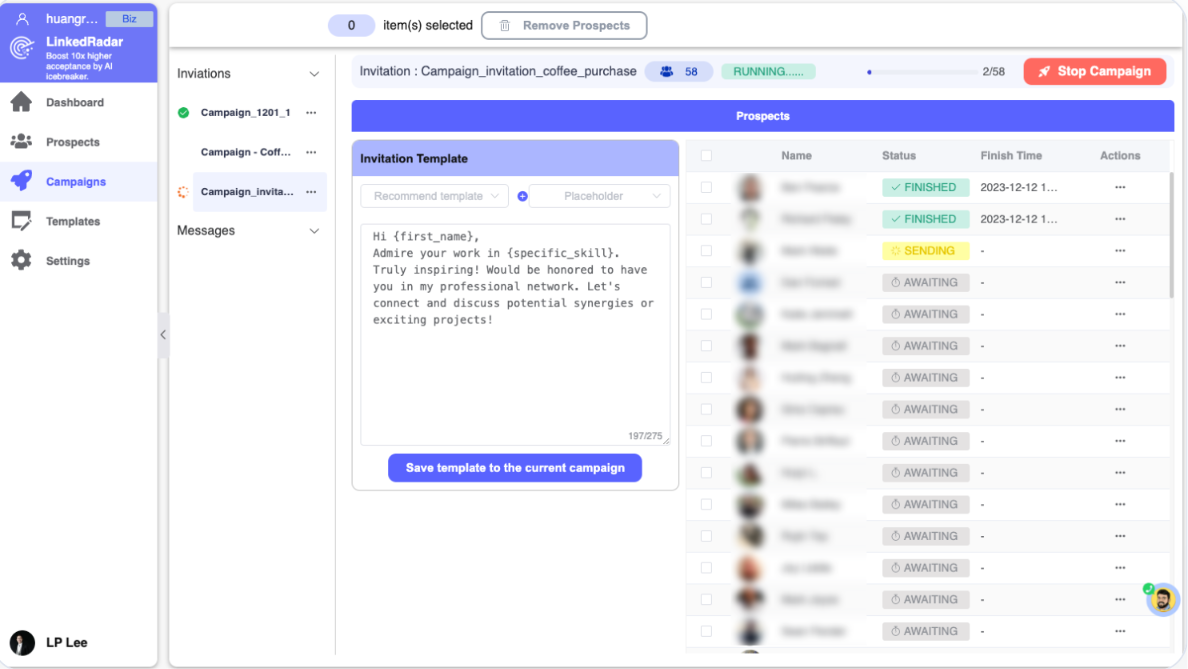
LinkedRadar Auto Connect lets you automate connection requests to second and third-degree LinkedIn profiles. You can add a personalized invitation message and set how many requests the campaign sends each day.
I started with Auto Connect because sending requests one by one is exactly the type of manual work I wanted the tool to remove. I built a small prospect list and set the campaign to handle the connection requests. The setup was simple. Once it was running, I did not have to open each profile and send the request myself.
What I liked most was the control over sending volume. I could set a daily limit that made sense for my account and let LinkedRadar manage the queue around it. LinkedRadar also says it adds random delays between actions and gradually increases activity to make the sending pattern look more natural.
Still, I would not treat these controls as protection from every LinkedIn restriction. LinkedRadar recommends starting with settings such as 15 invitations per day and a five-minute interval.
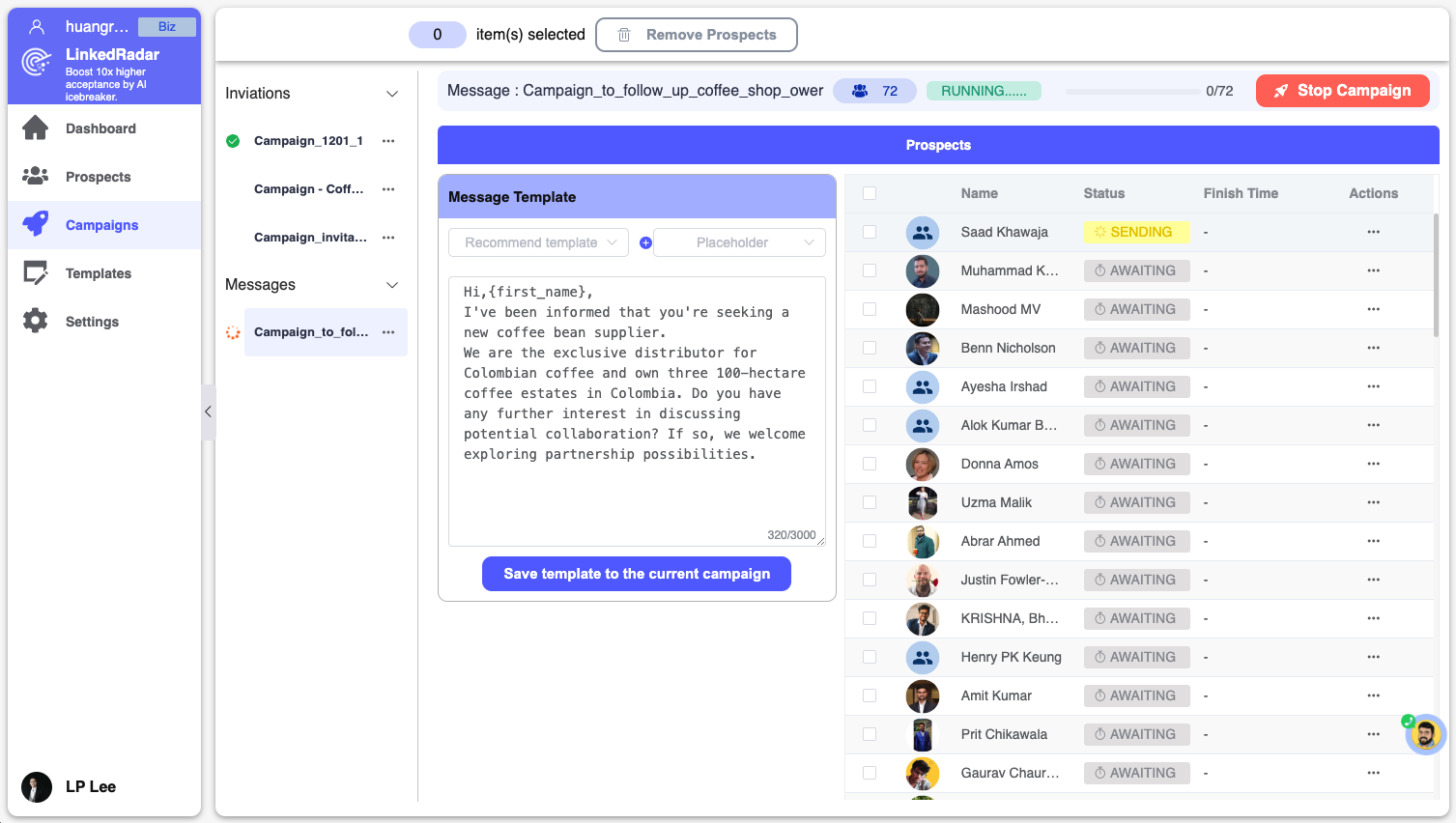
Getting prospects to accept my connection requests was only the first step. I also wanted to see how LinkedRadar handled the follow-ups that usually take more time to manage. I added follow-up messages to my campaign and let LinkedRadar handle the repetitive sending.
This meant I did not have to return to each prospect and send the next message myself.
For a basic outreach sequence, it did what I needed. The follow-ups kept moving without me having to track every prospect separately.
But I would be careful with longer sequences. One G2 reviewer said the first follow-up worked but they ran into an issue when trying to send the second one. That did not happen during my test, but it is worth knowing if you plan to build campaigns with several follow-ups.
So the feature works well for basic follow-up. I just would not assume every longer sequence will run perfectly without testing it first.
LinkedRadar's Email Finder helps you find verified business emails by keyword, location, and job title. It can also return contact and company data with each result.
I tested it by narrowing the search around the type of prospects I wanted to reach. What I liked was that I could see more than an email address. The available data can include job title, LinkedIn URL, company size, revenue, and funding.
Another useful part was the free preview. You can check up to 50 verified emails before signing in to download the list.
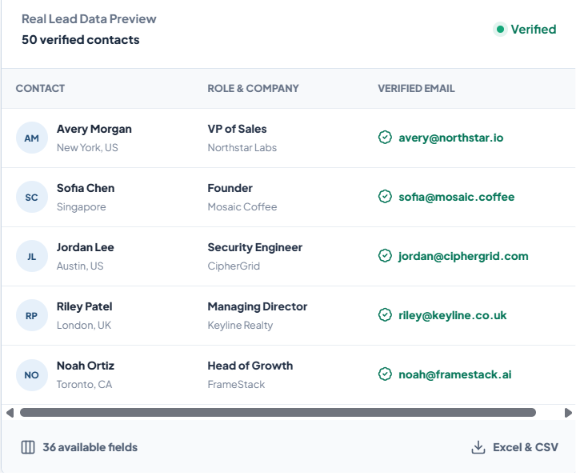
The final results can be exported as Excel or CSV. This made prospecting easier because I could build a targeted list before starting the outreach.
LinkedRadar’s CRM helps you collect prospects and organize them with groups and tags, so you can manage leads in the same place you use for LinkedIn outreach.
The real value became clear after I ran more than one campaign. Instead of opening LinkedIn profiles to remember where each prospect came from, I could keep campaign leads organized separately and find them again with tags.
That saved time when returning to older prospects or deciding who needed attention next. But the CRM felt better suited to organizing LinkedIn leads than managing a full sales pipeline. I would use it to keep outreach clean, not as a replacement for a dedicated sales CRM.
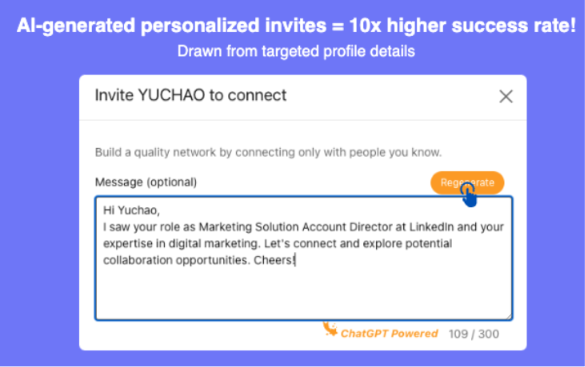
LinkedRadar’s AI Icebreaker makes it easier to write personalized connection messages based on a prospect’s profile. You can generate a message, and if it doesn’t feel quite right, just regenerate it.
It became especially helpful once personalization started to feel repetitive. Instead of writing every invitation from scratch, LinkedRadar gave me a strong starting point tailored to the person I wanted to reach out to. I still reviewed each message before sending it. Personalization based on a profile can save time, but the final message still needs to feel genuine for that prospect.
For me, that is the real value of AI Icebreaker. It speeds up the first draft without taking away control over what gets sent.
LinkedRadar lets you download the prospect data you collect as a CSV or Excel file. I used the export after building a list with Email Finder. It moved the prospect data into a format I could use outside LinkedRadar, instead of copying contacts by hand.
Depending on what LinkedRadar finds, the export can include a prospect’s work email, job title, LinkedIn URL, company size, revenue, funding data, and more.
That makes it useful when LinkedRadar handles prospecting and another tool handles the next step. I could build the list in LinkedRadar and carry the same data into the rest of my outbound workflow.
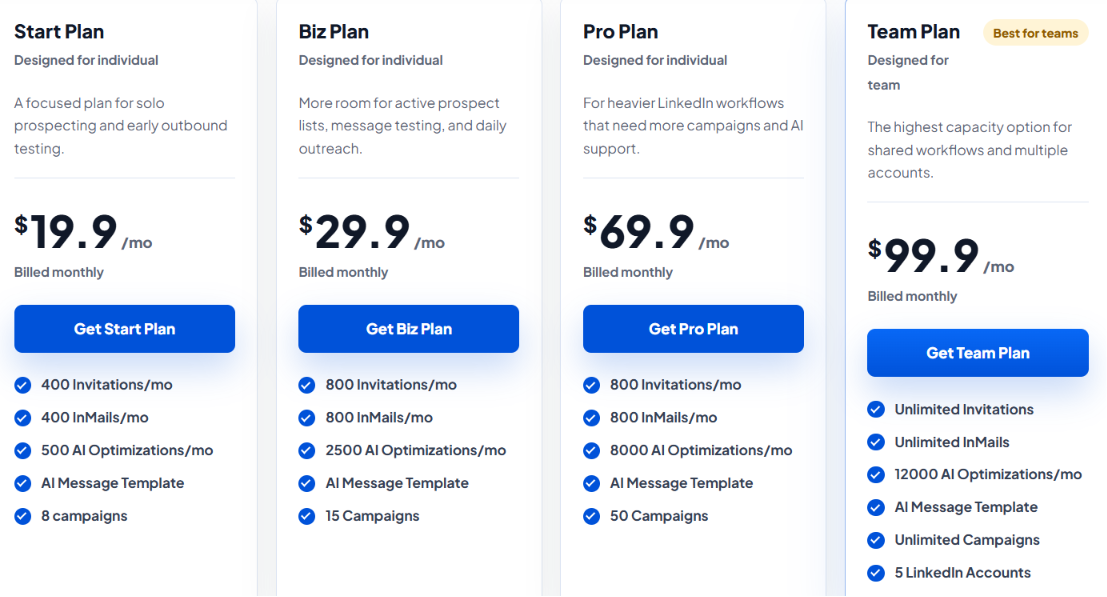
LinkedRadar offers four paid plans for LinkedIn automation. The biggest differences are how many invitations, InMails, AI optimizations, campaigns, and LinkedIn accounts each plan includes.
If you’re testing LinkedRadar with a single account, the Start plan is the easiest place to begin. Upgrading to Biz doubles your invitation and InMail limits and increases AI optimizations from 500 to 2,500 a month.
The jump from Biz to Pro is a little different. You still get 800 invitations and 800 InMails a month, but Pro gives you more AI capacity and increases the campaign limit from 15 to 50.
The Team plan is the only option designed for multiple LinkedIn accounts. It includes support for five accounts, along with unlimited invitations, InMails, and campaigns. LinkedRadar also offers yearly billing with a stated discount of 20% to 30%.
LinkedRadar makes the most sense if LinkedIn is your main outreach channel. It covers connection requests, follow-up messages, lead management, and AI-written icebreakers in one workflow.
The biggest deciding factor is simple. LinkedRadar fits a LinkedIn-first workflow. If you need a broader outbound system that brings LinkedIn and cold email together, its focus may feel too narrow.
LinkedRadar makes sense if most of your prospecting happens on LinkedIn. You can automate connections, send follow-ups, manage leads, and use AI for personalized invitations.
But that LinkedIn-first approach can become limiting when you also want to reach the same prospects through cold email. That is where Salesforge becomes the better alternative. Salesforge lets you run email and LinkedIn outreach in the same sequence.
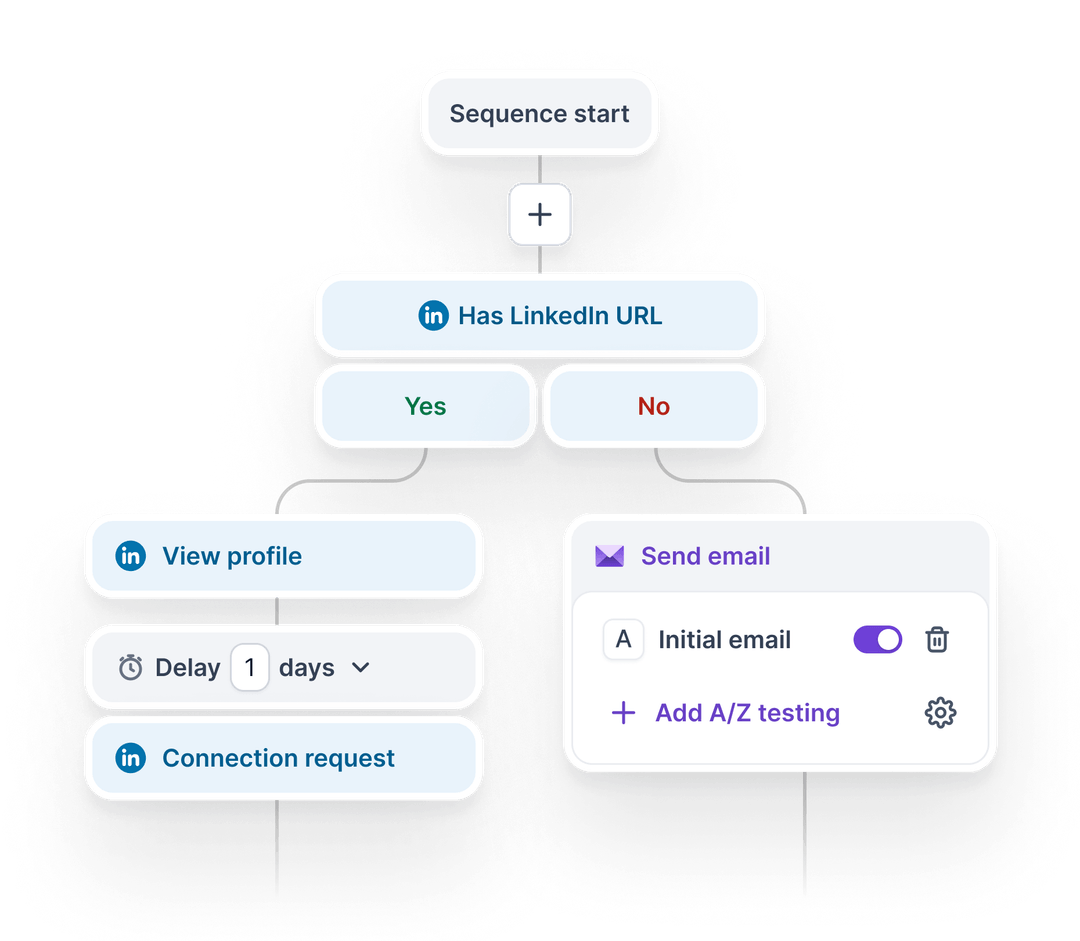
So instead of using LinkedRadar for LinkedIn and another platform for cold email, you can manage both from one place.
What You Gain by Switching to Salesforge
LinkedRadar is the simpler choice for LinkedIn-only automation. Salesforge is the better fit when you want LinkedIn and cold email working together instead of managing them separately.
Enter your email to get a custom plan & stack recommendation for your business
Please check your mailbox in 5 minutes

LinkedRadar is a solid option if you want to automate LinkedIn prospecting without building a complex outbound system from scratch. It covers the main pieces you usually need, Auto Connect, follow-ups, Email Finder, CRM, and an AI Icebreaker, so a lot of the work is handled for you.
That said, it has a few trade-offs worth keeping in mind. User reviews mention slow connection requests, limited free usage, and occasional follow-up issues. One reviewer also said they had less control over which prospects received requests.
The pricing also changes the value equation. Start costs $19.90/month, while Team reaches $99.90/month for five LinkedIn accounts.
If you want a simple LinkedIn-first outreach setup, LinkedRadar is the easier choice.
If cold email is a big part of your outbound strategy too, Salesforge is the stronger option. It lets you run email and LinkedIn in the same sequence, and on Growth you also get unlimited mailboxes and unlimited LinkedIn senders.
So as your outreach needs grow, Salesforge can help you keep everything in one place instead of stacking on another tool.
Start your 14-day Salesforge free trial and compare the multichannel workflow with LinkedRadar before deciding which setup fits your outbound process.