

Personalized Outbound Strategy
Get The Right Outbound Strategy In Minutes
Enter your email to get a custom plan & stack recommendation for your business
It's being carefully crafted by AI
Please check your mailbox in 5 minutes
Linked API costs $69 per month for one LinkedIn account. That sounds reasonable until you start adding more accounts.
Connect 5 accounts, and you’re at $345 per month. Connect 10, and that jumps to $690 per month. And that’s just on the Core plan.
So, what are you actually getting for that money?
Linked API gives you 50+ LinkedIn actions for prospecting, messaging, data extraction, connection management, and engagement. You can run them through its API, SDK, CLI, MCP, or integrations like n8n and Make.
That gives you a lot of control, especially if you’re building your own LinkedIn workflows. But the per-account pricing can change the equation once you start scaling.
In this Linked API review, I’ll look at how the API works, what you can actually automate, its integrations, pricing, and the limitations you should know before paying for your first seat.
Linked API is designed specifically for LinkedIn automation. It gives you detailed control over actions like searching, messaging, connecting, engaging, and retrieving data through its API, SDK, CLI, and MCP.
What it lacks is support for the broader outbound sales process. Salesforge API fills that gap by covering contacts, sequences, mailboxes, conversations, webhooks, and outreach across both email and LinkedIn.
The right choice depends on what you want to automate. Linked API focuses on LinkedIn, while Salesforge API brings LinkedIn into the wider sales outreach process.
Linked API doesn’t work like a typical API. Rather than using a separate REST endpoint for each LinkedIn task, you create workflows using different actions. These actions can include finding a person, checking a connection, sending a message, or retrieving company data. Here’s how it works:
First, you connect the LinkedIn account you want to automate. When using the API, each connected account has its own identification token, while your main Linked API token gives you overall API access. Linked API says your LinkedIn credentials are only used during the connection process and are not stored by the company.
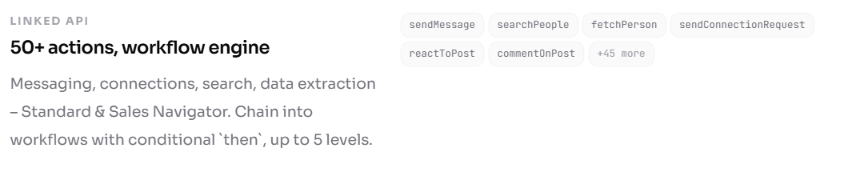
Next, you create a workflow using one or more actions. For example, you could search for companies, pull their employees, filter the people you want, and then perform another action on those results. Workflows can be simple or chained together up to five levels deep.
You can send the request through the REST API, Node.js SDK, CLI, MCP, or a no-code setup. Linked API then accepts the workflow and gives you a workflow ID that you can use to check its status.
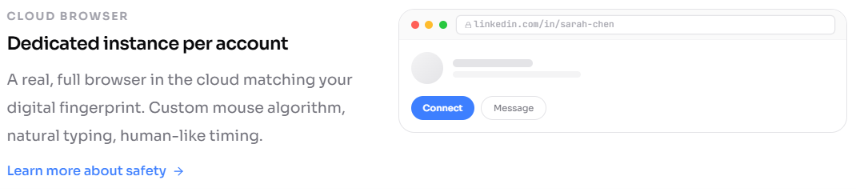
This is the important part. Linked API carries out the requested actions through a dedicated cloud browser connected to your LinkedIn account. It uses natural typing, mouse movements, and human-like timing while performing those actions.
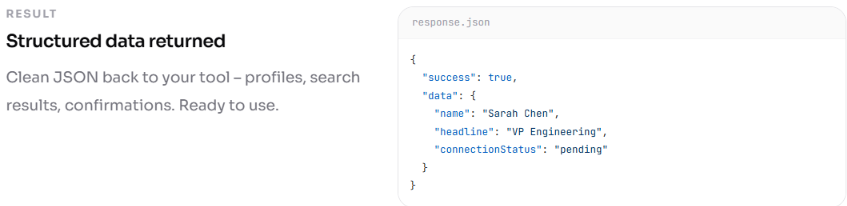
Once the workflow finishes, Linked API returns the result as structured data. That could be profile information, company data, search results, connection status, or confirmation that an action was completed.
One thing I would keep in mind is speed. Workflows run one at a time for each LinkedIn account. A simple workflow can take around 20 seconds, while a more complex one can take several minutes. If you send several requests to the same account, the later ones wait in a queue.
So, Linked API gives you a lot of flexibility, but it is designed to behave more like someone actually using LinkedIn than a traditional API returning every request instantly.
Linked API covers the main tasks you may want to handle programmatically on LinkedIn. Here’s what you can do with it:
Linked API is strong for integrations and AI agents, especially if you want to bring LinkedIn actions into a larger setup rather than use a separate automation tool. You have several ways to do that:
So, Linked API is a good choice here if flexibility matters to you. You are not tied to one integration method and can choose between no-code automation, AI agents, or a custom developer setup.
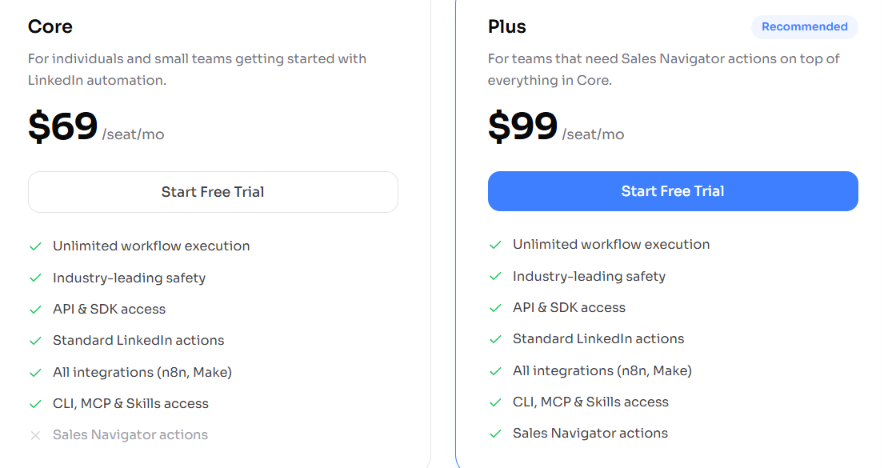
Linked API uses a per-seat pricing model, where one seat equals one connected LinkedIn account. So, if you want to automate five LinkedIn accounts, you need five seats. There are two plans:
The main thing to consider is how quickly the cost increases when you connect more accounts. For example, if you use the Core plan:
For one or two LinkedIn accounts, I think the Core plan is reasonably priced for what you get. You have access to the API, SDK, integrations, MCP, Agent Skills, and standard LinkedIn actions for $69 per account.
Where I would be more careful is at scale. Five Core accounts already cost $345 per month, while 10 cost $690. At that point, the per-seat model starts to feel expensive, especially if you do not need every account running its own LinkedIn automation.
Linked API has several controls designed to make automation behave more like normal LinkedIn activity. Each account runs through its own dedicated cloud browser, with natural typing, mouse movements, and human-like timing. You can also set working hours and action limits for each connected account.
But I would not call it risk-free. Linked API is not affiliated with or authorized by LinkedIn, and its own documentation says you are responsible for staying within the limits appropriate for your account.
So, Linked API has useful safeguards, but you still need to control how aggressively you automate your LinkedIn account.
Linked API is best suited to technical teams that want to build LinkedIn automation into their own product or workflow.
Linked API is a strong fit for developers, SaaS teams, and AI-agent builders. For sales teams that simply want to launch and manage multichannel outreach, it may be more technical than necessary.
Linked API is built specifically for automating LinkedIn actions. If you need an API for the wider outbound sales process, Salesforge API is the more relevant alternative.
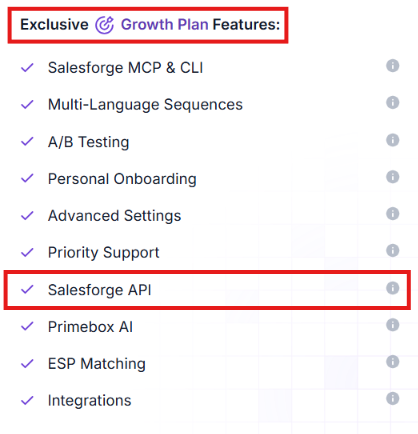
Salesforge API is available on the Growth plan and lets you connect Salesforge with your own tools, automate sales workflows, and move data between systems. Through the API, you can:
Salesforge Growth costs $96 per month and includes API access. In practice, that means you get an API built around the sales workflow, rather than one that is focused only on individual LinkedIn actions.
Linked API is the better choice if you need granular LinkedIn automation. Salesforge API makes more sense if you want to build or automate the broader email and LinkedIn outbound process.
Enter your email to get a custom plan & stack recommendation for your business
Please check your mailbox in 5 minutes

Linked API is worth considering if you know exactly what you want to build with LinkedIn. It gives developers granular control over LinkedIn actions and the flexibility to combine them into custom workflows.
The main question is whether you actually need that level of LinkedIn-specific control. If you do, Linked API gives you plenty to work with. If your use case is broader sales automation across email and LinkedIn, a dedicated LinkedIn API may be more than you need.
For that use case, you can try Salesforge API to automate the wider outbound sales process.
.jpg)

.jpg)

.jpg)